

Businesses rely on data to run operations and guide everyday decisions. As companies grow and adopt new technology, they often move data from older systems to newer platforms such as ERP software or cloud infrastructure.
This process, known as data migration, transfers business data between systems while keeping it accurate and secure. Companies use it when upgrading systems, consolidating databases, or adopting new digital tools.
The process still needs careful planning and testing. Without proper preparation, data migration can cause data loss, system downtime, and operational disruption.
Key Takeaways
Data migration is the process of transferring data between systems, databases, or platforms while keeping it accurate and secure.
Modern businesses rely on data migration to replace outdated systems, strengthen security, and support digital transformation.
Data migration types range from simple storage transfers to complex application, cloud, and business process migrations.
The data migration process runs from project scoping to post-migration audits and system decommissioning.

What Is Data Migration?
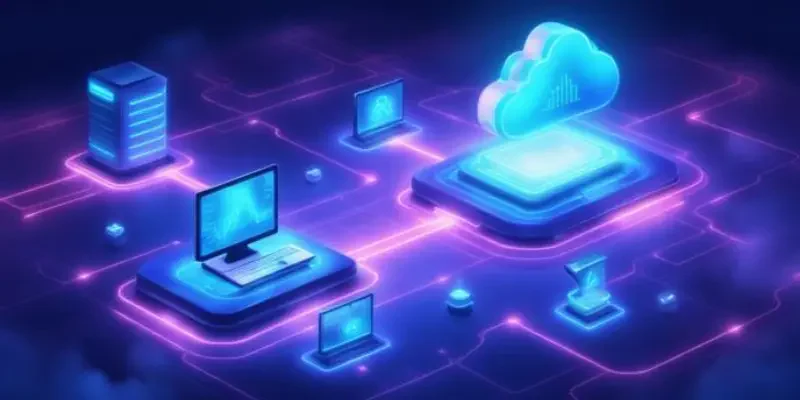
Data migration is the process of moving data from one system, database, or application to another. Companies use it when upgrading systems, implementing ERP software, or adopting newer platforms.
The process typically follows the ETL method: extract, transform, and load. Data is cleaned and adjusted before being transferred into the new platform.
Why Data Migration Is Important for Modern Businesses
Relying on outdated systems can hold a business back in several ways. The points below outline why data migration matters for modern businesses.
- Outdated systems slow down operations and increase costs, while modern platforms and cloud-based tools improve insights and scalability.
- Migration lets businesses use advanced tools, gain better insights from their data, and support digital transformation.
- Legacy systems are costly to maintain and often lack modern security features compared to newer platforms.
- Newer platforms offer stronger security, better compliance with data regulations, and room to scale as the business grows.
- Migration also cleans and organises existing data, so the new system starts with accurate, reliable information.
Together, these benefits explain why migration has become a priority for growing businesses. Getting it right early sets the foundation for long-term success.
"I've seen how poor data migration can hold a business back. If your data doesn't move well, neither does your decision-making."
Types of Data Migration
Data migration can take several forms, depending on the project. Businesses may migrate when upgrading infrastructure, replacing software, or modernising systems.
1. Storage Migration
Storage migration moves data between devices, such as older HDDs to faster SSDs. Businesses may also shift to centralised systems like SAN or NAS for better access.
2. Database Migration
Database migration moves structured data, like tables and schemas, to a new database system or version for better performance. It falls into homogeneous and heterogeneous types, depending on the platform change.
3. Migrating From One Database to Another.
Migrating between database systems is technically demanding, since each platform uses different rules and formats. Teams test thoroughly to confirm the new database matches the old one.
4. Application Migration
Application migration replaces one business application with another, such as moving from an outdated ERP software to a modern integrated ERP platform. Teams clean, restructure, and map the data so it works in the new application.
5. Cloud Migration
Cloud migration moves data and systems from on-premise infrastructure to platforms like AWS, Azure, or Google Cloud. Lift and shift is the simplest method, moving systems with minimal change.
6. Business Process Migration
Business process migration moves workflows as well as data, often during mergers or system upgrades. Standardising these processes first helps the new system fit how the business operates.
The Data Migration Process
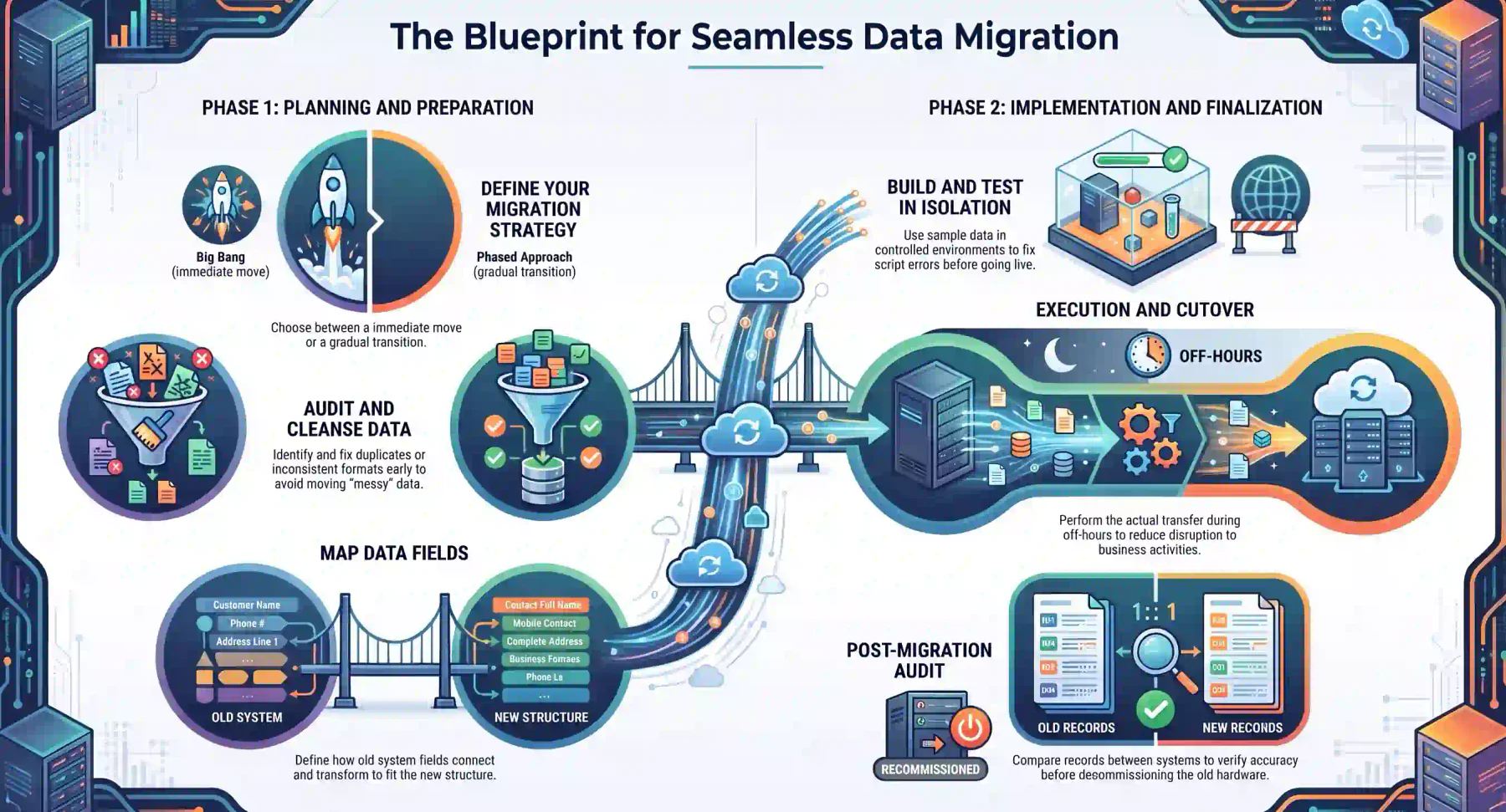
Moving large volumes of business data from one system to another involves several steps to ensure accuracy and avoid disruptions. Understanding the data migration process helps companies manage the transition more smoothly and reduce potential risks.
1. Project Scoping and Strategy Definition
A successful data migration begins with clear planning. Teams first define the purpose of the migration and identify which systems and data will be involved. They also decide what data should move to the new system and what can be left behind.
At this stage, businesses choose the migration approach. Some companies perform a “big bang” migration, moving everything at once during a short downtime window. Others take a phased approach and move data gradually while both systems run at the same time.
2. Data Auditing and Profiling
Before transferring any data, teams need to understand the quality and condition of the existing data. Data auditing helps identify issues such as duplicates, missing information, or inconsistent formats. These problems often build up over time in older systems.
Finding these issues early allows teams to clean and prepare the data before migration begins. Without this step, businesses may end up moving inaccurate or messy data into the new system. That can quickly reduce the value of the new platform.
3. Data Mapping and Design
Once the data has been reviewed, the team plans how it will move to the new system. Data mapping defines how each field in the old system connects to a field in the new one. In many cases, the structure is different, so the data must be adjusted.
For example, a single field in the old system may need to be split into several fields in the new system. During this phase, teams also create transformation rules to standardize formats such as dates, currencies, or codes. This ensures the data fits the structure of the new platform.
4. Build and Test
After the plan is ready, technical teams build the tools needed to perform the migration. These may include scripts, ETL pipelines, or system integrations that move the data automatically. However, they do not run these tools directly on live systems.
Instead, the team tests everything in a controlled environment using sample data. They repeat the process multiple times to find errors and fix them. Business users may also review the results to confirm that the data works correctly for daily operations.
5. Execution and Cutover
The execution phase is when the actual data migration takes place. In many cases, businesses schedule this during off-hours to reduce disruption to business activities. The old system may be temporarily paused to prevent new data from being added during the transfer.
During the migration, teams closely monitor the process to detect errors or delays. Depending on the strategy, data may move all at once or in smaller batches over time. Careful monitoring helps ensure the migration completes successfully.
6. Post-Migration Audit and Decommissioning
After the migration finishes, teams verify that all data transferred correctly. They compare records between the old and new systems to make sure nothing is missing or inaccurate. This step ensures the new platform works reliably before it becomes the primary system.
Once the new system is stable, the enterprise can retire the old one. Important historical data may be archived for compliance or reporting purposes. The final step usually involves shutting down legacy software and securely disposing of outdated hardware.
Data Migration vs. Data Conversion
Data migration and data conversion are often used interchangeably, but they refer to different processes. Data migration focuses on transferring data from one system, database, or platform to another. The main goal is to move information safely and efficiently.
Data conversion, on the other hand, focuses on changing the data itself. This may involve adjusting formats, structures, or data types so the information works correctly in the new system.
In most system upgrades or implementations, both processes work together. Data is first moved to the new platform and then converted to match the structure and requirements of the new environment. For better clarity, refer to the table below.
| Aspect | Data Migration | Data Conversion |
|---|---|---|
| Focus | Moving data between systems, databases, or platforms | Changing the data’s format, structure, or type |
| Main goal | Transfer information safely and efficiently | Make data compatible with the new system |
| Changes to data | Usually preserves the original content | Modifies how the data is represented |
| Example | Moving customer records to a new ERP platform | Converting dates, field formats, or data types |
| Typical sequence | Usually occurs first | Usually occurs during or after migration |
Key Factors to Consider Before Starting a Data Migration
Businesses need to evaluate several important factors to avoid risks such as data loss, downtime, or security issues. Careful preparation helps ensure the migration runs smoothly and supports business operations.
1. Data Quality and Cleansing
Data quality is one of the most important factors in a successful migration. If a company transfers duplicate records, outdated information, or incorrect formats, those problems will simply appear in the new system as well. This is why many IT teams follow the principle “Garbage In, Garbage Out.”
Before migration begins, companies should review and clean their data carefully. This may include removing duplicate records, updating outdated information, and standardizing how data is stored. Clean and reliable data helps the new system work properly from the start.
2. Stakeholder Alignment and Business Involvement
Many businesses assume that data migration is only an IT responsibility. In reality, different departments across the business play an important role in the process. Teams such as finance, HR, and operations understand the data they use every day.
Their input helps ensure the migrated data supports real business needs. When departments work closely with IT teams, it becomes easier to define data rules and test whether the new system works correctly. This collaboration helps avoid issues after the migration is complete.
3. Downtime Tolerance and Business Continuity
Data migration can sometimes require systems to pause while the data is transferred. During this period, employees may not be able to access certain applications or records. Because of this, companies must carefully plan how much downtime they can handle.
Some businesses can perform the migration over a weekend or during scheduled maintenance periods. Others, especially global businesses that operate around the clock, may need more advanced migration methods. These approaches allow data to move gradually while systems continue running.
4. Data Security and Privacy Regulations
Data becomes more vulnerable while it is being transferred between systems. Sensitive information such as financial data, customer records, or personal details must be protected throughout the process. Without proper safeguards, companies may face security risks or data breaches.
To reduce these risks, companies use strong security measures during migration. These may include encrypted transfers, secure network connections, and strict access controls. Companies must also follow data protection regulations that govern how sensitive information is handled.
5. Choosing the Right Tools and Expertise
Modern data migrations often involve large and complex systems. Trying to manage everything manually can be slow and increase the risk of mistakes. For this reason, many enterprises use specialized migration tools and automation software.
Experienced professionals also play an important role in a successful migration. If internal teams lack experience, companies may work with consultants or software vendors who specialize in system implementation. Their expertise can help avoid costly problems and keep the project on track.
Common Data Migration Risks
Without proper planning, issues such as data loss, system downtime, or transfer errors can disrupt operations. Understanding these common risks helps teams prepare better and reduce potential problems during the migration process.
1. Data Loss and Corruption
One of the biggest concerns during data migration is losing or damaging important data. Problems can occur if a network fails during the transfer or if the migration process handles the data incorrectly. Even small errors in data mapping or formatting can lead to missing or corrupted records.
To reduce this risk, companies should always create a full backup before starting the migration. This backup acts as a safety net if something goes wrong. Teams should also test the migration in a separate environment first and carefully check the data afterward to confirm everything transferred correctly.
2. Extended or Unplanned Downtime
Another common risk is downtime that lasts longer than expected. Data migration can take more time than planned, especially when dealing with large data volumes or technical issues. If systems remain unavailable for too long, business operations can slow down or stop completely.
Companies can reduce this risk by running test migrations before the actual project. These practice runs help teams estimate how long the process will take and identify potential problems early. Careful monitoring during the migration also helps teams respond quickly if delays occur.
Advanced Practices in Modern Data Migration
Migration methods keep improving as technology evolves, with many businesses now using automated tools to simplify complex tasks and reduce manual work.
- Automated data mapping matches fields between systems automatically, with some tools using machine learning to suggest mappings and speed up the process.
- Zero-downtime migration moves data to the new system while the old one keeps running, letting the business switch over once everything is synced and verified.
- Change data capture continuously syncs updates between old and new systems in real time, keeping data consistent throughout the migration.
- Cloud-based migration platforms now handle much of the process as a managed service, reducing the technical setup businesses need in-house.
How ERP Systems Simplify Data Migration Across Business Modules
ERP systems simplify data migration by bringing every business function into one connected platform. This replaces the need to juggle data across separate, disconnected tools.
According to ABS data, only around 4% of Australian businesses use ERP systems, while most already rely on digital tools. This disparity highlights the gap between basic system usage and fully integrated platforms, making data migration a critical step as businesses transition to ERP environments.
- A centralised data structure means finance, inventory, HR, and other modules share the same underlying data instead of separate databases.
- Predefined relationships between modules keep records like customers, orders, and invoices linked automatically after migration.
- Data only needs to be migrated once into the ERP, creating a single source of truth that every department can rely on.
- Built-in module dependencies carry related data across functions together, reducing the manual mapping needed between systems.
Conclusion
Data migration plays an important role when businesses upgrade systems, adopt new technologies, or move to cloud platforms. When done properly, it allows enterprises to preserve valuable historical data while improving performance, security, and scalability.
However, successful data migration requires careful planning, collaboration across departments, and the right tools. By understanding the migration process, evaluating potential risks, and preparing data beforehand, businesses can ensure a smoother transition and get the most value from their new systems.
If you want to ensure a smooth transition and avoid common migration risks, you can get a free consultation to find the right approach for your business.
Frequently Asked Question
Data migration moves data between different systems or platforms, often with format changes, while data transfer simply copies data from one location to another without altering its structure.
A common example is moving customer and financial records from an outdated accounting system to a modern integrated ERP platform.
IT teams typically lead data migration, but successful projects also involve business departments like finance, HR, and operations to confirm the data meets their needs.
Timelines vary with data volume and complexity, ranging from a few days for smaller migrations to several weeks or months for large, multi-system projects.