

Production cost reports rarely go wrong because of arithmetic. They go wrong because the BOM does not match the actual material issued, work orders stay open after shipment, labor time goes unlogged, and overhead is never allocated to any product.
That leaves finance closing the period with a cost variance nobody can trace. The result is quoting below actual cost, keeping a product line that is quietly losing money, and spending days reconciling spreadsheets instead of fixing the process.
This article explains where production cost variances come from and how connected manufacturing data closes the gap between standard and actual cost. Each report then reflects what the factory really spent.
Key Takeaways
A production cost report helps businesses track expenses, manage costs, and identify inefficiencies for better decision-making.
Automating cost tracking with Manufacturing ERP software ensures accurate and real-time reports while reducing errors and improving efficiency.
Integrating cost forecasting and material management features with manufacturing ERP software streamlines production processes and enhances cost control.
What is a Production Cost Report?
A production cost report (CPR) summarizes the flow of units and costs in a processing department. It is similar to a job cost sheet but used in process costing systems to track work-in-process activities.
In practice, the report compares the planned cost derived from the BOM and routing with the actual cost recorded from material issues, labor time, applied overhead, and the finished output of each work order. That comparison is what turns the report into a variance tool rather than a cost summary.
It also shows essential figures such as units transferred, per-unit processing cost, and the largest cost elements across materials, labor, and overhead. Managers use these to evaluate production efficiency and trace where costs moved away from standard.
Cost-of-production reports help businesses monitor critical metrics and address potential bottlenecks. They keep costing transparent and support better decisions on pricing, purchasing, and production planning.
Hashy AI Fact

AI automates production cost reports, ensuring accuracy and saving time. Hashy AI, HashMicro's assistant, generates detailed reports rapidly, monitors expenses, and identifies cost-saving opportunities, enhancing financial control and facilitating decision-making.
Get a Free Demo Now!
Important Things to Create a Good Production Cost Report Template

An effective production cost report template must address the needs of both managers and operational teams to ensure seamless use. It should provide precise, concise, actionable data that simplifies cost tracking and analysis.
The template becomes a reliable tool for managing production operations efficiently by incorporating key elements and features. Here are the key characteristics of an ideal template:
- Clarity and simplicity: A good template should be easy to understand, with well-organized sections for costs, units, and performance metrics. This ensures that users can quickly interpret data without confusion.
- Comprehensive data inclusion: The template must contain all necessary information, such as unit transfers, per-unit costs, and key cost elements like materials, labor, and overhead. Referencing a production cost report example ensures all critical data is covered.
- Be clear and concise: An ideal template avoids unnecessary details while providing all essential data. Clear and concise formatting helps users focus on actionable insights rather than getting lost in excessive information.
- Customizability: Flexibility is key for adapting templates to different production processes. Knowing how to make a production cost report ensures businesses can tailor the structure to suit their unique needs.
- Professional appearance: A template with clean formatting and consistent styling should look professional. A polished cost of production report reflects attention to detail and enhances credibility.
- Accurate calculations: Simplifying complex calculations ensures accurate direct costs and overhead totals. Reliable numbers are essential for proper cost analysis and decision-making.
- Performance insights: A well-crafted template provides actionable insights into production efficiency, helping to identify bottlenecks or areas of high cost. These insights make the cost production report a strategic tool for operational improvements.
These elements make a production cost report template essential for streamlining operations and managing costs effectively. By organizing cost data clearly, businesses can identify inefficiencies and make informed decisions that improve profitability.
To optimize your production cost management, consider exploring a Manufacturing software solution. Click the banner below to calculate the software price that can transform your operations today!

Production Cost Report Example and Template for Manufacturing
Efficient production cost report templates are essential for streamlining operations and maintaining accurate cost management. They provide a structured format for tracking and analyzing costs, helping businesses understand their expenses and optimize resource allocation.
To simplify your workflow, here are some templates to create a comprehensive and reliable cost of production report:
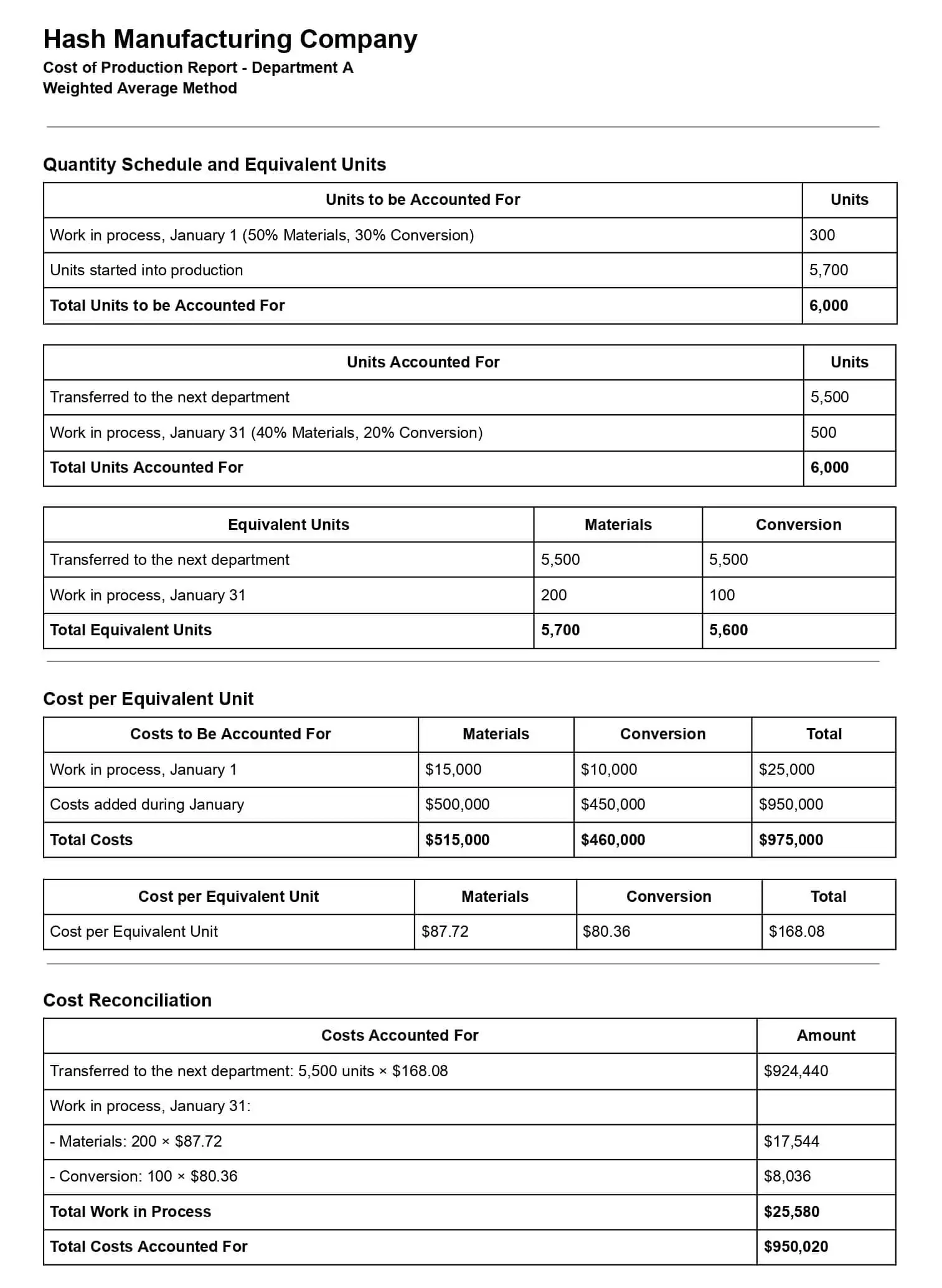
By utilizing a well-designed cost-of-production report, companies can identify inefficiencies and improve decision-making. With customizable options and detailed examples, such as a production cost report example, these templates make it easier than ever to create accurate and insightful cost reports tailored to your business needs.
Critical Components of a Cost of Production Report

A cost of production report breaks down unit flow and production costs into sections that managers can review together. It connects planned costs with actual production records to show where costs changed.
Quantity Schedule Section
The quantity schedule tracks units started, completed, transferred to finished goods, and left in work in process (WIP). It also records the completion percentages of beginning and ending inventories and calculates equivalent units for materials and conversion costs.
This unit flow provides the basis for the report’s cost calculations.
Cost Per Equivalent Unit Section
Under the weighted average method, cost per equivalent unit is calculated by dividing beginning inventory costs plus costs added during the period by equivalent units produced. Separate calculations for materials and conversion costs help managers see what each stage of processing costs.
Planned and Actual Production Costs
The bill of materials (BOM) sets planned material quantities and costs, while routing sets planned labor and machine requirements. Actual costs come from materials issued, labor recorded against work orders, and machine and overhead costs assigned to production.
Comparing these records shows whether material use, labor time, or other production costs exceeded the plan.
Cost Reconciliation Section
Cost reconciliation accounts for beginning WIP, materials, labor, overhead, and any costs transferred from previous departments. It then assigns those costs to completed units and ending WIP, so the cost of finished goods can be traced to production records.
The report can compare these reconciled actual costs and finished output with the BOM and routing plan. The resulting material, labor, overhead, and output variances give managers specific differences to investigate.
Purpose of Production Cost Report

A production cost report gives manufacturers a clearer view of production expenses and output, especially when used alongside Manufacturing ERP software and production planning software. Managers can use it to review costs, investigate inefficiencies, and make decisions about each production batch.
The report serves six purposes:
- Tracking production costs: It records direct materials, labor, and manufacturing overhead incurred during production, creating an accurate cost record for each batch or work order.
- Monitoring efficiency: Comparing materials issued with the quantities planned in the bill of materials helps managers detect material overuse. Labor and output records can reveal delays or lower-than-expected yield.
- Supporting decision-making: Managers can compare standard costs with actual costs before adjusting budgets or production plans. They can also check whether a batch remains profitable and update its selling price when higher costs put the target margin at risk.
- Evaluating per-unit costs: Dividing the cost assigned to completed goods by the number of finished units shows the actual unit cost. Comparing it with the planned unit cost helps assess each batch’s margin.
- Identifying cost fluctuations: The report highlights changes caused by material prices, excess consumption, labor hours, or overhead, so teams can investigate the source of a variance.
- Ensuring process accountability: Costs recorded by work order or department give managers a basis for reviewing discrepancies and approving production close once materials, labor, overhead, and finished output have been reconciled.
Together, these uses turn the report into a practical check on production costs before a batch is closed or its pricing is reviewed.
Improve Production Cost Report accuracy with HashMicro’s Manufacturing Software
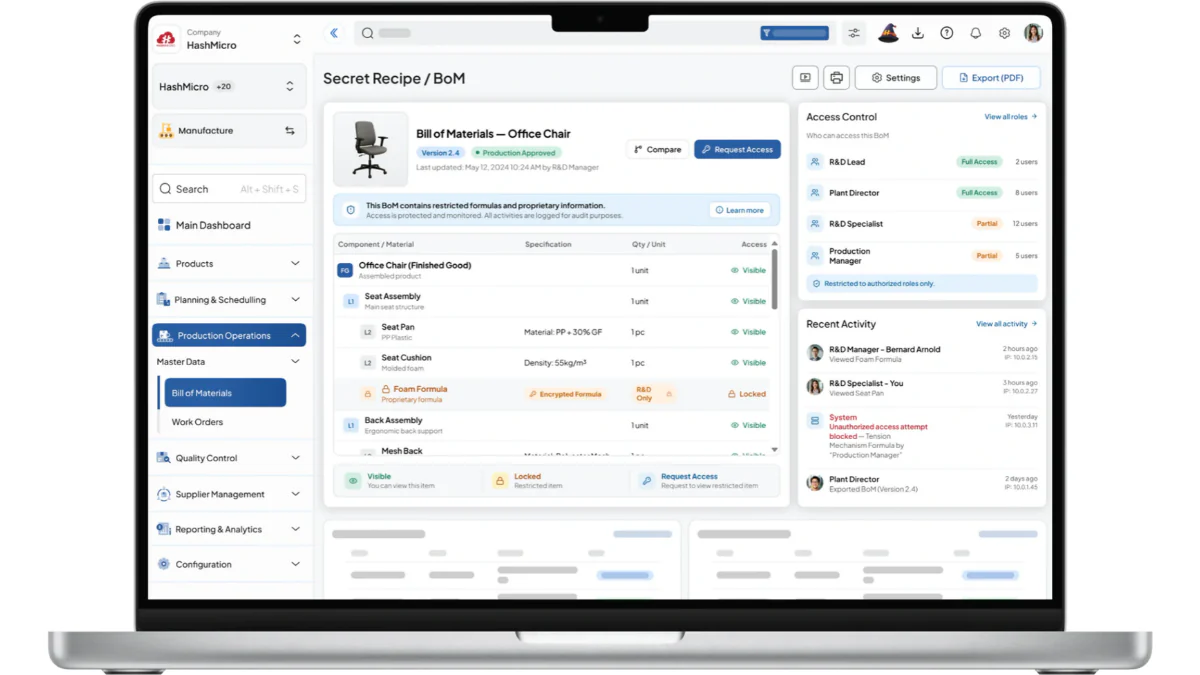
HashMicro’s Manufacturing Software is a robust solution designed to help businesses improve production cost reporting. Companies can ensure accurate production cost reports while optimizing resource efficiency and streamlining operations by tracking material usage, allocating labor costs, and calculating overhead.
To give businesses a firsthand experience, HashMicro offers free demo access to its manufacturing software. This allows potential users to explore its features and capabilities without any initial commitment, helping them make well-informed decisions.
Why we recommend it: HashMicro’s manufacturing software enhances production cost accuracy by automating cost tracking, streamlining processes, and providing real-time data insights.
Below are some key features of HashMicro’s manufacturing software, such as:
BoM Cost Forecast for Reliable Production Planning: Start by forecasting material, labor, and overhead requirements through the BoM Cost Forecast feature. Multi-Level BoM Integration and Finished Goods Production Simulation help planners evaluate complex product structures, expected costs, and projected output before production begins.
Work Order Management for Controlled Execution: Convert approved production plans into work orders with defined quantities, operations, work centers, and deadlines. Manufacturing Production Scheduling and Gantt Chart Schedule Management help teams coordinate resources, prioritize activities, and keep production on schedule.
Stock Issue Tracking for Accurate Material Consumption: Record every raw material issue, stock transfer, and finished-goods receipt against the relevant work order. Real-Time Stock Input and Output gives production and inventory teams reliable data on actual usage, shortages, excess consumption, and completed output.
Actual Cost Calculation Across Every Production Run: Manufacturing Cost Actualization consolidates material consumption, labor hours, machine usage, and overhead expenses as production progresses. Managers can compare forecasted costs with actual spending, identify cost drivers, and respond quickly when production expenses begin to exceed expectations.
In-Depth Reporting for Clear Production Cost Analysis: In-depth Reporting presents materials used, labor time, overhead allocation, output quantities, and total production costs in one view. Decision-makers can use these insights to review batch profitability, investigate inefficiencies, and support production close approval.
Variance Reporting for Better Cost Control: The Variance Report highlights differences between planned and actual material, labor, overhead, and output results. Managers can investigate overconsumption, downtime, yield issues, and margin changes before finalizing the production cost report.
OEE Tracking to Reduce Equipment-Related Costs: OEE Tracking measures equipment availability, performance, downtime, and output across manufacturing activities. These insights help maintenance and operations teams address performance losses that increase production overhead and reduce resource utilization.
Additionally, the software supports unlimited users, provides flexible customization options, and integrates effortlessly with third-party applications. Its adaptability and integration make it ideal for companies aiming to optimize production processes and ensure precise cost reporting.
Conclusion
A production cost report is vital for simplifying manufacturing processes and managing costs effectively. With structured templates, businesses can track expenses, identify inefficiencies, and improve decision-making.
HashMicro’s Manufacturing Software offers an efficient solution to streamline your production cost reporting. Its automation features reduce manual errors and provide accurate cost tracking, making operations more seamless and efficient.
Try HashMicro’s free demo today to experience the benefits firsthand. Simplify your production cost report process and take your manufacturing efficiency to the next level.
FAQ about Production Cost Report
A production cost report shows units started, completed, transferred, and left in work in process (WIP). It also records equivalent units, material, labor, and overhead costs, cost per equivalent unit, and how total costs are assigned to completed goods and ending WIP. Manufacturers may also compare planned costs with actual work order costs.
Equivalent units express partially completed WIP as a number of fully completed units. For example, 100 units that are 50% complete represent 50 equivalent units for the work performed. Materials and conversion costs may have different completion percentages.
Under the weighted average method, divide beginning WIP costs plus costs added during the period by equivalent units of production. Calculate material costs and conversion costs separately because their equivalent unit totals may differ.
A production cost report summarizes unit flow and costs for a department or process, typically in process costing. A job cost sheet tracks materials, labor, and overhead for a specific job or order in job costing.
Cost reconciliation checks that beginning WIP costs plus costs added during the period equal the costs assigned to completed units and ending WIP. It helps managers catch missing or misallocated costs before relying on the reported unit cost.