

Project resource management determines whether a project finishes on time, within budget, and with the right people working on the right tasks. Without it, even well-funded projects run into bottlenecks, overloaded teams, and cost blowouts that managers struggle to explain after the fact.
Project resource management determines whether a project finishes on time, within budget, and with the right people working on the right tasks. Without it, even well-funded projects run into bottlenecks, overloaded teams, and cost blowouts that managers struggle to explain after the fact.
Australian businesses across construction, professional services, mining, and technology all share the same core challenge: projects need people, equipment, and money at specific times, and those resources rarely align without deliberate planning.
Therefore, how a business manages project resources shapes every other outcome from kick-off through delivery.
Key Takeaways
Project resource management covers identifying, allocating, tracking, and adjusting people, equipment, materials, and budget across a project's full lifecycle.
The core activities are identifying requirements, checking availability, allocating resources to tasks, tracking usage and costs, and adjusting as conditions change.
A complete plan covers a resource list, roles, schedule, availability, cost rates, procurement lead times, and a risk and contingency plan.
HashMicro connects procurement, HR, inventory, and project cost data in one platform to give project managers accurate, real-time resource visibility.
What Is Project Resource Management?
Project resource management is the discipline of identifying, planning, allocating, and tracking everything a project needs to complete its objectives. Resources include people, equipment, materials, software, time, and budget.
The goal is to ensure the right resources are available at the right time, in the right quantity, and at a cost the business can sustain. When resources are managed well, project teams stay productive and costs remain predictable.
Project resource management covers the full project lifecycle, from early planning through to execution and closeout.
It connects with scheduling, procurement, budgeting, and workforce management. Growing businesses often need a connected platform to handle all of these effectively.
Why Project Resource Management Matters
"Resource management fails quietly. No single event announces it. Projects just take longer, cost more, and leave teams exhausted. When resource data sits in one place alongside budgets and schedules, managers stop reacting and start planning."
Resource management affects every dimension of project performance. The three points below explain where poor resource management causes the most damage and why the discipline is worth investing in from the start.
1. It prevents project delays
Most project delays trace back to resource gaps rather than technical problems. When a team member is unavailable, equipment arrives late, or materials run short, the tasks that depend on those resources stall until the situation resolves.
Proactive resource management identifies these conflicts before they occur. For example, a project manager who sees that two projects share the same specialist can plan around that constraint in advance, rather than discovering the clash mid-execution.
2. It helps control project costs
Resource costs typically account for the largest share of a project budget. Labour, plant hire, subcontractors, and materials all carry direct cost implications, and any misalignment between planned and actual usage creates budget variance.
When resource usage is tracked in real time using project cost tracking software against the budget, cost overruns become visible early. Therefore, project managers can make adjustments while the project still has room to recover, rather than reporting the damage at close-out.
3. It improves project visibility
A project manager who knows what resources are committed, available, and at risk can make better decisions faster. Resource visibility also helps senior managers who need to allocate capacity across multiple active projects simultaneously.
Without this visibility, businesses over-commit teams, under-resource critical tasks, or approve new projects without understanding the impact on existing workloads. As a result, the business loses the ability to plan with confidence beyond the immediate project.
Project Resource Management vs Resource Planning vs Capacity Planning
These three terms appear together regularly but each covers a distinct scope. The table below clarifies what each one means and how they relate to each other in practice.
In practice, these three disciplines work together. Resource planning feeds into project resource management, and capacity planning sits above both to give the business a complete picture of supply and demand across all active work.
The Project Resource Management Process
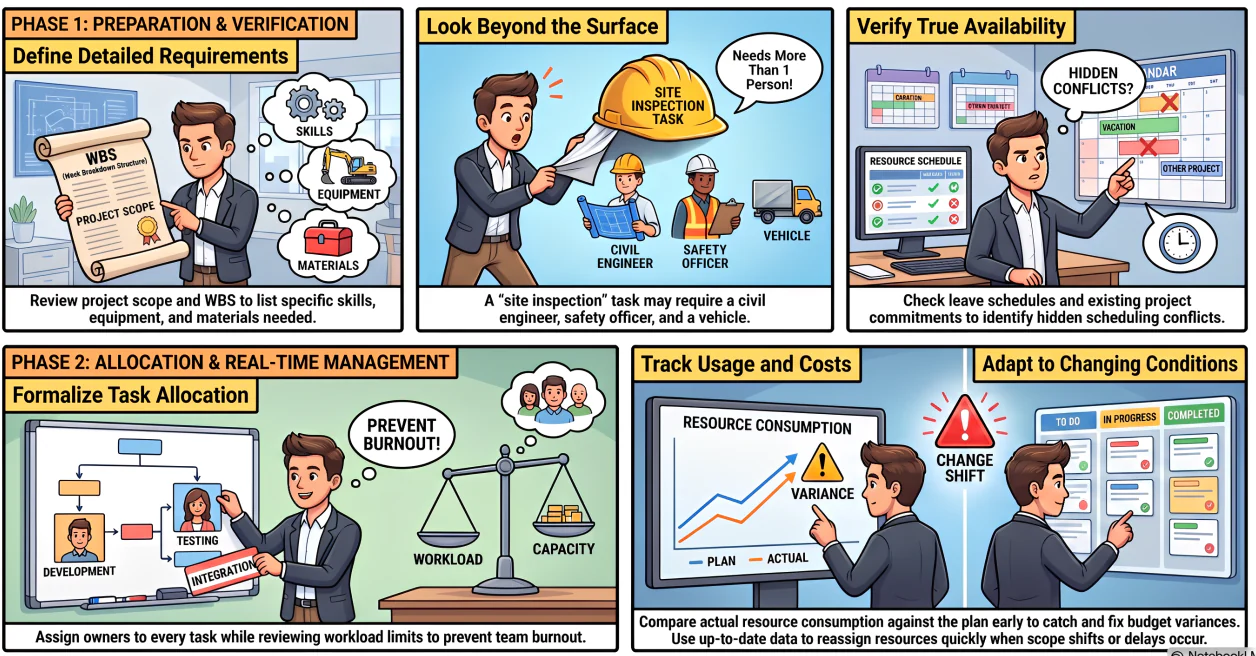
Project resource management follows a repeatable sequence of activities that the team applies across every project. Each action builds on the one before it, and the process cycles continuously as conditions on the project change.
1. Identify resource requirements
Start by reviewing the project scope, work breakdown structure, and schedule to determine what each task needs. Resources include people with specific skills, equipment, materials, software licences, and physical space.
Documenting requirements at this level of detail prevents assumptions from accumulating in the plan. For example, a task labelled "site inspection" may require a civil engineer, a safety officer, and a vehicle, not just a single staff member.
2. Check resource availability
Once requirements are clear, confirm whether the identified resources are actually available during the planned timeframes. This involves checking existing project commitments, leave schedules, equipment bookings, and supplier lead times.
Availability checking often reveals conflicts that are not visible from the project schedule alone. A resource that appears available may already be committed to another project, which is information the project manager needs before confirming task dates.
3. Allocate resources to project tasks
Assign specific resources to specific tasks based on confirmed availability, skill match, and cost. Record these allocations formally so that all team members and stakeholders can see who is responsible for each deliverable.
Clear allocation prevents two common problems: tasks with no owner, and resources committed across too many tasks at once. Therefore, allocation should be reviewed against workload limits before it is finalised.
4. Track resource usage and costs
Once the project is underway, compare actual resource usage against the planned allocation. Track both time spent and cost incurred so that any variance is visible while the project still has time to respond.
For example, if a subcontractor is consuming more hours than budgeted on an early task, the project manager can adjust remaining allocations before the overrun compounds across subsequent tasks.
5. Adjust resources as project conditions change
Projects rarely run exactly as planned. Scope changes, delays, staff absences, and equipment issues all require the project manager to reassign resources, revise schedules, or procure additional support, while project status reporting helps keep stakeholders informed about these changes.
Effective adjustment relies on up-to-date availability data and a clear view of where slack exists in the schedule. As a result, the project manager can make changes quickly and with confidence rather than relying on outdated plans.
What to Include in a Resource Management Plan
A resource management plan documents how a project will identify, allocate, track, and manage resources from start to finish. It becomes the reference point for both the project team and stakeholders throughout the project lifecycle.
The seven components below make up a complete plan.
1. Resource list
The resource list identifies every person, piece of equipment, and material the project requires. Each entry should include the resource type, quantity, and the tasks it supports.
A complete resource list prevents gaps from appearing mid-project and gives procurement teams enough lead time to source what is needed before tasks begin.
2. Roles and responsibilities
Define who is responsible for each resource type and how decisions about resource changes are made. This section covers project team roles, contractor scope, and escalation paths when resources become unavailable.
Clear role definition reduces the time spent resolving ambiguity during execution, particularly on projects with multiple contractors or cross-functional teams.
3. Resource schedule
The resource schedule maps each resource to the tasks and timeframes it supports. It shows when each resource is needed, for how long, and in what quantity.
This schedule integrates with the project timeline and procurement plan to ensure resources are available before tasks are due to start, not after.
4. Availability and capacity
Document the available hours, days, or units for each resource across the project period. Include any known constraints such as leave, shared commitments, or equipment service windows.
Availability data is the foundation for realistic scheduling. Without it, plans reflect what the team hopes is possible rather than what the business can actually deliver.
5. Cost rates and budget impact
Record the cost rate for each resource and calculate the budget impact of each allocation. This section connects the resource plan to the project budget and supports cost forecasting during execution.
When cost rates are documented upfront, any changes to resource allocation feed directly into cost reporting rather than requiring a separate manual recalculation.
6. Procurement and lead times
For resources that require purchasing, hiring, or external engagement, document the procurement process and lead times. This ensures that sourcing activity starts early enough to avoid delays at the tasks that depend on those resources
Lead times for equipment, specialist subcontractors, and imported materials can be significant, particularly for projects in regional or remote locations across Australia.
7. Risk and contingency plan
Identify the resource risks that could affect the project and document the contingency response for each one. Common risks include key staff absence, supplier delays, equipment breakdown, and budget shortfalls.
A contingency plan gives the project manager a pre-approved response to activate when a resource risk becomes a real event, rather than designing a response under pressure mid-project.
Common Project Resource Management Challenges
Even well-structured projects run into resource management difficulties. The challenges below appear across industries and project sizes, and understanding them helps managers build mitigation into the plan from the start.
- Resource conflicts across projects: When staff, equipment, or budget are shared across multiple projects, competing demands create bottlenecks that project managers cannot resolve without visibility over the full portfolio.
- Inaccurate availability data: Resource availability is often tracked manually or stored in disconnected systems, which means project plans are built on assumptions rather than current, verified information.
- Scope changes without resource reassessment: Additional work added to a project does not always trigger a review of the resource plan, which leaves the team expected to absorb extra tasks without extra capacity.
- Skill gaps discovered late: The right skills are not always available internally, and identifying the gap only after the project is underway delays sourcing and adds cost.
- Poor visibility of actual usage: Without real-time tracking, project managers learn about resource overruns through retrospective reporting rather than live data, which limits the ability to respond before the impact compounds.
- Budget drift from resource changes: Each resource reassignment or addition changes the project cost, and without a direct link between the resource plan and the budget, these changes accumulate without visibility.
Resource conflicts, inaccurate data, and cost drift are harder to manage when project data sits across disconnected systems. The banner below shows how a connected platform keeps resource planning, budgets, and availability visible in one place.






Best Practices for Project Resource Management
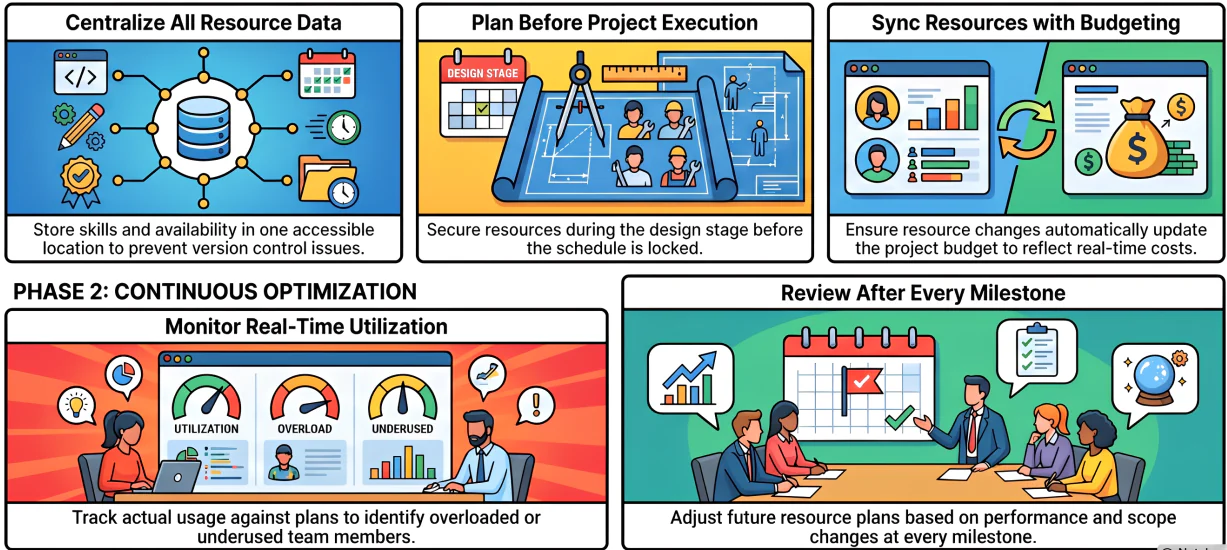
Consistent project resource management performance comes from disciplined habits rather than reactive responses. The practices below reflect what experienced project managers apply across different project types and scales.
1. Centralise resource data
Centralise resource availability, skill profiles, allocations, and costs in one place that every relevant stakeholder can access. Data spread across spreadsheets and email threads creates version control problems and prevents accurate reporting.
A centralised system using project management software for Australian businesses also makes it easier to identify conflicts between projects. For example, if two project managers both assign the same specialist to overlapping tasks, that conflict becomes visible before it causes a delay.
2. Plan resources before project execution
Resource planning should begin during the project design and approval stage, not after kick-off. Starting late means the project schedule is already locked before anyone has confirmed that the required resources are actually available.
Early planning also gives procurement teams enough lead time to source equipment, engage subcontractors, or hire staff without paying premium rates for urgency.
3. Connect resource planning with budgeting
Resource plans and project budgets should update together. When a resource allocation changes, the cost impact should reflect automatically in the project budget rather than requiring a separate manual update.
This connection gives project managers an accurate view of remaining budget at any point during execution, which supports better decisions about scope, schedule, and contingency use.
4. Monitor utilisation regularly
Track how resources are actually being used against the plan, not just at month-end reporting points. Regular monitoring identifies overloaded team members, underused capacity, and cost variance while the project still has time to adjust.
For example, a team member consistently logging more hours than their allocation suggests that either their tasks are taking longer than estimated or they have absorbed additional work that was not formally assigned.
5. Review resource changes after every milestone
After each project milestone, review whether the resource plan for the remaining work is still accurate. Scope changes, delays, or performance issues during the completed work may change what the next portion of the project actually needs.
This review habit prevents the plan from drifting out of date and ensures that allocations for future tasks reflect current project conditions rather than original assumptions.
How HashMicro Helps Manage Project Resources
For businesses that need tighter control over project resources, costs, and team allocation, HashMicro's project management software connects resource planning, procurement, budgeting, and workforce data in one integrated platform.
The procurement module supports the full purchasing cycle, including RFQ management, vendor comparison, multi-level approval workflows, and goods receipt tracking.
This helps project teams plan procurement lead times accurately and track committed costs from purchase order through to invoice.
HashMicro's HR and workforce module connects employee availability, leave, and skills data directly to project planning. As a result, project managers can confirm actual availability before finalising task allocations rather than relying on estimated capacity.
The accounting module links project cost data to the general ledger. Project budget reports draw from the same financial records as management accounts.
This removes the reconciliation effort that project teams typically spend aligning cost tracking tools against the finance system.
Conclusion
Project resource management is the operational discipline that connects what a project needs with what the business can actually deliver. Without it, resource conflicts, cost overruns, and team capacity problems accumulate gradually into delays that are difficult to recover from.
Businesses that manage resources proactively, starting before execution begins and tracking through to completion, give their project managers the visibility they need to respond to change rather than report on it after the fact.
If you want to see how HashMicro can support your project resource management, book a free consultation with the team today.
Frequently Asked Questions
Project resource management covers five core activities: identifying resource requirements based on project scope, checking resource availability against existing commitments, allocating resources to specific tasks, tracking usage and costs against the plan during execution, and adjusting allocations as project conditions change.
A project resource management plan documents how a project will identify, allocate, track, and manage resources from start to finish. It typically includes a resource list, roles and responsibilities, a resource schedule, availability and capacity data, cost rates, procurement lead times, and a risk and contingency plan for known resource risks.
Project resources include people with specific skills such as engineers, project managers, and specialists; equipment and plant; materials and consumables; software licences; subcontractors; physical workspace; and budget. Each resource type requires its own planning and tracking approach depending on how it is sourced and consumed.
Resource management is important because it directly affects whether a project finishes on time, within budget, and to the required scope. Poor resource management causes schedule delays, cost overruns, team capacity conflicts, and quality gaps. Effective resource management gives project managers the visibility and control they need to respond to change before it compounds.
Project management software helps by centralising resource data, automating allocation tracking, and connecting resource plans with budgets and schedules. For example, an integrated ERP system can link employee availability, procurement lead times, and project cost data in one place, reducing the manual effort required to keep plans accurate and giving project managers real-time visibility over resource performance.


![12 Best Project Management Software in Australia [2026]](https://storagewebsitev11.hashmicro.com/uploads/blog-2fa51fa8ed2c-untitled-design-76.webp)