


 Limited to 100 registrants

When finance, sales, inventory, and operations rely on the same system, its underlying structure matters. Slow reporting, inconsistent records, and difficult integrations often point to limitations in ERP architecture.
ERP architecture defines how an ERP system stores data, connects modules, manages workflows, and controls user access. It directly affects how quickly teams retrieve information, how reliably the system produces reports, and how easily new modules or locations can be added.
For Australian businesses, the right architecture supports growth without compromising data accuracy or usability. As more departments share information, a well-designed ERP foundation keeps processes connected and operational data reliable.
Key Takeaways
ERP architecture is the design structure showing how systems are built, connected, secured, and used across the business.
Core components are the database, modules, workflow engine, interface, integration layer, and security controls working together.
Architecture types like two-tier, three-tier, cloud, and postmodern affect scalability, integration, and long-term flexibility.
Choosing the right architecture depends on complexity, growth plans, data governance, integrations, and support capacity.

What Is ERP Architecture?
ERP architecture is the design structure that defines how an ERP system is built, connected, secured, and operated. It governs how data is shared, how workflows move in departments, how system is accessed, and how external tools are connected. There are two ways to understand ERP architecture. Logical architecture covers modules, business rules, workflows, user roles, approvals, and integrations.
Physical architecture covers cloud hosting, servers, databases, networks, devices, backup processes, and the infrastructure that keeps the system operational. ERP architecture differs from traditional software, which solves one narrow function such as payroll, accounting, or inventory tracking. ERP connects multiple departments through shared data and integrated workflows, so one transaction can affect several business areas without repeated manual entry.
"“Strong ERP architecture is not about adding more modules. It is about making sure data moves cleanly between every department that depends on it."
Why ERP architecture matters for Australian businesses
According to the Australian Bureau of Statistics, more than 2.5 million businesses were actively trading in Australia as at June 2023. Growth across that landscape brings new locations, more approval layers, and more systems to integrate. ERP architecture determines whether that growth runs through one connected system.Core Components of ERP Architecture
A complete ERP architecture includes six core components. Each has a distinct role, but the value comes from how they function together as one connected system.1. Centralised database
The centralised database is the foundation of ERP architecture. It stores master data and transactional records including customers, suppliers, products, employees, stock movements, orders, invoices, and payments. A centralised database removes duplicate entry and gives every department access to the same source of truth.2. Functional modules
ERP modules represent the main business functions. Common modules include finance, sales, purchasing, inventory, warehouse, manufacturing, CRM, HR, payroll, project management, and asset management. Each module handles a specific area of the business.3. Workflow engine
The workflow engine controls business rules and process automation. It routes approvals, triggers replenishment, sends alerts, applies credit limits, and advances transactions between departments. This is where ERP architecture converts static data into operational action.4. User interface layer
The user interface layer is how staff interact with the ERP. It includes dashboards, forms, reports, menus, mobile screens, and role-specific views that give each user access to what they need. A well-designed interface reduces training time and improves adoption.5. Integration and extension layer
The integration layer connects the ERP with external systems such as eCommerce platforms, payroll tools, banking feeds, POS systems, logistics platforms, and business intelligence software. Modern ERP architecture uses APIs, connectors, or middleware to keep data moving between systems.6. Security and access control layer
The security layer protects ERP data through role-based access, authentication, encryption, audit trails, backup rules, and permission governance. ERP systems hold sensitive information across finance, HR, payroll, sales, purchasing, and operations.How ERP Modules and Workflows Work Together

- Sales order is created. A staff member creates a customer order directly in the ERP. Customer data, pricing, and available stock are all accessible from the same system.
- Inventory availability is checked. The system queries the centralised database in real time. All relevant teams see the same stock position without running a separate report.
- Purchase or production order is triggered if stock is low. If inventory falls below the defined threshold, the workflow engine raises a purchase request or production order automatically.
- Goods are received or produced. The warehouse or production team records receipt or completion against the original order, linking all activity back to the source transaction.
- Inventory updates automatically. Stock levels adjust in the centralised database and are visible to all relevant departments without manual entry or a separate update process.
- Finance records invoice, cost, and revenue impact. The finance module captures the transaction including cost of goods, revenue recognition, GST treatment, and payment terms.
- Management dashboard updates in real time. Sales, inventory, margin, and fulfilment data refresh across reporting dashboards without a separate export or manual entry.
Common Types of ERP Architecture
The most common ERP architecture models are two-tier, three-tier, service-oriented, web-based, and cloud-based. These models are not just technical labels. They affect scalability, user access, support cost, integration flexibility, and how much infrastructure the business needs to manage internally.1. Two-tier ERP architecture
Two-tier architecture separates the client layer from the server or database layer. It is often used where a head office and subsidiaries need different levels of operational control. The benefit is flexibility across entities.2. Three-tier ERP architecture
Three-tier architecture separates the presentation layer, application layer, and database layer. Each tier has a distinct role in how the system processes and delivers information. The presentation layer handles what users see. The application layer handles business logic and workflows.3. Service-oriented architecture
Service-oriented architecture (SOA) breaks ERP functions into reusable services. Instead of building every process as one connected block, the system exposes services that other applications can call. This improves interoperability and makes it easier to connect the ERP with external systems.4. Web-based ERP architecture
Web-based ERP lets users access the system through a browser without installing software on individual devices. This simplifies access across offices, warehouses, branches, and remote teams. Security and role-based permissions still require deliberate configuration.5. Cloud-based ERP architecture
Cloud-based ERP is hosted on cloud infrastructure and delivered through a subscription model. The vendor manages infrastructure while the business focuses on configuration, process fit, and user adoption. This removes the need for internal hardware, on-site servers, or IT teams dedicated to infrastructure maintenance.Monolithic vs Postmodern ERP Architecture
Monolithic ERP uses one unified suite for most business functions. Postmodern ERP builds around a core ERP connected to specialist applications for specific needs. Both approaches can work, but they suit different operating models, data governance capabilities, and integration skill levels.Cloud vs On-Premise ERP Architecture
Cloud ERP is easier to scale and maintain. On-premise ERP gives more infrastructure control but requires stronger internal IT capability and planned upgrade cycles. The decision affects cost structure, security responsibility, upgrade approach, and long-term flexibility for the business.ERP Architecture for Data, Integration, and Security

1. Data management and single source of truth
ERP architecture should define where master data lives, who owns it, who can change it, and how it flows across the business. Customer records, supplier details, product codes, chart of accounts, inventory locations, employee records, and pricing rules all need governance to remain reliable.2. API and system interoperability
Modern ERP architecture needs a reliable way to connect with external systems. APIs, middleware, and connectors allow the ERP to exchange data with eCommerce, payroll, banking, logistics, CRM, and analytics tools. The goal is not to connect everything.3. Role-based access control
Role-based access control limits what each user can view, change, approve, or export. Finance staff need invoice and journal access. Warehouse staff need stock movement screens. Payroll records need tight restrictions. Too much access creates security and compliance risk.4. Encryption, audit trails, and backup
Encryption protects data in transit and at rest, limiting exposure if infrastructure is compromised. This applies to the ERP database and any data transmitted to or from connected systems. Audit trails record who changed what and when. This matters for compliance, financial control, and resolving disputes over data accuracy.How to Choose the Right ERP Architecture
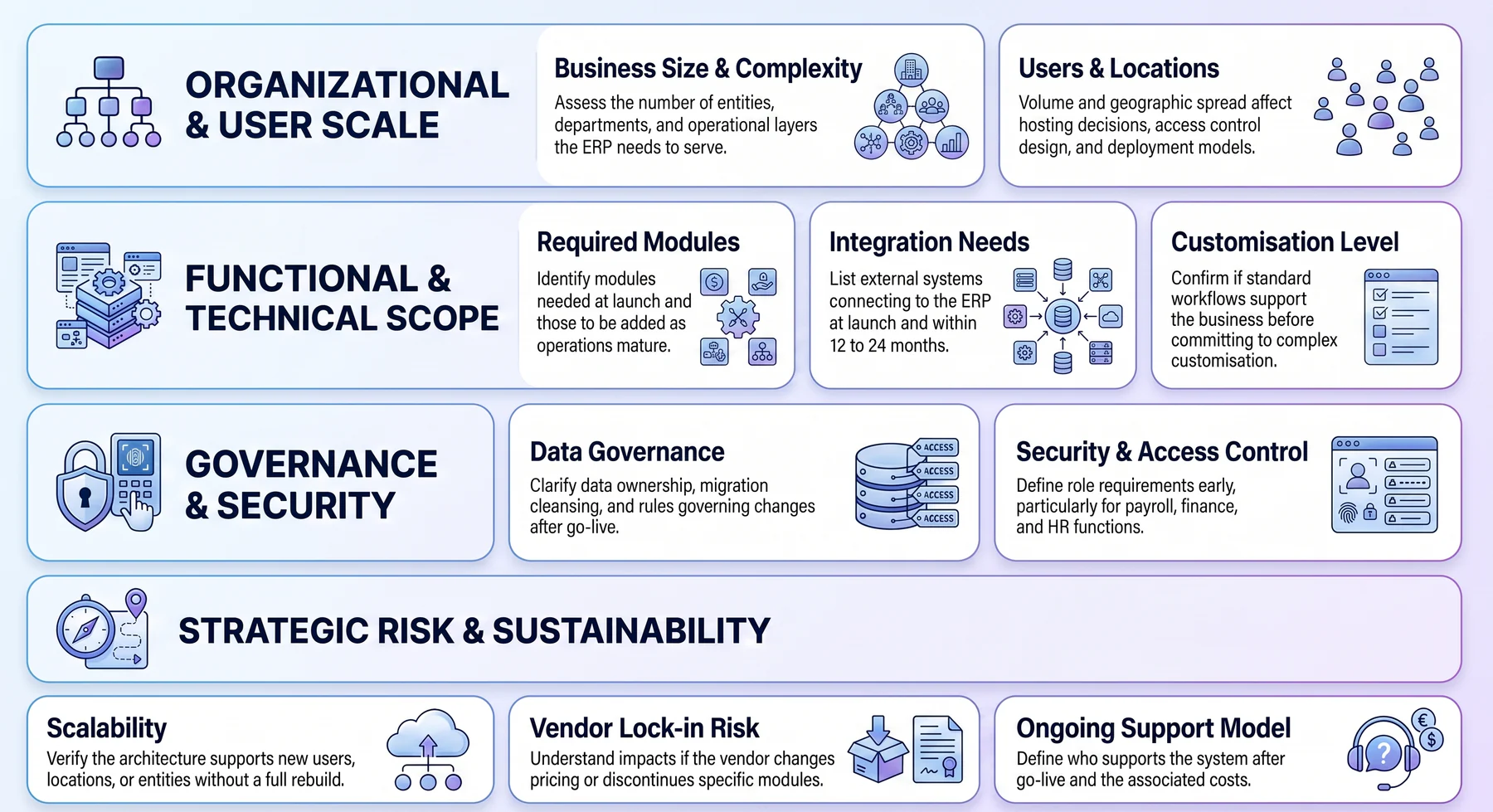
- Business size and complexity. Assess the number of entities, departments, and operational layers the ERP needs to serve.
- Number of users and locations. User volume and geographic spread affect hosting decisions, access control design, and deployment model.
- Required modules. Identify which modules are needed at launch and which can be added as operations mature.
- Integration needs. List every external system that must connect to the ERP at launch and within 12 to 24 months.
- Data governance requirements. Clarify who owns master data, how it will be cleansed before migration, and what rules govern changes after go-live.
- Security and access control. Define role requirements early, particularly for payroll, finance, and HR functions.
- Customisation level. Confirm whether standard workflows can support the business before committing to customisation that complicates future upgrades.
- Scalability. Verify the architecture can support new users, locations, or entities without a full rebuild.
- Vendor lock-in risk. Understand what happens if the vendor changes pricing, discontinues modules, or is acquired.
- Ongoing support model. Define who supports the system after go-live and what that costs.
Common ERP Architecture Mistakes to Avoid
Most ERP architecture mistakes happen when a business chooses features before understanding data flows, integrations, user roles, and long-term support needs. The system may look capable during a demo but become difficult to manage once implementation begins and real operational complexity surfaces.1. Treating architecture as only an IT issue
ERP architecture affects finance, operations, sales, procurement, HR, warehouse, and management reporting. If only IT designs the architecture, the system may not reflect how the business actually works. Process owners from each department should be involved before configuration begins.2. Choosing features without checking data flow
The critical question is how data moves between features. If sales, inventory, purchasing, and finance do not share clean data, manual reconciliation persists. Before committing to an ERP, map a few representative workflows end to end and verify that data flows without gaps, manual steps, or reimport processes between modules.3. Over-customising the ERP core
A cleaner architecture separates core ERP processes from extensions and integrations. When the core stays standard, the business benefits from vendor updates without rebuilding custom logic each time. The right question is not whether customisation is possible, but whether the requirement genuinely cannot be met through configuration of standard functionality.4. Ignoring integration complexity
Connecting too many systems without governance turns the ERP into a hub of fragile dependencies that break when any one system changes. Each integration should be scoped, owned, and tested as part of the implementation plan. Integrations left untested until after go-live are a leading cause of post-launch operational disruption.5. Weak data governance
Product codes, customer records, supplier details, account structures, inventory locations, and user permissions need to be cleaned and governed before go-live. Data governance is not a post-go-live problem to solve later. Every day of operation on dirty data adds to the backlog of corrections the business will eventually need to make.6. Poor role-based access control
Too little access creates bottlenecks where staff cannot complete their work without requesting administrator intervention. Role-based access control should be designed around real responsibilities, tested with actual users before go-live, and reviewed as the business grows and roles evolve.7. Underestimating upgrade and support needs
The architecture should support updates, new modules, changing reports, new integrations, and future growth without requiring a full system rebuild. Businesses that do not plan for ongoing support often find themselves on outdated versions, unable to take vendor updates, and relying on workarounds to close gaps in functionality.





Conclusion
ERP architecture determines whether a system can scale, integrate, and secure data as the business grows, shaping daily workflows, reporting accuracy, and compliance management.
Before selecting ERP software, businesses should assess how the architecture handles modules, data, integrations, security, and support, since a strong foundation reduces costly changes later.
To learn further about the right software for your operational needs, you can book a free consultation with our experts today. Start anytime and we hope to work with you in the future.
Frequently Asked Questions
The six core components are a centralised database, functional modules, workflow engine, user interface layer, integration and extension layer, and security and access control layer. Each component serves a specific purpose, but their value comes from working together as one connected system across departments.
Two-tier architecture separates the client layer from the server or database layer. Businesses may use this structure when a head office and its subsidiaries require different levels of operational control. Three-tier architecture separates the presentation, application, and database layers. This structure makes each layer easier to scale, maintain, and troubleshoot independently.
Monolithic ERP uses one unified suite for most business functions. Postmodern ERP combines a core ERP system with specialist applications for specific operational requirements. A monolithic structure can simplify governance, while a postmodern model offers greater flexibility but requires stronger integration governance and clear data ownership.
Cloud ERP is generally easier to scale and reduces the infrastructure burden. On-premise ERP provides more direct control but requires stronger internal IT capabilities and planned upgrade cycles. Neither option suits every business. The right choice depends on hosting requirements, compliance obligations, IT capacity, security policies, and growth plans.
ERP architecture influences which modules a business activates, how teams migrate data, how developers build integrations, how administrators configure roles, and how the system scales. Choosing the right architecture before implementation reduces rework, limits costly changes after launch, and provides a stable foundation for future growth.