







How often have you found yourself scrambling to locate missing stock or dealing with unexpected shortages? Without the right system, managing inventory manually can drain time, increase costs, and disrupt operations.
In the Philippines, according to Statista, businesses with strong inventory management systems are 52% more competitive than those relying on outdated tracking methods. Why leave your inventory to chance when a barcode inventory system can streamline stock tracking and improve efficiency?
To help you take control of your inventory, this article will guide you through the essential steps to implement a barcode inventory system efficiently. A barcode inventory system helps Philippine businesses track stock in real time by scanning item and location codes, reducing manual entry during receiving, transfers, and dispatch.
Key Takeaways
A barcode inventory system tracks stock in real time, improves accuracy, reduces errors, and streamlines warehouse operations using barcode technology.
Barcode inventory systems work by scanning product and location codes, sending data to software, then updating stock records automatically instantly.
HashMicro’s Barcode Inventory Software offers an advanced solution with features tailored for Philippine businesses, providing seamless integration, real-time updates, and comprehensive support to optimize inventory management and drive operational success.
What is a Barcode Inventory System?
A barcode inventory system is a digital solution that uses barcode technology to track, record, and manage inventory movements in real time. By scanning barcodes during receiving, storage, and dispatch, the system improves stock accuracy, speeds up inventory processes, and reduces manual errors. This approach helps businesses maintain better control over inventory levels, optimize warehouse operations, and ensure data consistency across all stock-related activities.
Besides, it’s also essential to know about the different barcodes for managing inventory well. There are two main types of barcodes:
- 1D Barcodes: These are the old-school barcodes with lines of different widths. They’re great for scanning lots of items fast, like in stores. They’re perfect for simple scanning needs.
- 2D Barcodes: These barcodes use shapes like squares and dots to store more info. They’re good for when you need detailed data, like QR codes. They work well for complex inventory systems.
Step-by-Step for Implementing a Barcode Inventory System
Implementing a barcode inventory system requires a structured approach to ensure smooth adoption and accuracy. The following steps will guide you through selecting the right tools, setting up GS1-compliant barcode labels, and integrating the system into your operations.
| Step | Description |
| Step 1: Create Barcodes for Your Products | Organize your inventory list in a spreadsheet and link each product to a unique barcode. You can create barcodes manually with an online generator, but barcode inventory software makes the process faster by assigning them automatically. |
| Step 2: Tag Your Inventory | Label each product using your barcode list. Use label printers and software, or a built-in label designer, and include key details such as the product name and barcode to keep identification clear and accurate. |
| Step 3: Choose a Barcode Scanner | Select a scanner based on your operational needs. A smartphone may work for light use, while a dedicated USB or wireless barcode scanner is better for faster and more efficient scanning, especially in larger warehouses. |
| Step 4: Connect Inventory Software | Integrate your barcode setup with inventory software so product data, labels, and stock tracking work in one system. This helps manage inventory smoothly and keeps stock records updated across operations. |
How Does a Barcode Inventory System Work?

Businesses use barcode inventory management systems to assign a number to each product they sell. They can associate multiple data points to the number, including supplier, product dimensions, weight, and even variable data, such as how many are available.
Barcodes can also be assigned to locations, such as shelves in warehouses or storage rooms, as well as bins. At the core of barcode scanner inventory software, the process starts with a barcode reader that uses a laser to read the barcode and convert it into digital information.
After scanning, the data goes into the warehouse inventory management software with a barcode scanner. This is key for keeping your stock levels up to date.
- Automated data entry: It cuts down on mistakes by updating records automatically.
- Real-time updates: It keeps track of stock levels as they change, avoiding mistakes.
- Detailed reporting: It gives you reports on stock levels, how fast items sell, and trends.
Benefits of Barcode Inventory System

Using barcode-based inventory software offers many significant benefits. This technology transforms inventory management by providing more accurate and efficient solutions. Here are some key advantages of a barcode inventory system:
- Greater inventory tracking and recording accuracy: A barcode system improves inventory accuracy by minimizing human error and keeping stock data consistently updated.
- Barcode scanning is more precise, reliable, and faster than manual data entry: By automating data entry, it speeds up the process and ensures greater accuracy with fewer manual errors.
- Barcode labels improve your data collection processes: Automated product information input increases efficiency and speed, making barcode scanning a standard feature in both inventory platforms and point-of-sale systems, allowing operations to run smoothly and without interruption.
- Scanning systems streamline processes that help to eliminate preventable errors: Simplifying various operational processes allows businesses to operate more efficiently and effectively, reducing costs caused by mistakes.
- Barcode inventory systems improve data analysis: Providing accurate and real-time information enables companies to analyze trends, optimize inventory, and make better business decisions.
Adding warehouse inventory management software with a barcode scanner and other inventory software makes your business run smoother. It’s a significant technological upgrade that improves overall business performance.

Barcode Inventory System Best Practices
To get the most from barcode inventory software, follow some strategies to ensure accurate tracking and efficient inventory management with a barcode scanner, making your operations run smoothly. Here are the steps businesses of all sizes can take to maximise the benefits of this system.
- Implement comprehensive warehouse inventory management software with a barcode scanner to monitor inventory levels effectively.
- Sync the barcode scanner and software for inventory for real-time updates on stock quantities and relevant data.
- Use high-quality barcodes and integrate the system with other software like accounting, shipping, and Point-of-sale platforms.
- Automate inventory control with barcode scanners that send real-time information to your management software.
- Train your staff to use the barcode inventory system to ensure they are consistent and accurate.
- Find the software that suits your business best by reading reviews and recommendations for good inventory software, like cloud inventory software in the Philippines.
- Establish inventory KPIs after implementation, such as safety stock levels, stock-to-sales ratios, sales rates, and other inventory ratios. Use them to measure performance and reduce cash tied up in stock.
Components of a Barcode Inventory System
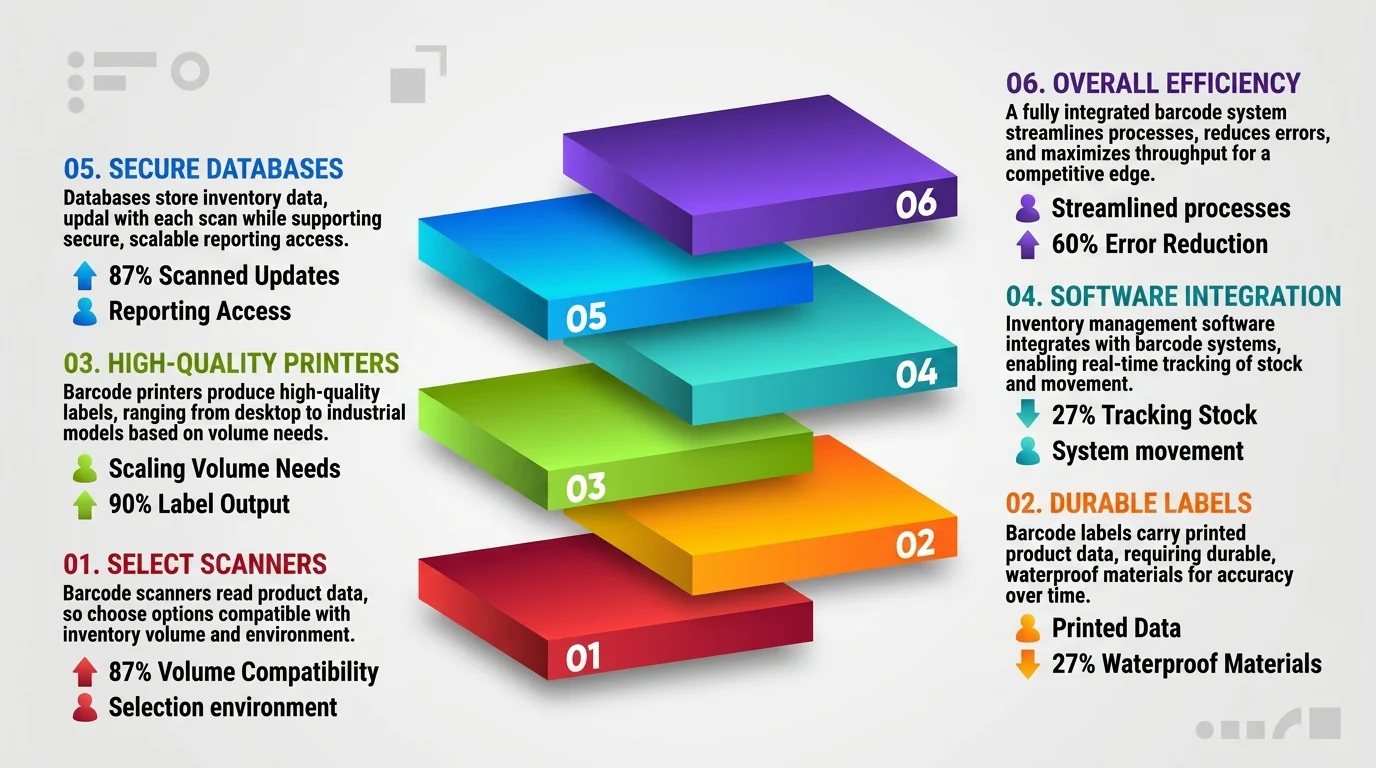
To effectively implement and operate a barcode system for inventory, it’s essential to understand the main components involved. Each component plays a unique role in capturing, storing, and utilizing data accurately and efficiently.
- Barcode scanner
The scanner is a critical component used to read barcode data. From handheld to fixed-mount options, select scanners compatible with your inventory environment and item characteristics, ensuring they can handle the required volume and speed. - Barcode labels
Labels carry the printed barcode that represents the product or item data. Choose durable, waterproof labels that are resistant to environmental conditions in your storage areas to maintain data accuracy over time. - Barcode printer
This device is essential for printing high-quality barcodes on inventory labels. Printers range from desktop to industrial models, depending on your business’s printing needs and volume. - Inventory management software
This software integrates with the barcode system, enabling real-time tracking of stock levels, locations, and movement across warehouses. Choose software with customizable fields to match your unique barcode inventory control requirements. - Database
The database stores all inventory data and updates it whenever a barcode is scanned. Ensure the database is secure and scalable and provides easy access for reporting and decision-making.
Understanding and implementing each component correctly allows a barcode system to deliver reliable, accurate inventory tracking, helping businesses save time, reduce errors, and improve overall efficiency.
How to Choose a Barcode Inventory Management Software?
Here are the key aspects to evaluate when selecting the ideal solution for your inventory management:
- Define your business goals: Clearly outline what you want to achieve with the barcode inventory management software, such as improved accuracy or reduced costs. Understanding your goals helps you select a solution that aligns with your business objectives and supports long-term growth.
- Account for your software and hardware needs: Evaluate the specific software features and hardware requirements necessary for your operations, including compatibility with existing systems. Conducting a thorough SDE analysis(Systems Design & Evaluation analysis) can help you assess whether your current infrastructure supports the new tools, ensuring you maximize the effectiveness and efficiency of the barcode scanner inventory software.
- Integration with Existing Systems: The inventory solution works well with your current systems, like ERP, CRM, and accounting. This means less work for you and fewer mistakes. It’s essential to pick a system that makes working together easy and smooth.
- User-Friendly Interface: A simple interface makes using the software easy for your team. It should be easy to understand and use right away. Things like clear dashboards and easy scanning help everyone work better and faster. The best software is one your team loves to use.
- Cost and ROI: Consider the cost and what you’ll get back (ROI) when picking software. Look at the upfront cost and ongoing expenses like subscriptions and updates. Compare these costs with the benefits like better efficiency and fewer mistakes. You want a solution that saves you money and helps your business grow.
Boosting Inventory Management Efficiency with HashMicro Barcode Software
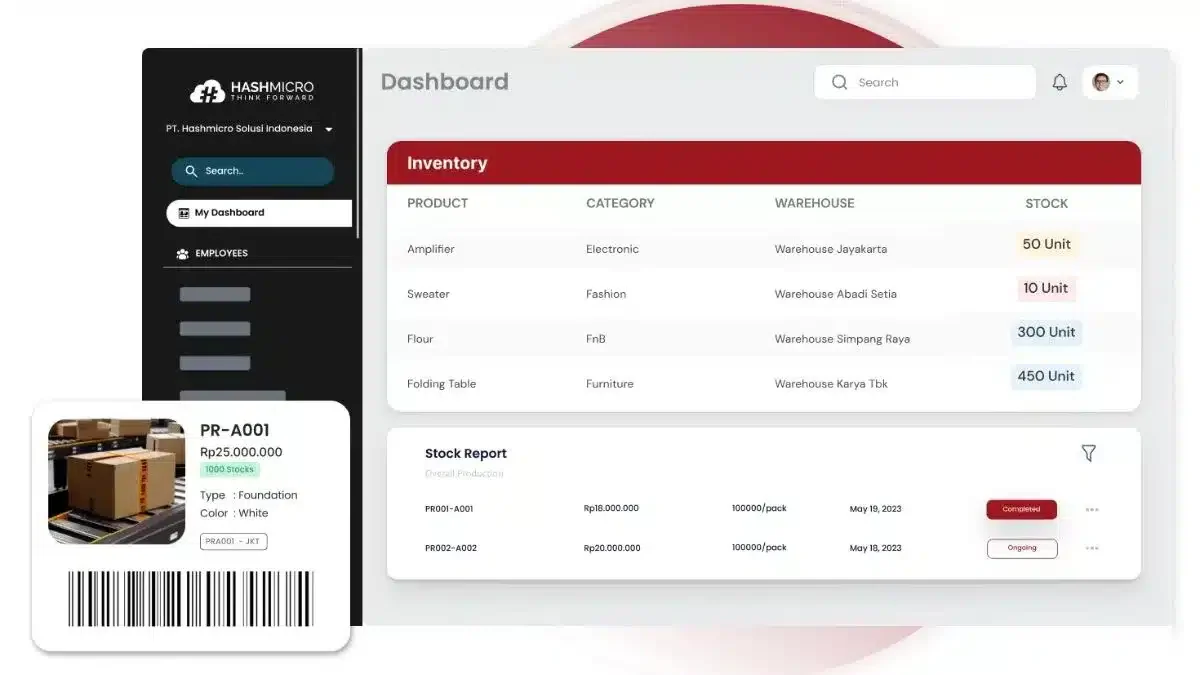
Using barcode inventory solutions can change the game for your business in the fast-changing Philippine market. This tech helps you control your inventory well. It makes your operations smoother, reduces mistakes, and enables you to spend less.
Choosing a barcode inventory solution is more than keeping up with technology. It’s about improving your business constantly. One such software is HashMicro Barcode Inventory Software, which has been the top choice for companies in the Philippines.
HashMicro is trusted by many companies in Southeast Asia in various industries. This software vendor has multiple advantages over other barcode software providers. You can easily integrate your other systems with various HashMicro modules and customise features that support your specific operations.
Here are some of the top features of HashMicro’s barcode inventory system:
- Product & Location Barcode: This feature ensures precise identification of products and their specific storage locations in the warehouse.
- Batch & Serial Number: It enables detailed tracking of individual batches or items throughout their entire lifecycle.
- ID Card Barcode: This allows for swift and efficient identification and access control for staff and authorized users.
- Asset Barcode: This facilitates tagging and monitoring company assets, ensuring accurate records and timely maintenance.
- Packaging Barcode: It enhances inventory accuracy by monitoring packaged goods and ensuring correct quantities and items during shipping.
- Document Barcode: This feature improves document management by tagging and tracking, allowing easy retrieval and organization.
- AI-powered Barcode: With Hashy AI from HashMicro, businesses can gain smart insights to predict stock needs and reduce errors beyond basic inventory tracking
If you want to know more about HashMicro barcode inventory software, you can try a free trial of the system and find out how HashMicro software becomes the best solution for your company’s barcode scanner software for inventory.
Conclusion
Barcode inventory system is an integral part of any business record-keeping because it turns physical stock into real-time digital data. By using 1D or 2D barcodes paired with scanners, labels, and inventory software, businesses can track products better. It makes movement faster, reduces manual errors, and maintains accurate stock records across warehouse operations.
To make the system work well, businesses need clear implementation steps, the right hardware, reliable software integration, and consistent staff training. So it is paramount for you to find the best inventory system. A good setup will improve stock visibility, support better decisions, and help businesses run inventory operations with more control.

FAQ About Barcode Inventory System
To create a barcode inventory system, follow four steps: generate barcodes for each product using inventory software, tag items with printed barcode labels, select a scanner suited to your operation, and connect everything to an inventory management system that syncs product data and keeps stock records updated in real time.
Code 128 is the best barcode for inventory management. It supports alphanumeric data, works with most standard scanners, and requires no specialized reading software. Its high data density makes it ideal for tracking stock, assets, and shipments across warehouses and distribution centers.
Retail products sold through Philippine supermarkets and convenience stores carry EAN-13 barcodes issued through GS1 Philippines, which assigns a country prefix to locally registered companies. For internal warehouse use, bin locations, pallets, work-in-progress, Code 128 is the more practical choice because it encodes letters and separators that numeric-only formats cannot.
A barcode inventory system tracks and manages stock using scannable barcode labels attached to each item. When scanned with a reader or mobile device, the system instantly updates stock levels, item locations, and movement history, giving businesses real-time visibility across their operations.
Neither is universally better; the right choice depends on your needs. RFID scans multiple items simultaneously without line-of-sight and stores more data, making it suited for large warehouses. Barcodes cost less, work with standard scanners, and are easier to implement for most businesses.