
Modern businesses rely on more than just processing transactions to run efficiently. As operations become more complex, systems need to work together rather than operate in isolation. This shift has made integration a key part of managing sales, data, and daily workflows.
POS integration plays an important role in connecting front end transactions with back-end systems. By linking different tools into an integrated system for retailers, businesses can reduce manual work, improve accuracy, and gain better visibility across operations.
Key Takeaways
Modern POS integration connects sales, inventory, and business tools into a single workflow for better efficiency.
What Is POS Integration
POS integration refers to the process of connecting a point of sale system with other business applications to enable seamless data flow. Instead of working as a standalone tool, the POS becomes part of a connected system that supports multiple operational functions.
To understand its impact, it is important to look at how POS integration works conceptually, how it supports business operations, and how data moves across systems.
Definition and Core Concept
At its core, POS integration is about linking systems so they can share and update data automatically. When a transaction happens, the information is instantly transmitted to connected platforms such as accounting, inventory, or CRM systems.
This removes the need for manual data entry and reduces the risk of inconsistencies. By ensuring that all systems reflect the same information, businesses can operate with greater accuracy and efficiency.
How POS Becomes a Central Business System
When integrated properly, a POS system evolves from a simple checkout tool into a central operational hub. It captures transaction data and distributes it across different systems that support various business functions.
This allows teams to access real-time information without switching between disconnected platforms. As a result, the POS becomes a key component in managing workflows, decision-making, and overall business performance.
The Role of Data Synchronisation
Data synchronisation ensures that information remains consistent across all connected systems. Every sale, update, or adjustment made in the POS is reflected automatically in other platforms.
This real time data flow helps businesses maintain accurate records and respond quickly to operational changes. It also reduces delays caused by manual processes and supports better coordination across teams.
What Is an Integrated POS System
An integrated POS system is the result of connecting a point of sale with other business tools into a consolidated platform for store transaction. Instead of operating independently, the system becomes part of a broader ecosystem that supports multiple functions across the business.
This type of system is designed to improve coordination between departments and ensure that data flows consistently. To understand its role, it is important to look at how it evolves, how it supports daily operations, and how it adapts to different business needs. For businesses comparing platforms, reviewing the top POS software for business can help identify which systems offer the right mix of integration, scalability, and daily workflow support.
From Standalone Tool to Connected Platform
Traditional POS systems were built to handle transactions at a fixed location without interacting with other tools. While effective for basic operations, they often created gaps between sales, inventory, and financial data.
An integrated POS removes these gaps by connecting multiple systems into one platform. This allows businesses to move away from isolated processes and operate with a more connected and efficient workflow.
How Integrated POS Supports Daily Operations
An integrated POS system helps streamline daily activities by automating how data is shared across systems. When a transaction is completed, it can automatically update inventory levels, record financial data, and store customer information.
This reduces the need for repetitive tasks and minimises the risk of errors. As a result, teams can focus more on operations and customer service rather than manual data handling.
Flexibility and Scalability Across Business Types
Integrated POS systems are designed to adapt to different industries and operational scales. Whether used by a small business or a multi-location enterprise, the system can be configured to match specific workflows and requirements.
As businesses grow, integrated systems make it easier to expand operations without rebuilding infrastructure. This flexibility allows organisations to scale while maintaining consistent processes and data accuracy.
Integrated vs Traditional POS Systems
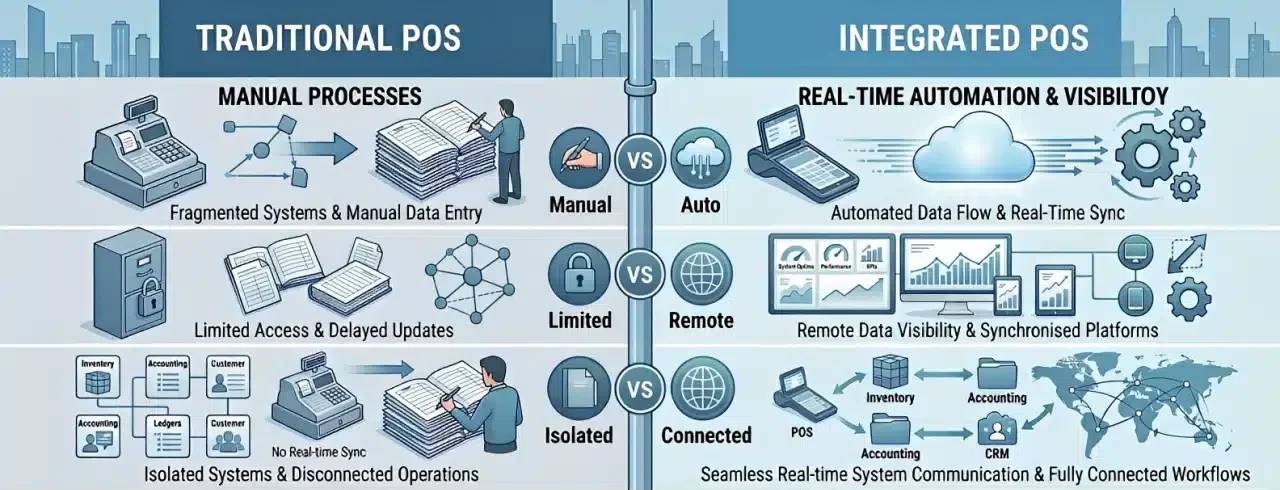
Understanding the difference between integrated and traditional POS systems helps businesses choose the right setup for their operations. While both handle transactions, they differ in how data is processed, accessed, and used across the business.
These differences affect not only operational efficiency but also decision-making and customer experience. Looking at how each system works highlights the advantages of integration in modern business environments.
Manual Processes vs Real-Time Automation
Traditional POS systems rely heavily on manual processes to update data across different functions. After a transaction is completed, staff often need to record sales, adjust inventory, or update financial reports separately.
Integrated POS systems automate these processes in real time. Every transaction instantly updates connected systems, reducing manual work and improving accuracy across operations.
Data Accessibility and Remote Management
Traditional systems are typically limited to on-site access, meaning data can only be viewed from specific terminals or locations. This makes it difficult for business owners to monitor performance without being physically present.
Integrated POS systems, especially cloud-based ones, allow access from anywhere using connected devices. This enables managers to track sales, inventory, and performance in real time, regardless of location.
Impact on Customer Experience
The differences between systems also affect how customers interact with a business. Traditional POS systems focus mainly on completing transactions, with limited ability to personalise service.
Integrated systems allow businesses to use customer data more effectively. Staff can access purchase history, preferences, and loyalty information, helping create a more personalised and seamless experience.
Core Functions of a POS System
A POS system supports more than just transactions. It connects multiple operational processes into a single platform that helps businesses manage sales, track data, and maintain efficiency.
To understand its full role, it is important to look at the core functions that support daily operations and overall business performance.
Sales and Transaction Processing
Sales processing is the primary function of any POS system. It allows staff to record purchases, calculate totals, and complete transactions quickly and accurately.
Modern systems also support multiple payment types, discounts, and order adjustments. This ensures transactions run smoothly, even during high-demand periods.
Inventory and Stock Management
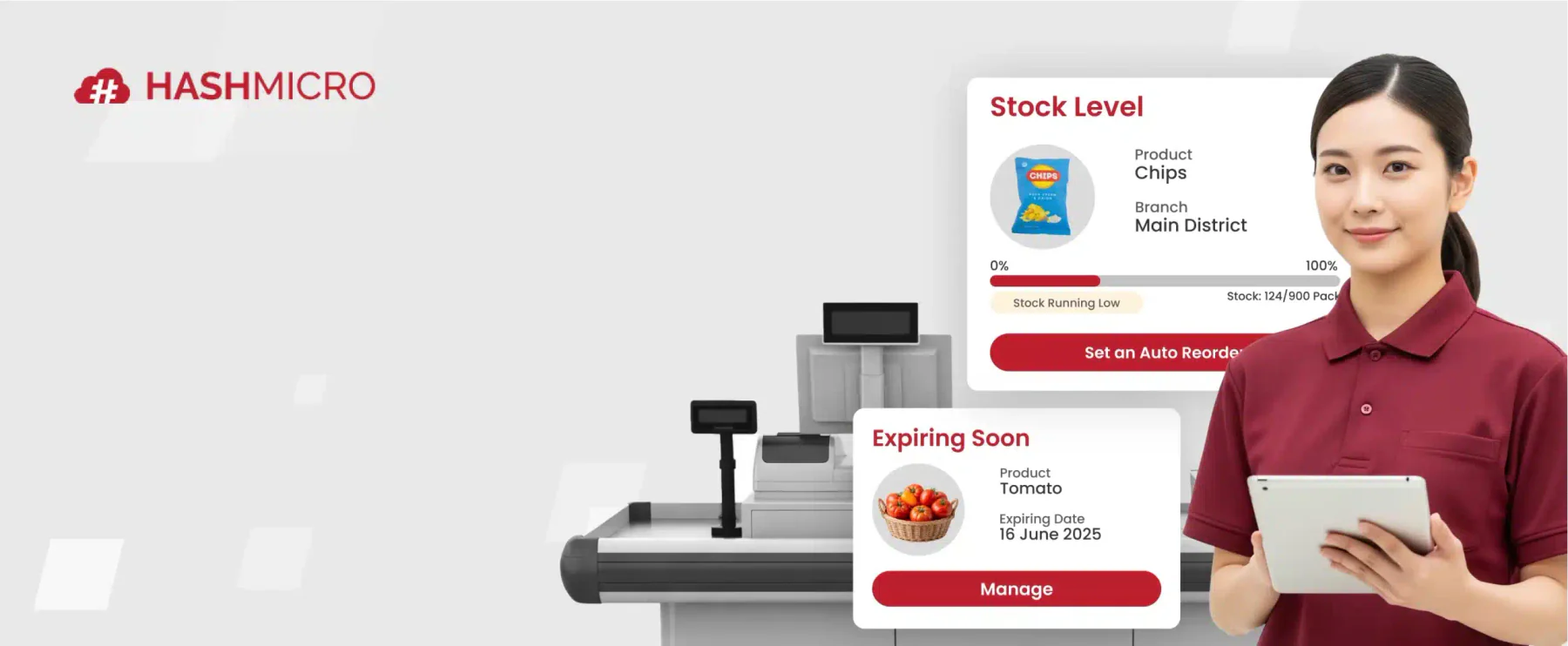
POS systems help track inventory levels in real time as transactions occur. Each sale automatically updates stock quantities, reducing the need for manual adjustments.
This visibility helps businesses prevent stock shortages and overstocking. It also supports better planning and more efficient inventory control.
Customer Data and CRM Capabilities
A POS system can store customer information such as purchase history and contact details. This data helps businesses understand customer behaviour and preferences over time.
With this information, businesses can personalise promotions and improve customer engagement. It also supports loyalty programs and repeat purchases.
Reporting and Business Insights
POS systems collect operational data and convert it into useful reports. Businesses can track sales trends, identify top-performing products, and monitor overall performance.
These insights help managers make informed decisions based on real data. This improves planning and supports long-term business growth.
Payment Processing and Security
A POS system supports various payment methods, including cards, contactless payments, and digital wallets. This flexibility improves convenience for customers during checkout.
At the same time, systems must ensure secure transactions through encryption and compliance standards. This helps protect sensitive data and maintain customer trust.
How POS Integration Works in Practice
POS integration works by enabling different systems to communicate and exchange data automatically. Instead of operating separately, each system becomes part of a connected workflow that supports real-time operations.
To understand how this works in practice, it is important to look at how systems communicate, how data flows between them, and how transactions are processed from start to finish.
APIs and System Communication
APIs act as the connection layer between different systems. They allow a POS system to send and receive data from other platforms such as accounting, inventory, or CRM tools.
Through these connections, systems can exchange information without manual input. This ensures that each platform stays updated and aligned with the latest data.
Real Time Data Flow Across Systems
Once systems are connected, data flows instantly between them whenever an action occurs. A completed transaction can immediately update inventory levels, financial records, and customer data.
This real-time flow reduces delays and prevents discrepancies between systems. It also allows businesses to respond quickly to changes in operations.
End to End Transaction Process
In an integrated environment, a single transaction triggers multiple updates across systems. When a sale is processed, the POS records the payment, updates inventory, and sends financial data to accounting software.
At the same time, customer information can be updated in CRM systems. This end-to-end process happens automatically, ensuring all systems remain consistent without manual intervention.
"POS integration helps businesses connect systems, improve data accuracy, and streamline operations across modern business environments."
Common POS Integration Examples
POS integration can be applied across different systems depending on business needs. Each integration serves a specific purpose, from improving customer insights to ensuring financial accuracy and operational efficiency.
Understanding these common examples helps businesses identify which integrations are most relevant to their workflows and long-term goals.
- CRM Integration for Customer Insights
Integrating POS with CRM systems allows businesses to capture customer data from every transaction, including purchase history and preferences. This helps personalise marketing efforts and improve long-term customer engagement. - Ecommerce Integration for Omnichannel Sales
POS integration with ecommerce platforms enables businesses to manage online and offline sales in one system. This ensures inventory and sales data remain consistent across all channels. - Accounting Integration for Financial Accuracy
Connecting POS with accounting software allows financial data to sync automatically. This reduces manual work, improves reporting accuracy, and supports compliance requirements. - Inventory Integration for Stock Control
Inventory integration updates stock levels in real time as transactions occur. This helps maintain accurate inventory data and supports better planning and replenishment. - ERP Integration for Business-Wide Visibility
Integrating POS with ERP systems connects multiple business functions into one platform. This improves coordination across departments and provides a complete view of operations. - Payment Integration for Seamless Transactions
Payment integration allows POS systems to connect with gateways and processors. This supports multiple payment methods while ensuring secure and efficient transactions.
Industry Use Cases of POS Integration
POS integration is used across different industries to support specific operational needs. While the core concept remains the same, how it is applied can vary depending on business models and customer expectations.
Understanding these use cases helps businesses see how integration can improve efficiency, service delivery, and overall performance in real-world scenarios.
Retail and Omnichannel Operations
In retail, POS integration connects in-store and online sales into a single system. This allows businesses to manage inventory, orders, and customer data consistently across multiple channels using a cohesive software for your grocery store.
By synchronising data in real time, retailers can prevent stock discrepancies and provide a seamless shopping experience. This is especially important for businesses operating across physical stores and ecommerce platforms.
Hospitality and Food Service
In hospitality, POS integration helps streamline order management and service workflows. Orders placed at the front of house can be sent directly to the kitchen, making it easier to operate as an integrated system for your cafe while reducing manual communication and errors.
It also supports payment processing and inventory tracking in real time. This improves service speed, enhances coordination between staff, and ensures a smoother customer experience.
Service-Based Businesses
For service-based businesses, POS integration helps manage transactions, bookings, and customer information in one system. This is useful for businesses such as salons, repair services, or consulting firms.
By connecting scheduling, payments, and customer data, businesses can operate more efficiently. It also helps improve service delivery and maintain better customer relationships.
Implementing POS Integration Successfully
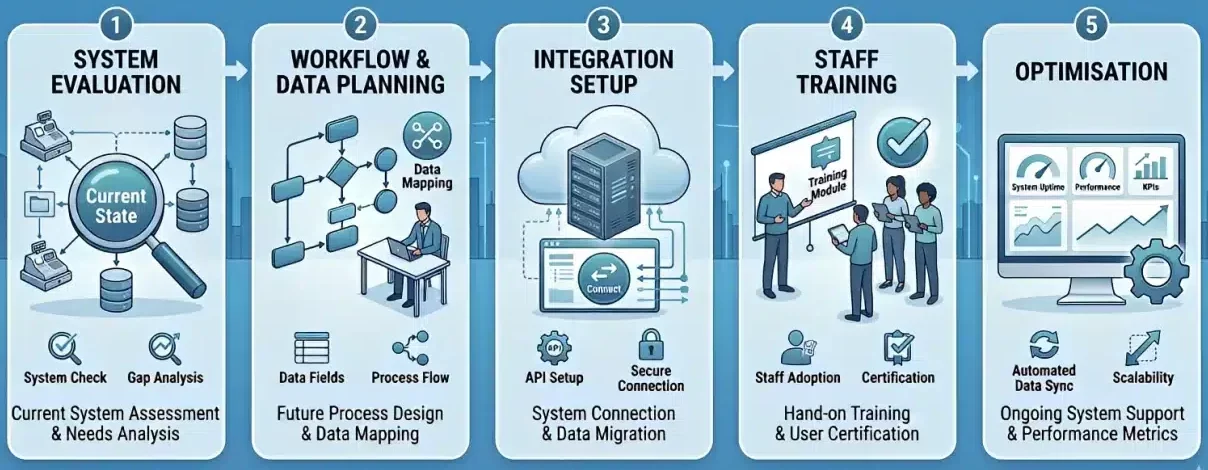
Implementing POS integration requires a structured approach to ensure systems work seamlessly without disrupting daily operations. Without proper planning, integration can lead to data inconsistencies, workflow issues, and adoption challenges.
By following a clear process, businesses can reduce risks and ensure the integration delivers long-term value across operations.
- Evaluating Existing Systems
The first step is reviewing current systems and identifying how they are used in daily operations. This helps determine compatibility, existing gaps, and whether upgrades or replacements are needed before integration. - Defining Data and Workflow Requirements
Businesses need to map how data should move between systems and how workflows will function after integration. Clear requirements ensure that systems support actual operational needs rather than adding unnecessary complexity. - Testing and Deployment Strategy
Before full implementation, systems should be tested in a controlled environment. This helps identify potential issues early and ensures that data flows correctly across all connected platforms. - Staff Training and Adoption
Successful integration depends on how well staff can use the system. Providing proper training and clear guidelines helps teams adapt quickly and ensures the system is used effectively in daily operations.
Common Challenges in POS Integration
While POS integration offers significant benefits, it also comes with practical challenges that businesses need to manage carefully. Without proper planning and system alignment, integration can lead to inefficiencies and data inconsistencies.
Understanding these challenges helps businesses minimise risks and maintain stable operations after implementation.
Poor Data Quality and System Mismatch
Inconsistent or inaccurate data can create issues when systems are connected. If different platforms use incompatible formats or outdated information, errors can occur across inventory, sales, and financial records.
API Limitations and Sync Issues
APIs enable systems to communicate, but not all integrations perform consistently. Limitations in API capabilities or delays in synchronisation can result in incomplete or outdated data.
Integration Complexity and Maintenance
As more systems are connected, integration becomes more complex to manage. Ongoing maintenance is required to ensure stability, prevent disruptions, and keep all systems aligned over time.
Integrating multiple business systems can become more manageable with AI-powered support. Hashy, HashMicro's AI assistant, helps businesses access information faster, reduce manual work, and improve visibility across connected operations, making it easier to manage POS integration with greater efficiency and accuracy.






Advanced Strategies for POS Integration
Once POS integration is implemented, businesses can move beyond basic connectivity and start using it to drive deeper operational improvements. At this stage, integration is no longer just about syncing data, but about using data to support smarter decisions.
By applying advanced strategies, businesses can maximise the value of their POS system and improve overall performance.
AI and Predictive Analytics
Integrated POS systems generate large volumes of data that can be used to identify patterns and trends. With AI and predictive analytics, businesses can forecast demand, optimise inventory levels, and plan operations more effectively.
These insights help reduce uncertainty and support faster, more informed decision-making. As a result, businesses can improve efficiency while responding better to changing conditions.
Personalised Customer Experiences
POS integration allows businesses to combine customer data from multiple systems into a single view. This enables more personalised interactions based on purchase history, preferences, and behaviour.
By delivering relevant offers and tailored experiences, businesses can improve customer satisfaction and build long-term loyalty. This also helps increase engagement and repeat purchases over time.
Conclusion
POS integration helps businesses connect systems and streamline operations across different functions. By reducing manual processes, it improves data accuracy and ensures information flows consistently.
A well integrated system also provides real-time visibility into sales, inventory, and customer data. This allows businesses to make faster decisions and respond more effectively to operational changes.
If your organisation wants to improve efficiency and system connectivity, the right solution can make a difference. You can book a consultation with our expert to explore POS integration solutions that support more scalable operations.
Frequently Asked Questions About POS Integration
POS integration is the process of connecting a point of sale system with other business applications such as inventory, accounting, and CRM systems to enable real-time data sharing and automation.
POS integration helps businesses reduce manual work, improve data accuracy, and streamline operations by ensuring that all systems are connected and updated in real time.
Common integrations include inventory management, accounting software, CRM systems, ecommerce platforms, ERP systems, and payment gateways.
POS integration improves operational efficiency, enhances data accuracy, supports better decision-making, and creates a more seamless customer experience across different sales channels.
Common challenges include data inconsistencies, system compatibility issues, API limitations, and the complexity of maintaining multiple system integrations.