

In the current Australian business landscape, businesses use a wide range of software for accounting, HR, and other functions. Adopting tools for different teams often creates fragmented systems, causing data silos, repeated work, and slower operations.
System integration connects applications and hardware into a unified platform for business, eliminating silos and improving efficiency. It automates workflows and ensures real-time data accuracy for smoother operations.
Key Takeaways
System integration connects software, subsystems, and hardware so data moves in real time and workflows run without manual intervention.
Types of system integration include legacy, EAI, B2B, and third-party models, each matching different technical and operational needs.
Implementation planning starts with goals, system architecture, tool selection, configuration, testing, deployment, and ongoing monitoring.
Advanced integration practices use microservices, event-driven architecture, AI-enabled iPaaS, and edge computing to build smarter ecosystems.
What Is System Integration?
System integration connects different software, sub-systems, and hardware into a single system that works together. It ensures technologies from different vendors can share data in real time and run workflows without manual intervention.
In business, ERP system integration links front-office tasks like sales and marketing with back-office functions such as inventory, finance, and procurement. Modern integration uses APIs, webhooks, and middleware to exchange data and coordinate processes.
A fully integrated system creates a smooth digital flow. For example, an online order can update inventory, trigger warehouse actions, record the sale, and update the CRM automatically, reducing errors and boosting productivity.
System Integration vs. Data Integration
While “system integration” and “data integration” are often used interchangeably, they are two distinct IT disciplines. Both aim to unify fragmented information but differ in objectives, methods, and technology. Understanding these differences is key for digital transformation planning.
Data integration focuses on consolidating, cleaning, and storing data for analysis. Using ETL or ELT processes, it creates a single source of truth for BI teams, data scientists, and executives. It is usually batch-oriented and supports reporting and strategic forecasting.
System integration, on the other hand, is operational and real-time. It connects workflows across applications, enabling immediate actions, like syncing a new CRM profile to an ERP for instant invoicing. In short, data integration asks “What happened?” while system integration asks “How can we make it happen now?”
Why Businesses Need System Integration

Moving from isolated software to a fully integrated system is essential for any business in today’s digital economy. Disconnected tools slow operations, frustrate employees, and hurt customer satisfaction, making integration a critical strategy.
System integration eliminates data silos, automates workflows, and synchronizes information across departments. This reduces manual work, cuts errors, and frees employees to focus on strategic tasks that drive revenue.
It also provides real-time visibility for executives, lowers costs by consolidating systems, and improves the customer experience with faster order processing and personalised support, boosting loyalty and retention.
"A unified system transforms chaos into clarity, letting teams work smarter and decisions happen faster."
Types of System Integration
There’s no one-size-fits-all approach to system integration. Every business has unique software, technical maturity, and operational needs. Choosing the right integration model is essential for a scalable, secure, and future-proof IT architecture.
1. Legacy System Integration
Many companies still rely on legacy systems that store critical historical data and run custom business logic. These systems often lack modern APIs, making direct integration challenging.
IT teams use middleware, API wrappers, or screen-scraping to connect legacy systems to cloud applications. This lets businesses keep stability while benefiting from modern SaaS and ERP tools.
2. Enterprise Application Integration (EAI)
EAI unifies internal applications like ERP, CRM, HCM, and SCM, allowing data and workflows to move seamlessly across the company. It creates a connected ecosystem where one action triggers responses in all relevant systems.
EAI uses middleware like an Enterprise Service Bus (ESB) or iPaaS hub. This hub-and-spoke model avoids messy point-to-point links, making the infrastructure scalable, agile, and easier to maintain.
3. Business-to-Business (B2B) Integration
B2B integration connects a company with external partners, suppliers, and customers. It automates the exchange of critical documents such as purchase orders, invoices, and shipping notices through a document management system.
Traditionally dominated by EDI over secure networks, modern B2B integration uses APIs and web services. This speeds up transactions, cuts costs, and strengthens transparency across supply chains.
4. Third-Party System Integration
Third-party integration links a company’s core systems, like ERP, with specialised SaaS tools such as e-commerce platforms, marketing automation, or payment gateways.
Using RESTful APIs, GraphQL, and webhooks, businesses can automate workflows across multiple endpoints. This creates an agile, scalable digital ecosystem that adapts quickly to market changes.
Industry Use Cases for System Integration
The benefits of system integration are universal, but each industry applies them differently. Examining practical use cases shows how connecting systems solves unique challenges and drives measurable business value.
1. Retail and E-Commerce
Retailers use multiple systems like e-commerce platforms, POS, ERP, WMS, and CRM. Without integration, stock mismatches and cancelled orders can hurt customer trust.
Integration updates inventory, reconciles financials, triggers shipping, and links to marketing tools. This ensures a seamless, end-to-end customer experience across all channels.
2. Healthcare and Medical Services
Hospitals rely on EHRs, lab systems, radiology, billing software, and scheduling portals. Manual data entry can cause errors, delays, and compliance risks.
Integration using HL7 or FHIR automates test requests, updates patient records, alerts doctors, and ensures accurate billing. This speeds up treatment and maintains strict regulatory compliance.
3. Manufacturing and Supply Chain
Factories use SCADA, PLCs, ERP, and logistics software. Manual monitoring of machines and production can lead to downtime and inefficiencies.
IoT sensors integrated with ERP and maintenance systems enable predictive maintenance. Issues trigger automatic work orders, parts orders, and schedule adjustments, reducing downtime.
4. Finance and Banking
Banks balance legacy mainframes with modern mobile apps and SaaS solutions. Processing customer requests manually is slow and error-prone.
Integration uses APIs to pull credit histories, check internal accounts, and run AI risk assessments. This speeds approvals, maintains compliance, and enhances fraud detection.
Data Security and Privacy Act Obligations When Integrating Business Systems
System integration improves data flow, but it also increases the number of places where sensitive business and customer data can move, sync, or be exposed.
For Australian businesses, integration planning should include privacy, security, retention, access control, and breach response from the start, not after systems go live.
1. The Privacy Act 1988 and the Australian Privacy Principles (APPs)
The Privacy Act 1988 sets the national framework for handling personal information in Australia.
When systems are integrated, teams must check how data is collected, used, disclosed, secured, corrected, and deleted across connected applications.
The Australian Privacy Principles are especially relevant for integration because data may move between CRM, ERP, HR, finance, and third-party tools.
APP 6 limits how personal information can be used or disclosed, while APP 11 requires reasonable steps to protect it from misuse, loss, and unauthorised access.
2. Notifiable Data Breaches (NDB) Scheme and integration risk
Integrated systems can widen the impact of a breach because one exposed account, API, or database may affect data across multiple platforms.
Under the Notifiable Data Breaches Scheme, covered businesses must notify affected individuals and the OAIC when an eligible data breach is likely to cause serious harm.
To reduce this risk, integration projects should include breach detection, audit trails, access logs, and clear ownership for incident response.
3. Cross-border data flows and data sovereignty
Many SaaS tools process or store data outside Australia. This matters when customer, employee, supplier, or financial data moves through overseas servers.
APP 8 requires businesses to take reasonable steps before disclosing personal information to an overseas recipient.
Before connecting systems, companies should review vendor data locations, access rights, backup policies, and contractual safeguards for cross-border data handling.
4. Security controls expected when integrating systems (ASD Essential Eight)
Security controls should protect every integration point, including APIs, middleware, user accounts, databases, and reporting tools.
The ASD Essential Eight gives a practical baseline for reducing cyber risk in Australian business systems.
Relevant controls include multi-factor authentication, patching, application control, restricted admin access, regular backups, and monitored access between connected systems.
Step-by-Step Implementation Guide for System Integration
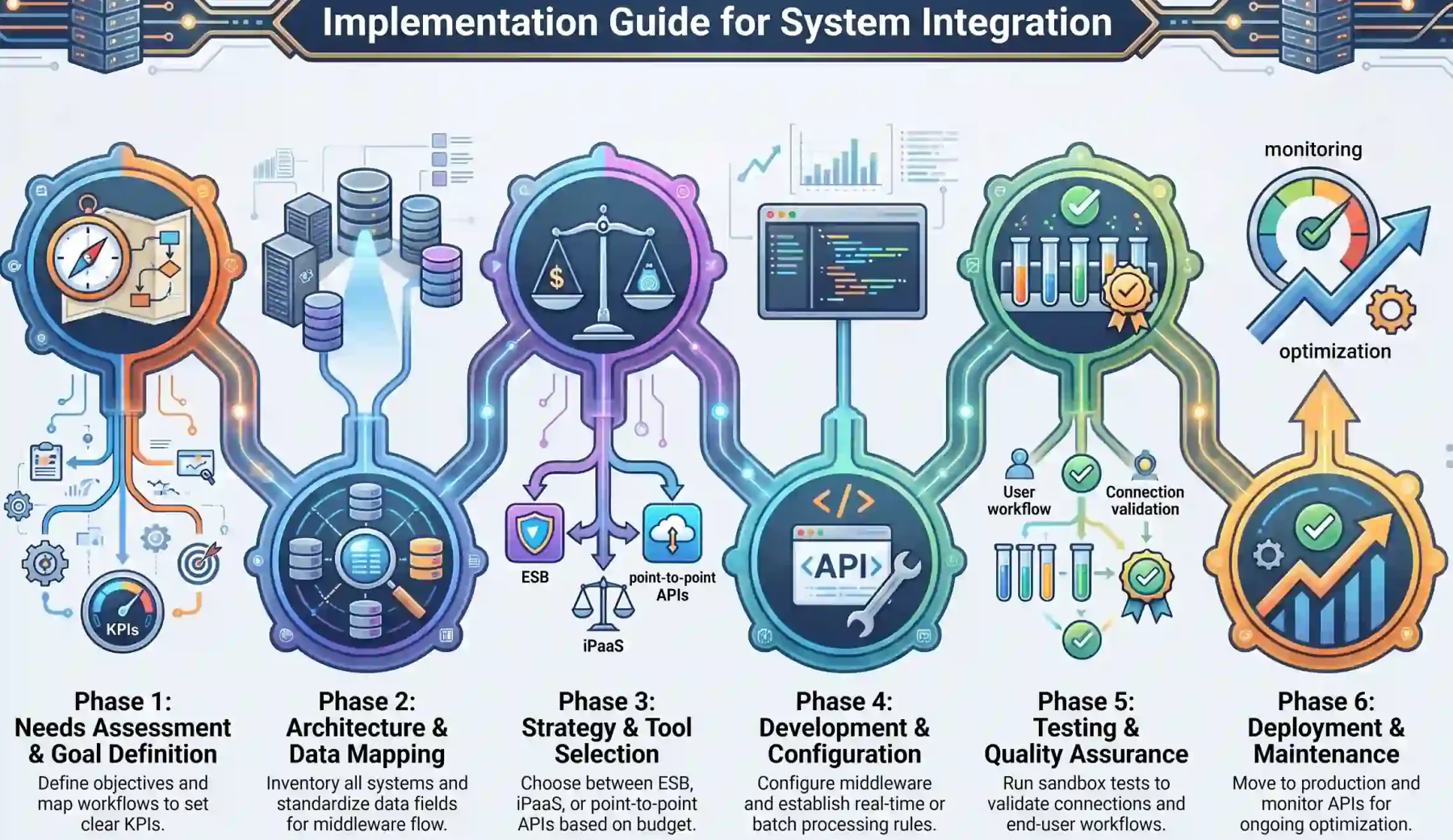
System integration projects need careful planning and collaboration. Rushing in can cause delays, errors, and extra costs.
-
Phase 1: Needs Assessment and Goal Definition
Define objectives like reducing manual entry or improving reports. Map workflows and set clear KPIs. -
Phase 2: System Architecture and Data Mapping
Inventory systems, APIs, and databases. Standardize fields and plan middleware data flow. -
Phase 3: Selecting the Right Integration Strategy and Tools
Pick ESB, point-to-point APIs, or iPaaS. Choose tools based on budget, resources, and data needs. -
Phase 4: Development and Configuration
Configure middleware and APIs. Decide on real-time or batch processing and set error-handling. -
Phase 5: Rigorous Testing and Quality Assurance
Test in a sandbox. Check individual connections, full data flow, and end-user workflows. -
Phase 6: Deployment, Monitoring, and Maintenance
Deploy to production. Monitor APIs, fix errors, and update integration logic as needed.
Common Pitfalls in System Integration and How to Avoid Them
System integration offers big improvements in business efficiency, but projects often fail due to common traps. Recognizing these pitfalls helps managers plan better and avoid costly mistakes.
1. The “Spaghetti Code” Trap
Many companies rely on direct, custom connections between systems. This may work for a few apps but quickly becomes a tangled mess as the enterprise grows.
If one system changes its API, multiple connections can break, causing downtime. Adopting a hub-and-spoke model, ESB, or iPaaS centralizes integration logic and reduces maintenance.
2. Ignoring Data Quality and Standardization
Integrating systems with messy or conflicting data spreads errors faster. CRMs and ERPs often hold different records for the same customer.
Data cleansing before integration is essential. Establish a Single Source of Truth (SSOT) and use Master Data Management (MDM) to maintain accurate records across all systems.
3. Underestimating Security and Compliance Risks
Connecting previously isolated systems increases vulnerability. A breach in one application can expose sensitive data throughout the network.
Use a Zero Trust model, encrypt data both in transit and at rest, and enforce strict authentication through API gateways. Ensure compliance with regulations like GDPR, CCPA, or HIPAA.
4. Scope Creep and Lack of Clear Strategy
Integration projects touch multiple departments, and additional feature requests can delay delivery and inflate costs.
Start with a Minimum Viable Product (MVP) that addresses the most critical bottlenecks. Once stable, expand in phases to add secondary systems without derailing the project.
Advanced Practices of System Integration
System integration is evolving rapidly. Forward-thinking companies move beyond basic data syncs and adopt smarter architectures to create truly intelligent ecosystems.
1. Microservices and API-Led Connectivity
Modern integration favours microservices, breaking applications into small, independent functions. API-led connectivity then links these services efficiently.
System APIs unlock core data, Process APIs shape it for business logic, and Experience APIs format it for end-user apps. This approach reuses integrations, cutting development time for new projects.
2. Event-Driven Architecture (EDA)
Traditional polling methods create latency and waste resources. Event-Driven Architecture pushes updates instantly when events occur.
Systems subscribe to event streams via brokers like Kafka. This enables real-time integration that scales to millions of events per second.
3. Edge Computing Integration
Centralized cloud processing can create delays, especially with IoT devices. Edge integration moves processing closer to data sources.
Middleware on local servers or gateways handles data instantly, triggering immediate actions and sending only essential data to central systems, reducing latency and cloud costs.
4. Artificial Intelligence and Machine Learning in iPaaS
Modern integration platforms now use AI-integrated tools to enhance data mapping, automation, and system performance. It can suggest data mappings automatically and self-heal minor API or format changes without disrupting workflows.
Machine learning ensures continuity, alerts IT teams to issues, and keeps business processes running smoothly despite changes in connected systems.
These advanced patterns only work when context travels with the data. Hashy AI reads connected ERP, API, and event data together, then flags integration issues before workflows slow down.






How System Integration Connects to an ERP System
An ERP system often becomes the central hub of an integrated business environment. It connects finance, inventory, sales, purchasing, HR, and operations in one place.
System integration allows external tools to send and receive ERP data accurately, so business actions can move from one department to another without repeated manual entry.
1. API connections to the ERP
APIs let other applications connect directly to the ERP to exchange data such as orders, invoices, stock levels, customer records, and payment updates.
For example, an e-commerce order can flow into the ERP, update inventory, trigger fulfilment, and create accounting records without staff re-entering the same data.
2. Middleware as the bridge to the ERP
Middleware sits between the ERP and external systems. It translates data formats, manages routing, checks errors, and controls how information moves between platforms.
This is useful when a business connects many tools, such as POS, CRM, warehouse software, supplier portals, and analytics platforms.
3. Built-in ERP connectors
Some ERP systems include ready-made connectors for common tools, reducing the technical effort needed to connect payment gateways, marketplaces, banks, or reporting apps.
Built-in connectors help businesses integrate faster, but teams should still test data accuracy, access permissions, and workflow rules before going live.
Conclusion
System integration is no longer just a technical choice; it is essential for staying competitive in today’s digital economy. Connecting disparate software into a unified system boosts operational agility, improves customer experiences, and strengthens overall business performance.
By following proven integration methods, avoiding common pitfalls, and adopting advanced practices like API-led connectivity and event-driven data flows, companies create seamless digital ecosystems. For guidance on building your integrated system, contact us for a free consultation today.
Frequently Asked Questions
System integration is the process of connecting different software, sub-systems, and hardware into a unified system that works seamlessly. It improves operational efficiency, eliminates data silos, and ensures real-time data accuracy across the organisation.
Data integration focuses on consolidating, cleaning, and storing information for analysis and reporting, while system integration is operational and real-time, connecting workflows across applications to automate processes instantly.
Key types include Legacy System Integration, Enterprise Application Integration (EAI), Business-to-Business (B2B) Integration, and Third-Party System Integration. Each type serves specific business needs and technical environments.
Retail, healthcare, manufacturing, and finance all gain operational efficiency, faster decision-making, and improved customer experience through connected systems tailored to their unique workflows.
Common pitfalls include spaghetti code from point-to-point connections, poor data quality, security risks, and scope creep. Avoid them by centralising integration logic, enforcing data governance, adopting Zero Trust security, and starting with a phased MVP approach.