







Choose an inventory management system in Malaysia by testing your actual stock workflows. Start with receiving, replenishment, delivery and reconciliation, then check costs and Malaysian invoicing. This guide helps owners, purchasing managers, warehouse teams and finance teams compare practical requirements. Use its demonstration checklist to turn software promises into clear purchasing evidence.
Key Takeaways
Inventory management system helps businesses track and control their inventory, orders, sales, and deliveries.
IMS operates using real-time data, automation, and integration to track and manage inventory efficiently.
An effective inventory management software offers a range of features designed to streamline operations and enhance accuracy.
The future of inventory management is evolving rapidly, driven by advancements in technology and changing business needs.
HashMicro Inventory Management Software is a comprehensive solution designed to automate and optimize inventory processes.

The sections below explain the workflow, evaluation criteria and practical next steps.
Choose Around Your Stock Problems and Operating Needs
An inventory management system records stock quantities, locations and movements. It helps teams track goods from receipt through delivery. Your shortlist should reflect the work your business needs to control.
Start with a problem your staff can describe clearly. Perhaps purchasing reacts to shortages while excess goods occupy valuable space. Perhaps warehouse counts disagree with records, delaying fulfilment and finance reconciliation. Turn each problem into a transaction the vendor must demonstrate.
A single warehouse needs clear receiving, storage and dispatch controls. Several warehouses add transfer handovers and visibility by location. Several legal entities introduce separate ownership, company accounts and reporting requirements. Record these needs separately when preparing your requirements.
Agree which requirements are essential before discussing optional features. Give warehouse, purchasing and finance staff a shared evaluation sheet. Ask each team to explain what a successful transaction looks like.
Evaluate Inventory Systems Against Daily Warehouse Work
Evaluate the complete stock journey using representative Malaysian business documents. Bring sample purchase orders, delivery orders, count sheets and SKUs. Include an exception that your current process struggles to resolve.
For physical counts, ask how staff compare counted and recorded quantities. Follow the difference through investigation, approval and the adjustment record. Check whether reviewers can trace the original discrepancy afterwards.
For replenishment, demonstrate minimum and maximum settings by product and warehouse. Ask who maintains those settings and approves the resulting request. Test a fast mover alongside stock that should not be replenished.
For sales orders, inspect reservation and the remaining available quantity. Then test delivery validation when stock cannot cover the requested quantity. Ask how staff record actual dispatch quantities and outstanding balances.
For warehouse transfers, follow goods leaving the source and reaching their destination. Identify who handles goods still in transit or quantities received differently. Require an explanation of the records used during reconciliation.
HashMicro supports optional picking and packing through warehouse configuration. Its barcode scanning supports Goods Receipt and Goods Issue. Picking quantities are entered manually. Test each required scan point using your labels and scanner.
Review barcode workflows for receiving and dispatch when defining those acceptance checks. Include units of measure and similar product labels in your samples. A successful receiving scan alone cannot prove picking support.

Measure Results with Stock and Fulfilment KPIs
Choose measurements that connect directly to your stock problems. Agree the calculation before comparing reports or dashboard appearances. Ask the vendor to show the underlying transactions behind each result.
| KPI | Formula | Required Data | Buying Decision |
|---|---|---|---|
| Inventory turnover | COGS ÷ average inventory value | COGS and average inventory value in MYR, using consistent reporting periods | Can finance examine capital tied up in stock? |
| Stock count accuracy | (Lines with no difference ÷ lines counted) × 100% | Count lines, recorded quantities and physical quantities | Can staff trace discrepancies behind the result? |
| Fill rate | (Qty delivered on first shipment ÷ qty ordered) × 100% | Ordered quantities and first-shipment quantities | Can sales assess initial fulfilment? |
| Aged stock share | (Inventory value older than N days ÷ total inventory value) × 100% | Age threshold, stock age and inventory values | Can purchasing identify value awaiting action? |
Define the age threshold before reviewing aged stock. Use consistent periods when comparing inventory turnover across reports. Document how the report treats the records in your sample.
A stock-count trend chart alone does not establish count accuracy. Ask for the calculation and inspect its source lines. Record whether each KPI is available directly or needs separate calculation.
Check Integration Boundaries and Total Ownership Costs
Map each handover between inventory, purchasing, sales and accounting. Identify shared records, file imports and third-party connectors separately. Ask vendors to demonstrate your existing sales channels and accounting tools.
Trace a purchase through receipt and its accounting records. Follow a sales order through delivery, invoicing and reconciliation. Check how corrections reach each department when quantities change.
Do not assume an existing sales application synchronises automatically. Ask which fields move, when they move and what triggers updates. Request evidence using your application and representative records. Include duplicate imports and failed updates in the test.
HashMicro provides stock reporting by warehouse across several companies. Each company keeps its own books. Group consolidation with intercompany eliminations currently requires spreadsheet exports. Include that work when assessing your reporting process.
Request an itemised quotation in MYR against the agreed scope. Ask whether software, configuration, migration and training are included. Clarify scanner requirements, integration work and ongoing support separately. These are quotation questions, rather than assumed additional charges.
Ask who owns failed-sync investigation and reconciliation. Confirm which services the quoted support covers and how issues are escalated. Agree who maintains mappings when either connected application changes.
Use Six Questions to Test a Vendor Demonstration
Use these questions to make demonstrations comparable. Record the evidence beside each answer during the session. An unresolved requirement should remain visible in the purchasing decision.
| Question | Good Answer | Red Flag |
|---|---|---|
| Can you reconcile a physical count? | Shows counted quantities, differences and the resulting adjustment record. | Replaces the stock balance without recording the discrepancy. |
| What happens when stock falls below minimum? | Demonstrates the configured replenishment proposal or RFQ and identifies purchasing approval. | Promises automatic purchasing without explaining approvals. |
| Can staff scan at every required stage? | Demonstrates each requested scan point using representative labels. | Uses a receiving demonstration as proof of picking support. |
| What happens when available stock cannot fulfil an order? | Demonstrates reservation, availability checking and delivery controls. | Skips the stock-availability test. |
| Can reports cover separate legal entities? | Distinguishes warehouse stock reporting, company books and group consolidation. | Presents central access as proof of automated intercompany eliminations. |
| Can the configured Malaysian invoice flow be demonstrated? | Shows applicable SST treatment and MyInvois submission status after setup. | Claims universal compliance without testing your transaction scenarios. |
For HashMicro, include its scanning limitation in the evaluation record. Goods Receipt and Goods Issue support scanning. Picking quantities are entered manually. Decide whether that workflow meets your warehouse requirements.
Use Royal Malaysian Customs Department guidance when checking applicable SST treatment. Consult LHDN e-Invoice guidance for your invoicing scenarios. Have finance agree the expected outcome before the demonstration.
Ask the vendor to repeat any unclear step. Keep screenshots or exported records where appropriate for your evaluation. Record the configuration needed and the person responsible for resolving each gap.
How HashMicro Handles Replenishment, Delivery and Counting
Use a connected transaction flow when evaluating HashMicro. Start with replenishment, continue through delivery, then reconcile a physical count. Keep your warehouse settings and approval responsibilities visible throughout.
Set Replenishment Rules and Review Approval
HashMicro allows minimum and maximum stock settings by product and warehouse. Refreshing replenishment generates an RFQ or interwarehouse transfer when stock falls below minimum. Ask purchasing to demonstrate RFQ approval and purchase confirmation. Check whether replenishment can confirm purchases without that approval.
Ask the demonstrator to explain the proposed quantity. Check the destination warehouse and the intended supplier or stock source. Have purchasing confirm where its approval sits in the process.
Follow the Order Through Delivery
Confirming a sales order creates a Goods Issue and reserves stock. Picking and packing are optional configured stages. In HashMicro, picking quantities are entered manually. Barcode scanning supports Goods Receipt and Goods Issue.
The delivery flow includes availability checking, actual delivered quantities and validation. On validation, HashMicro reduces stock and posts Dr COGS / Cr Inventory. This delivery entry records inventory cost rather than revenue. Ask finance to inspect the resulting stock and accounting records.
Use an order that available stock cannot fully cover. Ask the demonstrator to explain the delivery control shown. Compare the outcome with your agreed dispatch acceptance check.
Compare Physical and Recorded Stock
HashMicro's stock-count flow compares physical quantities with system quantities. An adjustment records the difference. Ask warehouse staff to inspect the comparison and resulting record. Finance should follow the adjustment into its reconciliation process.
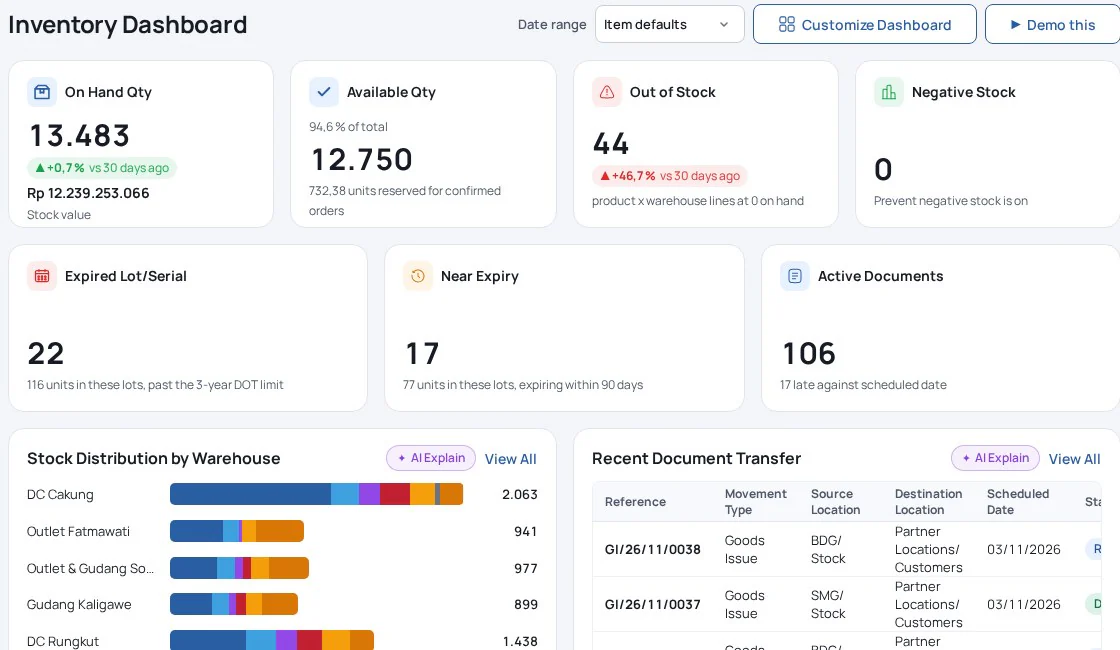
Review HashMicro stock control and replenishment workflows against your acceptance sheet. Record configuration decisions beside the transaction they affect. Resolve any required workflow that the demonstration leaves unclear.

Check Malaysian SST and MyInvois Requirements Separately
Evaluate stock controls, SST and MyInvois as separate requirements. A successful stock movement does not establish the correct invoice treatment. Involve finance when defining your Malaysian transaction tests.
Check applicable registration, invoice and record requirements through the official MySST portal. Ask whether the proposed scope captures your relevant registration details. Request the records finance needs for SST-02 preparation. Obtain a separate answer about return preparation and filing support.
The company, scenario and results in this example are hypothetical.
Use a hypothetical MYR 1,000 sale during the demonstration. Ask finance to specify its applicable SST treatment before entry. Compare the invoice, tax treatment and supporting records afterwards. The example amount is a test input, not a tax calculation.
HashMicro's configured invoice flow records buyer TIN, BRN and SST details. Applicable SST setup forms part of the flow. After setup, its connector submits invoices to MyInvois. It stores the UUID, validation status and QR.
Each Malaysian company needs its own taxpayer credentials and setup for this connector. Test credit notes and self-billed scenarios for your business. Include a rejected submission and ask how staff resolve it.
Check current applicability through LHDN's official e-Invoice guidance. Select transaction scenarios relevant to your company and customers. Do not infer SST-02 filing support from invoice tax configuration.
Prepare Your Data and Acceptance Checks Before Implementation
Prepare SKU records, warehouse locations, opening quantities and opening costs before migration. Include lot or serial details where your products need traceability. Resolve duplicate codes and unclear units before loading records.
Agree the applicable valuation method with finance before go-live. Reconcile opening inventory value with the general ledger. Investigate differences before approving the opening position.
Use location detail that staff can maintain during daily work. Add bins only where they support an actual operating process. Assign responsibility for updating location records when storage arrangements change.
Agree acceptance checks for receiving, counting, replenishment and delivery. Include an accounting reconciliation using representative records. State the expected result and required evidence for each check.
Assign owners for master data, discrepancy investigation and user training. Name the person responsible for cutover approval. Keep unresolved issues visible until the responsible team accepts their outcome.
For HashMicro, confirm whether optional picking and packing will be configured. Match training to the warehouse flow selected. Include manual picking entry wherever staff expect barcode scanning.
Inventory Management System FAQs in Malaysia
What is an Inventory Management System Used For?
An inventory management system records stock quantities, locations and movements. Businesses use it to track goods from receipt through delivery. For example, a distributor needs to compare warehouse quantities with recorded balances.
Its purchasing team also needs replenishment requirements by warehouse. Start by identifying which stock records your teams currently struggle to reconcile.
How Does an Inventory Management System Work?
It records transactions as goods enter, move through and leave warehouses. Receiving adds stock, while delivery records goods leaving for customers. Physical counts compare recorded balances with quantities staff actually find.
In a demonstration, follow one sample SKU through these steps. Ask to inspect the transaction records and resulting balances after each movement.
How Much Does Inventory Management Software Cost in Malaysia?
Request an itemised MYR quotation for your agreed operating scope. Ask whether it includes configuration, migration, training and ongoing support. Clarify scanner requirements and any work connecting existing applications.
Compare quotations using the same warehouse structure and transaction requirements. Ask which services are included before deciding whether the proposed price covers your needs.
How Do I Choose and Start Using an Inventory System?
Choose against receiving, counting, replenishment, delivery and reconciliation acceptance checks. Bring representative purchase orders, delivery orders and sample SKUs. Before implementation, prepare warehouse locations, opening quantities and opening costs.
Agree the valuation method with finance and reconcile opening stock value. Assign owners for master data, staff training and cutover approval before loading operational records.
Will an Inventory Management System Automatically Purchase Replacement Stock?
Ask whether replenishment creates a suggestion, RFQ, transfer or confirmed purchase order. HashMicro uses configured minimum and maximum levels to generate an RFQ or transfer. Ask purchasing to demonstrate RFQ approval and purchase confirmation.
Test that approval boundary during your demonstration. Ask the demonstrator to identify the resulting document and explain who confirms the purchase.
Can Warehouse Staff Scan Barcodes During Picking and Dispatch?
Demonstrate every scan point your warehouse requires using representative labels. HashMicro supports scanning on Goods Receipt and Goods Issue. Picking quantities are entered manually.
Include this limitation when assessing dispatch preparation and staff workload. A receiving demonstration cannot establish picking support, so record the outcome of each requested scanning test separately.
Does Multi-Warehouse Support Include Consolidated Company Accounts?
Warehouse stock visibility and group financial consolidation are separate requirements. In HashMicro, each company keeps its own books. Group consolidation with intercompany eliminations currently requires spreadsheet exports.
Ask finance to evaluate that reporting workload. For several Malaysian companies, request separate demonstrations of warehouse balances, company books and the proposed group consolidation process.
What Should Malaysian Buyers Check for SST and MyInvois?
Check applicable SST requirements through Customs and e-Invoice requirements through LHDN. HashMicro's MyInvois connector requires setup and each company's taxpayer credentials. Test credit notes and self-billed scenarios using representative transactions.
Ask separately about SST-02 preparation and filing. Invoice tax configuration alone does not establish support for preparing or filing that return.
Bring Your Stock Scenarios to a Focused Demonstration
Bring sample SKUs, your warehouse structure and the demonstration checklist. Include replenishment approvals, dispatch exceptions and Malaysian invoicing scenarios. Ask warehouse, purchasing and finance representatives to agree the expected results.
Record demonstrated outcomes, required configuration and unresolved questions in your evaluation sheet. Compare the proposed scope with an itemised MYR quotation. Then request a HashMicro demonstration using your stock and invoicing scenarios.
FAQ
An ERP inventory management system integrates inventory control with other business functions within an ERP system. It helps businesses track and manage inventory efficiently, ensuring accurate stock levels, reducing costs, and improving overall operations through real-time data and automation.
Inventory management encompasses forecasting, planning, procurement, tracking, and optimization. Demand forecasting anticipates customer purchases, assisting businesses in determining their inventory needs.
An example of inventory management is a clothing store using software that updates stock levels automatically when an item is sold. If inventory gets low, the system alerts the store to reorder, helping to keep popular items in stock and avoid running out or overstocking.
Conclusion
Start with the workflow and control requirements that matter to your team. Test those requirements with representative records before deciding on the next step.