







Many enterprises struggle with chaotic training records scattered across regional branches. When a manufacturing facility uses different spreadsheets than a regional warehouse, consolidating compliance data for safety audits becomes an administrative nightmare. Inconsistent labels like complete or passed leave managers guessing who is actually qualified for deployment.
Th.
This fragmentation carries real operational risks. PwC Malaysia’s 2023 workforce survey found that 59% of Malaysian employees said their roles require specialist training, up from 48% the previous year. Without clear visibility into employee training and qualifications, businesses may struggle to verify workforce readiness, monitor compliance, and deploy employees effectively.
R
Resolving these blind spots begins with a strong data foundation. This guide provides a practical spreadsheet structure, standard status categories, a seven step build process, and 10 tailored enterprise examples. Read on to evaluate your current tracker objectively and map out a realistic maturity path toward a connected modern human resource management workflow.
Resolving these blind spots begins with a strong data foundation. This guide provides a practical spreadsheet structure, standard status categories, a seven step build process, and 10 tailored enterprise examples. Read on to evaluate your current tracker objectively and map out a realistic maturity path toward a connected modern human resource management workflow.
Resolving these blind spots begins with a strong data foundation. This guide provides a practical spreadsheet structure, standard status categories, a seven step build process, and 10 tailored enterprise examples. Read on to evaluate your current tracker objectively and map out a realistic maturity path toward a connected modern human resource management workflow.
Key Takeaways
A useful training matrix connects each employee or role with required training, current status, evidence, expiry dates, and an accountable owner.
Standard fields and controlled status labels make spreadsheet records easier to validate, filter, approve, and report across departments or branches.
Review the matrix when people, roles, equipment, policies, or certification requirements change instead of relying only on a fixed annual update.
Discovering how structured tracking transforms workforce readiness is the first step toward an agile enterprise. To see these compliance workflows in action, explore the interactive product showcase below.

What is a training matrix?
A training matrix is a structured record that maps employees against required courses, competencies, certifications, and completion statuses. It provides managers with a consolidated view of workforce readiness by tracking supporting evidence, renewal dates, and accountable owners in a single location.
This matrix functions as an operational control rather than a static administrative document. Unlike a learning management system that delivers educational content or a skills matrix that measures general proficiency, a training matrix strictly tracks formal requirements and compliance obligations to ensure reporting remains clear and actionable.
What problem does a training matrix solve?
The training matrix eliminates the guesswork in workforce planning by centralising critical compliance and readiness data. By implementing this tool, enterprises can resolve several operational challenges:
Preventing deployment delays: An operations manager preparing a weekly assignment can instantly verify if a production technician has a valid and unexpired machine changeover authorisation before deploying them to the floor.
Eliminating data silos: The matrix aligns multiple departments around a single source of truth, removing the need to cross reference scattered spreadsheets, personal files, and emails.
Clarifying accountability: It creates clear boundaries where the human resources team maintains employee context, line managers confirm role readiness, and compliance owners verify requirements.Mitigating regulatory risks: Operations leaders can safely allocate work and prepare for audits with confidence, knowing that no expired certifications or pending approvals will slip through unnoticed.
Why does a training matrix matter for workforce planning?
A training matrix helps managers compare role requirements against current employee records before assigning work, planning development, or preparing for audits. This consolidated view is especially crucial when multiple departments or sites must follow the same compliance standards.
Consider a site manager building a weekly roster. If HR, safety teams, and supervisors keep separate trackers, the manager must manually reconcile these scattered sources to verify who is qualified. Missing or outdated data easily causes deployment delays and unnoticed capability gaps. To prevent these bottlenecks, we can look at how different stakeholders rely on the matrix for daily operations.
Streamlining HR and compliance validation
Human resources and compliance owners use the matrix to maintain accurate personnel files and prepare for audits. They rely on policy references, evidence, approval statuses, and renewal dates to ensure the organisation meets all regulatory standards without redundant paperwork.
Guiding managers and employee actions
For daily operations, line managers and employees depend on the matrix for work allocation and role readiness. Managers check competency evidence and expiry dates before assigning tasks, while employees track their own required schedules and due dates to remain compliant.
Empowering leadership and system control
Leadership teams and system administrators use high level data to manage operational risk and platform access. They review completion rates, critical role gaps, and change histories to make informed capacity decisions and maintain system integrity.
Measuring success and planning development
With this structured data, management can easily calculate internal measures such as departmental completion rates, expired certifications, renewals due within a defined period, and unresolved critical requirements.
Furthermore, the matrix actively supports succession and employee development. If only one person has an essential authorisation, managers can immediately identify this concentration risk and plan cross training. Connecting this operational information with broader management decisions ultimately builds a much more resilient and adaptable workforce.
What should a training matrix include?
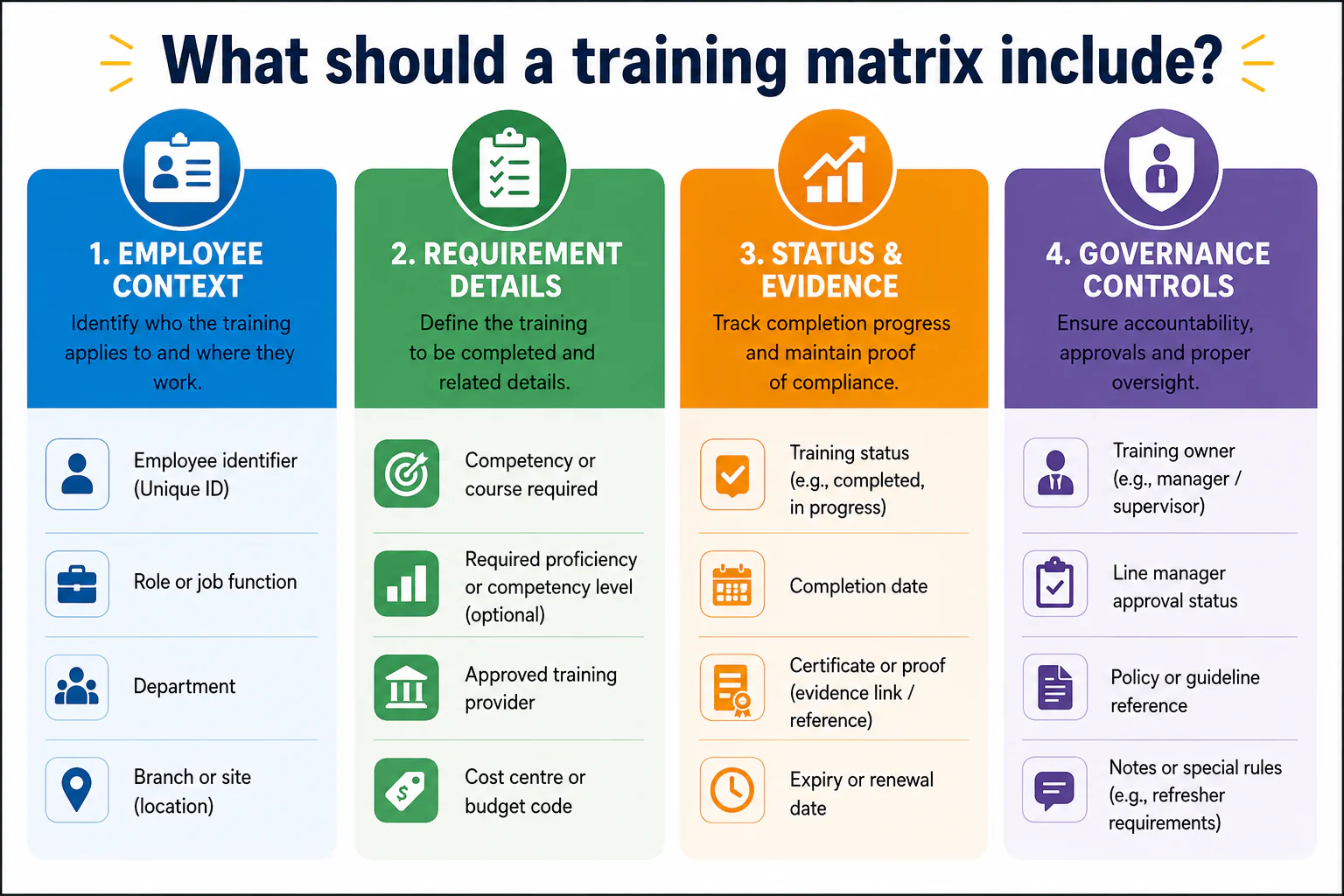
At minimum, a training matrix should identify the employee or role, organisational context, training requirement, status, completion or renewal date, evidence, and accountable owner. You should start with fields that support actual operational decisions. Optional columns should only be added if a designated person is fully responsible for maintaining and using them. To build a highly effective tracker, this data can be organised into four primary groups:
Employee context
The employee context group includes essential identifiers maintained by the human resources team. It captures the employee ID to uniquely identify individuals, their specific role or job function, and the department they belong to. For multi site operations, tracking the branch or site is also crucial to manage location based compliance and reporting effectively.
Requirement details
This section outlines the exact competency or course required by the organisation. The requirement owner defines the mandatory training, while an assessor can optionally update a controlled competency level scale to measure proficiency. Additionally, this group can include the approved training provider and a finance cost centre code for budget tracking purposes.
Status and evidence
Status and evidence fields track the actual progress and validity of the training. The training owner updates a dropdown status such as completed or in progress, along with the specific completion date. When physical or digital proof is required, this section must include direct links or references to certificate records. Furthermore, compliance owners must maintain the expiry or renewal dates to ensure continuous validity.
Governance controls
Governance controls establish clear accountability for every record in the matrix. This includes naming the specific training owner, such as a department manager or production supervisor, and tracking line manager approval statuses. Compliance owners can also use this section to link policy reference documents for tightly controlled requirements, while record owners may add short notes to provide context on specific refresher rules.
In multi branch enterprises, central HR relies on local managers to validate records. Therefore, you should start only with essential fields that managers can realistically maintain daily. An oversized form might look impressive, but unused columns merely create a dangerous false sense of control.
10 training matrix examples for enterprise teams
Choose among these training matrix examples according to operational risk, workforce scale, evidence requirements, and update frequency. A stable departmental list may work in a spreadsheet, while records involving frequent renewals, multiple branches, or several approval stages may benefit from an integrated workflow.
| Example | Objective and important fields | Accountable owner | Suggested review trigger | Maturity fit |
|---|---|---|---|---|
| 1. HR onboarding | Track induction, policy acknowledgement, system access, completion date and manager approval | HR onboarding lead | New hire, transfer or policy change | Spreadsheet for simple intake; integrated workflow for recurring multi branch hiring |
| 2. Manufacturing skills and authorisations | Confirm role, equipment, competency level, assessor, authorisation and renewal date | Production manager | New equipment, process change or authorisation expiry | Integration preferred where work allocation depends on current approval |
| 3. Warehouse safety | Track task clearance, equipment category, evidence, expiry date and refresher status | Warehouse manager | Task change, incident review or renewal date | Spreadsheet for one site; workflow for multiple warehouses or frequent renewals |
| 4. Finance and policy compliance | Record policy version, acknowledgement, process training, approval limit and completion | Finance controller | Policy, system or responsibility change | Suitable for controlled spreadsheet or HR workflow |
| 5. Sales enablement | Track product knowledge, CRM process, assessment, market segment and coaching action | Sales enablement manager | Product launch, process change or role transition | Spreadsheet initially; integration helps with larger sales teams |
| 6. Customer service | Map channel training, escalation procedure, quality assessment and coaching status | Customer service manager | Service change, quality review or new channel | Either, depending on coaching volume and reporting needs |
| 7. IT security | Track assigned procedure, completion, evidence, policy version and approval | IT security lead | Access change, procedure update or scheduled renewal | Integrated workflow useful for access linked requirements |
| 8. Maintenance competency | Record asset class, technical competency, assessor, authorisation scope and expiry | Maintenance manager | New asset, role change or reassessment | Integration preferred when asset assignments depend on competency |
| 9. Branch operations | Standardise role requirements, local completion, evidence, branch owner and exceptions | Regional operations manager | Branch opening, transfer, policy change or monthly review | Central workflow useful for consolidated branch reporting |
| 10. Leadership development | Track development objective, programme, feedback, action plan and review date | HR development lead | Promotion, succession review or programme milestone | Spreadsheet may work; HRM integration supports longer development histories |
For manufacturing, the matrix should answer a specific operating question: who is authorised for which role, process, or equipment? Warehouse teams may apply the same principle to task clearance and renewals. This can complement broader work on resolving warehouse management challenges, especially where workforce readiness affects daily scheduling.
Finance and IT examples often require clear policy versions and approval evidence. Leadership development is different: it may focus more on progression, feedback, and planned experience than fixed certification dates. Adjust every suggested review pattern to internal policy, customer requirements, risk level, and verified regulatory obligations.
Training matrix template: spreadsheet structure and status categories
A spreadsheet-based training matrix normally uses one row for each employee-requirement combination and one column for each controlled field. Keep employee, role, course, and status definitions on separate reference tabs, then use dropdown lists, date validation, filters, and protected formula columns in the working tab.
A practical workbook can contain:
- Employees: employee ID, role, department, branch, manager, and active status.
- Role requirements: role, required course or competency, evidence rule, renewal rule, and requirement owner.
- Courses: course code, title, provider, delivery method, and policy reference.
- Training records: employee-requirement combinations with status, dates, evidence, owner, and approval.
- Status definitions: approved labels and the conditions for using each one.
- Reporting: filtered summaries for overdue items, renewals, branch readiness, and unresolved approvals.
The following training matrix template contains fictional examples:
| Department | Branch | Employee or role | Training requirement | Completion date | Expiry date | Status | Owner | Evidence | Approval |
|---|---|---|---|---|---|---|---|---|---|
| HR | Kuala Lumpur | New HR Executive | Data handling induction | 8 July 2026 | Not applicable | Completed | HR Manager | Record HR-221 | Approved |
| Manufacturing | Shah Alam | Production Technician | Equipment authorisation | 15 September 2025 | 30 September 2026 | Expiring soon | Production Supervisor | Certificate TR-884 | Approved |
| Warehouse | Johor Bahru | Forklift Operator | Task authorisation renewal | 20 August 2025 | 20 August 2026 | Expired | Warehouse Manager | Certificate WH-119 | Approved |
| Finance | Penang | Accounts Payable Executive | Updated approval policy | Not completed | Not applicable | Scheduled | Finance Controller | Session booking | Awaiting approval |
| IT | Kuala Lumpur | Service Desk Analyst | Security incident procedure | Not completed | Not applicable | In progress | IT Security Lead | LMS record | Pending |
Use a controlled list of training status categories:
Not required
This status indicates that a specific training requirement does not apply to the employee or their current role. You must ensure the exact reason is recorded clearly within the system to avoid any confusion during compliance audits.
Not started
Use this label when a training requirement officially applies to an individual, but absolutely no activity has begun yet. It helps operations managers easily identify who needs immediate scheduling attention.
Scheduled
This status shows that a confirmed training session or formal assessment has been successfully arranged for the employee. It provides clear visibility into upcoming compliance activities and workforce availability.
In progress
Apply this tag when a training session or assessment has officially started but is not yet complete. This helps leadership track ongoing development efforts across various departments.
Completed
This label is strictly reserved for when all completion criteria and required evidence have been formally recorded. It signifies that the employee is fully qualified, compliant, and ready for operational deployment.
Expiring soon
Use this proactive status when a valid training record is rapidly approaching its defined renewal date. This label gives managers enough time to schedule refresher courses before any critical compliance lapses occur.
Expired
This critical status applies when a defined renewal date has passed without an approved replacement record. Employees carrying this status should immediately be restricted from performing regulated or dangerous tasks until their certification is renewed.
Awaiting approval
This status highlights that an employee has submitted their training evidence, but it still requires an authorised review. It keeps the operational workflow moving smoothly by notifying managers of pending sign offs.
You can use spreadsheet logic to flag approaching expiry dates, but the threshold must reflect internal policy. Test formulas, time zones, blank-date behaviour, and conditional formatting in the approved workbook before publication or operational use.
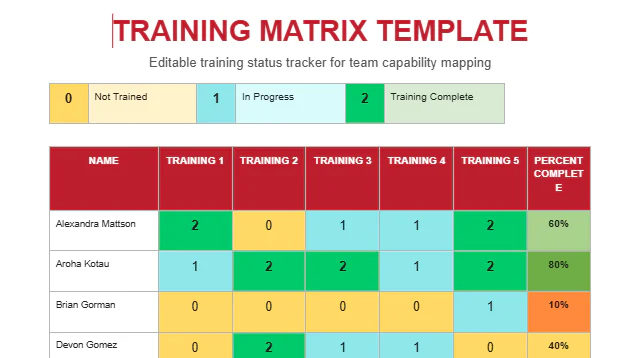
Training Matrix Template
How do you create a training matrix step by step?
To create a training matrix, define its purpose, establish the employee and role population, identify requirements, agree on fields and statuses, validate existing records, assign ownership, and set review triggers. Each stage needs a named owner, clear input, usable output, and a quality check before the next stage begins.
1. Define scope and business objective
Decide whether the matrix will support onboarding, task clearance, employee development, certification control, audit preparation, or several objectives. Set boundaries for departments, employment types, sites, and historical records so the project does not expand without control.
2. Build the employee and role list
Use a stable employee identifier rather than names alone. Link each employee to a controlled role, department, branch, and manager. If hiring data is already managed through recruitment software, decide when an approved candidate becomes an active employee record and enters the training workflow.
3. Identify training requirements by role
Ask authorised role and compliance owners to identify which requirements are mandatory, conditional, or developmental. Record the source, evidence rule, renewal logic, and exceptions. Do not copy requirements from another organisation without validation.
4. Choose fields and status definitions
We recommend agreeing on status definitions before importing historical records. Otherwise, teams may spend time mapping different interpretations after the workbook is already in use.
5. Populate and validate existing records
Import only records you can match to an employee and requirement. Retain a clear distinction between confirmed data, pending evidence, and unknown history. A blank cell should not silently mean completed, not required, or unavailable.
6. Assign owners and approval responsibilities
Name who updates, verifies, approves, and reports each record. Department managers may own operational accuracy while HR governs employee data and status definitions. The exact model depends on how authority is divided within your organisation.
7. Set review triggers and reporting routines
Review the matrix after new hires, transfers, promotions, new equipment, policy changes, course completion, certification renewal, audit preparation, and branch expansion. Add a recurring governance review based on organisational risk rather than relying only on an annual clean-up.
10 training matrix examples for enterprise teams
Choose among these training matrix examples according to operational risk, workforce scale, evidence requirements, and update frequency. A stable departmental list may work in a spreadsheet, while records involving frequent renewals, multiple branches, or several approval stages may benefit from an integrated workflow.
| Example | Objective and important fields | Accountable owner | Suggested review trigger | Maturity fit |
|---|---|---|---|---|
| 1. HR onboarding | Track induction, policy acknowledgement, system access, completion date and manager approval | HR onboarding lead | New hire, transfer or policy change | Spreadsheet for simple intake; integrated workflow for recurring multi-branch hiring |
| 2. Manufacturing skills and authorisations | Confirm role, equipment, competency level, assessor, authorisation and renewal date | Production manager | New equipment, process change or authorisation expiry | Integration preferred where work allocation depends on current approval |
| 3. Warehouse safety | Track task clearance, equipment category, evidence, expiry date and refresher status | Warehouse manager | Task change, incident review or renewal date | Spreadsheet for one site; workflow for multiple warehouses or frequent renewals |
| 4. Finance and policy compliance | Record policy version, acknowledgement, process training, approval limit and completion | Finance controller | Policy, system or responsibility change | Suitable for controlled spreadsheet or HR workflow |
| 5. Sales enablement | Track product knowledge, CRM process, assessment, market segment and coaching action | Sales enablement manager | Product launch, process change or role transition | Spreadsheet initially; integration helps with larger sales teams |
| 6. Customer service | Map channel training, escalation procedure, quality assessment and coaching status | Customer service manager | Service change, quality review or new channel | Either, depending on coaching volume and reporting needs |
| 7. IT security | Track assigned procedure, completion, evidence, policy version and approval | IT security lead | Access change, procedure update or scheduled renewal | Integrated workflow useful for access-linked requirements |
| 8. Maintenance competency | Record asset class, technical competency, assessor, authorisation scope and expiry | Maintenance manager | New asset, role change or reassessment | Integration preferred when asset assignments depend on competency |
| 9. Branch operations | Standardise role requirements, local completion, evidence, branch owner and exceptions | Regional operations manager | Branch opening, transfer, policy change or monthly review | Central workflow useful for consolidated branch reporting |
| 10. Leadership development | Track development objective, programme, feedback, action plan and review date | HR development lead | Promotion, succession review or programme milestone | Spreadsheet may work; HRM integration supports longer development histories |
For manufacturing, the matrix should answer a specific operating question: who is authorised for which role, process, or equipment? Warehouse teams may apply the same principle to task clearance and renewals. This can complement broader work on resolving warehouse management challenges, especially where workforce readiness affects daily scheduling.
Finance and IT examples often require clear policy versions and approval evidence. Leadership development is different: it may focus more on progression, feedback, and planned experience than fixed certification dates. Adjust every suggested review pattern to internal policy, customer requirements, risk level, and verified regulatory obligations.
Common training matrix mistakes and practical fixes
A training matrix becomes unreliable when definitions, owners, evidence rules, approvals, and review triggers are inconsistent. The workbook may still look complete, but managers cannot confidently interpret its statuses or determine whether the underlying records remain current. To maintain operational control, you must avoid these most critical failures:
Missing expiry dates
When expiry dates are missing, upcoming renewals become incredibly difficult to prioritise, exposing the business to severe compliance risks. You should always require a specific renewal date or mandate a documented not applicable value for certifications that do not expire.
No accountable owner
Failing to assign an accountable owner means critical updates often remain unresolved between HR and operational departments. You can fix this easily by making the owner field mandatory and assigning a backup owner for each requirement.
Approval treated as completion
Treating a basic submission the same as a verified completion makes unapproved records appear final. It is essential to separate completion declarations, evidence submissions, and final approval statuses into distinct tracking steps to prevent unqualified staff from performing dangerous or regulated tasks.
Duplicate spreadsheets
Relying on duplicate spreadsheets inevitably leads to different branches reporting conflicting versions of the truth. Establish one controlled master record and define a strict local update process to maintain absolute data integrity across all sites.
Excessive access
Granting excessive access allows records to be changed without clear accountability, which compromises the entire tracking system. Protect your data by applying strict role based access controls and documenting all approval permissions clearly.
A well maintained comprehensive audit trail log can help comprehensive audit trail log can help organisations understand exactly who changed a record, what specific data was altered, and when the final approval occurred. The depth of this required history ultimately depends on your internal governance policies and overall system design.
A useful training matrix is not merely a list of completed courses. It connects role requirements, employee status, evidence, renewal obligations, and accountable owners in a form that managers can maintain and trust.
Start with a controlled spreadsheet structure, validate requirements with authorised sources, and establish review triggers from the beginning. If duplicate records, missed renewals, approval delays, or branch reporting problems persist, discuss your ERP requirements with HashMicro to explore how training records, employee data, approvals, and management reporting could work in one connected system.
Building a highly reliable training matrix
A truly effective training matrix is more than a simple list of completed courses. It acts as a dynamic tool connecting role requirements, employee evidence, and renewal dates under clear accountable owners. By centralising this compliance data, enterprises quickly eliminate dangerous operational blind spots. This structured approach ensures managers can confidently deploy fully qualified staff for any task safely and efficiently.
The long term success of this system depends entirely on consistent maintenance and clear accountability. While a well structured spreadsheet is a great starting point, growing businesses should eventually explore automated software. Transitioning to dedicated platforms becomes necessary when manual tracking gets too complex for local managers. Ultimately, prioritising workforce readiness builds a highly resilient operation prepared for any rigorous regulatory audit.
Conclusion
Ultimately, a well constructed training matrix serves as a critical bridge between human capital planning and daily operational execution. By shifting the perspective from passive record keeping to active capability management, business leaders gain a transparent view of their true operational capacity and hidden vulnerabilities before assigning critical work.
However, the long term success of this framework depends entirely on organisational culture and accountability rather than software features. Establishing an environment where updating training statuses becomes a seamless part of daily work allocation is far more vital than building complex spreadsheets.
Mastering these foundational processes ensures that every deployment decision is backed by accurate intelligence. Organisations looking to experience how unified digital workflows can streamline this entire compliance cycle firsthand are welcome to explore a free demo.

Frequently Asked Questions
Review timing should follow operational triggers rather than one universal schedule. Check the matrix after hiring, transfers, promotions, policy changes, new equipment, training completion, certification renewal, and audit preparation. A recurring governance review can also be scheduled according to the organisation’s operational risk and internal policy.
Use a controlled list such as not required, not started, scheduled, in progress, completed, expiring soon, expired, and awaiting approval. Give every status a written definition, an identified updater, and a clear evidence requirement so departments do not interpret the same label differently.
Use a shared employee identifier, standard date format, central requirement list, and named owner for each branch. Consolidated renewal reporting should show upcoming and overdue records across all locations. Automated reminders and escalation workflows become more valuable when several local teams update the same central records.
Observable warning signs include conflicting file versions, missed renewals, repeated data entry, unclear approvals, delayed consolidated reports, and limited change history. Evaluate workflow complexity, evidence volume, access needs, and control risk rather than moving to software based only on employee count.
Yes. An approved integration can connect role data, employee profiles, training history, evidence, approvals, reminders, and management dashboards. The appropriate integration depends on the organisation’s system architecture, data ownership, access controls, and verified implementation requirements.