







Many businesses already use digital tools, but daily work across finance, sales, HR, inventory, and operations still depends on manual checks. Teams often need to review overdue invoices, prepare follow-ups, monitor stock issues, summarize customer records, or collect reports before making a decision. An AI agent helps solve this by understanding a goal, planning the next steps, using business data, and preparing actions that can still be reviewed by the right person.
For Malaysian businesses, this shift is becoming more relevant as the country strengthens its AI adoption and governance direction through initiatives such as the Malaysia National AI Office. Instead of using AI only to answer questions, companies can start applying AI agents to practical workflows, such as finance follow-ups, sales task routing, HR summaries, inventory alerts, and operational reporting, while keeping sensitive approvals under human control.
With the right ERP data and approval rules in place, AI agents can turn complex business processes into practical support for everyday operations to reduce manual effort.
Key Takeaways
AI agents help analyze data, plan tasks, and take actions to achieve business goals.
Businesses can maximize the benefits of AI agents by using them to support smarter and more efficient operations.
AI coworkers transform AI agents into practical business partners that support everyday work.
Manual work and scattered business information can limit productivity and increase operational risks. AI agents help businesses automate routine tasks and make better decisions with real-time insights.

What is an AI Agent?
An AI agent is an artificial intelligence system that can work toward a specific goal by analyzing data, planning tasks, and taking actions through connected tools. Unlike traditional AI that only responds to prompts, AI agents can execute workflows, making them useful for business automation, finance, customer service, and other enterprise operations.
The easiest way to understand an AI agent is by comparing it with a chatbot. A chatbot simply answers questions, while an AI agent can identify the information it needs, retrieve data from business systems, and prepare recommendations or actions. For example, it can review overdue invoices, generate payment reminders, and flag high-risk accounts for human review.
Although AI agents can automate many tasks, they still operate within business rules, user permissions, and approval workflows. Routine activities can be handled automatically, while important decisions such as financial approvals or accounting changes remain under human control.
How do AI agents work?
AI agents combine a defined goal, reasoning, access to data and tools, and continuous feedback to complete tasks. They understand the objective, gather the required information, take the appropriate action, and improve their performance over time.
1. Understand the goal
An AI agent begins by understanding the objective given by the user. The goal can be simple, such as generating an overdue invoice report, or more complex, like identifying customers who require follow-up based on recent payment activity.
To achieve this, the agent interprets the user's intent, considers the business context, and works within predefined permissions. This helps ensure that every action aligns with company policies and operational requirements.
2. Plan the next steps
Once the goal is clear, the AI agent determines the steps needed to complete the task. It identifies what information is required and organizes the workflow into a logical sequence before taking any action.
Unlike traditional AI that only responds to prompts, an AI agent can break larger tasks into smaller ones, making it more effective at handling complex business processes.
3. Use tools and data
AI agents become more valuable when they can securely access business data and connected systems. They may retrieve information from ERP, CRM, HR, accounting, or inventory platforms to complete a task accurately.
AI workflow automation becomes important, and instead of relying on stored knowledge alone, AI agents use real-time data while respecting user permissions and company policies. This allows them to provide recommendations that are relevant and up to date.
4. Take action or prepare recommendations
Based on the permissions assigned, an AI agent can either perform an action or prepare recommendations for human review. Routine tasks, such as drafting emails or categorizing support tickets, can often be automated.
For more sensitive processes, the agent presents supporting information and suggested actions while leaving the final decision to an authorized employee. This balance improves efficiency without sacrificing control.
5. Learn from feedback and context
AI agents continuously improve by learning from feedback and adapting to changing business rules. User preferences, workflow updates, and approval requirements help refine future responses.
Over time, this enables the agent to deliver more accurate recommendations while maintaining consistency with company policies and operational practices. The safest setup is controlled assistance. The agent should know what it can access, what it can suggest, what it can execute, and when it must ask a person to review the output.
AI agent vs AI assistant vs generative AI
AI agents, AI assistants, and generative AI are closely related, but they support businesses in different ways. Some focus on creating content or responding to instructions, while others can plan and carry out multiple steps towards a specific goal. The table below summarizes their key differences.
| Technology | Main Function | How It Works | Business Example |
|---|---|---|---|
| AI Agent | Completes goal-based workflows | Payroll otomatis, cuti, absensi, PPh 21, BPJS, dan rekrutmen | Terintegrasi dengan modul ERP lain dan mendukung regulasi lokal |
| AI assistant | Supports users with individual tasks | Provides information, recommendations, summaries, or drafts based on user instructions | Summarises a report or drafts an email when requested |
| Generative AI | Creates new content | Produces text, images, code, or summaries from a prompt | Creates product descriptions, reports, or marketing content |
Core Components of AI Agent
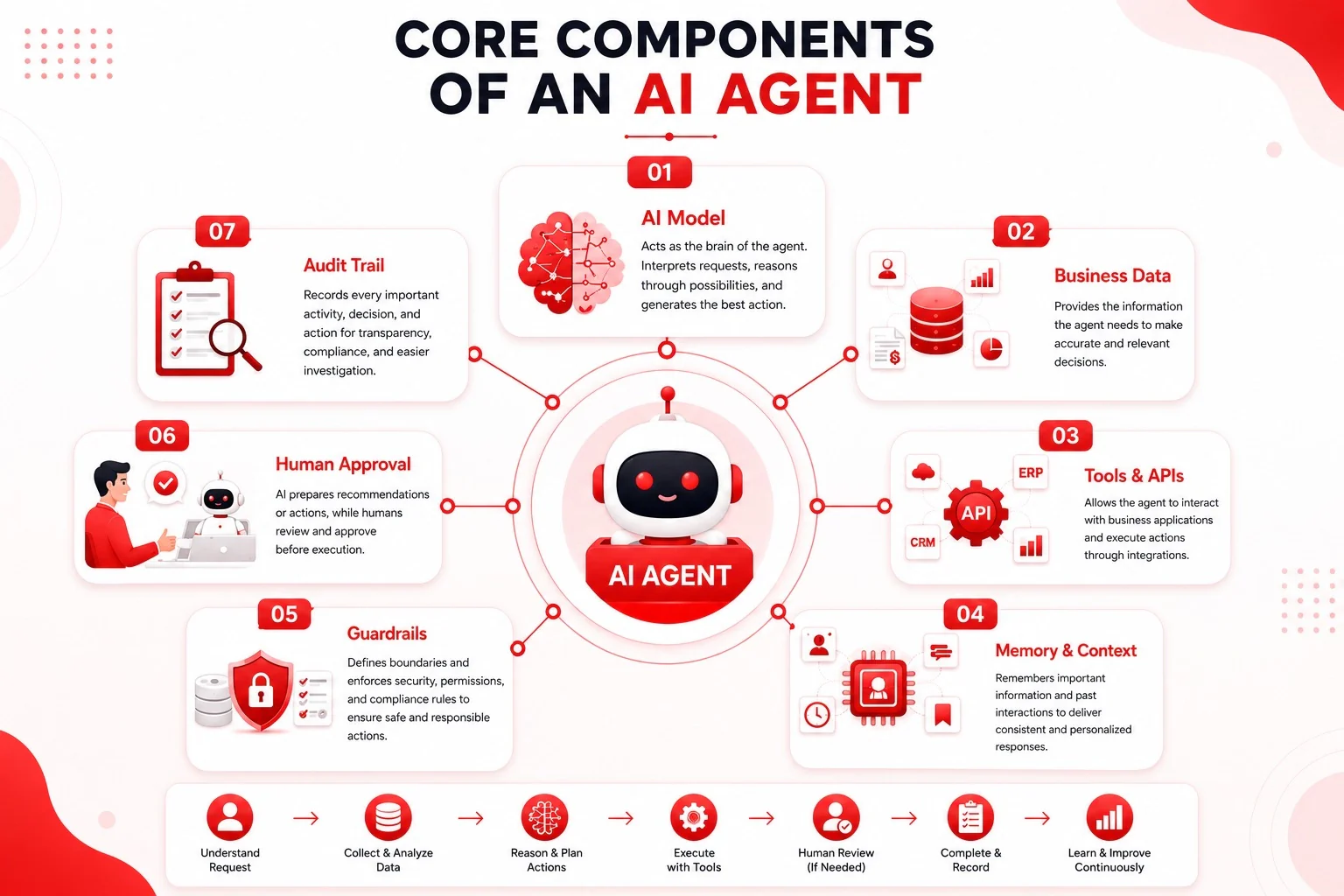
The capabilities of an AI agent are powered by several core components that enable it to understand business context, access relevant information, and perform tasks effectively. Together, these components transform AI from a simple conversational tool into an intelligent business assistant.
- AI model
The AI model acts as the brain of the agent. It interprets user requests, analyzes available information, reasons through different possibilities, and generates the most relevant response or action. The quality of the AI model directly affects how accurately the agent understands business context and produces reliable recommendations. - Business data
Business data provides the information the AI agent needs to make informed decisions. This may include customer records, invoices, employee information, inventory levels, financial transactions, or operational data. By using real-time business data instead of general knowledge, the agent can deliver responses that are more accurate, relevant, and aligned with current business conditions. - Tools and APIs
Tools and APIs allow the AI agent to interact with business applications rather than simply answering questions. Through secure integrations, the agent can retrieve information from ERP or CRM systems, generate reports, update records, or prepare workflows. This capability transforms AI from a conversational tool into an active business assistant. - Memory and context
Memory enables the AI agent to retain relevant information across conversations or workflows. It can remember user preferences, previous interactions, approval rules, or recurring business processes, allowing future responses to become more consistent and personalized without requiring users to repeat the same instructions. - Guardrails
Guardrails define the boundaries of what the AI agent is allowed to access and perform. They enforce security policies, user permissions, and compliance requirements to prevent unauthorized actions. With proper guardrails in place, businesses can safely automate tasks while protecting sensitive information. - Human approval
Some business processes require human review before actions are completed. AI agents can prepare recommendations, draft documents, or identify potential issues, while managers or authorized employees make the final decision. This approach helps increase productivity without reducing accountability. - Audit trail
An audit trail records every important activity performed by the AI agent, including prompts, generated outputs, approvals, and completed actions. These records improve transparency, simplify compliance reporting, and make it easier for businesses to review decisions or investigate issues when necessary.
AI agent use cases for Malaysian businesses
The best way to understand AI agents is to look at practical department-level work. Malaysian businesses often manage several workflows at once, including invoices, customer follow-ups, staff attendance, stock movement, procurement, service tickets, delivery schedules, and management reporting. As operations become more complex, handling these processes manually can slow productivity, increase errors, and make it harder for teams to respond quickly.
AI agents help by analyzing business data, preparing the next step, and supporting employees with intelligent recommendations instead of replacing human judgment. By automating routine tasks while keeping critical decisions under human oversight, businesses can improve efficiency, reduce administrative workloads, and enable teams to focus on higher-value activities across different departments.
Finance and accounting
In finance, an AI agent can help teams monitor overdue invoices, prepare reminders, and summarize collection risks. It can check invoice dates, customer payment history, outstanding balances, and previous communications, then prepare suggested follow-up actions. This connects naturally with AI in finance because finance teams often need both speed and control.
For accounting, an agent may review journal entries, flag unusual patterns, compare ledgers with supporting documents, and prepare a summary for the accountant. It should not post sensitive changes by itself. Posting, adjustments, write-offs, and reconciliations should remain under human approval.
Sales and CRM
Sales teams can use AI agents to summarize customer history, route leads, draft follow-up messages, and remind account managers about next actions. When connected with CRM automation, the agent can help sales managers understand which leads need attention, which quotations are still open, and which customers have gone quiet after a proposal.
Human approval remains important when the message affects pricing, contract terms, or strategic accounts. The agent can prepare the context and draft, while the sales manager decides the final action.
Inventory and procurement
Inventory teams can use AI agents to identify low stock, unusual movement, slow-moving items, or potential shortages. With AI inventory management, the agent can compare stock levels, sales trends, purchase lead times, and warehouse movement to recommend what should be reviewed.
For procurement, the agent may prepare reorder suggestions, compare supplier options, or flag a purchase request that needs urgent attention. It should not place stock orders or approve supplier changes without a defined approval flow. This is especially important for companies managing multiple warehouses or high-value materials.
HR and workforce administration
HR teams can use AI agents to summarize attendance patterns, prepare onboarding checklists, assist interview scheduling, and organize policy questions. For example, an HR agent may identify repeated lateness patterns and prepare a manager summary with relevant attendance data.
Hiring decisions, disciplinary actions, payroll changes, and employee evaluations should remain with people. The agent can organize information, but the decision must stay with the responsible manager or HR lead.
Customer service
Customer service teams can use AI agents to classify tickets, suggest responses, summarize customer history, and route urgent issues. If a customer reports a billing issue, the agent may check the ticket record, invoice status, and previous support notes before suggesting a response.
Sensitive cases should still move to a human agent. These include refunds, complaints involving legal risk, customer disputes, personal data requests, or any situation where the response could affect trust.
Logistics and operations
Operations teams can use AI agents to prepare delivery updates, flag delayed jobs, summarize daily operational exceptions, and route issues to the right department. In logistics, the agent may compare delivery schedules, warehouse dispatch data, and customer commitments to identify which orders need attention.
For manufacturers, distributors, and trading companies, this can help managers see problems earlier. The value is not that the AI makes every operational decision. The value is that it gathers the context and prepares the next action faster than a person manually checking several systems.
Benefits of AI agents for business teams
While AI agents offer significant benefits for business teams, their effectiveness depends on more than advanced AI capabilities alone. Organizations also need secure data access, clear governance, and reliable business systems to ensure AI-generated recommendations remain accurate, compliant, and aligned with operational processes.
Protect business data with proper access controls
AI agents often work with sensitive business information, so organizations should define clear user permissions and security policies. Each agent should only access the systems and data required for its role, helping reduce security risks while maintaining compliance.
Keep humans involved in high-risk decisions
AI agents can automate routine tasks such as preparing reports, drafting emails, or recommending actions. However, important activities like approving payments, hiring employees, or changing financial records should always require human approval.
Maintain transparency with audit trails
Every AI-assisted action should be recorded, including prompts, recommendations, approvals, and completed tasks. Audit logs improve accountability, simplify compliance, and make it easier to review or improve AI-driven workflows over time.
Use ERP data to provide accurate business context
AI agents deliver more reliable recommendations when connected to ERP systems. Access to real-time data such as invoices, inventory levels, procurement records, employee information, and customer history helps the agent generate outputs based on current business conditions instead of incomplete information.
Improve collaboration across departments
By working with ERP data, AI agents can support end-to-end business processes across finance, sales, procurement, HR, and inventory. This enables teams to share the same information, automate handoffs, and make decisions with greater confidence while keeping governance and approval workflows in place.
From AI agent to AI Coworker: How Businesses Turn AI Into Real Work

AI agents provide the technology behind intelligent automation, while AI coworkers represent how that technology is applied to support real business operations. Instead of functioning as standalone AI tools, they help teams complete everyday tasks across finance, sales, HR, inventory, procurement, customer service, and other departments.
Their value increases when connected to ERP systems, business data, and approval workflows. By accessing real-time information such as invoices, inventory levels, customer records, and employee data, AI coworkers can prepare recommendations, summarize information, and assist with routine processes more accurately.
However, AI is designed to support decision-making rather than replace it. While it can automate repetitive tasks and provide actionable insights, important decisions involving finance, legal matters, employees, or customers should always remain under human oversight.
How to start using AI agents in your business
Businesses should begin with a focused use case rather than implementing AI across the entire organization. The best starting point is a repetitive, data-driven, and low-risk workflow, such as summarizing overdue invoices, classifying support tickets, preparing sales follow-ups, or identifying inventory exceptions.
Once the workflow is selected, businesses should ensure the required data is accurate and accessible through approved systems. AI agents rely on high-quality business data to generate reliable outputs, so incomplete or outdated information can reduce their effectiveness.
The final step is to establish clear permissions and approval rules. Start by allowing AI agents to prepare recommendations or draft actions while keeping important decisions under human control. As the workflow proves reliable, businesses can gradually expand AI adoption to other processes.
Conclusion
AI agents are changing the way businesses handle daily operations by helping teams automate repetitive tasks, analyze business data, and prepare recommendations more efficiently. However, successful adoption depends on more than AI technology alone. Businesses also need reliable data, clear governance, approval workflows, and secure access to business systems to ensure AI supports operations without compromising control.
For Malaysian businesses, the most effective approach is to start with a focused workflow, connect AI agents to trusted ERP data, and expand gradually as teams gain confidence. With the right foundation, AI agents can become practical coworkers that improve productivity, support better decision-making, and help organizations work more efficiently while keeping people in control of critical business decisions.
Every business has different workflows and automation needs. Schedule a free demo to see how AI can be applied to your business processes with the right data, approvals, and business context.
FAQ about AI Agents
Yes. AI agents are not limited to large enterprises. Small and medium-sized businesses (SMBs) can also benefit by automating repetitive tasks such as invoice follow-ups, customer inquiries, inventory monitoring, and report generation. Rather than replacing existing employees, AI agents help teams save time, reduce manual work, and improve productivity. Businesses can start with a single use case and gradually expand AI adoption as their operational needs grow.
Businesses can measure the success of AI agents by tracking improvements in operational efficiency and business performance. Common metrics include reduced time spent on manual tasks, faster response times, improved accuracy, shorter approval cycles, lower operational costs, and increased employee productivity. Organizations should also monitor user adoption and the quality of AI-generated recommendations to ensure the technology continues delivering value over time.
Yes. AI agents can support multiple departments by accessing relevant business data and following predefined workflows. For example, an AI agent can help finance teams monitor overdue invoices, assist sales with lead follow-ups, support HR with onboarding tasks, and notify inventory teams about stock shortages. By working across connected systems, AI agents help improve collaboration and reduce the need for manual coordination between departments.
To integrate AI agents into an existing CRM, businesses should connect the AI solution through APIs or built-in integrations, ensuring it has secure access to relevant customer data and workflows. Once connected, AI agents can automate lead qualification, summarize customer interactions, recommend follow-up actions, and support sales teams with real-time insights while following user permissions and approval rules.
Traditional automation follows predefined rules and executes the same process repeatedly. AI agents, on the other hand, can analyze context, interpret business data, and adapt their recommendations based on changing situations. This makes them more flexible for handling complex workflows while still operating within business policies and approval rules.
Best AI agent tool for B2B lead generation should help businesses identify qualified prospects, automate lead qualification, personalize outreach, and recommend the next best sales actions. When integrated with CRM and ERP systems, AI agents provide real-time insights that help sales teams prioritize opportunities and improve conversion rates.