






CRM pricing can become difficult to control when businesses focus only on headline subscription fees. For small businesses and enterprises in Malaysia, the total cost may increase as user numbers, automation needs, integrations, data migration, security requirements, and support expectations expand.
This evaluation is becoming more important as Malaysian businesses expand their use of cloud-based systems. According to DOSM’s 2025 ICT usage report, 60.3% of establishments adopted cloud computing in 2024. As CRM adoption grows, decision-makers need to assess implementation, integration, training, support, and scalability, not only the initial subscription fee.
This guide explains the common CRM pricing models, the factors that shape enterprise project scope, and the considerations that help teams compare CRM vendors more effectively.
Key Takeaways
CRM pricing covers more than software access. Implementation, integration, data migration, training, and support can all affect the total investment.
CRM pricing depends on enterprise requirements such as users, workflows, reporting, security, integrations, and multi-entity operations.
A meaningful vendor comparison should assess total cost of ownership and operational fit, rather than comparing subscription fees alone.
Understanding these considerations provides a clearer basis for assessing business requirements, comparing available systems, and planning an appropriate budget.
Why You Must Pay Attention to CRM Pricing Plans?
Choosing the wrong CRM pricing plan can lead to unexpected expenses, underused features, and costly upgrades as the business grows. Before signing a contract, businesses should examine what the quoted price includes and how future operational requirements could affect the total investment.
It is easy to get caught up in flashy CRM features, but ignoring the pricing structure can quickly lead to hidden fees and budget overruns. Here is why you must look beyond the initial sticker price before signing a contract.
- Avoid Hidden Costs: Base subscription rates rarely tell the whole story. Analyzing the pricing structure helps you spot extra charges for setup, data migration, or premium support before they break your budget.
- Maximize True ROI: You should not pay for complex tools your team will not use. Carefully reviewing the tiers ensures you only invest in features that directly support your current sales operations.
- Plan for Scalability: A CRM should grow with your business, not penalize you for it. Checking the exact cost of adding new users or upgrading storage ensures the software remains affordable as your company expands.
Common CRM Pricing Models
CRM vendors may structure their commercial proposals differently. Understanding the model helps procurement and business teams identify what is included, what may require additional scope, and how future growth could affect the investment.
| Pricing Model | How It Works | Enterprise Consideration |
|---|---|---|
| Per-user subscription | Charges are based on the number of named, active, or role-based users. | Review projected user growth, role requirements, and whether all users need the same level of access. |
| Tiered plan | Features are grouped into package levels with different functionality and service coverage. | Confirm that required automation, reporting, API access, security controls, and support are available in the selected tier. |
| Module-based pricing | Costs vary depending on the functional modules selected for the CRM environment. | Prioritise modules that meet current process requirements while allowing additional capabilities to be added as the business expands. |
| Quotation-based enterprise pricing | The vendor prepares a tailored proposal based on users, workflows, integrations, implementation services, and support needs. | Compare the scope assumptions, delivery responsibilities, and ongoing support terms—not only the initial quotation. |
Brand Examples of Pricing Models
CRM vendors often combine several pricing approaches rather than relying on one model. Salesforce and Zoho CRM combine per-user charges with tiered editions, while SAP Customer Experience uses module-based pricing and HashMicro provides quotation-based proposals according to the required scope. The following examples compare each platform’s key features, advantages, limitations, and current pricing structure.
1. Salesforce
Salesforce is a cloud-based CRM platform designed to manage sales, customer service, marketing, and customer data within one ecosystem. It is commonly used by growing and large organisations that need extensive customisation, automation, and third-party integrations.
| Pros | Cons |
|---|---|
| Extensive customisation and AppExchange integrations | Higher tiers and add-ons can significantly increase costs |
| Advanced AI forecasting and automation | Complex configurations may require dedicated administrators |
Pricing model: Salesforce combines per-user subscription pricing with tiered editions. Its current APAC list prices are Free Suite at USD 0, Starter Suite at USD 25, Pro Suite at USD 100, Enterprise at USD 175, Unlimited at USD 350, and Agentforce 1 Sales at USD 550 per user per month. Most higher editions require annual billing, while add-ons, implementation, and premium support may be charged separately.
2. Zoho CRM
Zoho CRM is a cloud-based customer relationship management platform aimed at small businesses, growing companies, and larger sales teams. It focuses on providing sales automation, customer-data management, and reporting at a comparatively accessible entry cost.
| Pros | Cons |
|---|---|
| Affordable plans suitable for small and growing businesses | Advanced AI and automation require higher-tier plans |
| Distinctive no-code tools such as Blueprint and Canvas | Complex setups may require multiple Zoho products or integrations |
Pricing model: Zoho CRM uses per-user pricing combined with tiered plans. When billed annually, its published prices are USD 14 for Standard, USD 23 for Professional, USD 40 for Enterprise, and USD 52 for Ultimate per user per month. Monthly billing increases these prices to USD 20, USD 35, USD 50, and USD 65 respectively. A Free edition is available for up to three users.
3. SAP Customer Experience
SAP Customer Experience is a collection of enterprise customer-management solutions covering sales, service, commerce, customer data, and engagement. Its CRM component, SAP Sales Cloud, is primarily intended for organisations with complex sales operations or an existing SAP business-system environment.
| Pros | Cons |
|---|---|
| Deep integration with SAP S/4HANA and other SAP solutions | Implementation often requires specialised consultants |
| Strong governance capabilities for complex enterprise operations | Quotation-based pricing makes upfront cost comparison difficult |
Pricing model: SAP Customer Experience follows a module-based and quotation-based approach. SAP Sales Cloud pricing is provided upon request, with the final proposal depending on selected products, user entitlements, contract duration, add-ons, integration requirements, and implementation services. Malaysian businesses should request a written scope covering licences, implementation, data migration, support, and renewal terms.
4. HashMicro CRM
HashMicro CRM is an AI-native CRM and sales-management solution designed for Malaysian businesses that need customer management connected with wider operational processes. It supports growing businesses and enterprises that want CRM data integrated with sales, accounting, inventory, and other business functions.
| Pros | Cons |
|---|---|
| Hashy provides business-specific AI insights and sales recommendations | Public package prices are unavailable and require a quotation |
| Native integration with accounting, inventory, sales, and other ERP modules | The integrated scope may be excessive for microbusinesses needing only basic CRM functions |
Pricing model: HashMicro uses quotation-based pricing rather than a fixed public per-user subscription. The proposal is tailored according to the required modules, workflows, integrations, data migration, implementation, training, support, and company structure. Buyers should confirm whether customisation, implementation, and post-go-live services are included in the quoted price.
What Is Typically Included in CRM Pricing?
The scope of a CRM proposal can vary substantially between vendors. Some plans focus on core CRM access, while enterprise proposals may include configuration, implementation support, integrations, and a wider set of sales-management capabilities.
- User Licences and Access Levels:
CRM subscriptions are commonly priced according to the number and type of users. Sales representatives may need full access, while managers, administrators, and reporting-only users may require different licences.Businesses should confirm which users are billable, whether inactive accounts remain chargeable, and whether administrator or limited-access users require separate licences. They should also estimate future user growth because a low initial price may increase significantly as more departments adopt the system.
- CRM Features and Plan Limitations:
Base plans usually include contact management, lead tracking, opportunity management, sales pipelines, task reminders, and standard reports. Advanced features such as sales forecasting, approval workflows, custom dashboards, automation, quotation management, and AI tools may only be available in higher-tier plans.
- Configuration and Workflow Setup:
Some CRM plans allow users to configure fields, forms, sales stages, workflows, approval rules, and dashboards. More complex customisation may require paid consulting or technical development.
Integration costs also depend on the selected package. Standard connections to email, accounting, ERP, marketing, or customer service systems may be included, while custom connectors and API access may be charged separately.
- Implementation and Data Migration:
Implementation may include requirements gathering, system configuration, testing, user-role setup, and go-live assistance. However, these services are not always included in the subscription price.
Data migration can involve more than importing contacts. It may require data cleansing, duplicate removal, field mapping, validation, test migration, and reconciliation. The quotation should clearly state which records, data sources, and migration activities are covered.
- Implementation, Training, and Support:
CRM packages may include administrator training, user training, documentation, software updates, and basic technical support. Additional training sessions, on-site delivery, faster response times, or dedicated account support may require extra fees.
CRM Cost Factors That Affect Enterprise Scope
Enterprise CRM pricing is usually determined by the operational scope of the project. The following factors are useful for structuring internal discussions before approaching vendors.
| Cost Factor | Why It Affects Scope | Questions to Ask |
|---|---|---|
| Number and type of users | Different teams may require different access levels, workflows, and reporting permissions. | Which roles need full CRM access, limited access, approvals, or reporting-only access? |
| Process complexity | Multi-stage sales cycles, approvals, territory rules, and account structures require additional configuration. | Which workflows must be standardised, automated, or approved within the system? |
| System integrations | Connecting CRM with ERP, finance, marketing, help desk, or external applications can affect implementation requirements. | Which systems need to exchange customer, quotation, order, or payment data? |
| Data migration and quality | Legacy data may need cleansing, standardisation, deduplication, and validation before migration. | What data sources exist, and who is responsible for reviewing data accuracy before go-live? |
| Implementation and change management | Configuration, testing, training, and adoption support influence the overall delivery effort. | What training, testing, documentation, and internal ownership are needed for a successful rollout? |
Additional CRM Costs to Review
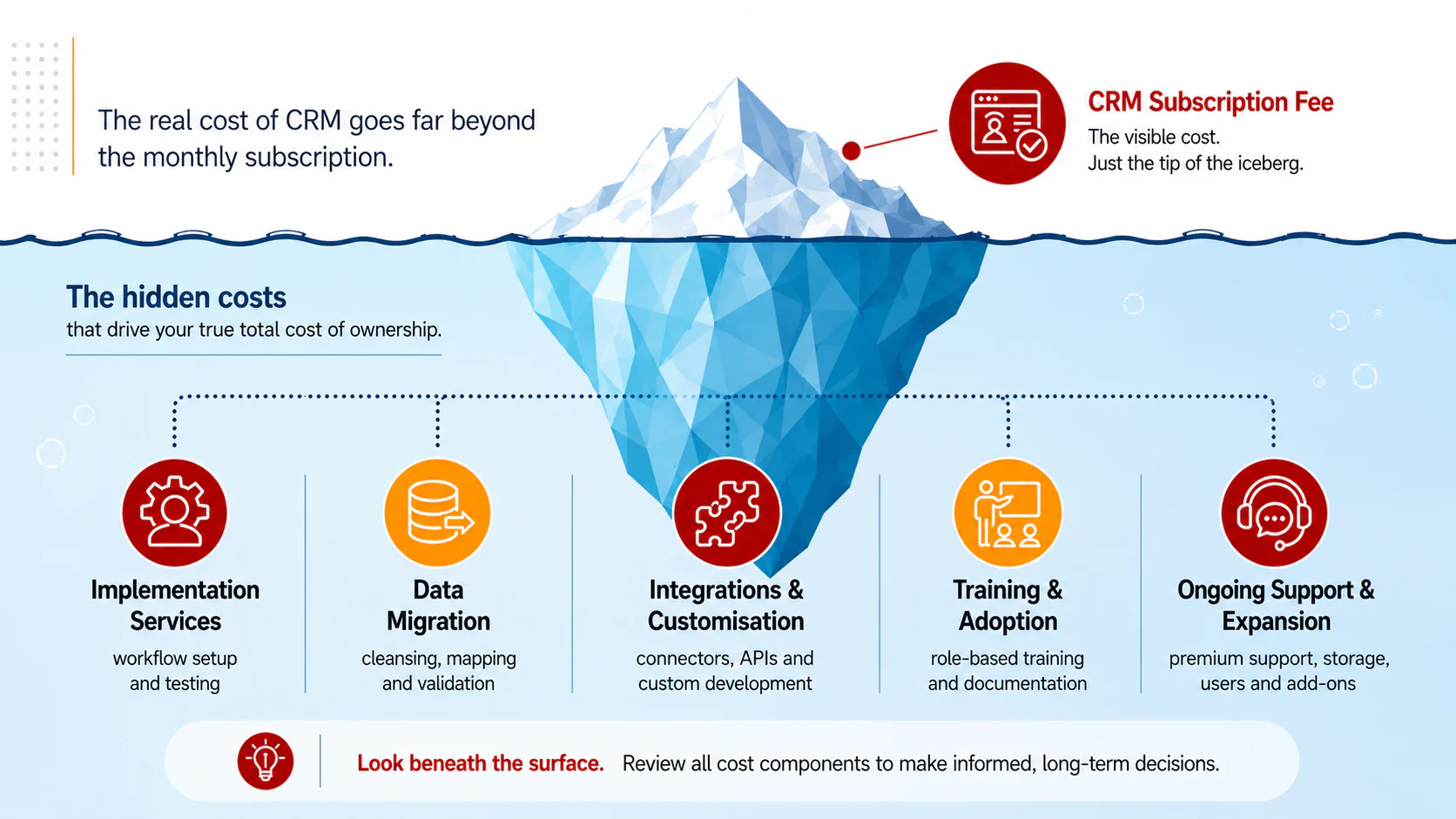
Some costs may not be immediately visible when teams compare headline subscription fees. Reviewing these areas early can help avoid scope changes after a vendor has been selected.
- Implementation services: Vendors may charge separately for workflow setup, user roles, approval rules, dashboards, testing, and project management. The cost usually increases with process complexity and the number of departments involved.
- Data migration: Moving records may require data cleansing, duplicate removal, field mapping, validation, and test imports. Historical activities, attachments, and data from multiple systems can add further effort.
- Integrations and customisation: Connections to ERP, accounting, marketing, or customer service systems may require paid connectors or custom API development. Business-specific fields, reports, and automation may also fall outside the standard package.
- Training and adoption: Standard onboarding may cover only basic system use. Role-based training, administrator sessions, documentation, and additional support after go-live may be charged separately.
- Ongoing support: Premium support, extra storage, additional users, advanced features, and higher API usage can raise ongoing costs as the business expands.
Why Total Cost of Ownership Matters
Total cost of ownership, or TCO, gives enterprise buyers a broader way to evaluate CRM investment. It considers not only the software subscription, but also the services and operational effort required to deploy, maintain, and improve the platform.
A CRM with a lower initial fee may require more manual work, external tools, or additional services later. Conversely, a proposal with a higher starting scope may provide broader functionality, better integration readiness, or stronger implementation support. The right choice depends on the organisation’s operational needs and expected business outcomes.
Evaluate CRM based on your business requirements. Build an internal checklist covering users, sales processes, customer-data sources, required integrations, reporting needs, security controls, and the support expected after launch. This creates a more consistent basis for comparing vendor proposals.
How to Compare CRM Vendors
When evaluating CRM vendors, involve the teams that will use, manage, and rely on the system. Sales leaders, operations teams, finance, IT, and management can each identify requirements that affect the long-term value of the solution.
Step 1. Define Business and User Requirements:
Identify the teams that will use the CRM, the number of users by role, existing sales workflows, approval processes, reporting requirements, data volume, security requirements, and systems that require integration. The result should be a documented requirements checklist that can be shared with every shortlisted vendor.Step 2. Give Every Vendor the Same Scope:
Send the same requirements, user assumptions, integration list, data-migration scope, and support expectations to each vendor. This prevents the business from comparing quotations based on different features, responsibilities, and service assumptions.Step 3. Test Vendors Using Real Business Scenarios:
Ask each vendor to demonstrate actual workflows, such as lead capture, lead assignment, quotation approval, pipeline forecasting, follow-up automation, and management reporting. The evaluation should focus on how the CRM handles the company’s processes, not only on presentation slides or feature claims.Step 4. Review Technical and Compliance Requirements:
Assess integration methods, API availability, access controls, audit trails, data hosting, backup procedures, security controls, and support for Malaysia’s PDPA requirements. The section should also explain which requirements must be validated through written documentation rather than relying only on a sales demonstration.Step 5. Calculate the Three-Year Total Cost of Ownership:
Compare subscription fees, implementation, data migration, integrations, training, support, storage, add-ons, and estimated renewal costs. Convert all proposals into MYR and apply the same timeframe, user count, and implementation scope so the comparison remains consistent.Step 6. Score Business Fit and Vendor Capability:
Use a weighted scorecard covering functional fit, implementation approach, integration readiness, usability, support quality, vendor experience, scalability, and total cost of ownership. The brief should instruct the writer to explain the reason behind each criterion rather than presenting an unexplained checklist.
Step 7. Validate the Contract Before Selection:
Confirm deliverables, exclusions, project responsibilities, implementation timelines, payment milestones, support terms, data ownership, renewal conditions, termination clauses, and charges for scope changes.
Conclusion
CRM pricing in Malaysia should be assessed as a business-investment decision rather than a simple software purchase. The total scope may include subscriptions, implementation, data preparation, integrations, training, and ongoing support.
For enterprise teams, a well-defined requirements list makes vendor comparisons more reliable. It helps stakeholders identify essential capabilities, validate delivery responsibilities, and select a CRM that can support operational growth without creating avoidable complexity.
If your team is reviewing CRM options, you can explore a free trial to assess how the solution fits your workflows, reporting needs, and integration requirements.
FAQ About CRM Pricing Scheme
Frequently Asked Questions
CRM pricing may be structured by user, feature tier, module, or a tailored enterprise quotation. The final proposal commonly depends on user roles, required workflows, integrations, implementation scope, and support requirements.
Compare the complete scope, including software access, required modules, implementation services, data migration, integrations, training, support, and any assumptions or exclusions. This gives a more accurate view of total cost of ownership.
Enterprise requirements differ in user volume, sales processes, approval workflows, reporting needs, security controls, integrations, and data complexity. These factors can affect the configuration and implementation effort required.
It depends on the vendor and proposal scope. Some standard integrations may be available, while ERP connections, custom APIs, or complex data flows may require additional implementation planning. Confirm this in writing before selecting a vendor.
Evaluate the CRM against measurable operational needs, such as pipeline visibility, follow-up consistency, reporting accuracy, process standardisation, and integration readiness. Consider the long-term value and total cost of ownership instead of the subscription fee alone.