







Manual paperwork remains a silent bottleneck for many organizations. When teams spend hours manually keying data from invoices, POs, and contracts into fragmented systems, the risk of human error skyrockets, and operational costs quietly climb. It is a tedious cycle that stalls growth.
Unlocking your data starts with automated capture. Technologies such as OCR, ICR, and IDP turn unstructured documents into usable information. As Ricoh Malaysia explains, this reduces manual work and errors, speeds up processing, improves accuracy, and supports better decisions.
Read on to discover how IDP works, why it matters, and how it can improve your ERP-based business systems and daily operations.
Key Takeaways
IDP turns documents into structured data faster with less manual entry.
IDP captures, validates, and sends document data into business systems automatically.
IDP speeds up processing, improves data accuracy, and keeps documents audit-ready.
When document intelligence integrates directly with a unified ERP system, raw data from your paperwork flows seamlessly into your core operations, establishing a single source of truth that connects your finance, procurement, and HR workflows.

What Is Intelligent Document Processing?

Intelligent Document Processing (IDP) is a technology that uses AI, OCR, machine learning, and automation to turn business documents into structured data. It reads invoices, purchase orders, HR forms, contracts, and similar files, then helps teams classify, extract, validate, and move document data into business systems faster.
How Intelligent Document Processing Works
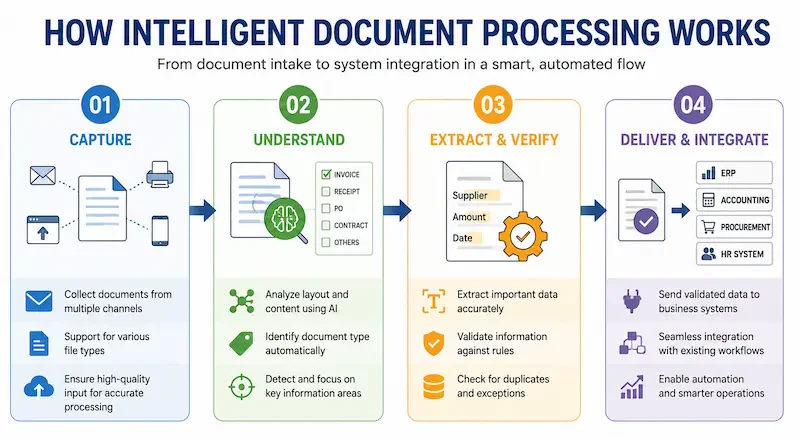
Intelligent Document Processing follows a structured end to end flow that turns raw files into actionable business data. By integrating AI and machine learning the process ensures high accuracy and seamless connectivity between document arrival and system utilization.
1. Document Capture
Documents are collected from scans, email attachments, portals, or mobile uploads. Clear input helps the system process different file formats accurately.
2. Classification
The system analyses each document’s layout and content to identify its type. It then prioritises the relevant fields for processing.
3. Data Extraction and Validation
Key details such as vendor names, amounts, and dates are extracted. The system validates the data and checks for duplicates or exceptions
4. Workflow Integration
Validated data is transferred to ERP, accounting, procurement, or HR systems. This supports AI technology for workflow automation across existing processes.
IDP vs OCR, RPA, and Document Automation
Understanding the distinctions between these terms is essential as they are often used interchangeably despite serving different functions. The following comparison highlights how each technology contributes to your document management strategy.
| Technology | Primary Function | Limitation |
|---|---|---|
| OCR | Translates images or scans into raw digital text. | Cannot understand context or extract specific meaning. |
| RPA | Automates repetitive human tasks based on rigid rules. | Struggles with unstructured documents or changes in layout. |
| Document Automation | Orchestrates the movement of files through a workflow. | Relies on manual input or pre-formatted data to function. |
| IDP | Combines AI, extraction, validation, and routing. | Requires high-quality capture for optimal AI performance. |
OCR extracts raw text, RPA automates rule-based tasks, and Document Automation routes files but often relies on structured input. IDP combines these capabilities with AI to understand varied documents, validate extracted data, and route it into automated workflows.
Benefits of Intelligent Document Processing
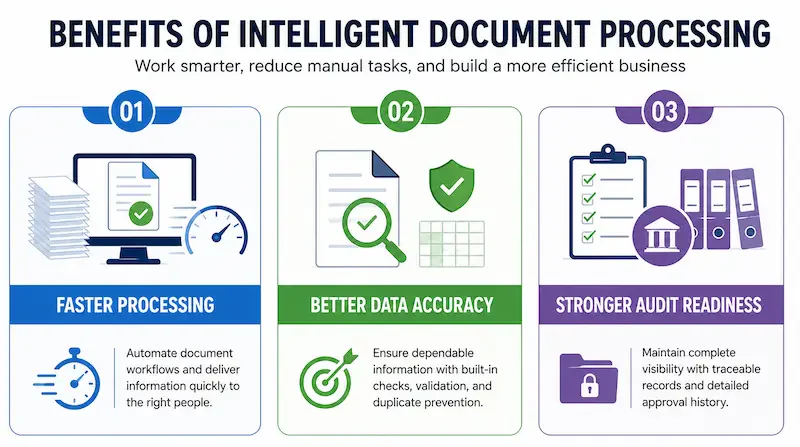
Implementing IDP helps businesses move beyond manual administration. Greater efficiency, data accuracy, and compliance can strengthen how businesses manage daily operations while improving team productivity.
Faster Processing
IDP automatically captures, classifies, and routes document data to the appropriate team or system. This reduces manual entry, shortens approval cycles, and helps prevent documents from being delayed between departments.
Better Data Accuracy
IDP validates extracted data against predefined rules and existing records. Duplicate detection and cross-verification help identify missing, inconsistent, or incorrect information before it enters business systems.
Stronger Audit Readiness
IDP records document sources, approval histories, and changes throughout the workflow. These traceable records make it easier to verify transactions, retrieve supporting documents, and prepare for internal or external audits.
IDP Use Cases for Malaysian Businesses
For businesses operating in Malaysia managing high volumes of local documentation is a common operational challenge. Implementing IDP allows companies to handle diverse document formats effectively ensuring that specific regional requirements such as tax compliance and standardized reporting are met with precision.
Invoice & AP
IDP automates invoice workflows by matching Malaysian supplier invoices with purchase orders and goods receipt notes. It flags discrepancies or duplicates before transferring validated data to accounting and MyInvois-related processes.
Purchase orders
IDP extracts supplier, item, MYR pricing, quantity, and delivery details from purchase orders. Malaysian manufacturers and retailers can use the validated data to coordinate local procurement with barcode-based inventory workflows across branches and warehouses.
HR documents
IDP digitises HR documents, payroll records, and employee claims in a searchable repository. This helps Malaysian employers manage information for EPF, SOCSO, and IRBM payroll processes.
Contracts & compliance
IDP extracts key contract details, obligations, and renewal dates for review and approval. Malaysian businesses can then track agreements and retrieve supporting records for audits, compliance checks, or disputes.
Conclusion
Intelligent Document Processing turns unstructured files into validated, structured data that can move directly into business workflows. This reduces manual processing while improving accuracy, traceability, and access to information.
Its value extends across finance, procurement, HR, and compliance, where document volumes and formats often vary. Effective implementation depends on document quality, validation rules, and integration with existing systems.
A free demo provides a practical view of how IDP captures, validates, and routes documents within a connected operational environment.
FAQ
Intelligent document processing is a technology that uses AI, OCR, machine learning, and automation to capture, classify, extract, validate, and process data from business documents. It helps companies turn invoices, forms, contracts, and other files into structured data for workflows and ERP systems.
OCR mainly reads text from scanned documents or images, while IDP goes further by understanding document types, extracting relevant fields, validating data, and sending that data into business workflows. OCR can be part of IDP, but IDP is the broader automation process.
IDP can process invoices, purchase orders, delivery documents, HR forms, employee records, claims, contracts, compliance files, and other structured or semi-structured business documents. For Malaysian businesses, it is especially useful in finance, procurement, HR, and audit-heavy workflows.
Businesses use IDP to reduce manual data entry, speed up document handling, improve data accuracy, support approval workflows, and create clearer audit trails. Its value increases when extracted document data flows directly into ERP, accounting, procurement, or HR systems.
Companies should evaluate document accuracy, supported document types, ERP integration, approval workflow, exception handling, audit trail, data security, and local support. The best IDP software should not only extract data, but also help teams use that data inside daily business processes.