






When onboarding records, certification dates, and refresher training histories are scattered across spreadsheets, email threads, and physical files, HR and operations managers lose visibility into which employees are ready to perform their roles. A learning management system (LMS) helps solve this by centralizing how organizations deliver, assign, track, and report workforce training within a single controlled process.
For Malaysian organizations, structured training management is also tied to regulatory requirements. Companies registered under the Human Resources Development Corporation (HRD Corp) are required to contribute a Human Resources Development Levy and may claim reimbursements for eligible training activities, which makes maintaining accurate training records an operational priority rather than a documentation formality.
This article explains what a learning management system does and the operating models it supports. It covers integration requirements, common selection criteria, and the decisions organizations typically face when adopting an LMS for the first time.
Key Takeaways
An Learning Management System centralizes training assignments, course delivery, completion tracking, certification records, and reporting so managers can see workforce readiness.
For Malaysian enterprises with branches, plants, warehouses, or frontline teams, access, language, mobile use, and local support should shape LMS requirements.
A practical LMS shortlist should use 15 capabilities covering business fit, delivery, administration, analytics, integration, governance, deployment, migration, and support.
Training records, compliance tracking, and employee learning can quickly become difficult to manage when handled through manual processes and disconnected systems. See how an LMS can centralize training, automate routine tasks, and improve learning visibility by requesting a free demo.

Learning Management System (LMS) Meaning and Definition
A learning management system is a central application for organizing training content, assigning learning to defined users, recording progress, managing assessments and certificates, and producing reports. For an enterprise, it replaces fragmented training administration with a structured record of workforce learning and readiness.
The LMS meaning becomes clearer when viewed through an operational example. A Malaysian manufacturer may need to assign induction modules to new employees, equipment training to technicians, and scheduled safety refreshers to plant teams. Administrators need to know which version of a course was assigned, while managers need to see completion and certification status without compiling separate spreadsheets.
The Core Records in an Enterprise LMS
The Core Records in an Enterprise LMS
An enterprise LMS centralizes training records, simplifying management, progress tracking, and documentation. Instead of spreadsheets or manual tracking, all training data is stored in one system for better visibility and reporting.
- Learner profiles
Store employee information linked to IDs, job roles, departments, locations, and reporting managers to ensure the right training is assigned to the right people.
- Course catalogues and learning paths
Organize classroom sessions, online courses, and structured learning journeys so employees can easily access required training.
- Assignments and approvals
Track course assignments, due dates, notifications, and manager approvals to help employees complete mandatory learning on schedule.
- Assessments and completion status
Record quiz scores, assessment attempts, feedback, and course completion status to measure learning outcomes and monitor progress.
- Certificates and renewal requirements
Maintain training certificates with issue dates, expiry dates, and renewal requirements to support compliance and certification management.
- Reports and Analysis
Generate reports for HR, managers, administrators, auditors, and leadership teams to monitor participation, completion rates, and overall training performance.
An LMS does not automatically correct weak course content, unclear training policies, or poor manager participation. Those problems still require process ownership. It may, however, provide the records and workflow controls needed to identify where the process is failing. Employee master data can also remain in recruitment software for employee data and workforce management instead of being maintained independently in every application.
Signs your organization may need an LMS
Signs your organization may need an LMS
As training programs expand across teams and locations, manual processes often become more difficult to manage. If the following challenges are becoming common, it may be time to evaluate whether an LMS can improve training administration and visibility.
- Training records are scattered
Training data is stored in separate files across departments or locations, making it difficult to maintain a single, accurate record and often leading to duplication or missing information. - Manual reporting
HR or administrators repeatedly compile training completion reports by hand, increasing administrative effort, slowing down reporting cycles, and raising the risk of human error. - Difficult certification tracking
Refresher training and expiring certificates are hard to monitor across employees, increasing the chance of missed renewals, expired credentials, and potential compliance issues. - Limited manager visibility
Managers cannot easily identify employees with overdue mandatory training or incomplete learning paths, making follow-up less timely and less effective. - Inconsistent onboarding
New employees receive different onboarding experiences across branches or business units, leading to inconsistent knowledge transfer, uneven skill levels, and varied training outcomes.
These signs justify a requirements investigation, but they do not always mean that new software is necessary. An organization should first confirm whether an existing HR software, ERP, collaboration, or content platform already covers the required workflow.
How Does an LMS Work Across Enterprise Systems?
An LMS follows a practical sequence: create or import content, assign it to learners, let employees learn, assess their understanding, record the result, and report progress. The platform may exchange employee, organizational, authentication, and reporting data with other systems, but each connection and ownership rule must be validated during selection.
An administrator may create a course directly or import material from a content or authoring tool. Assignment rules can use data such as employee ID, department, role, location, or manager. Learners receive access and notifications, complete digital or instructor-led activities, take assessments, and generate completion records. The LMS then exposes those records through dashboards, exports, or integrations.
A useful architecture discussion starts by identifying which platform is authoritative for each data object:
| Data or function | Typical system owner | Example objects | Question for the vendor |
|---|---|---|---|
| Employee master data | HR or ERP system | Employee ID, department, role, location, manager | Can records be synchronized without duplicate manual maintenance? |
| Learning activity | LMS | Course ID, assignment, score, completion date | Which records can be imported, exported, or updated through integration? |
| Authentication | Identity platform | User account, sign-in method, access status | Which single sign-on standards and account-provisioning methods are supported? |
| Learning materials | LMS, LCMS, or repository | Videos, documents, modules, course versions | How are content versions, formats, and access permissions managed? |
| Certificates | LMS | Issue date, expiry date, renewal status | Can expiry rules trigger reassignment, notification, and reporting? |
| Consolidated analytics | LMS, HR, ERP, or BI tool | Completion, department, cost centre, workforce status | How are reporting fields mapped and refreshed? |
The principle is to avoid creating competing sources of truth. An HRM system integration can supply workforce records, while ERP software data flow may provide organizational structures, locations, business units, or cost centres. The LMS should normally own detailed learning assignments and completion activity.
"If you are assessing whether an LMS fits your workforce, first map your existing training records, employee data, integrations, and reporting gaps. You can then arrange a consultative HashMicro product tour to discuss how these requirements relate to your HR and ERP environment."
Learning Management System (LMS) Used in Malaysia

In Malaysian enterprises, a learning management system is used to coordinate recurring training across dispersed workforces, maintain completion and certification records, and give managers consistent reporting. Common scenarios include onboarding, operational safety, product knowledge, technical development, branch training, leadership programmes, and audit preparation.
The table below maps practical situations to the LMS support and reporting signal an organization may require:
| Business situation | LMS support | Primary stakeholder | Reporting signal |
|---|---|---|---|
| New employee onboarding | Role-based induction path with due dates | HR and hiring manager | Completion and overdue status |
| Mandatory or policy training | Scheduled assignment and acknowledgement | HR, legal, or compliance owner | Completion by entity or department |
| Plant safety refreshers | Recurring courses and assessments | Operations or safety manager | Score, due date, and renewal status |
| Warehouse process training | Role-specific modules for handling and procedures | Warehouse manager | Participation and competency result |
| Retail or F&B branch training | Standard courses distributed across outlets | Area or branch manager | Completion by branch |
| Product and sales training | Product modules, quizzes, and updates | Sales enablement or product team | Assessment score and active participation |
| Technical skills development | Structured learning paths by job family | L&D and department head | Progress and time to competency |
| Leadership development | Cohorts, blended sessions, and milestones | HR or talent management | Path progress and attendance |
| Partner or franchise training | Controlled external learner access | Channel or franchise team | Completion by partner organization |
| Certification and audit preparation | Certificate records, expiry alerts, and exports | Compliance owner or auditor liaison | Valid, expiring, and expired certificates |
A logistics company, for example, might connect warehouse training to operational roles while keeping stock and movement records in an inventory management system for warehouse operations. A multi-branch retailer could use an HRM platform for workforce records to maintain employee experience while the LMS controls course assignments.
LMS Features and Business Benefits
An LMS is judged by what it actually does day to day, not by the size of its feature list. The features below are the ones that change how training is delivered, tracked, and reported, and each one carries a business benefit that HR and management can see in practice.
1. Centralized training records and reporting dashboards
The system stores every course, completion, and score in one place and turns them into dashboards and exportable reports. HR, managers, and leadership can see learning progress by employee, department, or programme without collecting data from spreadsheets or asking trainers for updates.
2. Automated onboarding and mandatory training paths
Learning paths can be assigned automatically based on role, department, or start date, so new hires receive the right modules from day one. This keeps onboarding consistent across locations and helps ensure mandatory training reaches every employee within the expected timeline.
3. Course assignment, reminders, and enrolment automation
Instead of assigning courses manually and chasing employees for completion, the LMS handles enrolment, deadline reminders, and escalation notices. Administrative effort drops noticeably, and L&D teams spend more time improving course quality rather than following up on attendance.
4. Certification and compliance tracking
The system records certificate validity, renewal dates, and expiring credentials, then alerts the right people before a certification lapses. This lowers the risk of employees working with expired credentials and keeps compliance records ready for internal reviews and external audits.
5. Manager dashboards and HR system integration
Managers get visibility into their own team's learning progress and overdue training, while integration with HR and business systems keeps employee management records consistent across platforms. Accurate, connected data supports better workforce planning and clearer performance reporting.
6. Assessments, feedback, and course analytics
Quizzes, assessments, and post-course feedback show whether the content is working, not just whether it was completed. Low scores or poor feedback on a specific module point directly to what needs revising, which improves training quality over time.
These outcomes should be assessed together with implementation costs, user adoption, course quality, and system integration. Reviewing both operational improvements and business context provides a more accurate picture of an LMS's long-term value.
Which 15 LMS Capabilities Matter Most to Enterprise Buyers?
Selecting an enterprise LMS involves more than comparing feature lists. Each capability should support a specific business requirement, improve training operations, and be validated through practical business scenarios before making a procurement decision.
* **Role-based learning assignment** – The LMS should automatically assign training based on job roles, departments, locations, or employment events such as onboarding or promotions. This reduces manual administration while ensuring employees receive the learning content relevant to their responsibilities.
* **Course catalogue** – A centralized course catalogue allows employees to browse and enroll in approved learning materials without accessing restricted content. Clear categorization and search functions also make it easier to find mandatory or optional courses.
* **Learning paths** – Learning paths combine multiple courses, assessments, and milestones into a structured training journey. This helps organizations deliver consistent learning programs and ensures employees complete prerequisites before progressing to advanced topics.
* **Mobile access** – Employees should be able to access training through smartphones, tablets, or other supported devices without sacrificing usability. Mobile learning is particularly valuable for frontline, field, and remote workers who have limited access to desktop computers.
* **Blended learning support** – The system should support both digital learning modules and instructor-led classroom sessions within a single training record. This provides a complete learning history regardless of how the training is delivered.
* **Assessments and quizzes** – Built-in assessments should allow administrators to define passing scores, attempt limits, feedback options, and grading criteria. These tools help measure learning effectiveness and identify employees who may require additional training.
* **Certification tracking** – The LMS should record certificate issue dates, expiry dates, renewal schedules, and supporting evidence in one place. Automated reminders also help reduce the risk of expired certifications and missed compliance deadlines.
* **Manager dashboards** – Managers should have access to dashboards that display their team's learning progress, overdue courses, and upcoming certification renewals. This visibility makes it easier to monitor performance and follow up with employees who require additional support.
* **Report exports** – Reporting features should allow authorized users to generate and export accurate training data for compliance, audits, and management reporting. Flexible report formats also make it easier to analyze learning performance across departments or business units.
* **HR or ERP integration** – Integration with HRM or ERP software enables employee records, organizational structures, and workforce changes to synchronize automatically. This eliminates duplicate data entry and ensures training assignments remain up to date.
* **Single sign-on (SSO) support** – SSO allows employees to log in using their existing company credentials instead of maintaining separate usernames and passwords. This simplifies user access while improving security and reducing IT administration.
* **Role-based access control** – Different user groups should receive permissions appropriate to their responsibilities, whether they are learners, managers, instructors, or administrators. Proper access controls help protect sensitive information while supporting governance requirements.
* **Multilingual content support** – The platform should support multiple interface languages and localized learning content to accommodate diverse workforces. This helps employees understand training materials more effectively and improves overall participation.
* **Content migration tools** – Migration capabilities should support transferring existing courses, learner histories, certificates, and training records from previous systems. A structured migration process minimizes data loss and reduces disruption during implementation.
* **Implementation and support services** – Evaluate the vendor's implementation methodology, administrator training, technical support, and post-deployment services before procurement. Ongoing support and clearly defined responsibilities contribute to smoother deployment and long-term system success.
The most effective LMS is one that aligns with your organization's operational requirements rather than simply offering the greatest number of features. Reviewing each capability against existing HR, ERP, and training processes also helps avoid unnecessary duplication while ensuring the platform supports long-term business goals.
Selecting an enterprise LMS involves more than comparing feature lists. Each capability should support a specific business requirement, improve training operations, enhance employee engagement, and be validated through practical business scenarios before making a procurement decision.
1. Role-based learning assignment
The LMS should automatically assign training based on job roles, departments, locations, or employment events such as onboarding or promotions. This reduces manual administration while ensuring employees receive the learning content relevant to their responsibilities.
2. Course catalogue
A centralized course catalogue allows employees to browse and enroll in approved learning materials without accessing restricted content. Clear categorization and search functions also make it easier to find mandatory or optional courses.
3. Learning paths
Learning paths combine multiple courses, assessments, and milestones into a structured training journey. This helps organizations deliver consistent learning programs and ensures employees complete prerequisites before progressing to advanced topics.
4. Mobile access
Employees should be able to access training through smartphones, tablets, or other supported devices without sacrificing usability. Mobile learning is particularly valuable for frontline, field, and remote workers who have limited access to desktop computers.
5. Blended learning support
The system should support both digital learning modules and instructor-led classroom sessions within a single training record. This provides a complete learning history regardless of how the training is delivered.
6. Assessments and quizzes
Built-in assessments should allow administrators to define passing scores, attempt limits, feedback options, and grading criteria. These tools help measure learning effectiveness and identify employees who may require additional training.
7. Certification tracking
The LMS should record certificate issue dates, expiry dates, renewal schedules, and supporting evidence in one place. Automated reminders also help reduce the risk of expired certifications and missed compliance deadlines.
8. Manager dashboards
Managers should have access to dashboards that display their team's learning progress, overdue courses, and upcoming certification renewals. This visibility makes it easier to monitor performance and follow up with employees who require additional support.
9. Report exports
Reporting features should allow authorized users to generate and export accurate training data for compliance, audits, and management reporting. Flexible report formats also make it easier to analyze learning performance across departments or business units.
10. HR or ERP integration
Integration with HRM or ERP software enables employee records, organizational structures, and workforce changes to synchronize automatically. This eliminates duplicate data entry and ensures training assignments remain up to date.
11. Single sign-on (SSO) support
SSO allows employees to log in using their existing company credentials instead of maintaining separate usernames and passwords. This simplifies user access while improving security and reducing IT administration.
12. Role-based access control
Different user groups should receive permissions appropriate to their responsibilities, whether they are learners, managers, instructors, or administrators. Proper access controls help protect sensitive information while supporting governance requirements.
13. Multilingual content support
The platform should support multiple interface languages and localized learning content to accommodate diverse workforces. This helps employees understand training materials more effectively and improves overall participation.
14. Content migration tools
Migration capabilities should support transferring existing courses, learner histories, certificates, and training records from previous systems. A structured migration process minimizes data loss and reduces disruption during implementation.
15. Implementation and support services
Evaluate the vendor's implementation methodology, administrator training, technical support, and post-deployment services before procurement. Ongoing support and clearly defined responsibilities contribute to smoother deployment and long-term system success.
A feature is only valuable if it addresses a documented business requirement, so capabilities such as mobile access and multilingual support should be evaluated based on employees' actual working conditions and operational needs. Comparing LMS requirements with existing HRM software and type of type of ERP capabilities also helps avoid duplicate functions and identifies where system integration is more effective than adding new features.
What Types of LMS and Adjacent Platforms Should You Compare?
An LMS manages structured assignment, delivery, completion, and reporting. An LXP emphasizes learner discovery and personalized experience; an LCMS manages reusable learning content; an HR system owns workforce records; and an authoring tool creates course materials. These categories can operate together, so buyers should compare their purposes and integration roles rather than assume one platform must replace every other system.
Common types of LMS include:
- Cloud-based systems hosted and maintained as a service
- On-premise systems deployed within infrastructure controlled by the organization
- Open-source systems whose software can be inspected and configured subject to their licence
- Commercial enterprise systems supplied with defined product and support arrangements
- Academic systems designed around students, classes, and educational administration
- Corporate LMS platforms designed around employees, roles, policies, and workforce development
- Industry-focused systems configured for specialized training or certification workflows
Deployment labels do not determine suitability on their own. Buyers still need to examine responsibility for updates, security controls, configuration, integrations, data export, availability, support, and total implementation effort.
| Platform | Primary purpose | Main users | Core data | Use this when | Integration role |
|---|---|---|---|---|---|
| LMS | Assign and track structured learning | Employees, managers, administrators | Assignments, progress, scores, completions, certificates | Training control and reporting are priorities | Receives workforce data and returns learning results |
| LXP | Help users discover and engage with learning | Learners and development teams | Interests, recommendations, activity, content interactions | Self-directed discovery is a major requirement | May pass activity or completion data to an LMS |
| LCMS | Create and manage reusable learning content | Instructional designers and content teams | Learning objects, versions, metadata | Content production and reuse require formal control | Publishes materials to an LMS or LXP |
| HR system | Manage employee and organizational records | HR, managers, and employees | Employee ID, role, department, manager, employment status | Workforce data is the main requirement | Supplies learner and organizational master data |
| ERP system | Manage integrated enterprise processes and records | Finance, operations, HR, and management | Entities, cost centres, operational and financial data | Cross-functional business control is required | Provides organizational context for reporting |
| Authoring tool | Build courses, simulations, or assessments | Course creators and subject experts | Pages, media, interactions, question banks | Teams need to create learning material | Exports content for delivery through an LMS |
Use an HR system for employee records and an ERP system for enterprise data as systems of record where appropriate. They are not necessarily replacements for specialized learning workflows, just as an LMS should not become the authoritative source for payroll, finance, or inventory records.
LMS vs HRIS vs Training Management System
The three systems overlap enough to be confusing, but each one owns a different part of the employee development process. An LMS delivers learning content, an HRIS holds employee records, and a Training Management System runs the logistics of training delivery.
| Aspect | Learning Management System (LMS) | HRIS | Training Management System (TMS) |
|---|---|---|---|
| Main purpose | Delivers and tracks digital learning content | Stores and manages core employee data | Plans and runs the operational side of training |
| Core focus | Courses, modules, assessments, and certifications | Employee records, payroll, leave, and attendance | Sessions, trainers, venues, budgets, and attendance |
| Primary users | Employees and learning administrators | HR and finance teams | Training coordinators and L&D teams |
| Training data held | Course progress, scores, and completion records | Summary records such as certifications and training history | Full session records, costs, attendance, and trainer details |
| Best for | Online, self-paced, and repeatable learning | Centralised workforce administration | Classroom, on-site, and instructor-led training programmes |
| Malaysia relevance | Supports digital upskilling and certification tracking | Handles EPF, SOCSO, EIS, and PCB employee data | Supports HRD Corp claim documentation and levy utilisation records |
| Common limitation | Limited handling of physical training logistics | Not built to deliver or coordinate training | Usually relies on an LMS for digital content delivery |
How to Choose Right LMS for Business?
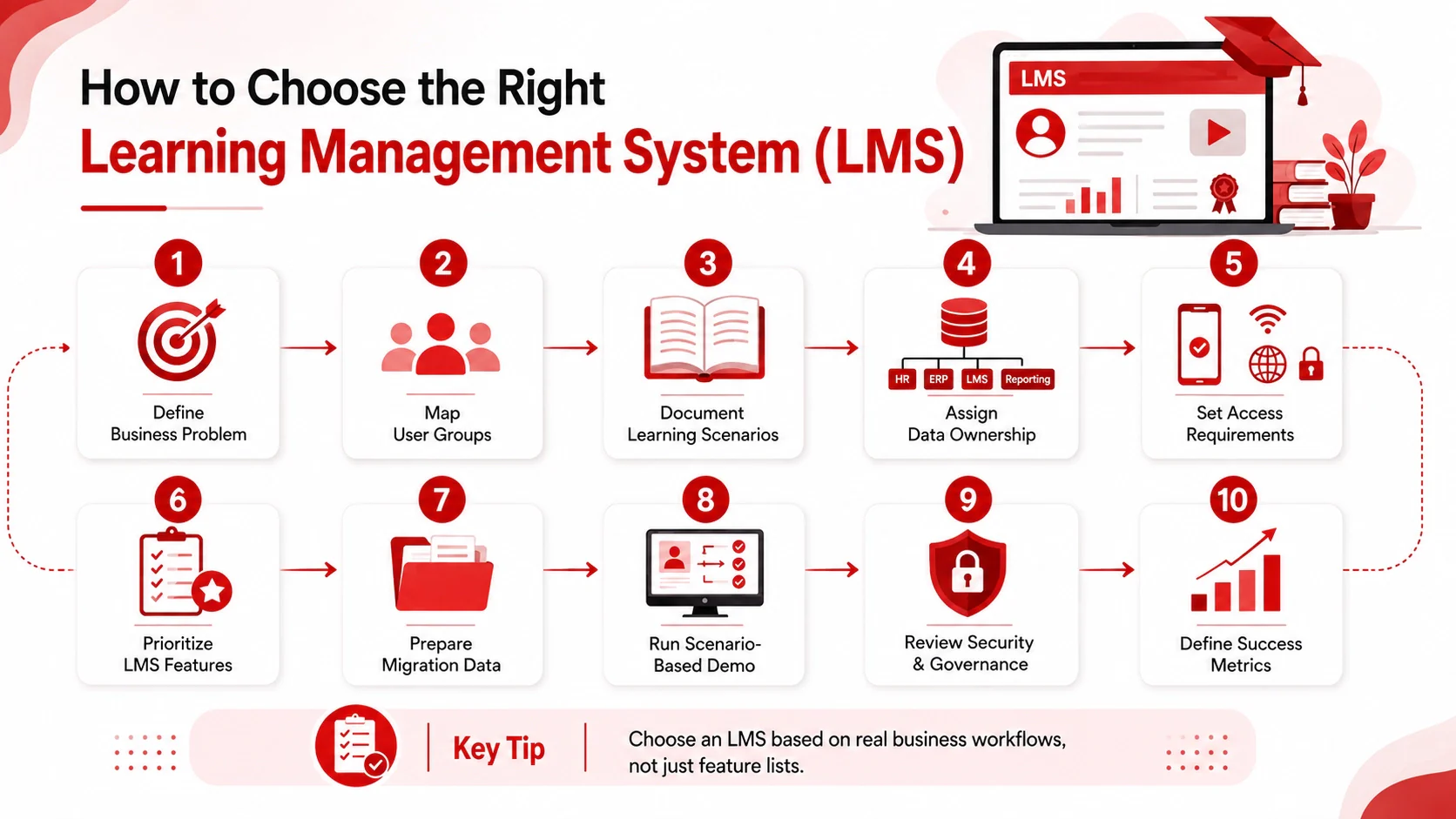
Choose an LMS by testing how well it supports documented training scenarios, workforce conditions, integration rules, governance requirements, and success measures. A long feature list is less informative than evidence showing how the platform handles an employee transfer, recurring certification, manager access, mobile learning, reporting, and data export.
Use this numbered evaluation process:
- Define the business problem. Identify the training records, delays, risks, or reporting gaps that prompted the project.
- Map user groups. Include employees, frontline workers, contractors, managers, instructors, administrators, auditors, and external partners where relevant.
- Document learning scenarios. Select representative cases such as onboarding, branch training, certification renewal, blended learning, or technical assessment.
- Assign data ownership. Decide whether HR, ERP, identity, LMS, content, or reporting systems own each record.
- Set access requirements. Document device, location, connectivity, language, authentication, and accessibility needs.
- Prioritize the 15 capabilities. Classify each as mandatory, desirable, or outside scope, with an accountable stakeholder.
- Prepare migration samples. Examine course files, historical completions, certificate records, employee identifiers, and data quality before demonstrations.
- Run scenario-based demonstrations. Give vendors the same workflows and sample questions instead of relying only on standard presentations.
- Review security and governance. Check permissions, audit records, authentication, backup, recovery, retention, export, and incident processes.
- Define measurement and ownership. Agree on baselines, targets, review periods, administrators, integration owners, and executive sponsorship.
Who Should Own LMS Implementation and Governance?
LMS ownership is normally shared because the platform touches training policy, technology, operational adoption, and employee records. One named product owner should coordinate decisions, but the responsibilities should be divided explicitly.
HR or L&D manages training content, assignments, and reporting, while IT handles integrations, access, and security. Department managers oversee role-specific learning and completion, procurement and legal review contract terms, and an executive sponsor ensures alignment and resolves priorities.
Before configuration begins, create a responsibility matrix covering:
- Employee and organizational data quality
- Course creation, review, approval, and retirement
- Assignment and reassignment rules
- Certificate expiry and renewal processes
- User support and administrator escalation
- Integration monitoring and reconciliation
- Permission reviews and administrator access
- Report definitions and distribution
- Post-launch adoption and measurement
Implementation should also include content and historical data decisions. Migrating every old course may introduce outdated or duplicated material. Teams should decide what must be retained, what can be archived, and which completion or certificate records require reconciliation. A pilot involving representative roles and locations can expose access, content, and reporting issues before a wider rollout.
Conclusion
A learning management system gives HR, L&D, and operations teams a structured way to manage how training is planned, delivered, and recorded across the workforce. Rather than relying on disconnected spreadsheets or manual sign-off processes, an LMS creates a single audit trail for every course assignment, completion status, and certification date, making it easier to assess workforce readiness and respond to compliance checks without scrambling to consolidate records from multiple sources.
For organizations operating in Malaysia, this matters beyond internal efficiency. Companies registered under HRD Corp have ongoing obligations to report eligible training activities and maintain documentation for levy reimbursement claims. An LMS that integrates with payroll and HR systems reduces the administrative load of meeting these requirements while giving management a reliable view of training progress at any point in the year.
Choosing the right platform depends on your workforce size, the types of training your teams run, and the systems your LMS needs to connect with. Request a free demo to see how the LMS supports your actual training workflows and long-term business needs.

FAQ about Learning Management System (LMS)
Common data objects include employee ID, role, department, location, manager, employment status, course assignment, completion date, assessment result, certificate status, and reporting fields. HR or ERP systems usually own employee and organisational master data, while the LMS owns learning assignments, activity, scores, completions, and certificates. Buyers should document the direction, timing, validation, and error-handling process for each exchange.
Ownership is usually shared. HR or L&D defines training rules, content governance, completion criteria, and reporting requirements. IT manages access, identity, integrations, and technical controls. Department managers drive participation and follow up on overdue learning, while an executive sponsor resolves priorities and resource conflicts. A named product owner should coordinate these responsibilities.
Track completion rate, overdue training, active learner participation, manager dashboard usage, certification status, assessment results, support requests, and administrator workload. Establish a baseline before rollout and agree on a review period, responsible owner, and target for each indicator. Results should be interpreted alongside content quality, manager follow-through, workforce access, and integration reliability.
Choose an LMS when the main priority is structured course assignment, mandatory training, learning paths, assessment, certification tracking, completion records, and management reporting. An LXP focuses more on learner discovery and personalised content experiences, while an LCMS focuses on creating, versioning, and managing reusable learning content. Enterprises may integrate these platforms instead of treating them as mutually exclusive alternatives.
Request documentation covering role-based access, authentication, administrator permissions, audit records, integration security, backup and recovery processes, retention settings, data export, incident support, and account deprovisioning. Buyers should also examine responsibility matrices, escalation routes, service arrangements, and exit procedures. Claims about Malaysian privacy requirements should be verified with current legal sources and internal advisers.
No. Schools and universities were early adopters, but most LMS usage today sits inside companies. Businesses use an LMS to deliver employee onboarding, compliance and safety training, product knowledge for sales teams, and skills development across departments. The system works the same way in both settings: it hosts the learning content, assigns it to the right people, and records who completed what. Only the audience changes, from students to employees, contractors, or even customers and channel partners. In Malaysia, employers also use an LMS to keep training records organised for internal reporting and HRD Corp related documentation, which is not a school use case at all.