










 Limited to 100 registrants

A Malaysian apparel brand sells on Shopee, Lazada, and its own webstore. Orders come in from three channels, the team checks three different dashboards, and stock is still tracked in a spreadsheet. When one order gets missed, the problem can quickly turn into overselling, delayed fulfillment, and unhappy customers.
This is where an OMS helps. By bringing order data, inventory updates, fulfillment status, and customer information into one workflow, businesses can reduce manual checking and keep every team working with the same order details.
In this guide, you’ll learn how an order management system works, which features matter most, and how Malaysian businesses can choose the right ERP system setup to manage growing order volumes with better control.
Key Takeaways
An order management system centralizes orders, inventory allocation, fulfillment, shipping, returns, and customer updates in one workflow.
OMS helps businesses process orders from multiple channels faster, from order capture to delivery tracking and post-purchase handling.
For Malaysian businesses, OMS reduces order errors, improves stock visibility, speeds up fulfillment, and supports growth without adding too much manual work.
Connected orders, inventory, and reporting help businesses manage fulfillment with fewer manual gaps. ERP software supports this workflow by keeping order management and operational data in one system.

What is an Order Management System (OMS)?
Order Management System is software that centralizes, automates, and tracks customer orders from placement to delivery across all sales channels. In simple terms, OMS meaning refers to a system that helps businesses manage order capture, inventory allocation, fulfillment, shipping, returns, and customer updates in one connected workflow.
For example, a Selangor apparel brand selling on Shopee, Lazada, and its own webstore can use an order management system to see every order in one dashboard instead of checking each platform manually. Some businesses use a standalone oms order management system, while others use an real-time stock tracking with inventory, finance, procurement, and reporting.
How Does an Order Management System Work?
An order management system works through four stages, from the moment a customer places an order to the moment it arrives at their door.
Step 1. Order placement and capture
When a customer orders through Shopee, Lazada, an owned webstore, physical POS, or B2B channel, the OMS automatically captures the order details, including items, quantities, customer data, payment status, and delivery address. For the Selangor apparel brand, this means orders from different channels enter one system without manual re-entry.
Step 2. Inventory check and allocation
After the order is captured, the OMS checks stock availability in real time and allocates it from the nearest or most suitable store, warehouse, or fulfillment point. If a Shopee buyer orders the last available size M shirt, the stock count updates across Lazada and the webstore immediately to prevent overselling.
Step 3. Fulfillment and dispatch
Once stock is confirmed, the OMS sends pick-and-pack instructions to the warehouse team and helps generate shipping labels, tracking numbers, and shipment bookings. With logistics integration such as J&T, Ninja Van, or DHL Malaysia, the team can dispatch orders faster without switching between courier portals.
Step 4. Delivery tracking and post-purchase
After dispatch, the OMS sends delivery updates to customers and keeps the full order history for customer service, audit, and analytics. If the Selangor apparel brand receives a return or exchange request, the system records the reason, updates the status, and helps the team handle the post-purchase process more clearly.
Key Features of an Effective Order Management System

Not all OMS platforms are equal. These are the six features that separate effective order management systems from basic tracking tools.
Inventory management: gives businesses real-time stock visibility across warehouses, stores, and sales channels. This helps prevent overselling, stockouts, and delayed replenishment, especially when orders come from Shopee, Lazada, webstores, or offline outlets.
Multichannel integration: connects all order sources into one system. Malaysian businesses can manage marketplace, webstore, POS, and B2B orders from a single dashboard instead of switching between platforms.
Order tracking: shows real-time order status for both internal teams and customers. Teams can monitor picking, packing, dispatch, and delivery, while customers receive automated updates without asking customer service manually.
Returns management: helps businesses handle exchanges, refunds, and returned items more neatly. A proper OMS can record return requests, update inventory after items are received, and track return reasons to spot product or fulfillment issues.
Analytics and reporting: turn order data into useful business insights. Teams can review sales trends, demand patterns, fast-moving SKUs, and slow-moving products to support purchasing, campaign planning, and operations review.
Role-based access control: limits what each team member can view or edit. Warehouse, customer service, and finance teams only access the data they need, reducing unauthorized changes and protecting sensitive order information.
Benefits of an OMS for Malaysian Businesses
Fewer order errors: help Malaysian businesses handle peak sales periods with more control. During campaigns like Shopee 11.11 and 12.12, manual order entry can easily lead to wrong addresses, incorrect quantities, duplicate orders, or missed purchases. An OMS reduces these risks by validating order details before fulfillment begins.
Faster fulfillment: allows teams to process orders without checking multiple dashboards manually. Once an order is captured, the system can route it to the right warehouse or store and send clear picking instructions. A business handling hundreds of orders per day can move faster because the workflow is already organized.
Full inventory visibility: helps businesses know what is available, allocated, or running low in real time. This is useful for Malaysian sellers that operate across Shopee, Lazada, webstores, physical outlets, and multiple warehouses. Instead of guessing stock availability, teams can make decisions based on updated inventory data.
Better customer experience: comes from faster updates, clearer delivery status, and easier return handling. In Malaysia’s competitive e-commerce market, customers often expect quick fulfillment and accurate tracking. An OMS helps reduce delays and gives buyers more confidence after checkout.
Scalability without proportional headcount: makes growth easier to manage. When order volume rises from 500 to 5,000 orders, businesses do not always need to add more coordinators at the same pace. The OMS helps automate repetitive order tasks, so teams can handle larger volumes more efficiently.
Data for better decisions: gives managers clearer insight into order history, return rates, channel performance, and demand patterns. Malaysian businesses can use this data to plan inventory buying, prepare for campaign seasons, choose better logistics options, and improve stock allocation across locations.
Signs Your Business Needs an Order Management System
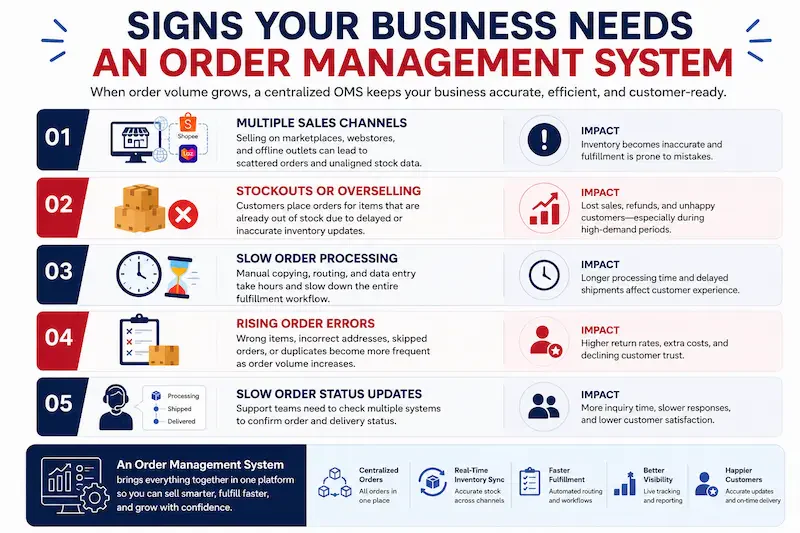
Selling on more than one channel: Managing Shopee, Lazada, a webstore, and offline outlets separately can make inventory data fall out of sync. One OMS helps centralize orders, stock updates, and fulfillment status in one place.
Frequent stockouts or overselling: When customers can still buy items that are no longer available, inventory tracking may not be keeping up with actual order volume. This becomes riskier during peak campaign periods.
Order processing takes too long: If the team spends hours checking dashboards, copying order details, routing orders, and updating tracking numbers manually, the business has likely outgrown spreadsheets.
Rising order errors: Wrong items, incorrect addresses, missed orders, and duplicate entries may still be manageable at 50 orders a day. At 500 orders a day, these errors can quickly affect fulfillment speed and customer trust.
Slow order status updates: When customer service needs to check several systems just to confirm fulfillment or delivery status, the business needs a more connected way to manage order updates.
Common Challenges in OMS Implementation
Implementing an OMS can improve order control, but the setup is not always instant. Businesses should prepare for these common challenges before switching systems:
- Integration complexity: Connecting an OMS to Shopee, Lazada, accounting software, warehouse systems, POS, and logistics APIs requires technical work. Not every OMS platform comes with ready Malaysian e-commerce connectors, so this should be checked during an ERP demo session.
- Data migration and clean up: Historical order data, product catalogs, customer records, SKUs, and stock balances often come from spreadsheets or legacy systems. If this data is incomplete or messy, the new OMS can create inventory discrepancies from day one.
- Team adoption and training: An OMS changes how warehouse, customer service, finance, and operations teams work. Some staff may need time to adjust, so training, updated SOPs, and a short parallel-running period should be included in the rollout plan.
- Choosing between standalone OMS and ERP: A standalone OMS may be enough for order tracking and fulfillment. However, businesses that also need accounting, HR, procurement, or inventory integration may get stronger long-term value from an ERP with built-in order management, even if the initial investment is higher.
"OMS implementation works best when businesses prepare their integrations, clean their data, and train teams before launch. For growing companies, the key decision is whether a standalone OMS is enough or whether ERP with built-in order management gives better long-term control."
OMS in Malaysia: Context and Industry Adoption

Malaysia’s e-commerce market is one of Southeast Asia’s active growth areas. As more Malaysian businesses sell through marketplaces, webstores, social commerce, and B2B channels, managing orders efficiently has become a critical operational capability.
E-commerce growth and omnichannel selling in Malaysia
Malaysia’s digital economy is strongly supported by e-commerce. MIDA reported that e-commerce was expected to remain the largest contributor to Malaysia’s digital economy in 2024, reaching US$16 billion in GMV with 17% growth. This growth makes OMS more relevant for businesses handling orders from multiple channels.
For sellers on Shopee, Lazada, webstores, and TikTok Shop, the main challenge is keeping stock, fulfillment, and customer updates accurate across every channel. B2B operations in Malaysia also use OMS workflows to manage purchase orders, repeat orders, pricing, and delivery schedules more clearly.
Key industries adopting OMS in Malaysia
Retail and fashion businesses use OMS to manage SKUs, variants, and marketplace orders across multiple channels. Manufacturers use it to track customer orders from confirmation to production and dispatch.
F&B businesses use OMS to manage online orders with outlet stock, while distributors and wholesalers rely on it for B2B order management. Healthcare and pharmacy businesses may also use OMS for more controlled order tracking and fulfillment records.
How OMS and ERP Work Together
OMS and ERP are not the same thing, but they work closely together. An OMS manages the order lifecycle, from order capture to delivery and returns. ERP connects that order data with wider business functions such as finance, procurement, HR, inventory, and reporting.
When an order is captured in an OMS, the data can flow into the ERP automatically. This can update accounts receivable, reduce inventory levels, and trigger procurement reorder points when stock falls below the set threshold. Without this connection, teams often need to reconcile order, stock, and payment data manually, which increases the risk of delays and reporting errors.
When the Selangor apparel brand ships 200 orders from a Shopee campaign, its ERP can update stock levels, record revenue, and trigger a reorder from the supplier using the same OMS data. This is why a cloud based order management system can be useful for growing businesses that need connected access across sales, warehouse, finance, and procurement teams.
| Comparison Area | Manual Order Management | Standalone OMS | ERP with Order Management |
|---|---|---|---|
| Order capture | Checked manually across channels | Centralized in one dashboard | Centralized and connected to wider business data |
| Inventory update | Often delayed | Updated in real time | Updated with procurement and finance impact |
| Finance connection | Manual reconciliation | Needs integration | Connected to accounting workflows |
| Business visibility | Limited | Strong order visibility | Full operational and financial visibility |
| Best fit | Very small teams | Growing multichannel sellers | Businesses needing end-to-end control |
For fast-growing Malaysian businesses, the question is rarely OMS or ERP. The real decision is whether to use a standalone OMS alongside existing systems or invest in an ERP that includes order management as a native module. Businesses planning ERP architecture should also consider edi integration, especially when handling B2B orders, suppliers, and trading partners that require structured data exchange.
Choosing the Right Solution for Your Business
Choosing the right order management system software starts with the systems it needs to connect with. Before deciding, check whether it can integrate with Shopee, Lazada, your webstore, logistics partners, accounting tools, or ERP system. Businesses with multiple warehouses should also check whether the system can route orders based on stock availability, location, or fulfillment priority.
Deployment model matters too. A cloud OMS is usually faster to set up and has lower upfront costs, making it practical for SMEs and growing e-commerce brands. On-premise deployment gives more control over data and infrastructure, which may suit manufacturers, distributors, or B2B companies handling sensitive order information.
For businesses that want order management connected with wider operations, an ERP with built-in OMS capabilities can be a stronger long-term option. It allows companies to manage orders, inventory, procurement, accounting, and reporting in one connected system without needing a separate OMS integration.
Conclusion
Order management becomes harder when sales channels grow but order tracking, inventory updates, and fulfillment still depend on manual work. An OMS helps businesses centralize orders, automate key processes, and track the full order lifecycle from checkout to delivery.
For Malaysian businesses selling through Shopee, Lazada, webstores, physical outlets, or B2B channels, the right OMS setup can reduce order errors, improve stock visibility, speed up fulfillment, and support better customer experience. It also helps teams make clearer decisions using order data instead of scattered spreadsheets.
If your business is planning to improve order control, a free demo can help you see how the right system supports order management, inventory, fulfillment, and reporting in one connected workflow.
FAQ About Order Management Systems (OMS)
Yes. An OMS helps businesses prepare for seasonal spikes by keeping order capture, stock allocation, fulfillment, and delivery updates in one workflow. This is useful during major campaigns when order volume rises quickly and manual checking becomes harder to control.
The timeline depends on the number of sales channels, warehouses, integrations, and data that need to be migrated. A simple setup may take a few weeks, while a more complex OMS connected to ERP, POS, marketplaces, and logistics partners may take longer.
The decision should involve operations, warehouse, customer service, finance, and IT teams. Each team handles a different part of the order process, so their input helps ensure the system fits daily workflows instead of only looking good on paper.
Businesses should prepare product SKUs, stock balances, customer records, order history, warehouse locations, pricing rules, and return policies. Clean data helps reduce mistakes when the OMS starts processing live orders.
No. An OMS is also useful for businesses that handle offline sales, B2B orders, wholesale orders, store pickup, and multi-location fulfillment. The system becomes more valuable when orders come from several sources and need to be tracked in one place.