











 Limited to 100 registrants

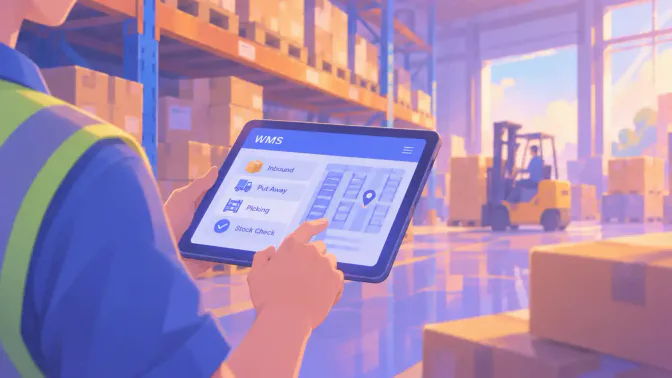
Mobile WMS connects warehouse staff with live stock data through handheld devices, phones, or tablets. It helps teams record each movement while receiving, storing, picking, and dispatching goods.
For Singapore businesses, this approach reduces manual updates and improves control across busy warehouses. It also helps teams respond faster when orders, stock levels, or delivery schedules change.
Key Takeaways
Mobile WMS lets warehouse staff scan and record stock movements from handheld devices, phones, or tablets as work happens.
A mobile WMS works by confirming items, locations, quantities, and users during receiving, putaway, picking, dispatch, and stock counts.
Mobile WMS benefits include more accurate stock records, fewer picking errors, faster workflows, and less paperwork.
Mobile WMS features to prioritise include barcode scanning, location tracking, inventory synchronisation, traceability, and reporting.
What Is Mobile WMS?
A mobile warehouse management system is software that lets warehouse workers complete inventory tasks from mobile devices. The system records each scan and updates stock information as work happens.
Depending on the operation, staff may use handheld warehouse scanners, rugged tablets, smartphones, or devices with built in barcode readers. These tools connect warehouse activities with purchasing, sales, inventory, and fulfilment records.
Mobile WMS can support receiving, putaway, picking, packing, stock transfers, cycle counts, and dispatch. It gives supervisors a clearer view of stock movement without relying on printed lists or delayed data entry.
"A mobile WMS records each stock movement the moment staff scan it, so warehouse records stay accurate without waiting for manual data entry later."
How Does a Mobile WMS Work in a Warehouse?
Mobile WMS follows the physical movement of stock through the warehouse. Each activity uses a scan or mobile confirmation to record the item, location, quantity, and responsible user.
| Warehouse activity | Mobile WMS action | Operational result |
|---|---|---|
| Receiving | Scan goods against a purchase order | Faster checks and fewer entry errors |
| Putaway | Confirm the item and storage bin | More accurate location records |
| Picking | Scan the bin and item before confirmation | Fewer incorrect picks |
| Dispatch | Scan cartons before loading | Improved shipment traceability |
1. Receiving Stock with Handheld Warehouse Scanners
Warehouse staff scan incoming cartons, pallets, or individual items against the related purchase order. A barcode inventory system can compare expected and received quantities before stock becomes available.
When goods arrive without labels, teams can print new labels for bins, cartons, or pallets. This creates a consistent record before products move further into the warehouse.
2. Putaway and Bin Location Confirmation
After receiving, the system directs staff to an approved storage location. Workers scan the product and bin label to confirm where the stock has been placed.
This process reduces misplaced inventory and helps pickers find products faster. It also gives supervisors a clearer view of available space across warehouse locations.
3. Picking Orders with a Barcode Scanner WMS
A barcode scanner WMS gives pickers a list of items and locations on their device. The picker scans the bin and product before entering or confirming the quantity.
If the wrong item or location is scanned, the system can flag the issue before the order continues. This helps reduce dispatch errors and unnecessary returns.
4. Packing, Dispatch, and Loading Verification
At the packing station, staff scan products into cartons and confirm the order contents. The system can record carton details, quantities, and the person who completed the check.
Before loading, workers scan cartons against the delivery record. This creates a final verification point and helps teams investigate missing or delayed shipments.
5. Cycle Counts and Stock Adjustments
Mobile WMS supports cycle counts by showing staff which bins or products require checking. Workers scan the location, count the stock, and submit the result from the device.
Supervisors can review differences before approving an adjustment. This keeps stock records current without requiring a full warehouse shutdown.
What Are the Benefits of Using Mobile WMS?
Mobile WMS improves warehouse control by connecting physical work with accurate digital records. The benefits become clearer when teams replace manual updates with verified scans.
1. Improve Inventory Accuracy and Real Time Stock Visibility
Every scan updates the stock record at the point of activity. This helps purchasing, sales, and warehouse teams work from the same information.
Singapore businesses can also view stock across multiple warehouses, outlets, or storage areas. This inventory visibility supports faster decisions when inventory is shared between locations.
2. Reduce Picking and Receiving Errors
Manual keying can introduce mistakes during receiving, picking, and stock transfers. Barcode checks validate the product and location before the transaction is completed.
When the system identifies a mismatch, staff can correct it immediately. This reduces the risk of incorrect deliveries, stock discrepancies, and repeated warehouse work.
3. Speed Up Warehouse Workflows
Mobile devices reduce the need for staff to return to a desk after each warehouse task. Workers can receive instructions, scan items, and confirm progress from the warehouse floor.
Faster updates help teams process orders sooner and respond to urgent requests. This is useful for retailers, distributors, and third party logistics providers managing changing order volumes.
4. Support Paperless Warehouse Operations
A warehouse mobile app can replace printed receiving sheets, picking lists, and stock count forms. Staff work from current instructions instead of carrying documents that may become outdated.
Digital records also make it easier to review user activity, stock changes, and transaction history. Businesses can learn more about Singapore’s digital support for SMEs when planning warehouse technology upgrades.
Mobile warehouse processes can also support better trade administration when they connect with wider business systems. Businesses handling import and export activities can review Singapore Customs TradeNet requirements alongside their internal workflow planning.
What Features Should You Look for in a Mobile WMS?
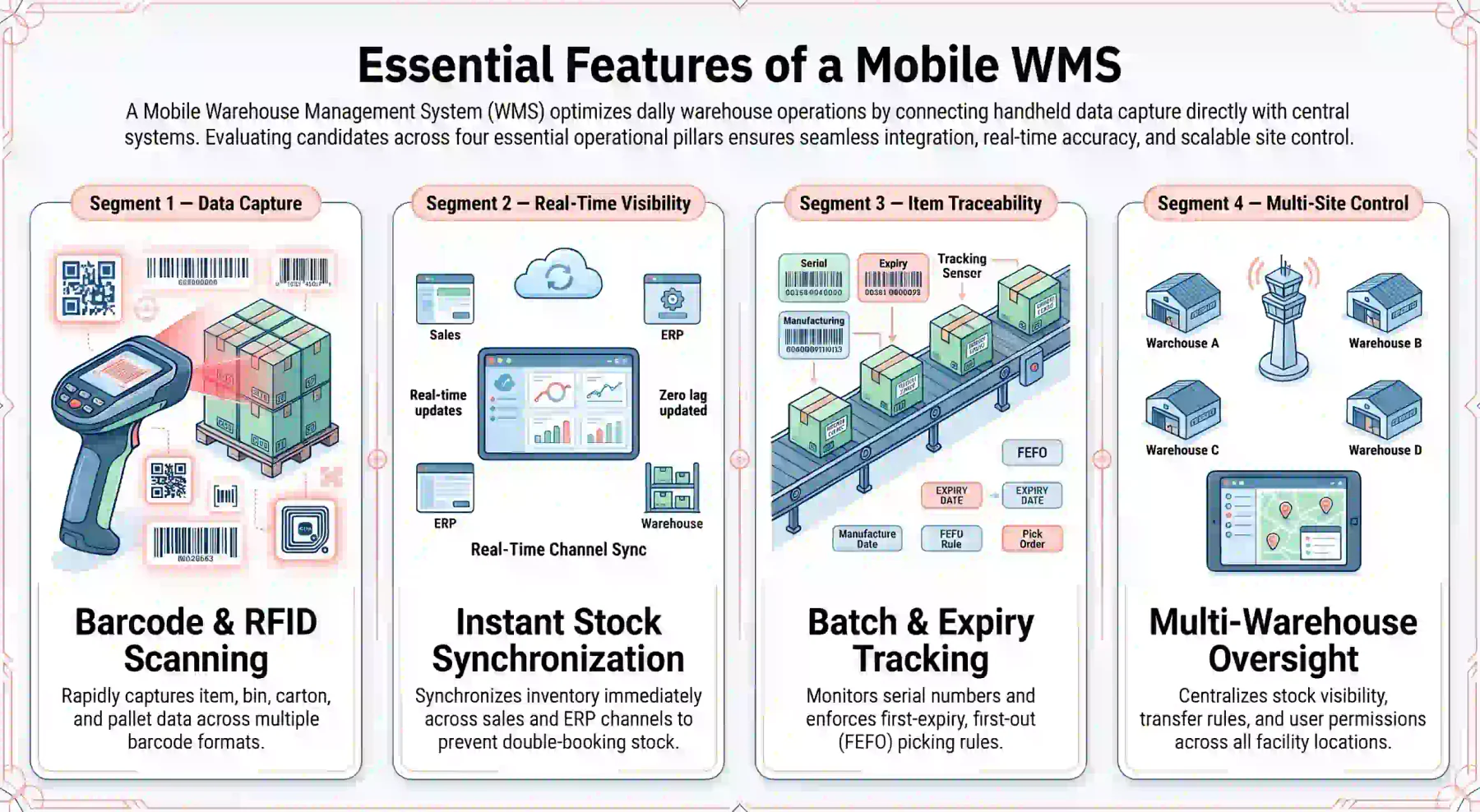
The right mobile WMS should support daily warehouse work without adding unnecessary complexity. Its features should match your products, storage methods, order volumes, and reporting needs.
Singapore businesses should also check whether the system can connect with their existing ERP, accounting, sales, and purchasing processes. This reduces duplicated records and gives each team a consistent view of inventory.
1. Barcode Scanning and Data Capture
Barcode scanning lets staff capture product, bin, carton, and pallet details quickly. The system should support the barcode formats used across your suppliers, warehouses, and sales channels.
Some businesses may also need mobile camera scanning, RFID readers, or label printing. The best option depends on scan volume, product size, warehouse conditions, and required reading distance.
2. Bin, Carton, Pallet, and Item Tracking
A mobile WMS should track stock at the level your warehouse requires. Some businesses need item level records, while others manage stock by carton, pallet, batch, or handling unit.
Clear location records help staff find stock faster and reduce unnecessary movements. They also support more accurate transfers between warehouses, outlets, and storage zones.
3. Real Time Inventory Synchronisation
Real time synchronisation updates inventory as staff complete warehouse transactions. This helps sales teams avoid promising stock that has already been picked, transferred, or allocated.
It also gives managers a more current view of available, reserved, damaged, and incoming stock. Businesses should check how often the system synchronises and what happens when connectivity is interrupted.
4. Batch, Serial Number, and Expiry Tracking
Batch and serial tracking helps businesses trace products from receiving to dispatch. This supports recall preparation, warranty records, quality checks, and customer service investigations.
Expiry tracking is especially useful for food, healthcare, and other products with limited shelf life. The system should support suitable picking rules, such as first expiry, first out, when required.
5. Multi Warehouse and Multi Location Support
Businesses with several warehouses need a shared view of stock across each site. A mobile WMS should show where stock is held, what is available, and which location can fulfil an order.
It should also support transfers, location restrictions, and user permissions. These controls help teams maintain consistent processes as the business expands.
6. Reporting and Warehouse Performance Monitoring
Reports should help managers review receiving times, picking progress, stock adjustments, and order fulfilment. Useful dashboards turn mobile transaction data into actions for supervisors and operations teams.
Look for filters by warehouse, user, product, date, order, and transaction type. These details make it easier to investigate delays, discrepancies, and repeated processing issues.
Handheld Warehouse Scanners vs Mobile WMS Apps
Businesses can run mobile WMS on dedicated scanners, smartphones, tablets, or combinations of these devices. The right choice depends on how often staff scan, where they work, and how durable the equipment must be.
| Device option | Best suited for | Main consideration |
|---|---|---|
| Dedicated handheld scanner | High volume receiving and picking | Durability and battery management |
| Rugged tablet | Supervisors and larger workflows | Screen size and mounting options |
| Smartphone | Smaller teams and occasional scanning | Camera performance and device protection |
| RFID reader | Fast scanning of tagged groups | Tag quality and system compatibility |
1. When to Use Dedicated Handheld Warehouse Scanners
Dedicated scanners suit warehouses where staff scan products throughout the day. They often include physical triggers, stronger housing, and scan engines designed for fast repeated use.
They can also work better in cold rooms, loading areas, and busy aisles. Before choosing a device, test its range, grip, battery life, screen visibility, and resistance to drops or dust.
2. When a Warehouse Mobile App Is the Better Option
A warehouse mobile app may suit small businesses, supervisors, or teams with lower scan volumes. Staff can use phones or tablets to receive stock, check quantities, and complete selected inventory tasks.
This option may reduce hardware requirements during an initial rollout. However, businesses should confirm that the camera, operating system, connectivity, and protective case can support daily warehouse use.
3. Combining Scanners, Phones, Tablets, and RFID
Some warehouses use different devices for different activities. Pickers may use scanners, supervisors may use tablets, and delivery teams may use phones for dispatch confirmation.
RFID can support faster identification when many tagged items must be read together. Businesses should compare the cost, label requirements, reading environment, and integration effort before selecting the technology.
4. Evaluating Durability, Connectivity, and Battery Life
Device performance affects warehouse productivity as much as software design. Test every device in the areas where staff will work, including racks, loading bays, freezers, and locations with weak signals.
Check whether the system can save transactions during short connection interruptions. A clear recovery process prevents duplicate entries when the device reconnects.
How to Choose Mobile WMS for Singapore Warehouses
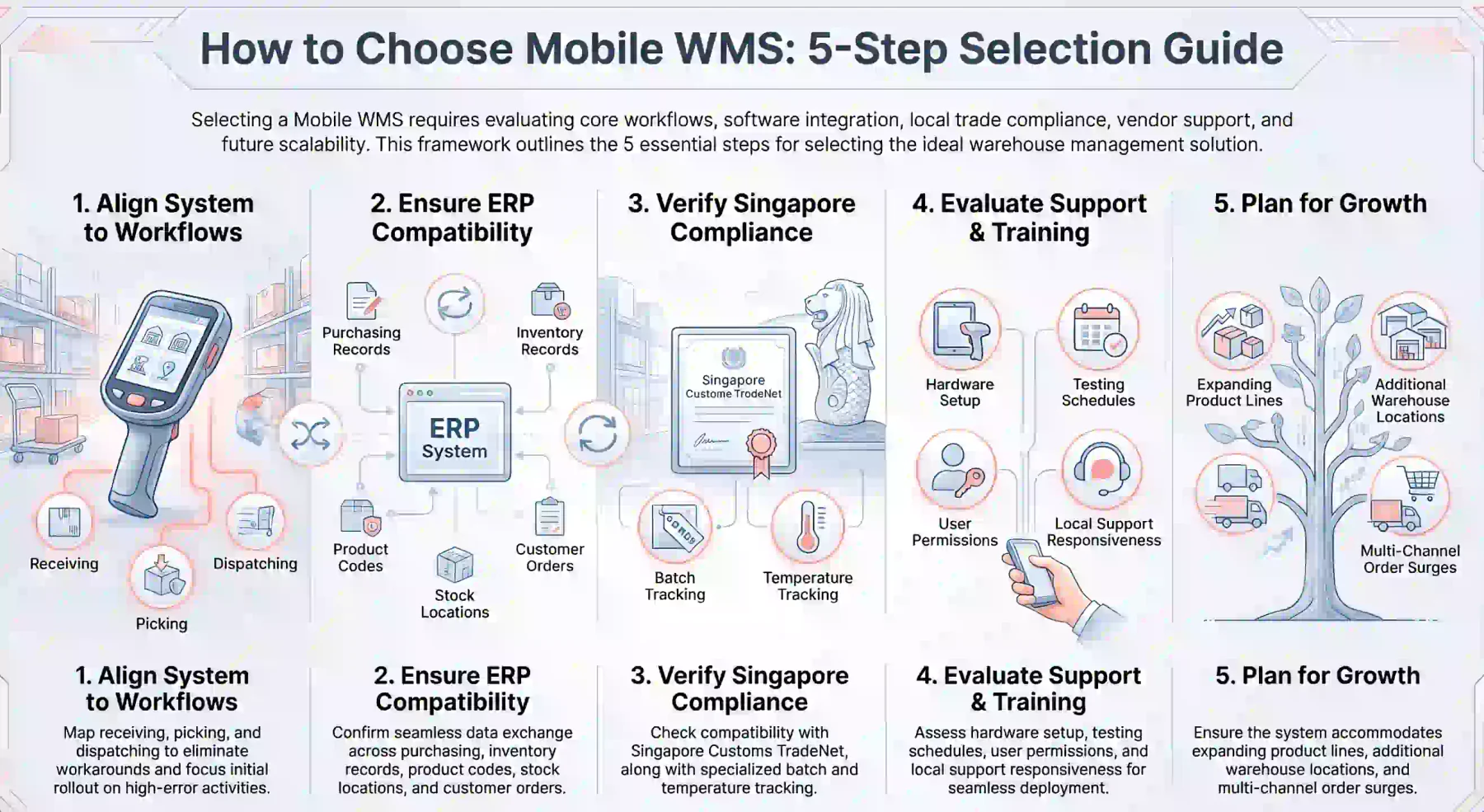
Choosing a mobile WMS requires more than comparing feature lists. Businesses should assess their current processes, product requirements, system connections, and future operating plans.
1. Match the System to Your Warehouse Workflows
Document how your team receives, stores, picks, packs, counts, transfers, and dispatches stock. The system should follow these workflows clearly instead of forcing staff to create workarounds.
Start with the activities that cause the most errors or delays. A focused rollout can help teams prove value before expanding the system to every warehouse process.
2. Check Compatibility with Existing ERP and Inventory Software
The mobile WMS should exchange accurate information with purchasing, sales, inventory, accounting, and delivery records. HashMicro’s warehouse management system connects these workflows so teams can confirm which data moves between systems and how often updates occur.
Ask vendors about product codes, customer orders, stock locations, units of measure, batch numbers, and adjustment approvals. Clear integration rules reduce reconciliation work after implementation.
3. Consider Singapore Compliance and Business Requirements
Warehouse systems should support the records your business needs for stock control, traceability, and trade operations. Importers and exporters can review Singapore Customs TradeNet information when checking related processes.
Food and healthcare businesses may also need stronger batch, expiry, temperature, or recall controls. These requirements should be included in the workflow review before a vendor is selected.
4. Compare Implementation, Training, and Support
Implementation includes device setup, data preparation, workflow configuration, testing, and staff training. A clear project plan helps warehouse teams understand what changes and when each process will go live.
Ask how the vendor handles support, updates, device replacement, and user permissions. Local support can also help teams respond faster when warehouse operations are affected.
5. Plan for Future Warehouse and Order Growth
The system should support more products, users, warehouses, and transactions as the business grows. Check whether new locations, devices, sales channels, and workflows can be added without replacing the platform.
Scalability also depends on reporting and integration capacity. Reviewing a digital warehouse approach can help clarify the system roadmap and confirm which capabilities are available today.
How Does Mobile WMS Connect with Purchasing, Sales, and Replenishment?
Mobile WMS becomes more useful when warehouse transactions connect with wider business processes. This creates a clearer link between what is ordered, what is received, what is available, and what customers can buy.
1. Connect Mobile Scanning with Purchasing and Sales Orders
Receiving teams can scan goods against purchase orders and record shortages or overages. Sales teams can then view more reliable stock information when preparing quotations and orders.
During fulfilment, the system can reserve stock and send picking instructions to the warehouse. This reduces the need for separate spreadsheets and manual messages between departments.
2. Automate Replenishment and Stock Alerts
Inventory software can compare available stock with reorder points, open orders, and expected deliveries. When stock reaches a defined threshold, the system can alert the responsible team.
Replenishment rules should reflect lead times, supplier schedules, demand patterns, and storage limits. This helps Singapore businesses avoid both stockouts and unnecessary excess inventory.
Common Mobile WMS Use Cases in Singapore
Mobile WMS can support different warehouse models across Singapore. The workflows may vary, but each use case depends on accurate scanning, location control, and timely inventory updates.
1. Retail and E Commerce Fulfilment
Retail and e commerce teams use mobile WMS to manage fast picking, packing, and dispatch. Barcode checks help reduce incorrect shipments when many orders are processed at once.
Integration with sales channels can also improve stock synchronisation. This helps reduce overselling when inventory is shared across stores and online platforms.
2. Food and Beverage Inventory Management
Food and beverage warehouses often need batch, expiry, and storage location controls. Mobile scanning helps staff record receipts, transfers, counts, and dispatches with less manual entry.
Teams can use the records to investigate stock differences and support product traceability. Businesses can also review relevant information from the Singapore Food Agency when designing storage processes.
3. Manufacturing Materials and Finished Goods
Manufacturers can use mobile WMS to track raw materials, components, work in progress, and finished goods. Scans can connect warehouse movements with production requirements and completed orders.
This helps production teams identify available materials before work begins. It also improves traceability when finished goods move into storage or dispatch.
4. Third Party Logistics and Distribution
Third party logistics providers need clear records for stock owned by different customers. Mobile WMS can separate inventory by client, warehouse, location, batch, and handling requirement.
Accurate scans also support billing records and service reporting. Supervisors can review activity by customer, order, user, or warehouse zone.
5. Pharmaceutical and Temperature Sensitive Stock
Pharmaceutical and temperature sensitive products require stronger traceability and controlled handling. Mobile WMS can record batches, expiry dates, locations, and authorised movements.
Additional sensors or connected systems may be needed for temperature monitoring. Businesses should confirm these requirements before selecting a standard warehouse workflow.
Pallet costs are easier to control when stock counts, locations and storage invoices stay connected. Hashy AI helps teams review those records and spot cost increases early.






Conclusion
Mobile WMS gives Singapore warehouses a practical way to connect staff, devices, stock, and business systems. By recording each movement at the point of work, it improves visibility and reduces avoidable errors.
The best system should match the warehouse workflow, support reliable scanning, and connect with purchasing, sales, and replenishment. A structured rollout helps businesses improve daily control while preparing for future growth.
To learn more about mobile WMS, book a free consultation with our experts today and gain advanced business insights.
Frequently Asked Questions
Mobile WMS runs on handheld scanners, rugged tablets, smartphones, and RFID devices. The right choice depends on scan volume, warehouse conditions, connectivity, and durability needs.
Some systems store approved transactions temporarily and sync them once the connection returns. Confirm how it prevents duplicate records and handles failed syncs before implementation.
Costs depend on users, devices, warehouses, integrations, and workflows. Request a quote based on your actual processes instead of comparing subscription prices alone.
Timelines depend on data quality, workflow complexity, device setup, and integrations. A smaller rollout can start with receiving, picking, and stock counts before expanding.
Many mobile WMS platforms connect with ERP and inventory systems through integrations or APIs. Confirm which records sync, how often they update, and which system is the source of truth.
A mobile WMS lets staff complete tasks on the floor using connected devices. A desktop WMS relies on fixed workstations, so staff often return to a desk to enter transactions.
Mobile WMS can suit small businesses when it matches their warehouse size, order volume, and budget. Starting with phones or tablets before adding dedicated scanners is a practical option.