








Are stock counts still forcing you to double-check, recount, and play it safe when ordering? Inventory tracking isn’t just what’s on the shelf, but it also covers what’s reserved, in transit, or already in customers’ hands.
Implementing advanced inventory tracking software is essential to overcoming these challenges. According to a survey, technology spending in Singapore is projected to rise by 4.6% in 2023, reaching US$16.7 billion.
With accurate tracking in place, you can cut stock discrepancies, speed up fulfilment, and keep inventory valuation easier to reconcile. The result is cleaner decisions and more reliable reporting.
Key Takeaways
Inventory tracking software boosts efficiency by automating stock monitoring, accurately tracking movement, and enabling smarter planning to cut costs.
Key aspects to monitor for inventory tracking include stock levels, stock locations, KPI, carrying costs, inventory turnover, and reorder levels.
An inventory system solution streamlines stock management through ERP integration by automating inventory control, order processing, and valuation.
What is Inventory Tracking Software?
Inventory tracking software is a smart digital tool that helps businesses keep accurate, real-time oversight of all their inventory, from raw materials to finished goods. It provides detailed visibility into stock quantities, item locations, and shipment progress through automated updates.
This technology helps me plan inventory more effectively by preventing excess stock and minimizing shortages. It also streamlines my operations by reducing manual tasks, lowering the risk of errors, and enabling faster, more strategic decisions that drive productivity and business growth.
What Are the Common Inventory Tracking Methods?

From my experience, the proper inventory tracking method can significantly improve efficiency. Knowing each option helps me choose the best fit for my business.
- Manual tracking: Uses spreadsheets or paper to record inventory movement. Simple, but slow and prone to errors.
- Barcode system: Products are tagged with barcodes and scanned during receiving, storage, and sales. Faster and more accurate than manual logs.
- RFID (Radio Frequency Identification): RFID tags transmit data automatically for real-time tracking without line-of-sight scanning. Best for large, high-volume operations.
- Perpetual inventory system: Stock levels update in real time whenever transactions happen. Often connected to ERP for cross-department visibility.
- Periodic inventory system: Inventory is updated through scheduled stock counts (monthly, quarterly, yearly). Easy to run, but not real-time, and more likely to create gaps.
Manual vs. Automated Tracking
| Aspect | Manual Tracking | Automated Tracking |
| How it’s recorded | Spreadsheets or paper logs | Inventory software (often a cloud-based inventory system) |
| Update speed | Depends on manual input | Real-time or near real-time updates |
| Accuracy | Higher risk of human error | More accurate with automated logging |
| Tracking locations | Hard to maintain consistently | Locations tracked systematically |
| Tracking movement | Easy to miss transfers and adjustments | Movement recorded per transaction |
| Time and effort | More manual work as volume grows | Less manual effort, faster workflows |
| Reporting | Basic, often manual | Detailed reports for planning and control |
| Scalability | Becomes harder to manage over time | Easier to scale across teams and sites |
The Challenges of Inventory Tracking

Inventory tracking is often more complex than it looks. Issues like human error, inaccurate data, and limited real-time visibility can disrupt daily operations and decision-making.
- Inaccurate data recording: Small entry mistakes can cause stock mismatches, delays, and wrong decisions.
- Lack of real-time visibility: Slow updates make it hard to see true stock levels, leading to overstock, stockouts, or missed sales.
- Inefficient manual processes: Spreadsheets and paper logs slow workflows and increase the chance of repeated errors.
- Difficulty in demand forecasting: Unreliable data turns forecasting into guesswork, which hurts cash flow and availability.
- Poor integration between systems: When inventory doesn’t sync with sales, purchasing, and accounting, teams work with conflicting numbers.
What are the Benefits of Inventory Tracking Software?
Inventory tracking software can change how a business runs day to day. It reduces manual work, improves accuracy, and gives you clearer stock visibility for better decisions. Reliable inventory management software improves business performance by updating stock records in real time and reducing costly discrepancies.
Here are the key benefits I’ve seen from using inventory tracking software:
- Real-time stock visibility: See stock levels across locations quickly, so you can prevent overstock and stockouts.
- Improved accuracy and efficiency: Automation reduces human error and speeds up routine inventory tasks.
- Better demand forecasting: Cleaner historical data helps you plan purchases, control storage costs, and keep the right stock available.
- Seamless system integration: Connects inventory with accounting, procurement, and sales so teams work from the same numbers.
- Enhanced decision-making: Real-time reports and analytics help you respond faster and improve performance over time.
How does Inventory Tracking Software Work?
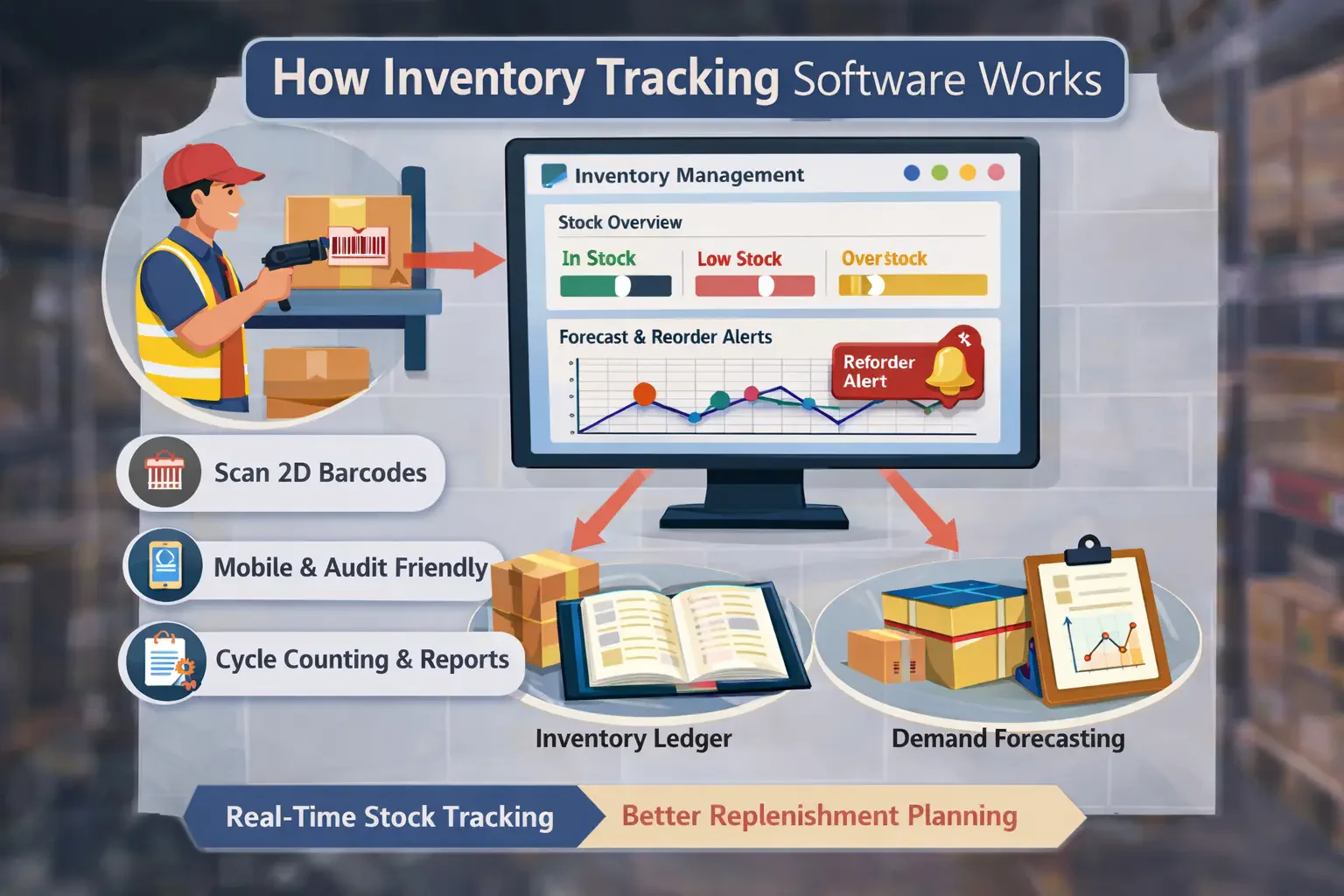
An inventory tracking system helps me monitor stock in a more structured way than manual methods. By scanning 2D barcodes during transactions, my team can quickly see what’s available, running low, or overstocked.
It also supports faster audits, mobile access, cycle counting, and more accurate reporting. Compared to spreadsheets or handwritten logs, it gives clearer visibility and tighter control over inventory.
With a built-in inventory ledger feature in the system, I can plan replenishment better and avoid stockouts or excess stock. Forecasting features also help spot demand patterns and time restocking more accurately.
What is Being Tracked by Inventory Tracking Software?
In my experience with inventory tracking, several key aspects must be closely monitored because they directly impact operational efficiency and overall business success. Here are some of the most important elements I always pay attention to:
1. Stock levels
Stock levels show how many units you have on hand at any moment. Keeping this updated helps you avoid stockouts or overbuying, and it becomes the baseline for other metrics like turnover and reorder planning.
2. Stock locations
Stock location tracking tells you exactly where items sit as they move through receiving, sorting, storage, and picking. It also helps flag slow-moving or aging stock early, so products don’t get lost in the warehouse.
3. Inventory accuracy / KPI
Inventory accuracy compares what the system says you have versus what’s physically available. Gaps usually come from miscounts, damage, supplier issues, or shrinkage, and this KPI helps you spot and fix the root cause before it disrupts operations.
4. Carrying costs
Carrying costs are the total expenses of holding inventory, including space, utilities, labour, insurance, and security. Tracking this keeps you aware of when inventory starts costing more than it’s worth, especially for slow-moving or obsolete items.
5. Inventory turnover
Inventory turnover shows how quickly stock is sold and replenished within a period. High turnover usually means healthier demand and leaner stock, while low turnover can signal overstock, weak sales, or purchasing that needs adjustment.
6. Reorder levels
Reorder levels set the point at which you should replenish stock to prevent shortages and keep operations running. When paired with more automated consumption tracking like backflushing, reorder timing becomes more consistent and easier to manage.
Read More: The Reasons Why You Should Choose Inventory Software
How Inventory Tracking Software Improves Inventory Control in Real Life
Inventory tracking software reduces stock guesswork by automating monitoring, order updates, and inventory valuation. When every movement is recorded as it happens, you get cleaner numbers and fewer fulfillment issues.
In real operations, the biggest wins come from visibility and fit. A good system scales across locations, matches your workflow, and keeps every team working from the same stock data.
For example, a Singapore-based FMCG distributor used HashMicro’s inventory system to track stock movement across warehouses. The team got clearer location-level stock visibility and more accurate replenishment, reducing discrepancies and improving fulfilment.
"By integrating advanced automation and analytics, inventory tracking software transforms raw stock data into strategic business intelligence. It’s one of the simplest investments that directly improves ROI and customer satisfaction."
Conclusion
Inventory tracking software improves stock accuracy and visibility, helping teams reduce discrepancies and manage inventory with more confidence.
With real-time data, businesses can prevent stockouts, avoid overbuying, and keep fulfilment and reporting more consistent.
If you want to assess what fits your workflow, a short consultation can help identify gaps and the features you actually need.
Frequently Asked Questions
-
-
FAQ
Yes, Excel can be a useful tool for inventory management, especially for small businesses with relatively simple needs. It offers a cost-effective and accessible way to track inventory levels, monitor sales and purchases, and generate basic reports.
The most barebones method of tracking inventory is to set up a manual inventory or sales ledger. You can do this with most accounting software, a spreadsheet, or even a physical notebook. Any time you make a sale or a purchase, record it in the ledger.
You can keep track of inventory supplies by using inventory management software or systems. These systems enable you to monitor stock levels in real-time, set up automatic reorder points, and receive alerts when supplies are low.
-