







ERP, CRM, warehouse, and e-commerce systems often store the same business information in different ways. Connecting them becomes harder when each system also uses its own protocol and rules.
An enterprise service bus (ESB) gives these systems a shared route for exchanging information. It can direct messages, translate data, coordinate actions, and track failures.
This article explains what an ESB does, how its architecture works, where businesses use it, and how it compares with other integration approaches.
Key Takeaways
An enterprise service bus gives applications a shared route for exchanging data and coordinating work.
ESB architecture uses adapters, routing rules, transformation, and monitoring to connect systems with different requirements.
A connected order can move between e-commerce, ERP, WMS, finance, and customer service without separate links between every system.
An ESB is useful for complex or older systems, but it needs clear ownership, recovery rules, and capacity planning.

What Is an Enterprise Service Bus?
An ESB is an integration pattern that lets applications exchange information through a shared layer. Each application connects to the ESB, which manages communication with other connected systems.
It can route a message, change its format, convert its protocol, check access, or coordinate several actions. These functions make an ESB a type of middleware.
For example, an online store may send an order as JSON through a REST API, while its ERP system accepts XML through SOAP. The ESB can translate the order before delivering it.
ESBs are also associated with service-oriented architecture (SOA), which makes business functions available as reusable services. IBM explains these functions in its enterprise service bus overview.
How Does Enterprise Service Bus Architecture Work?
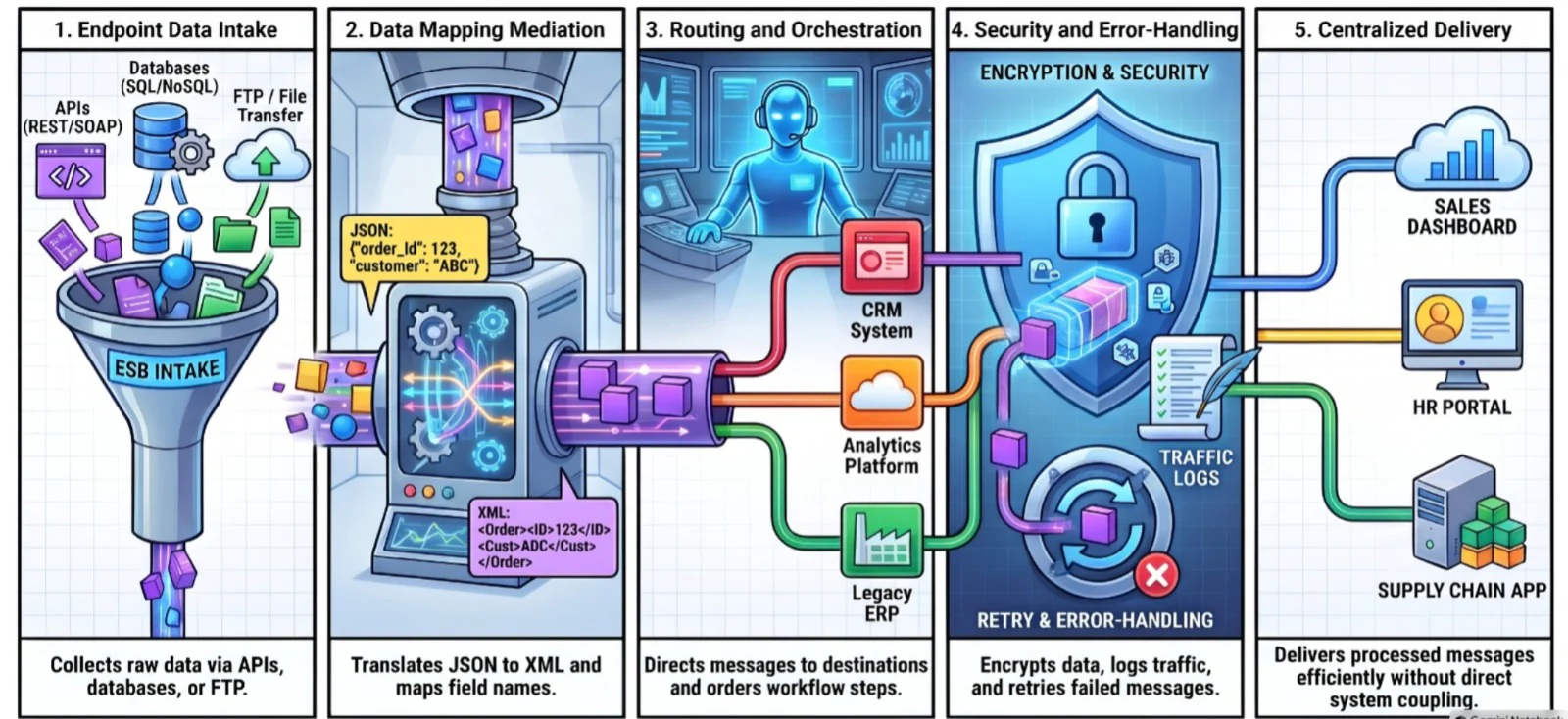
An ESB sits between connected applications. Its adapters receive messages, while routing, transformation, security, and monitoring rules determine what happens next.
1. Endpoints and Adapters
An endpoint is where a system sends or receives information. It may connect to an ERP, CRM, WMS, database, web service, message queue, or external partner.
Adapters handle the connection. One might collect a file from an older warehouse system through FTP, while another exchanges data with a cloud CRM through a REST API.
Depending on the systems involved, the ESB may handle JSON, XML, EDI, SOAP, HTTP, database records, or queued messages.
2. Message Routing and Orchestration
Routing rules decide where a message goes. They may use its type, customer, location, product, or transaction status to select one or several destinations.
Orchestration puts actions in the required order. An ESB can wait for ERP approval before asking the warehouse to fulfil an order, then send a finance update after confirmation.
If stock is unavailable, the process can stop and send an exception to sales. Routing may be direct, conditional, content-based, or sent to multiple systems at once.
3. Data Transformation and Protocol Mediation
Two systems may describe the same customer differently. One might label the field “customer ID” and another “account number”; dates, tax fields, and product codes may differ too.
The ESB maps those fields into a format the receiving system accepts. It can also validate required data, remove unused fields, or combine information from several sources.
Protocol mediation deals with how systems communicate. For instance, an ESB can receive a REST request and pass the relevant information to a legacy SOAP service.
4. Security, Monitoring, and Error Handling
Common controls can cover authentication, access rights, encryption, message validation, and audit logs. The exact controls depend on the ESB and its deployment.
Monitoring shows whether messages arrived, failed, or are waiting in a queue. If the ERP is temporarily offline, the ESB may retry later or send the message for review.
5. Centralised Communication Between Business Systems
Shared integration rules reduce the need to maintain the same logic in many direct connections. They also give teams one place to review traffic and failures.
That shared layer needs enough capacity and a recovery plan. An overloaded or unavailable ESB can delay several connected processes, so redundancy and monitoring matter.
What Is an Enterprise Service Bus Used For?
An ESB suits processes where several systems need the same information or must act in sequence. Typical uses include:
- Application connections: Linking ERP, CRM, WMS, finance, and e-commerce systems.
- Data synchronisation: Sharing customer, product, order, and inventory updates.
- Legacy access: Making older systems available to newer applications.
- Partner exchange: Handling supplier, logistics, marketplace, or payment data.
Some exchanges need an immediate answer, such as an inventory check. Others can run later through a queue, such as a shipment status update.
ESBs are most relevant when these connections involve older applications, mixed cloud and on-premise systems, or rules that several teams must manage together.
Enterprise Service Bus Integration: Common Business Use Cases
The value of an ESB becomes clearer in everyday workflows. These examples show where shared routing and data rules can reduce repeated work.
1. Synchronising Customer and Order Data
Orders in multi-channel sales may enter through an online store, POS, marketplace, sales team, or CRM. Each channel can use different customer and product identifiers.
An ESB can standardise those records, send customer details to the CRM, and pass order details to the ERP and warehouse. This limits manual entry and mismatched records.
2. Connecting ERP, CRM, and Warehouse Systems
CRM holds sales and customer activity, ERP manages operational and financial records, and WMS tracks warehouse tasks. An order often needs information from all three.
Through an ESB, ERP approval can trigger a warehouse request. Dispatch details can then return to the CRM, giving the sales team a current order status.
3. Modernising Legacy Applications
An older system may still hold data the business needs. Adapters let newer applications exchange information with it while replacement work continues.
This supports gradual modernisation, but the connection does not remove the older system’s security, performance, or data-quality limits.
4. Supporting Multi-Department Workflows
A purchase request may pass through management approval, procurement, inventory, and finance. An ESB can move the approved information between their systems.
Each team receives the details it needs without copying the full request into another application.
5. Integrating External Partners and Services
Suppliers, banks, marketplaces, payment services, government platforms, and logistics providers may all send data in different formats.
An ESB can validate an incoming update and translate it for internal systems. A delivery status, for example, can reach the ERP, CRM, and customer notification service.
ESB vs iPaaS vs API Gateway: What Is the Difference?
ESB, iPaaS, API gateways, and direct connections solve different parts of an integration problem. The table covers the closest comparison: ESB and iPaaS.
1. ESB vs iPaaS
An ESB is commonly run as a dedicated integration environment, including on-premise or hybrid deployments. An iPaaS is generally cloud-based and provider-managed.
| Area | ESB | iPaaS |
|---|---|---|
| Deployment | On-premise, private cloud, or hybrid | Primarily cloud-based |
| Infrastructure | Managed by the business or partner | Managed by the provider |
| Connections | May need custom adapters | Often has ready-made connectors |
| Typical fit | Complex and legacy systems | Cloud and SaaS connections |
Neither label alone decides the better fit. The choice depends on existing systems, security needs, available skills, and the amount of control required.
2. ESB vs API Gateway
An API gateway controls access to APIs. It commonly handles authentication, traffic limits, and request routing for applications that consume those APIs.
An ESB can also route requests, but its wider role includes connecting different applications, translating messages, and coordinating workflows.
Both can be used together. Microsoft’s enterprise integration reference architecture shows API management alongside workflow and back-end integration components.
3. ESB vs Point-to-Point Integration
A direct connection can be enough for two systems with a stable, simple exchange. It is quick to understand and has little shared infrastructure.
As connections multiply, each one may need separate security, field mapping, monitoring, and recovery rules. An ESB can move those common tasks into a shared layer.
4. How ESB, iPaaS, and API Gateway Can Work Together
A business might place an API gateway in front of external APIs, use an ESB for ERP and legacy systems, and use iPaaS for cloud applications such as cloud ERP.
Event buses can carry asynchronous updates, while data integration tools prepare information for reporting. The process determines which tool belongs where.
What Are the Benefits and Limitations of an Enterprise Service Bus?
An ESB can simplify a busy integration environment, provided its shared services have clear ownership and enough capacity.
Benefits
- Fewer direct dependencies: applications connect to the ESB instead of to each other.
- Reusable mappings: field mappings and rules can be reused across integrations.
- Consistent security rules: access and validation are applied in one shared layer.
- Better message visibility: teams can see what was sent, delayed, or failed.
- Support for older systems: adapters connect legacy applications with newer ones.
Limitations
- Specialist maintenance: the shared layer needs skills and ongoing ownership.
- Change bottlenecks: delays can build up when one team controls every change.
- Wider disruption: if the shared layer fails, several connected processes can be affected.
Changes to a shared service can also affect several applications. Testing, versioning, documentation, and recovery procedures therefore remain part of the work.
AWS discusses complexity and bottlenecks in its guide to enterprise service bus architecture. Some newer workloads may fit APIs, iPaaS, or event-based integration better.
"When several systems depend on the same integration, the routing rules matter as much as the connection itself. Teams need to know where an update goes and what happens if it fails."
Enterprise Service Bus Example: Connecting ERP, CRM, and Warehouse Systems
Consider an online order that must reach sales, operations, warehouse, and finance. The ESB carries updates between them as each part of the order progresses.
1. Customer Order Entry in CRM or E-Commerce
The online store or CRM sends the order to the ESB. Before passing it on, the ESB checks required fields and maps product codes to those used internally.
2. Order Validation and Processing in ERP
The ERP checks pricing, customer status, tax details, payment status, and stock availability. A valid order becomes a sales order.
If a check fails, the ESB routes the exception to the team responsible for correcting it.
3. Inventory and Fulfilment Updates in WMS
After ERP confirmation, the ESB sends a fulfilment request to the WMS. The warehouse records picking, packing, and dispatch before returning shipment details.
The ESB then passes the resulting inventory changes back to the ERP, so stock records reflect what left the warehouse.
4. Finance, Invoicing, and Payment Updates
The ERP or finance system generates the invoice and records payment status. The ESB passes relevant updates to the CRM and online store.
5. Delivery Notification and Error Handling
A logistics update can carry the tracking number to customer service and the notification system. If a destination is offline, the ESB can queue a retry.
Repeated failures move to an exception queue for investigation. The full route is: e-commerce or CRM → ESB → ERP → WMS → finance → customer update.
How to Implement an Enterprise Service Bus
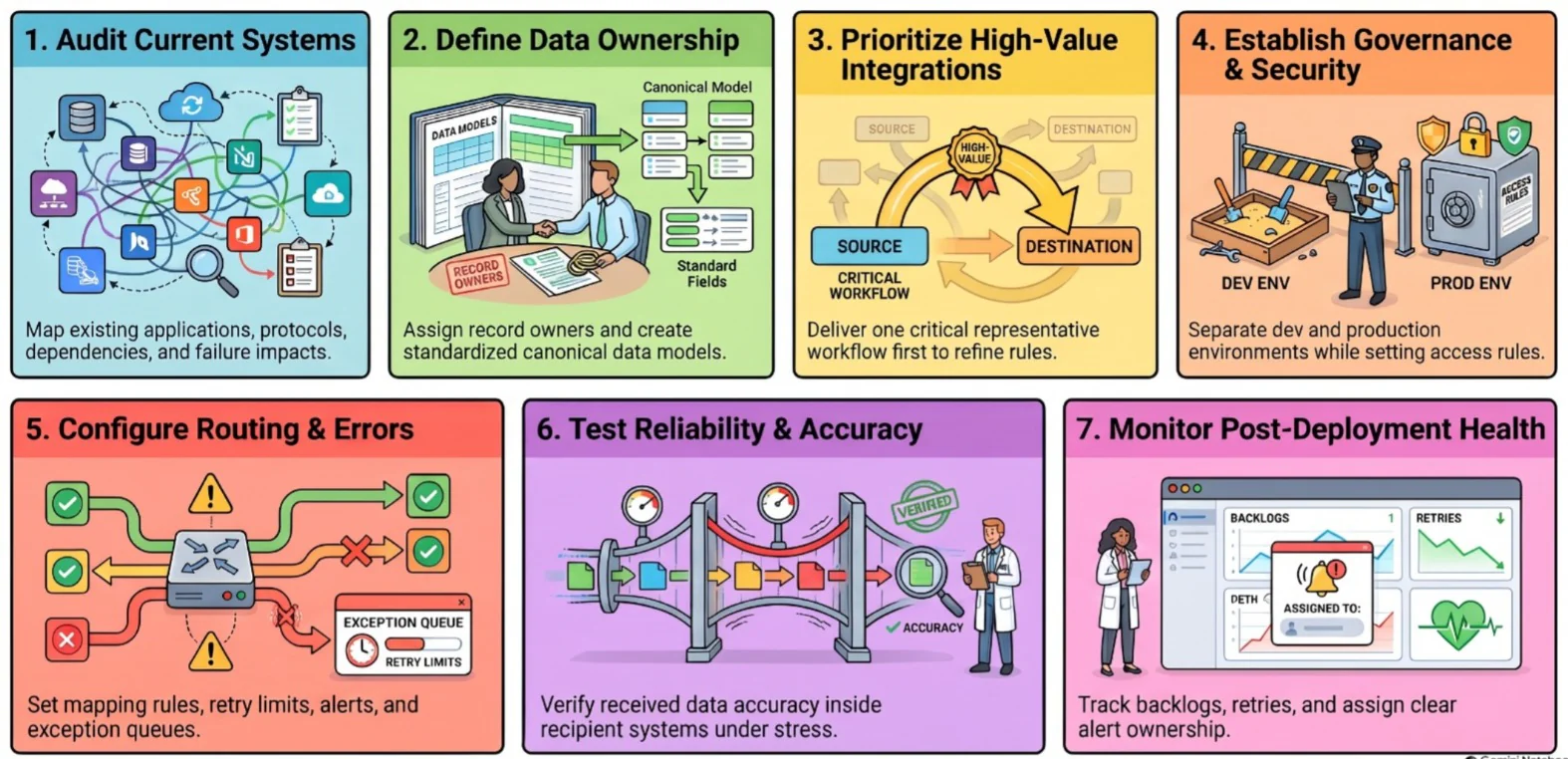
Start with the exchanges the business already depends on. Their owners, data rules, and failure points will shape the ESB design. Many of these steps also apply to an ERP implementation, where data ownership and testing carry the same weight.
1. Audit Current Systems and Integration Dependencies
List applications, databases, current links, data formats, protocols, manual handovers, recurring errors, and critical workflows.
For each connection, record who owns it and what happens when it stops working. This reveals the integrations that need attention first.
2. Define Data Ownership and Canonical Data Models
Agree which system owns each record. ERP may own financial transactions, CRM may own customer interactions, and WMS may own warehouse task status.
A canonical data model, a common format for shared records such as orders or products, can standardise frequent exchanges. It reduces repeated field mapping, though some systems will still need exceptions.
3. Prioritise High-Value Integrations
Rank connections by business impact, failure risk, transaction volume, and effort. Order processing, stock updates, payments, and purchasing are common starting points.
Deliver one representative workflow first, then use its results to refine the rules before connecting more systems.
4. Establish Security, Governance, and Access Controls
Define who can create, change, approve, and monitor integrations. Cover authentication, access rights, encryption, credentials, retention, audit logs, and partner access.
Keep development and production access separate so testing changes do not interrupt live exchanges.
5. Configure Routing, Transformation, and Error Handling
Document each destination, field mapping, and validation rule. Decide what happens when data is missing, a message is duplicated, or another system responds late.
Set retry limits, alerts, exception queues, and manual recovery responsibilities before the integration goes live.
6. Test Performance, Reliability, and Data Accuracy
Test ordinary transactions alongside invalid records, duplicate messages, downtime, high volume, and slow responses.
Check the result inside the receiving system, not just whether a message arrived. A delivered order with the wrong customer or tax code is still a failed integration.
7. Monitor Integration Health After Deployment
Track failures, retries, queue backlogs, processing time, duplicates, and completed business processes after deployment.
Give each alert an owner. A warning only helps when someone knows how to investigate and recover the affected transaction.
How Does ESB Fit Into an Enterprise Integration Strategy?
An ESB can serve the systems that need shared routing and transformation, especially where ERP software and legacy applications remain important.
Other needs may call for API management, iPaaS, event messaging, workflow automation, or data tools for reporting. One business can use several of these approaches.
Choose based on the workload and its owner. Document the decision, keep security and monitoring standards consistent, and review older dependencies as systems change.
Conclusion
An enterprise service bus helps applications exchange information through shared routing, transformation, and monitoring. It is useful when many systems depend on the same business data.
Its benefits depend on sound data ownership, reliable recovery, and careful management of the shared layer. Simpler or cloud-based connections may call for another approach.
Businesses reviewing how ERP connects with their other systems can book a free consultation to discuss their integration needs.

Frequently Asked Questions
An enterprise service bus is a shared integration layer that helps applications exchange data. It can route messages, change formats, coordinate actions, and monitor delivery.
Businesses use an ESB to connect systems such as ERP, CRM, WMS, e-commerce, finance, and older applications. It helps them share records and coordinate workflows.
An online store sends an order to an ESB. The ESB checks and translates it, then sends updates to ERP, warehouse, finance, CRM, and notification systems.
An ESB is often a dedicated integration environment suited to complex or older systems. An iPaaS is generally cloud-based and commonly includes managed infrastructure and ready-made connectors.
An API gateway manages access and traffic for APIs. An ESB has a wider integration role that can include message translation, protocol conversion, and workflow coordination.
Yes, especially where cloud applications must connect with older or on-premise systems. Some cloud workloads may be simpler to handle through iPaaS, APIs, or event messaging.
An ESB is a type of middleware. Middleware covers many ways to connect applications; an ESB focuses on shared enterprise integration rules and message flow.