











 Limited to 100 registrants


A warehouse management system (WMS) can improve stock visibility and make daily warehouse work more consistent. Its success, however, depends on how well the rollout reflects what staff do at the receiving dock, on the shelves, and at dispatch.
These nine WMS implementation steps take a team from process planning to go-live and ongoing improvement. Each phase has a clear outcome to check before the next begins.
Key Takeaways
A WMS rollout begins with clear goals, accurate stock data, and defined responsibilities. See what implementation should achieve.
The nine implementation phases take a warehouse from process mapping through testing, go-live, and improvement. See the nine phases.
A deployment checklist helps the team confirm readiness with evidence before launch. See the checklist.
What is a Warehouse Management System?

A warehouse management system is software that records and guides the movement of goods within a warehouse. It supports receiving, putaway, replenishment, picking, packing, dispatch, returns, and stock counts.
A WMS connects each movement to details such as the product, quantity, location, and stock status. Depending on the operation, it may also track batches, serial numbers, or expiry dates.
It can share information with purchasing, sales, inventory, and accounting systems. This helps teams work from consistent records as goods move through the business.
What Should a WMS Implementation Achieve?
A successful implementation helps staff receive goods into the right location, find available stock, and fulfil orders accurately. Supervisors should also be able to investigate discrepancies without relying on guesswork.
Choose measures that reflect the problems you want to solve, such as inventory accuracy, receiving time, pick accuracy, and order cycle time. Record the current results so you can compare them with performance after launch.
Define the first rollout’s boundaries. For example, a Singapore distributor might start with receiving and outbound fulfilment at its main warehouse, then add returns or other sites once those workflows are stable.
The Nine WMS Implementation Phases
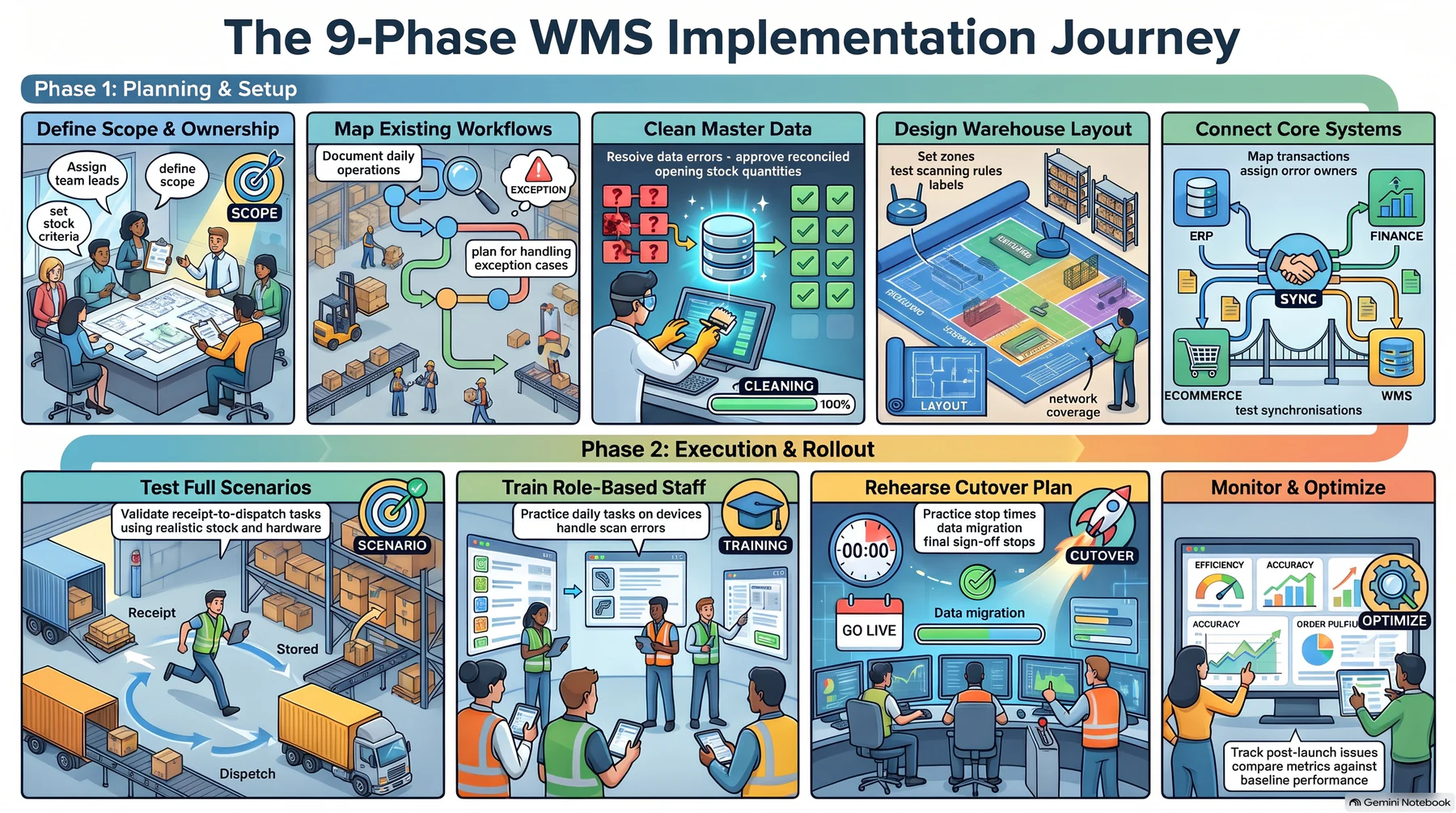
The WMS implementation process moves through planning, preparation, testing, launch, and improvement. Give each phase an owner and a result the team can review.
1. Define Scope, Ownership and Success Criteria
Specify the warehouse, products, users, and workflows included in the first release. Name owners for operations, data, integrations, training, and cutover, then agree on measurable launch criteria such as an acceptable stock reconciliation result.
2. Map How Work Happens Today
Follow goods from arrival to dispatch and document each handoff. Include exceptions such as short deliveries, damaged stock, partial picks, and returns, then decide how the proposed WMS workflow should handle them.
3. Clean Product, Location and Stock Data
Check product codes, units of measure, barcodes, pack sizes, locations, and opening quantities. Resolve duplicates and conversion errors, then have an inventory owner approve the reconciled stock figures before import.
4. Design the Warehouse Setup and Scanning Rules
Set up zones, aisles, racks, bins, and staging areas to match the physical site. Test movement rules, labels, scanners, printers, and network coverage where staff will use them; GS1 Singapore’s guidance can help teams assess product, location, and logistics-unit identifiers.
5. Connect Purchasing, Sales and Other Systems
Map the transactions that pass between the WMS and other systems, including expected receipts from purchasing and fulfilment work from sales. Define the required fields and an error owner for each connection, then test changes, cancellations, partial transactions, and failed synchronisation.
6. Test Complete Warehouse Scenarios
Test full tasks, from an expected delivery through putaway and from an order through dispatch. Have warehouse staff test realistic stock, devices, permissions, and exceptions, and resolve critical defects before they sign off.
7. Train Staff by Role
Train receivers, pickers, packers, supervisors, and administrators on the tasks they will perform. Practice with the planned devices and labels, including what to do when a scan fails or physical stock differs from the system record.
8. Rehearse the Cutover and Go Live
Document when the old process stops, when final stock is counted, who imports and reconciles opening data, and who approves the first live transaction. Rehearse the sequence and agree on a response if a critical step fails; Microsoft’s go-live checklist covers testing, migration, training, support, and sign-off.
9. Monitor the Rollout and Improve
During the first operating days, track failed scans, stuck orders, stock differences, and integration errors. Give each issue an owner, compare performance with the original baseline, and use what you learn to plan the next rollout phase.
WMS Deployment Checklist
A WMS implementation requires preparation at every stage to ensure the system is ready for daily warehouse operations. Use the following checklist to keep track of important tasks before configuration, before launch, and during go-live.
Stage | Checklist |
|---|---|
Before Configuration | - Define the project scope and responsibilities. - Document warehouse workflows. - Check inventory data, barcodes, and storage locations. |
Before Launch | - Test scanners, printers, and system integrations. - Train warehouse staff. - Fix critical issues and get approval from process owners. |
At Go-Live | - Follow the launch plan. - Verify inventory records. - Ensure support is available for every shift. - Record completed checks and approvals. |
Completing these checks helps ensure that the WMS is ready for daily operations and that warehouse staff can use it with confidence. Keep the checklist as a reference during implementation to track progress, identify remaining issues, and support a smoother go-live.
Common WMS Implementation Mistakes
Importing unverified stock can create discrepancies on day one. Reconcile opening quantities and correct product or unit-of-measure errors before moving data into the WMS.
Designing workflows without warehouse staff can miss the exceptions they handle every shift. Involve them in process mapping and let them test realistic receiving, picking, and dispatch tasks.
Testing only ideal orders or launching without a cutover owner leaves gaps when something fails. Test exceptions, assign responsibility for each decision, and make clear which process controls stock during the transition.
A Practical Path to a Dependable WMS
Treat the rollout as a series of decisions rather than a single launch date. First, confirm that the scope, workflows, and data are ready for configuration.
Next, require evidence that the configured system works with real devices, users, and connected processes. Complete tests should show what happens when transactions follow the normal path and when they do not.
Finally, approve launch after training, stock reconciliation, and a cutover rehearsal. If you are evaluating software alongside the rollout plan, review how HashMicro Warehouse Management supports your required workflows and connections.
Conclusion
A dependable WMS rollout starts with a clear understanding of warehouse work. Accurate data and practical rules give staff a stronger foundation for receiving, locating, and moving stock. Testing and training show whether those rules work in daily conditions.
A rehearsed cutover helps the team make a go-live decision based on evidence.With the right implementation approach, a WMS can improve inventory accuracy, streamline daily activities, and support long-term business growth.
Consult with our experts for free to discover how HashMicro's Warehouse Management System can help optimise your warehouse operations.
FAQ
There is no reliable fixed duration without knowing the number of sites, workflows, integrations, and records involved. Set the schedule after process and data assessment, with time for testing, training, and cutover rehearsal.
A phased rollout can be easier to manage when sites differ in workflow or data quality. A simultaneous launch may suit closely linked sites if each has completed testing and the team can clearly control stock during the transition.
Prepare product identifiers, units of measure, locations, barcodes where used, and reconciled opening quantities. Include pack sizes, batches, serial numbers, and expiry dates when those details are tracked.
The team monitors transactions, stock accuracy, device issues, and integration failures while supporting users across shifts. It then compares results with the baseline and adjusts workflows before extending the rollout.