







Finance, inventory, CRM, e-commerce, HR, and reporting systems rarely speak the same language. When each one holds its own version of the truth, the integration decision stops being an IT question and becomes a question of whether anyone can trust the numbers.
An iPaaS, or integration platform as a service, connects cloud applications, on-premise systems, APIs, databases, and legacy platforms through managed connectors, mappings, workflows, and monitoring. Therefore, it gives a business one place to see where a transaction stopped and who needs to act.
This guide suits enterprise decision-makers rather than first-time technology buyers. It does not rank vendors. Instead, it shows how to assess iPaaS against your process criticality, system landscape, data ownership, security model, internal skills, and growth plans.
Singapore businesses often coordinate several entities, regional applications, multiple currencies, shared master data, and different operating calendars. Those requirements should shape the integration design from the start rather than surface during a pilot.
Key Takeaways
iPaaS connects cloud, on-premise, and legacy systems through managed connectors, data mappings, workflows, monitoring, and exception controls.
The most useful evaluation criteria connect technical capabilities to business controls, including data ownership, audit trails, error handling, security, and change management.
A practical iPaaS decision starts with process criticality, system complexity, data quality, integration frequency, internal expertise, and expected growth rather than a vendor ranking.
A phased pilot should measure baseline conditions, test exception paths, assign governance responsibilities, and expand only after operational controls are proven.
How iPaaS Works Across Enterprise Systems
"Our first integration worked perfectly and still caused a problem, because nobody had agreed which system owned the customer record. Once we mapped the source of truth and gave every error queue a named owner, the platform stopped being a black box and started being something finance could actually audit."
iPaaS coordinates data flows between applications using connectors, mappings, workflows, monitoring, and controls. In a typical order flow, the platform receives an e-commerce order, validates it, reshapes it into the ERP format, checks it against inventory rules, then passes it to fulfilment and finance.
The exception path matters more than the happy path. For example, if the warehouse API goes down, the transaction should land in a visible error queue rather than disappear quietly.
The table below sets out the five stages of an enterprise integration platform, with the owner and control point for each. Treat it as an educational model rather than a description of any specific deployment.
| Stage | What happens | Business owner | Control point | Exception path |
|---|---|---|---|---|
| 1. Source capture | ERP, CRM, e-commerce, warehouse, HR, database, or legacy system emits a record through an API, file, event, or schedule. | Process owner | Confirm the source of truth and required fields. | Reject incomplete or unauthorised records. |
| 2. Connectivity | A managed connector authenticates to the source and destination. | IT Manager | Review credentials, permissions, and connection health. | Alert on authentication or network failure. |
| 3. Mapping and transformation | Fields, currencies, units, codes, and entity identifiers are translated into the destination model. | Data owner and application owner | Validate master-data mappings and transformation rules. | Place mismatched records in an error queue. |
| 4. Orchestration | The platform applies sequence, conditions, schedules, retries, and hand-offs across systems. | Operations owner | Check process timing, duplicate prevention, and dependency rules. | Pause, replay, or route a transaction for human review. |
| 5. Destination and monitoring | The validated transaction is written to the destination and recorded in logs and dashboards. | Finance, operations, or HR owner | Reconcile totals and retain an audit trail. | Escalate unresolved exceptions to the assigned support team. |
In practical terms, iPaaS architecture combines several capabilities:
- Connectors and APIs: Pre-built or configurable connections to ERP, CRM, payroll, warehouse, banking, commerce, and reporting applications.
- Data mapping and transformation: Rules for changing field names, formats, units, currencies, tax codes, entity identifiers, and date conventions.
- Workflow orchestration: Sequences that determine what happens when an event occurs, when a schedule runs, or when a downstream system responds.
- Error handling: Retry logic, dead-letter or error queues, replay controls, duplicate detection, and human approval where automation should stop.
- Monitoring and audit trails: Status dashboards, alerts, transaction logs, change history, and evidence of who reviewed an exception.
Moving data is not the same as managing a process. An integration may deliver a sales order into the ERP faithfully, yet it still cannot decide whether the credit approval, inventory allocation, pricing authority, or revenue recognition rules suit the business.
Those decisions stay with business owners and documented controls. For businesses reviewing ERP options, therefore, the real question is how process ownership inside the ERP will work alongside integration monitoring outside it.
Which Enterprise Processes Can iPaaS Support?
The strongest use cases are recurring, cross-system processes where timing, data consistency, and exception visibility all matter. However, not every process needs a platform, since a stable file exchange or a small interface that rarely changes may do the job at lower cost.
The table below helps teams spot opportunities by system, data object, owner, and control point.
| Process | Connected systems and data | Process owner | Validation and control point | Likely exception |
|---|---|---|---|---|
| Order-to-cash | E-commerce or CRM orders, customer records, pricing, inventory availability, invoices, shipment status, and payment updates between commerce, ERP, warehouse, and finance. | Sales operations and finance | Confirm customer, price list, stock status, tax treatment, entity, and payment terms before posting. | Order arrives before inventory is updated, or customer and product codes do not match. |
| Procure-to-pay | Purchase requisitions, supplier records, purchase orders, receipts, invoices, and approval status between procurement, ERP, warehouse, and accounts payable. | Procurement and finance | Match supplier, approved budget, purchase order, receipt, and invoice references. | Invoice quantity or price differs from the receipt, creating a manual review. |
| Inventory synchronisation | Item master, units of measure, stock balances, reservations, transfers, and fulfilment events between ERP, warehouse, retail, and e-commerce systems. | Supply chain and operations | Apply item, location, batch, serial, and unit mappings; reconcile balance changes. | An order is accepted online while a warehouse adjustment is still pending. |
| Finance consolidation | Journals, invoices, intercompany entries, currency amounts, entity codes, and close status from subsidiary ERPs and finance tools into a consolidation or reporting layer. | Group finance | Validate chart-of-accounts mapping, entity ownership, currency conversion rules, and period status. | One entity uses a different account or closing calendar, delaying consolidation. |
| Employee data exchange | Employee master data, department, position, join date, leave status, and payroll-related changes between HR, payroll, time attendance, ERP, and access systems. | HR and payroll | Restrict fields by role, verify effective dates, and maintain an authorised source of truth. | HR and payroll hold different bank, department, or employment-status values. |
| Management reporting | Operational transactions, budgets, sales pipelines, inventory, workforce, and finance measures from ERP, CRM, HR, and data-visualisation tools. | CFO, COO, or business intelligence owner | Define metric ownership, refresh timing, reconciliation rules, and drill-down evidence. | A dashboard refreshes successfully but uses stale or differently defined measures. |
A Singapore company with regional entities may also need entity-level reporting, several currencies, shared customer and product masters, and different working calendars. Those sit in the design brief rather than in a compliance checklist.
Start by documenting which system owns each object and who approves changes to it. That discipline usually matters far more than the length of a vendor's connector list.
Mapping how stock, purchasing, and fulfilment data should move is the practical first move. Our guide to supply chain management covers the activities that these integrations usually touch first.
Which iPaaS Capabilities Should You Evaluate?
A sound eval
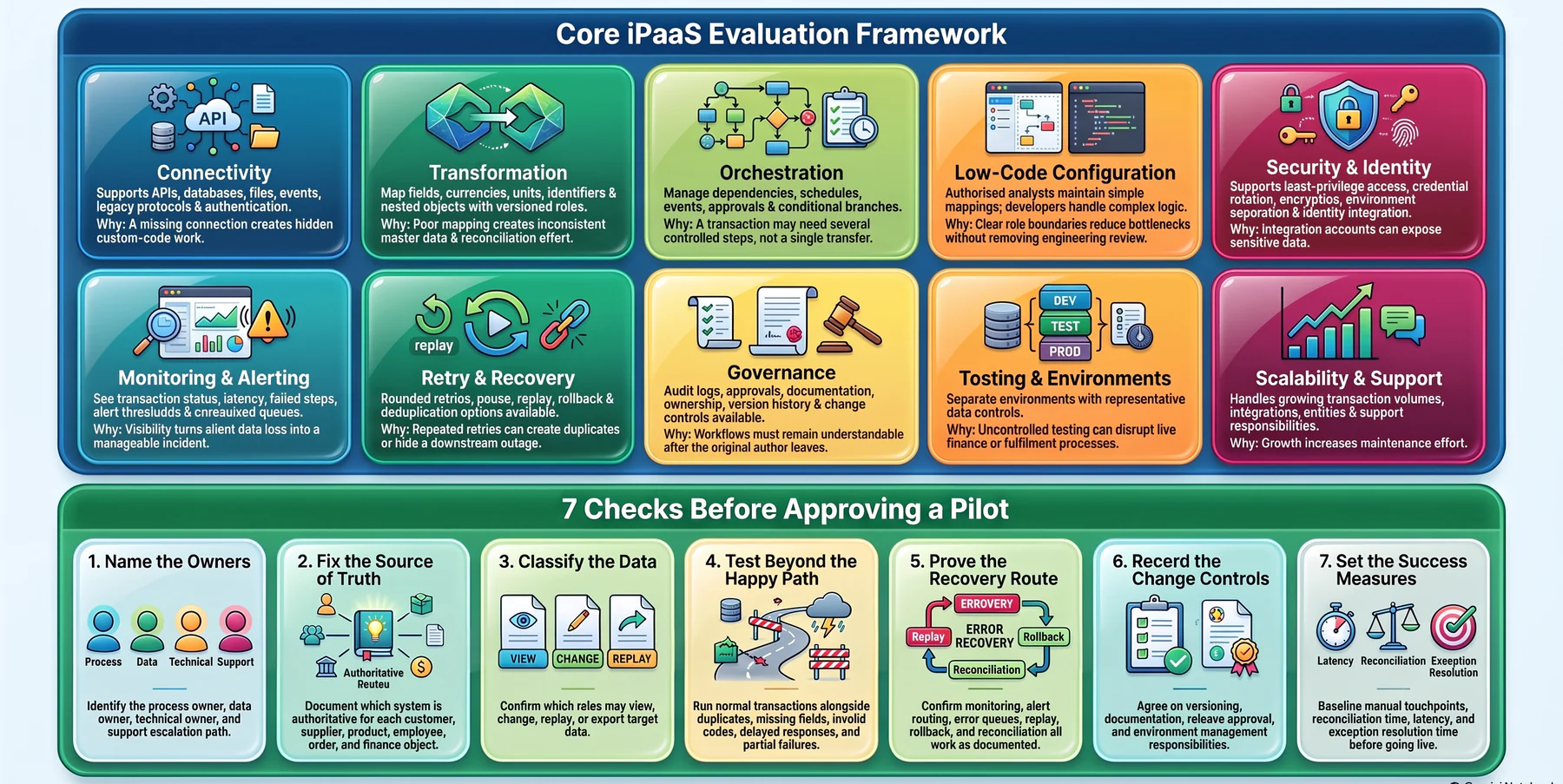
A sound evaluation covers connectivity, transformation, orchestration, security, monitoring, governance, scalability, and support. Tie each capability to a failure mode rather than to a feature list, since replay controls only earn their keep when a finance system goes offline.
The table below pairs each evaluation area with the question your buying group should ask.
| Evaluation area | Questions for the buying group | Why it matters |
|---|---|---|
| Connectivity | Does the platform support required APIs, databases, files, events, legacy protocols, and authentication methods? | A missing connection can create hidden custom-code work. |
| Transformation | Can teams map fields, currencies, units, identifiers, and nested objects with versioned rules? | Poor mapping creates inconsistent master data and reconciliation effort. |
| Orchestration | Can workflows manage dependencies, schedules, events, approvals, and conditional branches? | A transaction may need several controlled steps, not a single transfer. |
| Low-code configuration | Can authorised analysts maintain simple mappings while developers handle complex logic? | Clear role boundaries can reduce bottlenecks without removing engineering review. |
| Security and identity | Are least-privilege access, credential rotation, encryption, environment separation, and identity integration supported? | Integration accounts can expose sensitive financial, customer, or employee data. |
| Monitoring and alerting | Can owners see transaction status, latency, failed steps, alert thresholds, and unresolved queues? | Visibility turns silent data loss into a manageable incident. |
| Retry and recovery | Are retries bounded and are pause, replay, rollback, and deduplication options available? | Repeated retries can create duplicates or hide a downstream outage. |
| Governance | Are audit logs, approvals, documentation, ownership, version history, and change controls available? | A workflow must remain understandable after the original author leaves. |
| Testing and environments | Can teams use separate development, test, and production environments with representative data controls? | Uncontrolled testing can disrupt live finance or fulfilment processes. |
| Scalability and support | How does the service handle growing transaction volumes, integrations, entities, and support responsibilities? | Growth can increase maintenance effort even when individual workflows are simple. |
Before approving a pilot, work through the seven checks below in order. Each one closes a gap that typically surfaces late and expensively.
- Name the owners. Identify the process owner, data owner, technical owner, and support escalation path.
- Fix the source of truth. Document which system is authoritative for each customer, supplier, product, employee, order, and finance object.
- Classify the data. Confirm which roles may view, change, replay, or export it.
- Test beyond the happy path. Run normal transactions alongside duplicates, missing fields, invalid codes, delayed responses, and partial failures.
- Prove the recovery route. Confirm monitoring, alert routing, error queues, replay, rollback, and reconciliation all work as documented.
- Record the change controls. Agree versioning, documentation, release approval, and environment management responsibilities.
- Set the success measures. Baseline manual touchpoints, reconciliation time, latency, and exception resolution time before anything goes live.
Taken together, those checks form a workable set of integration requirements for finance, operations, IT, and security stakeholders.
How Does iPaaS Compare With ESB, EAI, API Management, and Custom Integration?
iPaaS is a delivery and management approach rather than a product category that replaces the others. ESB, EAI, API management, custom code, and workflow automation solve overlapping but distinct problems, and most enterprises run several at once.
The table below compares them on role, governance, best fit, and the limits worth weighing.
| Approach | Primary role | Deployment and governance | Best-fit scenario | Limitations to consider |
|---|---|---|---|---|
| iPaaS | Managed design, execution, monitoring, and governance of integrations across cloud and on-premise systems. | Usually provider-managed with organisation-controlled workflows, environments, identities, and policies. | Mixed application landscape with recurring changes and a need for central visibility. | Subscription dependency, connector gaps, platform-specific skills, and possible lock-in. |
| ESB | Central message routing, mediation, transformation, and service coordination. | Often enterprise-controlled and closely governed by architecture and infrastructure teams. | High-volume or complex internal service communication requiring central mediation. | Can require specialist skills and significant platform administration. |
| EAI | Broad discipline and tooling for connecting enterprise applications and shared data. | May include middleware, adapters, message brokers, and integration governance. | Long-running enterprise integration programmes with heterogeneous systems. | The term covers many architectures, so scope and operating model must be made explicit. |
| API management | Publish, secure, version, throttle, analyse, and discover APIs. | Focuses on API lifecycle, consumer access, policies, and developer experience. | External or internal API products that need controlled consumption. | It does not by itself orchestrate every cross-system business workflow. |
| Custom point-to-point integration | Bespoke code connecting two or more systems. | Controlled through software development, testing, deployment, and support practices. | Highly specialised logic, unusual protocols, or tightly controlled low-change interfaces. | Dependencies can multiply as systems and change requests increase. |
| Workflow automation | Trigger simple actions across applications, often for departmental tasks. | Usually owned by business teams with varying governance depth. | Lightweight approvals, notifications, and low-risk repetitive tasks. | May lack enterprise-grade replay, observability, data governance, or complex orchestration. |
The two work together more often than they compete. For example, API management might expose a secure customer-order API with rate limits and versioning, while the iPaaS consumes that API, transforms the order, checks inventory, posts it to the ERP, and reports the exceptions.
One governs the API product and the other coordinates the business flow. Treating either as a replacement for the other leaves an architectural gap that only shows up under load.
Your existing ESB or custom integration estate may also be perfectly reliable. Migration earns its place only when the current running cost, change friction, visibility, or governance gap is material and evidenced.
What Are the Business Benefits and Limits of iPaaS?
The gains come from more controlled and observable data movement rather than from the platform itself. A team may cut manual re-entry once a validated order flows straight into the ERP, though the result still depends on accurate product masters, clear ownership, and a process redesigned around the new hand-off.
The list below sets out the benefits most businesses can reasonably test.
- Fewer repeated entries between CRM, commerce, ERP, warehouse, HR, and finance systems.
- Faster access to validated information for fulfilment, reconciliation, and management reporting.
- Central monitoring of failures, delays, and unresolved exceptions.
- More consistent controls for transformation, approval, retry, and audit logging.
- A clearer change process when integrations, fields, or business rules move.
- Better visibility into where a transaction stopped and which team must act on it.
Treat every item above as a hypothesis with a number attached. Record a baseline for transaction volume, manual touchpoints, reconciliation effort, information delay, duplicate records, exception counts, and incident resolution time, then measure the same things after a controlled release.
The limits deserve equal weight. An iPaaS cannot repair poor source data on its own, settle ownership that leaders have not agreed, or stand in for process design.
A workflow will distribute an incorrect customer code to six systems just as reliably as a correct one. Broad access permissions can also widen exposure even when the connection itself is technically sound.
A large catalogue of integrations becomes hard to maintain when documentation, testing, and lifecycle ownership stay thin. Consequently, the strongest business case pairs expected operational gains with the people, governance, and support capacity needed to sustain them.
What Risks Should You Manage Before iPaaS Adoption?

Most adoption risk traces back to data quality, ownership, access, testing, exception handling, and architectural sprawl. A technically successful integration can still create a control problem when the wrong system becomes the source of truth, or when exceptions route to a team with no authority to clear them.
The table below pairs each risk with its trigger, its preventive control, and how you would detect it.
| Risk | Trigger | Potential impact | Preventive control | Detection and response |
|---|---|---|---|---|
| Poor data quality | Missing, duplicated, or inconsistent master records. | Incorrect orders, reports, balances, or employee records. | Data profiling, validation rules, ownership, and cleansing backlog. | Reconciliation reports, rejected records, and assigned data steward. |
| Unclear ownership | No agreed source of truth or approval authority. | Conflicting updates and unresolved disputes. | Data ownership matrix and change-approval process. | Escalation when systems disagree. |
| Integration sprawl | Teams create interfaces without architecture review. | Rising maintenance effort and hidden dependencies. | Inventory, naming standards, review gates, and retirement plans. | Dependency mapping and periodic portfolio review. |
| Security or access error | Excessive privileges, shared credentials, or weak rotation. | Unauthorised viewing, changes, or data export. | Least privilege, identity controls, credential management, and logging. | Access reviews, alerts, and incident response. |
| Insufficient testing | Only the successful path is tested. | Duplicate postings, lost transactions, or operational disruption. | Test cases for invalid, delayed, duplicate, and partial transactions. | Reconciliation, synthetic tests, and controlled rollback. |
| Weak exception handling | Failed records are discarded or sent to an unattended inbox. | Delayed fulfilment, inaccurate reporting, and hidden backlog. | Error queues, ownership, service targets, replay, and evidence retention. | Queue monitoring and management escalation. |
| Vendor dependency | Workflows rely on proprietary connectors or skills. | Migration cost or slower change if circumstances alter. | Portable documentation, contract review, interface standards, and skills transfer. | Annual architecture and dependency assessment. |
| Legacy constraints | Older systems lack APIs, stable identifiers, or test environments. | Fragile file exchanges and manual workarounds. | Adapter design, staged scope, and legacy-owner involvement. | Failure trends and change-impact analysis. |
| Business continuity gap | No plan for platform or downstream outage. | Critical processes stop without a controlled alternative. | Recovery objectives, manual fallback, backup, and replay procedures. | Exercises and post-incident review. |
Keep platform risk and business risk in separate columns. A provider may supply excellent logging, yet leadership still has to name the person who reads the alerts each morning.
Check any security and privacy claims against current official Singapore guidance where your data and sector make it relevant. That is a review task for your own compliance owner rather than something a vendor datasheet settles.
How Should Singapore Enterprises Assess iPaaS Readiness?
A business makes a stronger candidate when it runs multiple systems, carries recurring critical data flows, faces growing change demand, and needs central monitoring. Singapore teams should also weigh regional entities, shared services, currencies, operating calendars, and the usual mix of cloud and legacy applications.
The table below matches three common situations to the readiness signals and the sensible next move.
| Scenario | Readiness signals | Recommended next step |
|---|---|---|
| Small and stable landscape | A few systems, low change frequency, limited data volume, and clear manual controls. | Document interfaces and compare a simple connector or scheduled exchange with iPaaS cost and governance. |
| Growing multi-system business | ERP, CRM, e-commerce, warehouse, HR, and reporting tools exchange recurring data; manual reconciliation is increasing. | Select one high-value workflow, baseline its controls, and run a pilot with monitoring and exception ownership. |
| Regional or complex enterprise | Multiple entities, currencies, legacy applications, frequent changes, sensitive data, and cross-functional dependencies. | Establish an integration architecture board, data ownership model, risk register, and phased roadmap before expanding. |
A readiness workshop should close on five questions, which the list below sets out in the order they are usually easiest to answer.
- Find the friction. Which process creates the greatest operational or reporting friction today?
- Settle authority. Which system is authoritative for each data object?
- Sort the failures. Which ones need automatic retry, which need human review, and which need immediate escalation?
- Assign the owners. Who owns security, data quality, workflow changes, and daily support?
- Define the evidence. What baseline will decide whether the pilot continues?
Choose a process important enough to test the governance yet bounded enough to control. Order-to-cash, inventory synchronisation, and finance reporting all work well when their owners can supply representative test cases.
Expand only once the normal paths, exception paths, reconciliation, documentation, and support hand-offs have all held under real conditions. Teams integrating commerce and warehouse data often start here, and our guide to order fulfilment covers the hand-offs that break first.
Businesses already comparing platforms usually want the ERP side settled first, since the ERP is what most integrations treat as the source of truth. Our roundup of inventory management software in Singapore shows how those systems differ on connectivity and reporting depth.
Conclusion
An iPaaS pays off when a business treats it as a control layer rather than a data pipe. The platform can move a transaction reliably, though it cannot decide who owns the customer record, who clears a failed posting, or which numbers management should trust.
If disconnected systems are already creating duplicate work and inconsistent reporting, the fastest progress comes from fixing the authoritative system first. Book a free consultation with our team to map a practical evaluation path around your own systems, controls, and growth plans.
Frequently Asked Questions
Answer by comparing the number of systems, frequency of change, monitoring needs, integration patterns, internal development capacity, and governance requirements. Explain that custom integration can remain appropriate for highly specialised or tightly controlled scenarios, so the answer should use a decision framework rather than a blanket recommendation.
Explain that the answer depends on available connectors, APIs, data models, authentication methods, transformation requirements, and entity-level ownership. Use an illustrative multi-entity workflow and discuss currency, master-data, and reporting considerations without making unsupported regulatory claims.
Provide a concise checklist covering process scope, source of truth, data classification, access permissions, normal and exception testing, monitoring, rollback or replay, support ownership, documentation, and success measures. Make clear that the pilot should test operational controls, not only whether data can move.
Recommend establishing a baseline for manual data entry, reconciliation effort, information delay, exception volume, duplicate records, and incident resolution time. Explain that financial benefits should be validated against the organisation's own baseline and approved evidence rather than assumed from platform adoption.