








Construction project cost control software helps Singapore contractors compare project budgets with purchases, site spending and claims. Evaluate it using a real project and the records supporting each cost. This guide gives commercial managers and project teams practical examples, control checks and questions for reviewing software options.
The sections below explain the workflow, evaluation criteria and practical next steps.
What is Construction Project Cost Control Software?
Construction project cost control software links your tender BoQ, budget, purchases, site costs and progress claims in one place. It shows budget against actual cost for every work item as the job runs. Singapore contractors use it to protect margin and to back each payment claim under the SOP Act with clear records. Check the relevant requirements in Singapore Mediation Centre, Adjudication.
Think of it as the dashboard in a car. The fuel gauge, speed and warning lights sit in one view. You see a problem before the engine stops. Cost control software does the same for a project budget.
This guide is for contractors, quantity surveyors and project finance teams in Singapore. It covers the following topics.
- Why construction costs drift and where they leak.
- The features to look for in cost control software.
- The workflow from tender BoQ to progress claim.
- The SOP Act and GST rules for progress payments and retention.
- A worked S$ progress claim and a checklist with red flags.
Why Construction Project Costs Drift
Few projects go over budget in one big step. Costs drift through many small gaps. Each one looks minor until the final account.
- The BoQ, budget and purchase records sit in separate files.
- Site teams order materials without checking the remaining budget.
- Variations are agreed on site but priced weeks later.
- Subcontractor claims are paid without a measured quantity.
- Progress claims to the client lag behind the work done.
A main contractor building a Tampines factory shows the pattern. Its tender BoQ priced rebar at S$1,150 per tonne. Site orders went out at S$1,260 without a budget check. By month four, rebar alone was S$38,000 over budget.
The fix is a single baseline. Every purchase, timesheet and claim should point back to a BoQ item. Our guide to cost control in construction covers more strategies to avoid overruns.
Features to Look for in Cost Control Software
Not every project tool controls cost. Many track tasks but not money. Use the table below to test each option.
| Feature | What good looks like | Why it matters |
|---|---|---|
| BoQ with versions | Each change creates a new version with a reason | You can trace every price change |
| Internal cost budget | Budget per BoQ item for materials, labour, equipment and subcontract | Shows margin at item level |
| Budget change control | Changes need approval and leave a record | Stops silent budget creep |
| Site material requests | Requests are tied to a BoQ item | Links site use to the budget |
| Actual cost capture | Materials, labour and equipment booked per job | Gives live budget against actual |
| Progress measurement | Measured quantity per BoQ item per period | Backs every claim with evidence |
| Progress claims | Gross value, previous claims, retention and net amount | Speeds up billing and checks |
| Reports | S-curve, budget against actual and claim analysis | Shows trends early |
The BoQ is like a recipe card for the whole building. It lists every item, quantity and rate. If the recipe card changes without notice, nobody can tell why the cake cost more. Read our guide to the bill of quantities for more on BoQ structure.
Spreadsheet or Cost Control Software?
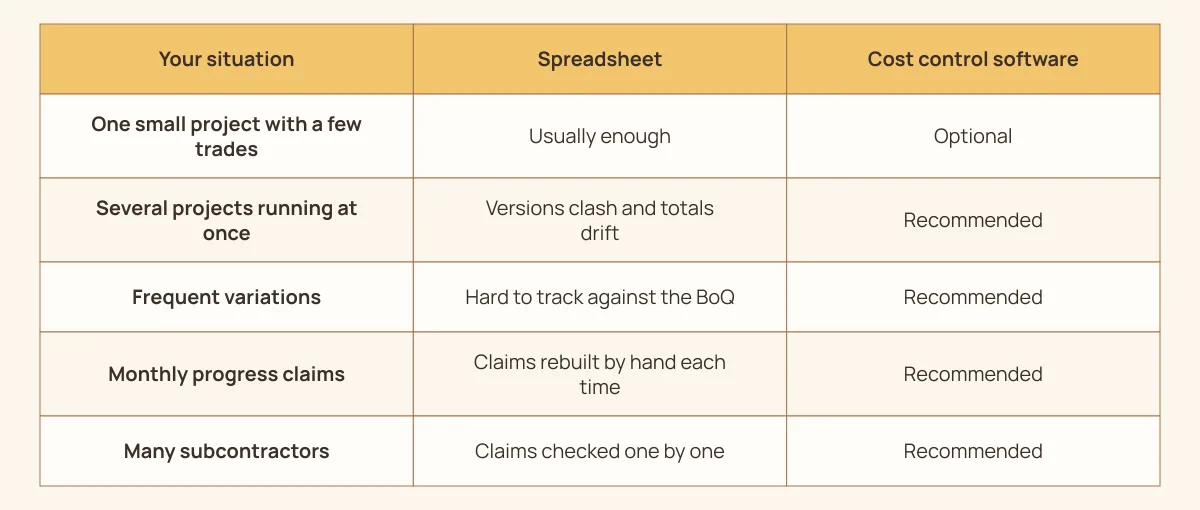
Many contractors start with spreadsheets, and that is fine for small jobs. The trouble starts with several projects, many variations and monthly claims. Use this decision table to choose.
| Your situation | Spreadsheet | Cost control software |
|---|---|---|
| One small project with a few trades | Usually enough | Optional |
| Several projects running at once | Versions clash and totals drift | Recommended |
| Frequent variations | Hard to track against the BoQ | Recommended |
| Monthly progress claims | Claims rebuilt by hand each time | Recommended |
| Many subcontractors | Claims checked one by one | Recommended |
A spreadsheet is like a paper logbook on a big site. It works until three people need it at once. After that, nobody is sure which copy is right.
Consider a Sengkang builder running four HDB upgrading jobs. Each project manager kept a separate cost sheet. Head office spent two days each month just merging them. One shared system removed that step.
The Workflow from Tender BoQ to Progress Claim
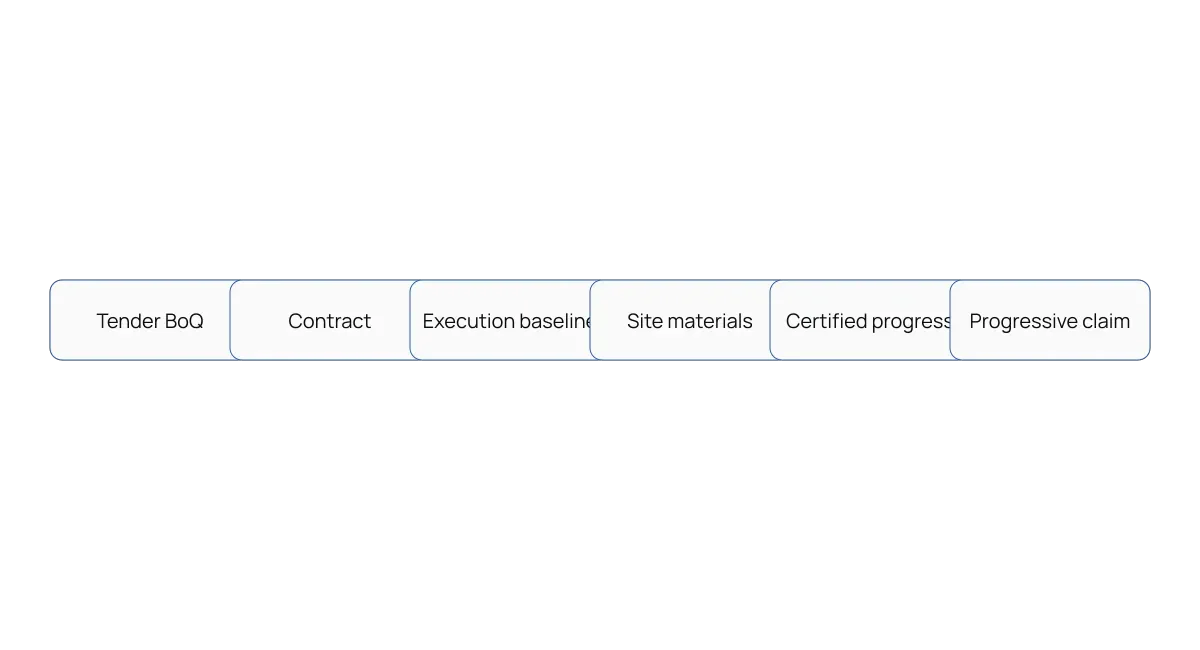
Good cost control follows the money from tender to final account. Each step hands its data to the next. Here is a typical sequence for a main contractor.
- Price the tender BoQ, often from a template.
- Register the awarded contract with its value, advance payment and retention terms.
- Build the internal cost budget from the BoQ.
- Issue job orders to your own crews or to subcontractors.
- Raise site material requests against BoQ items.
- Record actual materials, labour and equipment used.
- Measure progress per BoQ item for the period.
- Prepare the progress claim from the measured quantities.
- Review budget against actual and update the forecast.
Steps seven and eight are where cash comes in. A claim built from measured quantities is easier for the client to certify. It also stands up better if a dispute goes to adjudication.
Consider a Jurong M&E subcontractor fitting out a data centre. It measures cable tray installed each month per floor. The claim lists each floor's measured quantity against the BoQ rate. The main contractor certifies it within days, not weeks.
The SOP Act and Progress Payments in Singapore
The Building and Construction Industry Security of Payment Act, or SOP Act, took effect on 1 April 2005. It gives anyone who carries out construction work or supplies goods under a written contract the right to progress payment. It also provides a fast, low-cost adjudication process for payment disputes. Check the relevant requirements in BCA, Security of Payment Act.
The process runs like a structured conversation. The claimant serves a payment claim within the period set in the contract. The respondent replies with a payment response. If the claimant disagrees with the response or is not paid, it can apply for adjudication.
The Act is short on paper but strict in practice. Here are the main points contractors should know.
- The payment response is due by the contract date, and no later than 21 days after the claim is served.
- Pay-when-paid clauses are unenforceable under the Act.
- Adjudication applications go to the Singapore Mediation Centre, the authorised nominating body.
- Amendments to the Act took effect on 15 December 2019.
Good records decide most adjudications. An adjudicator looks at what was claimed, measured and agreed. Cost control software that ties each claim to measured BoQ quantities makes that evidence easy to produce. See BCA's guidance and the Act itself for the full rules.
GST on Progress Claims and Retention
GST in Singapore is 9%. A GST-registered contractor charges GST on progress payments. IRAS sets out when GST is due on construction work. Check the relevant requirements in IRAS, Current GST rates.
For progress payments, you account for GST at the earlier of two dates. One is when you receive payment. The other is when you issue an invoice. The same rule applies to retention sums when they are released or invoiced.
IRAS also notes that a letter of claim is not the same as a tax invoice. Many main contractors send a letter of claim to the developer first. Make sure your process issues the tax invoice at the right time. Check the IRAS construction guide for details. Check the relevant requirements in IRAS, GST guide for the construction sector.
A Kaki Bukit renovation contractor learned this the hard way. It issued tax invoices with every letter of claim. When clients cut the claimed amounts, it had to issue credit notes. Waiting for certification would have saved that work.
Worked S$ Progress Claim with Retention
Here is an illustrative case. A main contractor builds a S$5,000,000 warehouse in Tuas. The contract includes a 10% advance payment and 5% retention on each claim. All figures are before GST.
| Line | Amount |
|---|---|
| Contract sum | S$5,000,000 |
| Work measured to date (40%) | S$2,000,000 |
| Less previous claims | S$1,200,000 |
| Gross value this claim | S$800,000 |
| Less advance recovery (10%) | S$80,000 |
| Less retention (5%) | S$40,000 |
| Net claim before GST | S$680,000 |
| GST at 9%, if invoiced now | S$61,200 |
Now look at the cost side. The internal budget for the work done to date is S$1,700,000. Actual cost to date is S$1,820,000. The project is S$120,000 over budget for the work done.
The cost performance index, or CPI, compares budget with actual. Here it is S$1,700,000 ÷ S$1,820,000, or about 0.93. Each dollar spent earns about 93 cents of planned value. If this rate holds, the margin will shrink by the end of the job.
Software that shows these numbers each month gives you time to act. You can renegotiate supplier rates, check site waste or price a variation. A spreadsheet reviewed only at month end often finds the gap too late.
KPIs to Monitor on Every Project
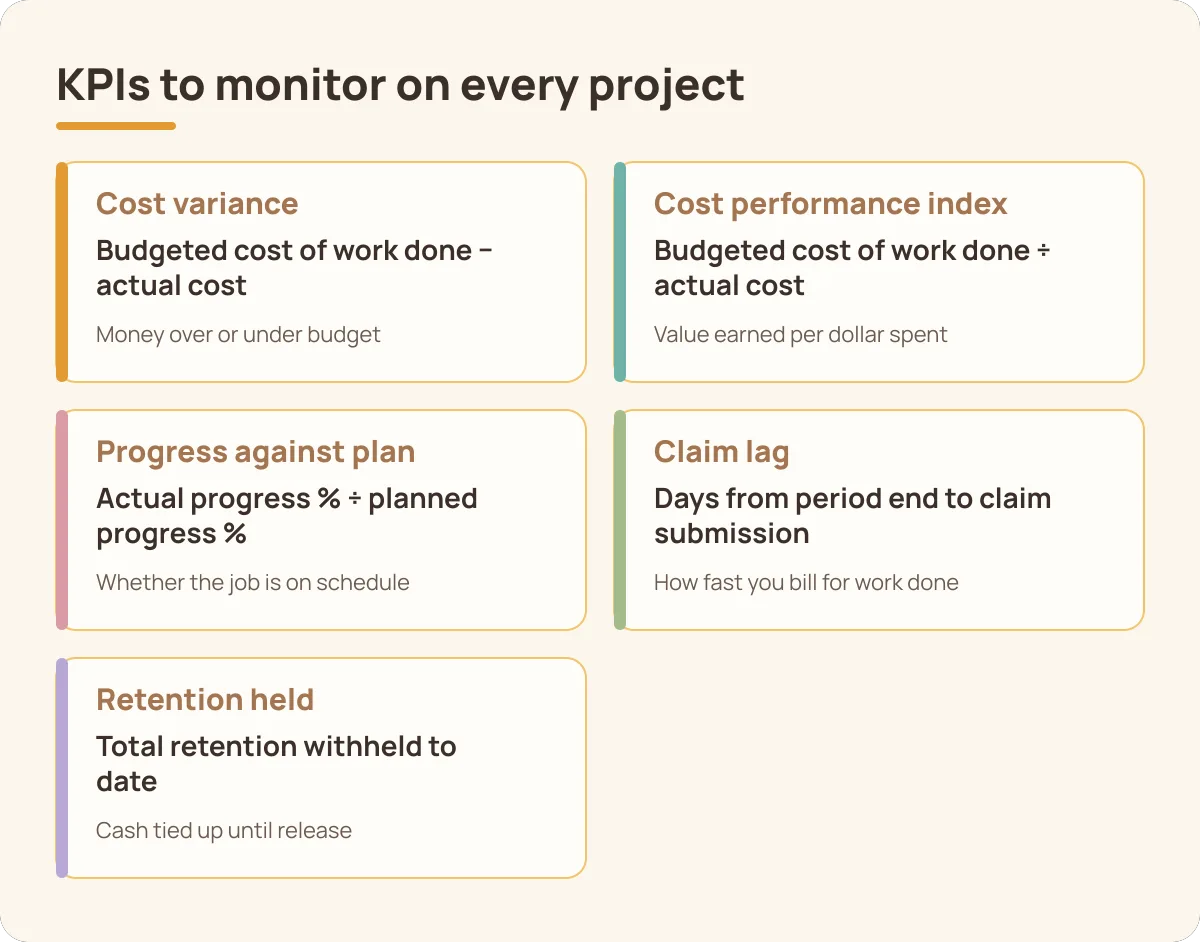
A few numbers tell you most of what you need. Review them monthly for each project. Compare them across projects to spot weak teams or trades.
| KPI | Formula | What it tells you |
|---|---|---|
| Cost variance | Budgeted cost of work done − actual cost | Money over or under budget |
| Cost performance index | Budgeted cost of work done ÷ actual cost | Value earned per dollar spent |
| Progress against plan | Actual progress % ÷ planned progress % | Whether the job is on schedule |
| Claim lag | Days from period end to claim submission | How fast you bill for work done |
| Retention held | Total retention withheld to date | Cash tied up until release |
Retention is like a deposit on a rental flat. The client holds it until the defects period ends. Track it closely, because it can add up to a large sum across projects.
Software Checklist with Red Flags
Use this checklist during a vendor demo. Each row lists a good answer and a red flag. Ask the vendor to show each one with your own data.
| Check | Good answer | Red flag |
|---|---|---|
| BoQ link | Every cost and claim points to a BoQ item | Costs sit in a general project bucket |
| Budget changes | Approved change requests with history | Budgets can be edited without a trace |
| Site requests | Material requests show the remaining budget | Site orders go straight to suppliers |
| Progress evidence | Measured quantities per item and period | Progress entered as a guessed percentage |
| Claim build | Claims show previous claims, advance recovery and retention | Claims typed up in a separate spreadsheet |
| Subcontractor claims | Subcontractor claims are checked against measured work | Subcontractor invoices paid on request |
| Reporting | S-curve and budget against actual on demand | Reports built by hand each month |
Take the progress evidence row seriously. A guessed percentage is hard to defend under the SOP Act. Our guide to construction progress tracking explains how to measure progress well.
How HashMicro Supports Construction Cost Control
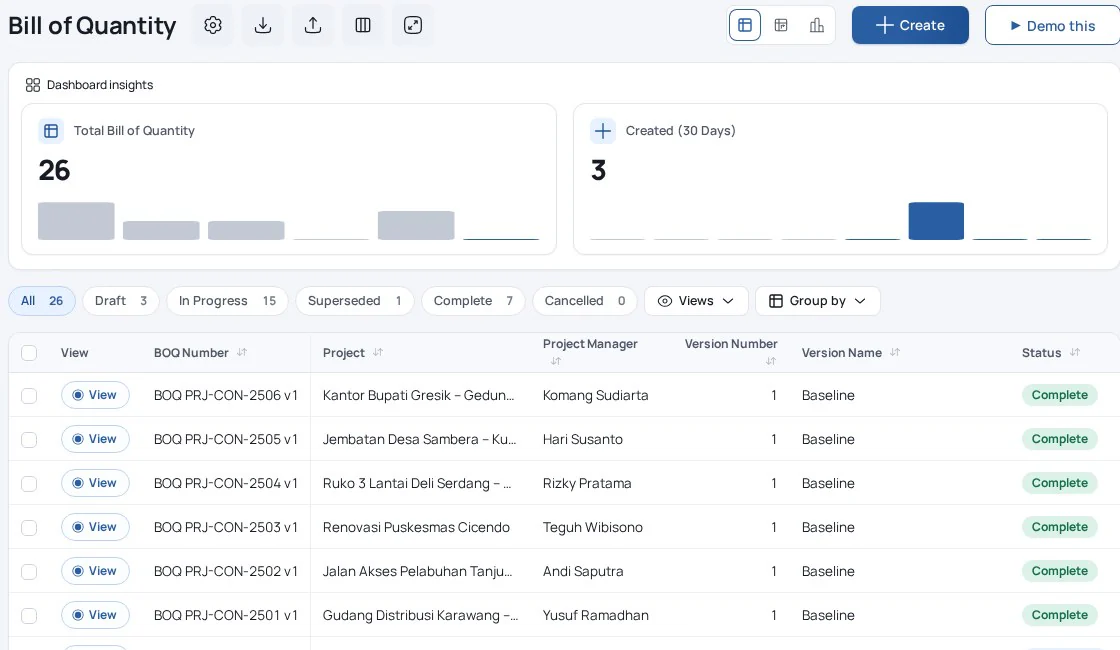
HashMicro's construction software runs contractor projects from BoQ to progress claim. BoQs are versioned and can start from templates. Contracts with the client link to the BoQ and carry the value, advance payment and retention terms. A cost sheet holds the internal budget per BoQ item, with revenue and margin.
Execution tools cover the site side. Job orders go to your own crews or to subcontractors. Resource actualisation records actual materials, labour and equipment against the budget. Site material requests can be raised against a BoQ item, and budget change requests need approval.
Progress and billing follow from the site records. Quantity surveys measure progress per BoQ item for each period. Progressive claims are built from approved surveys, showing gross value, advance deduction, retention and the net claim. Subcontractor claims can create the vendor bill.
Reports include the S-curve, Gantt chart, Cost Sheet Resource Analysis and Progressive Claim Analysis. A risk register and issue log sit alongside them. Note that the module is built for contractors. Project owners can track budgets and pay contractor bills, but owner-side certification needs its own process.
See it with one of your own projects. Book a demo and bring a real BoQ and last month's claim. Ask the team to rebuild the claim from measured quantities.
Conclusion
Start with the workflow and control requirements that matter to your team. Test those requirements with representative records before deciding on the next step.
Frequently Asked Questions
Construction project cost control software brings a project’s budget, resource usage and approved changes into a consistent view. A Singapore contractor with 3 active sites needs costs linked to the correct project and work item. Comparing a total budget with cash paid alone can miss committed purchases, unbilled work and changes still awaiting approval.Before selecting a solution, write down the specific record your team needs and who will maintain it. Use a small representative sample to confirm the scope with operational staff. Separate essential requirements from optional features, then ask the supplier to demonstrate the essential workflow using that sample.
Begin with the bill of quantities and an internal cost budget. For 1 concrete work package, record material, labour, equipment and subcontract costs against the same project code. Review approved changes separately from the original baseline. Compare progress with resource usage so a favourable cash position does not conceal work that has not yet been billed.As a next step, draw the handover between the people involved and identify where an exception needs approval. Walk through the example with the person doing the work and the person reviewing it. Keep the supporting documents together so another team member can reproduce the result.For the connected process, read: Related workflow: cost control in construction.
Cost depends on project count, users, budget detail, migration, approval rules and integrations. A contractor with 3 sites and detailed work-item budgets needs a different setup from one small job. An illustrative SGD 2,000 internal training allowance is a planning example, not a software quotation. Ask for implementation, support and recurring charges separately.Build a total-cost worksheet for the first year and later years, showing assumptions beside each line. Include internal staff time and ask who owns any extra work. Next, compare written proposals against the same scope and acceptance criteria rather than comparing headline fees with different inclusions.
A Singapore contractor may budget SGD 50,000 for one work package, place SGD 30,000 of orders and pay only SGD 10,000 so far. The remaining cash budget is not the same as the uncommitted budget. Use this example to ask how your team distinguishes ordered, received, billed and paid amounts before approving another purchase.Treat these figures as an illustrative scenario, not a statutory threshold or promised result. Next, repeat the exercise with a recent transaction and ask its owner to explain every difference. Check the relevant official guidance for the local context, and retain the documents that support your own decision.Official local guidance: BCA, Security of Payment Act.
Choose using a sample project with 1 scope change, a partial delivery and a subcontractor progress claim. Ask the project manager and accountant to explain the same cost position independently. Check the trace back to supporting records. Approval history and consistent project coding matter more than an attractive chart that cannot explain its underlying numbers.Next, record the outcome of each test and the evidence used to accept it. Name a responsible reviewer for any gap before agreeing the final scope. Ask for a repeat demonstration when a critical case fails, then use the written results to support the purchasing decision.
- Agree mandatory requirements before scoring.
- Test exceptions with supporting evidence.
- Record gaps and obtain a named owner.
Pilot one project or work package with an agreed opening budget. Map 20 representative cost lines and name the owner of each approval step. Reconcile opening commitments before adding new transactions. Review the pilot with site, procurement and finance staff, then document which unresolved differences must be corrected before expanding to more live projects.Next, agree the pilot’s acceptance criteria with the people who will use the process daily. Keep an issue log with an owner and a due date for each problem. Expand only after the team can explain and reproduce the results, including the handling of a correction.
- Prepare a clean sample and assign owners.
- Rehearse the complete workflow and corrections.
- Review the results before expanding the rollout.
Project cost control needs handovers with purchasing, accounting and site reporting. For 2 work packages, test whether shared project codes preserve the intended budget classification. Agree who owns corrections and when updates become visible. Confirm the handling of partial receipts and progress claims rather than assuming that connecting systems automatically produces a complete cost position.Next, create a field map and test both a normal record and a deliberate error before approving the interface. Ask who monitors failures and how corrections are replayed without duplicates. Include support responsibilities in the written scope so a future incident has a clear owner.