







ABSS accounting software helps Singapore businesses record sales, purchases, expenses, banking, and tax data. It keeps core financial records in one structured accounting system.
It works by combining accounting functions with selected tools for invoicing, inventory, reporting, and multi-company management. The available features depend on the edition chosen.
This review explains how ABSS works, where it supports Singapore businesses, and which limitations may encourage a move to connected business software.
Key Takeaways
ABSS accounting software covers core finance tasks, with Singapore GST, inventory and InvoiceNow options depending on the edition.
Key features of ABSS include invoicing, bank reconciliation and reporting; Premier adds multi-user access and multi-location inventory.
ABSS shortcomings include desktop-first access, integration limits and potential extra costs for support and upgrades.
HashMicro as an ABSS alternative connects accounting with sales, purchasing, inventory and reporting for growing businesses.
What Is ABSS Accounting Software?
ABSS is accounting software designed for small and medium-sized businesses. It supports general ledger, accounts receivable, accounts payable, banking, invoicing, purchasing, and financial reporting.
The Singapore edition includes GST functions and InvoiceNow options. Its feature range also covers inventory, multi-company files, multi-user access, and business reports, as shown on the ABSS Singapore feature page.
"Accounting software records what happened. Connected systems show what is happening."
Key Features of ABSS Accounting Software
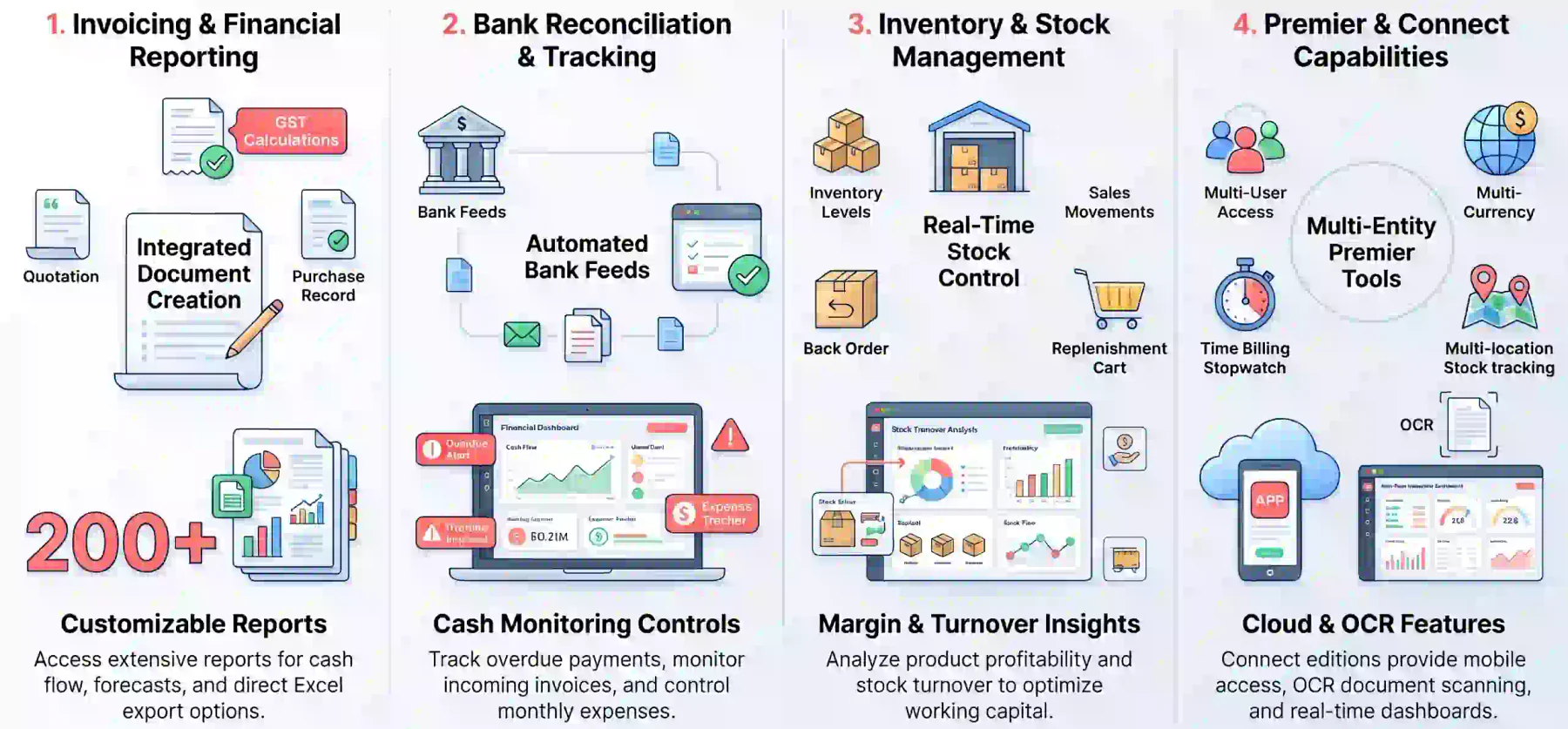
ABSS combines daily accounting tasks with selected operational tools in one application. The exact functions depend on whether a business chooses Accounting, Premier, or a Connect edition.
1. Invoicing, GST, and financial reporting
Users can create quotations, sales invoices, purchase documents, and payment records from the same system. Singapore editions also support GST calculation and selected filing workflows.
ABSS provides flexible reports for cash flow, financial health, forecasts, and transaction analysis. Businesses comparing these functions with cloud accounting software can also review whether they need real-time access and broader automation.
2. Bank reconciliation and payment tracking
Bank feeds can import transaction data and reduce manual entry. Reconciliation tools then help finance teams compare recorded transactions with bank activity.
Businesses can also monitor invoices, track overdue payments, and review expenses. These controls support more consistent cash monitoring during monthly reporting.
3. Inventory and stock management
ABSS inventory tools track stock levels, sales movements, back orders, and replenishment needs. Premier includes multi-location inventory functions for businesses managing stock across several sites.
Inventory reports can also show purchase trends, stock turnover, and product profitability. This gives finance teams more context when reviewing margins and working capital.
4. ABSS Premier and multi-user functions
ABSS Premier adds multi-user access, multi-currency accounting, time billing, multi-level pricing, and multi-location inventory. These functions suit businesses with more complex accounting requirements.
Connect editions add cloud-connected features, interactive dashboards, mobile access, and OCR scanning. Businesses should compare the editions before selecting a licence.
| Feature | Accounting | Premier | Connect editions |
|---|---|---|---|
| GST and invoicing | Yes | Yes | Yes |
| Multi-user access | Limited by licence | Yes | Available by plan |
| Multi-currency | Selected plans | Yes | Premier Connect |
| Multi-location inventory | No | Yes | Premier Connect |
| Mobile access | No | No | Available by plan |
Benefits of ABSS for Singapore Businesses
ABSS can suit businesses that need structured accounting without replacing their existing finance processes. Its value depends on transaction volume, user access needs, and operational complexity.
1. Familiar accounting workflows
ABSS provides established workflows for ledgers, invoices, purchasing, banking, and reporting. Teams with desktop accounting experience may find the structure familiar during daily use.
This can reduce disruption when a business replaces spreadsheets or moves away from manual bookkeeping. Training needs will still depend on the edition and existing processes.
2. Support for SMEs and multiple entities
Listed Accounting and Premier plans can support up to five company data files. This helps business groups keep separate records while using one accounting platform.
Multi-currency and multi-user functions also support companies with overseas transactions or shared finance responsibilities. Premier is more suitable when these needs are regular.
3. Local compliance and reporting capabilities
ABSS Singapore promotes GST calculation and F5, F7, and F8 filing support. InvoiceNow access depends on the selected product, cover plan, or Connect edition.
Businesses should confirm the latest compliance scope before purchase. Teams comparing broader financial reporting software can also review the Singapore ABSS accounting overview for e-invoicing, inventory, and reporting functions.
| Business need | How ABSS may help | What to check |
|---|---|---|
| Core financial control | Ledger, banking, invoicing, and reporting | Required users and transaction volume |
| Separate company records | Multiple company data files | Consolidation and intercompany processes |
| Singapore compliance | GST and selected InvoiceNow support | Edition and current filing requirements |
| Inventory tracking | Stock levels, sales tracking, and reordering | Warehouse complexity and integration needs |
ABSS Review: Shortcomings to Consider
ABSS can remain practical for stable operations, but its limits become clearer as a business adds locations, sales channels, and remote users.
The ABSS to Xero comparison recommends assessing workflow fit, reporting needs, and total ownership cost before migrating.
1. Desktop-first access
Core Accounting and Premier editions are desktop-installed, so access remains tied to a local machine or server. Connect editions add online features, but the working model still differs from fully cloud software.
This can affect remote approvals, branch access, and collaboration between finance teams. Businesses should confirm how many users need access at the same time.
2. Limited integrations and automation
ABSS may require add-ons, middleware, or CSV imports when sales flow through ecommerce, POS, or payment gateways. These extra steps can increase reconciliation work.
The impact becomes greater when a business manages several sales channels. Manual transfers can delay reporting and create additional checks for finance staff.
3. Extra costs for upgrades and support
Perpetual licences can reduce recurring software charges, but support, upgrades, cover plans, and add-ons may cost extra. Compare the full ownership cost before choosing a plan.
A lower upfront price may not remain lower when staff time, maintenance, migration, and integration work are included in the comparison.
4. Limited connection between finance and operations
Accounting records do not always provide a complete view of inventory, purchasing, sales, and approvals. Growing businesses may need connected workflows to reduce manual transfers.
This matters when managers need current operational data alongside financial results. It also affects businesses with multiple outlets, warehouses, or sales teams.
HashMicro as an ABSS Alternative
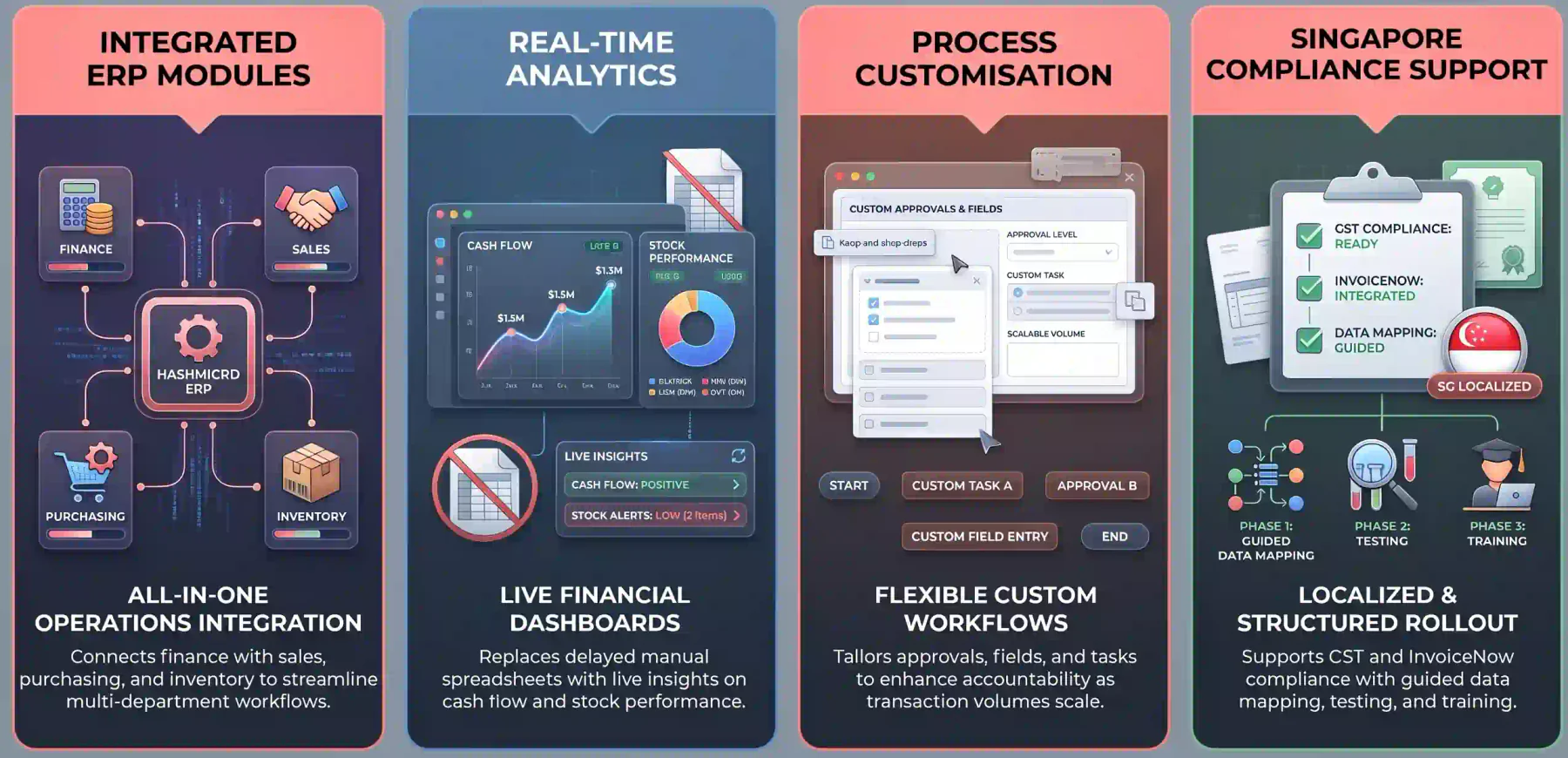
HashMicro suits businesses that need accounting alongside wider operations. Its ERP structure connects finance with sales, purchasing, inventory, and reporting.
An independent ABSS review can add another perspective when assessing fit. Compare its observations with current product documentation before deciding.
1. Integrated accounting and ERP modules
HashMicro connects accounting with purchasing, sales, and inventory operations through one ERP. Businesses evaluating inventory management software can compare whether a connected system better fits their workflows and reduces data movement between separate systems.
Teams can manage related transactions through connected workflows. This supports better control when several departments contribute to the same order or project.
2. Real-time analytics and reporting
Shared reports and dashboards help managers review financial and operational data together. This supports decisions on cash flow, stock, sales, and supplier performance.
Users can compare business results with current transaction data. This reduces dependence on delayed spreadsheets and manually prepared report packs.
3. Business process customisation
Businesses can customise workflows, approvals, fields, and reports around their processes. This gives teams more flexibility as transaction volumes and responsibilities grow.
Customisation also helps businesses standardise recurring tasks. Clear approval steps can reduce delays and improve accountability across departments.
4. Professional support for Singapore businesses
Singapore businesses can assess GST, InvoiceNow, implementation, and support requirements before switching. A structured rollout also helps protect data quality during migration.
The right implementation plan should cover data mapping, user training, testing, and post-launch support. These activities help teams adopt the new system with less disruption.
| Evaluation area | ABSS | HashMicro |
|---|---|---|
| Primary scope | Accounting with selected inventory tools | Accounting connected to wider ERP operations |
| Access model | Desktop-first, with Connect options | Centralised access across business functions |
| Reporting | Financial and selected operational reports | Cross-functional financial and operational reporting |
| Customisation | Depends on edition and setup | Workflows, approvals, fields, and reports can be configured |
| Best fit | Stable and manageable accounting needs | Growing businesses with connected processes |
When accounting, purchasing and stock records are connected, teams can review exceptions without piecing together separate reports. Hashy AI helps bring those records into one view.






Conclusion
ABSS remains practical for businesses with stable operations, experienced users, and manageable integration needs. However, growing businesses may need shared access, connected workflows, and broader operational reporting. These needs can make an ERP alternative more suitable than standalone accounting software.
HashMicro offers a broader platform for Singapore businesses that want accounting, inventory, purchasing, sales, and reporting in one environment. The right choice depends on process complexity and growth plans.
To learn more about ABSS accounting software, you can schedule a free consultation with our team today and learn what system is best for your business.

Frequently Asked Questions
ABSS is accounting software for recording sales, purchases, expenses, banking, and transactions. Singapore editions also support GST, reporting, inventory, and selected InvoiceNow functions.
ABSS Premier is the advanced edition of ABSS Accounting. It adds multi-user access, multi-currency, time billing, multi-level pricing, and multi-location inventory.
ABSS can suit Singapore businesses with stable accounting and inventory needs. Confirm current GST, InvoiceNow, user access, integration, and reporting requirements before buying.
The best alternative depends on your growth plans. HashMicro suits businesses that need accounting connected with inventory, purchasing, sales, and reporting.
ABSS focuses mainly on accounting with selected operational features. ERP software connects accounting with inventory, purchasing, sales, approvals, and business reporting.
Xero may suit businesses that prioritise cloud access, integrations, and remote collaboration. ABSS may suit stable businesses that prefer desktop accounting and familiar workflows.