







Inventory management software has no single price in Singapore. The cost depends on the stock processes a business needs to run, the people using the system, and the work required to set it up.
A monthly fee is only one part of the budget. Data migration, integrations, training, support, and staff time can change the total considerably, even when two vendors quote similar subscription prices.
This article explains what shapes a quote, which costs are easy to miss, and how to compare proposals against the inventory problems your business needs to solve.
Key Takeaways
Inventory software prices depend on users, warehouses, stock complexity, integrations, and implementation scope.
The full budget includes vendor charges, project work, internal effort, and transition costs.
A monthly subscription does not show the complete cost of running the system.
A sound business case uses current inventory records and clearly stated assumptions.

What Does Inventory Management Software Cost in Singapore?
The price depends on what the system must handle. A single warehouse tracking basic receipts and sales needs a different setup from a distributor managing batches, several sites, and separate finance systems.
Vendors may charge in different ways, so the starting price rarely tells the whole story. An itemised quote should separate the following costs:
- Software access: subscriptions or licences for the agreed users, sites, and contract term.
- Implementation: process review, configuration, testing, and go-live support.
- Data and integrations: migration and connections to other systems.
- Additional functions: modules, reports, scanning, or planning tools outside the base package.
- Ongoing service: support, maintenance, and future changes.
Ask vendors to show what each charge covers, what is excluded, and what happens when you add users or locations. A price without that scope is difficult to compare fairly.
What Should Inventory Management Software for Enterprises Include?
The right feature set follows the way stock moves through the business. Separate the controls needed on day one from functions that can wait until operations become more complex.
1. Core Stock Control: Multi-Warehouse Visibility, Transfers, and Barcodes
Teams should be able to see stock by location, record receipts and issues, transfer goods, run inventory counts, and investigate differences. Barcode scanning matters where manual entry slows this work.
2. Purchasing, Replenishment, and Batch or Serial Tracking
Reorder rules should reflect demand and supplier lead times. Businesses handling controlled or perishable goods may also need batch, serial, or expiry records that follow an item from receipt to dispatch.
3. Reporting, Auditability, and Access Control
Inventory reports need to be useful to both warehouse and finance teams. During a demonstration, check whether users can:
- Review stock: see quantities, movements, ageing, and exceptions by location.
- Reconcile value: trace inventory transactions into financial records.
- Control access: restrict adjustments, approvals, and sensitive master data by role.
- Review changes: identify who changed a record and when.
4. Essential Controls vs Advanced Capabilities
Not every business needs the same depth at launch. Use this distinction to prevent optional functions from obscuring a gap in everyday stock control.
| Area | Essential control | Possible advanced need |
|---|---|---|
| Stock | Receipts, transfers, counts | Batch or serial traceability |
| Planning | Reorder points and alerts | Demand forecasting |
| Oversight | Roles and standard reports | Multi-entity reporting and complex approvals |
A useful demonstration follows one item through receipt, transfer, reservation, adjustment, and valuation. It shows whether the proposed package supports the full process, not just individual screens.
Which Factors and Hidden Costs Shape the Total Price?
Two proposals can differ because they cover different work. Before comparing totals, check the assumptions each vendor has made about your stock, people, systems, and rollout.
1. What Changes a Quote
- Users and roles: the number of people who need access and what they can approve or change.
- Sites and entities: warehouses, branches, and legal entities included in the rollout.
- Stock complexity: SKU variants, batches, serials, kits, and valuation rules.
- Connected systems: accounting, sales, e-commerce, purchasing, and logistics interfaces.
- Delivery scope: migration, reports, training, testing, and support.
For example, a distributor with three warehouses and batch-controlled goods may need more setup from its stock management software than a one-site retailer, even if both have the same number of software users.
2. Costs That Sit Outside the Quote
A vendor quote may leave out work performed by your own team. Use the table to check what finance should include in the project budget.
| Cost category | Examples | Check |
|---|---|---|
| Recurring | Access, support, extra modules | What renews? |
| Project | Setup, migration, testing, training | What is included? |
| Internal | Data cleansing, reviews, staff time | Who does the work? |
| Transition | Parallel running, scanners, new reports | What is needed at go-live? |
First-year cost = recurring charges + project charges + internal effort + required equipment and transition work. Record the basis of each estimate so the total can be revised when scope changes.
3. Software Ownership Costs vs Inventory Operating Costs
Software ownership costs are what you spend to buy, launch, and maintain the system. Inventory operating costs arise from holding, ordering, moving, and sometimes losing stock.
Keep these figures separate in the budget. Software is an expense; reduced stock discrepancies or fewer emergency purchases are potential benefits that still need evidence. If the project may qualify for grant support, check the current rules on the EDGE Grant page before finalising the budget.
How Should You Compare Inventory Software Pricing Models?
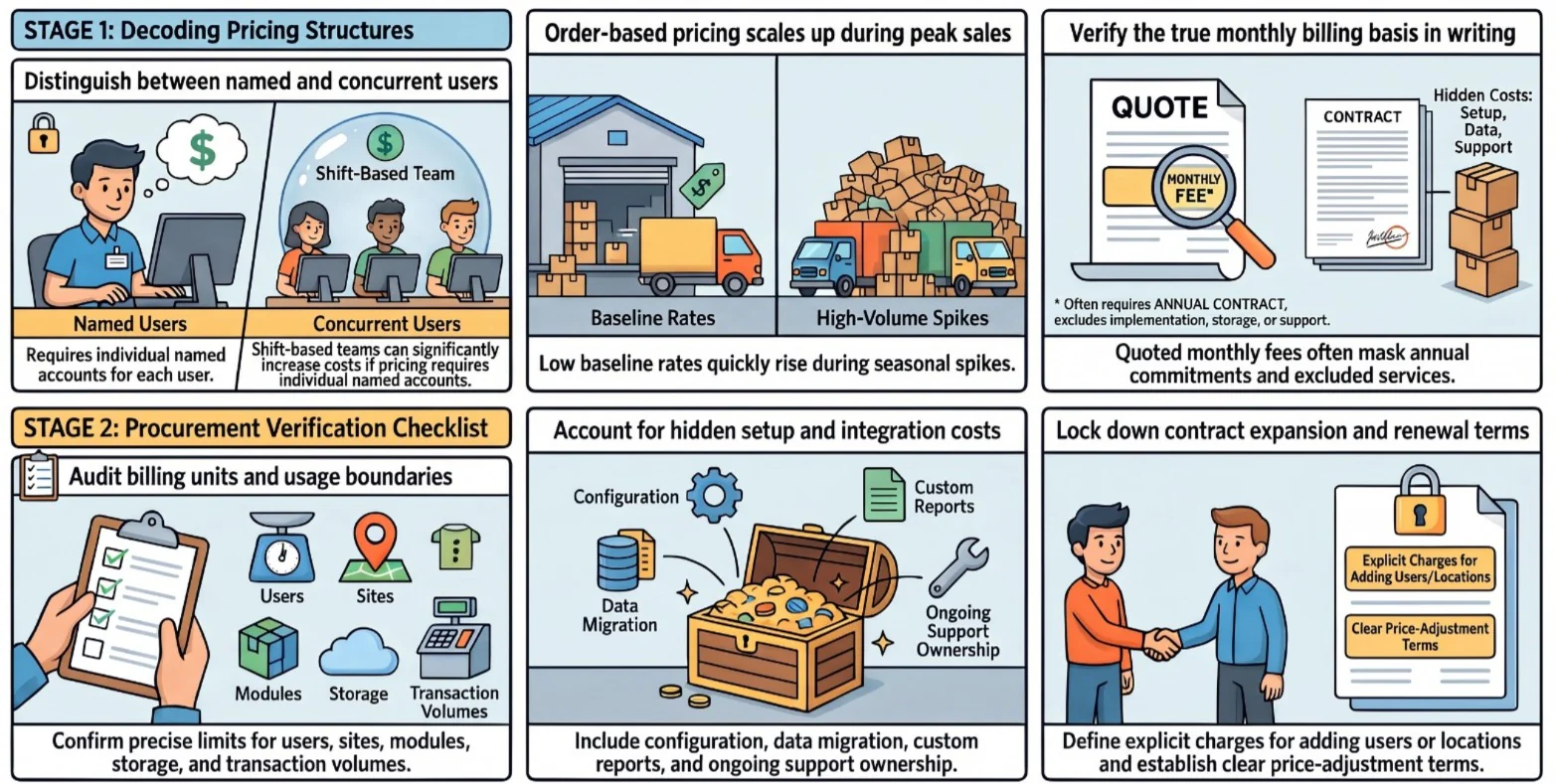
Compare pricing models using your expected activity, not a vendor’s lowest advertised tier. The useful question is how charges change as more people, orders, or sites enter the system.
1. Per-User, Flat-Rate, and Order-Based Subscriptions
Per-user pricing grows with access. Flat-rate plans may have usage or feature limits. Order-based plans can look affordable at low volume but rise when sales activity increases.
For shift-based teams, ask whether users are named or concurrent. For order-based plans, check what counts as an order and how seasonal peaks affect the bill.
2. Module-Based and Custom-Quote Structures
Module pricing lets a business pay for selected functions, but connected workflows may require more modules than first expected. Custom quotes allow broader scoping but need clear assumptions.
3. How a Monthly Cost Is Quoted
A monthly figure may be a true monthly charge or an annual contract divided by twelve. It may exclude implementation, extra users, storage, support, and taxes. Confirm the billing basis in writing.
4. A Pricing Model Checklist for Procurement Teams
- Billing unit: user, site, warehouse, module, order, or transaction.
- Included scope: functions, environments, storage, and usage limits.
- Setup: configuration, migration, testing, and training.
- Integration: development, monitoring, and support ownership.
- Service: response times and escalation terms.
- Growth: charges for extra users, locations, or modules.
- Contract: renewal, notice, and price-adjustment terms.
- Exclusions: custom reports, devices, and internal work.
How Do Inventory Management Systems Work With ERP Software?
Inventory decisions affect purchasing, sales, and accounting. The cost of connecting those functions depends on where records live and how transactions move between systems.
1. Data Flow Across Purchasing, Accounting, Sales, and Warehouse
When goods arrive, warehouse staff record the quantity and location. Purchasing checks the order, sales sees available stock, and finance needs the resulting value for reconciliation.
If separate systems handle those records, an integration must carry the right data at the right time. Failed or duplicated transactions need a clear way to be found and corrected. Also check whether the GST InvoiceNow Requirement applies to your business, since it can affect how invoice data leaves the system.
2. Master Data Ownership and Integration Dependencies
Before pricing an interface, decide which system owns each record. That decision affects migration, synchronisation, error handling, and long-term support.
- Items and units: one agreed source for SKU details and conversions.
- Customers and suppliers: clear rules for creating and updating records.
- Transactions: agreed timing for orders, receipts, and adjustments.
- Exceptions: an owner for failed transfers and conflicting records.
3. When an Integrated ERP Fits Better Than a Standalone Tool
A standalone inventory tool can suit a focused stock-control need. An integrated ERP becomes more relevant when purchasing, sales, warehouse, and finance depend on the same transaction records.
Test both approaches against your actual workflows. The comparison should include integration work, data ownership, reporting, support, and the effort of adding another site or entity.
How Can You Calculate the Business Case for Inventory Software?
Start with costs the business can already observe. A benefit belongs in the case only when there is a baseline, a reasonable route to improvement, and someone responsible for measuring it.
1. Identify the Inventory Costs Software Can Help Control
Review write-offs, excess stock, stockouts, emergency purchases, count variances, and time spent reconciling records. Use recent reports rather than assumed industry averages.
2. Estimate Savings From Less Manual Work and Fewer Stock Discrepancies
Estimate time savings as hours reduced × relevant labour cost. For discrepancies, compare the current cost of investigations and adjustments with a cautious target.
Saved time has financial value only if the team can use it productively or avoid a real cost. Record that assumption instead of treating every saved hour as cash returned.
3. Add Replenishment and Carrying Cost Improvements
Estimate a carrying-cost change as average stock value reduced × carrying-cost rate. Check that lower stock would still meet demand and supplier lead times.
4. Compare Benefits Against Total Cost of Ownership
Set expected benefits beside subscriptions, implementation, integrations, staff time, equipment, support, and renewals over the contract term. Include the period before benefits begin.
5. Present a Defensible Case Without Promising a Return
Show how the conclusion changes under three sets of assumptions:
- Conservative: benefits supported directly by current records.
- Expected: improvements after training and stable use.
- Expansion: additional value if more sites or processes adopt the system.
Give finance and operations the same assumptions to review. A range with clear evidence is more useful than a single savings figure that cannot be traced back to current performance.
"A business case is only as strong as the records behind it. Build the estimate from your own stock reports, not from a vendor brochure."
How Do You Choose Inventory Management Software for an Enterprise?
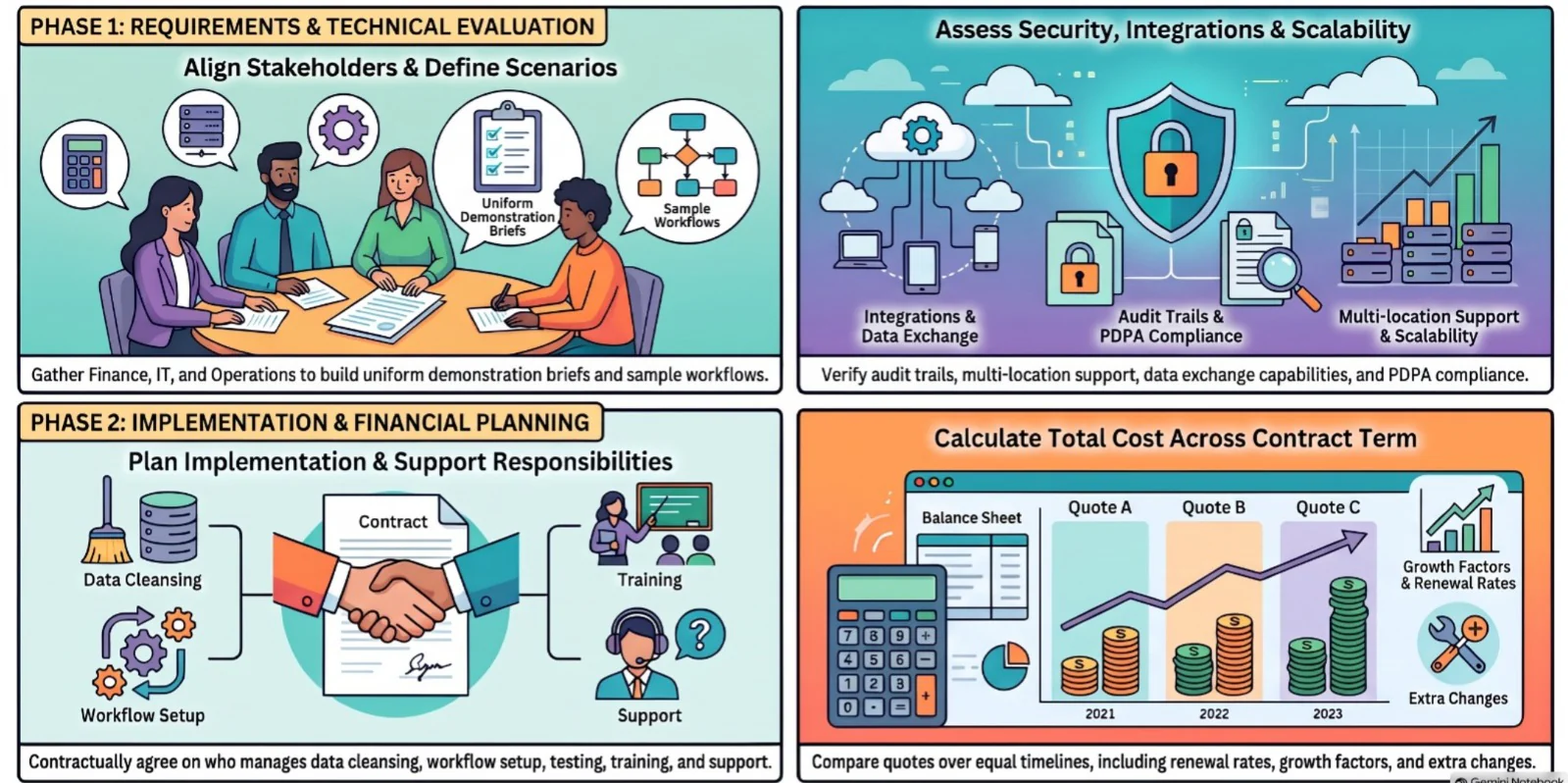
Selection becomes easier when every vendor receives the same brief and demonstrates the same stock scenarios. The brief should reflect current problems as well as planned growth.
1. Gather Requirements and Align Finance, Operations, and IT
- Operations: warehouses, stock flows, exceptions, and scanning needs.
- Finance: valuation, reconciliation, approvals, and reporting.
- IT: existing systems, data quality, security, and integrations.
- Procurement: users, contract terms, support, and expansion plans.
Prepare sample items, orders, transfers, and count discrepancies for demonstrations. Give each software requirement an owner and mark whether it is essential now or needed later.
2. Assess Integrations, Security, and Scalability
Ask vendors to show how permissions, audit trails, and data exchanges work in the proposed package. Check whether the design can support additional locations without rebuilding core processes.
Customer and supplier records may also contain personal data, so confirm how it is stored and protected under the PDPA data protection obligations.
3. Plan Implementation and Support Expectations
Agree who will cleanse data, configure workflows, test transactions, train users, and resolve issues after go-live. Put these responsibilities and the support terms in the proposal.
4. Evaluate Total Cost Across the Contract Term
Compare proposals over the same period and with the same assumptions. Include renewal terms, likely growth, and the cost of changes that the first-year quote does not cover.
Conclusion
Inventory management software cost in Singapore is shaped by the work the system must support, not the monthly fee alone. Users, stock complexity, integrations, implementation, and support all affect the final price.
An itemised quote and a business case based on current records give buyers a firmer basis for comparison. For a scope-based proposal, request a free consultation with HashMicro.

Frequently Asked Questions
A free tool may be enough for simple stock records at one location. Check its limits for users, transactions, reporting, support, and integrations before relying on it for a growing operation.
Inventory software tracks stock quantities, movements, and replenishment. A warehouse management system usually goes deeper into warehouse tasks such as putaway, picking, packing, and location control. The exact scope varies by product.
Grant support may be available for eligible projects. Singapore’s EDGE Grant replaced PSG for new applications from 30 September 2026. Check the current activity rules and eligibility before including grant support in a budget.
The timeline depends on data quality, warehouse count, integrations, process changes, testing, and training. Ask vendors for a schedule based on your scope rather than a standard implementation promise.
Many ERP products include inventory functions, but the available controls vary by product and edition. Confirm whether the proposed package covers your warehouse workflows, traceability, valuation, and reporting needs.