







Warehouse automation cost in Singapore depends on what the system must handle. Order volume, SKU dimensions, peak demand, site conditions and software connections can change a quote substantially.
Two warehouses of similar size may need different solutions. One may need faster picking; another may need storage equipment, conveyors, building changes and several system interfaces.
This guide shows which costs to budget, how to assess payback and what information suppliers need. It uses no universal price range because a useful estimate must reflect the facility and its operating data.
Key Takeaways
Warehouse automation cost in Singapore has no fixed price, because it depends on process scope, throughput, equipment, site conditions, and system connections.
A complete budget covers design, software, site works, integration, training, and ongoing support, not just equipment.
Payback comes from validated annual net benefit, so count released staff hours as cash savings only when spending actually falls.
Comparable quotes need the same workload, site data, and acceptance tests for every supplier.

What Does Warehouse Automation Cost in Singapore?
There is no dependable price that applies to every warehouse. The estimate changes with the processes covered, required throughput, equipment, software, site works and support arrangements.
A distributor automating one picking area may need a limited equipment setup. A multi-site operation adding storage, sortation and new system connections will have a different scope, even if its floor area is similar.
Before seeking a quote, define what enters and leaves the proposed system. Include receiving, storage, replenishment, picking, packing, dispatch and returns where they affect the design.
Which Costs Belong in a Warehouse Automation Budget?
Equipment is only part of the investment. A budget also needs the work required to install the system, connect it to existing records and keep it running after launch.
1. Equipment, controls, and software
Hardware costs reflect the selected storage, such as warehouse racking, along with movement and picking equipment. Controls, safety devices and software depend on the workflows and throughput the system must manage.
2. Site preparation and installation
Floor loading, power, network coverage, fire protection and access can affect installation. Check whether fire safety works or fit-out changes need approval; the SCDF Fire Safety Certificate and Temporary Fire Permit page explains related checks. A site survey should identify building work before it becomes a late change to the quote.
3. Integration, testing, and staff training
Connections to ERP, WMS, order and carrier systems need defined data flows and owners. Allow time to test failed updates, partial orders, returns and stock discrepancies.
Training should reflect each team's work. Warehouse staff, supervisors and IT may need different procedures for daily operation, exceptions and recovery.
4. Maintenance, support, and future capacity
Budget for maintenance, spares, energy, software renewals and support. Ask how capacity can grow if order peaks, SKU mix or the number of sites changes.
Use the categories below to check each quote. Mark an item as included, excluded or provisional, then record who must confirm any provisional amount.
| Budget category | Check the scope of | Quote status |
|---|---|---|
| Design and engineering | Process study, layout, safety review | Included / excluded / provisional |
| Equipment and controls | Hardware, scanners, controls, safety devices | Included / excluded / provisional |
| Software | Licences, users, workflows, reports | Included / excluded / provisional |
| Site preparation | Power, network, flooring, building work | Included / excluded / provisional |
| Integration | Interfaces, data mapping, security | Included / excluded / provisional |
| Implementation | Testing, training, cutover support | Included / excluded / provisional |
| Ongoing operation | Maintenance, spares, renewals, support | Included / excluded / provisional |
| Change and expansion | Contingency, added capacity, replacement | Included / excluded / provisional |
Confirm whether quoted amounts include GST and how your finance team will treat each cost. If part of the project may qualify for grant support, check the current rules on the EDGE Grant page before finalising the budget. Record the contract period as well, so one-time and recurring charges can be compared consistently.
How Do Implementation and Integration Change the Estimate?
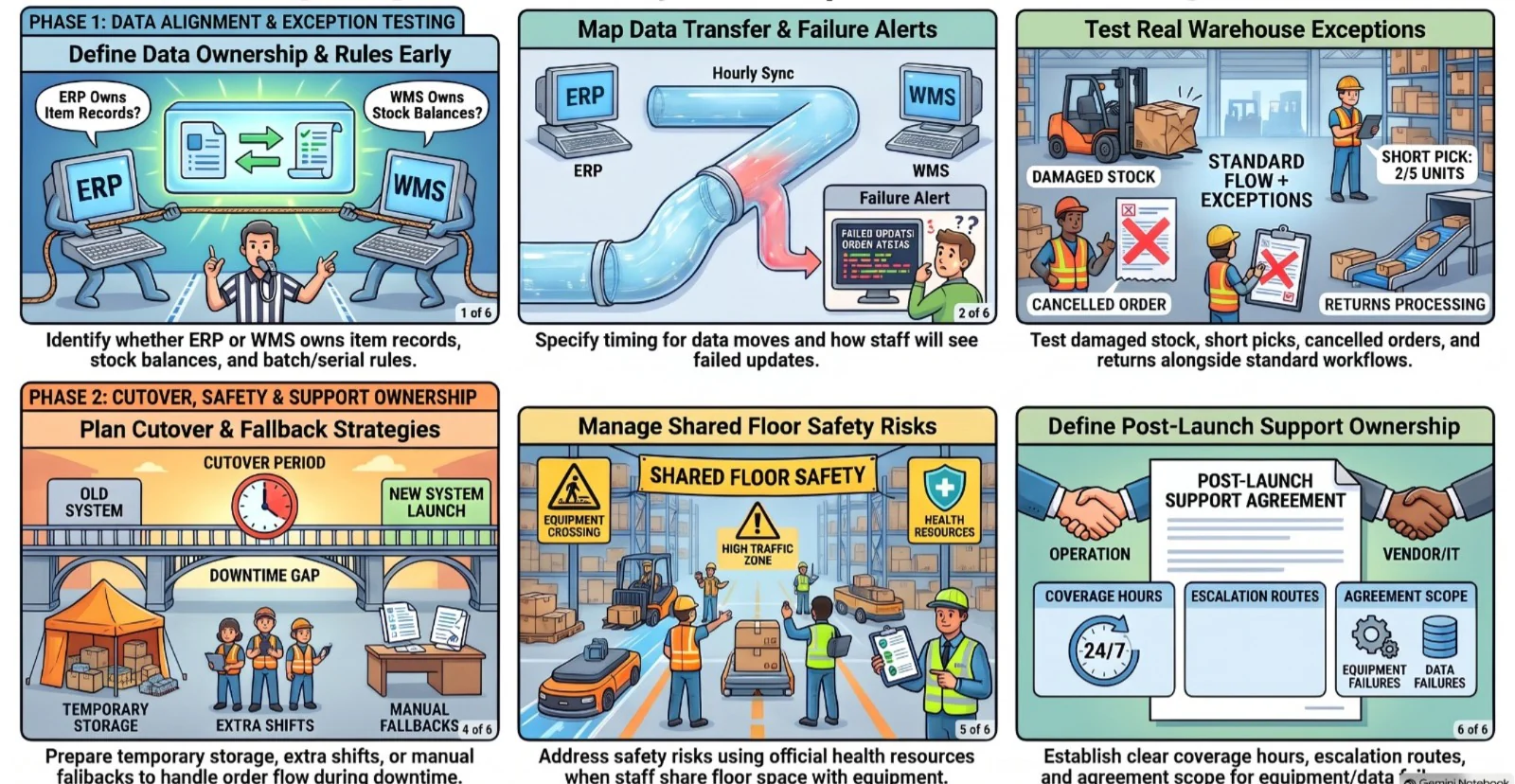
A system can meet its equipment specification and still disrupt work if its data or operating rules are unclear. Implementation costs rise when those decisions are left until installation.
1. ERP, WMS, and master data requirements
Identify which system owns item records, stock balances and orders, whether that is your ERP or your warehouse management software. Check units of measure, locations, barcode labels and batch or serial rules before designing interfaces.
For each connection, specify when data moves and how staff will see a failed update. This gives suppliers a clearer basis for pricing integration and testing.
2. Testing real warehouse exceptions
Test more than a standard pick and dispatch. Include damaged stock, short picks, cancelled orders, partial shipments and returns so the proposed workflow reflects daily work.
- Supplier responsibility: document configuration, interface behaviour and the tests included in delivery.
- Business responsibility: provide accurate data, make process decisions and approve test results.
- Shared responsibility: agree how defects are recorded, fixed and retested before launch.
3. Cutover, downtime, and support ownership
Plan how orders will be handled during installation and cutover. Temporary storage, extra shifts or manual fallback may be needed, depending on the site and operating calendar. Staff and moving equipment may also share the floor during commissioning, so use MOM's workplace safety and health resources to review the risks.
Define who responds when equipment stops or stock updates fail after launch. The support agreement should state coverage hours, escalation routes and the work included.
How Can You Calculate Cost and Payback?
Start with current operating records and a defined review period. Finance, operations and IT should agree which costs and benefits belong in the calculation.
1. Build the total cost of ownership
Total cost of ownership covers initial investment plus operating costs over the chosen period. Include equipment, site works, integration, training, maintenance, renewals and expected upgrades.
Total cost of ownership = initial investment + operating and support costs over the review period. Record the period and any replacement assumptions beside the result.
2. Measure the cost of staying manual
Use normal and peak periods to measure overtime, rework, picking errors, delayed fulfilment and space pressure. Keep each figure tied to a report or record its owner can check.
- Labour: overtime and avoidable handling time, supported by rosters and payroll records.
- Errors: correction, replacement and return costs supported by incident records.
- Capacity: overflow space or expansion costs supported by facility plans.
- Service: delayed orders with a financial effect the commercial team can validate.
Released staff hours are not automatically cash savings. Count them as a cash benefit only when spending will fall; otherwise, record the capacity they make available.
"Automation pays back when it fixes a bottleneck you can measure. Start with the delays, errors, and overtime your own records can prove."
3. Calculate annual net benefit and simple payback
Subtract additional annual costs, such as maintenance, energy and software renewals, from validated annual benefits. Use the same assumptions for every option under review.
Annual net benefit = validated annual benefits − additional annual operating costs.
Simple payback = initial investment ÷ annual net benefit. If net benefit is zero or negative, the project has no simple payback under those assumptions.
4. Check assumptions before approving the result
Ask who validated each baseline, how the benefit will be measured and when it will be reviewed. Test the result against lower demand or a slower launch before relying on it.
When Does Warehouse Automation Make Commercial Sense?
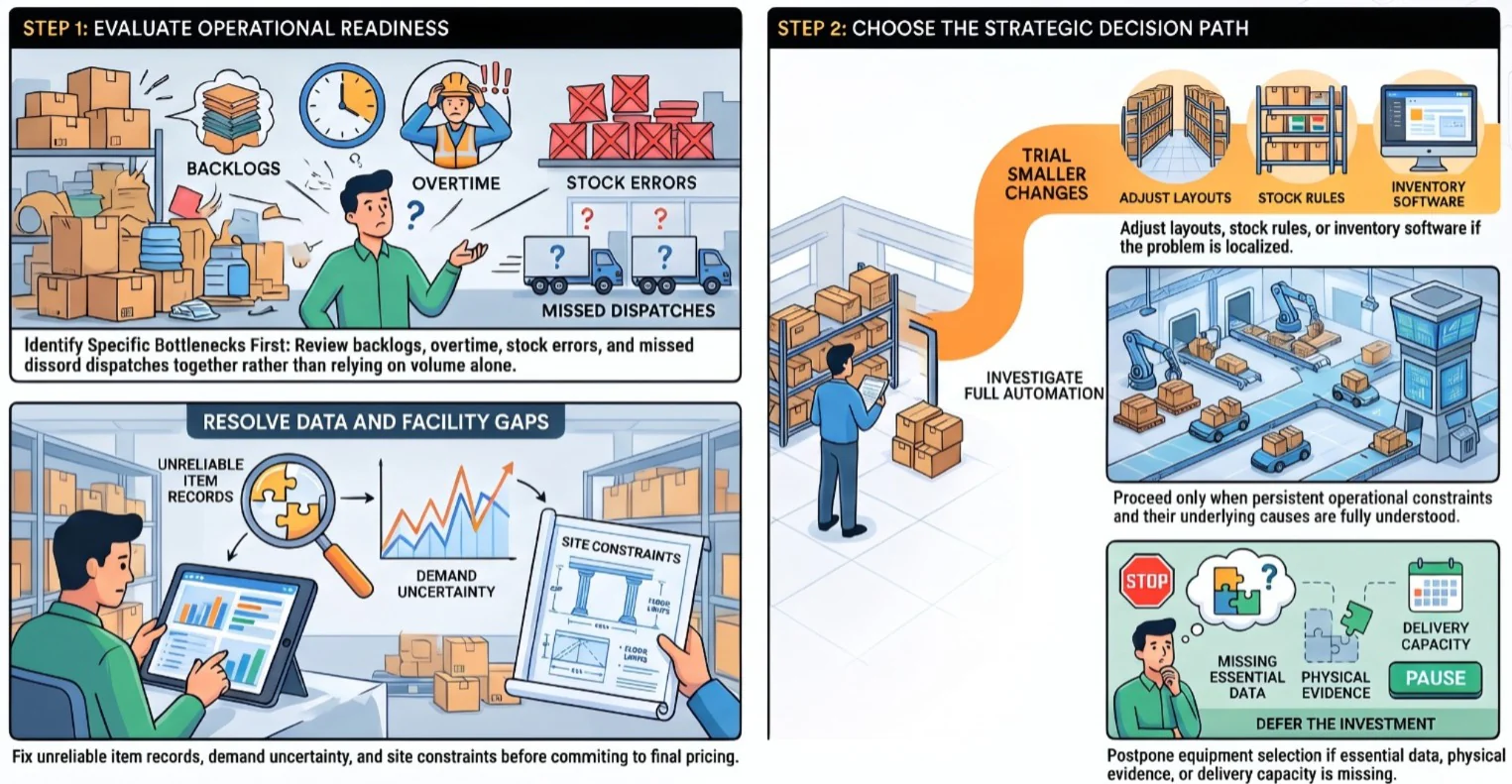
Automation is easier to justify when a recurring capacity, accuracy or service problem has been measured and the proposed system can address its cause.
1. Capacity, accuracy, and labour pressures
Review peak backlogs, overtime, stock errors and missed dispatch targets together. A busy warehouse may need automation, but volume alone does not show which process needs it.
2. When the data or facility is not ready
Unreliable item records, uncertain demand or unresolved site constraints can make equipment selection premature. Resolve the gaps that materially affect design before seeking a final price.
3. Smaller changes before a full automation project
A revised layout, clearer stock rules, better scanning or inventory management software may address a narrow problem. Compare these changes with a larger project using the same service and cost measures.
- Investigate: a measured constraint persists and its causes are understood.
- Trial a smaller change: the problem is limited to a process or area.
- Defer the investment: essential data, site evidence or delivery capacity is missing.
How Should You Compare Warehouse Automation Proposals?
Give suppliers the same operating brief. A lower quote is meaningful only when the proposed capacity, delivery work and support match the requirements being compared.
1. Collect order, SKU, peak, and site data
Provide order lines, SKU dimensions and weights, storage locations, returns and peak profiles. Include site drawings, clear heights, access limits and the hours the warehouse operates.
Label each input as measured, estimated or missing. For multiple sites, identify shared processes and local exceptions rather than treating every facility as identical.
2. Compare capacity, scope, and exclusions
Ask suppliers to state the throughput and storage capacity their design supports. Check which work is included, which items need site validation and what triggers a change in price.
3. Check acceptance tests and lifecycle support
Agree how throughput, accuracy, availability and recovery will be tested. Compare maintenance coverage, spare parts, software updates and the cost of adding capacity later.
Keep the quote review short enough to use in a decision meeting:
- Workload: the same average and peak order profiles for every supplier.
- Site: the same drawings, constraints and access information.
- Systems: named interfaces, data owners and test cases.
- Delivery: installation, cutover, training and acceptance criteria.
- Contract: exclusions, recurring fees, GST treatment and change rules.
Conclusion
Warehouse automation cost in Singapore reflects the work the system must perform and the facility it must fit. A complete budget covers equipment, software, site preparation, delivery and ongoing operation.
Use measured warehouse data to compare proposals and test payback. For a free consultation, discuss your ERP and inventory requirements with HashMicro; equipment design still needs a site survey and supplier assessment.

Frequently Asked Questions
Costs vary because facilities have different order volumes, SKU profiles, layouts, site conditions, equipment needs and system interfaces. Suppliers need the same operating brief to produce comparable proposals.
Check whether site preparation, data cleansing, integration, testing, training, cutover support, maintenance, spares and future expansion are included, excluded or provisional.
Integration depends on the proposed workflow and existing systems. Define which system owns orders, item data and stock records, then document the required data flows and exception handling.
Divide initial investment by validated annual net benefit. Count released hours as cash savings only if spending will fall; otherwise, record them as available capacity.
Prepare order and peak volumes, SKU dimensions, storage data, site drawings, labour patterns, current systems, service targets and known exceptions. Mark each input as measured, estimated or missing.