







An ERP demo is a vendor-run walkthrough that shows how a system handles your sales, purchasing, inventory, and finance processes before you sign a contract.
Most demos go well and still tell you very little, since the vendor drives, the data is clean, and nobody shows what happens when an invoice doesn't match the receipt.
Preparation beforehand is the real test against your own processes. This article covers what a demo should include, how it differs from a trial, what to prepare and ask, red flags, and how to compare vendors.
Key Takeaways
An ERP demo is a guided walkthrough run by the vendor, while a trial gives your own team hands-on access to a sandbox.
Preparation decides the value of the session, so send your own processes, documents, and sample data before the meeting.
Ask the vendor to run your exception scenarios, not only the clean path, since that is where most implementations run into trouble.
Score every vendor against the same criteria on the same day, or the most polished demo wins by memory rather than fit.
What Is an ERP Demo?
An ERP demo is a guided walkthrough where a vendor shows how its software handles sales, purchasing, inventory, finance, and reporting, with the presenter driving while your team watches and asks questions.
Most sessions run 60 to 120 minutes and cover either a broad overview or a few specific workflows. A broad session suits an early shortlist, a focused one suits the final two or three vendors.
The point is not admiring the interface. You are there to find out whether the system handles your actual transactions and approval chain without custom work.
Treat it as evidence gathering, not a sales meeting. The questions you bring decide how much you learn, since a vendor will otherwise show the path that always works.
ERP Demo vs ERP Trial: Which One Do You Need?
A demo and a trial answer different questions, and most buyers need both at different points. The table below sets out where each one fits.
Enterprise vendors often replace a self-serve trial with a scoped proof of concept instead, configuring a slice of your process in a controlled setting.
Run the demo first regardless. A trial only earns its place once you know which workflows actually need testing.
How to Prepare Before an ERP Demo
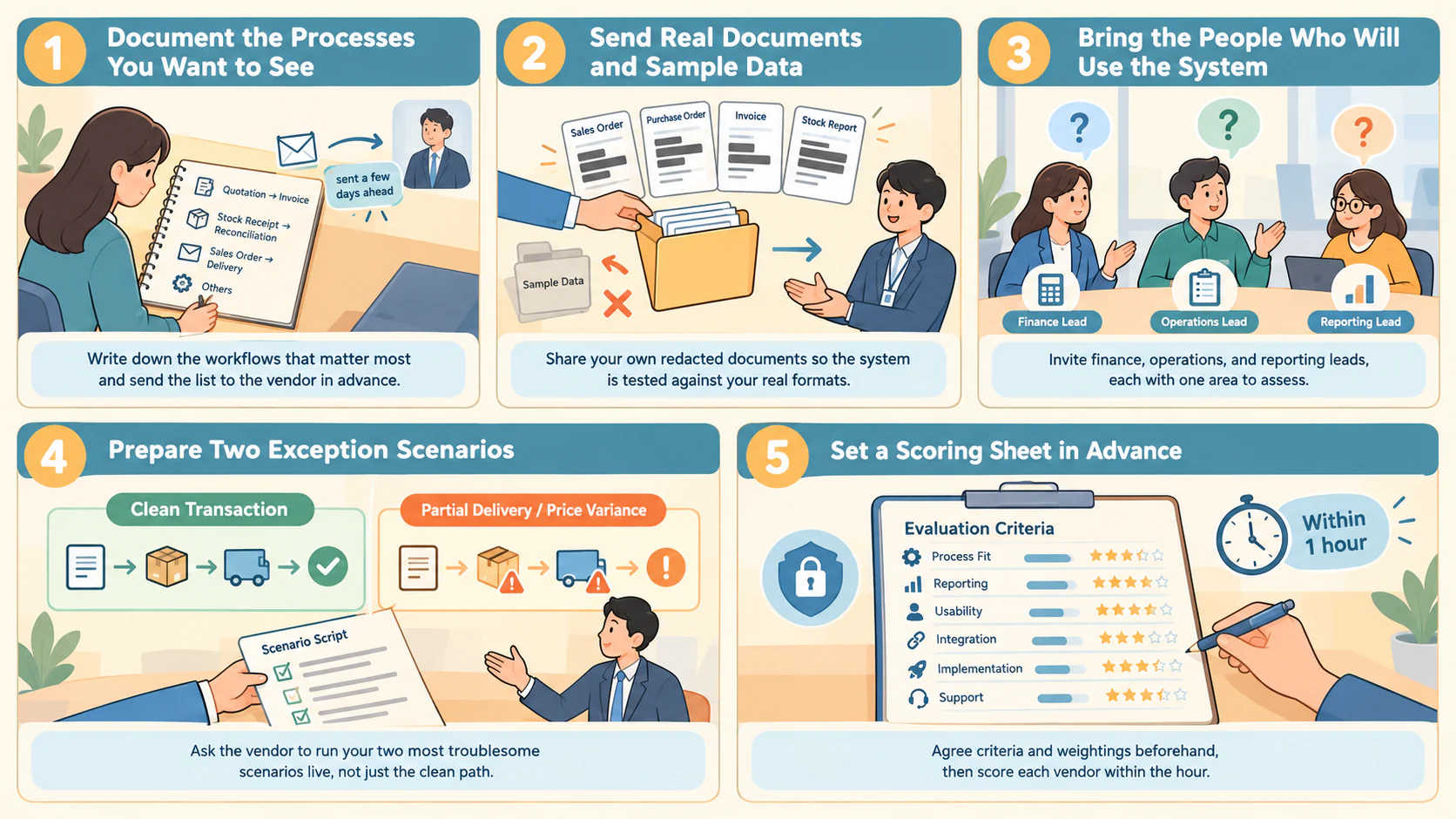
A few hours of preparation change what the vendor actually shows you.
1. Document the processes you want to see
Write down the three or four business processes that matter most, such as quotation to invoice or stock receipt to reconciliation, including who approves what.
Send that list to the vendor a few days ahead, so the presenter builds the session around your business instead of a generic script.
2. Send real documents and sample data
Share a redacted sales order, purchase order, invoice, and stock report, and ask the vendor to use those formats instead of their own sample set.
Seeing your own layout and field names in the system reveals gaps fast, like a missing reference field nobody mentioned in the brief.
3. Bring the people who will use the system
Invite the finance lead, the operations or warehouse lead, and whoever handles reporting. A room full of managers tends to miss the detail that decides adoption.
Give each attendee one area to assess and one question to ask, so the debrief produces specific findings rather than general impressions.
4. Prepare two exception scenarios
Pick the two situations causing the most manual work today, a partial delivery or a price variance, and ask the vendor to run both live.
How a system handles a broken transaction says more than how it handles a clean one, but only if you ask before the session starts.
5. Set a scoring sheet in advance
Agree criteria and weightings before the first demo, covering process fit, reporting, usability, integration, implementation, and support, then lock it.
Score within an hour of each session while detail is fresh, so the comparison reflects what you saw rather than what you remember two weeks later.
ERP Demo Checklist: What to Cover in the Session
A demo checklist keeps the session on what decides fit, not on whatever the vendor finds easiest to show.
For Singapore businesses, ask whether the finance system supports InvoiceNow requirements if the business falls within the applicable GST requirements.
Work through it in that order, since core workflow and exceptions eliminate unsuitable vendors fastest, before reporting and configuration narrow the rest.
Ask the presenter to pause whenever they skip an area. A deferred answer is still useful, as long as someone writes down that it was deferred.
What to Ask in an ERP Demo
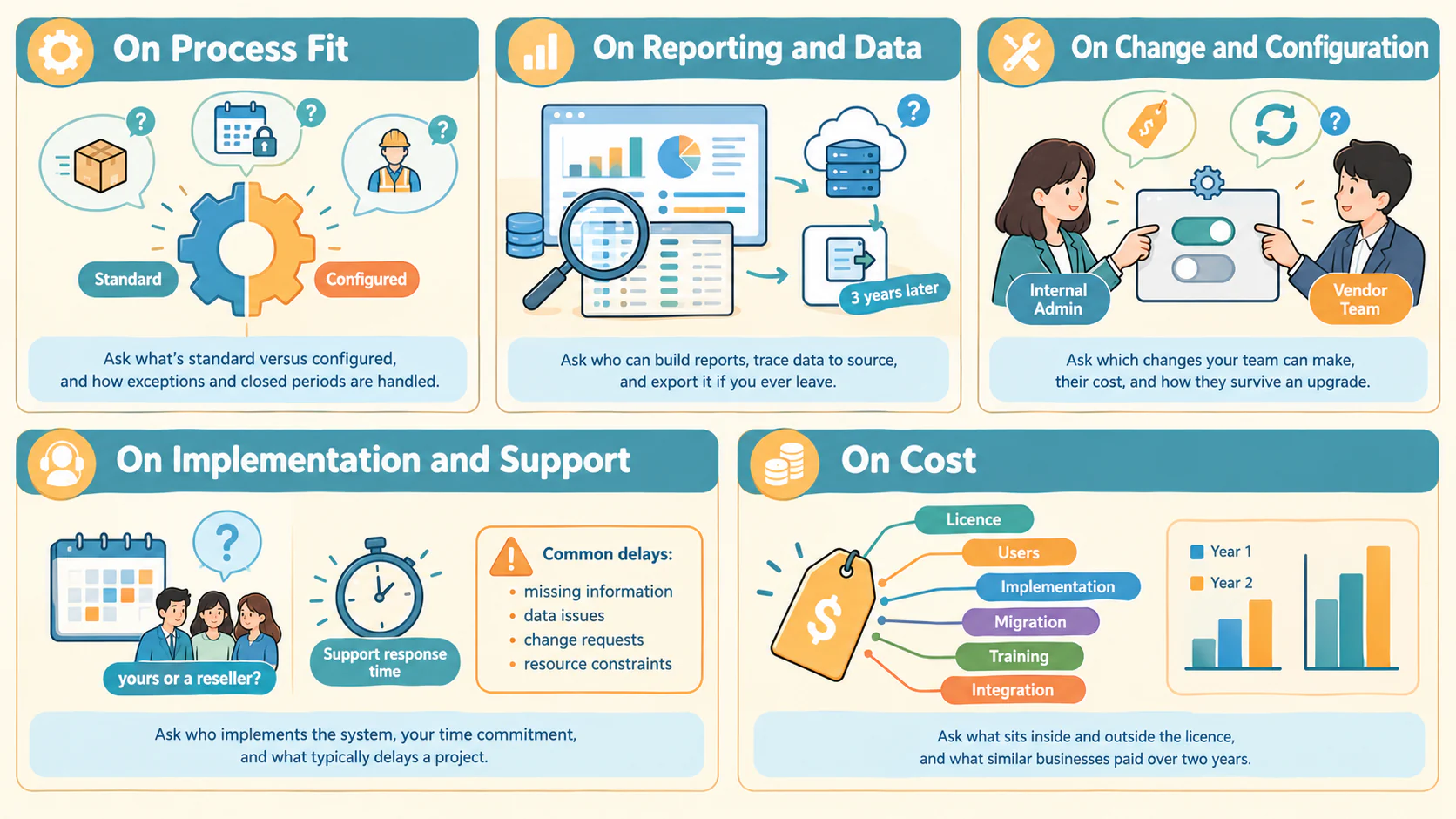
The questions below are grouped by theme, and each one has a wrong answer worth hearing.
1. On process fit
- Which parts of what you just showed are standard, and which needed configuration?
- How would the system handle a delivery that arrives short against the purchase order?
- What happens when someone needs to correct a document in a closed period?
- Can you show the same transaction from the perspective of a warehouse user?
2. On reporting and data
- Can my finance lead build a new report without raising a request with you?
- How do I trace a figure on this dashboard back to the transactions behind it?
- Where does the data sit, and who on your side can access it under Singapore's data protection rules?
- How do we export our own data if we decide to leave in three years?
3. On change and configuration
- Which changes can our internal admin make, and which need your team?
- What does a configuration change cost once we are live?
- How do customisations behave when you release an upgrade?
- Can you show one change being made live right now?
4. On implementation and support
- Who implements this, your own team or a reseller?
- How many hours a week will our staff need to commit during the project?
- What is the support response time, and who answers first?
- Which three things most often delay a project like ours?
5. On cost
- What is included in the licence, and what sits outside it?
- How does the price change when we add users, entities, or modules?
- What are the implementation, migration, training, and integration costs?
- What has a business of our size typically paid in year one and year two?
Record answers in writing during the session, since the detail stays accurate when every vendor sounded reasonable at the time.
Businesses evaluating the inventory side in parallel often find these questions overlap. Our roundup of inventory management software in Singapore covers stock accuracy and reporting depth.
Red Flags to Watch During an ERP Demo
Some demo behaviours predict implementation problems reliably enough to act on.
- Every question gets a yes. No system fits every process natively, so a vendor who never names a limitation is managing the meeting, not answering it.
- The presenter avoids live clicks. Slides or recorded video standing in for the real system usually means the feature is not ready to show.
- Your sample data never appears. If you sent documents and the demo still runs on vendor data, nobody prepared for your business.
- The exception path gets skipped. A vendor who moves past your partial delivery scenario twice is unlikely to handle it well in production.
- Configuration always needs their team. Routine field and workflow changes that require paid consulting become a recurring cost.
- Pricing stays vague. A refusal to break down licence, implementation, and support figures makes the year-two cost impossible to plan.
- The implementer is unnamed. When the demo team and the delivery team are different companies, accountability needs settling before signing.
"A vendor who never names a limitation is not being impressive. They are rehearsing a sale, not answering the question you actually asked."
None of these rule a vendor out alone. Three or more in a single session is a pattern, not a bad day.
How to Compare Vendors After the Demos
Comparison fails when every vendor gets judged on a different basis, which is what happens without a scoring sheet.
Adjust the weightings to fit your situation rather than taking them as fixed. Heavy reporting needs might raise that line and lower integration.
Debrief with every attendee right after each demo, then shortlist two vendors for a trial or proof of concept, and ask for a reference call with a similar customer.
Businesses mapping stock, purchasing, and fulfilment together may want that process settled first. Our guide to ERP in supply chain management covers the hand-offs a demo should show.
Conclusion
An ERP demo rewards the buyer who prepares. The vendor will always show a working system, so your documents and exception scenarios turn the session into real evidence.
Bring the people who will use the software, score every vendor on the same sheet within the hour, and treat a skipped exception as an answer in itself.
Send your own processes ahead and get a free consultation built around your actual transactions, including the ones that currently cause manual work.
Frequently Asked Questions
Most buyers get useful comparison from three to five vendors at the broad-overview stage, then narrow to two or three for focused, workflow-specific sessions. Demoing too many vendors at the same depth wastes time, while demoing only one removes any basis for comparison.
Yes, and it is worth asking for directly. Send a redacted sales order, invoice, or stock report ahead of the session so the vendor builds the walkthrough around your actual documents instead of a generic sample set.
Letting the vendor control the entire agenda. Without a prepared list of workflows, exceptions, and questions, the session only ever shows the path that already works, which tells you very little about how the system behaves under real conditions.
Agree a weighted scoring sheet covering process fit, exception handling, reporting, usability, integration, implementation, and cost before the first demo, then score every vendor against the same sheet within an hour of each session while the detail is still fresh.
Most vendors provide a demo at no cost, since it is part of the sales process. Charges usually appear only at the proof of concept stage, where a vendor configures a slice of your process using your own data. Confirm what the session includes before booking.
A broad overview runs around 60 minutes, while a workflow-focused session for a shortlisted vendor usually takes 90 to 120 minutes. Allow extra time for exception scenarios and a live configuration change, and block 30 minutes afterward for a debrief while detail is still fresh.