







A low monthly fee can look attractive until setup and daily use enter the picture. For a Singapore retailer selling across several channels, the final cost also depends on how stock, orders, returns, and accounts connect.
Shopify, marketplaces, and physical fulfilment locations may each hold different stock records. Keeping them aligned can require reservations, frequent updates, error checks, and staff time that an advertised price does not show.
This article breaks down the charges behind an ecommerce inventory software quote and the records needed to assess its value. It focuses on the scope of your operation rather than an unsupported price range.
Key Takeaways
Ecommerce inventory software has no single price in Singapore, so compare itemised quotes covering subscription, usage, setup, and internal costs.
Channels, warehouses, SKU variants, returns, and integrations drive the cost of multichannel inventory software more than company size does.
Implementation costs include data cleaning, migration, integration testing, training, and internal staff time that a vendor quote often leaves out.
A credible ROI case uses current records, measured costs, and stated assumptions instead of a guaranteed return.

What Does Ecommerce Inventory Software Cost in Singapore?
There is no reliable single price for ecommerce inventory software in Singapore. A quote reflects the channels, locations, users, order activity, integrations, and services included in the proposed scope.
A retailer with one storefront and warehouse may need basic stock updates and purchasing. A seller using Shopify, Shopee, Lazada, and several fulfilment sites also needs rules for shared availability and exceptions.
Ask vendors to price the same operating scope. The comparison should cover setup, software access, expected usage, support, and the work your own team must complete before the system can go live.
Which Pricing Models and Charges Should You Compare?
Vendors may package the same work in different ways. One quote may include training and integration setup, while another places those services outside its monthly fee.
1. Subscription, User, and Module Fees
A subscription may cover a fixed package or charge separately for users, locations, and modules. Check whether warehouse staff, finance users, administrators, and occasional users need different access.
Confirm which functions are included at the quoted tier. Stock reservations, purchasing, advanced reports, and marketplace connections may sit in separate modules or require additional services.
2. Order Volume, API Usage, and Seasonal Peaks
Some plans charge by order count, transaction volume, storage, or API use. Ask what counts towards each limit, including cancellations, returns, split shipments, and repeated stock updates.
Model a busy sales period as well as an ordinary month. A plan that fits average volume may cross a higher pricing threshold during a campaign or seasonal peak.
3. Comparing the Full Quote, Not Just the Monthly Fee
Use these four categories to put proposals on the same basis. Keep each vendor’s inclusions and exclusions beside the figure rather than comparing totals without their scope.
| Cost type | Typical items | Question to ask |
|---|---|---|
| Recurring | Access, users, modules, support | What renews? |
| Usage-based | Orders, API calls, storage | When do charges rise? |
| One-time | Setup, migration, testing, training | What work is included? |
| Internal | Data review, project time, user training | Who does the work? |
Request an itemised quote and statement of work. Together, they should identify the contract term, usage limits, delivery tasks, support terms, renewal rules, and costs triggered by a change in scope.
What Drives the Cost of Multichannel Inventory Software?
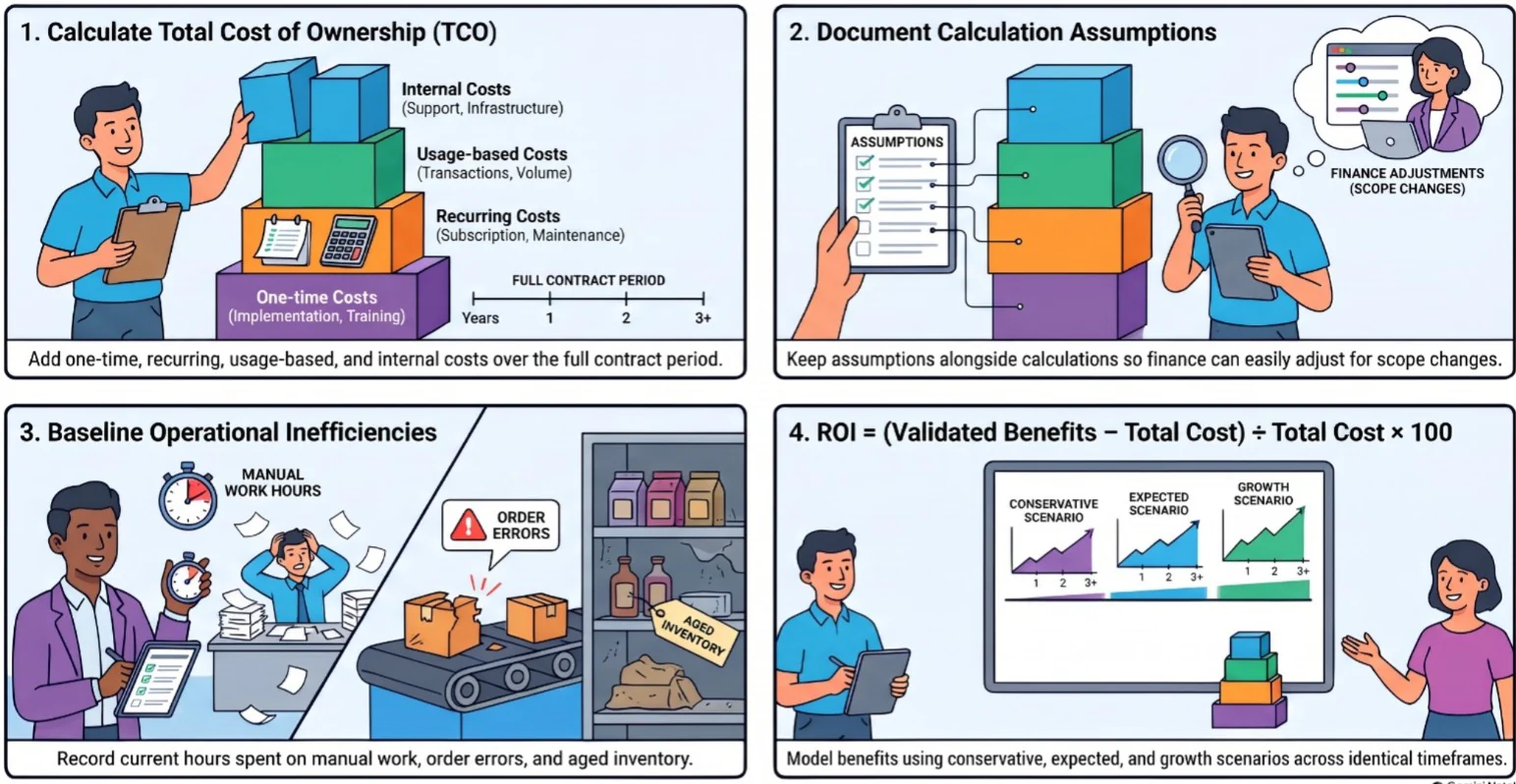
Employee count alone says little about inventory complexity. A small team can still manage thousands of variants, several sales channels, and frequent returns.
1. Channels, Locations, Users, and Order Volume
Each new channel needs product and stock data to match the central record. Each warehouse or store adds questions about available stock, transfers, allocation, and who can change quantities. Good stock management software keeps one central record that every channel reads from.
Order volume affects the amount of data the system processes. User roles affect permissions, training, and testing, especially when sales, warehouse, purchasing, and finance share the workflow.
2. Variants, Reservations, Returns, and Fulfilment Rules
Sizes, colours, bundles, and channel-specific SKUs need consistent mappings. A mistake can show stock as available online even when the warehouse has already reserved it for another order.
Returns add another decision: is the item available for resale, awaiting inspection, or written off? Split shipments and cancellations also need clear rules so stock records remain accurate.
3. Reporting, Approvals, and Support Requirements
Reports may need to separate available, reserved, damaged, and in-transit stock by channel or location. Approval rules and audit trails add work when adjustments or write-offs need tighter control.
Support scope also changes a quote. Check who monitors failed updates, how issues are escalated, and whether help during sales peaks or outside standard hours is included.
Which Implementation Costs Are Easy to Miss?
Implementation is shared work. The vendor may configure the system, but the business still needs people who know its products, stock rules, reports, and exceptions well enough to check the result.
1. Product Data Preparation and Migration
Product records often contain duplicate SKUs, inconsistent units, or outdated variants. Cleaning them before migration takes time, but carrying errors into the new system makes stock figures hard to trust.
Agree which records will move, including products, suppliers, opening stock, and outstanding orders. Because outstanding orders carry customer details, check how personal data is handled under the PDPA data protection obligations. Assign someone to check quantities and values after each migration test.
2. Configuration and Integration Testing
Warehouses, user roles, stock statuses, and approval rules need to match actual work. Connections also need tests for ordinary orders and exceptions such as refunds, partial fulfilment, and failed updates.
3. Training, Go-Live Support, and Internal Staff Time
Include the time needed for warehouse, customer service, finance, and ecommerce teams to test and learn their tasks. Decide who will handle unresolved issues when the new process starts.
- Vendor work: confirm configuration, migration support, documentation, and issue resolution in the statement of work.
- Internal work: allocate time for data checks, process decisions, testing, and training attendance.
- Go-live cover: agree who monitors orders, stock updates, and returns during the first operating period.
"The vendor can configure the system, but only your team knows which product records and stock rules are right. Budget that time before you sign."
Which Capabilities Matter for Ecommerce Inventory?
Buy the controls needed for current order flows first. Additional functions have value when they address a defined problem, but a long feature list cannot compensate for inaccurate shared stock.
1. Stock Accuracy Across Channels and Locations
The system should show where stock sits, what is reserved, and what can still be sold. Test how quickly each channel reflects a receipt, sale, transfer, cancellation, or adjustment.
2. Replenishment, Returns, and Fulfilment
Purchasing teams need to see demand and supplier commitments before stock runs low. Fulfilment teams need clear allocation rules, while returns must flow back into the right stock status.
Where warehouse activity is complex, test warehouse management software features such as barcode scanning, cycle counts, picking, packing, and transfers. Include these functions only if the proposed process needs them.
3. Choosing Essentials Before Advanced Functions
Mark each requirement as essential now, useful later, or outside scope. The distinction keeps the first quote focused and makes future expansion easier to price.
- Essential controls: reliable stock updates, reservations, returns, permissions, and transaction history.
- Operational additions: barcode workflows, replenishment rules, and more detailed warehouse reporting.
- Advanced needs: forecasting, complex allocation, and reporting across several entities or regions.
How Do Shopify, ERP, and Logistics Integrations Affect Cost?
A connector does more than move data between screens. Its cost depends on which records move, how often they update, and what happens when a transaction fails.
1. Shopify App or Dedicated Inventory System?
A Shopify inventory app, or Shopify’s own multi-location inventory tools, may suit a simpler storefront and fulfilment setup. A dedicated system becomes more relevant when several channels or locations need shared stock rules and broader reporting.
Compare the actual workflows, not the product labels. Check reservations, returns, purchasing, warehouse activity, and finance handoffs before deciding how much system depth is needed.
2. Product and Stock Data Ownership
Decide where each item, variant, quantity, order, and return is maintained. If two systems can change the same record independently, teams need rules for conflicts and corrections.
3. Update Frequency, Failed Syncs, and Connector Scope
For each connection, document whether updates happen immediately or on a schedule. Ask how staff see delayed transactions and who is responsible for replaying or correcting them.
- Ecommerce channels: products, availability, orders, cancellations, and returns.
- ERP and accounting: purchasing, valuation, invoices, and reconciliation.
- Logistics: dispatch details, tracking updates, and delivery exceptions.
Include connector setup, testing, monitoring, and later changes in the quote. A low initial integration fee says little about the effort needed to keep data reliable after go-live. For invoicing, check whether the GST InvoiceNow Requirement applies to your business, since it can affect how invoice data leaves the system.
How Can You Build a Credible Cost and ROI Case?
Use records your teams already maintain. The business case should show what the system will cost, which problems it may reduce, and how each expected benefit will be measured.
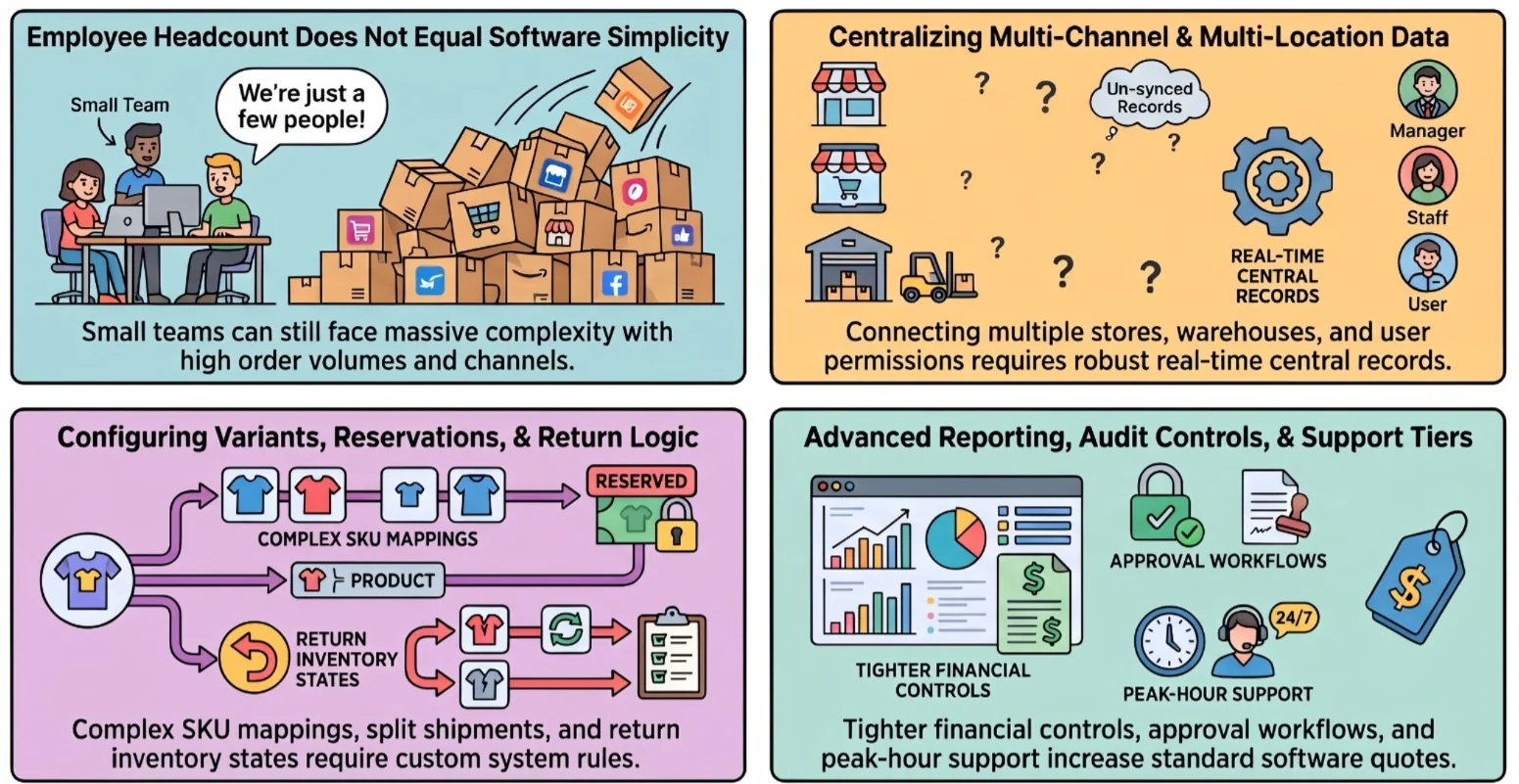
1. Calculate Ownership Cost Across the Contract Term
Add recurring charges, expected usage, implementation, internal effort, support, and likely expansion over the same contract period for every proposal. Note when each charge begins.
Total cost of ownership = one-time costs + recurring costs + usage-based costs + internal costs. Keep the assumptions beside the calculation so finance can revise it if the scope changes.
2. Measure Manual Work, Stock Errors, and Aged Inventory
Record current hours spent reconciling stock and orders, overselling incidents, fulfilment corrections, write-offs, and aged inventory. Use a consistent period and name the owner of each figure.
These measures are possible sources of value, not automatic savings. A benefit should enter the calculation only when the proposed process can reasonably affect it.
3. Record Assumptions Before Estimating Benefits
Estimate outcomes under conservative, expected, and growth scenarios. State which improvements depend on clean data, staff adoption, working integrations, or changes to purchasing and fulfilment.
ROI = (validated benefits − total cost) ÷ total cost × 100. Use the same period for benefits and costs, and avoid presenting the result as a guaranteed return.
How Should Singapore Businesses Compare Vendors?
Give each vendor the same brief, sample transactions, and questions. This makes differences in scope visible before price becomes the deciding factor.
1. Give Vendors the Same Requirements Brief
Document your software requirements before contacting vendors: list channels, warehouses, users, SKU variants, order volumes, stock rules, returns, reports, and connected systems. Include the problems the current process creates and the outcomes you need.
2. Test Overselling, Split Orders, and Returns in Demos
Ask each vendor to show what happens when the last unit sells on one channel while another order is pending. Then test a split shipment, cancellation, return, and failed stock update.
Record what worked in the proposed package and what required configuration or another product. A demonstration using your scenarios provides stronger evidence than a generic feature presentation.
3. Compare Scope, Exclusions, Support, and Renewal Terms
- Delivery: which migration, configuration, testing, and training tasks are included?
- Ownership: which tasks and data checks remain with your team?
- Support: who handles failed connections and urgent order issues?
- Growth: how do charges change with more users, orders, channels, or locations?
- Contract: what are the renewal, notice, and price-adjustment terms?
Read vendor comparisons as descriptions of their own packages, not independent proof of fit. Base the decision on the quoted scope, demonstrated workflows, and total cost your teams have checked.
Conclusion
Ecommerce inventory software cost in Singapore depends on more than a subscription. Channel connections, stock rules, implementation work, usage limits, and support can all change the amount a business pays.
A useful comparison starts with the same operating brief for every vendor. Itemised quotes, realistic demonstrations, and current inventory records give finance and operations a firmer basis for the decision. To see how a connected system handles your own channels and stock rules, book a free consultation with our team.

Frequently Asked Questions
There is no single reliable price. The quote depends on channels, warehouses, users, order activity, required functions, integrations, implementation, and support. Compare itemised proposals based on the same scope.
It may be enough for a simpler operation. Test how it handles shared stock, reservations, returns, purchasing, other marketplaces, warehouse activity, and reporting before choosing it over a dedicated system.
Depending on the contract, order-based fees, transaction tiers, API usage, storage, and support needs may increase. Confirm what counts towards each limit and model a peak sales period.
Exclusions vary, but buyers should check data cleansing, historical migration, custom reports, integration testing, staff training, internal project time, and support after go-live.
Many products offer connectors or APIs, but coverage varies. Confirm the specific data flows, update frequency, error handling, testing scope, and ongoing support for each connection.
Start with current reconciliation hours, stock discrepancies, overselling incidents, fulfilment corrections, write-offs, and aged inventory. Compare supported improvement estimates with total costs over the same period.