







A single stock discrepancy can trigger a chain of problems, from delayed orders and unexpected shortages to excess inventory that ties up working capital. As stock levels change throughout the day, keeping every record accurate becomes increasingly challenging without the right tools. Businesses need a reliable way to track inventory movements, maintain visibility, and keep daily operations running smoothly.
An inventory management system can help, but what makes one truly effective? The answer lies in its features. From real-time stock tracking to automated alerts and detailed reporting, each capability serves a different operational purpose. Understanding inventory software features helps businesses identify the tools they need to resolve inventory challenges, improve accuracy, and manage stock with greater confidence.
Key Takeaways
An inventory management system helps businesses efficiently manage stock, orders, and deliveries by automating tasks and tracking inventory in real-time.
Inventory management software offers key features like barcoding, and forecasting, which streamline operations and improve accuracy.
When selecting inventory management software, consider total ownership costs and choose between on-premise or cloud solutions to meet your business goals.
Achieve seamless inventory management with HashMicro by aligning advanced features like real-time analytics and automated reordering.
What is an Inventory Management System?
Inventory management software helps businesses control stock, orders, sales, and deliveries efficiently, ensuring the right levels to avoid overstocking or shortages. Typically delivered as software, they automate workflows and track inventory in real time to streamline operations and cut errors.
Tailored features for Singaporean companies provide smarter control and faster, data-driven decisions for a clear competitive edge. With the basics covered, let’s dive into the essential inventory management features that make this software so valuable.
Key Inventory Management System Features
To fully understand how inventory management system can benefit your business, it’s essential to delve into the specific features it offers.
1. Centralized Inventory Management
Managing stock across multiple locations can get messy. Centralized inventory management simplifies this by allowing businesses to oversee all inventory from a single platform. This ensures data consistency across all channels, making supply and demand easier to manage.
2. Barcoding and Scanning Technology
Barcoding and scanning technology reduces human error by allowing quick, precise product scanning, making these inventory management techniques essential to maintain and improve accuracy.
This inventory management feature speeds up inventory counting and order fulfillment, resulting in more efficient operations.
3. Forecasting and Demand Planning
Staying ahead of demand is crucial. Forecasting and demand planning features use historical data and market trends to predict future inventory needs. This ensures you always have the right stock levels, minimizing the risk of stockouts or overstocking.
4. Automated Alerts and Notifications
This inventory management system feature keeps you informed with automated alerts and notifications. Once stock levels are low, it’s time to reorder, or discrepancies arise, these timely alerts will help you stay on top of your inventory.
5. IoT and Cloud-Based Features
The Internet of Things (IoT) and cloud-based inventory systems are becoming increasingly vital in modern inventory management. With IoT, businesses can track inventory in real time through connected devices. Meanwhile, cloud-based platforms offer the flexibility to access inventory data at any time and from anywhere.
These features provide businesses with greater visibility and control over their inventory.
6. Data Backup and Security
Data backup and security features are vital for protecting sensitive inventory information. Inventory management system with strong security measures ensures your data is safe from unauthorized access and potential breaches. Regular backups also guarantee that your inventory data can be recovered in case of a system failure.
7. Integration with Other Business Systems
Integrating inventory management software with other business systems, such as accounting or sales software, is a key feature that enhances efficiency and streamlines operations.
This integration ensures seamless data flow between different departments, reduces the need for manual data entry, and minimizes errors, making inventory management software an essential tool for optimizing business processes and improving overall efficiency.
8. Configurability and Customization
Configurability and customization features allow businesses to tailor the inventory management software to their needs. Whether customizing inventory report, setting up user roles, or adjusting workflows, these features ensure that the software works best for your business. This flexibility can significantly improve efficiency and user satisfaction.
9. Real-Time Reporting and Analytics
Real-time inventory report and analytics provide businesses with up-to-date information on their inventory levels. This feature helps companies decide when to reorder stock and which products sell well. Businesses can optimize their inventory management processes and reduce costs by analyzing this data.
With these powerful features established, let’s see how different industries benefit from tailored inventory management solutions.
10. Inventory optimization
Inventory optimization uses algorithms and analytics to keep stock precisely balanced with demand, preventing both overstocking and stockouts. With right-sized inventory, teams work more efficiently, meet deadlines more reliably, and cut carrying costs.
11. Product supply and customer demand
Effective inventory systems forecast demand and analyze sales trends to align supply precisely with what customers will buy, preventing overproduction and stockouts. Keeping this balance lowers holding costs and waste while freeing up working capital for growth.
12. Mobile Inventory Management for Warehouse Teams
Mobile inventory management lets warehouse staff check stock and record movements while working on the floor. With a handheld device, teams can update receiving, put-away, picking, transfers and stock counts at the point of activity. Look for an app that shows current quantities and locations, supports barcode scanning and controls access by user role.
Industry-Specific Features for Inventory Management

Different industries require specialized inventory management features to meet their unique operational demands:
1. Manufacturing: focus on production tracking and quality control
Inventory management system must focus on production tracking and QC report in the manufacturing industry. This ensures that raw materials are available when needed and that finished products meet quality standards. By optimizing these processes, businesses can reduce waste and improve production efficiency.
2. Wholesale distribution: emphasis on order fulfillment and supplier management
For wholesale distribution, the emphasis is on order fulfilment and supplier management. In this case, an inventory management software for wholesale would help businesses track large volumes of stock, manage supplier relationships, and ensure timely order delivery. Efficient order fulfilment is key to maintaining customer satisfaction and business growth.
3. Retail: importance of omnichannel inventory management
In retail, omnichannel inventory management is crucial. This feature allows businesses to manage inventory across multiple sales channels, including online and offline stores. By providing a unified view of inventory, businesses can ensure that stock is available where and when customers need it.
4. E-commerce: role of integrated inventory across multiple channels
E-commerce businesses relies on an integrated inventory management system. This feature connects inventory data across various online platforms, ensuring that stock levels are accurate and up-to-date. It helps businesses avoid overselling or underselling, leading to better customer experiences and increased sales.
Strategic Considerations for Choosing Inventory Management Software
To successfully implement an inventory management system, choosing the right software requires careful and strategic considerations to ensure long-term success and optimal performance.
1. Evaluating the total cost of ownership
When choosing inventory management software, evaluate the total cost of ownership, including the upfront price plus ongoing maintenance, updates, and training. This cost view naturally leads to assessing whether your current system can scale for future needs or if an upgrade is warranted.
2. Assessing the need for upgrading your current system
Assess whether your current system needs an upgrade. If it’s outdated or missing essential features, it’s time to invest in a better solution to boost efficiency and control. Once you’ve decided, prioritize implementation and training to maximize the software’s impact.
3. Implementation and training requirements
Successful rollouts hinge on implementation and training, so choose software that is easy to deploy and provides comprehensive staff education to leverage its features fully. Finally, decide between on-premise and cloud-based deployment based on your security needs, scalability goals, budget, and IT resources.
4. On-premise vs. cloud-based solutions
Both deployment models have merits: on-premise offers tighter control and customization, while cloud delivers flexibility and anywhere access. Choose based on your security, budget, and IT resources. With that decided, develop an inventory management strategy that aligns with your business goals and operational realities.
Achieve Seamless Inventory Management with HashMicro
Aligning software features with your business goals is key to developing a successful inventory management strategy. Whether you’re focused on cutting costs, improving customer satisfaction, or scaling your operations, choosing the right tools is crucial. Advanced features like real-time analytics and IoT integration can give you a competitive edge by enhancing decision-making and streamlining operations.
Inventory management software is tailored to meet these needs, helping Singaporean businesses optimize inventory management, improve efficiency, and achieve their goals. The software’s customizable options ensure it aligns perfectly with your objectives, driving both growth and profitability.
Here’s how HashMicro can elevate your inventory management process:
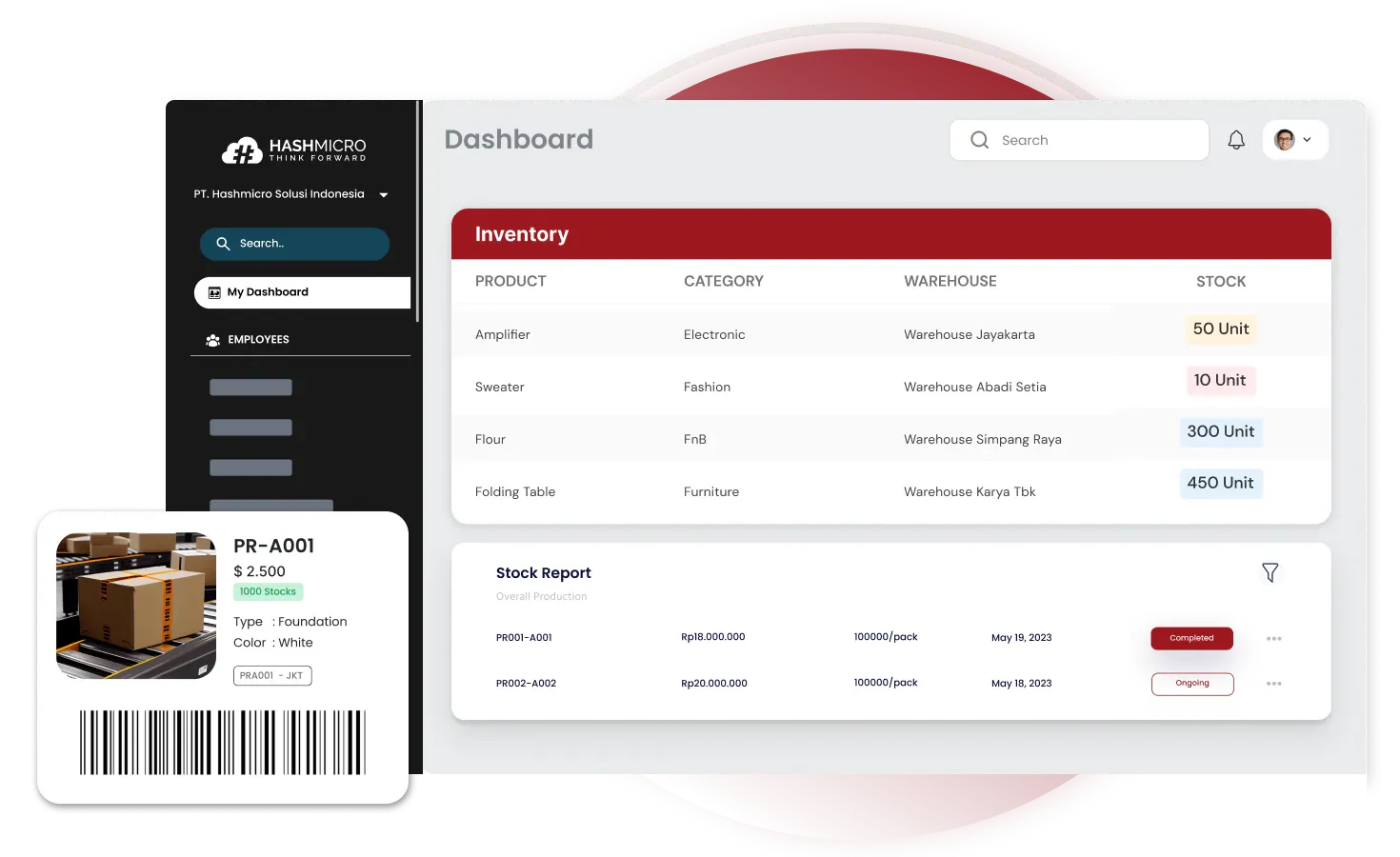
- Real-Time Inventory Insights: Get instant updates on key inventory metrics like turnover rates, stock levels, and order cycle times, ensuring you have the data to make informed decisions quickly.
- Seamless Multi-Location Management: Effortlessly manage inventory across multiple warehouses or outlets, providing consistent tracking and reporting, regardless of where your stock is stored.
- Automated Reordering System: Set automated reorder points based on your specific metrics, such as stock-to-sales ratio and lead time, to maintain optimal inventory levels without manual oversight.
- Customizable Reporting: Generate detailed reports aligned with your chosen KPIs, giving insights into inventory performance, cost efficiency, and overall business impact.
- Scalability for All Business Sizes: Whether a small business or a large enterprise, HashMicro’s software adapts to your needs, allowing you to manage inventory efficiently as your business grows.
By integrating HashMicro’s software into your operations, you improve your inventory metrics and gain a strategic advantage in the marketplace.
"Modern inventory management features leverage automation and real-time analytics to minimize human error, ensure accurate stock visibility, and streamline warehouse operations for maximum efficiency."
— Angela Tan, Regional Manager
Conclusion
Inventory management software includes crucial smooth operation features, like centralized management and IoT integration. When you fully understand and use these features, you’re setting your business up to manage inventory better and more effectively.
HashMicro’s Inventory Management Software combines all these essential features in one powerful package, specifically designed for the needs of Singaporean businesses. Whether you need seamless integration, real-time reporting, or customizable options, HashMicro is here to help you stay ahead of the competition and manage your inventory with ease.
Don’t wait! Experience it with HashMicro’s free demo and see how their software can be the game-changer you’ve been looking for
Frequently Asked Questions About Inventory Management Software
Essential features of inventory management software include real-time tracking, automated reordering, barcode/RFID integration, inventory forecasting, multi-location management, and detailed reporting tools to optimise stock levels and streamline operations.
Inventory management software automates stock tracking, purchasing, replenishment and reporting. This reduces manual data entry, prevents duplicate work and helps teams make faster decisions using accurate inventory information.
Look for real-time inventory visibility, barcode scanning, multi-location support, demand forecasting, automated replenishment, ERP integration, reporting tools, mobile access, security controls and an interface that is easy for staff to use.
Mobile inventory software allows warehouse staff to access stock information, record movements and complete receiving, picking and stocktaking tasks from handheld devices. This improves real-time visibility and reduces delays caused by manual data entry.
ERP integration connects inventory data with purchasing, sales, accounting and warehouse processes. This reduces duplicate entry, improves data accuracy and helps teams make decisions using consistent information.
Barcode scanning verifies products, quantities and locations during receiving, picking, transfers and stocktakes. This reduces manual entry errors and helps ensure that the correct items are recorded.
Multi-location management records stock movements between warehouses and updates inventory availability across locations. Teams can track transfer status and view the latest quantities before allocating orders.
Inventory software should provide role-based access, user permissions, audit trails, secure backups, data encryption and authentication controls. These measures help protect inventory records and limit unauthorised changes.
Demand forecasting uses historical sales, stock movement and demand patterns to support better purchasing and replenishment decisions. This can reduce excess inventory, storage costs and the risk of stock obsolescence.