
In today’s fast-paced retail environment, retail POS systems have become essential for businesses looking to improve customer experience.
Over the years, retail POS systems have transformed from basic cash registers into advanced, feature-packed platforms that boost operational efficiency. As e-commerce grows and the need for smooth integration between in-store and online sales increases, selecting the right POS system for retail is more important than ever.
To help businesses better understand this evolution, this article explores modern POS systems, their functions, and the many benefits they offer. It will also discuss the different types of retail point-of-sale systems, highlighting the differences between traditional and modern solutions.
Key Takeaways
A retail POS system manages inventory, customer data, and sales reporting, not just transactions.
From inventory tracking to sales analytics, a retail POS system helps your business run more efficiently.
Choose a retail POS system with the features your business needs to streamline every transaction.
What is a POS System?
A point of sale (POS) system combines hardware and software to allow businesses to complete sales transactions. At its core, a retail POS system manages everything from sales, inventory tracking, and customer management to reporting and analytics.
In fact, modern POS systems are used across various industries, with retail being one of the largest adopters. Moreover, the customizable systems allow businesses to integrate different tools for more efficient retail management.
Whether used in physical stores or online, retail POS software ensures businesses can keep up with today’s speed, accuracy, and data management demands. Moreover, many retail point-of-sale systems offer advanced features such as cloud-based management, mobile capabilities, and third-party app integrations. As a result, these advancements enable retail businesses to operate more efficiently.
How a POS System Works
To understand how POS systems work, it’s important to break down the core components of a retail POS system. The functionality of a modern retail system typically involves several steps.
- Transaction processing: The POS system automatically records each sale and issues a receipt, thereby ensuring accurate accountability and reliable financial reporting documentation.
- Inventory management: In addition, it updates stock levels in real time with each transaction, which in turn helps businesses maintain accurate inventory and avoid stockouts, ultimately enhancing customer satisfaction.
- Payment processing: Furthermore, the POS system supports multiple payment methods, including cash, cards, and digital wallets. As a result, it streamlines transactions, enhances payment security, and reduces fraud risk.
- Data analytics: With real-time reporting and analytics, the system provides valuable insights into sales performance and customer behavior. Consequently, businesses can make informed decisions to drive sustainable growth.
These processes occur seamlessly in modern retail POS systems, including grocery store POS, making the checkout experience faster and more efficient for both the retailer and the customer.
Benefits of POS System
Understanding what is a retail POS system gives retailers a clear edge in managing daily operations. Modern retail POS systems simplify sales transactions and deliver many other benefits. They offer even greater value when integrated with robust retail management software.
1. Improved Accuracy
Automated transactions significantly reduce the risk of human error in retail operations. Retailers can trust that data collection is both accurate and reliable. This level of precision maintains confidence in financial reporting and supports dependable inventory records.
2. Inventory Management
A retail POS system tracks inventory levels in real time and gives businesses continuous visibility into stock. Retailers can proactively avoid stockouts and overstock situations. This capability optimizes supply chain efficiency and helps reduce unnecessary holding costs.
3. Enhanced Customer Experience
A retail POS system speeds up the checkout process and supports multiple payment options. These combined capabilities significantly enhance the overall customer experience. Shoppers appreciate the convenience and speed, which boosts satisfaction and encourages repeat visits.
4. Sales Data Analysis
Retail POS systems generate detailed reports on customer behavior and product performance. Businesses use this data to make better, faster decisions. Decision-makers can refine marketing strategies and improve product offerings based on actual consumer trends.
5. Mobile Capabilities
Mobile POS systems let retailers serve customers anywhere in the store, not just at fixed registers. This flexibility significantly reduces wait times and enhances service efficiency. As a result, customers enjoy a faster, more convenient shopping experience.
Retailers must evaluate several key aspects when selecting the best POS solution. These include functionality, user-friendliness, integration options, security measures, and cost-effectiveness. Customer service quality and the vendor's overall reputation also matter for a reliable long-term investment.
Types of POS Systems
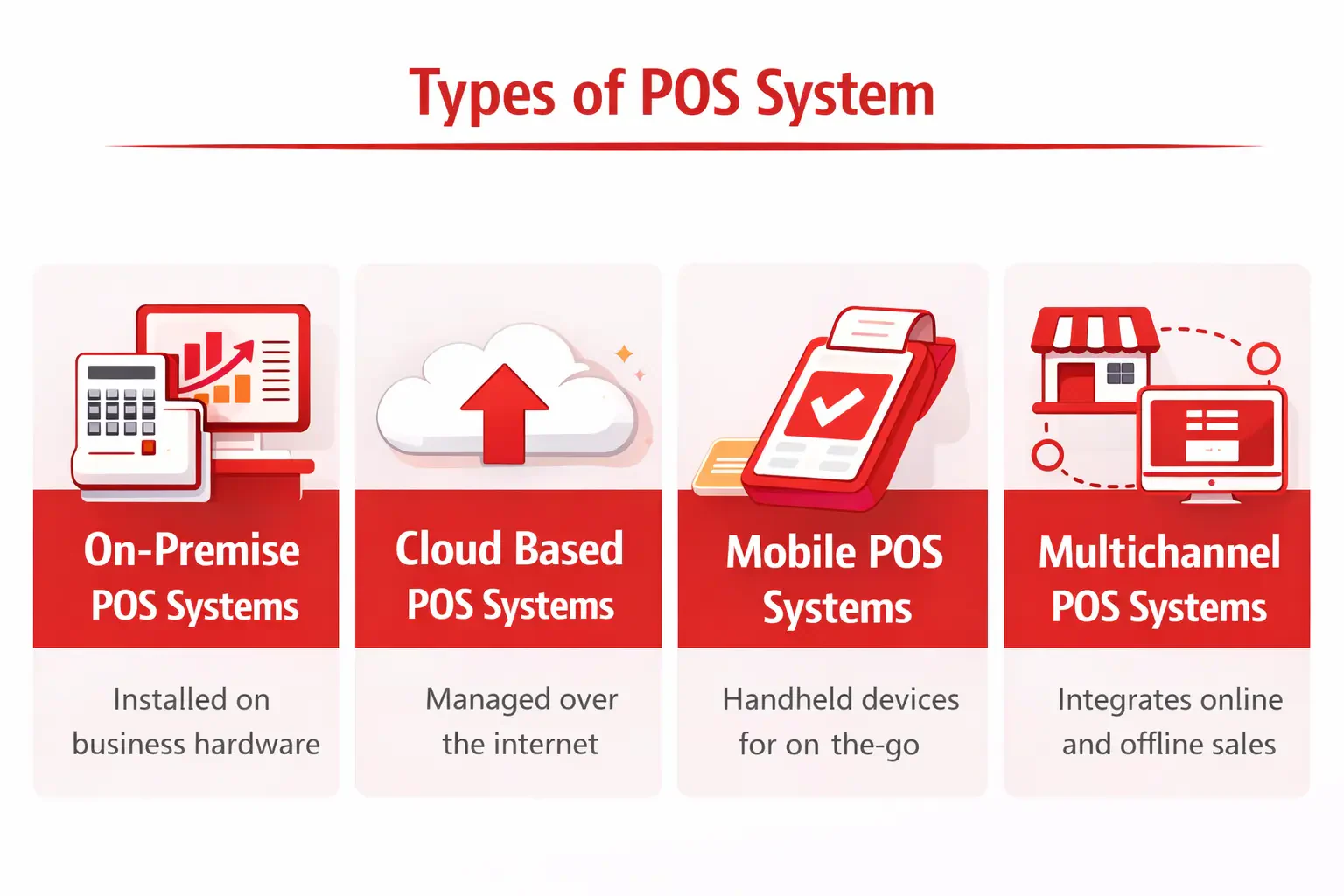 Understanding the different types of POS systems can help businesses choose the one that best fits their needs. Here are some of the most common types used in retail:
- On-Premise POS Systems: These systems are hosted locally, meaning the software is installed on the business’s hardware.
- Cloud-Based POS Systems: Managed via the internet, these systems allow for remote access and real-time updates.
- Mobile POS Systems: These handheld POS devices enable businesses to process transactions on the go, making them ideal for pop-up stores or small shops.
- Multichannel POS Systems: These systems integrate online and offline sales, providing a seamless experience across all platforms.
Traditional vs. Modern POS Systems
| Aspect | Traditional POS | Modern POS |
| Flexibility | Manual updates | Automatic cloud updates |
| Mobility | Fixed terminal only | Mobile & remote access |
| Integration | Limited integration | E-commerce & accounting sync |
The shift from traditional POS systems to modern ones has revolutionized the retail industry. In the past, traditional POS systems were limited to basic functionalities, such as processing sales and storing records onsite. However, modern retail point of sale systems offer a variety of advanced features that make them far more efficient and adaptable. Specifically, the differences can be seen in three key areas:
- Flexibility: Traditional systems often require manual updates, whereas modern cloud-based systems update automatically.
- Mobility: Older systems are confined to a fixed terminal, while modern systems allow mobile capabilities and remote access.
- Integration: Modern POS systems POS system integrates easily with e-commerce platforms, accounting software, and customer relationship management tools, providing essential POS integration that traditional systems cannot match.
This comparison highlights how modern POS systems are essential for businesses that want to stay competitive in today’s retail landscape, especially in markets like the POS system Philippines.
POS Features
Beyond just processing sales, modern retail POS software has a wide range of features catering to different aspects of retail management. Some of the key features include:
- Dashboard: Presents business recording history information, allows configuration according to needs, and displays data in real time in an easily analyzable format.
- Insights: An analytical dashboard for quick and concise business data analysis.
- Invoice: Collects invoice data in real-time, categorizes invoice history into several categories, and generates e-invoices as desired.
- Orders: Collects and displays sales history based on various categories.
- Products: Creates, manages, and categorizes product data into several groups, facilitating the management of product information such as variants, pricing, product composition, and offer packages.
- Promotions/Vouchers & Discount: Manages various promotions, vouchers, and discounts for customers.
- Sale Coupons: Manages various types of sale coupons and gift cards.
- Membership: Manages customer membership data and implements loyalty programs.
- Reporting: Generates various reports related to sales transactions, order analysis, history, discounts, and inventory.
- Database & Logs: Manages the database and system activity logs.
- Configuration: Manages various aspects of the POS system by customizing it to meet business needs.
All of the features mentioned above play a crucial role in enhancing the accuracy and speed of sales data management.
Conclusion
Today, retail POS systems have become a core part of how modern businesses operate. Overall, from improving transaction accuracy to enabling real-time inventory visibility, the right system can make day-to-day retail management significantly more manageable.
As retail continues to evolve, the ability of a POS system to integrate with other business tools will matter just as much as its checkout capabilities. For that reason, those still comparing options may find it helpful to look through a curated overview of top POS solutions for retailers, which can help narrow down the choice based on specific business needs.
FAQ About Retail POS System
A retail point-of-sale (POS) system helps Philippine retailers manage sales transactions, track inventory, and store customer data in real time. It combines hardware like barcode scanners and receipt printers with software that processes payments, generates reports, and supports BIR-compliant documentation.
A retail POS program is software that enables Philippine retailers to process sales, manage inventory, and track customer data in real time. It streamlines store operations and enhances the shopping experience, with many options offering BIR-accredited features for tax compliance.
A retail POS system processes transactions at checkout, where customers complete a purchase in-store or online. It combines hardware like barcode scanners and terminals with software that tracks sales, updates inventory in real time, and records data for BIR-compliant reporting.
The five common types of POS systems are on-premise, cloud-based, mobile, multichannel, and self-service kiosk systems. Philippine retailers typically use cloud-based or mobile POS solutions that support BIR compliance, GCash and Maya payments, and real-time inventory tracking across multiple locations.
Yes, the Bureau of Internal Revenue (BIR) requires Philippine businesses to register their POS systems before use. Systems must meet accreditation standards and obtain a Permit to Use, ensuring that all sales transactions are properly recorded for tax compliance and reporting.