












Are you still tracking inventory manually? According to Gartner Digital Insights, 41% of businesses still use manual methods to manage their inventory. While spreadsheets and pen-and-paper tracking might work for very small operations, they fall apart quickly once you start scaling across multiple locations, sales channels, or warehouses.
To help you cut through the noise, we evaluated 12 of the most widely used inventory management systems available in Singapore across more than 30 data points, including G2 ratings, Forbes Advisor scores, user sentiment, feature depth, pricing, and integration capabilities, to build this definitive guide.
Key Takeaways
|
Top Inventory Management Systems
Market research shows that each inventory management system delivers its own value proposition. To simplify your decision, I’ve outlined the top-performing options expected to dominate in 2026:
| Brand | Best For | Rate | Source |
|---|---|---|---|
| HashMicro | Enterprise inventory with ERP integration, supports multi-warehouse | 4.8 | G2 |
| Katana | Delivers reliable Inventory and production management supported by smooth integrations. | 4.4 | G2 |
| Ordoro | Enhances multichannel inventory control and shipping through seamless e-commerce integrations. | 4.5 | G2 |
| Fishbowl | Delivers robust inventory management with seamless reporting. | 4 | G2 |
| NetSuite | Combines real-time visibility with automation to streamline inventory. | 4 | G2 |
| SAP | Delivers comprehensive inventory control with real-time insights and streamlined processes. | 4.2 | G2 |
| Oracle | Has comprehensive visibility related to the management of material flows, warehouse work, and product costs. | 4.3 | G2 |
| Monday.com | Its functionality to include inventory control featuring e-commerce and order management, and seamless third-party integrations. | 4.7 | G2 |
| ShipBob | Tailored for e-commerce enterprises, offering immediate insight into stock levels. | 3.7 | G2 |
| Zoho | The software offers real-time tracking and management of stock levels. | 4.1 | G2 |
| Xero | It provides real-time tracking of stock levels. | 4,4 | G2 |
What is Inventory Management Software?
Inventory management software tracks stock, item movement, and storage locations in real time, so reorders, warehouse workflows, and reporting stay consistent and less manual, especially across multiple sites.
For teams evaluating inventory management tools for fast-growing startups, the best-fit options usually combine real-time tracking, automation, multi-warehouse control, and clean integrations with accounting, POS, or ERP systems, so accuracy holds up as volumes and users scale.
Why It Matters: The Business Impact for Singapore Enterprises
Singapore’s high operating costs, tight warehousing space, and omnichannel expectations make inventory failures especially costly. Here’s what the numbers look like—without software vs. with it.
Singapore Government Support: Lower the Cost of Getting Started

What are the Key Features?

From my experience, understanding the key features of an inventory management system is essential before making any decision. Knowing what each feature does helps me identify which solution can truly streamline my operations and support long-term growth.
1. Real-Time Inventory Tracking
Monitor stock levels across multiple locations in real time. The system automatically updates quantities when items are received, transferred, or sold, minimizing manual input and reducing errors.
2. Barcode & RFID Scanning
Accelerate stock intake, dispatch, and audits with barcode or RFID scanning. This feature simplifies tracking and ensures item-level accuracy across the supply chain.
3. Automated Reordering
Set minimum stock thresholds and automate purchase orders when inventory falls below safety levels. This prevents stockouts and overstocking, improving cash flow management.
4. Multi-Location & Warehouse Management
Manage inventory across various warehouses, stores, or branches in one centralized system. Users can view stock availability and movement in each location instantly.
5. Batch & Expiry Tracking
Ideal for perishable goods or regulated industries, this function enables tracking of batch numbers, production dates, and expiry dates to ensure compliance and product quality.
6. Supplier & Purchase Management
Integrate vendor details, purchase orders, and delivery records directly into the inventory system for smoother procurement and supplier performance tracking.
7. Inventory Valuation & Costing
Supports various costing methods such as FIFO, LIFO, or Weighted Average to help businesses calculate accurate COGS, maintain precise records, and sync cleanly with financial reporting software for inventory and COGS.
8. Stock Movement & Transfer Management
Track every inbound, outbound, and internal transfer between locations with automated documentation and audit trails.
9. Reporting & Analytics
Generate detailed inventory reports, including turnover rates, demand forecasting, and stock aging analysis for better decision-making and demand planning.
10. Integration with Other Systems
Connects seamlessly with accounting, sales, procurement, and warehouse management modules to maintain synchronized data across departments.
What are the Benefits?
In my experience, implementing an inventory management system has been a game-changer for maintaining accuracy and efficiency. It not only streamlines daily operations but also helps me make smarter, data-driven decisions for better cost control and performance.
-
Operational Efficiency: Streamlines tracking and monitoring, saving time and effort.
-
Cost Savings: Prevents unnecessary purchases and compliance-related fines.
-
License Compliance: Ensures all software is legally licensed.
-
Data Security: Keeps systems updated to protect against threats.
-
Resource Optimization: Allocates resources based on actual usage.
-
Increased Productivity: Minimizes downtime and supports smooth operations.
Implementing software inventory provides significant benefits for companies, from operational efficiency to enhanced security and productivity.
11 Popular Inventory Management Software Singapore
After understanding the importance of having the right inventory management system, the next step is to choose the software that best fits your business needs.
With numerous options available, finding the optimal solution can be a challenging task. Below, I have compiled a list of the top 12 inventory management Singapore solutions that can help your company manage its inventory more efficiently and effectively.
Read on for a comprehensive review to find the right solution for your business.
1. Katana
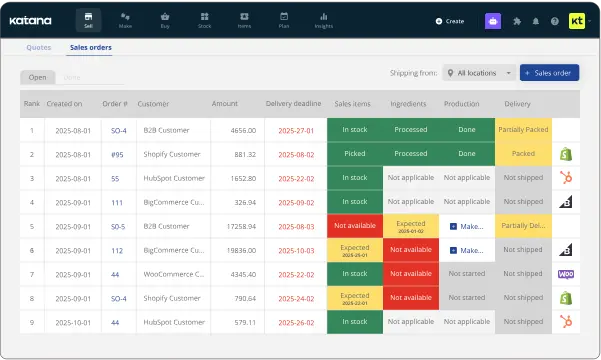
I chose Katana because it’s a cloud inventory platform that works as a Fishbowl Inventory alternative for manufacturing, with inventory tracking, order management, and production planning for small to mid-sized businesses.
Users have reported several issues with Katana Inventory Management, including sudden and significant price increases, system glitches that are slow to be resolved, and a lengthy, complicated onboarding process. These drawbacks have led to frustration and dissatisfaction among some users.
Consumer Sentiment (Forbes): Ease of Use: 79% positive | Customer Support: 79% positive | Customization: 50% positive | Data Sync: 80% positive
Features:
- Multichannel sales and production management
- SKU management
- Traceability
- Integrations with e-commerce platforms
| Pros | Cons |
|---|---|
| ✓ Implementation service | × Not ideal for drop shippers |
| ✓ Product management | × Primarily for SMBs |
| ✓ Integration capabilities | × Additional costs for extra users |
2. Ordoro
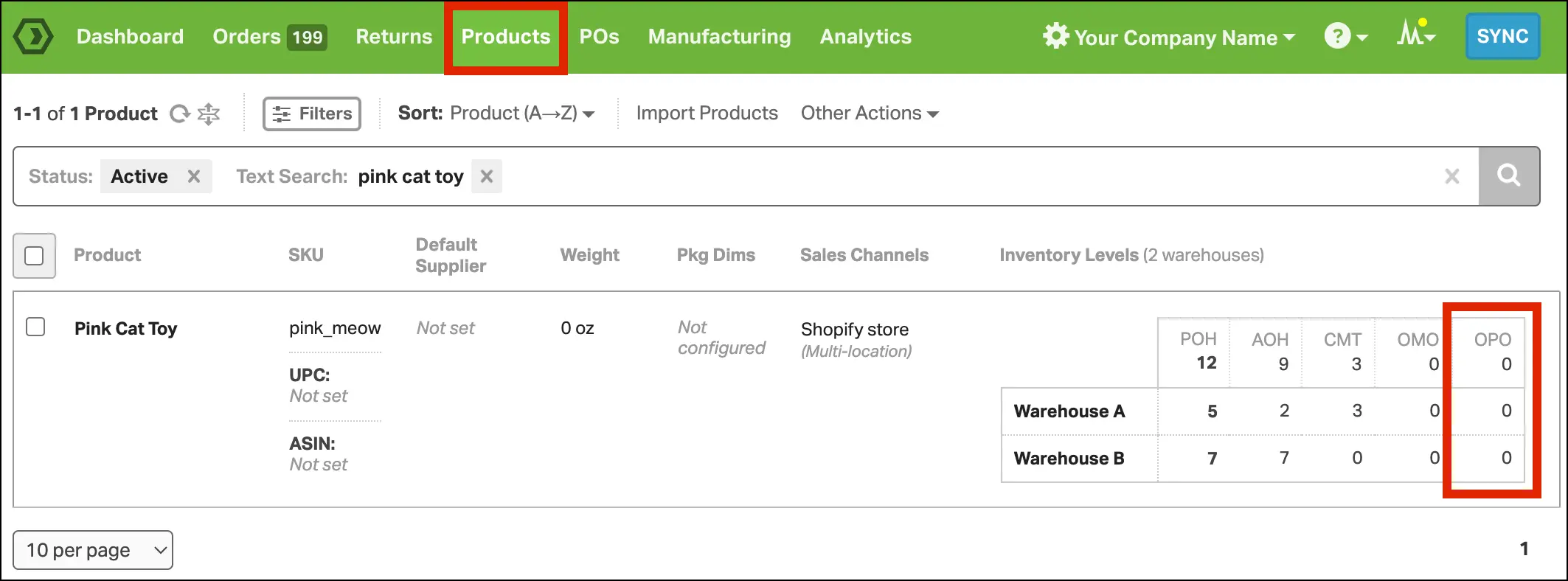
I chose Ordoro because it is a comprehensive e-commerce inventory management system designed to optimize warehouse operations for growing merchants. It works well alongside warehouse management software for order fulfillment, helping teams handle everything from shipping a hundred items to processing half a million orders per month.
Some users have reported encountering error messages when Ordoro attempts to communicate with their websites. Additionally, there have been instances where the documentation provided for these error codes was insufficient, making troubleshooting more challenging.
Consumer Sentiment (Forbes): Ease of Use: 100% positive | Customization: 89% positive | Customer Support: 71% positive
Features:
- Manages the entire inventory process for businesses shipping varying quantities of items monthly.
- Drives efficiency in every operation involved in the multichannel sales process.
- Allows integration with different sale channels for improved fulfillment workflows.
| Pros | Cons |
|---|---|
| ✓ Shipping options monitoring | × Lacks a mobile version |
| ✓ Return label creation | × Pricing is considered expensive for small businesses |
| ✓ E-commerce platform integration | × Updates occur once every hour, not in real-time |
3. Fishbowl
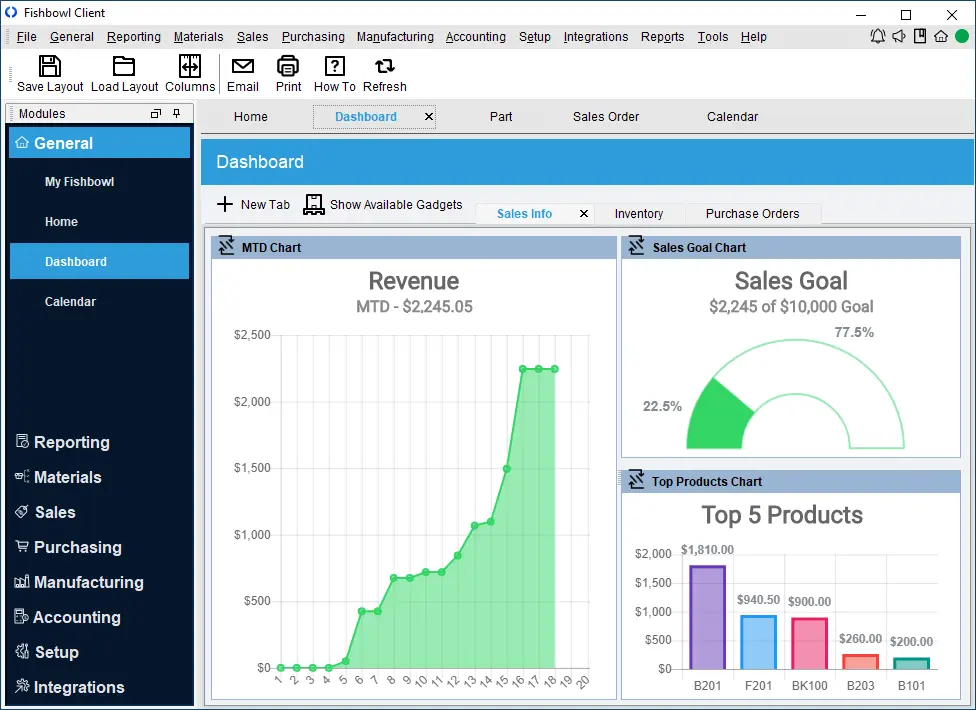
I chose Fishbowl because it is an inventory management system designed for Singapore businesses to streamline and optimize inventory-related processes for businesses, particularly those in manufacturing, warehousing, and distribution. It serves as a robust tool to track inventory, manage stock levels, handle orders, and enhance overall operational efficiency.
Some users have reported that Fishbowl can be prone to crashing, requiring them to restart the program during tasks. Additionally, there are recurring issues with line items displaying as zero, which prevents orders from shipping and necessitates frequent support calls to resolve.
Features:
- Inventory tracking system.
- Multi-location management.
- Auto purchasing.
- Vendor management.
- Payment processing, and order management.
| Pros | Cons |
|---|---|
| ✓ Extensive Inventory Management Capabilities | × Initial Complexity for Setup |
| ✓ Multi-Channel Sales Integration | × High Cost of Implementation and Maintenance |
| ✓ Scalability for Growing Businesses | × Steeper Learning Curve for New Users |
| ✓ Robust Reporting and Analytics Tools | × Limited Customization for Unique Needs |
| ✓ Efficient Order Management | × Occasional Software Performance Issues |
4. NetSuite Inventory Management
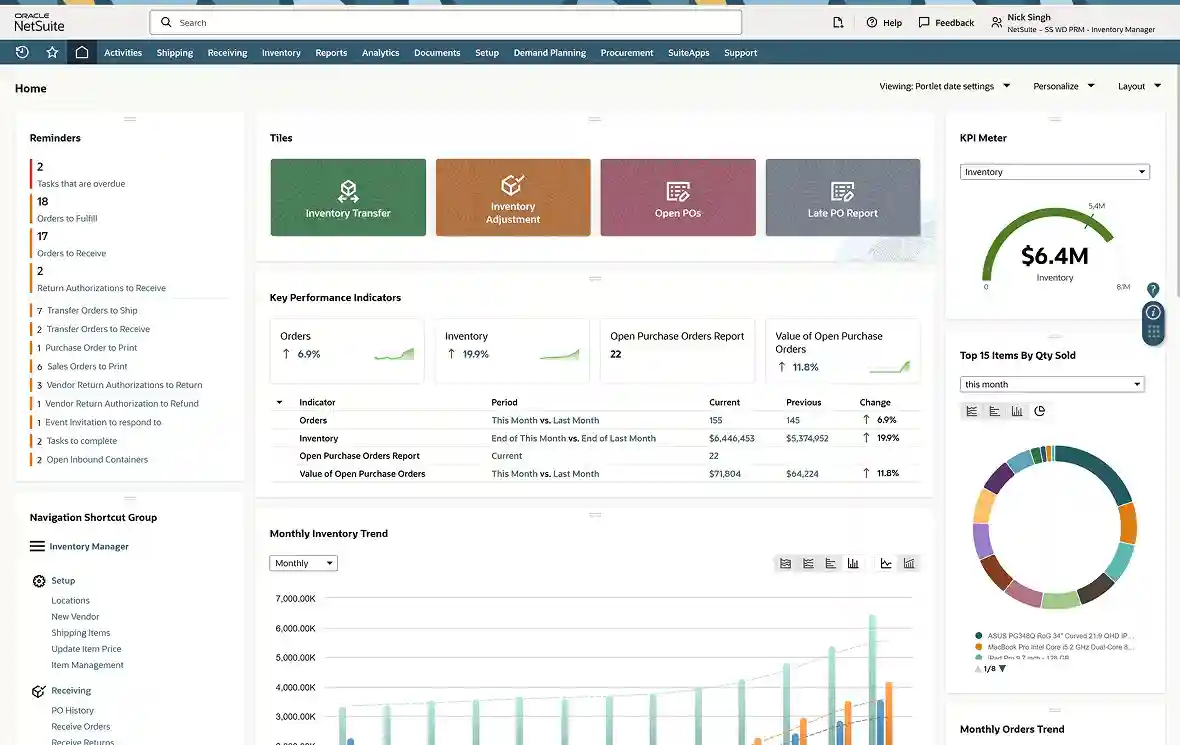
I chose NetSuite because it offers various features, including multi-location fulfillment, replenishment, cycle counting, traceability, and item visibility. These features help minimize manual processes, automate inventory management, reduce handling costs, and optimize cash flow.
Some users have noted that while NetSuite offers robust features, its integration process can be time-consuming and may involve additional costs. Additionally, the system’s interface isn’t always intuitive, which can present challenges during setup and everyday use.
Features:
- Real-time inventory counts.
- Multi-location tracking.
- Lot and serial tracking.
- Demand forecasting.
| Pros | Cons |
|---|---|
| ✓ Automates inventory management | × Subscription pricing may change over time |
| ✓ Reduces handling costs | × Limited basic support, additional support at extra cost |
| ✓ Optimizes cash flow | |
| ✓ Provides clear visibility into stock |
5. HashMicro Inventory Management System
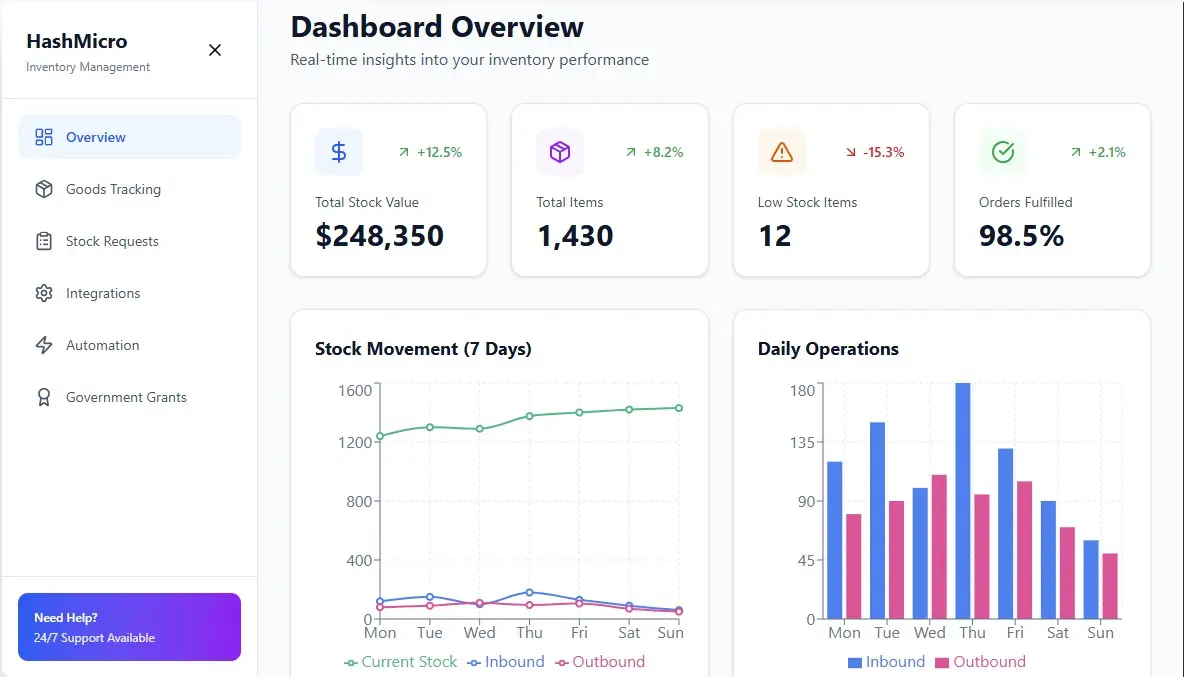
HashMicro provides an inventory management system designed for mid-to-large enterprises in Singapore. The system integrates with ERP modules and supports multi-warehouse operations.
With AI-driven automation, HashMicro Inventory Management Software helps companies in Indonesia and Singapore streamline tasks such as generating barcodes, monitoring stock in real time, managing picking and packing, placing supplier orders, and handling customer shipments efficiently.
Features:
- Efficient Goods Tracking
- Streamlined Stock Requests
- Tailored Integration
- Automated Inventory Operations
- Partnership with Singapore Government Grants
| Pros | Cons |
| ✓ Easy integration with other modules without requiring 3rd party assistance. | × Not suitable for SMEs that have simple needs compared to large-scale enterprises. |
| ✓ Data security is guaranteed with ISO certification. | × Implementation duration may vary based on the level of customization wanted by the company. |
| ✓ Wide choice of installation types from cloud, on-premise, and hybrid. | × Requires training for advanced features |
| ✓ Ease of monitoring from anywhere with mobile app integration and offline access. | × Higher investment compared to standalone solutions |
| ✓ Lifetime customer service and support after purchase. |


6. SAP
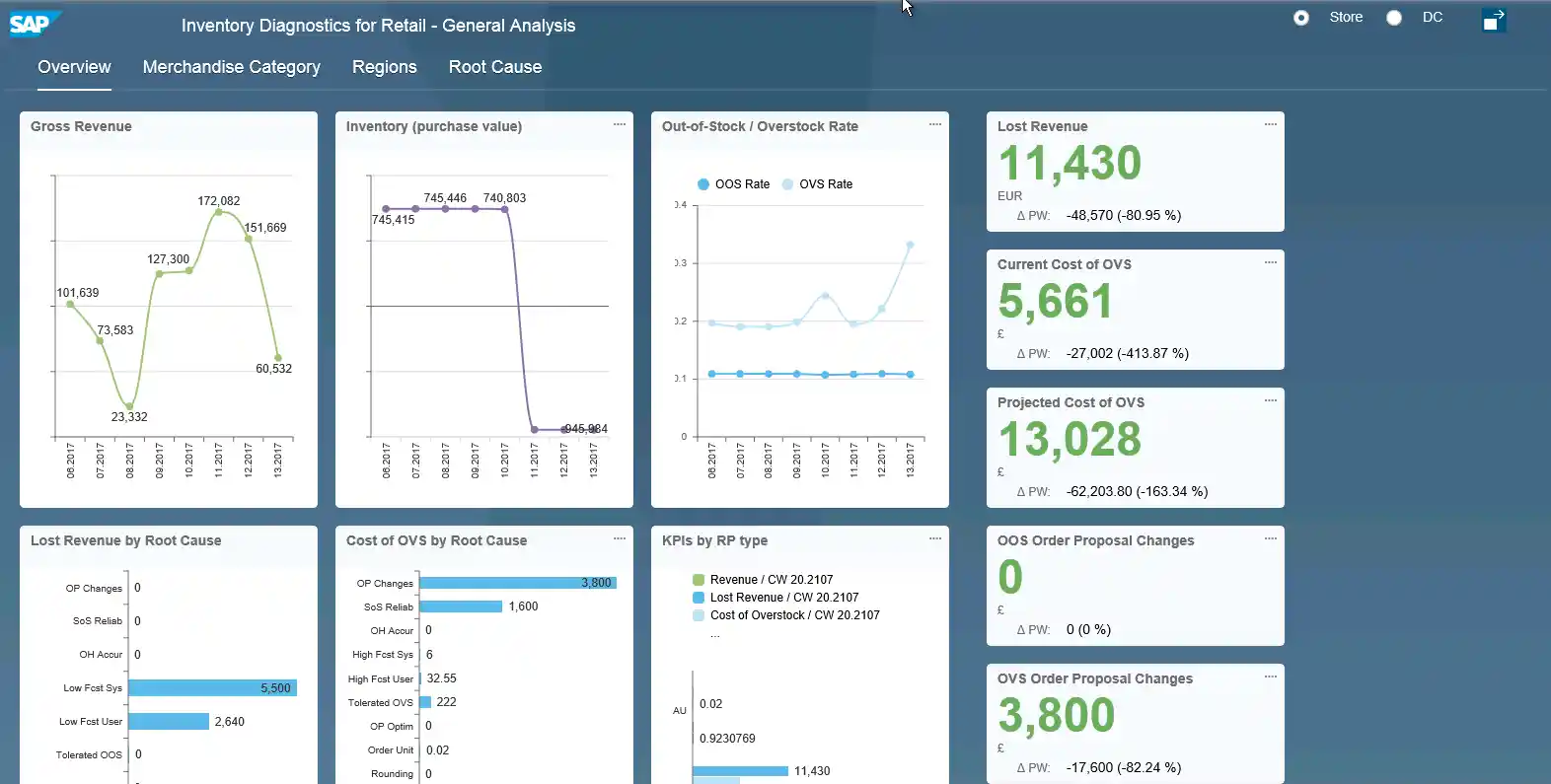
I chose the SAP ERP System because it provides a powerful system type module to help manufacturing and distribution businesses better manage their inventory. Therefore, this module facilitates efficient real-time, optimizes the levels of storage, and ensures timely shipping with the ability to track and record all stock transfers.
Some users say SAP inventory management software for large enterprises comes with high upfront costs and a complex implementation, which can be tough for smaller businesses. Its broad feature set also has a steeper learning curve, often requiring ongoing training and support.
Features:
- Inventory tracking system.
- Goods receipt and issue.
- Inventory valuation.
- Reporting and analysis.
| Pros | Cons |
|---|---|
| ✓ Faster decision making | × Complex system |
| ✓ Reliable sharing of data | × Lengthy implementation process |
| ✓ Enhanced financial management | × High prices |
| ✓ Better utilization of time and money | × Disappointing customer support |
| ✓ Provides tools to improve inventory | |
| ✓ levels and tracks the movement of materials |
Also Read: 10 Best Wholesale Distribution Software in 2026
7. Oracle Inventory Management
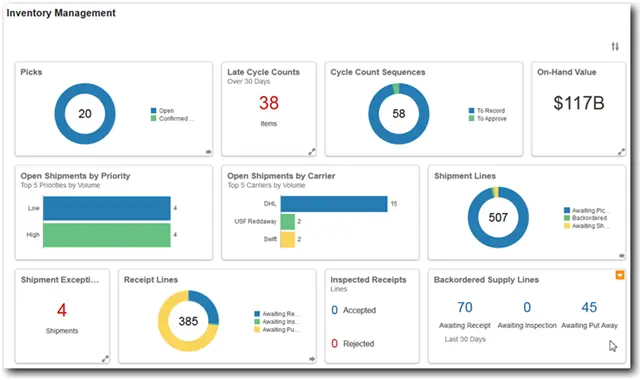
I chose Oracle because it is a provider with comprehensive visibility related to the management of material flows, warehouse work, and product costs throughout the supply chain.
Some users have reported that Oracle can be complex, making it challenging for non-technical users to operate effectively. Additionally, the system’s sensitivity during development can lead to a higher expectation of errors, which may hinder the development process.
Features:
- Proactively monitor facility operations and inventory levels.
- Support discrete inventory, process inventory, and spare parts in a single solution.
- Automate reorder points and replenishment strategies.
Pros Cons ✓ Proactively monitor facility operations × Complex system ✓ Support discrete inventory, process inventory, and spare parts in a single solution × Lengthy implementation process ✓ Track global inventory balances and transact in dual units of measure × High prices ✓ Flexibly define inventory categories and locations × Limited customization ✓ Automate reorder points and replenishment strategies
8. Monday.com
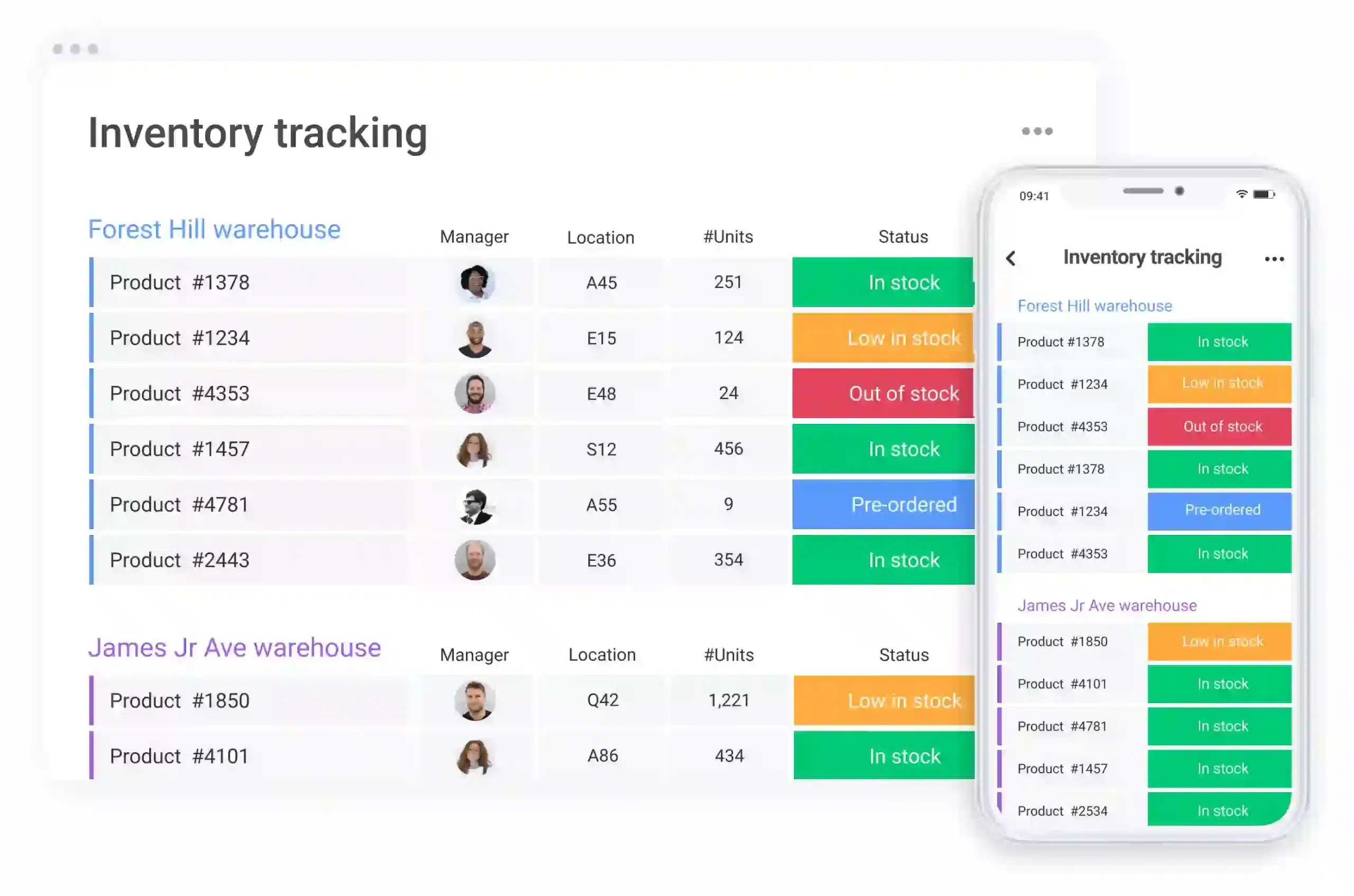
I chose Monday.com because it is known for its time and project management capabilities, extends its functionality to include inventory control featuring e-commerce and order management, and seamless third-party integrations.
Some users have found Monday.com overwhelming due to the flood of email notifications, which quickly clutters their inboxes. Others felt that the platform’s interface lacked the depth and flexibility they needed, ultimately leading them to switch to alternative tools after extended use.
Features:
- Facilitates effective management of e-commerce-related tasks.
- Provides control over inventory processes.
- Enables users to access and manage inventory on the go.
- Streamlines the process of managing orders efficiently.
- Integrates with third-party tools and systems.
| Pros | Cons |
|---|---|
| ✓ Ready-made templates | × Mobile version lacks optimization and some functionalities |
| ✓ Intuitive dashboards | × Complex especially for advanced inventory features |
| ✓ Flexibility in project management | |
| ✓ Integration harmony |

Fun Fact
9. ShipBob
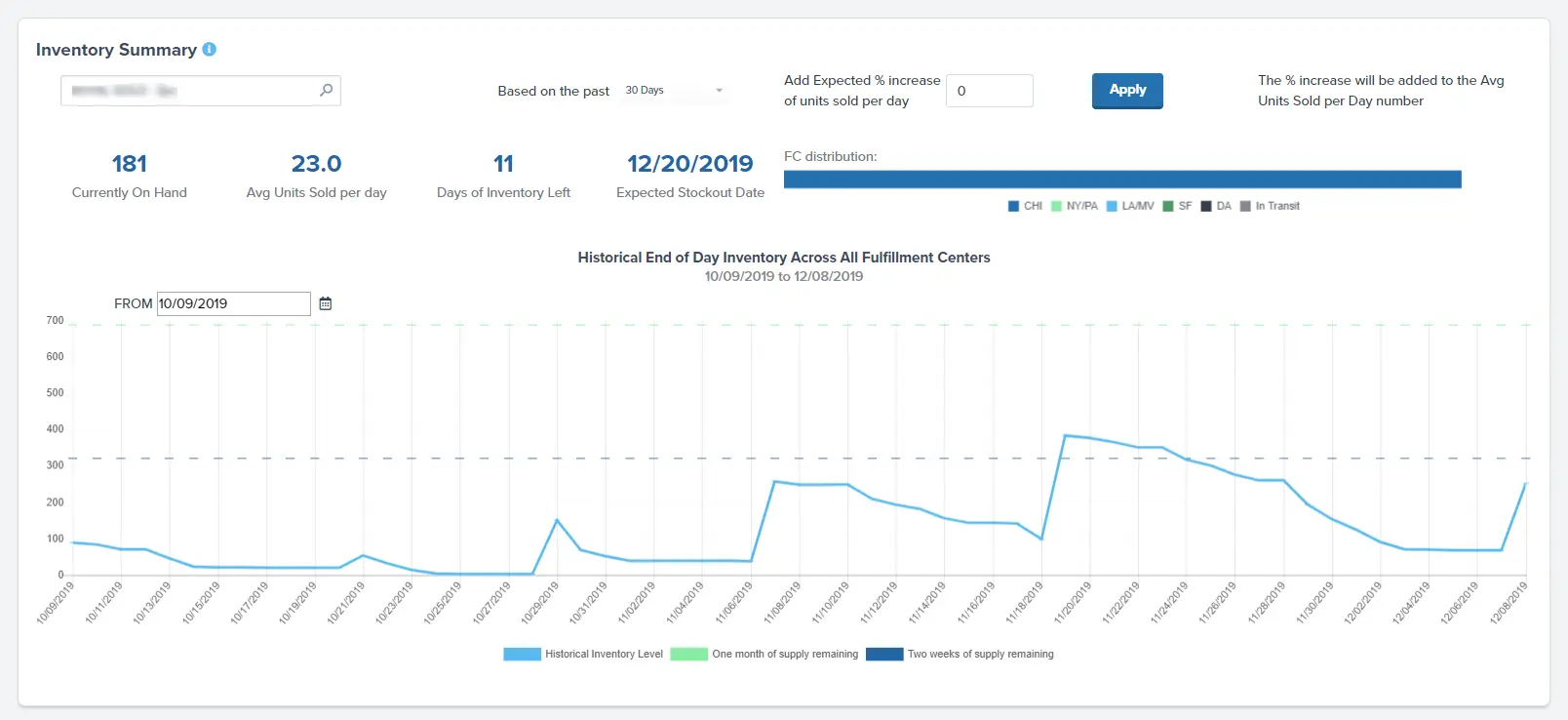
I chose ShipBob because it is a software for inventory management tailored for e-commerce enterprises, offering immediate insight into stock levels and shipping statuses across numerous warehouses.
Some users have reported significant challenges with ShipBob’s services, including lost inventory, frequent order delays, and subpar customer support. These issues have led to customer attrition and frustration among businesses relying on timely deliveries.
Features:
- Inventory tracking.
- Shipping management.
- API access.
- Order management.
| Pros | Cons |
|---|---|
| ✓ Multi-Channel Fulfillment Capabilities | × Higher Fulfillment Costs for Smaller Businesses |
| ✓ Distributed Warehousing Network | × Limited International Shipping Options |
| ✓ Integration with Major E-commerce Platforms | × Complex Pricing Structure |
| ✓ Real-Time Order and Inventory Management | × Customer Support Challenges |
| ✓ Streamlined Shipping and Order Tracking | × Minimum Order Requirements for Usage |
10. Zoho Inventory
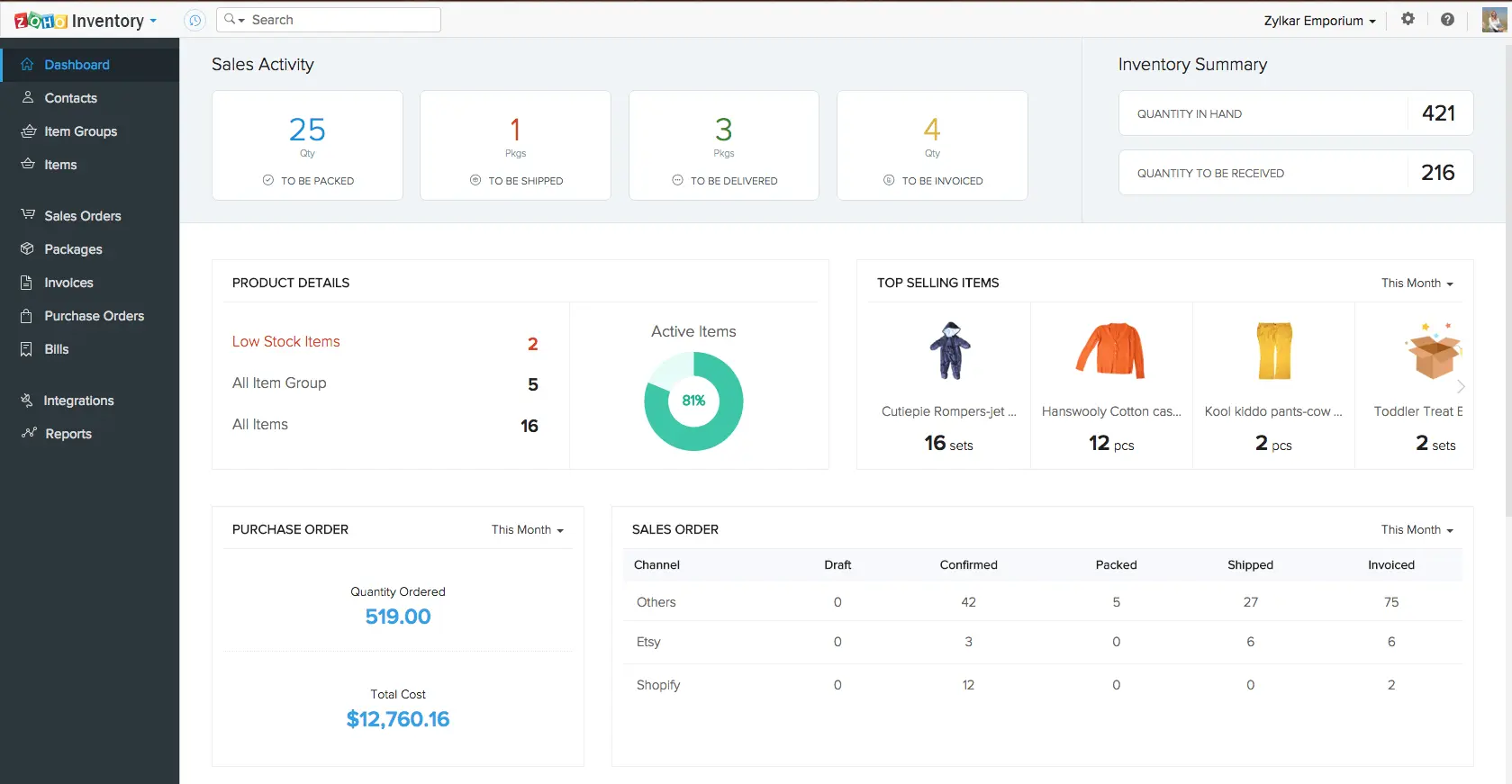
I chose Zoho Inventory because it is a cloud-based inventory and order management software designed to cater to the needs of growing businesses. The software offers real-time tracking and management of stock levels.
Some users have faced issues with Zoho Inventory’s customer support, citing unhelpful responses and a refusal to escalate problems to managers. Additionally, integration challenges with platforms like Shopify and the lack of features like pick lists can complicate warehouse operations for fast-moving inventory and day-to-day fulfillment.
Features:
- Real-time inventory tracking.
- Reporting tools.
- Integration with Zoho CRM.
| Pros | Cons |
|---|---|
| ✓ Suited for Small Businesses | × Limited Features and Customization |
| ✓ Comprehensive Integration | × Accuracy Issues |
| ✓ Real-Time Shipping Rates | × Pricing Dependence on Orders |
| ✓ Inventory Tracking |
11. Xero
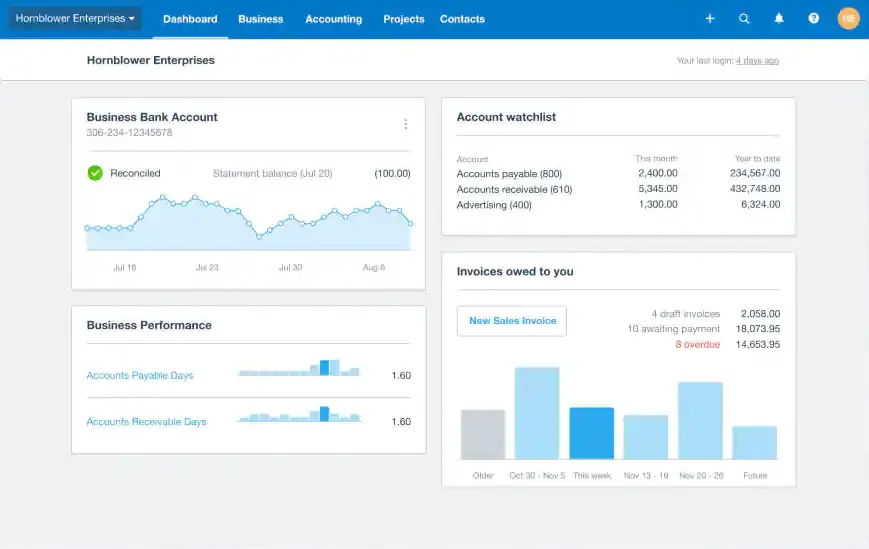
I chose Xero because it offers an inventory management software solution to help businesses manage their stock efficiently. It provides real-time tracking of stock levels. The system also emphasizes simplicity and ease of use, allowing users to stay on top of their numbers.
Some users have expressed concerns about Xero’s inventory management capabilities, noting the absence of features like delivery notes or packing slips. While workarounds exist, they can be cumbersome, requiring multiple additional steps, which may hinder efficiency for businesses that rely on these documents.
Features:
- Quick and easy inventory management
- Real-time stock tracking
- Sales performance insights
- Invoice integration
| Pros | Cons |
|---|---|
| ✓ User-friendly | × Limited customization |
| ✓ Real-time monitoring | × Businesses with more extensive needs may incur higher costs |
| ✓ Sales performance insights |
What to Consider When Selecting Inventory Management Software
Companies with optimized inventory management systems see a 30% improvement in order fulfillment rates, reducing delivery delays and boosting customer satisfaction. To achieve these results, a reliable inventory management software must prioritize precision and real-time accuracy.
From my perspective, the key indicators of a dependable inventory management tool or software include:
- Usability: Opt for platforms featuring a user-friendly interface and requiring minimal learning efforts.
- Real-time Syncing: Ensure stock data remains current and synchronized across all warehouses and sales channels in real-time.
- Barcode Compatibility: The system should support a barcode tracking system, facilitating easier product identification and tracking.
- Inventory Alerts: Ability to set up notifications and alerts for products out of stock, prompting restocking actions.
- Scalability: Look for a tool capable of accommodating business growth, handling increased data, and more complex inventory tracking needs.
- Mobile Accessibility: Compatibility across a variety of devices allows for greater flexibility in inventory management.
- Automation: Choose platforms that automate repetitive tasks, reducing dependency on manual inputs and minimizing potential human errors.
- Integration Abilities: Opt for tools that seamlessly integrate with other business software, ensuring a cohesive workflow.
Conclusion
Inventory management is about control and consistency. When stock data stays accurate across locations, teams spend less time fixing errors and more time improving operations.
This guide covered 12 inventory solutions in Singapore. For SMEs with basic needs, tools like Zoho Inventory or Xero offer quick setup. For enterprises requiring ERP integration and multi-warehouse support, options like HashMicro, SAP, or NetSuite provide more comprehensive capabilities.
Before deciding, assess your integration requirements, team size, and growth trajectory to ensure the system scales with your business.
FAQ About Inventory Management
-
What features should I look for when selecting inventory management software?
The features you should prioritize depend on your business needs. However, essential features often include barcode management, stock tracking, integration capabilities, automated stock requests, customization options, mobile accessibility, and support for multiple locations or warehouses.
-
How do I determine the best inventory software for my business in Singapore?
Evaluate software based on scalability, ease of integration with existing systems, security measures, user-friendliness, customer support, customization options, pricing models, and whether the software aligns with your specific industry requirements.
-
What are the potential challenges of implementing inventory software?
Challenges can include a complex implementation process, the need for system integration, potential downtime during deployment, staff training requirements, data migration issues, and ensuring the software’s adaptability to changing business needs.
-
Can these inventory systems handle multi-location inventory management software efficiently?
Yes, most of the top inventory management software in Singapore offer features to manage inventory across multiple locations or warehouses. They enable users to monitor stock levels, transfers between locations, and provide real-time visibility into inventory across different sites.
-
How do these inventory systems enhance inventory accuracy and streamline operations?
These systems utilize barcode scanning, automation of stock movements, cycle counting, and real-time tracking to minimize errors and discrepancies in inventory counts. They also optimize inventory levels, reduce handling costs, and automate reorder points, leading to more efficient operations.