


 Limited to 100 registrants

Familiar with the saying, “What got you here will not get you there”? The same applies to business. As operations grow, older software can hold teams back, which is why many businesses migrate to modern ERP systems to improve coordination across departments.
ERP migration isn’t a small project. Companies must move years of data, adjust existing workflows, and train employees to use a new system. Without proper planning, issues like data errors, downtime, or unexpected costs can quickly arise.
A smooth ERP migration needs a clear plan, strong coordination, and careful testing before go-live. With the right approach, businesses can reduce risk and build a stronger foundation for long-term growth.
Key Takeaways
ERP migration is the core definition of system transition, and it describes the process of moving data, workflows, and integrations from a legacy platform to a new ERP system.
ERP migration challenges occur during system transition, including data quality issues, cost allocation pressures, compliance requirements, and stakeholder alignment across departments.
ERP migration planning follows structured implementation phases such as team formation, data auditing, migration execution, and system validation to support a controlled transition.
ERP migration best practices focus on system accuracy and adoption, including data cleansing, staged testing, post go-live monitoring, and consistent user support.

What Is ERP Migration?
 At its core, ERP migration means moving your data, workflows, and business processes from an old system to a new ERP platform, a management platform for business that centralises operations across departments.
Unlike a simple software update, ERP migration moves data between different system structures. Data must be extracted, cleaned, reformatted, and loaded correctly through an Extract, Transform, and Load process. It also prompts companies to review workflows and build a stronger foundation for future growth and decision-making.
The Difference Between ERP Migration and ERP Implementation?
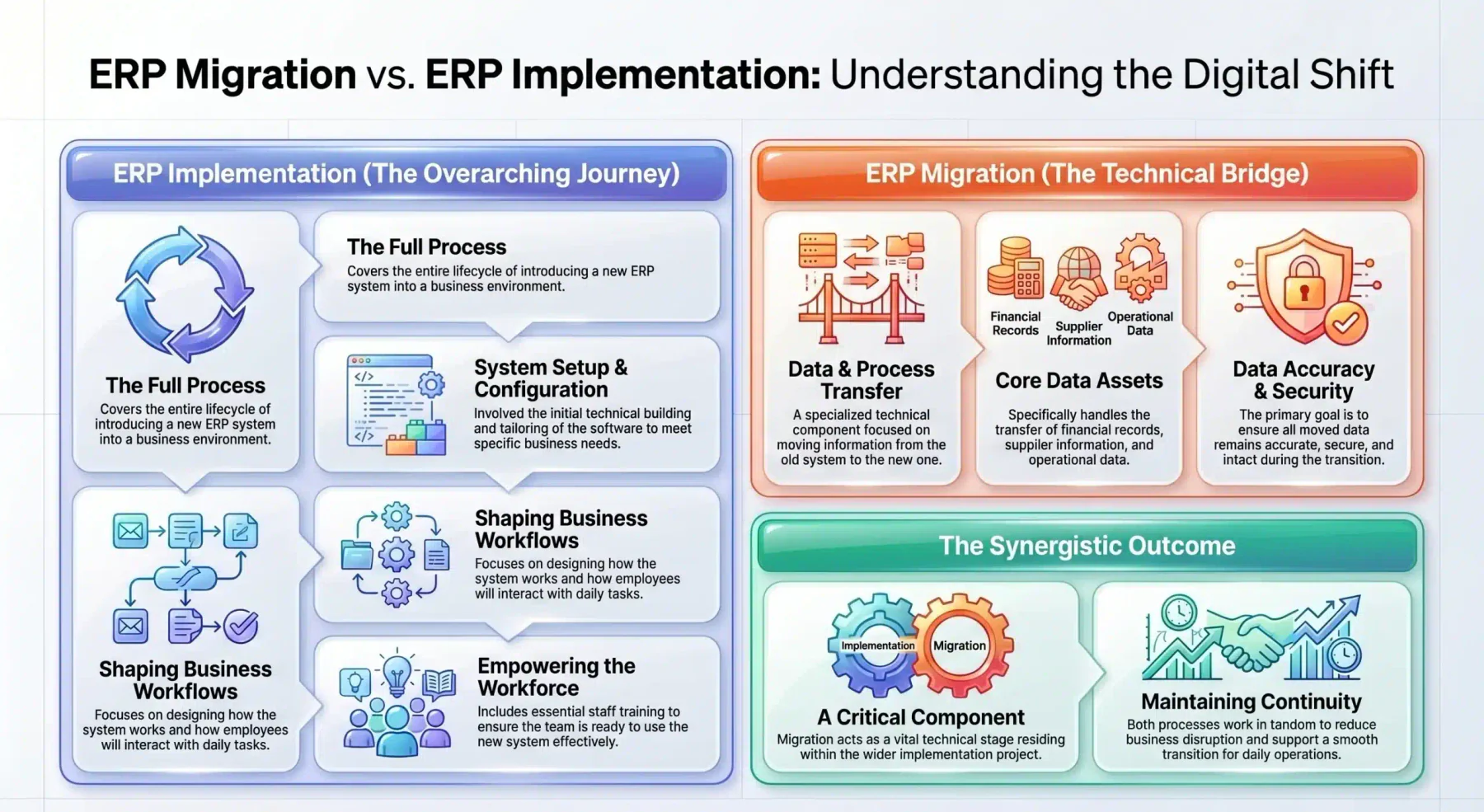
Many people confuse ERP migration with ERP implementation, but both terms refer to different parts of the same journey. ERP implementation covers the full process of introducing a new ERP system into a business. It includes system setup, configuration, workflow design, and staff training.
ERP migration, on the other hand, focuses on transferring data and processes from an existing system to a new one. This includes moving financial records, supplier information, and operational data. Therefore, migration acts as a critical technical component within the wider implementation project.
While implementation shapes how the system works for the business, migration ensures the data moves accurately and securely. Then, both processes work together to support a smooth transition, reduce disruption, and maintain continuity across daily operations.
Common Challenges in ERP Migration
ERP migration is more than just switching systems; it’s the complex process of moving critical data and operations from outdated tools into a modern streamlined business process platform. While the long-term benefits are significant, the journey can be challenging, which is why understanding the common risks early on is key to a successful transition.
1. Data quality and redundancy
Poor data quality is one of the most common problems in ERP migration. Over the years, companies often accumulate duplicate records, missing information, and inconsistent entries across different systems. If you move messy data into a new ERP without cleaning it first, you’ll only create bigger problems in reporting, operations, and decision-making.
2. Migration costs and resource allocation
Many companies underestimate how much time and effort an ERP migration really takes. It’s not just an IT expense, teams across finance, HR, sales, and operations must step away from daily work to support testing, data cleanup, and process mapping. If the project runs longer than planned, costs and productivity losses can increase quickly.
3. Regulatory and compliance requirements
For companies in regulated industries, ERP migration comes with strict data privacy and security responsibilities. Sensitive information must be transferred securely and remain accurate for auditing and legal purposes. If compliance is overlooked during migration, the company risks penalties, legal trouble, and reputational damage.
4. Stakeholder alignment and change management
ERP migration changes how people do their jobs, and not everyone feels comfortable with that. Employees may resist new systems, especially if they are used to old processes or fear disruption. Clear communication, leadership support, and proper training are essential to ensure teams adopt the new system successfully.
"ERP migration challenges often come from data issues, cost pressure, compliance requirements, and team alignment. When businesses address these risks early, they reduce disruption and create a smoother transition to a more reliable and scalable system."
Key Steps to Plan a Successful ERP Migration
ERP migration is too complex to handle without a clear plan; guesswork almost always leads to delays, budget overruns, or system failures. To succeed, companies need a structured, step-by-step approach, starting with careful planning that sets the direction for the entire project.
1. Build a cross-functional migration team
Start by forming the right team, because ERP migration should not sit with IT alone. Appoint an executive sponsor for budget and alignment, a project manager to manage timelines, and technical and functional leads who understand how the business operates. Assign clear data owners to clean and validate information before migration.
2. Audit and map existing data
Before moving anything, take time to understand your data. Review all systems, spreadsheets, and databases to spot duplicates, missing details, or outdated records. Then clearly map how each piece of old data will fit into the new ERP, especially when fields don’t match exactly.
3. Define what data should be migrated
Avoid the temptation to move everything into the new system. Focus on active customers, vendors, employees, inventory, and open transactions that the business still uses daily. Archive older historical data separately so you meet audit requirements without slowing down your new ERP.
4. Execute data migration and system integration
Once planning is complete, begin moving the data in stages, not all at once. Extract, clean, and load it into a testing or staging environment first, where you can catch errors safely. At the same time, connect the new ERP to other systems the company still relies on, such as payroll or e-commerce platforms.
5. Validate and test the new ERP system
After migration, test everything carefully. Compare data between the old and new systems to make sure numbers, records, and balances match exactly. Then let key users run real daily tasks in the new system to confirm that workflows function smoothly and the system performs well under normal workload.
Best Practices for ERP Migration
The steps above give you a clear roadmap, but following them isn’t enough on its own. To handle unexpected challenges and keep the project on track, you also need to apply proven best practices that support smarter workflows and task automation throughout the migration.
1. Clean and standardise data before migration
Don’t wait until the new system goes live to fix messy data, clean it first. Remove duplicates, correct formatting issues, and delete outdated records while you’re still in the old system. Set clear rules for naming and data entry so everything stays consistent, which makes the migration smoother and prevents future reporting problems.
2. Test migration in stages
Avoid moving everything at once without practice. Instead, run several test migrations using small batches of data first, then gradually increase the volume to catch errors early. These trial runs help the team fix issues, refine the process, and make sure the final go-live happens without major surprises.
3. Monitor system performance after Go-Live
Your job isn’t done once the new ERP goes live. Stay close to the system during the first few weeks, support employees as they adjust, and fix issues quickly. Keep an eye on both technical performance and daily business results to ensure the new system truly improves operations as planned.
How Long Does an ERP Migration Typically Take?
The length of an ERP migration depends on several factors, including business size, system complexity, and required customisation. Team availability and data quality also influence how smoothly the project runs.
For small to mid-sized businesses moving from basic accounting software to a cloud ERP, migration usually takes 3 to 6 months. Cleaner data and simpler workflows allow teams to focus on setup, testing, and training with fewer delays.
Larger companies often need 9 to 18 months or longer due to multiple systems and complex operations. Therefore, careful planning, data preparation, and thorough testing are essential to avoid costly issues before go-live.
To help you understand the differences more clearly, we provide a summary table below.
| Company Size | Typical ERP Migration Duration | Key Characteristics |
| Small to mid-sized businesses | 3 to 6 months | Moving from basic accounting tools to cloud ERP. Data is cleaner, processes are simpler, and focus is on setup, testing, and training. |
| Large enterprises | 9 to 18 months or more | Multiple systems, complex workflows, and international operations. Requires deep planning, data cleansing, and thorough testing before go-live. |
Crucial Implementation Steps for a Flawless Transition
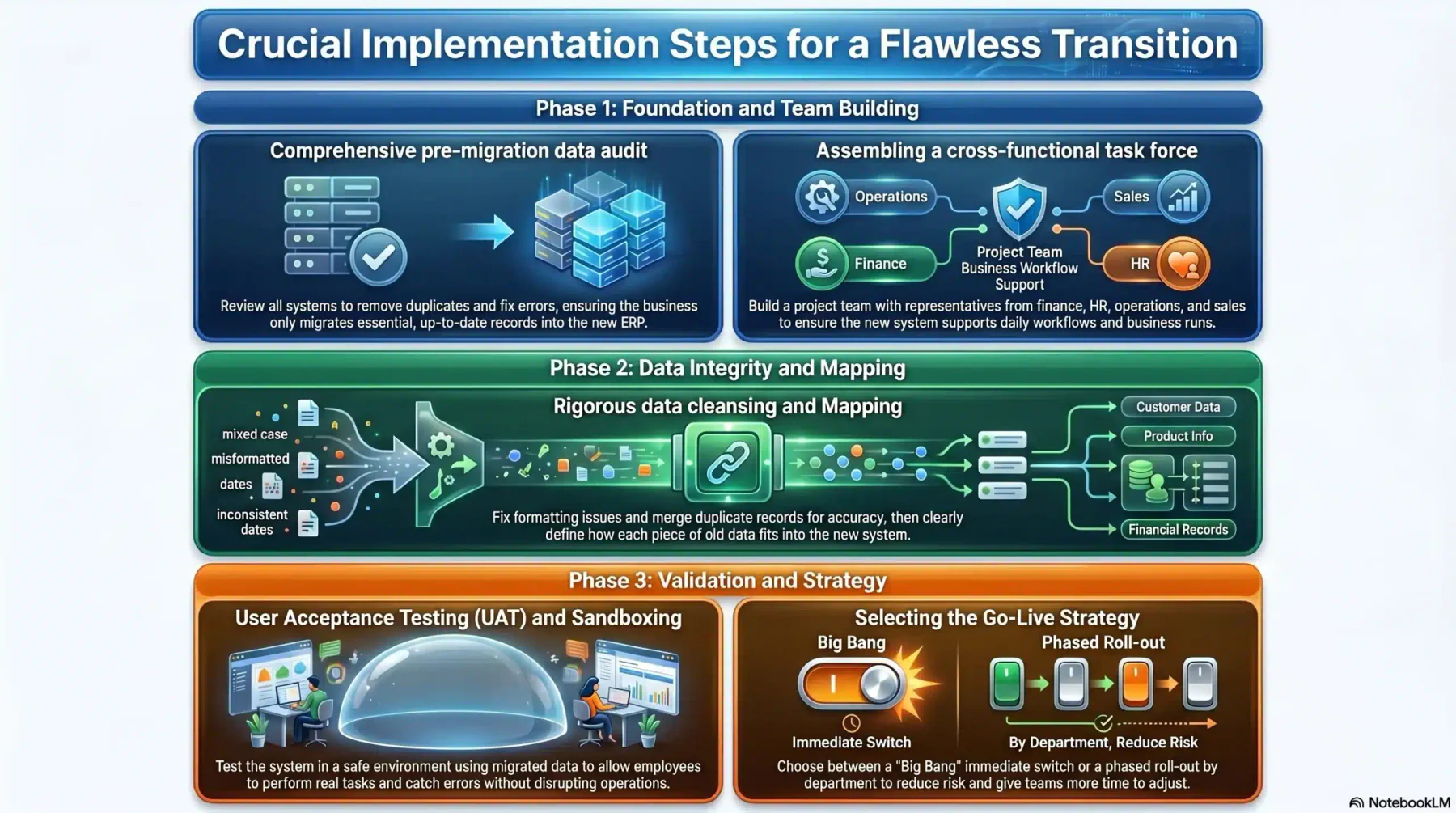
ERP migration needs a clear and structured plan to succeed. It’s not just about extracting, transforming, and loading data, you need a detailed project roadmap that guides the entire process and helps ensure a smooth transition.
1. Comprehensive pre-migration data audit
Before moving any data, take a close look at what you currently have. Review all systems, remove duplicates, fix errors, and decide which data the business still needs. There’s no benefit in bringing years of outdated or unused records into the new ERP.
2. Assembling a cross-functional task force
ERP migration affects the whole company, not just IT. Build a project team with people from finance, HR, operations, sales, and other key departments. These team members understand daily workflows and can make sure the new system truly supports how the business runs.
3. Rigorous data cleansing and Mapping
After auditing your data, clean it carefully. Fix formatting issues, correct mistakes, and merge duplicate records so everything is accurate and consistent. Then clearly define how each piece of old data will fit into the new system to avoid confusion later.
4. User Acceptance Testing (UAT) and Sandboxing
Before going live, test the new system in a safe environment. Let employees try real tasks using migrated data to make sure everything works as expected. This helps you catch errors and fix problems without disrupting daily operations.
5. Selecting the Go-Live Strategy
Decide how you want to launch the new system. You can switch everything at once (Big Bang) or roll it out step by step by department or location. While launching in phases usually takes longer, it reduces risk and gives teams more time to adjust.
What Data Should Be Migrated for Australian Businesses
Once the migration plan is clear, the next priority is deciding which data should move into the new ERP system. Migrating only relevant, compliant, and actively used data helps reduce risk, improve performance, and support accurate reporting after go-live.
Financial and tax data
Financial records form the core of any ERP migration. Businesses should migrate GST transactions, BAS data, PAYG withholding records, and a well-mapped chart of accounts. Accurate financial data then ensures reporting consistency, audit readiness, and compliance continuity.
Payroll data
Payroll data requires extra care due to strict reporting and privacy obligations. This includes Single Touch Payroll Stage 2 records, SuperStream data, employee TFNs, award rates, leave balances, and payroll tax data by state. Clean payroll data helps avoid errors, delays, and compliance issues after migration.
Customer and supplier data
Customer and supplier records support daily operations and cash flow. Businesses should migrate contact details, ABN or ACN information, consent records, and payment terms in line with Australian Privacy Principles. Well-maintained master data then improves billing accuracy and supplier coordination.
Inventory, sales, and operational data
Operational data keeps the business running after go-live. This includes multi-location stock, open sales orders, purchase orders, active work orders, and barcode or SKU records. Migrating only open and active transactions helps teams continue work without disruption while keeping historical data archived securely.
Conclusion
ERP migration supports long-term growth when a business plans it carefully. It involves more than moving data, because it also improves workflows, aligns teams, and strengthens operations. Therefore, clean data and clear planning help reduce risk.
With realistic timelines and a structured ERP migration strategy, companies can manage change more smoothly. Testing, staff support, and post go-live checks then ensure system stability. You can book a free consultation with HashMicro to plan your ERP migration with confidence.
Frequently Asked Question
Software migration usually refers to moving a single application or dataset to a new system or platform. ERP migration is broader and more complex because it involves transferring integrated data, workflows, and business processes across multiple departments into a unified ERP system.
An ERP migration project should involve executive sponsors, a project manager, IT specialists, department leaders, and key users. This mix ensures technical accuracy, regulatory compliance, and alignment with daily business operations.
ERP migration complexity depends on data volume and quality, system customisation, third-party integrations, company size, and regulatory or compliance requirements. Clear planning and data preparation help reduce these challenges.