


 Limited to 100 registrants

Managing employee salaries is a critical yet complex duty for managers, especially ensuring accurate net pay. Payroll management errors not only affect employee satisfaction but can also cause legal issues and financial losses.
Common net pay challenges include inaccurate tax calculations, outdated systems, and inconsistent benefit deductions. These problems can trigger employee dissatisfaction, payroll disputes, and compliance risks. In the Philippines, a study by DOLE links payroll errors and compliance gaps to a significant share of labour disputes.
The report stresses accurate payroll systems to reduce mistakes and build business trust. Adopting modern payroll software is essential to overcome these challenges and streamline payroll. This article explores net pay and shows how the right payroll software can transform your business.
Key Takeaways
Net pay is the actual take-home income an employee receives after taxes, contributions, and other deductions.
Calculate net pay by subtracting taxes and other deductions from an employee’s gross pay to determine the employee’s actual take-home income.
Learn how to calculate net pay accurately each pay period by accounting for each employee’s earnings, deductions, and applicable tax regulations.
What is Net Pay?
Net pay, often called take-home pay, is the amount an employee receives after all deductions and withholdings are subtracted from gross income. The net pay formula removes BIR withholding tax, statutory contributions, and other deductions from gross pay. It represents the actual amount of employees' spendable income.
Understanding take-home pay is essential for managing personal finances and reviewing an income statement. Unlike gross income, which shows total earnings before deductions, net income is what employees retain and can be used for daily expenses or savings.
Deductions from gross pay can include mandatory items like SSS, PhilHealth, and Pag-IBIG contributions plus BIR withholding tax, as well as optional benefits such as HMO or company retirement plans. These deductions directly reduce net take-home pay, so it helps to weigh gross pay and net pay when planning financial goals.
Difference Between Gross Pay and Net Pay
Gross pay represents the total amount an employee earns before deductions, including salary, wages, bonuses, overtime, tips, and commissions. Net pay represents the amount an employee actually takes home after taxes, pension contributions, and other withholdings are removed; therefore, it is the real spendable income.
| Differences | Gross Pay | Net Pay |
|---|---|---|
| Components | Salary, bonuses, overtime, tips, commissions | Final take-home amount |
| Deductions | None applied | Taxes, pension, other withholdings |
| Purpose | Shows total earnings | Shows spendable income |
For example, a salaried employee earning ₱60,000 annually would have a monthly gross pay of ₱5,000, while an hourly worker paid ₱15 per hour for 35 hours a week would earn ₱525 in gross pay. If both had deductions of ₱1,000 and ₱75, respectively, then their net pay would be ₱4,000 and ₱450.
Why Net Pay Matters?
Net pay is a crucial element of payroll accounting management that directly impacts employee satisfaction and organizational success. Beyond being the final figure employees see on their paychecks, net pay ensures compliance, transparency, and trust within your business.
Key reasons why net pay matters:
- Building trust within your organization: Accurately calculating and delivering net pay fosters employee trust, making them feel valued and confident in your company. This trust can improve employee motivation and loyalty, reducing turnover rates and boosting morale.
- Budgeting for each year: Detailed gross and net income records provide your leadership team with valuable insights for financial planning. These records enable better forecasting, ensuring resources are allocated effectively, and the business remains financially stable.
- Keeping detailed records: Maintaining payroll records documenting gross pay, deductions, and net pay can protect your business during wage claims or audits. These records act as a transparent defense, showcasing compliance with labor laws and safeguarding the company’s reputation.
- Ensuring compliance: Accurately tracking and calculating net pay vs. gross pay ensures your business meets legal tax and withholding obligations. Compliance not only avoids costly penalties but also strengthens your company’s financial credibility.
- Preventing legal and financial risks: Payroll records, including net pay formula breakdowns, are mandatory by law and protect against legal disputes. Failure to maintain these records could lead to fines, lawsuits, or reputational damage that harms gross profit and long-term growth.
Calculating Net Pay With a Formula
To determine your net take-home pay, take the Gross pay and subtract it from taxes and other deductions. Gross pay covers total earnings from salary, wages, or extra compensation before deductions. Deductions include mandatory items like income taxes, Social Security, and Medicare. Voluntary deductions cover health insurance, retirement plans, and union dues.
Calculating your net pay starts with understanding the simple formula:
For example, if your gross income is ₱3,000 monthly and you have ₱800 in combined deductions, your take-home pay would be ₱2,200. Understanding how these deductions impact your paycheck allows you to plan better and make informed financial decisions, highlighting the critical difference between net pay and gross pay.
Reducing Net Pay
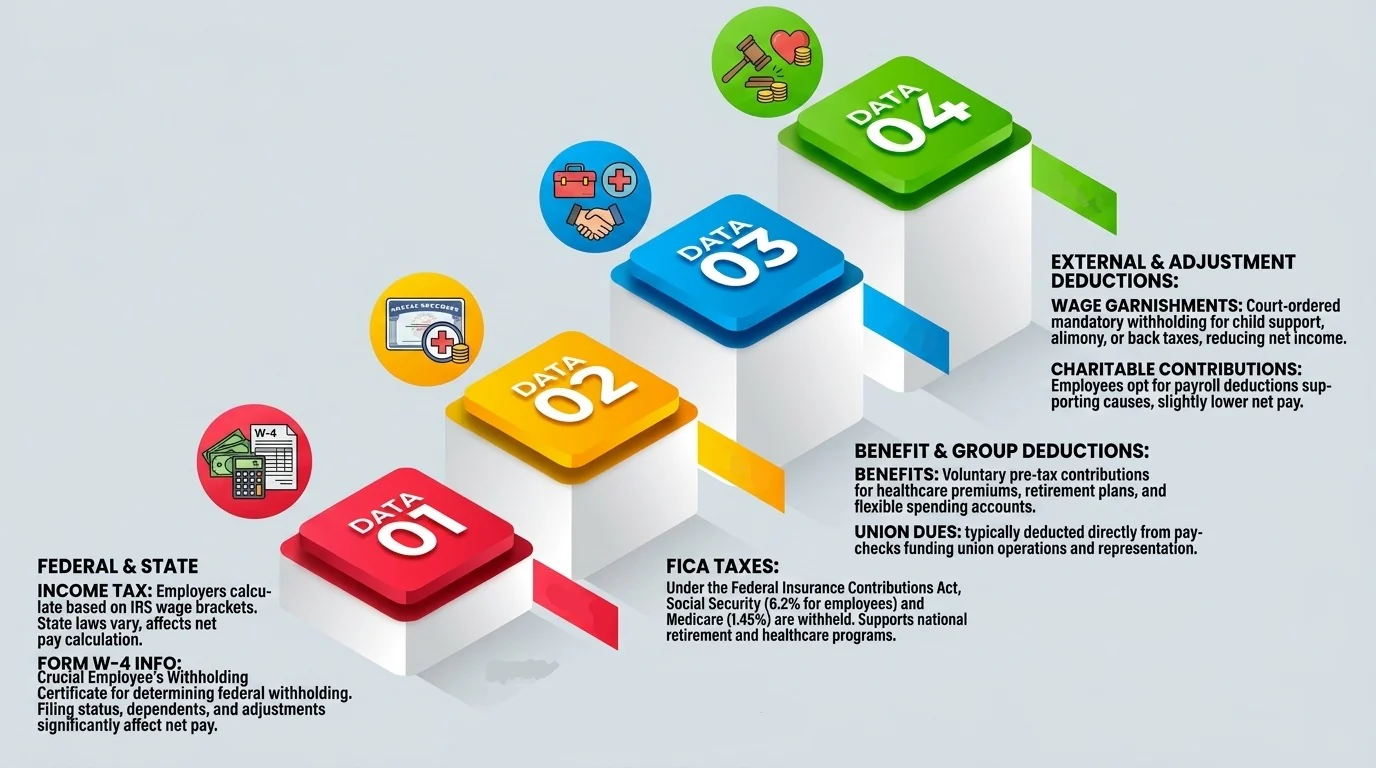
Various deductions, both voluntary and involuntary, can reduce an employee’s net take-home pay. These deductions are necessary to meet legal requirements, cover benefits, or fulfill personal obligations, directly impacting the amount employees receive in their paychecks.
Key factors that can reduce net pay:
- Withholding tax on compensation is deducted from wages using BIR's graduated tax brackets under the TRAIN Law. The amount depends on taxable income after mandatory contributions, and employees can request additional withholding but not less.
- National income tax in the Philippines follows a single BIR tax table, with no separate regional or state-level rates. This keeps the tax deduction consistent nationwide, regardless of where the employee works.
- Mandatory contributions include SSS, PhilHealth, and Pag-IBIG, covering social security, health insurance, and housing benefits. Wage garnishments are court-ordered deductions for debts such as child support or unpaid loans. Both reduce take-home pay.
- Voluntary payroll deductions such as HMO premiums, retirement fund contributions, cooperative loans, and union dues also lower net pay. They do so by reducing taxable or take-home wages before the paycheck is issued.
Employees can review these deductions in detail on their income statement or pay stubs. Understanding these factors empowers employees to manage their finances effectively and adjust when necessary.
An HR leader can automate these net-pay calculations using a system with payroll automation to avoid mistakes and streamline the process. This reduces manual errors in tax deductions and benefit contributions while ensuring compliance with labor regulations. HashMicro’s advanced payroll management system in the Philippines simplifies payroll processes and ensures accurate deductions.

How to Calculate Net Pay Each Pay Period
 Calculating net pay for each employee involves understanding their unique earnings and deductions. While the take-home pay formula may seem straightforward, applying it requires a step-by-step approach to ensure accurate results and compliance with tax regulations.
Five steps to calculate net pay:
- Determine gross income: Start by calculating the employee’s total earnings for the pay period, which includes wages, bonuses, overtime, and commissions. This gross pay forms the foundation for calculating deductions and determining the final net pay.
- Deduct pre-tax contributions: Subtract any pre-tax benefits, such as healthcare premiums, retirement contributions, or HSA/FSA savings, from the employee’s gross income. These deductions reduce the taxable income, benefiting both the employee and the employer.
- Calculate taxable income: After pre-tax contributions, determine the remaining taxable income. This amount is subject to federal, state, and local taxes, which vary depending on filing status, dependents, and other factors.
- Withhold taxes: Deduct applicable federal, state, and local taxes, including Social Security and Medicare under FICA. For example, a single employee earning ₱5,000 monthly in Georgia might pay 22% federal tax, 7.65% FICA, and 4% state tax.
- Apply post-tax deductions: Finally, subtract any post-tax deductions, such as court-ordered garnishments or after-tax contributions to retirement plans. These adjustments result in net take-home pay, the final amount employees receive in their paychecks.
For instance, an employee with ₱5,000 in gross pay and typical deductions might have a net income of ₱3,152.50 after taxes and contributions. Keeping accurate records of these calculations on the income statement ensures transparency and builds trust with employees, reinforcing the importance of understanding net pay vs gross pay.
Streamline Net Pay Management with HashMicro’s Advanced Payroll System
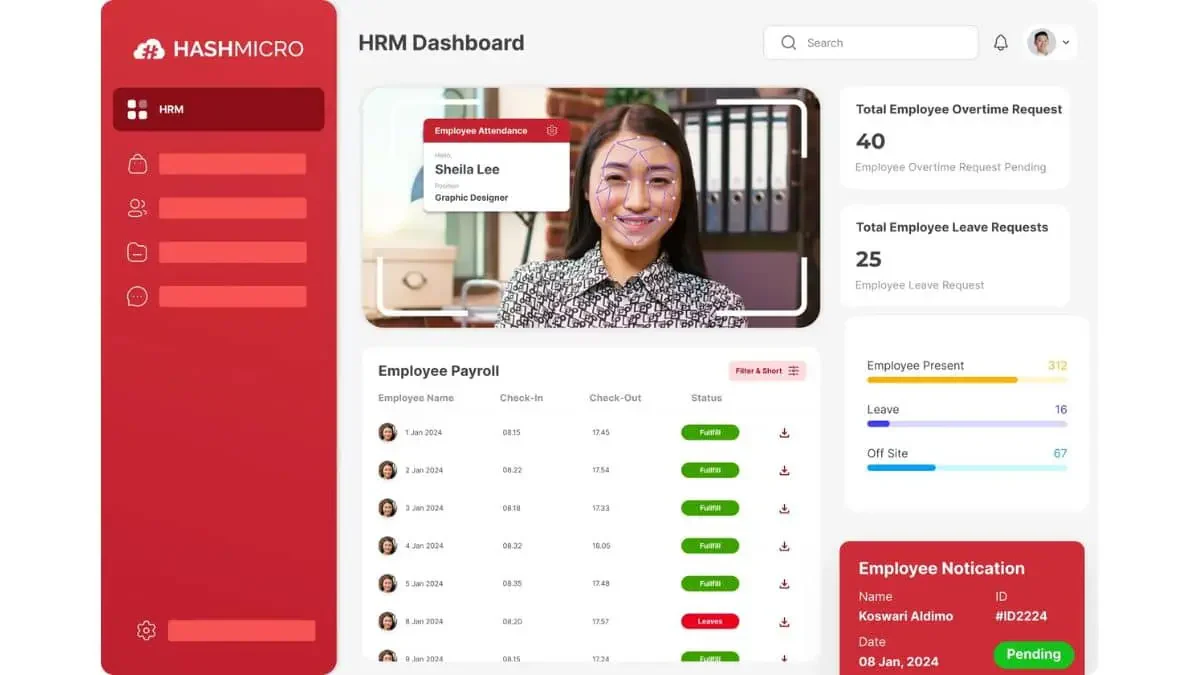
HashMicro’s Payroll System helps businesses calculate and manage net pay accurately while staying compliant with local payroll regulations. It supports tax deductions, employee benefits, and large-team payroll processing through automation tools that reduce errors, save time, and keep payroll operations more consistent.
With its user-friendly interface and flexible features, this payroll software can handle complex payroll tasks without making daily workflows harder for HR teams. Businesses can use it to streamline payroll operations, improve employee satisfaction, and explore better net pay management through a free trial.
HashMicro provides a range of payroll features such as:
- Fully localized payroll and payslip calculation: Automatically calculates taxes, deductions, and wages for monthly, daily, and hourly employees based on local payroll rules, helping HR teams reduce manual errors and improve payment accuracy.
- Dynamic schedule and roster management: Helps HR teams create, adjust, and manage employee shifts, rosters, and custom working hours, making workforce planning more flexible and efficient.
- Mobile employee self-service: Allows employees to access payslips, request leave, and update personal details through a mobile app, reducing repetitive HR admin tasks.
- Overtime management linked with attendance and payroll: Connects attendance records with payroll calculations to ensure overtime hours are tracked accurately, and employees are compensated fairly.
- Leave management with carryover and expiry tracking: Tracks leave balances, carryovers, and expiry dates in real time, making leave requests easier to manage while supporting company policy compliance.
- Professional templates and in-depth reporting: Provides customizable templates for contracts and payslips, along with reports for leave, payroll, expenses, overtime, and attendance to support better HR decisions.
HashMicro’s Payroll System offers industry-specific modules for retail, manufacturing, construction, and more, helping businesses address unique payroll challenges. It also integrates with third-party HR and accounting tools, supports customizable workflows, and provides unlimited user capacity for companies looking to optimize payroll operations efficiently.
Conclusion
Understanding net pay is essential for employees and employers, as it determines the amount received after deductions. By mastering the concept of net pay vs gross pay, businesses can ensure accurate payroll processing, build trust with employees, and comply with legal requirements.
HashMicro’s Payroll System offers a reliable solution for businesses seeking to simplify payroll management. With features like automated tax calculations, attendance integration, and customizable templates, this software ensures accuracy, efficiency, and compliance in managing employee compensation.
Schedule your free consultation with HashMicro today and experience how their advanced system can transform your payroll operations. Click below to get started and empower your business with smarter payroll management!

FAQ About Net Pay
Net pay is the amount remaining after taxes and deductions are subtracted from your gross salary. This is the money deposited into your bank account as your income. Salaried employees usually receive a detailed breakdown of their salary, including take home pay, on their monthly payslip.
You should use net pay because it shows the real amount available for budgeting, savings, and daily expenses. Gross salary can look higher, but net pay reflects deductions such as withholding tax, SSS, PhilHealth, Pag-IBIG, loans, and other payroll adjustments.
Gross pay refers to an employee’s total earnings before any taxes or deductions, while take-home pay is the actual amount they take home after withholdings. For example, if an employee earns ₱40,000 gross per month and has ₱8,500 deducted for taxes and benefits, their take-home pay would be ₱31,500.
Gross pay is the employee’s total earnings before deductions, including salary, overtime, bonuses, and allowances. Net pay is the remaining amount after payroll deductions are removed. For employees, gross pay shows earning value, while net pay shows the actual amount they can spend or save.
To calculate net pay in the Philippines, start with gross earnings, then subtract BIR withholding tax, SSS, PhilHealth, Pag-IBIG, loans, and approved deductions. The basic formula is Net Pay = Gross Pay – Taxes and Deductions for the current payroll period, recorded on the payslip.