

 Limited to 100 registrants

Stock accuracy issues quietly drain margins long before they show up on a balance sheet. A misplaced pallet here, a missed scan there, and suddenly your reports no longer match what sits on the warehouse floor.
Inventory tracking is how Australian businesses stop that gap from widening. Automated inventory records track every stock movement across receiving, storage, and despatch, so teams can rely on real numbers instead of guesswork.
This guide walks through what inventory tracking covers, the methods and systems available, and practical ways to lift accuracy across multi-location operations.
Key Takeaways
What is Inventory Tracking? It is the ongoing process of recording stock quantities, locations, and movements so system data always matches what is physically on the shelf.
Inventory Tracking Methods range from manual spreadsheets to barcode, RFID, and QR code scanning, each suited to a different scale and operational need.
An Inventory Tracking System unifies stock data across locations and channels, giving teams a single source of truth for purchasing, sales, and finance.
How to Improve Inventory Tracking comes down to automation, scanning hardware, real-time updates, and standardised processes across every site.
What Is Inventory Tracking?
Inventory tracking is the ongoing process of recording stock quantities, locations, and movements across a business. It captures each transaction (receiving, transfers, sales, returns) so the on-hand figure in your system reflects what actually sits on the shelf.
In practice, tracking sits between purchasing, warehousing, and sales. As a result, finance, operations, and customer service teams all work from the same numbers rather than chasing reconciliations.
Why Inventory Tracking Is Important
Without reliable tracking, businesses end up reacting to problems instead of preventing them. The three benefits below explain why accurate inventory data records pays off across day-to-day operations.
Improves inventory accuracy
Accurate stock data starts with consistent recording at every touchpoint. When receivers, pickers, and despatch staff log movements as they happen, system counts stay close to physical counts.
Higher accuracy then reduces emergency stocktakes and end-of-month adjustments. Therefore, finance can close the books faster and ops teams stop second-guessing the numbers.
Prevents stockouts and overstocking
Real-time visibility into stock levels helps planners reorder at the right moment. For example, automated reorder points can trigger purchase orders before a fast-moving SKU drops to zero.
The same data also flags slow-moving stock before it ties up cash. As a result, businesses avoid both empty shelves and bloated warehouses.
Enhances operational efficiency
Clear tracking removes the small frictions that slow warehouses down, like double handling, lost items, and disputed counts. Pickers find stock faster, and supervisors spend less time investigating discrepancies.
Over time, those small wins compound. For example, fewer mis-picks lead to fewer returns, lower freight costs, and happier customers.






What Does Inventory Tracking Monitor?
"Inventory tracking only delivers value when every site follows the same process. Once that consistency is in place, the data becomes trustworthy enough to drive real operational decisions."
A good tracking system covers more than just quantity on hand. It follows several data points across the supply chain so finance and operations always work from the same view.
- Stock quantities by SKU, batch, or serial number
- Storage location (warehouse, bin, shelf)
- Inbound receipts from suppliers
- Internal transfers between locations
- Outbound orders to customers
- Returns, damages, and write-offs
- Expiry or use-by dates for perishables
- Cost movements for accurate COGS reporting
Together, these data points give the business a single, trustworthy view of stock.
Inventory Tracking Methods
Different stock management methods suit different scales and business models. Below is a quick walkthrough of the main approaches teams use today.
Manual vs Automated tracking
Manual tracking relies on spreadsheets and clipboards, which works for very small businesses with low SKU counts. However, error rates rise quickly once volume or locations expand.
Automated tracking uses an inventory tracking software to log movements in real time. Therefore, teams spend less time on data entry and more on actual stock decisions.
Barcode inventory tracking
Barcodes remain the most widely used tracking method because they are cheap to print and fast to scan. Each item carries a unique code that ties back to a record in your inventory system.
Scanning at receiving, picking, and despatch keeps counts accurate without manual entry. For most retailers and distributors, barcodes deliver the strongest accuracy-to-cost ratio.
RFID inventory tracking
Radio frequency identification tags broadcast their ID to nearby readers, so staff can scan dozens of items at once without line-of-sight. This makes RFID a strong fit for high-volume warehouses and apparel retailers.
The trade-off is upfront cost. Tags, readers, and integration work require a larger investment than barcodes, although the speed gains often justify it for large operations.
QR code inventory tracking
QR codes hold more data than standard barcodes and can be scanned with any smartphone camera. As a result, they suit lighter operations like cafés, pop-up retail, or asset tracking on construction sites.
They also work well for customer-facing use cases such as batch traceability or product information lookups. For example, a producer can link a QR code to harvest date and origin details.
What Is an Inventory Tracking System?
An inventory tracking system is the software that captures, stores, and reports on every stock movement. It pulls data from scanners, sales channels, and accounting tools into one source of truth.
The right system depends on operational complexity and how many locations or channels you run. The next two sections cover the main types and the features that matter most.
Types of inventory tracking systems
Tracking systems fall into a few clear categories, depending on how stock data is captured and updated.
- Periodic systems update stock counts at set intervals, such as monthly stocktakes
- Perpetual systems record every movement in real time as it happens
- Cloud-based systems centralise data across locations and sync with ecommerce, POS, and accounting
- On-premise systems keep data on local servers, which suits businesses with strict data control needs
- ERP-integrated systems combine inventory with finance, purchasing, and sales in one platform
Most growing Australian businesses move toward perpetual, cloud-based systems because they scale across multiple sites without heavy IT overhead.
Key features of inventory tracking systems
Strong stock tracking platform options share a common set of features. Look for these when shortlisting vendors.
- Real-time stock updates across locations
- Barcode, RFID, or QR code scanning support
- Batch, lot, and serial number tracking
- Reorder point automation and low-stock alerts
- Multi-warehouse and bin-level location control
- Integration with accounting, POS, and ecommerce platforms
- Reporting dashboards for stock turnover and ageing
- Mobile app access for floor and field teams
These features keep operations consistent as transaction volume grows.
Benefits of Inventory Tracking Systems

A well-implemented tracking system pays off across finance, operations, and customer experience. The benefits below show where the impact tends to land first.
Increased visibility and control
Centralised data means managers see live stock positions across every site, not just the warehouse next door. This visibility helps prevent unauthorised movements and supports clear audit trails.
Tighter control also reduces shrinkage. For example, location-level tracking makes it easier to spot patterns when items go missing.
Faster order fulfilment
Real-time data helps pickers locate items quickly and confirms availability before orders are promised. Therefore, despatch teams can move from order to truck without constant back-and-forth checks.
Faster fulfilment then lifts customer satisfaction and reduces the cost per order. It also frees up staff for higher-value tasks like quality control.
Better demand planning
Historical movement data feeds directly into demand forecasts. As a result, planners base purchase orders on actual sales velocity rather than gut feel.
Better forecasts shrink working capital tied up in slow stock. Over time, this lifts cash flow without sacrificing service levels.
Reduced operational costs
Automation removes the cost of repeated manual counts, reconciliations, and stocktake shutdowns. It also reduces costly errors such as double orders or short shipments.
For multi-site businesses, the savings compound quickly. For example, cutting weekly stocktake hours across five warehouses can free up a meaningful labour budget each year.
Common Challenges in Inventory Tracking
Even with good intentions, businesses run into recurring tracking issues. Recognising the patterns below helps you fix root causes rather than symptoms.
Tracking inconsistency
When some sites scan and others log manually, the data set becomes unreliable. Reports look fine on paper, but they don’t match what’s on the floor.
Standard procedures, shared scanning hardware, and a single inventory tracking software close the gap. Therefore, every location records movements the same way.
Limited inventory visibility
Disconnected systems hide stock in silos. Sales teams may quote items that are actually unavailable, or warehouses may reorder stock that already exists at another site.
Cloud-based platforms solve most of this by pooling data into one view. As a result, teams see the full picture before making decisions.
Supply chain disruptions
Late deliveries, port delays, and supplier shortages all distort tracking accuracy. Expected receipts may sit in the system for weeks before goods actually arrive.
Real-time supplier integrations and clearer ETAs help teams respond faster. For example, planners can switch suppliers or rebalance stock between sites before customers feel the impact.
Overstocking and stockouts
Poor tracking leads to either too much stock or too little, and both outcomes hurt margins in different ways.
Reorder rules and demand forecasting reduce the swing. Over time, businesses settle into safer stock levels that protect cash without risking service.
How to Improve Inventory Tracking
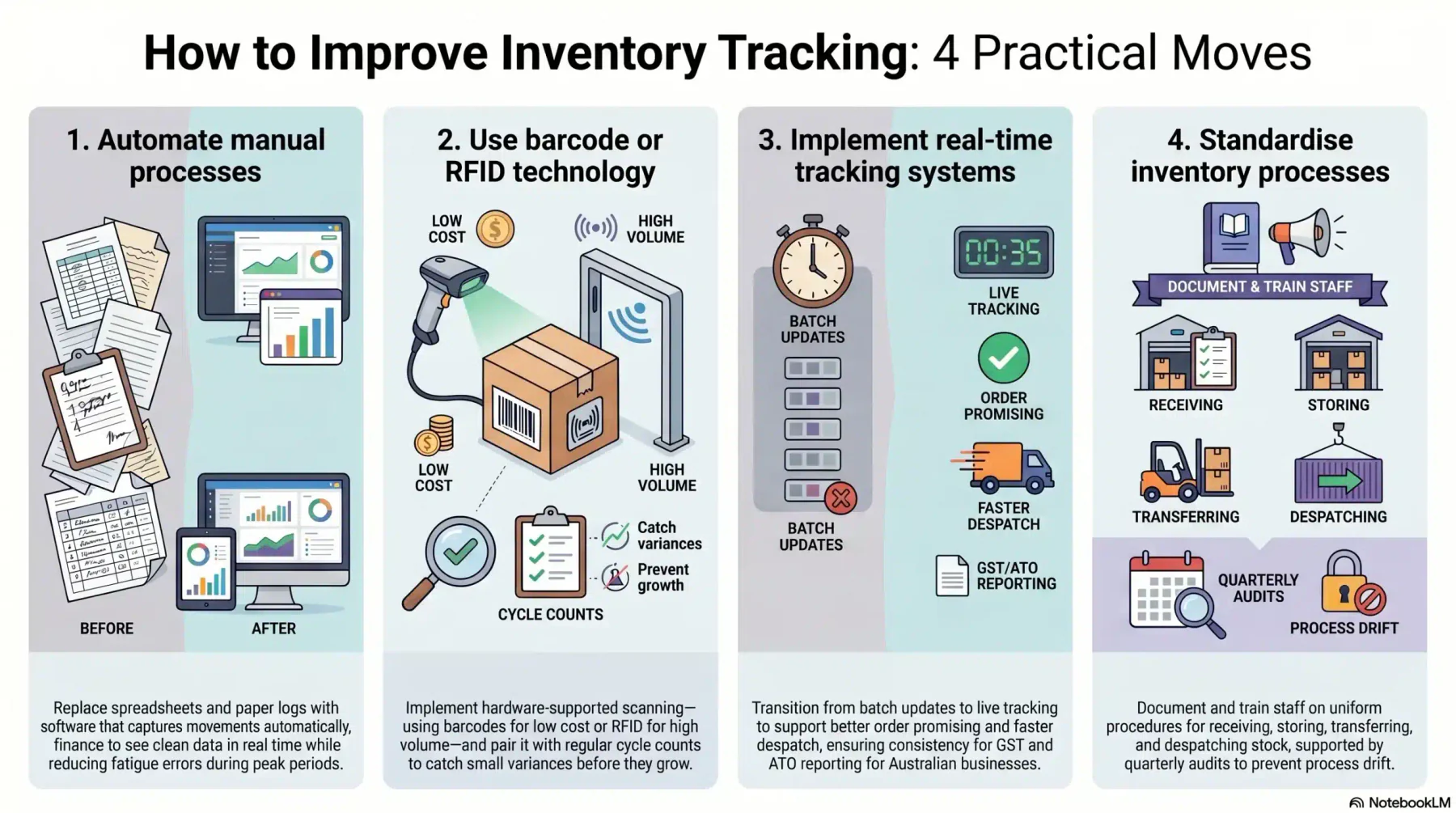
Improving tracking doesn’t require a full system rip-and-replace. The four practical moves below cover most of the accuracy wins.
1. Automate manual processes
Replace spreadsheets and paper logs with software that captures movements automatically. Pickers scan, the system updates, and finance sees clean data in real time.
Automation also reduces fatigue errors during peak periods. As a result, accuracy holds up even during high-volume seasons.
2. Use barcode or RFID technology
Hardware-supported scanning is the fastest accuracy lift available. For most businesses, barcodes deliver strong returns at low cost, while RFID suits very high-volume environments.
Pair scanning with regular cycle counts. Therefore, small variances get caught before they grow into big ones.
3. Implement real-time tracking systems
Move from batch updates to live tracking so every movement reflects in your system within seconds. This change supports better order promising, faster despatch, and tighter compliance.
For Australian businesses managing multiple sites, real-time data also helps with GST and ATO reporting. Numbers stay consistent between operations and finance.
4. Standardise inventory processes
Document how to receive, store, transfer, and despatch stock, then train every site on the same procedures. Consistency removes most of the variance that creeps into multi-location operations.
Regular audits keep standards in place. For example, a quarterly process review catches drift before it becomes a habit.
Inventory Tracking vs Inventory Management
Inventory tracking and inventory management often get used interchangeably, but they cover different ground. Tracking is the data layer: where stock is, how much, and what state it’s in.
Inventory management is the broader discipline that uses that data. It covers planning, purchasing, supplier relationships, demand forecasting, and stock optimisation across the business.
For retailers, this connection is central to stock accountability improvement, as traceable movements make discrepancies, shrinkage, and unauthorised adjustments easier to identify.
If you want to tighten stock accuracy and replace fragmented tracking with a single source of truth, book a free consultation with our team to map your requirements.
Conclusion
The right setup turns scattered stock data into a single, trusted view that finance and operations can both rely on. Cleaner counts, faster despatch, and steadier cash flow follow naturally.
The biggest wins come from standard processes and the right scanning method, not from chasing every feature. If you want help tightening accuracy across your sites, schedule a free consultation with our team today.
Frequently Asked Question
Inventory tracking is the process of recording stock quantities, locations, and movements as they happen. It keeps your system numbers aligned with what actually sits on the shelf, so finance and operations work from the same data.
For most small businesses, barcode scanning paired with cloud-based software offers the best balance of accuracy and cost. It removes manual entry errors without requiring heavy hardware investment or long training cycles.
RFID lets staff scan many items at once without line-of-sight, which speeds up high-volume operations. Barcodes cost much less and remain ideal for smaller retailers or distributors with simpler workflows.
With real-time tracking in place, most businesses move from full annual stocktakes to rolling cycle counts. This keeps accuracy high without shutting operations down for days at a time.
Inventory tracking captures stock data such as location, quantity, and movement. Inventory management uses that data to plan purchasing, forecasting, and supplier strategy across the business.