









 Limited to 100 registrants
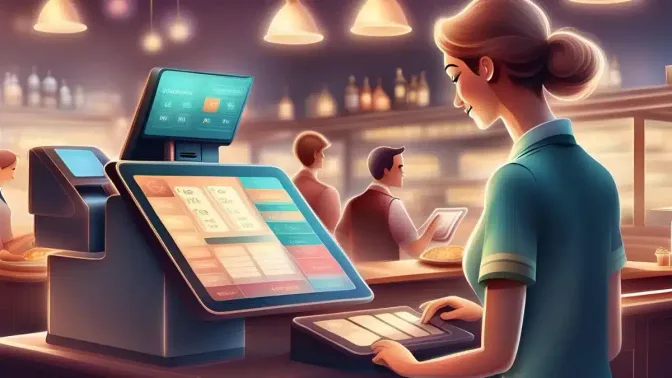
Restaurant POS systems provide many benefits for business including faster ordering, real-time sales tracking, and seamless inventory management that makes operations more efficient and accurate.
Handling a restaurant manually can cause payment mistakes, inventory errors, and weak promotions. These problems can affect growth and profits. Kapag hindi naayos, these issues can harm your business, which is why using a restaurant POS system is crucial for better efficiency.
This article highlights the benefits of restaurant POS system and lists seven key reasons why it’s essential. Understanding these reasons will show how a POS system can improve your operations and magdala ng tagumpay.
Key Takeaways
A POS machine for restaurant simplifies operations by handling orders, payments, and inventory tracking.
The benefits of a restaurant POS system include streamlining operations, improving security, and enhancing customer satisfaction.
A restaurant POS system helps businesses operate efficiently by streamlining orders, payments, inventory, and customer management while ensuring secure data handling.
Every restaurant is different and will require a different configuration for the POS machine to fit its unique needs.
Definition of a Restaurant POS System
A POS machine for restaurants handles orders, payments, receipts, and helps with tracking inventory and sales. It automates tasks such as sending orders to the kitchen and updating stock, making operations smoother.
Using a restaurant POS system increases efficiency by preventing errors, speeding up service, and avoiding stock issues. It helps keep customers happy, ensures accurate orders, and maintains smooth operations. Without it, businesses may face disorganization, delays, and missed insights.
7 Essential Benefits of a Restaurant POS system

A POS system for food and beverage (F&B) operations helps streamline tasks and increase your business’s success. These are seven reasons to consider it.
-
Streamline employees’ daily tasks and workflows
Restaurant POS systems simplify daily operations by automating order taking, billing, and reporting. Allowing staff to focus on providing great customer service. For instance, they can send orders directly to the kitchen, cutting down errors and speeding up service.
The benefits of restaurant POS systems include automatic end-of-day reports, saving time and minimizing mistakes. It ensures smoother transactions, allowing your staff to work more efficiently and deliver a better experience for customers.
-
Improved customer satisfaction
A restaurant POS system for food and beverage (F&B) operations speeds up order processing and ensures accurate billing, reducing wait times and errors. Features like loyalty programs and personalized services enhance the dining experience, increasing customer satisfaction and loyalty.
The POS machine for restaurants can store customer preferences and past orders. This enables staff to offer personalized service, improving customer satisfaction, and encouraging repeat visits to the restaurant.
-
Ensure access rights are not misused
A restaurant POS system improves security by assigning user roles and limiting access to sensitive data. This prevents unauthorized access to crucial information and lowers the risk of internal fraud, ensuring only approved employees handle specific tasks in the system.
For example, only managers can cancel transactions or view financial reports. This ensures that sensitive actions are carefully controlled and monitored, which helps prevent errors and fraud in daily restaurant operations.
-
Compatible with various platforms and devices
Benefits of a restaurant management system include flexibility, as they work with tablets, smartphones, and traditional terminals. This allows you to manage operations from anywhere with real-time updates. A manager can check sales and inventory from home or while traveling, staying informed.
-
Mitigate the risk of stolen inventory
POS software for food and beverage (F&B) operations track inventory in real-time, making it easier to detect discrepancies and prevent theft. Automated inventory tracking ensures stock levels are accurate, reducing losses and enhancing cost control for your business.
These systems send alerts when stock is running low or when unexpected issues occur, allowing for quick action to prevent theft and wastage. This helps ensure that operations run smoothly while minimizing the risk of costly errors or shortages in your inventory.
-
Adopting a cloud-based solution
Cloud POS machine for restaurant enables you to access data from anywhere, anytime. It keeps your data safe and easy to retrieve. Even if a terminal fails, your information stays secure and accessible, avoiding downtime and data loss.
Using a restaurant POS system benefits you by protecting against system crashes without losing critical data. You can easily access stored information for a smooth and uninterrupted operation.
-
Connects effortlessly with other modules
A restaurant POS system connects with key tools like central kitchen, accounting, payroll, and CRM. This integration simplifies operations and improves decision-making. For instance, sales data syncs with accounting software for accurate financials and easier tax reporting.
How Does a POS Machine for Restaurants Operate?
A POS machine for restaurant helps handle transactions and simplify different F&B tasks. It automates sales, tracks inventory, and manages customer orders, boosting accuracy and efficiency. This leads to better customer satisfaction and overall business success. Here’s how a typical system works:
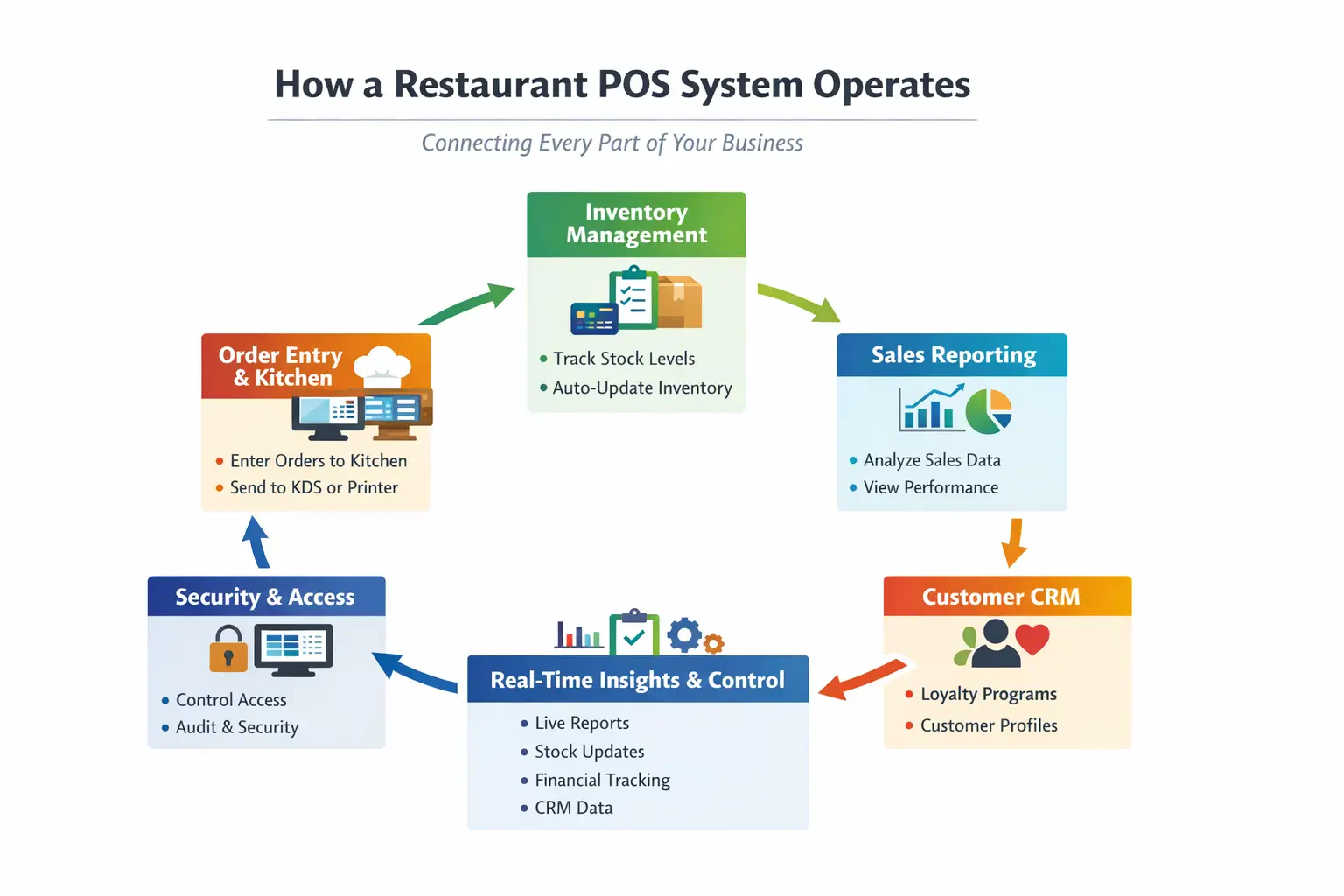
By combining these features, POS systems for food and beverage (F&B) operations and retail POS systems make tasks easier, ensure accuracy, and boost customer satisfaction.
What to Know When Implementing a POS Machine for Your Restaurants

Now that you know understand the benefits and operation of a POS machine, you just need to know what to set up one for your establishment. Here is a simple overview on what to consider when you decide to use a POS machine for your restaurant.
-
Know what you need
Before you decide to buy and install a POS system in your restaurant, you must assess your business and make a list of what you actually need the POS system for. Factors such as restaurant size, service model, average volumes of orders, and the complexity of your menu will determine how much hardware you need and how complex your POS needs to be.
A small café, for example, will only need one basic checkout terminal machine paired with a simple receipt printer. While a large dining restaurant will have two or even eight terminals and multiple handheld POS devices. They use more complex systems like table management, kitchen order routing, split-bills accounting, accounts with different levels of access, and a waiters’ performance tracker.
-
Configuring menu and price
One of the biggest hurdles during peak hours is sorting out all the menus. For this reason, you must set your menus right. First, you must put your menus into categories like appetizers, main meals, drinks, etc. Be sure that the items name are clear and aren’t duplicated so that there won’t be confusion during rush hours.
Make sure to add variants for each item with different sizes, as adding them to unique items can clog the menu. Remember to add modifier options like toppings and allergy options. When pricing the menus, ensure that all the terminals are in sync, as pricing rules and charges can change. And don’t forget to put the correct TIN ID in the tax information.
-
Configuring inventory
Inventory tracking is very important for a restaurant to operate well. Setting up a POS inventory system correctly is crucial to avoiding any setbacks. Ensure that it connects with the menu to keep a consistent real-time update on each sale. It is also advisable to set up your low-stock threshold not just based on the raw amount of materials but also on suppliers’ delivery time and the average demand of items.
It is important that you set a standard unit of measurement for different type of items as mixing them up can cause huge miscalculation. Separating ready-to-sell into sales inventory and raw ingredients into recipe mapping also helps with keeping depletion logic. Even with an automatic system, it is still important to manually check the inventory at times to ensure that there’s no spoilage or input errors.
-
Configuring Payment
Once the menu and pricing are set ,you need to determine how customers can pay for it. Ensure that you have set up all the needed payment methods that your restaurant use such as cash, card, and digital money. Make sure that you align the payment method with that of the customers; too many unused payment options can slow down cashiers.
You can make it even faster by adding shorts cuts like round off buttons and common tender amounts like ₱500 and ₱1,000. Don’t forget to add service charge consistently for restaurant with table service. Ensure that the service charge reflects the local practice and wage law.
-
Configuring Accounts
You have to determine on who you trust when using the system. Make different accounts that have different levels of access; a cashier only needs access to order entry and payment processing, while a supervisor will need bigger finance control and reporting access. Limit employees’ access based on their trust and training level to ensure that revenue leakage, such as wrongful refund, won’t happen.
-
Implementation
Once everything is set and done, test the system first before using it. Simulate real scenarios to test all the POS features and limits. For real practice, it is preferable to do it during slow hours so that any mistakes won’t have any big repercussions. This ensures that the POS system is implemented correctly and the staff will be familiarised with the system.
Conclusion
Evidence shows that restaurant POS systems enhance service speed, reduce errors, and streamline operations by automating tasks like order processing, payment handling, and inventory management. This allows restaurants to focus on delivering quality service.
A POS machine for restaurants also ensures better security, real-time updates, and efficient management of inventory and sales data. By investing in the right POS system, restaurants can reduce risks and improve overall efficiency, leading to better customer satisfaction and growth.
Ultimately, POS systems for food and beverage (F&B) operations provide valuable tools to manage daily tasks, prevent losses, and increase productivity. And all the features combined together creates a highly beneficial system for businesses in the food industry.
FAQs Asset Management Software
POS systems improve the customer experience by cutting wait times, boosting accuracy, and offering personalized service. Faster transactions and fewer errors help keep lines short and your customers happy.
Advanced restaurant POS systems let you monitor menu items, ingredients, and everything in your kitchen. You can easily track inventory and create reports to help you order the right amount of ingredients.
A POS system prevents transaction errors by allowing cashiers to scan bar codes for purchases, rather than manually entering SKU numbers or prices, which happens when using a cash register.