
Australia’s retail sector is shifting fast. KPMG’s 2024 report via KPMG Australian Retail Outlook 2025 found that 42% of Australian shoppers surveyed are omnichannel. This highlights the modern retail POS system is essential for handling today’s transaction demands.
A retail POS system is a centralised platform that processes sales, from checkout to back office. Unlike traditional point of sale software, a modern retail POS connects every part of the store, so retailers can avoid lost sales caused by disconnected tools.
This guide breaks down how retail POS systems work, the different types available in the Australian market, and the key features local retailers should evaluate before choosing the right solution for their business.
Key Takeaways
A retail POS system is a system used to process transactions and manage sales activities within a retail environment.
What Is a Retail POS System?
A retail POS (Point of Sale) system is a combination of hardware and software used to process transactions and manage sales in a retail environment. Beyond handling payments, it connects checkout activity with inventory, customer data, and financial records.
The hardware usually includes devices such as touchscreen terminals, barcode scanners, receipt printers, cash drawers, and card payment terminals. These tools allow store staff to quickly scan products, calculate totals, and complete transactions accurately.
Behind the interface, POS software manages product data, pricing, stock levels, and sales reporting. By synchronizing transactions with inventory and business records, a modern POS system helps retailers monitor operations and make more informed decisions.
How Retail POS Systems Work
Retail POS systems capture sales data at the moment a transaction occurs and automatically update related business records. This process ensures inventory levels, payment information, and sales reports remain accurate across the entire retail operation.
By connecting checkout activity with inventory databases and financial systems, a POS platform allows retailers to process purchases quickly while maintaining real-time visibility into store performance.
Transaction Flow
A transaction begins when the cashier scans a product barcode or selects an item from the POS interface. The system instantly retrieves the product information, including price, description, and stock availability, from the inventory database.
Once all items are added, the POS automatically calculates the subtotal, applies discounts or promotions, and determines the required taxes. The customer then selects a payment method such as cash, card, or digital wallet to complete the purchase.
After payment authorization, the system records the transaction, prints or sends a receipt, and updates the sales records. This entire process typically takes only a few seconds, allowing retailers to operate a real-time checkout system that delivers fast and efficient checkout experiences.
Real-Time Data Synchronization
Modern POS systems synchronize transaction data across multiple systems as soon as a sale is completed. When an item is sold, the inventory database is immediately updated to reflect the new stock level.
At the same time, the system records financial data such as revenue, taxes, and cost of goods sold. Customer information and purchase history may also be updated if loyalty programs or CRM features are enabled.
This real-time synchronization helps retailers maintain accurate inventory visibility, avoid overselling products, and generate up-to-date sales reports for better operational decision-making.
"A modern retail POS system transforms store operations by connecting sales transactions, inventory visibility, and customer insights into a single data driven platform. When retailers integrate these capabilities effectively, they can improve decision making, optimise stock management, and deliver more seamless shopping experiences."
Multi-Location Data Synchronization
A multi-location retail POS system works by connecting every store’s terminal to one central cloud database, syncing transactions, inventory, and staff data in real time.
Each sale updates the shared database instantly, so managers can view combined stock levels and revenue from every store without visiting locations individually.
This structure also keeps pricing and promotions aligned across stores, while giving head office one consolidated report to compare performance between locations.
Types of Retail POS Systems
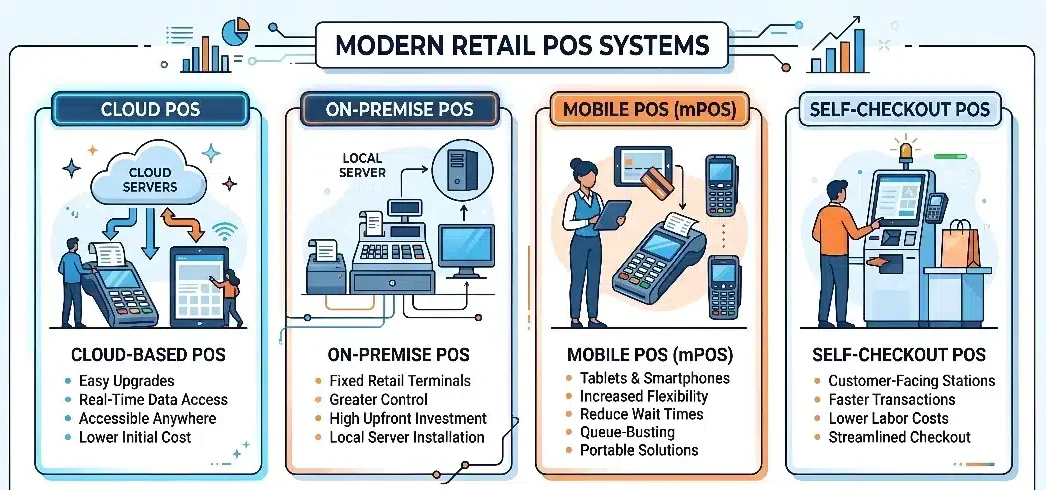
Retail businesses operate in different environments, from small boutiques to large multi-location chains. Because of this diversity, POS systems are designed in several formats to match specific operational needs, budgets, and store layouts.
1. Cloud-based POS
Cloud-based POS systems store data on remote servers and are accessed through the internet using web browsers or applications. Retailers manage transactions, inventory, and reports through a centralized platform without relying on local infrastructure.
This model allows business owners to monitor sales, adjust pricing, and review performance from any location. Cloud POS systems also typically include automatic updates, data backups, and subscription-based pricing that reduces the need for expensive hardware.
2. On-premise POS
On-premise POS systems operate using software installed on local computers and servers within the retail store. All transaction data, inventory records, and customer information are stored directly on the company’s internal network.
This setup gives businesses greater control over their infrastructure and can operate without constant internet connectivity. However, it usually requires higher upfront costs for hardware, maintenance, and ongoing system management.
3. Mobile POS (mPOS)
Mobile POS systems allow retailers to process transactions using portable devices such as tablets or smartphones. These systems are typically paired with wireless card readers, barcode scanners, and compact receipt printers.
The flexibility of mPOS enables staff to complete purchases anywhere in the store, reducing checkout queues and improving customer service. It is also widely used by pop-up stores, food trucks, and small retailers that need a portable sales solution.
4. Self-checkout POS
Self-checkout POS systems allow customers to scan and pay for items independently using touchscreen kiosks. These setups usually include integrated barcode scanners, payment terminals, and weight sensors to verify purchased items.
Retailers adopt self-checkout to improve checkout speed and reduce labor requirements during busy periods. When implemented properly, these systems can increase transaction throughput while giving customers a faster and more convenient shopping experience.
Key Features of a Retail POS System
A modern retail POS system does more than process transactions. The right solution should support daily operations, improve visibility across the business, and provide tools that help retailers manage inventory, customers, and store performance more effectively.
1. Inventory management
Inventory management is one of the most critical capabilities of a retail POS system. The platform should track stock levels automatically as transactions occur, ensuring that product availability remains accurate across the store.
Advanced systems support product variants such as size, color, or style, making them ideal for industries like apparel or specialty retail. Many POS platforms also provide low-stock alerts, purchase order generation, and stock transfers between locations.
2. Customer relationship management
Many POS systems include built in Customer Relationship Management (CRM) tools that capture customer data during transactions. This allows retailers to track purchase history, shopping preferences, and overall customer value.
With this information, businesses can run loyalty programs, send targeted promotions, and personalize marketing campaigns. Over time, these features help strengthen customer retention and increase repeat purchases.
3. Reporting and analytics
Retail POS systems generate detailed reports that help business owners monitor store performance. Managers can review metrics such as sales by product, peak trading hours, and overall revenue trends.
These insights allow retailers to make more informed decisions regarding pricing, promotions, and product selection. Advanced platforms may also provide forecasting tools based on historical sales data.
4. Employee management
POS systems often include employee management tools to help track staff activity during store operations. Each employee can log in using unique credentials, allowing managers to monitor transactions and maintain accountability.
Many systems also support permission controls, ensuring that only authorized staff can perform sensitive actions such as issuing refunds or modifying product prices.
5. Omnichannel integration
Modern retail operations frequently combine physical stores with online sales channels. A POS system should integrate with e-commerce platforms to ensure that inventory, pricing, and product data remain synchronized.
This integration enables retailers to manage all sales channels from a single system while supporting services such as click and collect or in store returns for online purchases.
Retail POS Use Cases by Industry
Although all retail POS systems process transactions, different industries require specific capabilities to support their workflows. Choosing a POS system that matches a retailer’s operational needs helps improve efficiency and accuracy in daily store activities.
1. Apparel and fashion
Fashion retailers often manage products with multiple variations such as size, color, and style. POS systems designed for apparel stores typically include matrix inventory features that make it easier to track these product variants.
These systems also support seasonal pricing, promotional discounts, and product exchanges, which are common in fashion retail. With better inventory visibility, store staff can quickly check stock availability and assist customers more effectively.
2. Grocery and convenience
Grocery stores operate in fast-paced environments where checkout speed is essential. POS systems in this sector are optimized for rapid barcode scanning, high transaction volumes, and integration with weight scales for loose produce.
Many systems also include features such as expiration date tracking and inventory alerts. These tools help store managers reduce waste, manage perishable products, and maintain consistent stock availability.
3. Electronics and specialty retail
Retailers selling electronics or technical equipment often require detailed product tracking. POS systems for this sector frequently include serial number tracking to support warranty management and product servicing.
This capability helps businesses manage returns, repairs, and product authentication more efficiently. It also provides better traceability for high-value items that require after-sales support.
How to Choose the Right Retail POS System
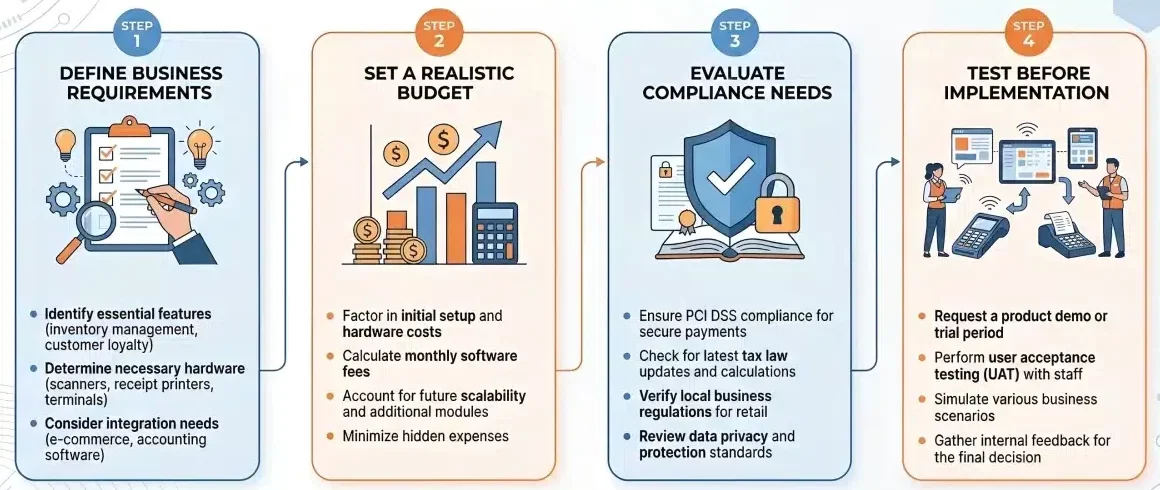
Selecting a retail POS system is a strategic decision that affects daily operations, customer experience, and long-term scalability. A structured evaluation process helps retailers avoid costly mistakes and identify the recommended POS tools that support both current needs and future growth.
Define business requirements
Retailers should begin by analysing their operational workflows before comparing POS vendors. Understanding checkout processes, inventory complexity, and store operations helps identify the features that will actually improve efficiency.
Important considerations may include:
- number of store locations
- product catalogue complexity
- required integrations such as accounting or e-commerce platforms
- checkout speed and customer experience requirements
Set a realistic budget
When evaluating POS systems, businesses should focus on the total cost of ownership rather than just the subscription price. A POS solution often involves multiple cost components that influence long-term expenses.
These typically include hardware costs, software subscriptions, payment processing fees, and additional modules such as reporting or integrations. Understanding these elements helps retailers choose a solution that remains sustainable as the business grows.
Evaluate local compliance needs
Retailers should also ensure that the POS system supports local financial regulations and tax requirements. Built-in compliance features simplify accounting processes and reduce the risk of reporting errors.
Key areas to verify include tax calculation, payment gateway compatibility, and integration with accounting platforms used in the region.
Test before implementation
Before committing to a vendor, businesses should test the POS system in a real or simulated store environment. A pilot test allows managers and staff to evaluate usability, transaction speed, and reporting capabilities before a full rollout.
Hands-on testing ensures the system supports daily workflows and performs reliably during real checkout scenarios.
"Selecting a retail POS system should focus on how it performs in daily operations. Retailers need to evaluate usability, inventory accuracy, and system reliability, as these factors directly influence long-term efficiency and return on investment."
Retail POS Security and Compliance
Retail POS systems handle sensitive financial and customer data during every transaction. Because of this, strong security standards and regulatory compliance are essential to protect payment information and maintain customer trust.
1. PCI-DSS compliance
One of the most important security standards for POS systems is PCI-DSS (Payment Card Industry Data Security Standard).This framework defines strict guidelines for how businesses store, process, and transmit cardholder data during payment transactions.
Modern POS systems typically use technologies such as encryption and tokenization to secure payment information. These measures ensure that card details are protected while moving through payment gateways and are not stored directly within the retailer’s system.
2. Data privacy and customer protection
Beyond payment security, retailers must also protect personal customer data collected through POS systems in line with the Privacy Act 1988. Information such as names, email addresses, and purchase histories must be stored securely to prevent unauthorized access.
Retailers can strengthen data protection by implementing role-based access controls, secure authentication, and encrypted data storage. These safeguards help businesses comply with privacy regulations while maintaining customer confidence in their systems.
Common Retail POS Implementation Mistakes
Even the most advanced POS system may fail to deliver value if it is implemented incorrectly. Many retailers experience operational issues not because of the technology itself, but due to poor planning, limited testing, or infrastructure gaps during deployment.
Common mistakes to avoid include:
• Ignoring scalability
Some businesses choose entry-level POS systems that work well for a single store but struggle to support future growth. When retailers expand to multiple locations or add e-commerce channels, these systems often become difficult to integrate or upgrade.
• Weak network infrastructure
Modern POS systems frequently rely on internet connectivity, especially cloud-based platforms. Without a stable network or backup connection, stores may experience checkout disruptions during internet outages.
• Insufficient staff training
Employees interact with the POS system throughout the day. If staff are not properly trained, simple transactions such as returns or inventory updates may become slow and error-prone.
• Poor data preparation before migration
Migrating outdated or inconsistent product data into a new POS system can create long-term database issues. Cleaning product catalogs, pricing information, and inventory records before migration helps ensure a smoother transition.
By planning implementation carefully and preparing staff and infrastructure in advance, retailers can maximize the value of their POS investment.
Advanced POS Strategies for Modern Retail
As retail competition intensifies, POS systems are evolving beyond simple checkout tools. Modern platforms now support data-driven strategies that help retailers improve efficiency and deliver smoother customer experiences.
1. Omnichannel synchronisation
POS systems connect online and offline channels to maintain consistent inventory and support services such as click and collect (BOPIS).
2. Data-driven inventory planning
Retailers use POS data to analyse sales trends, seasonal patterns, and purchasing behaviour to forecast demand and adjust stock levels.
3. AI-driven insights
Some POS platforms provide insights that highlight sales trends, recommend restocking quantities, and detect slow-moving products.
4. Real-time decision making
Retailers can monitor live sales performance and adjust pricing, promotions, or stock allocation based on current store activity.
5. Centralised multi-store management
POS systems allow retailers to manage multiple store locations from a single platform, improving consistency in pricing, inventory, and reporting.
Conclusion
Retail POS systems deliver the greatest impact when technology aligns with real retail operations. With the right implementation, businesses can streamline transactions, maintain accurate inventory visibility, and improve overall store efficiency.
Each retailer has different priorities, from faster checkout and inventory tracking to omnichannel integration and customer insights. Evaluating POS platforms based on scalability, integration capabilities, and operational fit helps ensure long-term value.
For retailers evaluating their next step, a structured review can help identify the most suitable POS solution. If you want help shortlisting options, book a free consultation with our team.
Frequently Asked Questions About Retail POS Systems
Most modern POS systems are designed with simple interfaces, but the learning curve depends on system complexity and staff training.
The cost depends on hardware, software subscriptions, and transaction fees, ranging from basic setups to more advanced multi-store systems.
Declined transactions are usually caused by payment issues such as insufficient funds, incorrect details, or network errors during processing.
Performance issues can slow down checkout, disrupt inventory updates, and create inconsistencies in sales reporting across systems.