
Retail, hospitality, and service businesses have changed dramatically over the past decade. Old cash registers are being replaced by fast, internet-connected POS systems. A modern POS now links front-of-house and back-office tasks, becoming the core of a business.
Cloud technology powers this change, giving businesses of all sizes access to tools once reserved for big companies. Sales, inventory, customer info, and reporting all work together seamlessly. Owners can make smarter decisions without being tied to a physical location.
In a competitive market, speed and insight are essential. Cloud POS lets owners track operations from anywhere, on any device. Whether it’s a café, retail store, or multi-site business, mastering these platforms is key to growth and success.
Key Takeaways
Cloud POS moves data to secure remote servers, giving owners real-time insights and remote management capabilities.
Legacy, cloud, hybrid, and SaaS systems offer different benefits, choosing the right type depends on business size, internet reliability, and growth plans.
Real-time reporting, automated inventory, payment flexibility, integrations, and multi-location management improve efficiency and decision-making.
Integrations with ERP, marketing platforms, and predictive analytics optimise inventory, reduce costs, and boost revenue.
What Is a Cloud POS System?
A cloud POS system is a web-based platform that handles transactions, tracks inventory, and stores business data on remote servers instead of local computers. Often called an ePOS, it uses the internet to give businesses a flexible, scalable, and easily accessible way to manage daily operations.
Traditional POS systems work differently. All software and data sit on a computer or server in the store. Managers must be on-site to check sales, run reports, or back up data, and updates often need IT support.
Cloud POS moves the heavy work to secure, remote servers. Tablets, phones, or desktop terminals in the store act as simple interfaces. Transactions and data go straight to the cloud, enabling smooth POS integration within a system that connects sales, inventory, and reporting.
The benefits are clear. Business owners can monitor sales, adjust prices, and approve orders from anywhere. Providers handle backups, encryption, and automatic updates, while subscription pricing keeps software up to date without big upfront costs.
Types of Cloud POS Systems
"Switching to a cloud POS transformed our café operations. We track inventory in real time, reduce errors, and manage multiple locations effortlessly. It’s a game-changer for efficiency and growth."
Cloud POS comes in different types, each suited to specific business needs. Choosing the right cloud-based point-of-sale system depends on your setup, internet reliability, and growth plans.
Legacy POS Systems
Legacy POS, or on-premise systems, rely entirely on local hardware and software. Data stays on-site, making them stable even with poor internet.
These systems need high upfront investment for servers and terminals, and maintenance requires dedicated IT support. Scaling to multiple locations is costly, and consolidating data across sites is slow and manual.
Cloud-Based POS Systems
Pure cloud POS systems store all data remotely and sync it in real time across devices. This makes them ideal for a modern digital system for retail business environments.
This model is flexible and low-cost, running on standard tablets or computers. The main limitation is internet dependence, so offline functionality may be needed for uninterrupted operation.
Hybrid POS Systems
Hybrid POS blends local reliability with cloud flexibility. A local server stores data and syncs continuously with the cloud, ensuring smooth operation even if the internet drops.
Businesses can continue transactions, process cash, and queue card payments offline. Once the connection returns, the system syncs automatically without data loss.
SaaS POS Systems
SaaS POS is delivered via subscription rather than ownership. Businesses pay monthly or yearly, getting software, support, and hosting bundled.
This model keeps a cloud-hosted POS solution secure, compliant, and continuously improved without unpredictable maintenance costs.
Key Features of a Cloud POS System
Cloud POS goes far beyond simple transactions. Modern systems combine sales, inventory, reporting, and management tools in one platform. Knowing these key features helps businesses run efficiently and make smarter decisions.
1. Real-Time Data and Reporting
Cloud POS updates data instantly across all registers. Owners and managers can track sales, staff performance, and product trends in real time. Dashboards can be customised for different roles, keeping everyone aligned.
Advanced reporting helps optimise staff schedules, reward top performers, and monitor inventory movement. These insights empower businesses to act quickly and improve overall performance.
2. Inventory Management
Cloud POS automates stock tracking from receipt to sale, reducing human error and costly stockouts. Variants like size, colour, or ingredients are managed easily under a single product entry.
Smart systems can trigger automatic reorders when stock runs low. This keeps shelves stocked, cuts waste, and reduces admin time, freeing staff for other tasks.
3. Payment Processing
Modern POS handles cash, card, and contactless payments like Apple Pay or Google Pay. Integrated processing reduces errors and speeds up checkout, improving the customer experience.
End-of-day reconciliation is simpler with consolidated transaction reports. Businesses can also choose flexible gateways if they want to negotiate processing rates.
4. System Integrations
Cloud POS connects with accounting, CRM, eCommerce, and other tools. Data flows automatically, cutting manual entry and keeping sales, stock, and customer info accurate.
These integrations create a unified system for smoother operations, better marketing, and consistent customer experiences across channels.
5. Multi-Location Management
From one dashboard, owners can monitor all stores, compare performance, and update menus or pricing instantly. Multi-location inventory ensures items can be tracked or transferred between stores.
This centralised POS control saves time, boosts sales, and provides customers with a seamless experience, whether they shop at one store or across multiple locations.
How to Implement a Cloud POS System
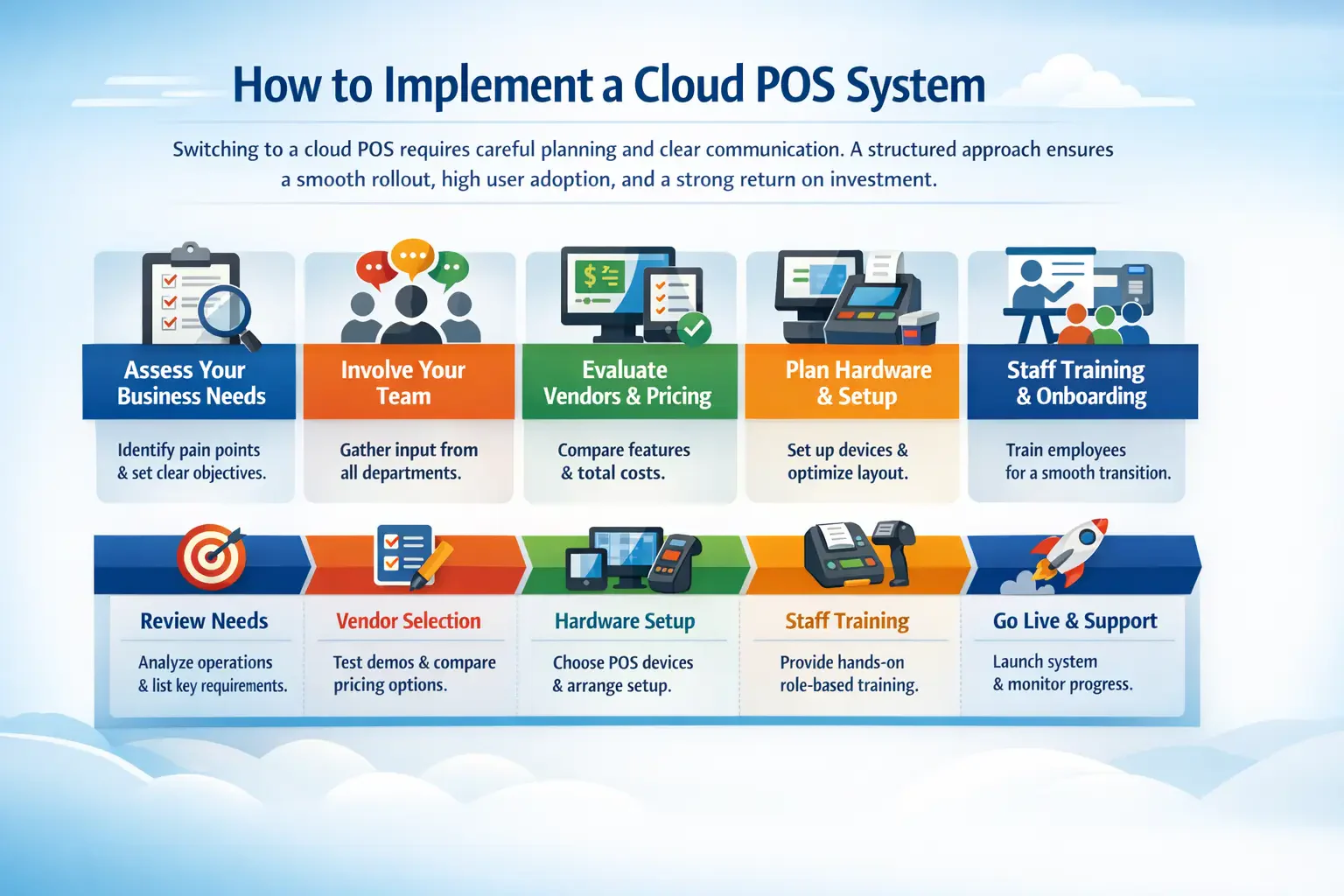
Switching to a cloud POS requires careful planning and clear communication. A structured approach ensures a smooth rollout, high user adoption, and a strong return on investment.
Assess Your Business Needs
Start by reviewing your current operations and identifying pain points. Are checkout lines too long or inventory data inaccurate? List the problems to define clear objectives for your new system.
Involve staff from every department. Talk to cashiers, inventory managers, and finance teams. Document “must-have” and “nice-to-have” features to guide vendor selection and ensure the system meets real needs.
Evaluate Vendors and Pricing
Request personalised demos tailored to your workflows, not just marketing materials. Test common scenarios like returns, bill splitting, or purchase orders.
Consider total costs over several years. Look beyond subscription fees to hidden charges, hardware requirements, and payment processing rates. Check vendor support, uptime, and their commitment to improvements.
Plan Your Hardware and Setup
Choose reliable, ergonomic hardware that suits your store and brand. Decide whether you can use standard tablets or need vendor-specific devices.
Map POS stations with enough space, proper cable management, and power sources. Include peripherals like scanners, printers, cash drawers, and ensure strong, stable internet for smooth operations.
Staff Training and Onboarding
Train staff with role-based programs. Cashiers focus on transactions while back-office staff learn reporting and inventory management.
Use sandbox environments for practice and appoint “super-users” to support peers. This hands-on approach reduces resistance and ensures a smoother transition.
Best Practices for Your Cloud POS
Launching a cloud POS is just the start. To get maximum value, maintain security, and improve operations continuously, businesses should follow proven best practices every day.
Secure Your Network and Data
Protect your local network and devices, even if the cloud provider secures their servers. Use strong passwords, Two-Factor Authentication, and Role-Based Access Control to limit access.
Ensure PCI-DSS compliance and avoid open Wi-Fi for transactions. Regularly review user logs to spot unusual activity, such as repeated voids or manual cash drawer openings.
Keep Software and Updates Current
Enable automatic updates for the POS software and underlying operating systems. Updates include security patches, performance improvements, and new features.
Read release notes for major updates to understand new functionalities. Applying updates promptly keeps workflows efficient and customer data safe.
Integrate With Your Existing Tools
Connect your POS with accounting, marketing, and supply chain systems. Automation reduces manual entry, errors, and wasted time.
Regularly review integration options to expand your system’s capabilities. Proper connections ensure sales, customer, and inventory data flow seamlessly across platforms.
Industry-Specific Cloud POS Use Cases
While the fundamental advantages of cloud-based systems apply universally, different sectors utilize highly specialized features to optimize their daily operations and enhance the customer experience.
Retail Operations
Retailers use cloud POS to sync in-store and online inventory in real time. Mobile POS tablets let staff check stock and process sales on the shop floor, cutting checkout queues during busy periods.
Restaurants and Hospitality
Cloud POS helps restaurants send orders directly to the kitchen, reduce errors, and manage tasks like splitting bills or happy hour pricing. Integration with delivery apps keeps operations smooth.
Service-Based Businesses
Salons, spas, and repair shops use cloud POS for appointments, automated reminders, and staff commission tracking. Owners can manage schedules, process payments, and calculate payouts in one dashboard.
Step-by-Step Implementation Guide
Transitioning to a new cloud-based infrastructure requires careful planning to avoid business disruption. Follow these critical steps for a seamless deployment:
- Step 1: Assess and Select: Check workflows and software needs. Make sure the POS works with your hardware or plan for new tablets.
- Step 2: Network Preparation: Upgrade Wi-Fi and add a backup connection. Keep the system online at all times.
- Step 3: Data Migration: Export inventory, customer, and vendor data. Import it into the new POS with provider support.
- Step 4: Staff Training and Soft Launch: Use a training register for practice. Do a soft launch during quiet hours to spot issues.
Common Pitfalls to Avoid
Even with the best technology, poor execution can hinder success. One major pitfall is ignoring offline capabilities. While cloud POS systems are internet-dependent, the best platforms offer an “offline mode” that securely caches credit card data and syncs it once the connection is restored. Failing to verify this feature can result in lost sales during an outage.
Another common mistake is neglecting role-based security permissions. Business owners sometimes grant universal administrative access to all employees for convenience. This compromises sensitive financial data and makes it impossible to track cash drawer discrepancies back to a specific user. Always configure strict user permissions, ensuring staff can only access the features necessary for their specific roles.
Advanced Practices for Maximum ROI
Once your cloud POS is running, use its advanced features to boost returns. Connect your system with ERP software or marketing platforms through Open API integrations to run targeted campaigns based on detailed purchase histories.
Predictive analytics can transform inventory management. The POS can generate automated purchase orders from past sales and seasonal trends, reducing holding costs, avoiding spoilage, and keeping best-selling items in stock.
Conclusion
Cloud POS systems have transformed retail, hospitality, and service businesses by linking front-of-house and back-office operations. They provide real-time insights, automated workflows, and remote access, making operations smoother and more efficient.
Leveraging advanced features like predictive analytics and ERP integrations drives higher ROI and operational resilience. Businesses that plan carefully, train staff, and maintain security get the most from their POS. Contact us today for a free consultation to see which system suits your business.