
Payment processing is no longer a back-office process. The payment terminal sitting on your counter directly affects your revenue, your security, and how customers feel walking out the door.
Today’s customers expect to pay with cards, phones, and wearables without friction. Businesses that cannot meet those expectations lose sales. It is a must for you to upgrade your payment system to the current standards.
Hence, we are here to introduce you to the payment terminal and its benefits. This guide covers everything you need to choose, deploy, and optimize the right payment terminal for your operation.
Key Takeaways
A payment terminal is a hardware device that captures, encrypts, and transmits card data to a bank for authorization in milliseconds.
What Is a Payment Terminal?

A payment terminal is a hardware device that captures payment data from cards or smart devices. It transmits that data to a bank for authorization, then returns an approval or a decline to the merchant.
It is also called a credit card terminal, EFTPOS machine, or card reader. These devices are the primary touchpoint between a customer’s payment method and your business bank account.
Modern terminals are specialized computers. They process transaction in milliseconds. They support magnetic stripe swipes, EMV chip insertion, and NFC contactless taps from cards, phones, and wearables.
During each transaction, the terminal communicates with a digital payment gateway that securely authorises funds between the customer and issuing bank. As a result, approvals occur in seconds while sensitive card data remains protected throughout the process.
Quotation:
"At the end of the day, your payment terminal is the last thing a customer interacts with. If it's slow or complicated, that's what they remember."
Why Your Business Needs a Payment Terminal
These are the most important reasons for you to get a payment terminal.
- Consumer Expectations Have Changed
Customers now expect to pay using cards, mobile wallets, and wearables. Businesses that only accept cash lose sales and create friction at checkout.
A payment terminal ensures your business accepts all major payment methods. This directly affects conversion at the point of sale.
- It Protects You from Fraud Liability
Terminals with EMV chip support shift fraud liability back to the card issuer. Without EMV compliance, your business absorbs the cost of fraudulent transactions.
Point-to-Point Encryption (P2PE) scrambles card data the moment it is captured. This protects sensitive data in transit and reduces your exposure to breaches.
- It Speeds Up Your Checkout
When paired with software for streamlined transaction handling, modern terminals reduce processing delays and minimise failed payments. Consequently, checkout flows remain consistent even during high-volume trading periods.
Payment Terminal vs. POS System
A payment terminal handles one thing: the financial transaction. It captures card data, communicates with banks, and confirms whether a payment is approved. It does not track inventory or record purchase history.
A modern POS system functions as a point-of-sale application for store manager workflows, centralising pricing, stock visibility, and staff activity in one interface. Therefore, managers gain clearer control over daily operations while reducing manual reconciliation errors.
The real power comes from integrating both. A POS system calculates the total and pushes it directly to the connected terminal. The customer pays, and confirmation flows back instantly.
This integration removes manual entry by the cashier entirely. It eliminates human error, speeds up checkout, and simplifies end-of-day reconciliation into a single automated process.
Types of Payment Terminals
Every business has different physical environments and customer interaction patterns. The market offers four primary terminal types, each solving a specific operational problem.
1. Countertop Terminal
A countertop terminal is a stationary device hardwired to a local network via Ethernet. It sits permanently on a checkout counter and plugs directly into a standard power outlet.
These terminals are built for high-volume, high-speed environments. Supermarkets, pharmacies, and retail stores rely on them for their reliability and rapid transaction processing.
The primary advantage is stability. Wired connections are more secure and consistent than wireless, reducing dropped transactions during peak hours. The tradeoff is that the device cannot move.
2. Portable and Wireless Terminal
Portable terminals look like countertop units but run on rechargeable batteries. They connect via Wi-Fi or Bluetooth, allowing staff to bring payment directly to the customer.
Restaurants and bars use these extensively for pay-at-table service. Customers keep their card in hand throughout the process, reducing anxiety about skimming or theft.
The key consideration is network coverage. Dead zones or wireless interference can cause transaction failures. Staff must also return devices to charging bases consistently during shifts.
3. Mobile Payment Terminal
Mobile terminals are the most flexible option available. A small card reader connects via Bluetooth to a smartphone or tablet running a dedicated payment application.
Newer standalone smart terminals resemble smartphones. They include touchscreens and barcode scanners and operate on Android. Cellular SIM cards give them payment capability anywhere with a signal.
Plumbers, food truck vendors, delivery drivers, and market sellers rely on mobile terminals daily. Retailers also deploy them for line-busting during peak shopping periods to clear queues faster.
4. Virtual Terminal
A virtual terminal is software, not hardware. It is a secure web-based portal that turns any browser-connected device into a payment processing tool for card-not-present transactions.
Service providers use virtual terminals to bill clients remotely by phone or mail. Law firms, medical offices, and wholesalers process payments without the customer ever being physically present.
Card-not-present transactions carry slightly higher processing fees than in-person payments. This reflects the statistically greater fraud risk associated with manually entered card details.
Key Features of a Payment Terminal
Choosing a payment terminal based on looks alone is a mistake. The real value sits inside: its security protocols, connectivity options, and the payment methods it supports.
Modern terminals are built to maximize transaction success, protect sensitive card data, and accommodate how today’s customers prefer to pay. Knowing these features is what separates a smart hardware decision from an expensive one.
1. Supported Payment Methods
A terminal must accept EMV chip cards and NFC contactless payments at a minimum. Magnetic stripe support remains necessary, though the method is being phased out globally due to fraud vulnerability.
NFC powers tap-to-pay cards and mobile wallets like Google Pay. Many smart terminals now also read QR codes for compatibility with regional digital wallets in international markets.
2. Connectivity Options
Ethernet provides the fastest and most stable connection for stationary terminals. For mobile environments, dual-band Wi-Fi and Bluetooth cover most in-venue needs reliably.
Cellular connectivity via 4G LTE or 5G is essential for field operations. High-end terminals offer dual-comm, automatically switching to cellular backup if the primary connection goes down.
3. Security and EMV Compliance
EMV chips generate a unique one-time transaction code with every purchase. Intercepted EMV data cannot be reused to produce counterfeit cards or fund fraudulent transactions elsewhere.
Tokenization replaces real card numbers with a randomized string stored safely on your system. This allows recurring billing without holding actual card data on your local servers.
4. Receipt and Reporting Capabilities
Thermal printers are standard in most countertop and portable terminals. They print instantly without ink and produce clean receipts directly at the point of sale every time.
Smart terminals send digital receipts by SMS or email. Cloud dashboards give business owners real-time sales visibility across multiple locations and allow remote firmware updates.
Industry-Specific Use Cases for Payment Terminals
Business type shapes hardware needs more than almost any other factor. The right terminal for a supermarket is rarely the right terminal for a plumber.
Retail and Supermarkets: a dependable transaction system for Australian businesses must support fast authorisation, integrated loyalty tracking, and tokenised returns. This ensures payment efficiency while maintaining compliance with local banking and card network requirements.
Hospitality and Restaurants: Portable pay-at-table terminals keep cards in the customer’s hands. Built-in tip prompts, bill splitting, and instant receipts streamline service from order to payment.
Healthcare and Medical Practices: Terminals must support FSA and HSA cards with the correct Merchant Category Codes. Tokenized card storage supports recurring co-pay billing under strict HIPAA guidelines.
Field Services and Trades: Mobile terminals over cellular data allow technicians to collect payment on completion. This eliminates paper invoicing and reduces accounts receivable cycles significantly.
Step-by-Step Implementation Guide
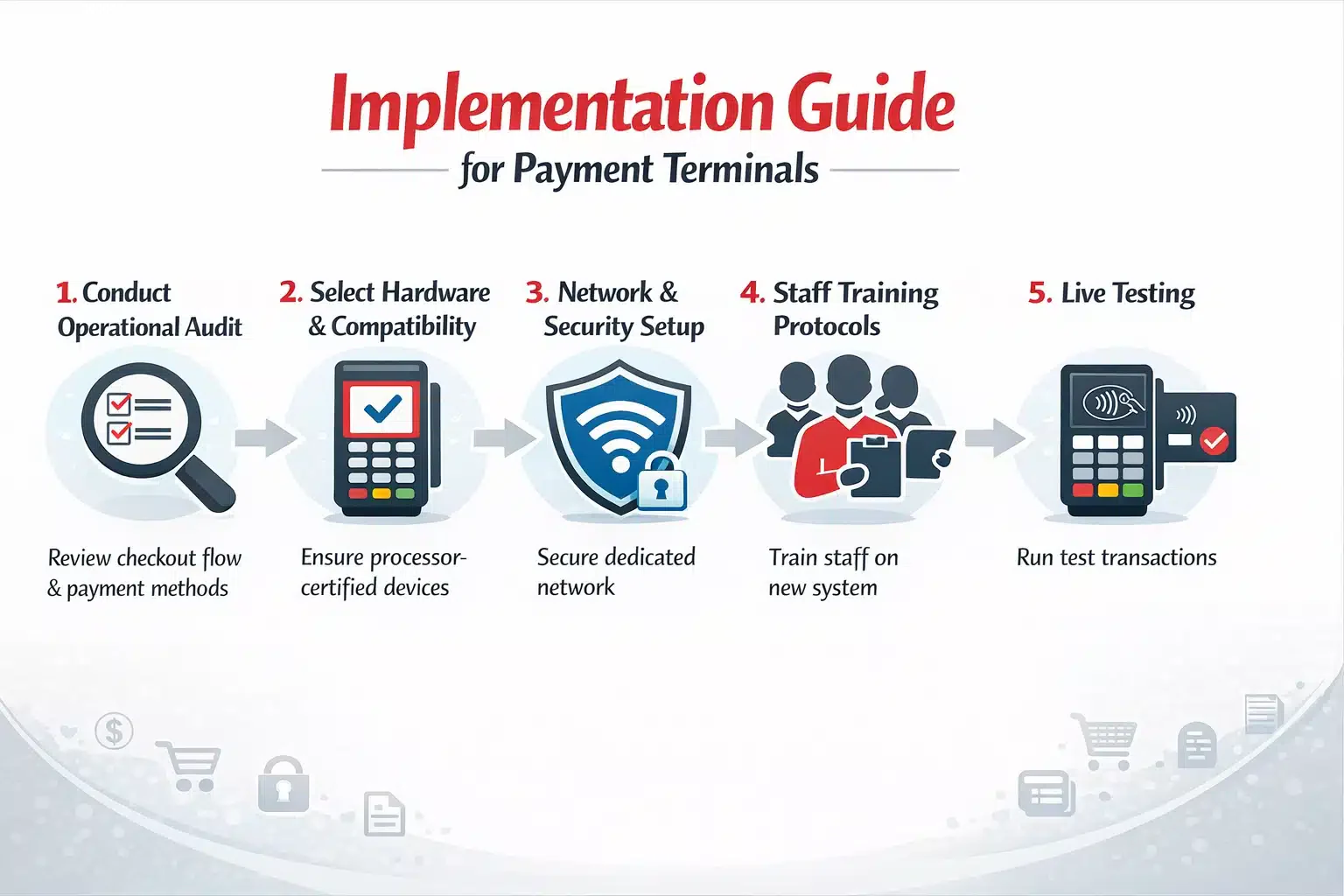
Deploying a new fleet of payment terminals, or even upgrading a single device, requires careful planning to avoid disrupting your daily cash flow. Follow these implementation steps to ensure a smooth transition.
Step 1: Conduct an Operational Audit
Review your current checkout flow before purchasing any hardware. Identify bottlenecks and determine which payment methods your customers request most frequently at the point of sale.
This audit defines your hardware requirements precisely. Skipping it leads to buying equipment that does not match your real operational environment or transaction volume.
Step 2: Select Hardware and Processor Compatibility
Confirm that your chosen terminal is certified by your payment processor before committing. Incompatible hardware cannot be activated and results in wasted budget and delayed deployment.
Decide between purchasing outright or using a monthly rental. Outright ownership is more cost-effective in almost every scenario beyond the first twelve months of operation.
Step 3: Network Configuration and Security Setup
Place terminals on a dedicated segmented network, never on a shared guest or public Wi-Fi. Use VLANs to isolate terminal traffic from the rest of your business network entirely.
Configure firewalls to allow outbound communication to your processor while blocking unauthorized inbound traffic. This setup is a baseline requirement for PCI DSS compliance.
Step 4: Staff Training and Protocol Establishment
Train all staff to process sales, voids, and refunds correctly on the new hardware. Establish a clear nightly batching routine, so settlements are never missed or delayed.
Staff who understand basic troubleshooting resolve minor issues without calling support. That competence directly reduces checkout delays and improves the customer experience at busy periods.
Step 5: Live Testing
Process test transactions using swipe, chip, and tap methods before going live. Verify each appears correctly in your merchant dashboard with accurate amounts and payment method labels.
Confirm voided transactions do not settle. Only open the terminal to real customer transactions once every payment method has passed all tests cleanly without exception.
Common Pitfalls to Avoid
Even seasoned business owners can make costly mistakes when procuring and deploying payment terminals. Being aware of these pitfalls can save your business from unnecessary liability and costs.
Falling into Long-Term Leasing Traps
Non-cancelable equipment leases are one of the costliest traps in merchant services. A terminal retailing for under $300 can cost thousands across a 48-month lease agreement.
Always purchase terminals outright when the budget allows. If rental is necessary, choose month-to-month programs only and avoid any agreement with cancellation penalties or lock-in clauses.
Neglecting Offline Processing Capabilities
Internet outages should not stop your business from processing payments. Without Store and Forward mode enabled, your terminal stops working the moment your connection drops.
Offline mode encrypts and stores card data locally during the outage. Transactions process automatically when connectivity is restored, ensuring no sales are lost to a network disruption.
Ignoring Firmware and Software Updates
Terminals are computers and require regular security patches to stay protected. Skipping updates leaves known vulnerabilities unaddressed and risks pushing your business out of PCI DSS compliance.
Non-compliance exposes you to fines and breach liability. Schedule updates during off-hours so patches are applied consistently without interrupting daily payment operations.
Advanced Practices for Payment Terminal Optimization
For businesses looking to maximize their operational efficiency and leverage payment hardware, adopting advanced practices is essential. The modern payment terminal can do much more than simply authorize funds.
Implementing Surcharge and Cash Discount Programs
Smart terminal software detects whether the customer is paying with a credit or debit card. It automatically calculates and applies a compliant surcharge to credit transactions before approval.
The fee is displayed clearly on screen before the customer confirms. This passes processing costs to the consumer and protects your profit margins without manual intervention.
Omnichannel Tokenization
Omnichannel tokenisation becomes more effective when connected to a POS system for retailers that synchronises in-store and online payments. Therefore, returning customers experience faster checkout without repeated card entry.
Returning customers get a frictionless one-click checkout experience across both channels. Your physical and digital payment environments are unified without storing any raw card data.
Leveraging Terminal-Level Analytics
Smart terminals capture data on peak transaction times, location performance, and payment method trends. Business owners use this data to optimize staffing schedules and inventory decisions.
AI-driven dashboards can flag unusual transaction patterns automatically. Early anomaly detection surfaces potential employee theft or point-of-sale fraud before losses become significant.
Preparing for Biometric Payments
Advanced terminals are beginning to incorporate palm scanning and facial recognition for payment. Customers link biometric data to a tokenized account and complete purchases without a card or phone.
Adopting biometric-ready hardware now positions your business ahead of this shift. It appeals to tech-forward customers and reduces checkout friction to its lowest possible point.
Conclusion
A payment terminal is not just a device that collects money. It is a security layer, a data source, and a direct factor in how every customer experiences your business at checkout.
Choosing the right type, deploying it securely, and using its full feature set transforms your terminal into a genuine strategic asset. Speed, protection, and customer satisfaction all improve when hardware decisions are treated seriously.
To ensure the right configuration, security posture, and long-term performance, businesses should get expert’s advices before deploying or upgrading any payment terminal solution.
Frequently Asked Question
A payment terminal is a hardware device that captures card or digital payment data, sends it to a bank for authorization, and returns an approval or decline to the merchant. It is also called a credit card terminal or EFTPOS machine.
A payment terminal handles only the financial transaction. A POS system manages the broader business operations, including inventory, employee tracking, and customer data. The two work best when integrated together.
The four main types are countertop terminals, portable and wireless terminals, mobile payment terminals, and virtual terminals. Each suits different business environments and customer interaction styles.
Keep firmware updated, place terminals on a segmented network, and ensure your device supports EMV, P2PE, and tokenization. Never connect terminals to a public or guest Wi-Fi network.
Yes. Most terminals support offline or Store and Forward mode. Card data is encrypted and stored locally during an outage, then processed automatically once the connection is restored.