

Retail and business payments have changed significantly over time. Businesses once relied on manual card imprinters that were slow and prone to errors. Today, most payments are processed through faster digital systems like EFTPOS.
EFTPOS stands for Electronic Funds Transfer at Point of Sale. It connects payment terminals to banking networks so transactions can be processed instantly when customers tap, insert, or use digital wallets.
Many people confuse EFTPOS with a point of sale system, even though they serve different purposes. EFTPOS handles the payment transaction, while the POS manages sales, inventory, and reporting.
Key Takeaways
EFTPOS securely transfers funds from a customer to a merchant while the POS manages sales, inventory, and reporting.
Transactions happen within seconds through encrypted communication between the terminal, processor, and bank for instant authorization.
Android terminals, SoftPOS, and tokenization turn EFTPOS into tools for engagement and analytics.
Integrated systems, network backups, transparent fees, and physical security reduce errors and protect both revenue and customer trust.
What Is EFTPOS in a POS Environment?
EFTPOS stands for Electronic Funds Transfer at Point of Sale. Simply put, it moves money from a customer’s bank account to a business account during a card payment. When someone taps, inserts, or swipes a card, the EFTPOS network processes the transaction.
In most businesses, EFTPOS appears as the payment terminal or card reader. Many people also call it a card machine or pin pad. The device reads payment details and sends the request through the banking network.
Behind the terminal, several systems work together to approve the payment. Banks, payment gateways, and providers like Visa, Mastercard, and American Express verify the transaction within seconds.
Within a POS setup, EFTPOS works alongside the POS rather than replacing it. The POS records the sale, while the EFTPOS terminal processes the payment securely and helps reduce manual errors.
How EFTPOS Transactions Actually Work
"EFTPOS has become more than just a payment tool. It is a strategic asset that improves customer experience, reduces errors, and provides actionable insights for smarter business decisions."
An EFTPOS transaction only takes a few seconds, but multiple systems work together in the background. Payment terminals, banks, and card networks communicate almost instantly to approve and confirm the transaction.
Connecting POS to Banking Networks
The process starts when the POS sends the final payment amount to the EFTPOS terminal. The customer then taps, inserts, or swipes their card or digital wallet.
The terminal immediately encrypts the payment data before sending it through the payment network. This helps protect sensitive customer information during the transaction.
The request is then routed to the payment processor or acquiring bank. From there, the system identifies the card provider, such as Visa or Mastercard, and forwards the request.
Authorization and Fund Verification
Once the request reaches the issuing bank, the bank checks whether the card is valid and whether sufficient funds or credit are available.
The system also performs fraud and security checks. If anything appears unusual, the payment may be declined or require additional verification like a PIN.
Instant Transfer and Confirmation
If approved, the issuing bank sends back an authorization code and temporarily reserves the funds from the customer’s account.
The confirmation is then returned to the EFTPOS terminal, where both the customer and cashier can see the approved payment message.
At this point, the payment is authorised but not yet fully settled. The actual transfer of funds usually happens later during end-of-day settlement processing.
EFTPOS vs POS: Understanding the Difference
People often use EFTPOS and POS as if they mean the same thing. In reality, they are separate systems that work together during checkout. Understanding the difference helps businesses choose the right payment setup and avoid operational issues later.
Payment Processing vs Full POS System
A POS system manages the overall sales process. It records transactions, tracks inventory, applies discounts, and generates reports for the business.
EFTPOS only handles the payment transaction itself. The terminal receives the amount from the POS and processes the card payment through networks like Visa or Mastercard.
Where EFTPOS Fits in Retail Operations
In most stores, the POS system sits in front of the cashier and usually includes the screen, scanner, receipt printer, and cash drawer.
The EFTPOS terminal sits closer to the customer so they can tap or enter their PIN directly. The terminal activates when the payment stage begins.
Integration With POS Software
Older setups often relied on separate checkout software, requiring staff to enter totals manually into the terminal. This slowed transactions and increased the risk of data entry errors.
Modern POS and EFTPOS systems now work together automatically. The POS sends the payment amount directly to the terminal, helping businesses process transactions faster and maintain more accurate payment records.
Types of EFTPOS Payments in Practice

EFTPOS systems now support several payment methods. As payment habits evolve, terminals continue adapting to support both physical cards and digital payment options.
1. Debit and Credit Card Payments
Debit and credit cards remain the most common EFTPOS payment method. Customers can insert, swipe, or tap their cards to complete transactions.
Most modern cards use EMV chip technology, which generates a unique code for each transaction and improves payment security.
2. Contactless Card Payments
touchless payment allows customers to complete purchases without inserting or swiping their cards. The system uses Near Field Communication (NFC) to transfer payment data securely.
Many Australian customers prefer contactless payments because they are faster and more convenient, especially for lower-value purchases.
3. Mobile Wallet Payments
Mobile wallets allow customers to pay using smartphones or smartwatches instead of physical cards. Payment details are securely stored and transmitted digitally to the terminal.
Popular options include Apple Pay, Google Pay, and Samsung Pay, which are now widely used across retail and hospitality businesses in Australia.
4. Tap-to-Pay on Phones
Some businesses can now accept payments directly through smartphones without separate EFTPOS hardware. The phone itself functions as the payment terminal.
This setup is popular among mobile businesses, pop-up stores, and delivery services because it allows payments to be accepted almost anywhere.
Industry-Specific EFTPOS Use Cases
EFTPOS works across many industries, although each business type uses it differently. Payment speed, mobility, and system integration usually depend on how the business serves its customers.
Retail and High-Volume Supermarkets
Large retailers and supermarkets prioritise fast and reliable checkouts. Their EFTPOS terminals are usually integrated directly with the POS so payment amounts transfer automatically.
Many stores also use customer-facing terminals that support contactless payments. During busy periods, some retailers deploy mobile terminals to reduce queue times.
Hospitality, Restaurants, and Cafes
Restaurants and cafes often use a portable POS setup that allows staff to process payments directly at the table. This improves service flow during busy operating hours.
These terminals commonly support bill splitting and tipping features, making them suitable for fast-moving hospitality environments.
Healthcare and Medical Facilities
Medical clinics and dental practices also rely on EFTPOS for patient payments. In many cases, the terminal connects directly with the clinic’s billing system.
Some healthcare terminals can process health fund claims instantly, allowing patients to pay only the remaining balance after rebates are applied.
Field Services, Trades, and Mobile Businesses
Tradespeople and mobile businesses often use portable EFTPOS devices to accept payments on-site instead of sending invoices later.
These terminals typically connect through Wi-Fi or mobile networks, allowing businesses to process secure payments from almost any location.
Strategic Implementation Steps for EFTPOS Systems
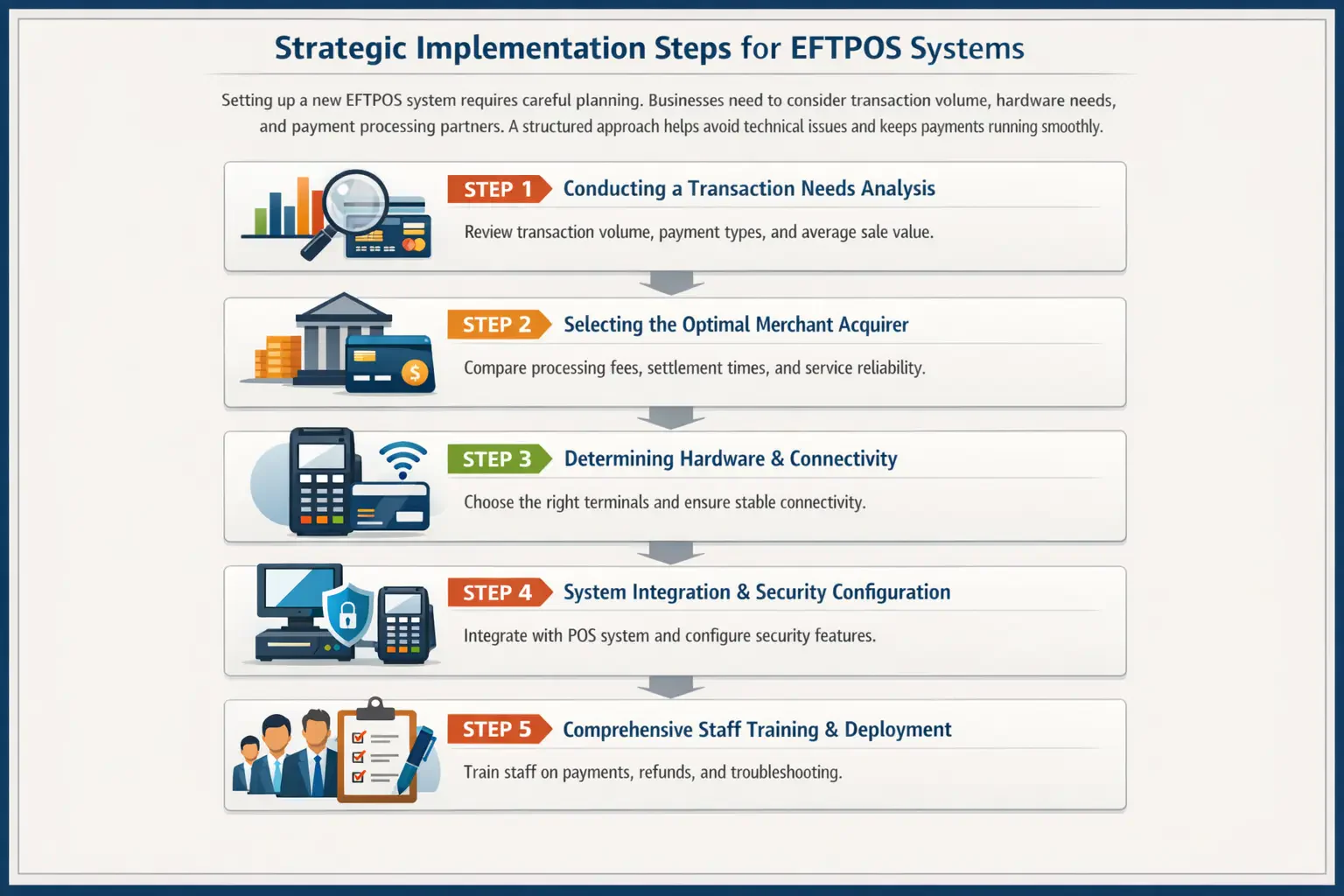
Setting up a new EFTPOS system requires proper planning. Businesses need to consider transaction volume, hardware requirements, and payment providers before implementation. A structured setup helps reduce technical issues and keeps payments running smoothly.
Step 1: Conducting a Transaction Needs Analysis
The first step is understanding how the business processes payments each day. Managers should review transaction volume, average purchase value, and common payment methods.
This helps determine whether the business needs countertop terminals, portable devices, or mobile payment solutions.
Step 2: Selecting the Optimal Merchant Acquirer
Next, the business selects a payment provider or acquiring bank. This provider processes card payments and transfers funds into the business bank account.
Before choosing a provider, businesses should compare transaction fees, settlement times, and overall service reliability.
Step 3: Determining Hardware and Connectivity Requirements
The next step is choosing the right EFTPOS hardware. Countertop terminals suit fixed checkout counters, while portable devices work better for restaurants and mobile businesses.
A stable internet connection is equally important to ensure transactions process quickly and reliably.
Step 4: System Integration and Security Configuration
After choosing the hardware, the EFTPOS terminal must connect with the POS system. Integrated setups allow payment amounts to transfer directly to the terminal, helping reduce manual input mistakes and improve checkout accuracy.
Step 5: Comprehensive Staff Training and Deployment
Staff training is one of the most important parts of deployment. Employees should know how to process payments, issue refunds, and handle declined transactions properly.
Good training helps businesses avoid operational issues during busy trading periods.
Common Pitfalls and How to Avoid Them
Even with modern EFTPOS technology, businesses can still face operational issues. Many problems come from poor integration, unreliable connectivity, or misunderstanding how payment systems work together.
- The Double-Entry Dilemma with Standalone Terminals
Standalone EFTPOS terminals that are not connected to the POS often create double-entry problems. Staff must enter payment totals manually, which increases the risk of mistakes.
A fully integrated setup solves this issue by allowing the POS to send the exact amount directly to the EFTPOS terminal automatically.
- Vulnerability to Network Outages
EFTPOS systems rely heavily on stable internet connections. Businesses using a single broadband line may struggle to process payments during outages.
Many companies now use terminals with built-in 4G or 5G backup connections to keep payments running during network disruptions.
Payment processing fees can sometimes be confusing. Low advertised rates may only apply to standard cards, while premium or international cards incur additional charges.
Businesses should review pricing structures carefully and monitor transaction statements regularly to avoid unexpected costs.
- Neglecting Physical Terminal Security
Physical EFTPOS security is often overlooked. Unattended terminals are more exposed to tampering or skimming risks.
Businesses can reduce this risk by securing terminals properly, inspecting devices regularly, and storing mobile units safely after hours.
Advanced EFTPOS Practices for Modern Businesses
Modern businesses now use EFTPOS for more than basic card payments. Advanced setups help improve customer experience, simplify operations, and provide better business insights through connected systems.
Utilizing Android-Based Smart Terminals
Android-based EFTPOS terminals function much like smartphones, with touchscreen interfaces and app support. Many businesses use software for retailers that combines payments, stock tracking, loyalty programs, and receipt management within one system.
This setup helps staff work more efficiently while reducing the need for separate hardware devices.
Implementing SoftPOS (Tap-to-Pay on Mobile Devices)
SoftPOS allows businesses to accept payments directly through smartphones or tablets using NFC technology. This removes the need for traditional EFTPOS hardware.
The setup works well for pop-up stores, mobile businesses, and teams that need flexible payment options on the go.
Omnichannel Tokenization
Omnichannel tokenization helps connect online and in-store payment experiences. Instead of storing card details directly, the system uses secure digital tokens for transactions.
This creates a smoother checkout experience for customers while improving payment security across channels.
Leveraging Transactional Data Analytics
Every EFTPOS transaction generates useful business data. Reporting dashboards can show payment trends by location, terminal, time, or card type.
Businesses often use this data to improve staffing decisions, evaluate promotions, and better understand customer behaviour.
Streamlining the Financial Reconciliation Process
Modern EFTPOS systems can automate reconciliation processes at the end of the day. Transactions are grouped, processed, and matched with accounting records automatically.
This reduces manual bookkeeping work, lowers the risk of errors, and gives businesses better visibility into daily cash flow.
Conclusion
EFTPOS systems have transformed the way businesses accept payments, offering speed, security, and seamless integration with POS software. By understanding the differences between EFTPOS and POS, companies can streamline checkout, reduce errors, and improve the customer experience.
Advanced practices like Android terminals, SoftPOS, and transactional analytics allow businesses to gain insights, engage customers, and simplify financial reconciliation. To explore the best EFTPOS solution for your business, consult with our expert right now.
Frequently Asked Questions About EFTPOS
EFTPOS encrypts card data, uses EMV chip technology, and can integrate with tokenization and fraud detection systems to protect customer information.