
Modern commerce is evolving quickly as customer expectations continue to shift. Today, speed, convenience, and flexibility play a major role in how businesses deliver their services. Relying on fixed checkout counters is no longer enough to keep up with these demands.
Many businesses now look for ways to serve customers directly, whether on the sales floor, at a restaurant table, or during events. This shift has made mobile point of sale technology an essential part of daily operations.
Mobile POS systems allow businesses to process transactions from anywhere, reduce queues, and access real time data instantly. With better flexibility and faster service, companies can improve both efficiency and customer experience using modern checkout software.
Key Takeaways
Understand how mobile POS systems work including their core components transaction flow and role in modern business operations.
See how mobile POS compares to traditional POS in terms of setup flexibility payment methods and overall cost efficiency.
Explore how retail hospitality and service businesses use mPOS to improve efficiency and enhance customer experience.
Discover how to implement mPOS successfully by selecting the right system setting up operations and training your team for smooth adoption.
What Is a Mobile POS (mPOS) System
A mobile point of sale (mPOS) system allows businesses to process transactions using portable devices instead of fixed checkout counters. This approach gives more flexibility in how and where transactions happen, especially for businesses that need a scalable system for hospitality businesses.
Unlike traditional systems, mPOS is designed to support faster service and real time data access. To understand how it works, it is important to look at its core components, daily usage, and why businesses are adopting it.
Core Definition and System Components
A mobile point of sale (mPOS) system is a portable solution that allows businesses to process transactions using smartphones, tablets, or handheld devices. Unlike traditional systems, it is not limited to a fixed checkout location.
An mPOS setup typically includes three main components: the mobile device, the POS application, and a payment reader. The device acts as the interface, while the application handles transactions and data processing.
The payment reader connects wirelessly or through a port to accept card or digital payments. Together, these components turn any location into a functional checkout point.
How mPOS Works in Daily Operations
In daily use, an mPOS system allows staff to handle transactions directly where customers are. Products are selected through the app, totals are calculated automatically, and payments are processed on the spot.
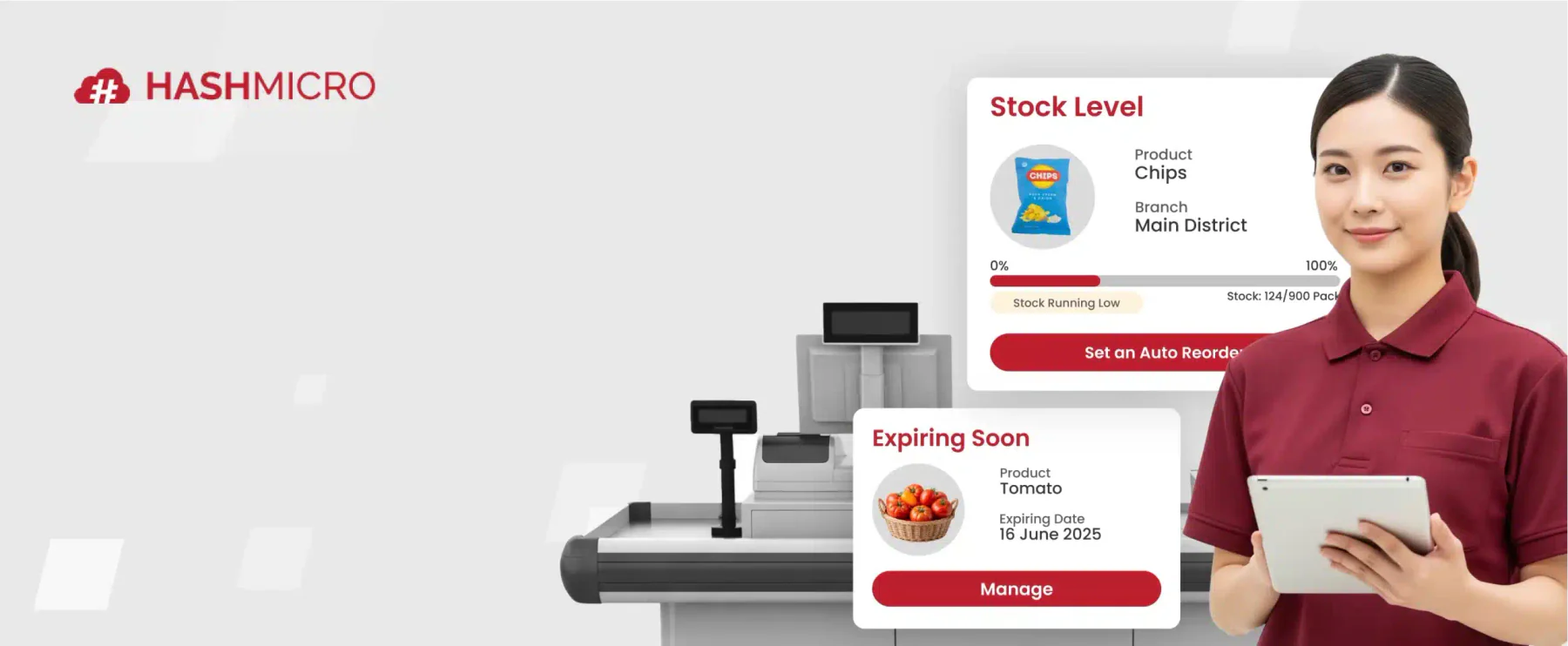
Once a transaction is completed, the system updates sales data and inventory in real time. This information is stored in the cloud, making it accessible across different devices and locations.
This process reduces manual work and minimises errors. It also helps teams respond faster to changes in demand or stock levels.
Why Businesses Use mPOS Today
Businesses adopt mPOS systems to improve flexibility and efficiency in their operations. Instead of directing customers to a fixed counter, staff can assist and complete transactions anywhere.
This approach helps reduce waiting times and creates a smoother customer experience. It also allows businesses to make better use of their physical space.
As operations grow, mPOS systems make it easier to manage multiple locations and access consistent data. This is why they are widely used across retail, hospitality, and service industries today, including as a software solution for resto operations.
mPOS vs Traditional POS Systems
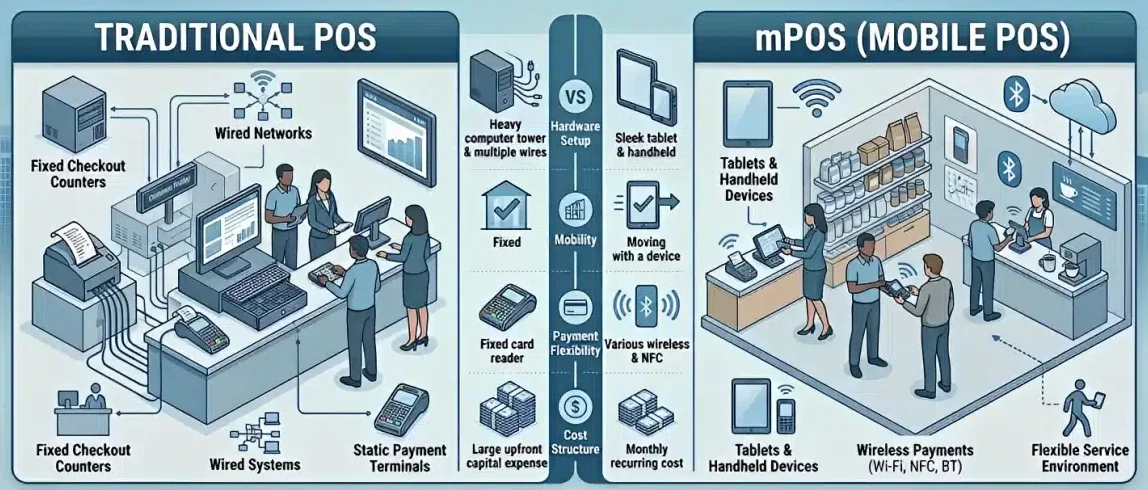
Understanding the difference between mobile and traditional POS systems helps businesses choose the right setup for their operations. While both handle transactions, they differ in flexibility, cost, and how they fit into daily workflows.
Traditional systems are built for fixed checkout environments, while mPOS focuses on mobility and ease of use. These differences can directly affect customer experience and operational efficiency.
Hardware and Setup Requirements
Traditional POS systems rely on fixed hardware such as cash registers, monitors, barcode scanners, and wired payment terminals. These setups require dedicated space, installation, and ongoing maintenance, which can make them more complex to manage.
mPOS systems use portable devices like tablets or smartphones paired with compact card readers. Setup is faster and simpler, allowing businesses to deploy a mobile POS solution with minimal infrastructure.
Mobility and Connectivity
Traditional POS systems are tied to a specific location and depend on wired connections. Customers need to complete transactions at a checkout counter, which often leads to queues during busy hours.
With mPOS, transactions can be handled anywhere using Wi Fi or mobile networks. Staff can assist customers directly, helping reduce waiting time and improve service flow.
Payment Methods and Flexibility
Many traditional systems support basic payment methods but may require upgrades to handle newer options like contactless payments or digital wallets.
mPOS systems are designed to support multiple payment methods from the start, including tap to pay and mobile wallets. This makes transactions faster and more convenient for customers.
Cost Structure and Scalability
Traditional POS systems usually involve higher upfront costs for hardware, installation, and software licenses. Expanding the system often requires additional investment and setup.
mPOS solutions typically follow a subscription model, making them more affordable to start. They are also easier to scale, as businesses can add or reduce devices based on their needs.
Key Features of an mPOS System
Modern mPOS systems offer more than just payment processing. They combine multiple business functions into a single platform, helping teams manage transactions, track data, and improve daily operations.
These features allow businesses to work more efficiently while delivering a smoother customer experience. Below are the key capabilities that make mPOS systems valuable in modern operations.
Contactless and Multi Payment Support
One of the main advantages of mPOS systems is their ability to support various payment methods in a single device. Businesses can accept chip cards, contactless payments, and mobile wallets without requiring additional systems.
This flexibility helps speed up transactions and reduces friction during checkout. Customers can choose their preferred payment method, making the process more convenient.
Cloud Based Data and Real Time Sync
mPOS systems use cloud technology to store and update data instantly across all devices. Every transaction is recorded in real time, ensuring that sales, inventory, and customer information stay accurate.
This allows business owners and managers to monitor performance from anywhere. It also reduces the need for manual data entry and end of day reconciliation.
Inventory Tracking and Control
Inventory management is directly integrated into most mPOS systems. When a transaction is completed, stock levels are automatically updated without manual input.
This helps prevent stock discrepancies and makes it easier to monitor product availability. Some systems also provide alerts when inventory runs low.
Customer Data and CRM Integration
mPOS systems can capture customer information during transactions, such as email addresses or purchase history. This data is stored and organised for future use.
With this information, businesses can run targeted promotions and personalise customer interactions. It also supports loyalty programs and repeat purchases.
Reporting and Business Insights
mPOS platforms provide built in reporting tools that turn transaction data into useful insights. Businesses can track sales performance, identify popular products, and analyse trends over time.
These insights help managers make better decisions and adjust strategies based on actual data. As a result, operations become more efficient and responsive to changes.
How mPOS Improves Business Operations
Beyond features, mPOS systems create real impact in how businesses run their daily operations. By making transactions more flexible and data more accessible, they help teams work faster and serve customers more efficiently.
These improvements are not limited to checkout processes. They also affect staff productivity, store management, and overall customer experience.
Faster Checkout and Shorter Queues
mPOS allows transactions to happen anywhere, removing the need for customers to wait at a fixed counter. Staff can complete purchases directly on the sales floor or at the table.
This approach helps reduce queues, especially during peak hours. Faster checkout leads to smoother service and lowers the risk of abandoned purchases.
Improved Staff Productivity
With mPOS devices, staff can handle multiple tasks using a single tool. They can process payments, check inventory, and assist customers without switching between systems.
This reduces unnecessary movement and saves time during daily operations. As a result, teams can serve more customers efficiently.
Better Customer Experience
mPOS systems make interactions more direct and convenient. Customers no longer need to move between different points in the store to complete a purchase.
Staff can also provide quicker assistance by accessing product or customer information instantly. This creates a more personalised and seamless experience.
More Flexible Store Operations
Without fixed checkout counters, businesses can use their space more efficiently. Stores can adjust layouts, add displays, or create more engaging customer areas.
mPOS also supports temporary setups such as pop up stores or events. This flexibility makes it easier for businesses to adapt to different sales environments.
Industry Use Cases for mPOS
Mobile point of sale systems are not limited to a single type of business. Their flexibility allows organisations across different industries to adapt the technology based on their operational needs.
By enabling transactions to happen anywhere, mPOS helps businesses reduce friction, improve service speed, and create a more seamless customer experience.
Retail and Apparel
In retail environments, speed and convenience play a major role in shaping the customer experience. With mPOS, staff can assist customers directly on the shop floor without directing them to a fixed checkout counter.
They can also check product availability in real time, making it easier to offer alternatives when items are out of stock. This approach keeps the shopping journey smooth and reduces the risk of abandoned purchases.
Hospitality and Food Service
Restaurants, cafes, and other hospitality businesses rely heavily on efficient service. mPOS allows staff to take orders directly at the table and send them instantly to the kitchen.
Payments can also be completed at the table, removing unnecessary steps in the process. This not only improves table turnover but also enhances customer satisfaction through faster and more convenient service.
Field Services and Home Repair
For field service businesses such as technicians and contractors, payment collection can often be delayed. mPOS enables them to accept payments on site immediately after completing a job.
Digital invoicing can also be generated on the spot, reducing administrative work and improving cash flow. This creates a more efficient and professional experience for both the business and the customer.
Events and Entertainment
In events such as festivals, exhibitions, or concerts, transactions usually occur at high volume within short timeframes. mPOS allows vendors to serve customers from virtually anywhere without relying on fixed terminals.
This mobility helps reduce queues and ensures faster service during peak periods. As a result, both operational efficiency and attendee experience are significantly improved.
"Mobile point of sale systems give businesses the flexibility to serve customers anywhere while maintaining real time visibility across operations, making them a key driver of efficiency and modern customer experience."
How to Implement an mPOS System
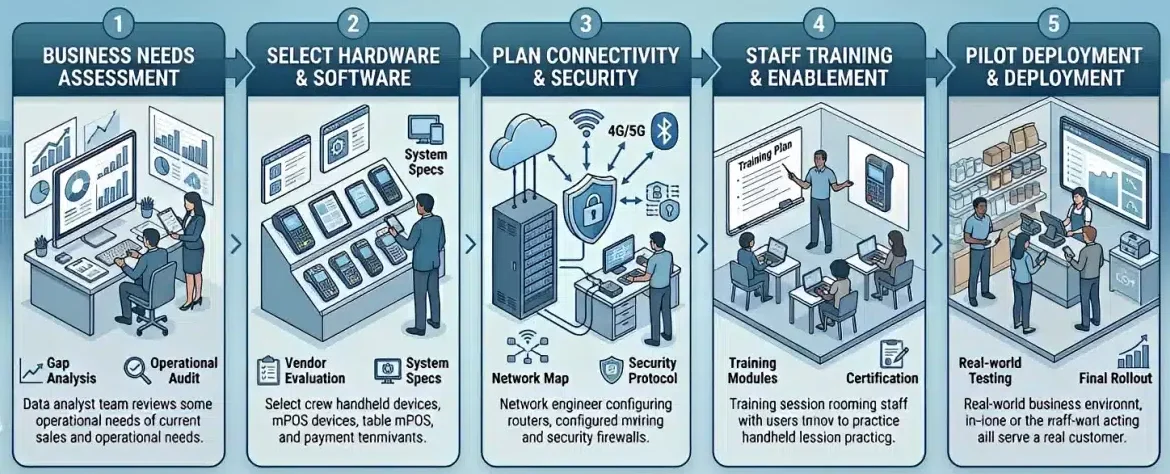
Implementing a mobile point of sale system requires more than simply choosing a device and installing an app. Businesses need a structured approach to ensure the system integrates smoothly into daily operations.
With proper planning, organisations can avoid disruptions, improve staff adoption, and maximise the long term value of their mPOS investment.
Assess Your Business Needs
The first step is understanding how your business operates and where improvements are needed. Identify pain points such as long checkout times, limited mobility, or inefficient inventory tracking.
You should also evaluate transaction volume, store layout, and existing systems. This helps ensure the mPOS solution aligns with your operational requirements and business goals.
Choose the Right Hardware and Software
Selecting the right combination of hardware and software is critical for long term performance. Businesses can choose between standard tablets or more durable commercial devices depending on their environment.
On the software side, focus on ease of use, feature availability, and scalability. It is also important to ensure the system integrates well with existing tools such as accounting or inventory platforms.
Plan Connectivity and Security
Since mPOS systems rely on wireless connectivity, having a stable and secure network is essential. Businesses should assess Wi Fi coverage across their premises and eliminate any potential dead zones.
Security is equally important. Ensure the system follows PCI compliance standards and uses encryption to protect transaction data, especially when handling customer payment information.
Train Your Team
Even the best system will not perform well without proper staff training. Employees should understand how to process transactions, manage inventory, and handle common issues.
Hands on training sessions can help staff become more confident using the system. This also ensures a smoother transition and reduces operational errors during the early stages.
Run a Pilot Deployment
Before rolling out the system across the entire business, it is advisable to start with a pilot. This allows you to test performance in a real environment and identify any issues early.
Feedback from staff during this phase is valuable for refining processes. Once the system runs smoothly, it can then be scaled confidently across other locations or departments.
Best Practices for mPOS Optimisation
Once an mPOS system is implemented, the next step is ensuring it continues to perform efficiently over time. Without proper optimisation, even the best systems can lead to slow performance, security risks, or inconsistent usage across teams.
By following a set of best practices, businesses can maintain system reliability, improve staff efficiency, and deliver a consistently smooth customer experience.
Use Commercial Ready Devices
While standard tablets are widely used, they are not always designed for demanding business environments. Investing in protective cases or commercial grade devices helps prevent damage from drops, spills, or heavy daily use.
This reduces downtime and avoids frequent device replacements. As a result, operations remain stable even during busy periods.
Implement Device Management (MDM)
Mobile Device Management (MDM) helps businesses maintain control over how devices are used. It allows administrators to restrict access to only necessary applications and prevent unauthorised usage.
MDM also supports remote monitoring and troubleshooting. This ensures devices remain secure and consistent across all locations.
Maintain Network Stability
A reliable internet connection is essential for mPOS performance. Businesses should regularly monitor their network to ensure strong coverage across all operational areas.
Upgrading to a dedicated or segmented network can help reduce interference. This ensures transactions are processed smoothly, even during peak hours.
Ensure Continuous Staff Training
As systems evolve, ongoing training becomes important to maintain efficiency. Staff should be regularly updated on new features, workflows, and best practices.
Continuous training helps reduce errors and improves confidence in using the system. This ultimately leads to better service and smoother daily operations.
Common mPOS Challenges and Solutions
While mobile point of sale systems offer significant advantages, they also come with operational challenges that businesses need to manage proactively. Without the right preparation, these issues can disrupt transactions and affect the overall customer experience.
Understanding common challenges and how to address them helps organisations maintain system reliability and ensure smooth day to day operations.
Connectivity Issues
Because mPOS systems rely on wireless networks, unstable connections can interrupt transactions. This is especially problematic during peak hours when multiple devices are connected at once.
To minimise this risk, businesses should invest in strong Wi Fi infrastructure and consider backup options such as mobile data. Choosing a system with offline functionality also ensures transactions can continue temporarily without an active connection.
Security and Compliance Risks
Handling payment data on mobile devices introduces potential security concerns. Without proper safeguards, businesses may be exposed to data breaches or compliance issues.
To address this, organisations should use systems that meet PCI compliance standards and implement encryption for all transactions. Additional measures such as device locking and access control can further strengthen security.
Device and Battery Limitations
Mobile devices are dependent on battery life and can experience performance issues over time. A device running out of power during operations can delay transactions and affect service quality.
Businesses can prevent this by maintaining charging routines and using backup devices or portable power solutions. Regular device maintenance also helps ensure consistent performance.
Staff Adoption and Training Gaps
Introducing new technology can sometimes create resistance or confusion among staff. Without proper training, employees may struggle to use the system efficiently.
Providing hands on training and ongoing support helps improve adoption. Clear guidelines and internal support systems ensure staff can confidently use the mPOS in daily operations.
Future Trends in Mobile POS Technology
Mobile point of sale technology continues to evolve alongside changes in consumer behaviour and financial innovation. What started as a simple payment tool is now becoming a central system that connects transactions, data, and customer experience.
As businesses adopt more digital and flexible operations, mPOS is increasingly used not just for processing payments, but also for improving decision making and customer engagement.
SoftPOS and Tap to Pay Technology
One of the most significant developments is the rise of SoftPOS, where smartphones can accept contactless payments without additional hardware. This allows businesses to turn standard devices into payment terminals with minimal setup.
This approach lowers hardware dependency and makes it easier to scale operations. It is particularly useful for businesses that require mobility or operate in temporary or flexible environments.
AI Driven Insights and Automation
Artificial intelligence is starting to play a bigger role in how mPOS systems operate. Instead of only recording transactions, systems can analyse sales patterns and automate certain processes.
This includes identifying product trends, supporting inventory decisions, and streamlining routine tasks. As a result, businesses can operate more efficiently while making better use of their data.
Advanced CRM and Personalisation
mPOS systems are becoming more closely integrated with customer data platforms, enabling a more personalised approach to service. Staff can access customer preferences and purchase history during interactions.
This makes it easier to deliver relevant recommendations and targeted promotions. Over time, this level of personalisation helps strengthen customer relationships and improve retention.
Conclusion
Mobile point of sale systems enable businesses to process transactions more flexibly while improving service speed and operational efficiency. By allowing payments to happen anywhere, mPOS helps reduce queues and create a smoother customer experience.
A well implemented mPOS system also provides real time data visibility, better inventory control, and more efficient staff workflows. When supported by the right strategy, mPOS becomes a key driver of modern business performance.
If your organisation wants to improve transaction flexibility and streamline daily operations, the right system can make a significant difference. Request a free consultation with our experts to explore mPOS solutions that support more efficient operations.
Frequently Asked Questions About Mobile POS (mPOS)
A mobile POS system is a portable solution that allows businesses to process transactions using smartphones, tablets, or handheld devices. It enables payments, inventory tracking, and real time data access without relying on fixed checkout counters.
Traditional POS systems use fixed hardware and are tied to a checkout counter, while mPOS systems operate on portable devices with wireless connectivity. This allows transactions to be completed anywhere, improving flexibility and customer experience.
mPOS systems are widely used in retail, hospitality, field services, and events. Any business that requires flexible payment processing, faster service, or mobile operations can benefit from adopting mPOS technology.
Yes, most mPOS systems follow PCI compliance standards and use encryption to protect payment data. Businesses can further improve security by implementing device management and access controls.
mPOS systems improve mobility, reduce queues, and provide real time insights into sales and inventory. They also support multiple payment methods, helping businesses deliver faster and more convenient customer experiences.