

Running a business on a basic till in 2026 puts you at a disadvantage before the day starts. Modern cash register systems do far more than record payments. They connect sales, stock, and reporting into one view that helps you make faster, more confident decisions.
Australian retailers and hospitality operators are moving away from traditional tills at pace. Cloud-based systems now handle everything from real-time inventory syncing to end-of-day reconciliation without manual effort. The gap between an old electronic register and a modern POS system has never been wider.
Knowing how these systems work, what separates them from each other, and when to upgrade helps you pick the right tool for where your business is headed, not just where it stands today.
Key Takeaways
A cash register records sales, processes payments, stores cash, and connects transaction data with stock, loyalty, and accounting tools.
Cash registers have evolved from mechanical tills into cloud-based POS systems that give Australian businesses live sales visibility.
A modern cash register system depends on reliable hardware, simple software, and cloud connectivity to keep checkout and reporting accurate.
A POS system gives businesses broader control than a standard till because it links sales, inventory, staff access, and reporting in one workflow.
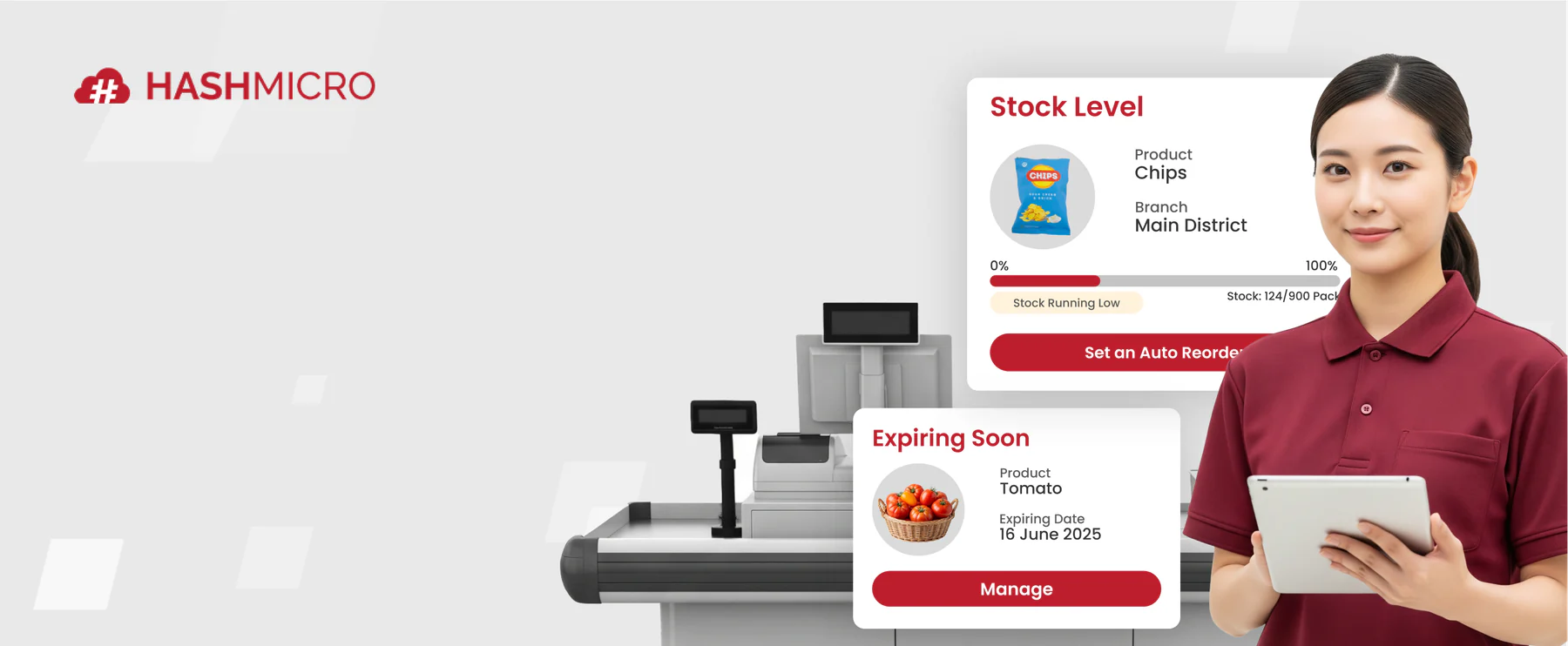
What Is a Cash Register?

At its core, a cash register records sales, processes payments, and stores cash securely. Every retail and hospitality business depends on one, whether that’s a mechanical drawer from decades ago or a tablet-based system running in the cloud.
The basic function hasn’t changed much. You ring up a sale, collect payment, and generate a receipt. What has changed is how much else a modern system does around that single transaction.
Today’s cash registers have grown into a proper transaction machine, connecting inventory tools, loyalty programmes, and accounting platforms in one place. One sale at the counter can trigger a stock update, a loyalty point, and a journal entry simultaneously.
"A modern cash register is no longer just a transaction tool, it plays a key role in connecting sales, inventory, and reporting to give businesses better control and visibility."
The Evolution of Cash Registers in Australia
Cash registers started as mechanical devices built to prevent theft as much as record sales. The early ones produced a paper tape and rang a bell so the owner knew when the drawer opened.
Electronic registers arrived in the 1970s and 1980s, bringing digital displays and printed receipts. Australian retailers adopted them quickly because they cut errors and sped up service during peak trading hours.
The shift to cloud-based POS systems changed everything again. A retailer in Melbourne can now check their Bondi store’s live sales figures from their phone without waiting for an end-of-day report.
Key Components of a Modern Cash Register System
No single component makes a cash register system work on its own. The hardware, software, and connectivity layer all need to function together for the system to perform reliably.
1. Hardware elements (Drawer, Receipt Printer, Display)
The physical components, including the cash drawer, receipt printer, customer display, and barcode scanner, form the foundation. Get these wrong and every transaction takes longer than it should.
Businesses in high-traffic environments need hardware built for durability. A thermal printer that jams during a Saturday lunch rush costs more in lost service time than its price tag ever suggests.
Most modern systems use modular hardware, so you can swap a faulty printer or add a second display without replacing the whole setup.
2. Software and User Interface
The software is where the system earns its keep. It handles pricing, discounts, tax calculations, and staff permissions, and it should do all of that without requiring more than an hour of training.
Good point-of-sale software for business surfaces the right information at the right moment. During a sale, that means product names, prices, and payment options. After close, that means reports your manager can actually read and act on.
Look for software that updates automatically in the background. Manual version updates are a security risk and an operational headache.
3. Internet connectivity and Cloud infrastructure
Cloud-based systems sync data across every device and location in real time. Make a price change at head office and it pushes to every register within seconds.
A stable internet connection matters more than most operators realise until they lose it mid-service. Choose a system with an offline mode that queues transactions locally and syncs when connectivity returns.
Cloud storage also means your sales data is backed up automatically. A register failure doesn’t wipe out your trading history.
What Australia's Mandatory Cash Acceptance Rules Mean for Your Cash Register
Australia's cash acceptance codes now set a clear baseline for some supermarket and fuel retail sites. For businesses in scope, the cash register needs to keep cash payments easy to process, visible at checkout, and simple to reconcile against card and digital payments.
1. What the cash acceptance code requires
The ACCC says the cash acceptance mandate applies to certain supermarkets and fuel retailers, with cash accepted for in-person payments of $500 or less between 7 am and 9 pm. It does not apply to every industry, so businesses should confirm whether the code covers their site before changing checkout settings. ACCC Cash Acceptance Industry Codes is the best source for the current rules.
2. What it means for your cash register workflow
Cash registers and POS systems should support cash tender types, receipt logs, and clear payment prompts so staff can handle compliant transactions without slowing the queue. That setup also helps managers reconcile cash drawers, spot exceptions, and keep reporting tidy when cash still matters at the counter.
Cash Register vs POS System: What’s the Difference?
The two terms get used interchangeably, but they describe very different tools. Understanding the gap helps you avoid spending too little or too much for what your operation actually needs.
An electronic cash register handles the transaction and not much else. It records the sale, opens the drawer, and prints the receipt. That’s the full scope.
A POS system connects that transaction to the rest of your business. Inventory drops when a product sells, staff hours can be tracked against sales data, and your accountant gets a clean export at month end. It is the practical choice for streamlining store operation using POS software across every part of the business.
To make the difference clearer, here’s a simple comparison:
| Feature | Electronic Cash Register (ECR) | Point of Sale (POS) System |
|---|---|---|
| Function | Basic transactions & cash storage | Full business management |
| Hardware | All-in-one, closed system | Flexible devices (PC, tablet, etc.) |
| Inventory | Basic tracking only | Real-time stock management |
| Reporting | Simple daily reports | Advanced analytics & insights |
| Integrations | None or very limited | Connects with multiple tools |
| Upfront Cost | Lower upfront | Higher but more scalable |
Benefits of Using a Modern Cash Register System
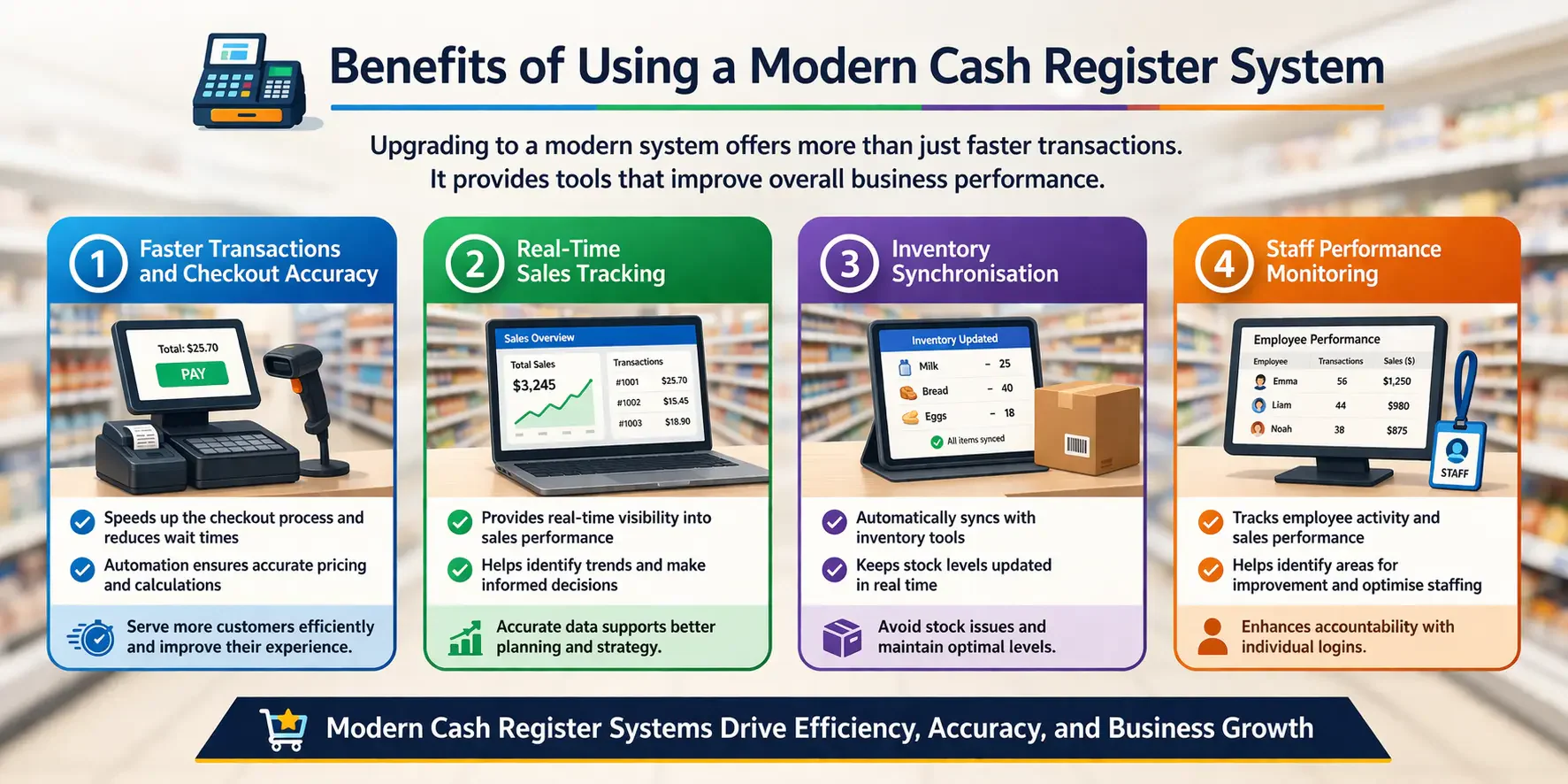
Upgrading isn’t just about faster checkouts. The real value sits in the data and automation that run quietly in the background while your team focuses on customers.
1. Faster Transactions and Checkout Accuracy
Customers notice a slow checkout. A system that hesitates, crashes, or requires manual price lookups adds friction at the worst possible moment.
Modern systems process sales quickly because pricing, modifiers, and tax rules come pre-configured. Your staff tap, confirm, and take payment without hunting for anything.
Accuracy improves too. Manual price entry causes errors. Barcode scanning and pre-set product lists don’t.
2. Real-Time Sales Tracking
Knowing what you sold yesterday is useful. Knowing what you’re selling right now is better.
Real-time sales data lets you spot which products are moving during a trade period and act on it. You can push a slow line with a discount or reorder before you disappoint customers with an out-of-stock.
Business owners with multiple locations can compare performance across sites without waiting for reports to land in an inbox.
3. Inventory Synchronisation
Every sale that doesn’t update your stock count is a problem waiting to happen. You either over-order, run out, or spend hours doing manual stock counts to reconcile the difference.
Automatic inventory synchronisation removes that problem entirely. Each transaction updates stock levels in real time, and low-stock alerts flag reorder points before you run dry.
This matters most during seasonal peaks, when stock management becomes the difference between trading well and turning customers away.
4. Staff Performance Monitoring
Individual logins track who processed which sale and when. That data protects your business and gives managers something concrete to work with during performance conversations.
You can identify your top performers, spot unusual patterns in refunds or voids, and schedule staff more effectively based on when your busiest trading periods actually fall.
It’s not about surveillance. It’s about running a tighter, fairer operation with real information rather than gut feel.
Industries That Rely on Cash Register Systems
Cash register systems appear across almost every sector, but the way each industry uses them varies significantly. The right setup for a café looks nothing like the right setup for a franchise retail chain.
1. Retail stores and Franchises
Retail moves fast and the checkout line is where customers form their final impression of your store. A slow or error-prone system damages that moment every time.
Franchises need consistency above all else. When every location runs the same system, pricing, reporting, and training stay aligned across the network. That’s difficult to achieve with mismatched hardware and software scattered across different sites.
2. Cafés, Restaurants, and Bars
Hospitality environments put POS systems under real pressure. Orders change mid-service, split bills are common, and the kitchen needs updates the moment a table orders.
A POS solution built for Australian restaurants handles table management, course-by-course ordering, and flexible payment splits without slowing the floor team down. Integration with kitchen display screens keeps orders accurate and cuts the back-and-forth between staff.
3. Service-Based businesses
Salons, repair shops, and clinics use cash registers differently. The transaction usually comes at the end of a booked appointment rather than a browse-and-buy interaction.
These businesses gain the most from systems that connect payment processing with booking records and customer history. Seeing a client’s previous services at checkout improves the interaction without your team needing to remember everything manually.
4. Multi-Outlet and Growing businesses
Running two or three locations on separate, disconnected systems creates a reporting headache that compounds over time. Figures need manual consolidation, discrepancies are hard to trace, and any pricing change has to be made site by site.
A centralised system solves this. Sales, stock, and staff data flow into a single dashboard, and any update made centrally pushes to every location at once. Owners can monitor performance without bouncing between spreadsheets.
When Should You Upgrade from a Cash Register?
If your current system slows down transactions, it may be time to upgrade. Long checkout times can frustrate customers and reduce overall efficiency, especially during busy periods.
Frequent manual work is another clear sign. Tasks like updating prices, tracking sales, or managing stock manually can lead to errors and wasted time.
Growth is also an important factor to consider. As your business expands, you’ll need a system that can handle higher transaction volumes and more complex operations.
Once a business starts outgrowing a basic till, the next challenge is not only choosing better software but also making sales, stock, and reporting easier to act on. Hashy, HashMicro's AI Coworker, reads connected checkout and inventory data through the Company Nexus, so teams can ask live sales questions, spot stock issues, and follow up faster.






Choosing the Right Cash Register System for Your Business
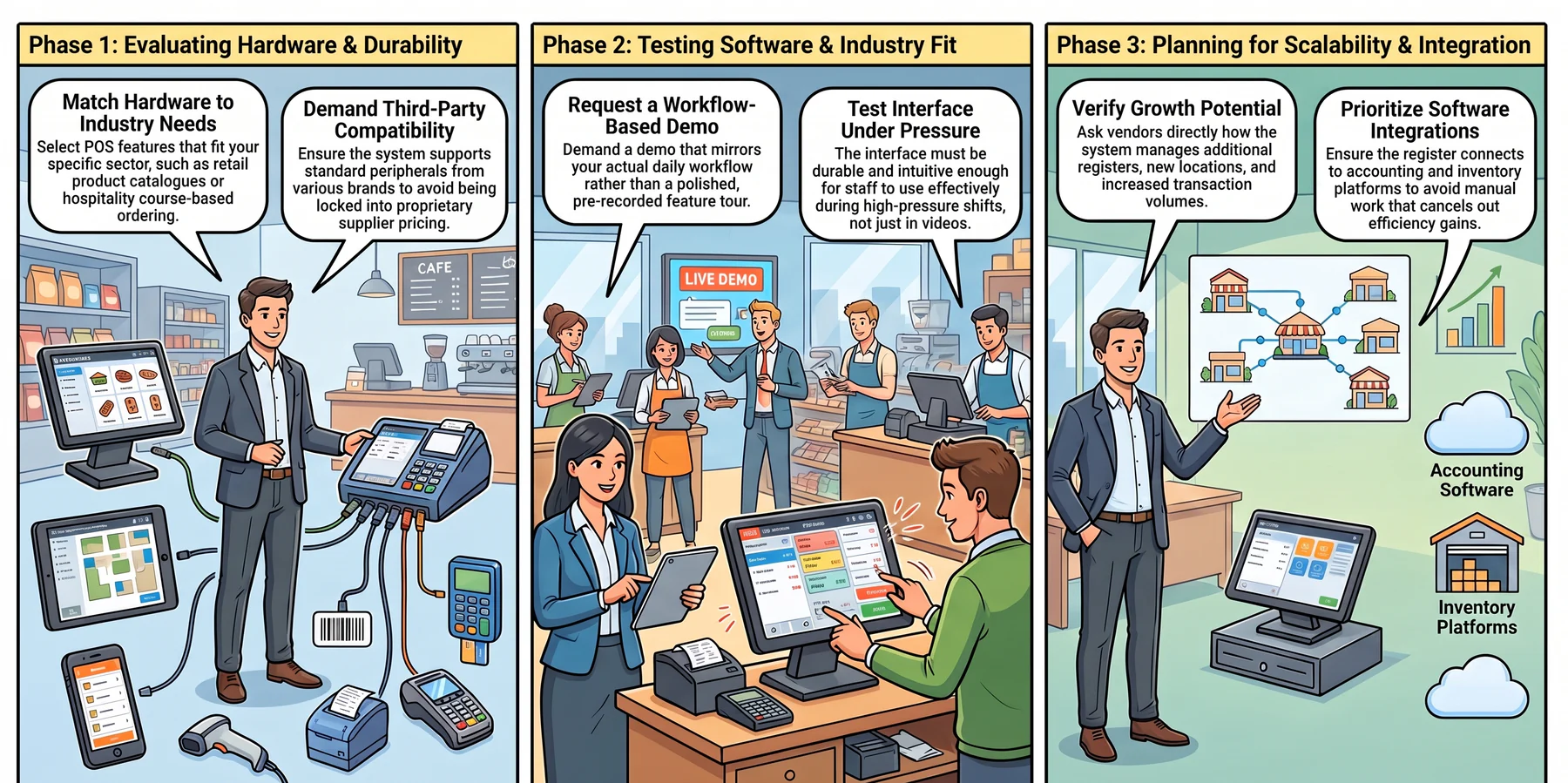
The right system depends on your operation, not on what’s popular or what a supplier recommends. Three areas matter most when evaluating your options.
1. Hardware Compatibility and Durability
Choose POS software for retails with features that match your industry needs, whether that’s inventory management and product catalogues for retail, or table management and course-based ordering for hospitality.
Check that the system supports standard peripherals from third-party brands. Proprietary hardware locks you into one supplier and one pricing structure.
2. Software Features and Industry Fit
Generic POS software rarely fits any industry perfectly. Retail operators need strong inventory and product catalogue tools. Hospitality operators need table management and course-based ordering.
Request a demo that mirrors your actual workflow, not a polished feature tour. The interface your staff use every shift needs to hold up under pressure, not just in a product video.
3. Scalability and Integration
A system that works now but can’t grow with you forces a costly replacement later. Ask vendors directly how the system handles additional registers, new locations, and higher transaction volumes.
Integrations matter as much as core features. A cash register that doesn’t connect to your accounting software or inventory platform creates manual work that cancels out the efficiency gains you were hoping for.
Conclusion
Cash registers have come a long way from mechanical tills. Today’s systems give Australian businesses real-time visibility across sales, stock, and staff performance in a way a basic register simply cannot match.
For businesses ready to move beyond a standalone till, the right system pays for itself through time saved, errors avoided, and better decisions made with accurate data. Start a free consultation with us and implement your own POS system today.
Frequently Asked Question
A cash register handles basic transactions, while a POS system includes advanced features like inventory and reporting.
Yes, but many small businesses now prefer POS systems for better functionality and scalability.
Costs vary depending on features, ranging from basic units to advanced cloud-based systems.
Traditional cash registers cannot track inventory, but modern systems often include inventory management features.