
















Managing a business gets a lot harder when your payment system can’t keep up. Slow checkouts, messy records, and scattered customer data are common signs that your current transaction method is holding you back.
These issues directly affect your bottom line from inaccurate stock counts to frustrated customers at the register. A modern POS system helps address all of this by keeping payments fast, records clean, and operations running smoothly.
This article breaks down how POS transactions work, the different types, and how to manage them effectively.
Table of Contents
Key Takeaways
|
What is a POS Transaction and How Does It Work?
POS transactions are payments for the purchase of goods or services. They are usually carried out in one environment at one POS terminal. POS transactions can be done directly, such as using cash and credit or debit cards.
In addition, POS transactions can also be done online, such as through contactless payments and using e-wallets. POS transactions help your company speed up and protect transactions while improving customer experience and optimizing business efficiency.
A POS setup includes a combination of hardware and software. The hardware consists of credit card readers and cash registers or tablets with cloud-based POS software, which is now more commonly used. The software records transactions and stores sales data in the business’s books.
Where Are POS Transactions Used in Everyday Business?
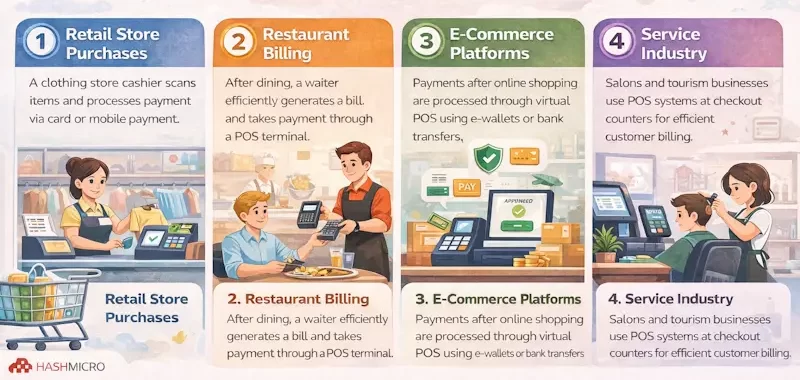 After discussing the definition of POS transactions, it is time to review further examples of POS transaction implementation in various business fields. The following is an explanation of POS transaction examples:
- Retail store purchases: A customer purchases an item at a clothing store, where the cashier scans it using a POS system and processes the payment via card or mobile payment. The transaction is completed instantly, and a digital receipt is issued.
- Restaurant billing: After customers finish eating, they will ask for a bill, or the waiter will give them a bill. The server efficiently processes the payment through the POS terminal by simplifying the billing processes.
- E-commerce platforms: After shopping online, the payment is processed through a virtual POS. Various electronic payment systems, such as e-wallets or virtual bank account transfers, are used. This e-commerce POS integration ensures safe transactions.
- Service industry: In salons, customers settle their bills at the checkout counter, where a POS terminal often part of a tourism POS system used in service-oriented businesses processes the payment efficiently to ensure a smooth and seamless transaction.
How Does a POS Transaction Actually Work?
You may wonder how POS transactions work in detail. Understanding the process can be complex, but we have outlined a step-by-step guide to help you grasp how POS transactions function.
This breakdown will help your business optimize payment processing, improve transaction security, and enhance customer experience.
Step 1: Initiation of the transaction
- Physical store: A POS transaction begins when customers select their desired items. The cashier then scans the product using a barcode scanner or manually enters the item into the POS system to proceed with the transaction.
- Online stores: The POS transaction starts when a customer adds products to their cart and proceeds to checkout. At this stage, the system calculates the total cost, and the customer then selects a preferred payment method. The transaction is completed once the payment is verified and the order is confirmed.
Step 2: Processing payments
- Payment information capture: During a POS transaction, the system collects the customer’s details using a card reader or a secure online payment system.
- Transaction Routing: The payment information is transmitted over the internet to the credit card processor, which then forwards it to the respective card network.
- Authorization Request: The credit card network sends the transaction details to the issuing bank to obtain payment authorization.
- Authorization Confirmation: The issuing bank approves the transaction and sends a confirmation back to the merchant through the credit card network, temporarily holding the transaction amount in the customer’s account.
Step 3: Managing inventory
- Real-time updates: As the POS transaction occurs, the system instantly adjusts inventory levels by subtracting the sold items from stock. This real-time update helps prevent overselling and ensures a smooth restocking process.
Step 4: Generating receipts
- Receipt options: After passing through the previous stages, the POS transaction is completed, resulting in a receipt that can be sent digitally via SMS, email, or printed directly.
Step 5: Capturing and analyzing data
- Transaction data: The POS system records each transaction’s complete data, including payment methods and purchase history. This data is analyzed, providing insightful information on consumer behaviour, sales patterns, and overall company success.
Step 6: Settling transactions
- Batch processing: Batch settlement of POS transactions usually occurs once a day or a few times per week. This process is automated for companies who use a payment gateway.
- Fund transfer: After deducting interchange and payment processor fees, the issuing bank transfers the money to the acquiring bank, which then sends it to the merchant’s bank account.
Step 7: Integrating with other systems
- Seamless integration: Modern point-of-sale (POS) systems are all easily integrated with accounting software, inventory control tools, and customer relationship management (CRM) platforms. This connectivity improves overall corporate efficiency and guarantees coordinated processes.
Breaking Down the Different Types of POS Transactions
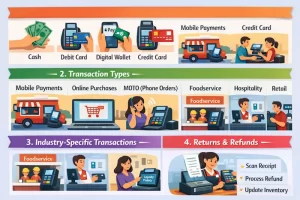 Understanding the different types of POS transactions will help your business to improve efficiency, reduce errors, and better manage finances. So, here are the types of POS transactions along with their explanations:
1. Payment methods
- Cash: Customers can pay with cash at a tiny neighborhood cafe, and the cashier manually inputs the money into the POS system to finish the transaction.
- Debit card: When a customer buys clothes at a store using a debit card, the transaction is processed through the POS system, and the payment is directly deducted from the bank account.
- Digital wallets: Customers use the Apple Pay digital wallet to pay for their order at a coffee shop by tapping their smartphone against the point-of-sale system.
- Credit card: A consumer uses a credit card to purchase food at a supermarket. When the payment is processed via the card network, the POS terminal subtracts the amount from the customer’s credit limit.
- Other payment options: When a client uses a gift card to pay at a bookshop, the POS system subtracts the amount from the card balance.
2. Transaction types
- Mobile payments: While serving clients on the road, a food truck operator utilizes a tablet-based mPOS system to take orders and process payments using digital wallets and credit cards.
- Online purchases: An online fashion shop accepts customer payments through a virtual point-of-sale system, which uses digital wallets to complete the transaction.
- Mail order/telephone order (MOTO) transactions: A client orders flowers from a florist over the phone. The florist uses the POS system’s MOTO capability to process the payment over the phone.
- In-store purchases: One customer buys an air conditioner in an electric store. After the clerk scans the products, the consumer uses a POS terminal at the checkout counter to pay.
3. Industry-specific transactions
- Foodservice: A fast-food restaurant needs a POS system, such as Square Restaurant POS, to manage counter orders, integrate kitchen operations, and process payments quickly to maintain fast service.
- Hospitality: A chain of hotels uses a POS system to handle reservations, dining service orders, and guest checkouts. The hotel’s property management system is connected with the payment system.
- Retail: The POS system counts customer loyalty points, handles payments, and maintains inventory at a big retail store.
- Other industries: A salon maintains client profiles while managing appointments, tracking beauty product sales, and processing service payments using a POS system.
4. Returns and refunds
For example, when a customer returns a jacket to a clothing store, the cashier scans the receipt and processes the refund using the POS system. The transaction is reversed, and the refunded amount is credited to the customer’s original payment method. Simultaneously, the inventory is updated to reflect the returned item.
What Can Go Wrong with POS Transactions?
Implementing POS transactions in a business will certainly provide various benefits in managing company finances, but there are several challenges that your business must face. Here are the following explanations:
Practical Steps for Businesses to Accept POS Transactions
Implementing a reliable POS system is essential for smooth transactions and efficient operations. Here are practical steps that your business can take to accept POS transactions:
1. Setting up terminals for digital payments
Your business needs a POS terminal to accept debit, credit, or digital payments. This device processes transactions efficiently, ensuring customers can make payments quickly, easily, and securely. With this technology, businesses can improve customer experience and reduce errors in payment processing.
2. Utilizing mobile wallets
To enhance transaction convenience, utilize popular mobile payment apps such as Apple Pay, Google Pay, or Samsung Pay. These digital wallets allow customers to make contactless payments with their smartphones without needing physical cards or cash.
Apart from providing convenience, this method is more hygienic as it reduces direct contact with payment machines or banknotes. Adopting this digital payment system improves transaction efficiency and meets the preferences of modern customers who prioritize speed and security in shopping.
3. Implementing online payment gateways
Integrating a trusted online payment gateway is essential for e-commerce stores to ensure smooth and secure POS transactions. With this system, customers can make payments directly on the merchant’s website using various methods.
This integration increases customer convenience, helps businesses process transactions more efficiently, reduces error risk, and increases user confidence in the payment system.
4. Accepting cash payments
Every business that implements POS transactions needs to set up a cash register to handle customers who make physical payments in cash. By implementing these procedures, you can ensure the accuracy and security of managing cash transactions.
5. Using QR code payments
Another way to accept POS transactions is to display a unique QR code at your physical store’s cash register so customers can scan and complete payments quickly. This method is also suitable for various types of businesses, as it is beneficial for small companies or pop-up shops, offering a practical and efficient payment method.
Strategies for Managing POS Transactions Effectively
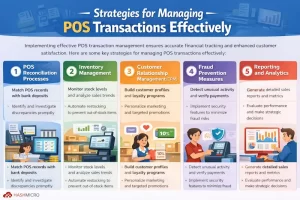
Implementing effective POS transaction management ensures accurate financial tracking and enhanced customer satisfaction. It involves using the right tools, procedures, and strategies to optimize transaction handling and business performance.
Here are some key strategies for managing POS transactions effectively:
1. POS reconciliation processes
This process involves matching the data recorded in the POS system with the bank deposit records. It is also useful for determining the accuracy and compatibility of the two parties’ records.
If there is a mismatch, it must be immediately identified and investigated. Thus, errors in a business’s financial transactions will be prevented by comparing the seller’s data to the bank’s deposit amount.
2. Inventory management
POS systems monitor inventory levels in real-time, allowing businesses to avoid stock shortages and overstocking. These systems streamline ordering and restocking processes by analyzing sales trends and stock availability, ensuring products are always available when required.
By managing inventory, POS transactions effectively involve tracking inventory, optimizing the checkout process, enhancing payment security, and integrating with other business systems.
3. Customer relationship management (CRM)
POS transaction data is utilized to develop comprehensive customer profiles through customer relationship management. This information helps design loyalty programs, personalized marketing strategies, and targeted promotions.
4. Fraud prevention measures
POS systems are essential for identifying and preventing fraudulent transactions. They track unusual activity, verify payment methods, and confirm transaction legitimacy, helping to minimize fraud risks and financial losses.
5. Reporting and analytics
POS systems produce comprehensive sales reports and performance metrics, offering valuable insights into business operations. These reports enable businesses to evaluate sales trends, track financial performance, and make informed strategic decisions to enhance growth and efficiency.
Conclusion
A POS system handles more than just payments. When managed well, it keeps inventory accurate, records organized, and checkouts moving fast all small things that make a big difference in how smoothly a business runs day to day.
That said, no two POS systems are exactly alike. The right one depends on your business type, how many transactions you’re handling, and whether it works well with your existing tools. Getting that match right from the start saves a lot of headaches down the line.
If you’re still figuring out which system suits your business best, looking into a breakdown of the top POS systems available today is a solid next step.
Frequently Asked Questions
-
What is an example of a POS transaction?
– Retail purchase: a customer buys a pair of shoes at a store, swipes their debit card POS terminal, and the system authorizes the payment to complete the transaction
– Restaurant bill: A diner orders a meal at a restaurant and pays using a credit card at the POS terminal after the meal. -
What does POS mean?
It stands for ” point of sale,” which can be defined as the place where a transaction takes place between a customer and a merchant. However, in the context of restaurants, you often talk about the point of sale system, specifically the hardware and software used to run your business.
-
Is POS transaction safe?
Yes, POS system transactions are generally safe. Modern POS systems use advanced security measures, such as EMV chip technology and encryption, to protect sensitive card information. However, businesses must remain vigilant and invest in robust security measures to mitigate potential risks.














