

















Imagine customers piling up at checkout, watching as slow transactions delay their shopping experience. In the supermarket industry, every second counts. A Supermarket POS (Point of Sale) system isn’t just a cash register, it’s the backbone of seamless operations and optimized business processes.
Failing to choose the right POS system can mean losing sales and customer dissatisfaction. But selecting the perfect POS isn’t just about speed, it’s more than that. Read on to discover 10 tips on choosing the system that can transform your business before your competitors beat you to it!
Key Takeaways
|
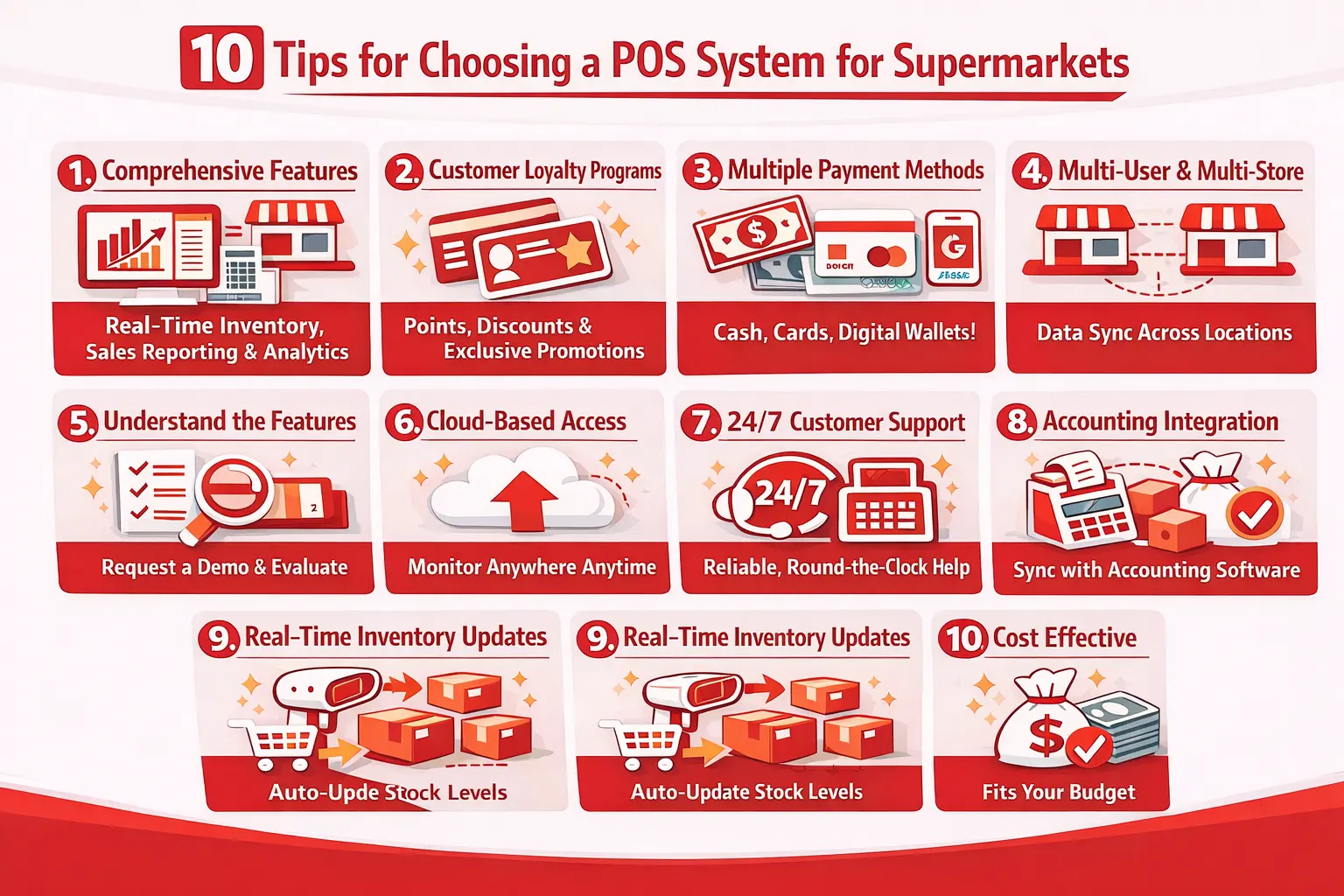
1. Pick a POS System with the Features You Need
A reliable POS system should offer more than just transaction processing. It should provide tools that enhance business efficiency, such as real-time inventory management to prevent stock shortages or overstock, and identify best-selling products and peak shopping hours.
Beyond processing speed, the right system should help you understand how your store performs day to day. Look for features like automated alerts for low stock, shift based sales summaries, and product level reporting, which turn your checkout counter into a source of actionable business insight.
2. Get a POS That Supports Customer Loyalty Programs
A customer loyalty program integrated into the POS system can significantly boost repeat sales. Features like discounts, points based rewards, and exclusive promotions incentivize customers to keep coming back. In the Philippines, where supermarkets are on every corner, having a loyalty program can set your business apart.
Beyond just discounts, a great loyalty program can provide deeper insights into consumer behavior. By tracking purchase history and preferences, supermarkets can personalize offers and even introduce VIP perks for high-spending customers. This level of customization not only ensures your supermarket remains a top choice for your customers.
3. Make Sure It Accepts Different Payment Methods

Consumers use diverse payment methods, from cash and credit/debit cards to digital wallets like GCash, Maya, and ShopeePay. With the increasing shift towards cashless transactions, supermarkets accommodating these options can significantly enhance customer experience. The more payment choices we offer, the more efficient the checkout process becomes.
Beyond convenience, integrating multiple payment methods into a POS system also helps supermarkets reach a broader customer base. Many shoppers prefer digital payments due to cashback rewards, promos, and security benefits.
4. Choose One That Works for Multiple Users and Branches
For supermarket chains, having a multi user and multi branch POS system is essential. This allows different store locations to synchronize data, ensuring accurate sales and inventory reporting across all branches. Without a unified system, supermarkets may face discrepancies in stock levels, delayed updates on sales figures, and inefficiencies in tracking business performance.
Additionally, a multi user system ensures that different team members can access relevant data and perform tasks based on their roles. This functionality improves workflow, enhances security through user access controls, and ensures that employees only have access to the information necessary for their tasks.
5. Understand the Features Before You Buy
Before selecting a POS system, take the time to fully understand its functions. Not all POS software is built the same, and choosing the wrong one could slow down operations instead of improving them. Look for a system that not only processes transactions but also provides valuable insights into sales trends, inventory movement, and customer preferences.
To make an informed decision, ask the provider for a free demo to test its usability, evaluate its support options, and check its compatibility with your daily operations. Take note of how intuitive the system is, if it’s too complicated, it might slow down your cashiers and frustrate customers. A POS should simplify operations, not make them harder.
6. Go for a Cloud Based POS for Easy Access
Cloud based POS software provides a game changing advantage for modern supermarkets. Unlike traditional systems that require onsite management, a cloud based POS allows you to monitor your business from anywhere. This means whether you’re at home or traveling, you can keep an eye on real-time business performance without being physically present.
Another key benefit is the automatic updates and data security that cloud-based systems offer. There’s no need for manual software installations, ensuring you always have the latest features and security patches. Additionally, cloud backup protects your data from unexpected hardware failures, keeping your business running smoothly.
7. Check If Customer Support is Reliable
Technical issues can disrupt supermarket operations, causing delays, frustrated customers, and lost revenue. A minor system glitch or a network failure can bring checkout lines to a halt, affecting your store’s efficiency. That’s why having reliable 24/7 customer support from your POS provider is crucial.
A responsive support team ensures that problems are resolved quickly, minimizing downtime and preventing major disruptions. Whether it’s troubleshooting hardware issues, fixing software bugs, or guiding your staff on best practices, a strong customer support system keeps your supermarket running smoothly at all times.
8. Make Sure It Can Connect with Accounting Software
A POS system integrated with accounting software simplifies financial management by streamlining bookkeeping and automating data entry. With automatic sales recording, tax calculations, and real-time expense tracking, supermarket owners no longer need to rely on manual spreadsheets or separate financial systems.
Additionally, integrating a POS with accounting software helps generate real-time profit and loss statements, track revenue trends, and manage cash flow more effectively. A unified system will give you better visibility into your finances, allowing you to make data-driven decisions that enhance business profitability and sustainability.
9. Look for a POS That Updates Inventory in Real Time

Your POS system should automatically update stock levels after each sale, preventing discrepancies and ensuring accurate inventory control. This means that every item scanned at checkout instantly reflects in the system, allowing store managers to track stock movement in real time.
Beyond just monitoring stock, real time inventory synchronization enables automated reordering and better forecasting. With AI powered insights, supermarkets can predict demand trends and adjust their purchasing strategies accordingly. This reduces waste, optimizes storage space, and ultimately improves profitability.
10. Think About the Cost and If It Fits Your Budget
Supermarket owners should choose a POS system that aligns with their budget and long-term business needs. Investing in the right POS software is not just about the upfront cost but also about its overall value to your operations. The right choice depends on the size of your supermarket, your expected growth, and how much flexibility you need.
Additionally, some premium POS systems come with advanced features such as AI powered analytics, automated inventory tracking, and seamless third-party integrations. While these may have a higher price tag, they can ultimately save costs by improving efficiency, reducing errors, and enhancing customer satisfaction.
Conclusion
A supermarket POS system does more than process transactions. It connects inventory, payments, and reporting into a single workflow that keeps daily operations running smoothly. When evaluating options, the features that matter most will depend on your store’s size, the number of branches you manage, and the payment methods your customers already use.
The 10 tips above cover the practical factors worth checking before committing to any system. For a broader look at what’s available, exploring a comparison of the best POS systems for supermarkets can help you weigh your options side by side before making a final decision.
Frequently Asked Questions
-
How do you use POS in supermarkets?
A POS system in supermarkets is used to scan barcodes, process payments, and track inventory in real time. It helps cashiers check out customers faster and keeps records of sales for better business management.
-
How a POS system can improve productivity in a supermarket?
The best POS for a grocery store depends on your needs, but options like Square, Lightspeed, or HashMicro offer strong inventory management, multiple payment options, and easy integration. Look for a system that fits your budget, supports your store size, and has good customer support.
-
What is the best POS for a grocery store?
A POS system speeds up checkout, reduces errors, and automates inventory tracking to prevent stockouts. It also helps with sales reporting and customer management, making operations smoother and more efficient.














