














Table of Contents
A payment terminal is a specialized hardware device that allows merchants to accept credit cards, debit cards, and digital wallet payments by communicating directly with financial institutions. According to the Bangko Sentral ng Pilipinas (BSP), the push for a cashless Philippines has turned these devices from luxury tools into essential infrastructure for any physical storefront.
Modern terminals do more than just read cards; they encrypt sensitive data, manage transaction records, and ensure that funds are transferred securely from a customer’s account to a merchant’s bank. As consumer behavior shifts toward contactless methods in 2026, understanding how to choose and manage this hardware is vital for operational success.
Key Takeaways
Learn how payment terminals work process card, QR, and e-wallet transactions for faster and more secure checkout.
See the differences between countertop, mobile, and smart POS terminals based on your store setup and sales flow.
Find out how to prepare for unstable internet, power interruptions, and other operational issues that affect payment processing.
Understand the key security and compliance standards, from EMV requirements to data privacy protection for customer transactions.
What is a Payment Terminal?
A payment terminal, commonly known as a credit card machine or POS terminal, is an electronic device used to process cashless transactions at the point of sale. In the Philippines, these devices have evolved to support the National Retail Payment System (NRPS) framework, allowing them to handle various payment rails beyond traditional cards. The primary role of the terminal is to capture payment information from a card’s magnetic stripe, EMV chip, or NFC antenna and transmit it securely to the acquiring bank for authorization.
Modern terminals in 2026 are often powered by modified Android systems, offering touchscreens and integrated cameras for scanning QR codes. This is a significant jump from the older “knuckle buster” manual imprinters once used in Manila department stores. Today, a terminal must be able to process a transaction in under three seconds to meet the expectations of busy Pinoy shoppers. Whether it is a small stall in a weekend market or a large supermarket chain in BGC, the terminal acts as the gatekeeper of financial security and data integrity during every sale.
How Terminal Transactions Work
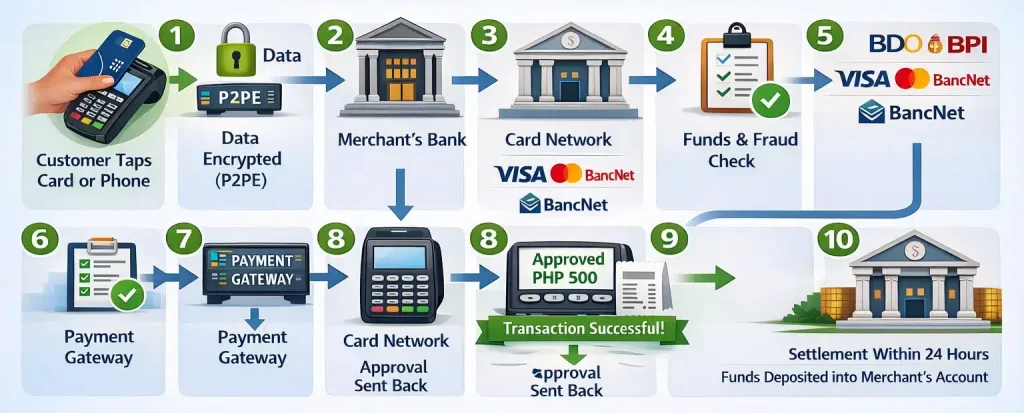
A PHP 500 terminal transaction happens in seconds: when a customer taps their card or phone, the terminal encrypts the data with P2PE, sends it through the payment gateway to the merchant’s bank, and routes it via the card network to the issuing bank for fund and fraud checks. Once approved, the terminal shows a successful message and issues a receipt—often sent by SMS or email—while the payment is usually settled into the merchant’s account within 24 hours after batch closing.
Types of Terminals for Philippine Businesses
Your choice of terminal depends on your business model, physical setup, and how you interact with customers. The Philippine market offers four main categories.
1. Countertop terminals
Standard for high-volume environments like supermarkets, pharmacies, and department stores. They plug into a power source and connect via Ethernet for maximum stability. These rarely move from the checkout counter and can handle thousands of transactions daily without connection drops.
2. Portable and wireless terminals
Suit restaurants and cafes that offer pay-at-the-table service. These connect via Wi-Fi or Bluetooth to a base station, giving servers the flexibility to bring the terminal to the customer.
3. mPOS (mobile point-of-sale) readers
A pocket-sized devices that pair with a smartphone app via Bluetooth. Delivery riders, pop-up market vendors, and freelance service providers use these to accept card payments without investing in expensive hardware. If you are evaluating mobile options, reviewing the best POS system in the Philippines can help you compare features and pricing.
4. Smart POS terminals
This types resemble high-end smartphones and run full applications. Business owners can manage their inventory directly on the payment device, merging sales tracking and stock management into a single interface.
| Terminal Type | Best For | Connection | Price Range (PHP) |
|---|---|---|---|
| Countertop | Supermarkets, retail chains | Ethernet / Landline | ₱15,000–₱35,000 |
| Portable / Wireless | Restaurants, cafes | Wi-Fi / Bluetooth | ₱12,000–₱28,000 |
| Smart POS | Multi-branch boutiques | 4G / 5G / Wi-Fi | ₱20,000–₱45,000 |
| mPOS | Delivery, pop-up shops | Smartphone Bluetooth | ₱3,000–₱8,000 |
Security Rules from the BSP
Businesses that use payment terminals need to follow strict security standards to protect customer data and reduce fraud risk. Here are the key rules and practices to understand:
- Use EMV-compliant terminals
Every payment terminal should be able to read chip-enabled cards securely. This helps reduce fraud compared to older magnetic stripe transactions. - Avoid relying on the swipe method for chip cards
If a merchant still swipes a chip-enabled card instead of using the chip reader, the business may become liable for fraudulent transactions under the EMV Liability Shift rule. - Protect customer card data
Terminal users and staff should never have access to a customer’s full card number or CVV. This supports safer payment handling and stronger data privacy controls. - Apply Point-to-Point Encryption (P2PE)
Encryption helps protect card data as it moves through the payment process. This reduces the risk of sensitive information being exposed during transmission. - Use tokenization for safer transactions
Tokenization replaces the actual card number with a random token. If the internal network is compromised, the token cannot be used like the original card data. - Keep terminal firmware updated
Regular firmware updates help protect payment machines from malware, software vulnerabilities, and newer cyber threats. - Support compliance with data privacy rules
Payment handling should also align with the Data Privacy Act of 2012 by limiting access to sensitive customer information and using secure transaction methods.
How to Set Up Your Hardware
Setting up a payment terminal takes more than turning the device on. A proper setup helps your business process transactions smoothly, protect customer data, and reduce operational risk.
| Step | What You Need to Do | Why It Matters |
|---|---|---|
| 1. Check your infrastructure | Make sure your store has a stable internet connection and a secure power source before installing the terminal. | This helps prevent downtime, failed transactions, and disruptions during business hours. |
| 2. Separate the payment network | Create a dedicated VLAN for payment terminals so transaction data stays separate from guest Wi-Fi and office devices. | Network separation improves security and supports PCI DSS compliance. |
| 3. Configure terminal settings | Set up the merchant ID, apply the correct tax rate, and enable features such as tipping if needed. | Correct settings help the terminal process payments accurately and support proper sales recording. |
| 4. Train your staff | Teach employees how to accept different payment methods, process voids or refunds, and respond to basic terminal issues. | Staff who understand the process can reduce errors and handle transactions with more confidence. |
| 5. Perform daily device checks | Inspect the terminal regularly for signs of tampering, such as skimmers or unusual overlays on the card slot. | Routine checks help protect your business and customers from payment fraud. |
Common Mistakes with Payment Machines
Many businesses use payment machines every day, but small mistakes can still lead to failed transactions, reporting issues, or avoidable losses. Here are some of the most common mistakes to avoid:
- Ignoring software updates
Skipping updates can leave the terminal vulnerable to security risks and slower transaction processing. Regular updates help keep the device secure and reliable. - Having no backup connection
A terminal that relies only on one internet source can stop working during busy hours. Use a device with automatic failover, such as a backup SIM, to avoid lost sales. - Overlooking receipt requirements
Even when digital receipts are more common, businesses still need to follow BIR receipt requirements. Make sure each receipt includes details such as your TIN, business address, and VAT breakdown. - Using one terminal for multiple businesses
Mixing transactions from different businesses in one terminal can create reporting problems and audit issues. Each business should use its own merchant account and terminal setup.
Payment Trends for 2026

Payment terminals in the Philippines are starting to move beyond traditional card machines. In 2026, more businesses are expected to adopt SoftPOS, which turns an Android smartphone into a contactless payment terminal through an app and NFC. This gives micro-SMEs, pop-up sellers, and delivery riders a more practical way to accept digital payments without adding extra hardware costs.
At the same time, payment technology is becoming more advanced and more connected. Biometric authentication, such as palm scanning and facial recognition, is beginning to appear in premium retail environments, while more businesses now prefer payment systems that connect with sales, inventory, and reporting tools in one platform. This is why many companies are pairing payment hardware with POS software in the Philippines to improve visibility, reduce manual work, and keep up with changing customer expectations.
Conclusion
The payment terminal has evolved from a simple card reader into a valuable business tool. In the Philippines, it helps connect physical retail with the growing digital economy. By choosing the right hardware, meeting BSP requirements, and integrating your terminal with reliable software, your business can create a smoother checkout experience and improve operational efficiency. As payment technology continues to advance in 2026, strong security and reliable connectivity will remain essential for long-term success.
If you are also exploring which POS solutions can support payment terminal integration, sales tracking, and day-to-day retail operations, it is worth reviewing a broader list of available vendors. You can find them in this guide to POS systems in the Philippines, which covers options businesses can compare based on their operational needs and growth plans.
FAQ’s about Payment Terminal
-
Can I use one terminal for both GCash and credit cards?
Yes, modern smart terminals in the Philippines can usually accept both physical cards such as Visa and Mastercard and digital wallets through QRPH integration. This setup helps businesses handle multiple cashless payment methods using one device and keep transactions more organised in a single bank statement.
-
What should I do if my terminal displays a “Connection Error”?
First, check whether your Wi-Fi or cellular signal is active. If the main connection is unavailable, the terminal may switch to its backup SIM automatically, but if it does not, restart the device or connect it to a mobile hotspot so you can continue processing transactions.
-
Does a payment terminal automatically report my sales to the BIR?
No, a payment terminal records transactions, but it does not automatically submit tax reports to the BIR. However, when connected to an ERP or accounting system, the transaction data can support the creation of BIR-compliant reports and help simplify tax reporting.














