







A kitchen display system (KDS) is an important part of operating a restaurant, whether that is a fast-casual outlet or a multi-location restaurant chain. A busy kitchen without the right tools is a recipe for disaster. Lost tickets and miscommunication between the front and back of house will make any restaurant operation costly, inefficient, and horrible for customers.
That is why many are investing in KDS. It replaces the noisy, paper-based ticket system with a digital, real-time interface that keeps kitchen staff aligned with every order coming from the floor, the counter, or even third-party delivery platforms.
Table of Contents
Key Takeaways
|
What Is a Kitchen Display System?
A Kitchen Display System (KDS) replaces paper tickets with a digital screen-based technology that receives, displays, and tracks kitchen orders in real time. Connected directly to the POS system, it shows each order’s components, modifications, and wait times. Staff are allowed to mark progress instantly. Modern KDS solutions also integrate with inventory tools and delivery platforms, making it a complete operational intelligence system for any food service environment.
How Does a Kitchen Display System Work?

Understanding how a KDS functions mechanically helps operators appreciate why it is such a powerful tool. The process begins at the front of house or wherever an order originates and flows seamlessly to the kitchen in a matter of seconds.
Step 1: Order Entry
A customer places an order through any of several touchpoints: a server entering it into a POS terminal, a customer using a self-service kiosk, a QR code-based table ordering system, or an online/delivery application. Regardless of the source, the order data is captured digitally and transmitted to the KDS immediately upon confirmation.
Step 2: Order Routing
Not every item in an order goes to the same station. A well-configured KDS can route specific items to specific screens. For example, hot beverages might go to the barista station, grill items to the grill cook’s screen, and cold desserts to the dessert prep area. This routing is typically configured during setup based on the restaurant’s menu structure and kitchen layout. The result is that each station only sees what is relevant to them, reducing confusion and visual clutter.
Step 3: Order Display and Color Coding
Once an order arrives on the KDS screen, it is displayed as a digital ticket. Most systems use a color-coded timeline to indicate urgency. A ticket might start in white or green when it first arrives, shift to yellow after a defined number of minutes have passed, and turn red when it exceeds the target preparation time. This visual cue immediately tells kitchen staff which orders need attention without requiring them to check a clock or ask the expeditor.
Step 4: In-Progress and Completion Marking
Staff interacts with the KDS using either a touchscreen or a bump bar, a physical panel with programmable buttons mounted near the screen. When a cook starts working on an item, they can mark it as in-progress. When it is done, they bump it off the screen or mark it complete. This status change is often reflected on the expeditor’s screen, allowing them to coordinate the final plating and delivery to the table.
Step 5: Data Collection and Reporting
Throughout this entire process, the KDS is collecting timing data: when the order arrived, how long it took to acknowledge, how long preparation took, and when it was marked complete. This data flows into the reporting module, where managers can review average ticket times, identify peak pressure periods, and compare performance across shifts or locations. Over time, this intelligence becomes a critical input for staffing optimization and menu engineering decisions.
Key Features to Look For in a KDS

Not all kitchen display systems are created equal. The market includes everything from basic single-screen setups to enterprise-grade platforms with AI-driven forecasting. Knowing which features genuinely matter to your operation will help you cut through the noise and focus on what delivers real value:
Order management and display customization
- Real-Time POS Integration is a must, as any lag defeats its whole purpose. Ensure that order entry and kitchen display is sync instantly. Should integrate natively with your existing POS or offer a clean API for custom setup. Bidirectional integration (KDS status flowing back to POS) keeps front-of-house informed when food is ready.
- Multi-Station Routing is needed to place orders in the correct prep zone so each station only sees what’s relevant to them. Without routing, every station sees every order, which creates noise that just slows decisions.
- Customizable Ticket Layouts allow managers to configure what information appears, how it’s laid out, and which fields are highlighted. The system should adapt to your workflow, not the other way around.
Performance and flexibility
- Color-Coded Timers and Alerts is a vital feature as the timer elapsed time, which is represented by color, gives staff at-a-glance order priority. Audio alerts for overdue tickets add an extra layer of accountability during peak service.
- Bump Bar and Touchscreen Support is a necessity as bump bars offer an alternative to touchscreen interaction. The best systems support both, giving your team flexibility based on their station and preference.
- Recall and Void Functions make operational errors easier to correct by allowing authorized staff to recall accidentally completed tickets or modify orders in real time.
Operational efficiency and scalability
- Analytics and Reporting Dashboard should cover ticket times, peak period analysis, items per ticket, and station-specific performance. Even basic reporting is vastly superior to the zero visibility that paper tickets provide
- Offline Mode has to exist as kitchen operations must continue uninterrupted even when internet connectivity drops. This is Non-negotiable for high-volume venues where any downtime means lost revenue.
- Multi-Screen and Multi-Location Support is used by larger kitchens that require multiple screens to share or divide order queues simultaneously. Cloud-based platforms allow franchise or multi-site operators to monitor and configure all locations from one central dashboard.
Benefits of Using a Kitchen Display System

The advantages of implementing a kitchen display system extend well beyond simple order visibility. When properly deployed, a KDS touches nearly every dimension of kitchen performance.
1. Dramatically reduced order errors
A Digital KDS standardized format, eliminating the failure points of paper tickets; there will be no more illegible writings, tickets being lost, and tickets getting mixed up during rush hours. The reduction in order errors translates directly to fewer remakes, less food waste, and significantly happier customers.
2. Faster service times
Every minute matters in the dining industry, which is why a KDS compresses the time between order placement and kitchen acknowledgement to near-zero. Restaurants that implement KDS technology see a reduction of 15 to 30 percent in average ticket time.
3. Improved kitchen communication
Verbal communication is a huge part of kitchen communication despite the kitchen being a high-noise environment. A KDS would solve this by being the only single source of truth for every station. When an order is modified after being sent, the update appears immediately on the relevant screens without anyone having to shout across the kitchen.
4. Enhanced staff accountability
Transitioning to a KDS eliminates ongoing expenses such as printer paper, printer ribbons, and thermal rolls. These consumable costs add up quickly over the course of a year. Despite the high price, investment in digital hardware typically pays for itself within months for busy operations.
5. Significant paper and consumable cost savings
Transitioning to a KDS eliminates ongoing expenses such as printer paper, printer ribbons, and thermal rolls. These consumable costs add up quickly over the course of a year. Despite the high price, investment in digital hardware typically pays for itself within months for busy operations.
6. Better customer experience
A KDS that integrates with a customer-facing display or order status board allows diners to see when their order is being prepared and when it is ready. This reduces perceived wait times and improves satisfaction scores even when actual wait times remain unchanged.
7. Valuable operational data
KDS accumulates data from every order processed over days to months. This helps managers mine for insights that can help them with evidence-based operational decisions.
8. Scalability across multiple locations
Restaurants looking to scale need to use a cloud-based KDS, which provides a standardized operational framework that can be replicated across every new location. The centralization ensures consistency and allows corporate teams to monitor kitchen performance across the entire portfolio from a single dashboard.
Types of Kitchen Display Systems
Kitchen display systems come in several configurations, each suited to different types of operations, kitchen sizes, and budget constraints. Understanding the distinctions helps operators make a more informed purchasing decision.
| Type of KDS | Features | Benefits |
| Single-Screen KDS | One central screen displays all orders, suitable for small operations like cafes and food trucks. | Cost-effective for small operations; easy to manage low-volume orders on a single screen. |
| Multi-Station KDS | Multiple screens for different prep stations (grill, salad, dessert) with an expeditor screen showing all orders’ statuses. | Increases efficiency in large kitchens; allows focused work per station and better coordination at the expediting station. |
| Expo (Expeditor) Display | A dedicated screen showing the status of all orders, including whether components are pending, in progress, or complete. | Helps expeditors manage pacing and ensures synchronized delivery of complete orders to tables. |
| Drive-Through KDS | Orders from drive-through speakers/kiosks are routed immediately to the kitchen and displayed on confirmation screens for customers. | Speeds up service in fast-food restaurants and creates a seamless customer experience. |
| Cloud-Based KDS | Stores data and configurations remotely, accessible from any internet-connected device; preferred for multi-location operators. | Allows centralized management and monitoring across locations; accessible from anywhere. |
| Tablet-Based KDS | Runs on standard commercial tablets (iOS/Android) instead of proprietary hardware. | Lower upfront costs; offers flexibility to scale easily with easily replaceable devices. |
KDS or Kitchen Printer?
For decades, the kitchen printer was the standard tool for transmitting orders from the front of house to the kitchen. It is still widely used, and understanding the genuine strengths and limitations of each approach is valuable for any operator considering making a switch.
The case for kitchen printers
Kitchen printers are proven technology. They are reliable, widely supported, and familiar to virtually every kitchen worker. They produce a physical ticket that can be placed on a rail, passed between stations, and referred to repeatedly without any technology interaction.
In operations where staff turnover is very high and training time for new hires needs to be minimal, the simplicity of a paper ticket is genuinely advantageous. Kitchen printers also work completely independently of network connectivity, making them resilient to infrastructure issues.
The case for KDS
Despite the familiarity of kitchen printers, a KDS outperforms them on almost every operational metric that matters in a modern food service environment. A KDS eliminates consumable costs, provides real-time status tracking, enables order modification without reissuing a ticket, integrates with delivery platforms, and generates operational data.
Paper tickets do none of these things. As restaurants become more complex operations, requirements and customer experience expectations continue to rise, making the limitations of the paper ticket system increasingly costly.
Hybrid approaches
Many operators, especially those transitioning from legacy systems, choose a hybrid approach: running a KDS as the primary order management system while keeping a backup kitchen printer available for contingency situations. This approach provides the operational benefits of digital order management while maintaining a safety net during the transition period or in the event of technical issues.
The bottom line is that for any restaurant serious about operational efficiency, accuracy, and data-driven management, a kitchen display system is the superior long-term investment. Kitchen printers remain a viable option for very small, very simple operations or as backup devices, but they cannot match the comprehensive capability of a modern KDS.
How to Choose the Right KDS for Your Restaurant

Selecting the right kitchen display system requires a structured evaluation process. The wrong choice can mean paying for features you do not need, struggling with a system that does not integrate with your existing tools, or facing a hardware setup that is incompatible with your kitchen environment. Here is a practical framework for making this decision well.
1. Map your kitchen workflow
Before evaluating any specific product, document your current kitchen workflow in detail. How many distinct preparation stations do you have? How many concurrent orders are you typically managing during peak service? What are the main sources of orders (dine-in, takeaway, delivery)? What information does each station need to see? This operational mapping will determine your minimum requirements for screens, routing rules, and integrations.
2. Audit your existing technology stack
Your KDS needs to work with your existing POS system, and ideally with any other tools you use, like delivery aggregator platforms, inventory management software, and customer-facing displays. Check what integration options are available for the KDS solutions you are considering. Prioritize native integrations over workarounds, and be skeptical of vendors who promise compatibility without documented evidence.
3. Evaluate hardware durability
The hot, humid, greasy, and busy kitchen environments are harsh. The hardware you select must be rated for these conditions. Look for screens with IP ratings indicating resistance to moisture and dust. Consider whether touchscreens will remain responsive in high-humidity environments. Evaluate the quality of mounting options and the ease of cleaning. Don’t cheap out; a KDS that fails after six months will just make things more expensive.
4. Consider ease of training
The best KDS in the world is only as effective as the team using it. Evaluate how intuitive the system is for kitchen staff with varying levels of technical comfort. Look for vendors who provide thorough onboarding support, training materials, and ongoing customer service. The transition from paper tickets to digital management involves a learning curve, and a vendor who supports you through that curve is worth more than one who sells you hardware and disappears.
5. Review reporting and analytics depth
Data-driven management requires a KDS with indepth analytics module. Ask if the KDS you’re considering can access historical ticket time, can drill down by station, shift, or time period, and can export reports to other tools. The reporting capability of a KDS is often undersold in marketing materials, but it is one of the most valuable aspects of the investment over the long term.
6. Assess total cost of ownership
Don’t just see the initial hardware and set-up costs. Monthly software subscription fees, per-device licensing costs, support and maintenance contracts, and the cost of additional screens for expansion can increase expenses manyfold. A higher upfront investment in a superior system often delivers a better return than a cheaper solution that requires workarounds and causes recurring operational friction.
7. Test before you commit
If at all possible, pilot a KDS solution in a single location or even a single kitchen station before committing to a full deployment. This pilot period will surface integration challenges, staff training needs, and any hardware compatibility issues in a controlled context, rather than discovering them during a busy weekend fiesta.
Implementing a KDS: Best Practices
Even the best technology fails to deliver its potential when implementation is rushed or poorly managed. Here are the best practices that consistently separate successful KDS rollouts from frustrating ones.
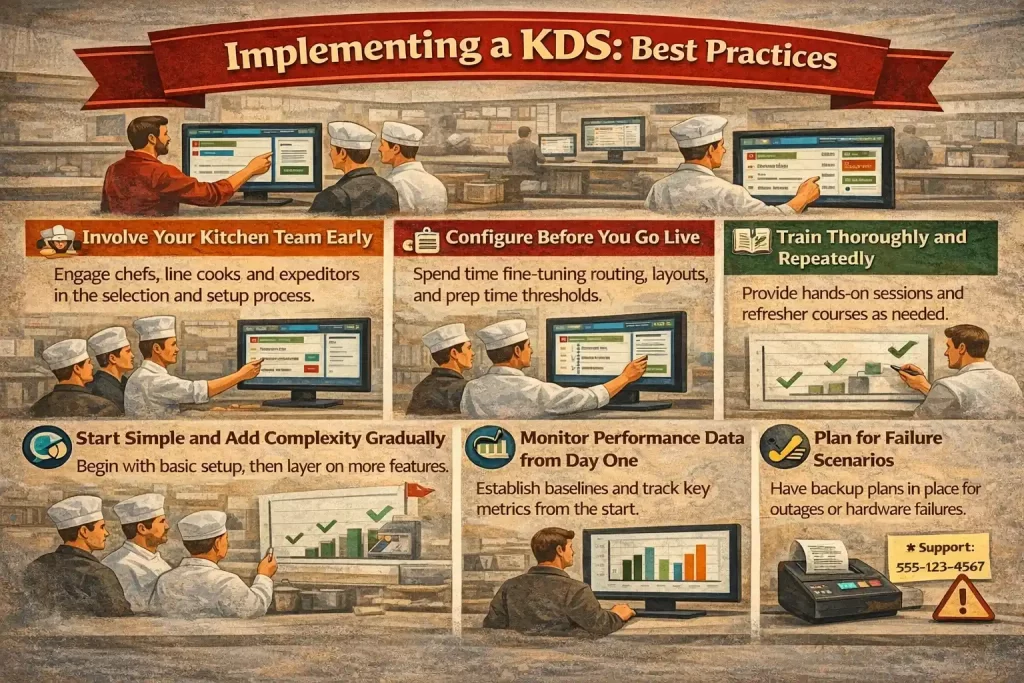
By implementing these methods, you can utilise the KDS technology to its fullest extent.
Common Challenges and How to Overcome Them
No implementation goes perfectly, and kitchen display systems come with a set of predictable challenges that operators frequently encounter. Being aware of them in advance puts you in a much better position to address them constructively.
| Challenge | Solution |
| Staff Resistance to Change | Engage staff early by explaining the “why” behind the change, demonstrating how the system simplifies tasks, celebrating early wins, and addressing concerns with patience. |
| Integration Failures with Existing POS | Test the integration thoroughly before going live, work with vendors with a successful track record for your POS, and have a clear escalation path for technical support if issues arise. |
| Screen Positioning and Visibility | Plan screen placement carefully by soliciting feedback from staff, and be open to remounting hardware if initial placement is ineffective. |
| Over-Complexity in Configuration | Start with a minimal, functional configuration and only add complexity when needed. It ensures the system remains simple and effective. |
| Data Overload | Build formal data review habits, designate a role for analytics review, and schedule regular reviews of key metrics. Use the data for actionable operational decisions. |
The Future of Kitchen Display Systems
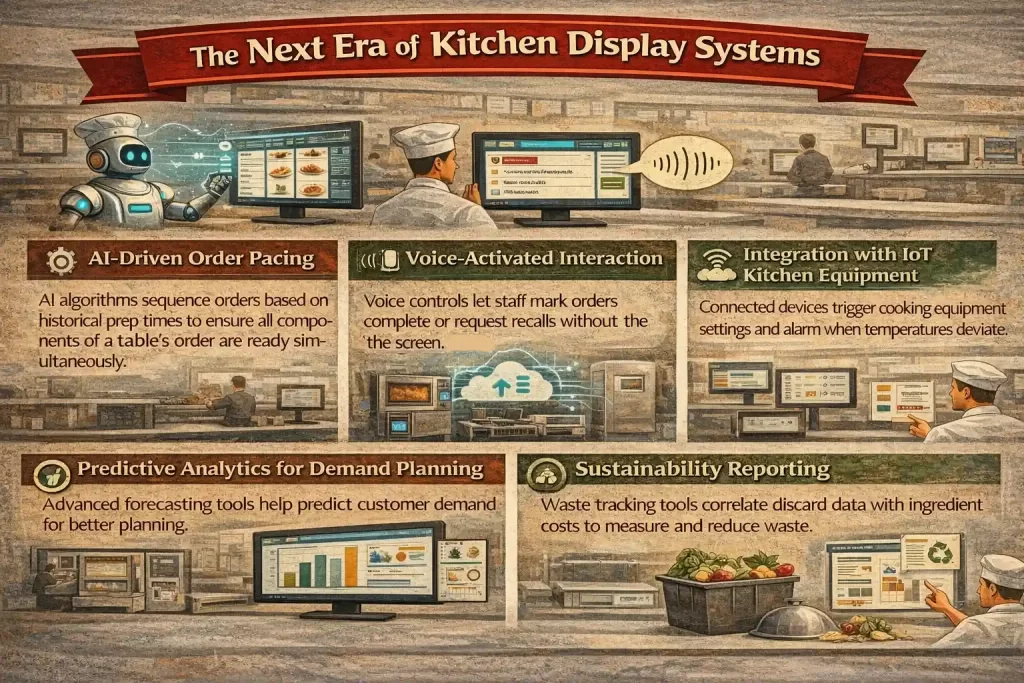
Kitchen display technology is not standing still. The next generation of KDS platforms is incorporating capabilities that would have seemed futuristic just a few years ago, and understanding where the technology is heading helps operators make investment decisions with a longer horizon in mind.
KDS in Different Restaurant Formats
The way a kitchen display system is configured and used varies significantly depending on the type of food service operation. Understanding these format-specific nuances helps operators choose and configure a system that is genuinely tailored to their context.
Quick-service and fast-food restaurants
In quick-service environments, speed is the paramount operational priority. KDS configurations in these settings typically feature large, high-contrast displays designed for rapid visual scanning, minimal on-screen information (item name, quantity, and any modifications only), and short timer thresholds that reflect the 2-3 minute target completion times common in fast food.
Integration with drive-through ordering systems and digital menu boards is often a critical requirement. Systems used by global QSR chains are also typically built to handle extremely high concurrent transaction volumes without performance degradation.
Full-service restaurants
Full-service dining operations have more complex KDS requirements due to the larger menus, multi-course dining structures, and table pacing considerations involved. In these environments, KDS configurations often include course-based order management (holding a dessert ticket until the appropriate moment), multi-station routing with an expeditor display, and integration with table management systems that flag special occasions, dietary requirements, or VIP guests. Timer thresholds are generally longer, reflecting the different service cadence of a full-service meal compared to a quick-service transaction.
Ghost kitchens and delivery-only operations
Ghost kitchens are facilities that produce food exclusively for delivery without any dine-in component. It is one of the fastest growing restaurant formats. They rely heavily on KDS to manage orders from multiple online platforms. These kitchens often run several virtual brands from the same location, requiring the KDS to be highly flexible, handle complex routing, and integrate with delivery platforms. The KDS is a critical part of the operation as it ensures that orders are processed efficiently with minimal staff interaction and optimized for delivery.
Conclusion
A kitchen display system (KDS) is a tool that every restaurant needs in an age where many are competing in the restaurant industry. Not only does it make restaurant operations much more efficient, but it also makes it much cheaper in the long run.
Every restaurant can and will likely need to use a KDS. But a KDS can function as much as the POS system that it is integrated with. An outdated or less capable POS system would not be able to handle the full power of a KDS. So when you decide to implement a KDS system, assess your POS system first and make sure it’s the best POS system out there.
FAQ for KDS
-
How does kitchen display system work?
A Kitchen Display System (KDS) electronically displays orders to kitchen staff, replacing traditional paper tickets. It receives orders from the POS system and organizes them by prep station, allowing real-time updates, reducing errors, and streamlining kitchen workflows.
-
What is KDS and POS?
KDS (Kitchen Display System) displays orders for kitchen staff, while POS (Point of Sale) handles customer transactions and order processing at the front of the house. The two systems are often integrated to ensure smooth communication between the front and back of the restaurant.
-
What is the cost of kitchen display system?
The cost of a KDS varies based on features, brand, and the number of stations needed. Basic systems may start at a few hundred dollars per screen, while more advanced setups with cloud support and multiple features can cost thousands of dollars.