









 Limited to 100 registrants

An HRIS, or Human Resource Information System, is a powerful tool that automates routine HR processes and centralises employee data. Many HR teams today still spend up to 50% of their time on manual tasks, resulting in slower productivity and higher stress.
As companies grow, handling employee information across spreadsheets and separate tools quickly becomes inefficient. HR teams must juggle hiring, payroll, and compliance, often leading to scattered data and avoidable mistakes.
The best HRIS system brings these processes into one system, replacing manual work with a structured digital approach. This allows HR teams to work faster, keep records accurate, and focus more on supporting employees instead of managing paperwork.
Key Takeaways
An HRIS can alleviate administrative burdens, freeing up HR teams for strategic activities.
An HRIS automates tasks, reduces costs, and enhances the employee experience.
When choosing an HRIS, consider customization, integration, and data security.
A cloud HRIS system centralizes HR functions and, when integrated with an AI-powered ERP, becomes a single source of truth.
What Is a Human Resource Information System (HRIS)?
HRIS, known as Human Resource Information System, is software that aids organizations in managing and automating core human resource processes. For businesses asking what HRIS system capability in practice is, it starts with a centralized repository of employee master data, storing information such as names, addresses, national IDs, and more.
An HRIS system goes beyond only data storage, offering a range of HR functions, including recruiting, applicant tracking, time and attendance management, performance appraisals, and benefits administration. .
By interacting with the data and providing reporting capabilities, the human resource information system makes the stored information more accessible and usable, effectively becoming a “smart database” of employee information. Once you understand what an HRIS does, the next step is choosing the best HRIS software in the Philippines for your team size, compliance needs, and budget. The four criteria below make that decision easier.
How does HRIS Work?

An HRIS system works by collecting employee information from HR teams, managers, employees, and connected business systems. It stores this information in a centralized database, applies predefined workflows and access controls, and then uses the data to support HR operations.
The process generally includes data collection, centralized storage, workflow automation, and reporting. For example, an approved attendance record can be used for payroll processing, while updated employee information can appear automatically in HR reports. Integrations allow the same verified data to support recruitment, performance management, accounting, and other authorized processes.
1. Organizational Structure
A Human Resource Information System helps organizations create a clear structure, including job roles, responsibilities, and who reports to whom. This clarity makes it easier to manage daily tasks and ensures everyone knows what’s expected of them.
An HRIS system also helps organizations find and hire the right people by simplifying the recruitment process, so they can build a team that supports their overall business goals.
2. Employee Data Management
An HRIS system provides a complete view of each employee, including their personal and professional details. The system automates record-keeping, reporting, and self-service functions, increasing employee efficiency and convenience.
Benefits of Using Cloud HRIS System
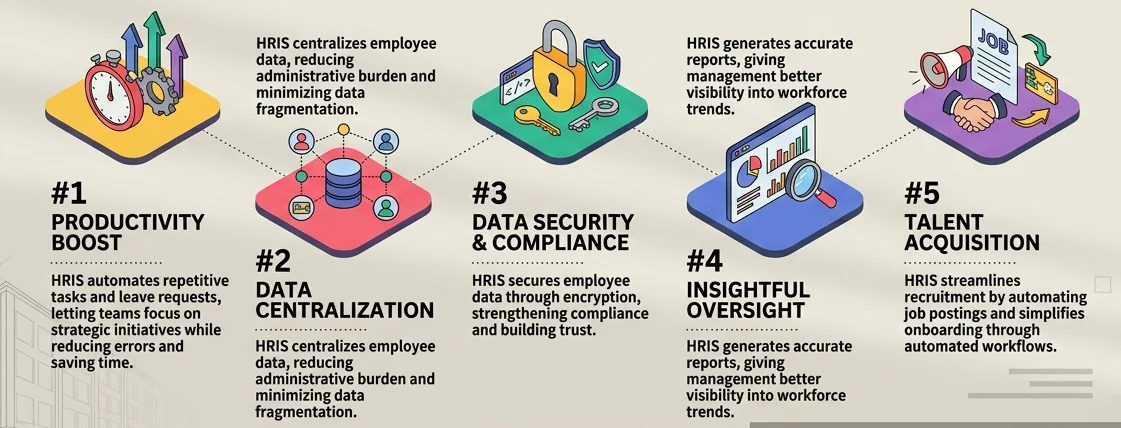
Implementing HRIS software can transform organization’s workforce management by streamlining key HR processes and improving efficiency. Beyond simplifying daily tasks, it offers tangible benefits such as enhanced data security, improved accuracy, and a seamless employee experience.
- Increased productivity: Human Resource Information System streamlines repetitive tasks such as attendance tracking and payroll processing, allowing HR teams to focus on strategic initiatives. This efficiency boosts overall productivity across the organization.
- Centralized employee data: With HRIS, all employee information is stored in a single platform, making it easy to access and manage. This centralization reduces administrative burden and minimizes data fragmentation.
- Automation of HR roles: The system automates HR processes like leave requests, performance appraisals, and compliance tracking. Automation reduces manual effort, minimizes errors, and saves valuable time.
- Improved data storage & security: HRIS software offers secure data storage with access controls and encryption, protecting sensitive employee information. This enhances trust and compliance with privacy regulations.
- Higher report accuracy & improved oversight: HRIS generates accurate reports and real-time analytics, providing HR teams and management better visibility into workforce trends. This leads to more informed decision-making and strategic planning.
- Enhanced recruitment: HRIS systems streamlines the recruitment process by managing job postings, applicant tracking system, and automating candidate evaluations. This results in faster hiring and better talent acquisition outcomes.
- Easier onboarding: The system simplifies onboarding by automating workflows and providing new hires access to necessary resources. This creates a smoother onboarding experience and helps new employees integrate quickly.
Key Functions of an HRIS System
An effective Human Resource Information System (HRIS) is essential for streamlining HR processes and managing workforce data efficiently. By centralizing key functions such as employee data management, payroll, and recruitment, a cloud HRIS system simplifies complex tasks and enhances organizational productivity.
- Employee information management: HRIS serves as a centralized database to store and manage employee records, including personal details, job history, and performance data. This ensures easy access and streamlined data handling for HR teams.
- Recruitment and onboarding: The system facilitates job postings, tracks applicant progress, and automates onboarding tasks, providing a seamless experience for both HR personnel and new hires.
- Payroll and benefits administration: HRIS systems automate payroll calculations, tax deductions, and benefits distribution, reducing errors and ensuring timely payments to employees.
- Performance management: It helps track employee performance through appraisals, goal-setting tools, and feedback systems, enabling better alignment of individual contributions with organizational objectives.
- Time and attendance tracking: The system monitors work hours, leaves, and absences using a detailed leave form template, providing accurate data for payroll and improving overall workforce management.
- Compliance and reporting: HRIS system assists in maintaining compliance with labour laws and generating reports for audits and regulatory requirements, minimizing legal risks and ensuring transparency.
"Modern HRIS solutions is strategic systems that help organizations manage people, processes, and compliance with precision. When implemented effectively, an HRIS becomes the backbone of HR operations, driving efficiency, and data-driven decision-making."
HRIS vs. HRMS vs. HCM
People often use the terms HRIS, HRMS, and HCM interchangeably, but the meaning of HRIS and its related terms can refer to different things depending on a company’s features. While they all relate to managing employees, each term can focus on various areas.
Here are the differences between HRIS, HRMS, and HCM:
| System | Primary Focus | Typical Scope |
| HRIS | Employee data and core HR administration | Employee records, organizational structure, recruitment, onboarding, attendance, benefits, self-service, and HR reporting |
| HRMS | HR process management and operational automation | HRIS capabilities plus payroll management, leave management, scheduling, time and labor tracking, performance reviews, approval workflows, and other integrated HR management systems. |
| HCM | Strategic workforce and talent management | HRIS and HRMS capabilities plus workforce planning, compensation planning, learning, succession planning, talent development, and workforce analytics |
HRIS Features
The best cloud-based human resource system supports a variety of HR processes and interactions. The technology provides smart automation of workflows across the business. Hence, the HRIS system has several features to automate tasks and manage employees.
Below are the key features that an HRIS system must have:
| Feature | What It Does |
|---|---|
| Employee Data Management | Stores and manages employee information such as personal details, job roles, and benefits keeping data accurate and up-to-date for better HR decision-making. |
| Employee Self-Service | Allows employees to access and update their information, request time off, and view pay stubs online reducing admin work for HR and boosting employee engagement. |
| Time Tracking | Records employee work hours including clock-in/clock-out, vacation, and sick leave to ensure accurate payroll processing and identify attendance patterns. |
| Payroll Processing | Automates payroll calculations including salaries, benefits, and taxes ensuring employees are paid accurately and on time while reducing compliance risks. |
| Data Security | Protects sensitive employee information from unauthorized access, theft, or damage keeping HR data safe and compliant with data protection regulations. |
| Compliance Management | Helps HR teams stay compliant with labor laws and industry standards by providing alerts for compliance deadlines and accurate tracking of employee data. |
Challenges of Human Resources System
Managing human resources effectively is crucial for any organization, but implementing an HR system comes with its own set of challenges. From ensuring data security to navigating integration complexities, businesses must address these issues to fully optimize their HR operations.
- Data security risks: HR systems handle sensitive data such as employee personal details, payroll information, and performance records, making them attractive targets for hackers.
- Integration complications: Integrating HR systems with other business tools, such as payroll, project management, or ERP platforms, often involves complex processes that require technical expertise
- High implementation costs: The upfront investment for purchasing, customizing, and deploying an HR system can be substantial, particularly for smaller organizations. These costs may include licensing, setup, and ongoing maintenance.
- User adoption and training: Employees may struggle to use a new HR system effectively, especially if the interface is not user-friendly. Comprehensive training programs and ongoing support are essential to ensure users can navigate the system with efficiency.
- Customization and scalability issues: Many HR systems offer limited customization, making adapting to specific company needs or workflows challenging. Additionally, scaling the system to accommodate increased demands may require costly upgrades.
- Compliance and legal updates: Labor laws and regulations frequently change, requiring HR systems to stay updated to avoid non-compliance penalties. This necessitates regular system updates and vigilance.
HRIS Management Best Practices

Beyond just managing employees, HR teams can use data stored in the system to develop proactive talent management and retention strategies. By digging into this data, organizations can uncover hidden insights and opportunities for growth.
To maximize the benefits of HRIS functionalities, the following guidelines are recommended:
1. Tailor Your HRIS to Your Organization
Customize your HR information system to fit your organization’s unique needs and workflows. This might include configuring fields, forms, and workflows to match your specific processes and reporting requirements. Be sure to check if your HRIS provider allows for customization when selecting a system.
2. Connect Your HRIS to Other Systems
Integrate your HRIS with other relevant systems, such as performance management, learning management, and recruitment systems. This will help you consolidate data and get a complete view of your employees’ life cycles.
According to a survey, 71% of HR professionals believe that their organization’s HR systems are not integrated, which leads to inefficiencies and data inconsistencies. Additionally, according to a survey on Gartner, 54% of HR managers prefer integrated HR software suites.
3. Uncover Patterns and Trends
Use historical HRIS data to identify patterns and trends in employee turnover, engagement, and performance. Analyze the factors contributing to turnover, such as tenure, job level, department, and performance ratings.
4. Develop Personalized Interventions
Using Human Resources Information System (HRIS) insights to create personalized interventions for at-risk employees. This might include targeted training, career development opportunities, or workload or job responsibilities adjustments.
5. Foster Collaboration Between HR and Managers
Encourage collaboration between HR and line managers to use HR data analytics for talent management and retention strategies. Give managers access to relevant HRIS data and insights to support data-driven decision-making at the team level.
Key Considerations when Choosing HRIS

To find the perfect HRIS solution, you need to consider all aspects of HR management, including recruiting, onboarding, learning, succession planning, and HR help desk. You want a complete, end-to-end solution that can adapt to your changing needs.
Below are some of the key considerations for choosing HRIS:
1. Initial Assessment
Identify your organization’s biggest pain points and challenges with current HR processes. Decide who will participate in the HRIS selection process and whether you’ll need external consultants.
2. Collect Internal Data
Conduct an internal audit to determine the must-have features and functionalities of your HRIS system. Talk to employees, managers, and stakeholders to understand their needs and observe day-to-day operations.
3. Create a Checklist
Make a checklist of your needs and requirements based on your internal evaluation. Update this checklist regularly as you research different HRM information systems. Use it to compare your needs with the features of each product.
4. Assess Budgetary Limitations
Determine your project’s budget by considering your requirements and potential constraints. HRIS vendors can help you narrow down costs and budgets. Break down costs into software, hardware, implementation, and support.
5. Evaluate HRIS Vendors
Research and evaluate different HRIS vendors based on your checklist and budget. Look for vendors that offer a flexible and scalable solution that can grow with your organization. Consider factors like customer support, security, and integration with other systems.
6. Plan for Implementation and Training
Plan for implementation and training once you’ve selected an HR software vendor. Develop a project plan that outlines the timeline, resources, and milestones for implementation. Also, training and support should be planned to ensure a smooth transition to the new HRIS.
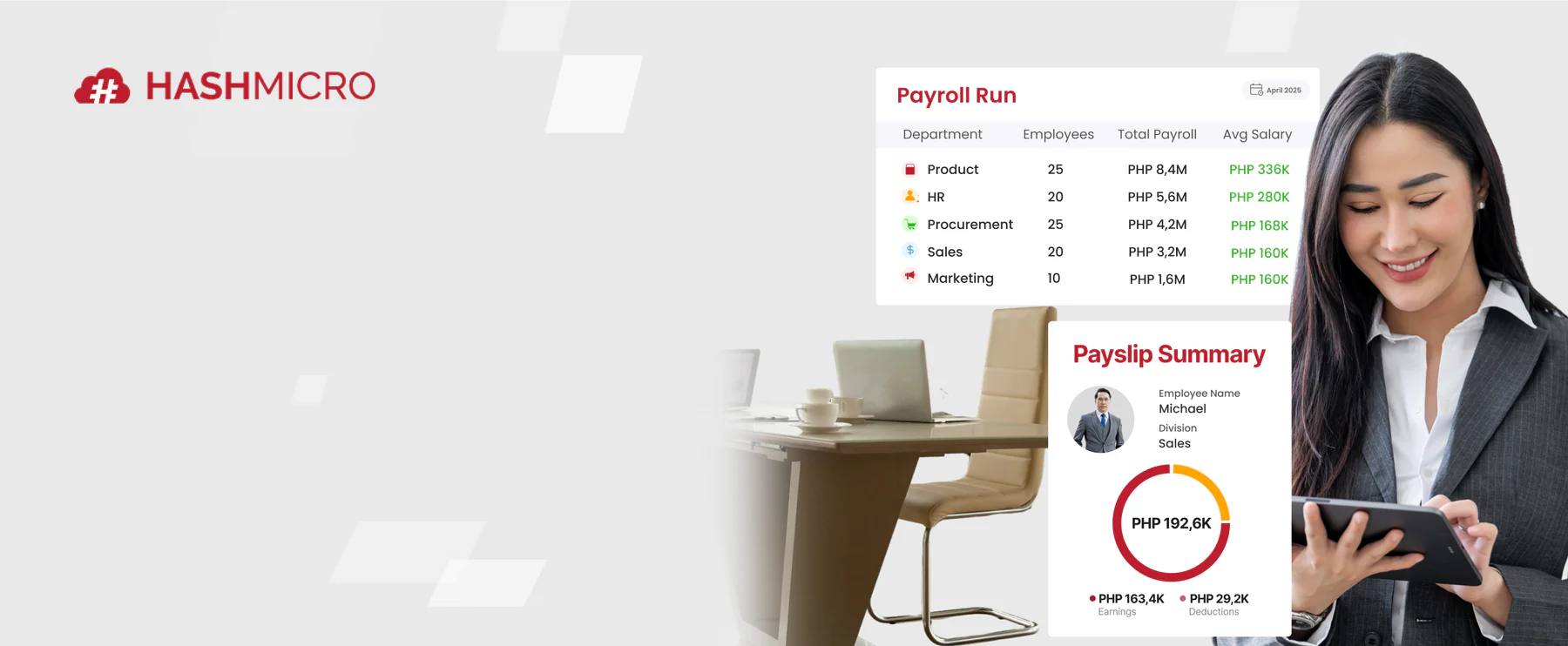
Once you have defined your requirements, budget, and evaluation criteria, assess how well each system supports your daily HR workflows. HashMicro’s HRM solution connects core HR processes in one platform for more coordinated workforce management.
How HRIS Supports Compressed Work Week & WFH Arrangements
Leave management during the 4-day workweek era presents unique challenges. A single leave request can affect payroll, staffing, and leave balances differently than in a standard five-day setup. An HRIS system applies leave policies based on each employee's actual work pattern, supports remote employee self-service for filing and attendance, and centralizes data to streamline compliance reporting across flexible arrangements, helping HR enforce a consistent telecommuting policy under DOLE.
How Cloud-Based HRIS Enhances Core HR Functions
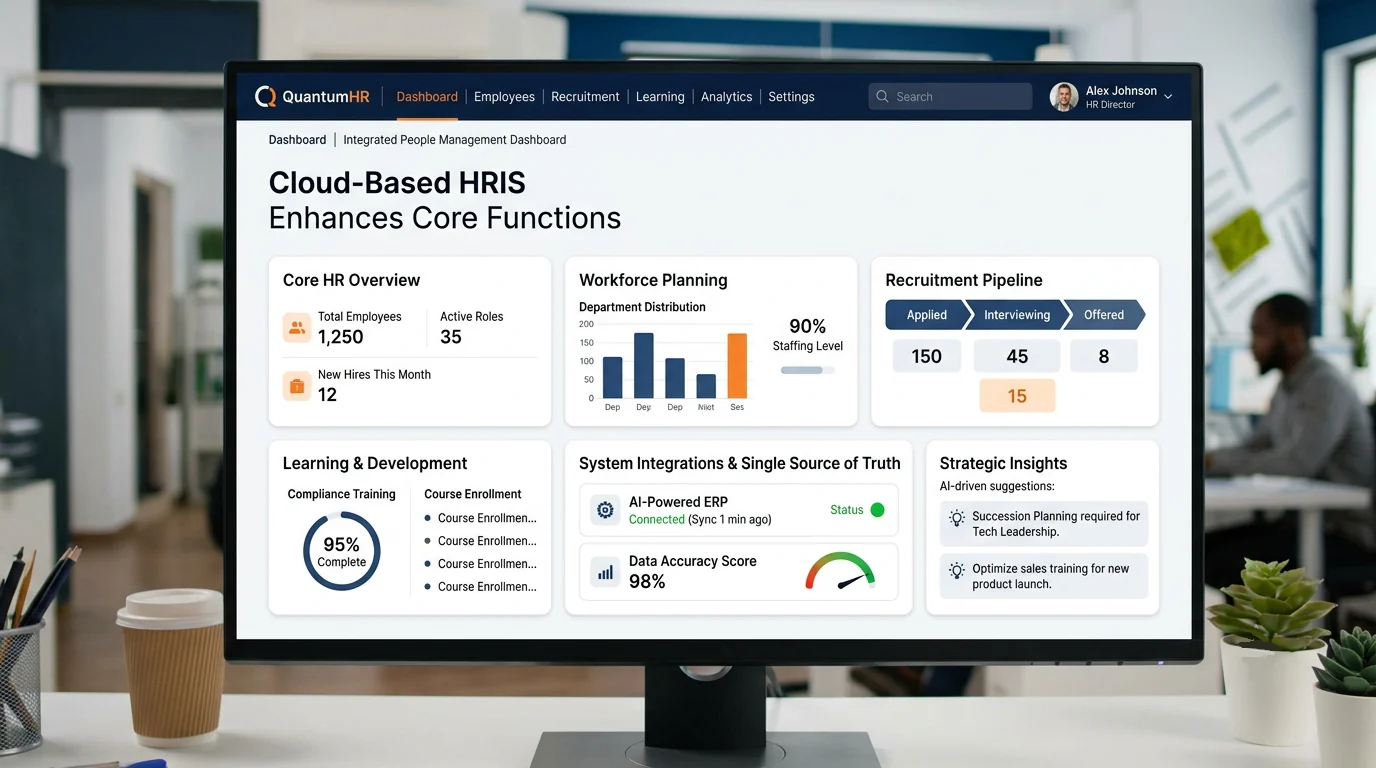
A human resource information system, or HRIS system, centralizes HR functions such as recruitment, training, and workforce planning while eliminating manual tasks. It gives HR teams a unified view of employee data that reduces errors and helps HR professionals support better business decisions.
A cloud HRIS system connected to an AI-powered ERP becomes more than record storage as it provides real-time HR data, maintains consistency, and aligns HR operations with business objectives. For businesses still evaluating options, comparing the top HRIS systems in the Philippines is a practical next step.
Conclusion
An HRIS system does more than store employee records. It automates routine HR tasks, connects key processes, and gives organizations a reliable data foundation. Companies that implement HRIS early reduce administrative overhead, improve compliance accuracy, and free HR teams to focus on work that drives business growth.
The right HRIS delivers its full value when it integrates with broader business systems. A cloud-based HRIS connected to an AI-powered ERP keeps data consistent and scales with business growth. It transforms HR from a record-keeping function into a strategic driver of workforce performance across the organization.
Philippine businesses need an HRIS system configured for local compliance requirements, DOLE regulations, and flexible work arrangements. HashMicro's HRM solution is built to meet these needs. Book a free consultation today and see how HashMicro's HR management system supports your team from day one.
FAQ For HRIS
The significance of an HRIS lies in its ability to connect people and workflows, supporting daily operations and boosting productivity. Employees use an HRIS system to access their own records, submit leave requests, and update personal details through self-service tools. It also helps HR teams collect and manage data needed for regulatory compliance.
No. A human resource information system is a broader platform that manages employee data, recruitment, attendance, performance, and benefits. Payroll is just one component. While some HRIS systems include payroll processing, others integrate with a separate payroll tool. The key difference is that HRIS covers the full employee lifecycle, not just compensation.
Data privacy is a critical factor when choosing an HRIS in the Philippines. HR systems process sensitive employee data, so they must comply with the Philippine Data Privacy Act and related security requirements. Vendors should clearly explain how data is stored, accessed, and secured, and demonstrate that their HRIS system handles personal information lawfully and responsibly.
Yes. While HRIS systems are common in large enterprises, cloud-based options make them accessible and cost-effective for small businesses too. A small business can use an HRIS to manage employee records, automate leave tracking, and maintain compliance without building a large HR team. The key is choosing a scalable system that matches current needs.
No. An HRIS system automates administrative tasks, but it does not replace the judgment, relationships, and strategic thinking that HR professionals provide. It handles data entry, reporting, and routine workflows. This frees HR teams to focus on employee development, culture building, and workforce planning. An HRIS makes HR more effective, not redundant.