
















Managing a business without a system is like trying to fill a jar with water while blindfolded: you won’t know when it’s full, where it’s leaking, or how much is being wasted. And by the time you realize something is off, the damage is already done.
Most business owners think accounting is just about recording income and expenses. But the right system does much more than that. It tells you where your money is going, flags problems before they grow, and gives you the numbers you need to make decisions with confidence.
In this article, we’ll break down what an accounting system really does, how it solves the financial challenges most businesses quietly struggle with, and how to know if your current setup is actually working for you.
Key Takeaways
|
Table of Contents
What is an Accounting System?
Accounting system is a method for recording a business’s financial records, including income, expenses, taxes, invoices, money from the business’s bank account, sales, and payroll. This system processes those transactions to generate reports, such as profit and loss statements and balance sheets.
A study from Acta Electronica Malaysia found that over 70% of managers in Candelaria, Quezon rely on an accounting system software to manage core functions such as accounts payable, billing, receivables, fixed assets, inventory, and payroll due to its reliability and ease of use. The research also shows that businesses using structured accounting systems experience clearer financial tracking and fewer manual errors, which helps improve efficiency in daily financial operations.
A well-organized accounting system software helps businesses maintain accurate records, stay financially organized, and make better strategic choices. Integrating AI-powered financial management further enhances this by automating routine tasks and providing predictive insights for more informed decision-making.
Why Philippine Businesses Need a Proper Accounting System
In the Philippines, having a proper accounting system is a legal requirement. The BIR mandates that businesses maintain a BIR-accredited Computerized Accounting System (CAS) capable of generating compliant reports such as books of accounts, official receipts, and tax returns. Non-compliance risks penalties, suspension of business registration, or a full BIR audit.
Beyond compliance, VAT filing, withholding taxes, and quarterly income tax returns all depend on accurate financial records. Without a proper system, small errors can snowball into costly discrepancies by filing season.
Features of Accounting Software
Accounting software should possess a range of features and functionalities to meet the diverse needs of businesses. Here are some essential features of an accounting system that businesses typically require:
- Expense tracking: The software should allow users to categorize expenses, capture receipts electronically, and reconcile expenses with bank transactions. Advanced expense tracking functionalities may include mileage tracking, vendor management, and approval workflows to streamline expense management processes.
- Invoicing and billing: It should support customizing invoices with company branding, itemizing products or services, and integrating with payment gateways for seamless transactions.
- Payroll management: The bookkeeping system should offer payroll processing capabilities, including calculating wages, managing deductions and benefits, generating pay stubs, and filing payroll administration Philippines taxes.
- Risk management and compliance: It aids in risk management by maintaining accurate records and automating compliance tasks. It helps identify potential risks and ensures regulatory compliance, safeguarding assets and maintaining stakeholder trust.
- Revenue management: This software provides insights into sales performance, pricing strategies, and customer profitability. It enables revenue tracking, forecasting, and analysis to facilitate revenue enhancement and cost reduction efforts.
- Financial reporting and analysis: Standard reports such as income statements, balance sheets, and cash flow statements should be available, along with customizable reporting options to meet specific business requirements.
Accounting software should offer a comprehensive suite of features and functionalities that address the diverse needs of businesses, from basic accounting tasks to advanced financial management and analysis capabilities.
Benefits of Accounting Systems for Businesses
A computerized accounting system software is important in modern business operations, offering benefits that contribute to efficiency, accuracy, and strategic decision-making. Here are some key reasons why accounting software is essential for businesses:
- Automation of financial processes: Accounting software automates repetitive tasks like invoicing, payroll, and 2 way matching. This software saves time and reduces errors associated with manual data entry.
- Enhanced accuracy and compliance: By minimizing errors and ensuring consistency in data entry, accounting software helps businesses maintain compliance with basic accounting guidelines and tax regulations to reduce the risk of penalties.
- Real-time financial insights: Accounting software provides visibility into key financial metrics and trends, enabling businesses to identify growth opportunities, allocate resources effectively, and mitigate risks.
- Scalability and flexibility: Accounting software adapts to evolving business needs and seamlessly scales to support growth, whether expanding into new markets, adding product lines, or adjusting organizational structure.
By automating key functions, ensuring compliance, and offering real-time insights, these systems empower businesses to allocate resources efficiently and adapt to growth with confidence. Leveraging accounting software ultimately leads to a more agile and resilient business capable of meeting changing market demands.
Accounting System vs. Accounting Information System (AIS)
An accounting system is a way businesses record and manage financial activities, like tracking income, expenses, assets, and liabilities. It can be done manually (using paper) or digitally (with software). Its main job is to organize and summarize financial data for reporting purposes.
An accounting information system (AIS), on the other hand, is a more advanced version that uses technology to handle financial data. It doesn’t just track and record finances—it also processes, stores, and shares the data, making it more accessible and efficient. An AIS includes:
- People: Those who use the system.
- Processes: Steps to collect and manage data.
- Data: All the financial information.
- Software: Tools to process the data.
- Hardware: Computers and networks that run the system.
- Security: Safeguards to keep data accurate and safe.
Key Difference
| Aspect | Accounting System | Accounting Information System (AIS) |
| Purpose | Records and manages financial transactions. | Processes, stores, and shares financial data in an integrated way. |
| Method | Manual or basic digital recording. | Technology-based system with software and hardware. |
| Components | Documents and transaction records. | People, processes, data, software, hardware, security. |
| Efficiency | Limited efficiency, especially if manual. | Automated, faster, more accurate, and scalable. |
| Output | Basic financial reports. | Real-time information with stronger data protection. |
Types of Accounting Systems
Accounting systems can be classified in different ways depending on how financial transactions are recorded and managed. Each type offers a distinct level of detail, accuracy, and operational complexity, so understanding these classifications helps businesses choose the system that best fits their needs. Broadly, accounting systems are grouped based on how entries are recorded and the method used to process financial data.
1. Based on How Entries Recorded
Based on how entries are recorded, there are two main types of accounting systems: single-entry and double-entry. These approaches vary in accuracy and detail—single-entry records each transaction once, while double-entry records it twice, as both a debit and a credit. This structure helps maintain balanced accounts and produces more reliable financial information.
| Type | Description | Best For |
| 1. Single-Entry Accounting | Records each transaction once, either as income or expense. Simpler but less detailed. | Small businesses with simple financial needs. |
| 2. Double-Entry Accounting | Records both debit and credit for every transaction, keeping accounts balanced and accurate. | Growing businesses that need higher accuracy, fraud control, and complete financial statements. |
2. Based on Method Used
Based on the method used to process financial data, accounting systems can be divided into three categories: manual, computerized, and cloud-based systems. Each method differs in terms of speed, accuracy, and the level of technology required. Manual systems rely on handwritten ledgers, computerized systems use installed software, and cloud-based systems operate online for real-time access. These three methods offer businesses different levels of efficiency and flexibility depending on their operational needs.
| System Type | Explanation |
| 1. Manual System | Transactions are recorded by hand in physical ledgers. Simple but time-consuming and prone to errors. |
| 2. Computerized System | Uses software to record and store transactions quickly, automating tasks like payroll, accounts payable, and revenue recognition through specialized revenue recognition software. |
| 3. Cloud-Based System | A computerized system hosted online, accessible anywhere, and designed to support a flexible, cost-effective accounting process for financial management. |
How Accounting System Works

Accounting information system uses various technologies to automate and streamline financial processes, enabling businesses to manage their finances more efficiently and effectively. Here’s an overview of how accounting software typically functions:
- Data entry: Financial administration platform allows users to input financial transactions electronically, covering sales invoices, payments, and journal entries.
Example, a purchasing staff member inputs a supplier invoice for ₱50,000 worth of office equipment into the system, including the vendor name, date, and amount. - Automated recording: Some software automates data entry through features like OCR and bank feed integration.
Example, when the business receives a scanned invoice via email, OCR technology automatically reads the document and populates the relevant fields, vendor, amount, and due date, without any manual typing. - Processing: The system processes transactions based on set rules and categorizes them into relevant accounts.
Example, using the ₱50,000 invoice example, the system automatically identifies it as a capital expenditure and categorizes it under the “Equipment” asset account rather than a regular operating expense. - Classification: Automated workflows ensure consistent and accurate transaction classification.
Example, any payment made to a supplier tagged under “Utilities” will always be classified under overhead costs, ensuring no transaction is misplaced in the wrong cost center. - Calculations: The software calculates sales revenue, taxes, and account balances from the entered transactions.
Example, when a sales invoice of ₱100,000 is recorded, the system automatically calculates the 12% VAT (₱12,000), the net amount due, and updates the total accounts receivable balance in real time. - Posting: It automatically posts calculated values to the general ledger, reducing errors and improving efficiency.
Example, once the ₱50,000 equipment purchase is processed and verified, the system posts a debit entry to the Equipment account and a credit entry to Accounts Payable, no manual ledger writing required.
These systems save time and reduce errors by streamlining data entry, ensuring consistent classification, and providing reliable calculations. Ultimately, bookkeeping systems empower businesses to focus on strategic growth.
Signs that Your Business Needs Accounting System
Several signs or problems can emerge within companies that signal the need for accounting software. Here’s a closer look at some of these indicators:
1. Manual data entry errors
If your company is experiencing frequent errors in financial records due to manual data entry, it may be a sign that you need accounting software. Manual entry is prone to mistakes, leading to inaccuracies in financial reports and potential compliance issues.
2. Time-consuming processes
If your employees spend excessive time on repetitive accounting tasks such as invoicing, reconciliations, or generating reports, this indicates inefficiencies in the process. Accounting software can automate these tasks, saving time and improving productivity.
3. Difficulty in tracking expenses
Companies struggling to track expenses effectively, especially in cases where there are multiple payment methods or reimbursement processes, may benefit from accounting software. These systems streamline expense tracking, categorization, and reconciliation, providing better visibility into spending patterns.
4. Limited financial insights
Businesses that lack real-time access to financial data or struggle to generate comprehensive reports may find it challenging to make informed decisions. Accounting software provides timely and accurate financial insights, enabling better decision-making and strategic planning.
5. Lack of integration
If your company’s accounting system software operates in isolation from other business functions such as stock control management, sales, or CRM, it can lead to data silos and inefficient workflows. An integrated, robust accounting system facilitates seamless data exchange between systems, improving operational efficiency and accuracy.
6. Dependency on paper-based records
Relying on paper-based records or outdated accounting methods can hinder productivity and increase the risk of data loss or theft. Accounting software digitizes financial records, providing secure storage, easy retrieval, and backup options to safeguard critical information.
If you need a guide to accounting software that can provide you with more well-rounded choices of the most well-known accounting system software in the Philippines, read further on the Accounting platforms for Philippine businesses for Filipino businesses here.
HashMicro Accounting Software as a Comprehensive Financial Management Solution
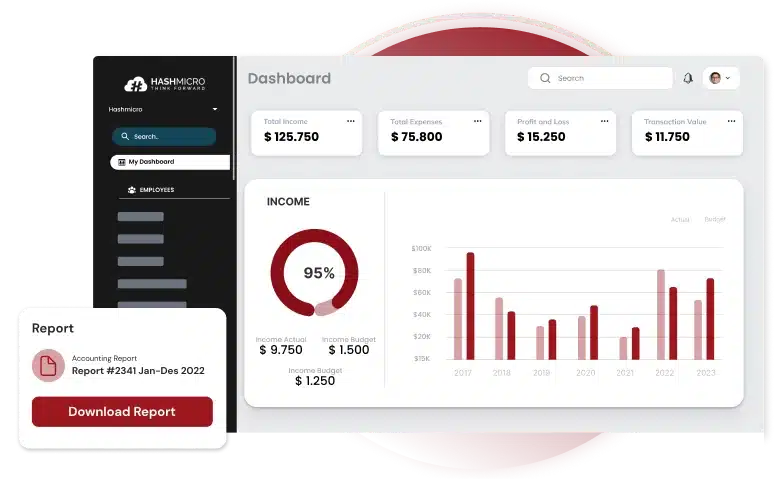
HashMicro offers the best accounting system softaware in the Philippines, designed to simplify and automate accounting processes for businesses of all sizes. It offers many features to facilitate efficient transaction tracking, invoicing, expense management, payroll processing, tax compliance, and financial reporting.
HashMicro is a principal company known for its standardized systems and commitment to delivering high-quality solutions. Trusted by over 1,750 clients, it proves HashMicro Accounting Software’s credibility and effectiveness in meeting businesses’ diverse needs.
This software covers end-to-end business processes, offering comprehensive features, such as:
- Invoicing and expense management: Create, send, and manage invoices while keeping full visibility over business spending.
- Payroll and tax compliance: Automate payroll calculations and stay BIR-compliant with automated tax reports and filings.
- Financial reporting: Generate real-time reports including income statements, balance sheets, and cash flow summaries.
- System integration: Connect seamlessly with sales, purchasing, CRM, HRM, and manufacturing modules for a unified business platform.
Interested in knowing how much it will cost for your business? Try the pricing calculator below for a personalized estimate.

Conclusion
A proper accounting system helps businesses manage finances, stay compliant with BIR regulations, and make more confident decisions. From tracking daily transactions to generating tax reports, the right system removes the guesswork and gives businesses a clearer picture of their financial health.
If you are still evaluating which solution fits your business, our guide to the best accounting software in the Philippines breaks down the top options by features, pricing, and business size so you can compare and find the one that works best for you.
FAQ about Accounting System
-
Is an accounting system required for small businesses in the Philippines?
Yes. Regardless of size, all businesses registered with the BIR are required to maintain books of accounts. If a business uses software to manage its finances, that software must be BIR-accredited as a Computerized Accounting System (CAS). Small businesses that rely solely on manual records are still required to keep organized ledgers that can be presented during a BIR audit.
-
How do cloud-based accounting systems benefit businesses in the Philippines?
Cloud-based accounting systems offer numerous benefits to businesses in the Philippines. These benefits include:
1. Enable real-time processing and data handling.
2. Improve accessibility, allowing use from any device with an internet connection.
3. Include features like automated backups and data recovery.
4. Streamline accounting processes.
5. Enhance data security to protect financial information.
6. Support remote work capabilities. -
What is the difference between an accounting system and bookkeeping?
Bookkeeping is the process of recording day-to-day financial transactions, such as sales, purchases, and payments. An accounting system is the broader structure that organizes, processes, and analyzes those records to produce financial reports and support business decisions. In short, bookkeeping is one part of what an accounting system does.
-
How much does accounting software cost in the Philippines?
Pricing varies depending on the features and scale of the software. Basic cloud-based options can start at around ₱500 to ₱1,500 per month, while more comprehensive solutions with payroll, tax compliance, and multi-module integration can range from ₱3,000 to ₱15,000 or more per month. Some providers also offer one-time licensing fees for on-premise systems. It is best to request a personalized quote based on your business size and needs.














