
















Modern warehouses and supply chains need clear, real time stock visibility. That is why many businesses use AIDC technology to replace manual counting and paper records, with barcodes and QR codes becoming the most common tracking tools.
Both help teams identify and track items, but they differ in data capacity, function, and use case. Knowing those differences helps businesses choose the right system for faster and more accurate inventory control.
Now that the role of barcodes and QR codes is clear, it is important to see how they differ in actual use. A closer comparison will help you choose the right fit for your inventory operations.
Table of Contents
Key Takeaways
|
Understanding the Basics of Inventory Tracking Technologies
 AIDC, or Automatic Identification and Data Capture, helps businesses identify items and record data without relying on manual input. This reduces human error and gives companies more accurate inventory records across warehouse and supply chain activities.
In daily operations, AIDC usually works through three parts: a label, a scanner, and software that updates stock data automatically. Barcodes have been the main option for years, but as operations become more complex, many businesses now also consider QR codes for greater data flexibility.
How 1D Barcode Tracking Works
 A barcode is a machine readable code that stores data using vertical lines and spaces of different widths. Traditional barcodes, also known as 1D or linear barcodes, became common in retail because they help cashiers identify products and check prices quickly.
A scanner reads the barcode by shining light across it. The dark bars absorb the light, while the white spaces reflect it back to the sensor. The scanner then turns that pattern into data, which links the item to its record in the inventory system.
A standard 1D barcode consists of several critical components:
- Quiet Zone: The blank margins on either side of the barcode that tell the scanner where the code begins and ends.
- Start and Stop Characters: Specific patterns of bars and spaces at the beginning and end of the code that indicate the direction in which the barcode is being read.
- Data Characters: The actual encoded information, typically an item number or SKU.
- Check Digit: A mathematical calculation based on the preceding digits, used to verify that the barcode was scanned correctly and to prevent read errors.
Common 1D Barcode Symbologies
Not all barcodes are created equal. Different industries have developed specific “symbologies” (the mapping between messages and barcodes) to suit their unique needs. Some of the most common 1D barcode types include:
- UPC (Universal Product Code): Standard retail barcode in North America, mainly used for point-of-sale scanning.
- EAN (European Article Number): Similar to UPC but used globally for retail products.
- Code 39: An older alphanumeric barcode often used in automotive and industrial settings.
- Code 128: A compact, high-density barcode commonly used for logistics, shipping, and warehouse tracking.
- ITF-14 (Interleaved 2 of 5): Often used on outer packaging and shipping cartons because it handles rough printing well.
QR Code Explained: The Shift to 2D Scanning
1D barcodes changed retail and inventory tracking, but they can only store a limited amount of data. As businesses needed to include more details like batch numbers, expiry dates, and serial numbers, traditional barcodes became less practical because the code had to get longer.
That is why 2D codes became more common, especially QR codes. Developed in 1994 by Masahiro Hara at Denso Wave, QR codes were created to track vehicle parts more efficiently and hold much more data than standard barcodes while still being easy to scan from different angles.
How QR Codes Encode and Read Data
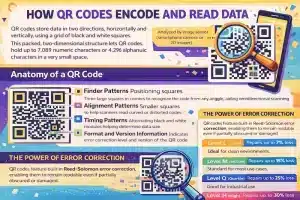 QR codes use a square pattern to store information across both height and width, not just along a single line. This design gives them far greater data capacity than traditional barcodes while keeping the code small enough for limited label space.
A QR code is scanned using an image sensor (like a smartphone camera or a 2D imager). The software analyzes the image, locates the code, and decodes the matrix. The anatomy of a QR code is highly sophisticated and includes:
- Finder Patterns: The three large corner squares that help scanners detect the QR code and read it from any angle.
- Alignment Patterns: Smaller squares that help the scanner read distorted or curved codes accurately.
- Timing Patterns: Alternating black and white lines that help define the code’s structure.
- Format and Version Information: Areas that show the error correction level and QR code size.
- Data and Error Correction Areas: Sections that store the main information and help recover damaged data.
The Power of Error Correction
One of the most revolutionary features of the QR code is its built-in Reed-Solomon error correction. This mathematical algorithm allows the QR code to remain readable even if it is partially obscured, dirty, or physically damaged. There are four levels of error correction in QR codes:
- Level L (Low): Can restore up to 7% of lost data. Ideal for clean environments where space is at a premium.
- Level M (Medium): Can restore up to 15% of lost data. The standard for most marketing and general use cases.
- Level Q (Quartile): Can restore up to 25% of lost data. Good for industrial environments.
- Level H (High): Can restore up to 30% of lost data. Essential for harsh warehouse environments, outdoor asset tracking, or when placing a logo in the center of the code.
Barcode vs QR Code: Key Differences Explained
 When evaluating a barcode vs QR code for your operational needs, the decision ultimately boils down to understanding their fundamental differences across several technical and practical dimensions. While both serve the purpose of identification, their capabilities differ drastically.
| Feature | Barcode | QR Code |
|---|---|---|
| Data Capacity | Stores small data like SKU; needs database lookup | Can store large data such as SKU, batch, expiry, and URLs |
| Physical Size | Gets longer as more data is added | Stores more data in a compact square code |
| Scanning Direction | Must align scanner horizontally | Scans from any angle (omnidirectional) |
| Damage Tolerance | Easily unreadable if label is damaged | Can still scan even if up to 30% damaged |
Advantages and Disadvantages of Traditional Barcodes
Despite the advanced capabilities of newer technologies, the 1D barcode remains the most widely used tracking technology globally. Understanding its strengths and limitations is crucial for supply chain architects.
| Advantages | Disadvantages |
|---|---|
| ✓ Uses global standards like UPC and EAN, so retailers widely accept it. |
✗ Stores limited data and often needs a database to show full item details. |
| ✓ Low setup cost because scanners and labels are easy to find. |
✗ Scratches or smudges can make it hard to scan. |
| ✓ Works very fast in checkout and other simple scanning tasks. |
✗ Needs a flat and fairly wide surface, so curved items can be tricky. |
Advantages and Disadvantages of QR Codes
The adoption of QR codes in inventory management has skyrocketed, particularly as mobile technology has permeated the warehouse floor. However, they are not a perfect silver bullet for every scenario.
| Advantage | Disadvantage |
|---|---|
| ✓ Stores more data, including serial numbers, batch details, and links. |
✗ Requires 2D scanners or camera-based devices, so hardware upgrades may be needed. |
| ✓ Fits small labels, making it suitable for compact products and components. |
✗ May feel excessive for simple businesses with limited tracking needs. |
| ✓ Remains readable even when partially scratched or damaged. |
✗ Cannot fully replace UPC codes in many retail checkout systems yet. |
| ✓ Can be scanned with smartphones, which may reduce device costs. |
✗ Scanning results can vary depending on camera quality and label condition. |
Hardware and Software Requirements
 The debate over barcode vs QR code extends beyond the labels themselves it deeply impacts the hardware and software ecosystem of your business. The tools required to read, process, and manage these codes are distinct.
Scanning Technologies Explained
1D barcodes are read by laser or CCD scanners, while QR codes need a 2D imager, which can read both 1D and 2D codes, making it ideal for upgrades.
Software and ERP Integration
Scanned data must integrate into inventory software or ERP, with the system parsing QR code data and automatically updating the database fields.
Industry-Specific Use Cases: Barcode vs QR Code in the Real World
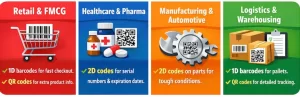 When evaluating a barcode vs QR code, looking at how different industries apply these technologies provides invaluable context. The “best” choice is rarely absolute; rather, it is highly dependent on the specific regulatory requirements, physical environments, and data needs of a given sector.
1. Retail and FMCG
Retail relies on 1D barcodes because they support fast checkout and simple product identification. Many brands now also add QR codes for extra product information.
2. Healthcare and Pharmaceuticals
Healthcare uses 2D codes because they can store important details like serial numbers, batch numbers, and expiry dates in a small space.
3. Manufacturing and Automotive
Manufacturers often use 2D codes on parts because they stay readable even in tough production environments.
4. Logistics and Warehousing
Logistics teams often use both. 1D barcodes work well for pallets, while QR codes help track items that need more detailed data.
Conclusion
In conclusion, 1D barcodes are ideal for fast, high volume tasks like retail checkout due to their simplicity and cost effectiveness. They are widely used for quick product identification with minimal data.
QR codes, on the other hand, are better suited for industries that need more data capacity, flexibility, and durability. They are perfect for tracking items with complex details and offer better error correction, making them ideal for sectors like healthcare, manufacturing, and logistics.
FAQ About Barcode vs QR Code
-
What is the main difference between 1D barcodes and QR codes?
1D barcodes store data in one direction (horizontally), while QR codes store data in both directions (horizontally and vertically), allowing for much greater data capacity in a smaller space.
-
How much data can a QR code hold compared to a 1D barcode?
A 1D barcode typically holds 12-85 characters, while a QR code can hold up to 7,089 numeric characters or 4,296 alphanumeric characters, making QR codes ideal for more detailed information.
-
Why are QR codes more durable than 1D barcodes?
QR codes have built-in error correction (Reed-Solomon), allowing them to be read even if they are partially damaged or obscured. 1D barcodes, however, can become unreadable if scratched or smudged.
-
Can QR codes replace 1D barcodes in retail?
While QR codes offer more data capacity, 1D barcodes are still widely used in retail for fast checkout. QR codes are increasingly used on packaging for extra product information and consumer engagement.
-
Are 1D barcodes cheaper to implement than QR codes?
Yes, 1D barcodes are cheaper to implement, with affordable scanners and simple printing methods. QR codes may require more advanced scanning devices and software, making them slightly more expensive to implement.














