






POS terminals quietly handle billions of transactions every day, keeping businesses afloat, yet many owners still underestimate the impact these devices have on speed, security, and overall operations. Understanding how POS terminals work, their types, key features, and compliance standards helps you choose a setup that truly fits your business needs.
Table of Contents
Key Takeaways
|
What Is a POS Terminal?
A point-of-sale (POS) terminal is an electronic device used at the point of sale. Its hardware interface serves as both the customer’s payment method (Debit, credit, mobile wallet, contactless payment, etc.) and the merchant’s payment-processing infrastructure. In its simplest form, a terminal reads payment data, communicates with financial institutions to authorize the transaction, and confirms the result to both the merchant and the customer.
Point of sale refers to the precise moment and location where a purchase is completed, but today it encompasses far more than a simple cash register. It has evolved into a sophisticated ecosystem of hardware and software that can manage inventory, track customer loyalty, process multiple payment types, and generate detailed sales analytics all in real time.
A POS terminal is not the same as a complete POS system. A POS terminal is the payment device itself, while a full POS system includes the terminal, software, connected hardware, and integrations that link these components. Modern terminals now go further by being mobile, cloud-connected, and central to daily business operations.
How POS Terminals Work
Understanding how a POS terminal processes a payment requires following the transaction through several distinct technical stages. While this happens in seconds, each step involves multiple systems working in coordination.
Step 1: Payment Data Capture
When a customer presents a payment card, the terminal captures the relevant financial data using one of several input methods:
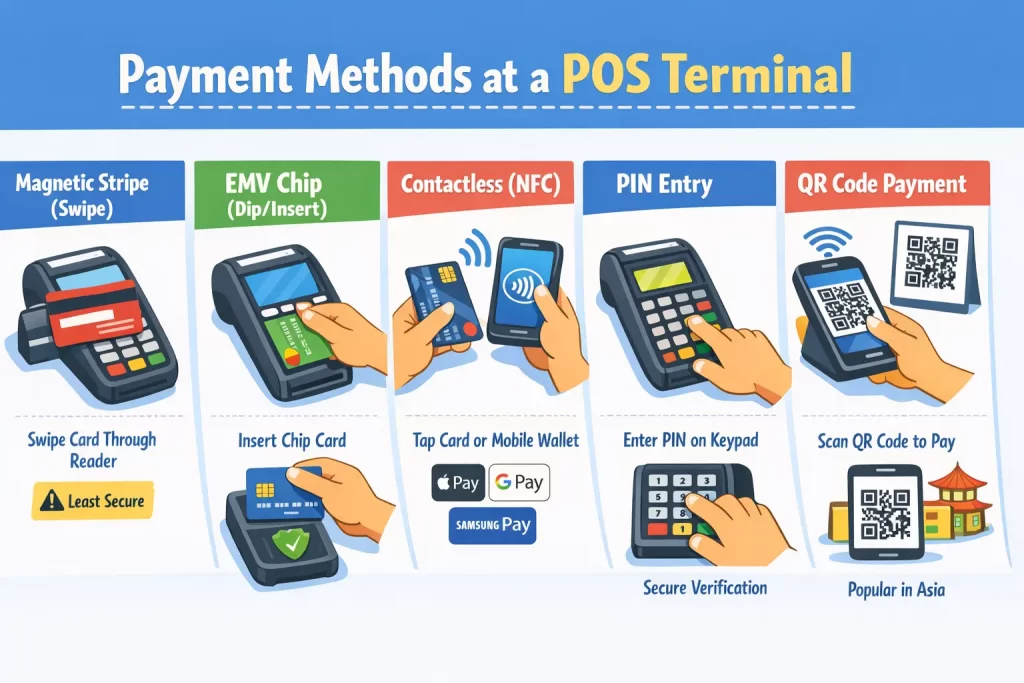
- Magnetic stripe (swipe): The card’s magnetic stripe stores encoded account information. Swiping the card through a reader pulls this data. This is the oldest and least secure method, as magnetic stripe data can be cloned relatively easily.
- EMV chip (dip/insert): Europay, Mastercard, and Visa (EMV) chips generate a unique cryptogram for each transaction, making it far harder to counterfeit. The customer inserts the card and leaves it in the reader while the transaction processes.
- NFC/Contactless (tap): Near-field communication allows cards and mobile wallets (Apple Pay, Google Pay, Samsung Pay) to transmit payment data wirelessly when held within a few centimeters of the terminal’s contactless reader.
- PIN entry: For debit transactions and additional verification on credit transactions, the customer enters a personal identification number on the terminal’s encrypted keypad (PIN pad).
- QR code scanning: In some markets, particularly across Southeast Asia, customers scan a merchant-displayed QR code or present their own QR code for the terminal to scan, linking the transaction to their mobile banking or e-wallet account.
Step 2: Encryption and Tokenization
The terminal encrypts payment data as soon as it gets captured. Modern terminals use Point-to-Point Encryption (P2PE), which renders card data unreadable as soon as it enters the device. In tokenization, the actual card number (Primary Account Number, or PAN) is replaced with a randomly generated token that has no exploitable value outside the specific merchant or processor ecosystem. This prevents intercepted data from being used fraudulently.
Step 3: Authorization Request
The encrypted transaction data travels from the terminal through a payment gateway to the acquiring bank (the merchant’s bank). The acquiring bank forwards the request to the card network (Visa, Mastercard, UnionPay, etc.), which routes it to the issuing bank (the customer’s bank). Within 1 to 3 seconds, the issuing bank checks the account balance, credit limit, fraud flags, and card status, then returns an approval or decline code.
Step 4: Authorization Response and Completion
The terminal receives the response. If approved, it displays a confirmation, optionally prints a receipt, and stores a transaction record. If declined, the customer is prompted to try another payment method. At the end of the business day (or at defined settlement intervals), the merchant’s terminal sends all approved transactions in a batch to the acquiring bank for settlement (the actual transfer of funds into the merchant’s account).
Step 5: Reporting and Reconciliation
Modern terminals and the POS software connected to them log every transaction, timestamp, and outcome. This data flows into reporting dashboards, accounting integrations, and inventory management systems, giving businesses a real-time and historical view of their financial performance.
At the same time, businesses must reconcile POS records with payment processor reports, bank settlements, refunds, voids, and chargebacks to confirm that every transaction is accurately recorded and that the funds received match sales made.
Types of POS Terminals
The market offers a wide range of terminal form factors, each designed for different use cases. Choosing the right type is one of the most important decisions a business will make when building its checkout infrastructure.
| System | Examples |
| Traditional countertop terminals are fixed-payment devices installed at checkout counters, typically connected via Ethernet or Wi-Fi. They handle high transaction volumes well and are common in retail stores, groceries, and quick-service restaurants. |
|
| Wireless and mobile terminals are portable devices that connect via Wi-Fi or cellular networks, enabling staff to accept payments away from a fixed point of sale. They are useful for businesses that need flexibility in where payments are made. |
|
| Smart (Android/iOS) terminals are advanced payment devices with touchscreen interfaces and operating systems such as Android or iOS. They can run POS apps, loyalty tools, analytics software, and digital receipts, making them more versatile than standard terminals. |
|
| Self-service kiosk terminals are payment terminals integrated into standalone kiosks that allow customers to browse, order, and pay independently. These are often used to reduce staff workload and speed up service during busy periods. |
|
| Integrated POS systems are terminal setups connected directly to wider business systems such as inventory, CRM, scheduling, and accounting. These are often used by large businesses that need one connected platform across operations. |
|
| Virtual terminals are software-based payment terminals that allow merchants to enter card details via a browser or app manually. They are useful for remote payments, but they typically carry higher fraud risk and transaction costs. |
|
Key Features to Look For in a POS Terminal
Not all terminals are created equal. When evaluating options, businesses should assess both hardware specifications and software capabilities to determine long-term usefulness.
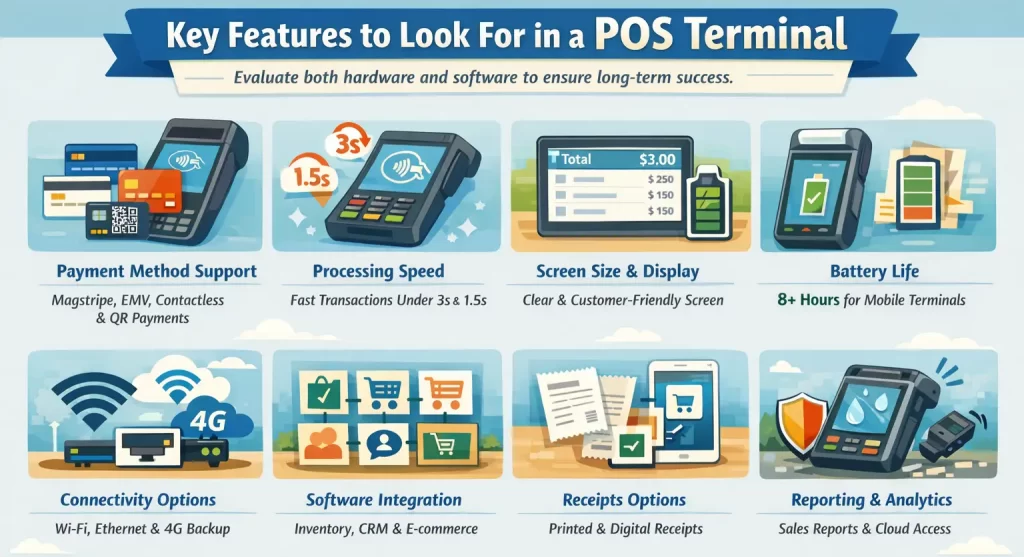
- Payment Method Support: Support multiple payment methods, including magstripe, EMV chip, contactless, and QR payments. In markets such as the Philippines, Indonesia, Singapore, and other Southeast Asian nations, QR payments are non-negotiable.
- Processing Speed: Prioritise fast transaction processing to reduce queues and improve checkout experience. Ideally, a process EMV chip transactions should be done in under 3 seconds, and contactless payments in under 1.5 seconds
- Screen Size and Display Quality: Choose a clear, responsive screen that helps both staff and customers. Customer-facing screens that show the transaction total, itemized list, and promotional messages improve transparency and engagement.
- Battery Life (for Mobile Terminals): Ensure strong battery life for mobile terminals to avoid service disruption. Wireless terminals should offer at least 8 hours of continuous operation under typical usage loads
- Connectivity Options: Look for flexible connectivity like Wi-Fi, Ethernet, and cellular backup. Dual-SIM or automatic failover to cellular when Wi-Fi drops out is a valuable feature for retail environments.
- Software Integration Capabilities: Check integration with inventory, accounting, CRM, loyalty, and e-commerce systems.
- Receipt Options: Offer both printed and digital receipts for convenience and lower paper use.
- Reporting and Analytics: Include reporting and analytics to track sales, peak hours, and performance. Implement cloud-based reporting accessible remotely.
- Hardware Durability: Select durable hardware that can handle heavy daily use and lower replacement costs. Look for terminals with IP-rated water resistance, tempered glass screens, and drop-test certifications.
POS Terminal Connectivity and Integration

A POS terminal does not operate in isolation; its value is multiplied by how well it integrates with a business’s broader technology ecosystem. Understanding connectivity options and integration capabilities is essential for building a scalable payment infrastructure.
1. Network Connectivity
Ethernet: Wired Ethernet provides the most stable and fastest connection for countertop terminals. It is the preferred option for high-volume retail environments where connection reliability is critical, and the terminal’s fixed location makes cabling practical.
Wi-Fi (802.11 a/b/g/n/ac): Wi-Fi provides flexibility within a defined coverage area and is suitable for most retail and hospitality settings. Dual-band Wi-Fi (2.4GHz and 5GHz) capability is preferable, as the 5GHz band offers higher speeds and less interference in congested networks.
Cellular (4G LTE/5 G): Built-in cellular connectivity enables terminals to operate anywhere with mobile network coverage, ideal for delivery vehicles, outdoor markets, and field sales teams, and provides failover when primary network connectivity is lost.
Bluetooth: Bluetooth is used primarily for connecting peripheral devices such as receipt printers, barcode scanners, and cash drawers to the terminal, rather than for internet connectivity.
2. Payment Gateway Integration
The payment gateway is the intermediary software layer that securely transmits transaction data between the terminal and the payment processor. Terminals must be certified to work with specific payment gateways. When selecting a terminal, confirm that it is compatible with your preferred payment processor and supports the card networks you need to accept.
3. ERP and Business Software Integration
For medium and large enterprises, integrating terminal data with an Enterprise Resource Planning (ERP) system is essential for improving operational efficiency. Each sale recorded at the terminal should automatically update inventory, post revenue to the correct accounting ledger, and sync customer purchase history to the CRM without requiring manual re-entry.
4. Omnichannel Integration
Retailers that operate both physical stores and online channels need to synchronize terminal data with their e-commerce platform. They should keep customer purchase histories consistent across all channels, update inventory in real time, and apply loyalty points regardless of whether customers buy in-store or online. Terminals with omnichannel integration enable this unified customer view.
Security Standards and POS Terminal Compliance

Payment security is a legal and contractual requirement for any business that accepts card payments. Understanding the standards governing POS terminal security helps merchants protect their customers, reputation, and finances.
1. PCI DSS Compliance
The Payment Card Industry Data Security Standard (PCI DSS) is the global security framework developed by the major card networks (Visa, Mastercard, American Express, Discover, and JCB) to protect cardholder data. Any business that accepts, processes, stores, or transmits card payment data must comply with PCI DSS requirements.
PCI DSS mandates include:
- Installing and maintaining a firewall configuration to protect cardholder data
- Protecting stored cardholder data with strong encryption
- Encrypting transmission of cardholder data across open, public networks
- Using and regularly updating anti-virus software
- Restricting access to cardholder data on a need-to-know basis
- Assigning a unique ID to each person with computer access
- Regularly monitoring and testing networks
- Maintaining an information security policy
Terminals themselves must be PCI PTS (PIN Transaction Security) certified, which validates that the hardware meets strict security requirements for PIN entry and cardholder data protection.
2. EMV Certification
EMV certification verifies that a terminal properly supports chip-based payment standards. Card networks such as Visa and Mastercard require this certification before merchants can accept EMV chip cards. Merchants who use non-EMV terminals assume greater risk: when fraud occurs on a swipe-only terminal, they typically absorb the loss rather than the issuing bank under EMV liability shift rules.
3. Point-to-Point Encryption (P2PE)
P2PE solutions encrypt cardholder data from the moment of card swipe, tap, or dip, ensuring that data is never in an unencrypted state within the merchant’s environment. This significantly reduces the scope of PCI DSS compliance requirements and protects against terminal tampering and data interception attacks.
4. Tokenization
Tokenization replaces sensitive card data with a non-sensitive placeholder (token) that can be stored and used for recurring transactions without exposing actual card numbers. This is particularly important for subscription businesses and those that store card-on-file data for repeat customers.
5. Physical Security Features
Modern terminals incorporate physical anti-tamper mechanisms. If someone attempts to physically open or modify the terminal to install a skimming device, it will detect the intrusion, wipe its cryptographic keys, and render itself non-functional. Staff should be trained to visually inspect terminals regularly for signs of tampering and never allow unauthorized individuals to handle terminal hardware.
6. TLS/SSL Encryption
All data transmitted between the terminal and the payment gateway must be encrypted using Transport Layer Security (TLS) version 1.2 or higher. Older versions of SSL and early TLS versions are deprecated due to known vulnerabilities and must not be used in PCI DSS-compliant environments.
Industries That Rely on POS Terminals

Different industries have distinct requirements that shape how terminals are deployed and configured. Examining sector-specific use cases reveals the full range of terminal applications.
- Retail: Retail businesses are a core market for POS terminal technology as they all need efficient and accurate payment processing at checkouts. They use POS terminals to speed up checkout, scan products, sync inventory, manage loyalty programs, and support multiple payment lanes from a single, centralized platform, with all transaction data aggregated in a single management system.
- Food and Beverage: Restaurants, cafés, and bars rely on POS terminals for tableside payments, faster service during peak hours, and integration with kitchen display and table management systems. This helps make your experience easier, avoids bottlenecks, and reduces the risk of card skimming.
- Hospitality: Hotels use POS terminals across front desks, restaurants, spas, pool bars, and room service, with integration into property management systems for room charges, pre-authorizations, and split payments.
- Healthcare: Clinics, pharmacies, dental practices, and hospitals use POS terminals to handle co-payments, prescription purchases, and deposits while maintaining strict payment and data privacy standards such as HIPAA and PCI DSS compliance.
- Transportation and Ticketing: Taxis, ride-hailing services, buses, trains, and airline counters need mobile POS terminals that can handle unstable connectivity and issue tickets or receipts in real time.
- Event and Entertainment: Concerts, festivals, sports venues, and amusement parks depend on wireless POS terminals with long battery life and cashless payment systems. cellular connectivity, often as part of cashless payment system.
- Government Services: Government agencies use POS terminals to collect taxes, fines, and public service fees while ensuring strong security, audit trails, and integration with financial management systems. It often provides multi-currency or multi-payment-type support to serve diverse populations.
Making the Most of Your POS Terminal Investment

POS terminals have evolved far beyond simple cash registers; they are now essential tools that influence payment speed, security, customer experience, and operational efficiency. In a competitive market, the right terminal can improve accuracy, enhance financial visibility, and support smoother business operations when integrated with other tools.
Do not choose a POS terminal based solely on price. A cheaper device can create bigger problems if it fails to integrate with your software, support your preferred payment methods, or receive proper support. Businesses achieve better long-term results when evaluating terminals based on connectivity, integration, security, scalability, and total cost of ownership.
Remain competitive and future-ready by staying informed about emerging capabilities, including SoftPOS, biometric authentication, and CBDC support. The terminals you deploy today will shape the payment experience you offer customers for the next three to five years, a time period in which consumer payment preferences and technology capabilities will shift substantially. Choosing wisely now sets the foundation for that evolution.
Conclusion
FAQ for POS terminals
-
Where are POS terminals found?
POS terminals can be found in places that accept customers payment , such as retail stores, supermarkets, restaurants, cafés, pharmacies, hotels, clinics, and other service counters. Modern terminals are also used by mobile sellers and field businesses because some devices can accept cards, QR payments, and e-wallets in one unit.
-
How much is a POS terminal in the Philippines?
The cost varies by provider and setup. In the Philippines, some POS terminal providers use a subscription model instead of a large upfront purchase. For example, Maya has publicly stated a subscription price of PHP 949 per month on one of its business pages, while its published pricing pages also show transaction fees that vary by payment method, such as 3.50% MDR for major card payments and 1.50% MDR for QR payments.
-
Can I use POS without BIR registration?
No, for businesses in the Philippines using a POS machine for sales without proper BIR registration is not a safe approach. BIR rules state that registration of POS/CRM and similar sales machines is done through the Enhanced eAccreg System, and BIR regulations also recognize invoices or receipts generated by registered CRM/POS and related systems. So if you are operating a business and using a POS for official sales transactions, it should be properly registered with the BIR.
-
Is POS the same as ATM?
No, a POS terminal is mainly used by merchants to accept and record customer payments at the point of sale, while an ATM is a banking machine mainly used by customers for cash withdrawal, balance inquiry, and other bank account services. Some payment terminals may look similar, but their purpose is different.