





Philippine merchants are collecting more digital payments than cash at the counter, and many checkout setups have not caught up. According to the Bangko Sentral ng Pilipinas, digital payments reached 57.4% of monthly retail transaction volume in 2024, up from 52.8% in 2023. Counters still running on a standalone cash register end up with two records that never match: one in the drawer, one in the spreadsheet. Choosing between the available types of POS system is what closes that gap.
The cost of picking wrong is not only operational. A POS that cannot issue BIR-compliant receipts exposes the business to penalties during an audit, and one that cannot sync branches leaves managers approving purchase orders on week-old stock figures.
This guide breaks down 10 POS system types used in the Philippines today. For each one you get the key features, an indicative local price range, the kind of business it suits, and its main limitation. An overview table lets you compare all 10 side by side, and a closing section covers the BIR registration and accreditation rules every POS in the country must meet.
Key Takeaways
A Point of Sale (POS) system combines hardware and software businesses used to process sales transactions. It is the main site where clients make purchases and companies monitor sales, control inventories, and provide reports.
Today, businesses use a select few POS system options. We’ll review different types of POS system definitions, key characteristics, pricing ranges, and a few POS examples.
The right POS system depends on transaction volume, online or offline operations, budget, and tool integrations.
In the Philippines, all POS machines must be BIR registered and accredited before use, and are required to generate X reading and Z reading reports for tax compliance.
What is a Point of Sale System?

A Point of Sale (POS) system combines hardware and software businesses used to process sales transactions. It is the main site where clients make purchases and companies record sales, control inventories, and provide reports. POS systems come in two varieties: cloud based and traditional (on-premises), with features specific to e-commerce, retail, and hospitality.
With a point-of-sale (POS) system, businesses can accept cash, credit/debit cards, mobile wallets, and other digital payment methods. The POS system helps owners make well informed decisions by offering real time revenue, sales trends, and business performance statistics.
Any company hoping to increase sales, improve customer satisfaction, and streamline operations needs a point-of-sale (POS) system. The right POS system investment may greatly increase productivity and profitability for both small and large organizations.
Types of POS Systems
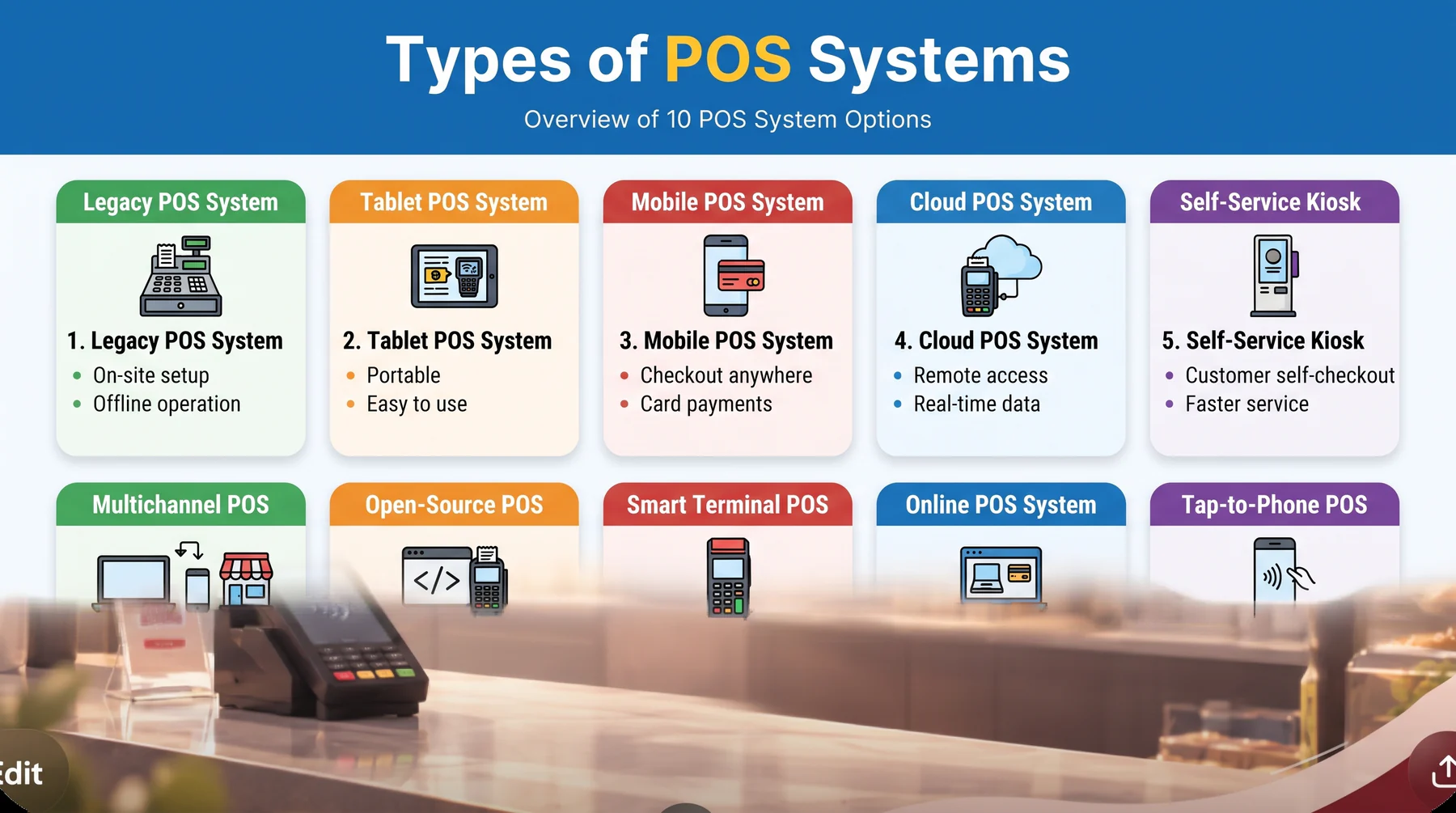
Today, businesses use a select few point of sale system. We’ll review different types of POS system definitions, key characteristics, pricing ranges, and a few POS examples. Keep in mind that the features offered by these systems frequently overlap.
1. Legacy POS system
The hardware used by this system is usually exclusive and only accessible from the POS supplier. Orientation is lengthy and slow since legacy retail point-of-sale systems require much more training than other systems. Additionally, you’ll need someone to install the system and be onsite for any necessary maintenance.
Key features: Barcode scanning, tax and discount computation, offline operation, business reporting, and strong data security.
Pricing and examples: In the Philippines, the average package for legacy POS systems starts at ₱75,000, including software and hardware. Point of sale system example in the Philippines is certain gas stations use legacy POS systems that connect with petrol dispensers and accept cash and credit card payments.
2. Tablet based POS system
Typically, tablet-based systems are self-installable and self-maintained, allowing you to start using them whenever it is convenient. Most tablet-based retail point-of-sale (POS) systems, such as Square Retail POS, are cloud-based solutions that enable you to manage your business from anywhere.
Key features: Intuitive tablet interface, multiple transaction methods, customer data collection, and social media integrations.
Pricing and examples: Implementing a tablet based Point of Sale (POS) system in the Philippines costs roughly ₱25,000 to ₱75,000 for a reliable tablet and accessories and an extra ₱1,500 to ₱7,500 for software subscription fees.
Small businesses and food trucks are examples of POS systems in the Philippines. These commonly use tablet based POS systems for contactless payments, invoicing, and real time sales tracking.
3. Mobile POS system
A mobile point of sale system is a modern, portable POS system. Mobile devices, such as tablets or smartphones, operate the point-of-sale software. With the mobile POS solution, customers don’t have to disrupt their shopping experience to purchase. Instead, any store staff can check out consumers using a mobile system.
Key features: Portable hardware, line busting capabilities, integrated card reader, and multiple shopping fulfillment options.
Pricing and examples: Mobile POS systems need portable devices like smartphones or tablets to process transactions. Prices for devices and accessories typically range from ₱15,000 to ₱50,000, plus an extra ₱900 to ₱2000 for software subscription, depending on the brand and features.
A mobile POS allows businesses to accept card payments using a compact card reader connected to a smartphone or tablet. Pop up stores, food trucks, and events for real time reporting and inventory management commonly use mobile POS systems.
4. Cloud based POS system
A cloud-based POS system saves data in the cloud rather than on a local device or network. This implies that you can view and modify company data from any location. However, before adopting a cloud-based or mobile setup, it's worth choosing a secure POS system type that fits your risk tolerance
Key features: Remote access to business data, modern hardware compatibility, multiple fulfillment options, and easy integration with existing tools.
Pricing and examples: The initial investment for implementing a cloud based POS system in the Philippines can range from approximately ₱25,000 to ₱75,000. This estimate includes hardware, software, installation, and training.
Ongoing monthly costs for software subscriptions and support services can add ₱1,299 to ₱1,999, depending on the chosen provider and plan. Cloud POS offers a real time dashboard, inventory and purchase tracking, and CRM features. Cafes, restaurants, and small retail businesses use it.
5. Self service kiosk POS
A self service kiosk is a point-of-sale system that enables customers to explore, order, and pay for goods and services independently without the direct help of business employees. These kiosks are usually positioned in busy sections of shops or eateries to increase customer service effectiveness and cut down on wait times.
Key features: Independent ordering and payment, support for loyalty points and mobile payments, customer behavior analytics, and reduced labor costs.
Pricing and examples: The price of a self service kiosk varies based on size, materials, and features. In the Philippines, a basic kiosk can range from ₱50,000 to ₱200,000, while more advanced models may cost ₱500,000 or more.
In the Philippines, self service kiosk POS systems are found in most fast food chains, restaurants, and high traffic food establishments. Businesses can reduce queues, enhance order accuracy, and offer a seamless customer experience by using them.






6. Multichannel POS systems
Multichannel point-of-sale (POS) systems are made to handle inventory and sales on various platforms, including mobile, internet, and in store. By combining all sales data onto a single platform, these systems give merchants an integrated view of their business operations.
Multichannel point-of-sale (POS) systems will be very helpful for businesses that operate across multiple sales channels and must guarantee a consistent consumer experience.
Key features: Unified customer experience, real time inventory management across all channels, consolidated sales view, and flexible order fulfillment.
Pricing and examples: Essential components like tablets, barcode scanners, receipt printers, and cash drawers can cost between ₱10,000 and ₱50,000, depending on quality and brand, while the subscription fee for software costs around ₱1,500 to ₱30,000, depending on features and scalability.
POS for cafés, POS restaurant, and food businesses are the most common examples of multichannel POS systems because they offer an all in one solution for dine in and delivery sales. These systems integrate online payments in store and connect with online orders.
7. Open source POS systems
Open source point-of-sale (POS) systems give users access to their source code, enabling companies to modify the program to suit their unique requirements. Because of their flexibility and control, open source point-of-sale (POS) systems are an attractive choice for shops with particular needs or technological expertise.
Key features: Full customization, flexible integrations, active developer communities, and scalability as the business grows.
Pricing and examples: Most open source POS systems are free, allowing businesses to download and use the software for free. Customizing the software to meet specific business needs or integrating it with existing systems may require hiring developers, leading to additional expenses.
Retail stores, restaurants, and service based businesses in the Philippines mostly use open-source retail POS systems. These systems help them with inventory management, e-commerce integration, real time sales tracking, and mobile accessibility. Small and medium enterprises and local retailers customize POS systems to integrate with their online and offline stores.
8. Smart Terminal POS
A smart terminal is an all-in-one Android device that merges the screen, card reader, and receipt printer into a single unit that fits in one hand. Unlike a tablet setup, the payment hardware is built in, so there is no separate reader to pair or charge. Most units ship with an app store, letting merchants add loyalty, e-wallet, or inventory apps without replacing the device. Before you shortlist a vendor, compare the best retail POS systems sold in the Philippines, because terminal pricing and local support differ widely by brand.
Key features: Built-in card and QR reader, thermal printer in the same unit, Android app ecosystem, and 4G plus Wi-Fi connectivity.
Pricing and examples: Smart terminals in the Philippines generally run from ₱18,000 to ₱45,000 per unit, with software fees of ₱800 to ₱2,500 monthly. Pharmacy chains, convenience stores, and salon counters favor them because one device replaces three.
Main limitation: Screen size makes large catalogs slower to browse than a tablet or desktop terminal.
9. Online POS System
An online POS runs entirely in the browser and treats the web storefront as the primary till. Orders from the website, marketplace listings, and social commerce channels land in the same order queue that staff work from, so stock is deducted once no matter where the sale started. It suits sellers whose revenue is mostly online but who still fulfill or accept walk-ins from a warehouse or showroom.
Key features: Browser-based checkout, marketplace and storefront connectors, shared stock ledger, and automated order routing.
Pricing and examples: Software subscriptions range from ₱1,200 to ₱8,000 monthly, and hardware is often just an existing laptop plus a label printer at ₱6,000 to ₱15,000. Online-first apparel brands and electronics resellers in Metro Manila use this setup.
Main limitation: A dropped connection stops checkout entirely, since there is no local fallback.
10. Tap-to-phone POS
Tap-to-phone, also called SoftPOS, turns a standard NFC smartphone into the card reader itself with no extra terminal attached. Staff open the merchant app, enter the amount, and the customer taps a card or phone against the back of the device. It has the lowest hardware barrier of any POS system type, which is why field agents and delivery riders use it.
Key features: No dedicated reader, contactless card acceptance, merchant QR Ph payments, digital receipts by SMS or email, and same-day onboarding.
Pricing and examples: Merchants typically pay no hardware cost beyond a compatible phone, with per-transaction fees of roughly 1.5% to 2.5% instead of a subscription. Delivery services, insurance agents, and market stall vendors use tap-to-phone.
Main limitation: No receipt printer and no cash drawer, so it rarely works as a store's only POS.
Comparison of All 10 POS System Types
| POS system type | Best for | Where data lives | Indicative PH cost | Main limitation |
|---|---|---|---|---|
| Legacy | High-volume single sites | On-premise server | From ₱75,000 all-in | Vendor-locked hardware, onsite support needed |
| Tablet based | Small retail, cafés | Cloud | ₱25,000–₱75,000 + ₱1,500–₱7,500/mo | Limited peripheral options |
| Mobile | Pop-ups, food trucks, events | Cloud | ₱15,000–₱50,000 + ₱900–₱2,000/mo | Small screen, battery dependent |
| Cloud based | Multi-branch retail and F&B | Cloud | ₱25,000–₱75,000 + ₱1,299–₱1,999/mo | Needs stable internet |
| Self-service kiosk | QSR, high-traffic food courts | Cloud or hybrid | ₱50,000–₱500,000+ | High upfront cost per lane |
| Multichannel | Retailers selling in-store and online | Cloud | ₱10,000–₱50,000 + ₱1,500–₱30,000/mo | Setup complexity across channels |
| Open source | Teams with in-house developers | Self-hosted | Free license, dev cost varies | No vendor SLA or BIR support |
| Smart terminal | Convenience stores, pharmacies, salons | Cloud | ₱18,000–₱45,000 + ₱800–₱2,500/mo | Small screen for large catalogs |
| Online POS | Online-first sellers with a warehouse | Cloud | ₱1,200–₱8,000/mo | No offline checkout fallback |
| Tap-to-phone | Field sales, delivery, market vendors | Cloud | No hardware, 1.5%–2.5% per transaction | No printer or cash drawer |
How to Choose the Right POS System
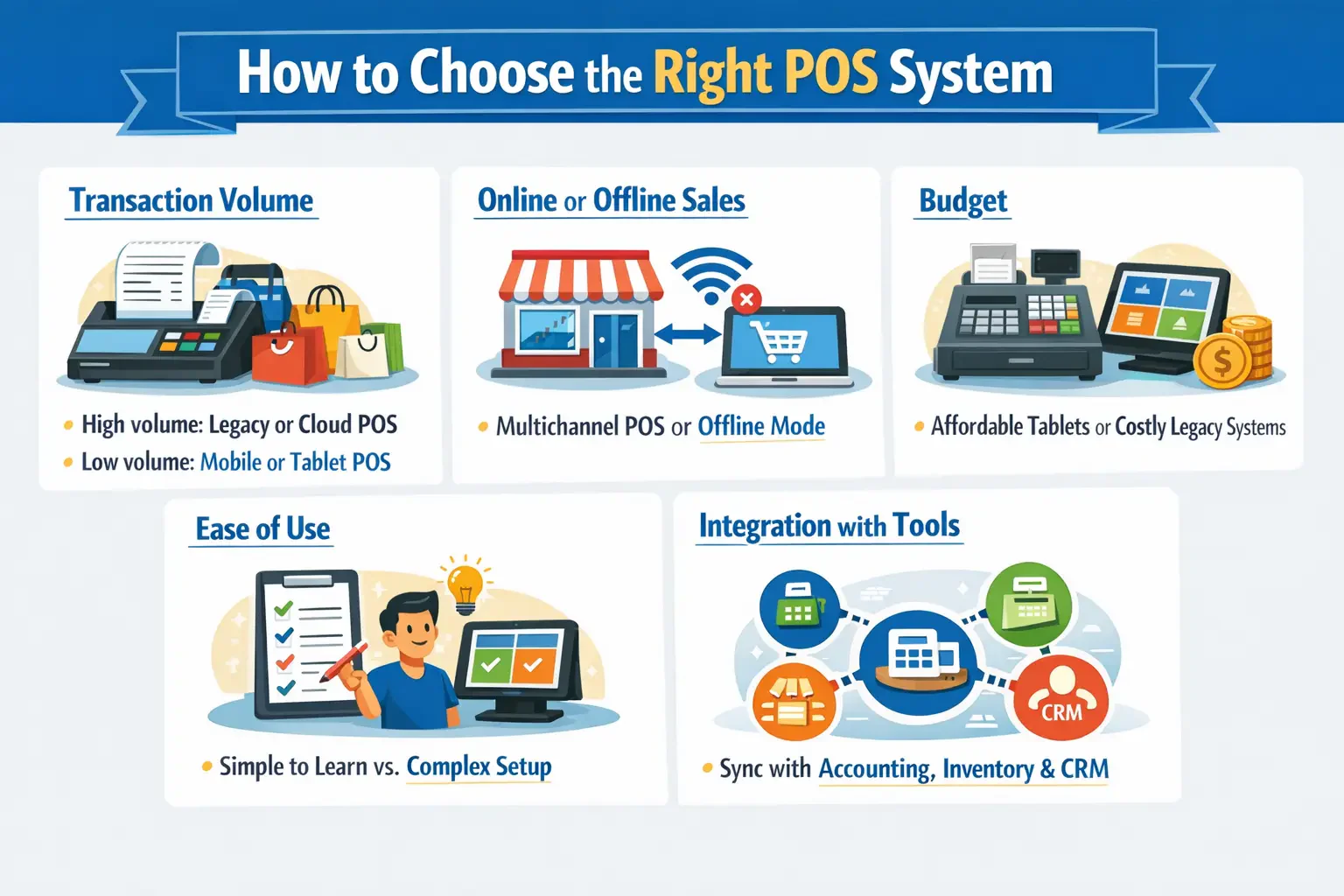
There is no single POS system that works for every business. A small bakery has different needs from a clothing chain with five branches across multiple cities. Before you sign up for anything, here are the things worth thinking through:
1. Transaction volume
A store that processes hundreds of transactions a day needs something stable and fast. Legacy or cloud based systems tend to hold up better under that kind of load. For smaller shops or pop ups, a mobile or tablet based setup is usually more than enough.
2. Online or offline sales
Businesses selling through both a physical store and an online shop benefit from a multichannel or cloud based POS software that keeps everything in sync. For areas where the internet cuts out regularly, a system that runs offline is the safer bet.
3. Budget
Mobile and tablet based systems are easier on the wallet upfront and usually come with monthly subscription pricing. Legacy and kiosk setups cost more to install but may make sense for businesses that want to own the hardware outright. Make sure to account for both hardware and software costs when comparing options.
4. Ease of use
A system that staff can pick up in a day is worth more than one packed with features nobody uses. Tablet based systems are generally the easiest to get started with, while legacy systems take longer and often need someone onsite for support.
5. Integration with existing tools
A good POS integration with your accounting software, inventory system, or CRM means fewer manual entries and less room for error. Check whether the POS can connect to tools already in use before making a decision.
POS System Regulations in the Philippines

Businesses operating in the Philippines must meet the requirements set by the Bureau of Internal Revenue (BIR). Any POS machine used for sales needs to be registered and accredited by the BIR before it can be used legally. This applies to legacy systems, cloud based ones, and tablet setups alike, as long as they are used to issue official receipts or sales invoices.
On a daily basis, the system needs to generate a Z reading report at the end of the business day and an X reading per shift. These are not optional, they are part of what the BIR checks during audits. Receipts must follow the BIR format, and the system should keep a full record of all transactions. Failing to comply can lead to fines or, in serious cases, the suspension of the business permit.
When selecting a POS system, always confirm it is BIR accredited before making a purchase. Some vendors handle the registration process on behalf of the business, while others leave it to the owner to sort out directly with the BIR.
Conclusion
Choosing the right type of POS system is a foundational decision for any business that wants to run transactions efficiently and keep a clear view of its inventory and sales data. The key is to match the system’s strengths whether that’s offline reliability, cloud flexibility, or multichannel integration, to the real demands of day to day operations.
If you are still evaluating which solution fits your business model, a closer look at the top rated POS systems available in the Philippines can help you compare specific products side by side and narrow down the right choice for your industry and scale.
FAQ About Types of POS
An effective POS system should be user friendly, robust inventory management, secure payment processing, detailed reporting, and able to integrate with other business systems. It should also offer scalability and omnichannel capabilities.
A POS (Point of Sale) system is the comprehensive software and hardware solution that manages all aspects of sales and business operations, while a POS terminal is the physical device used at checkout to process payments.
Examples of retail Point of Sale (POS) systems include Square, Clover, Shopify POS, Lightspeed Retail, and Epos