






Most businesses don’t realize how much a lost or unmanaged receipt is actually costing them. What started as a clerical task has quietly become a core part of financial operations touching everything from tax compliance to cash flow. And as the business grows, doing this manually stops being inefficient and starts being a liability.
The good news is that automating receipt management isn’t as complicated as it sounds. Instead of playing catch up at month end, expenses get captured and categorized as they happen so the numbers your team is working from are actually accurate.
Key Takeaways
|
Defining Receipt Management in the Modern Accounting Landscape
Receipt management is more than just filing paperwork it’s the process of collecting, organizing, and converting proof of purchase documents into usable financial data. In 2026, it sits at the center of modern accounting, turning everything from paper slips to PDF invoices into structured records that actually talk to your accounting systems.
The process is straightforward. A receipt gets scanned, OCR technology pulls the key details like vendor name, date, and amounts, and the data is verified against spending rules before landing in the general ledger. It’s a clean chain when it works. The problem is that manual handling at any point in that process is usually where things slow down or fall through the cracks.
It’s also worth separating receipt management from expense management, since the two often get mixed up. Receipt management is about the document itself the proof that a transaction happened. Expense management covers everything around it approvals, policies, and reimbursements. You can’t do the second one properly without nailing the first.
The Critical Importance of Digital Receipt Management
Switching to digital receipt management isn’t really a choice anymore it’s a necessity. Thermal paper fades within months when exposed to light, heat, or just time. By the time a tax audit rolls around three years later, that receipt in someone’s wallet is likely a blank slip of paper, which doesn’t hold up with anyone.
The other problem with physical receipts is that they end up everywhere pockets, email inboxes, glove compartments, desk drawers. That scattered spending becomes invisible to the finance team until someone chases it down, which is usually too late for accurate reporting.
There’s also more data in a receipt than most people realize. A bank statement might show a $500 charge at an electronics store, but the receipt tells you whether that was office equipment or something that has no business being expensed. That level of detail is what actually lets finance teams enforce spending policies properly.
Comprehensive Benefits of Automated Receipt Management
1. Audit Readiness and Compliance
When an audit hits, the burden of proof falls on you and scrambling through shoeboxes or email threads to find documentation is not a position you want to be in. A digital receipt system lets finance teams pull up any record by date, vendor, or amount in seconds. Most tax authorities now accept digital copies as valid originals, which means a well maintained system turns an audit from a stressful event into a straightforward process.
2. Significant Cost Reduction
Manual expense reports cost more than most businesses realize. When you factor in the time it takes an employee to file it, a manager to approve it, and finance to reconcile it, a single report can cost over $50 to process. Automation cuts that down significantly OCR fills in the fields automatically, the approvals move faster, and your team gets back to work that actually moves the needle.
3. Fraud Detection and Prevention
Expense fraud is more common than most businesses want to admit, and manual review processes rarely catch it there’s simply too much volume. Automated systems check every single transaction, flagging duplicates, weekend purchases that look personal, or receipts where the amount doesn’t match the card feed. That kind of consistent oversight is a strong deterrent on its own.
4. Enhanced Cash Flow Visibility
When employees sit on receipts until month end, the finance team is making decisions based on numbers that don’t reflect reality. Real time submission through a mobile app fixes that expenses get logged as they happen, and the CFO always has an accurate picture of where the business actually stands financially.
Core Technologies Powering Receipt Management
 1. OCR (Optical Character Recognition)
 1. OCR (Optical Character Recognition)
The backbone of modern receipt management. Early versions needed perfect conditions to work properly, but today’s AI enhanced OCR is trained on millions of receipt layouts it can tell the difference between a tip and a total, handle multiple currencies, and even read handwritten notes.
2. Cloud Computing
What makes the whole thing scalable. Unlike on premise servers, cloud storage grows with your business, keeps data accessible from anywhere, and comes with enterprise-grade encryption built in far more secure than a filing cabinet.
3. API Integration
What takes receipt management from useful to genuinely valuable. Without it, you still have people manually moving data between systems. With it, an approved receipt automatically triggers the right journal entries, keeping your financial statements in sync with what’s actually happening in the business.
Challenges in Receipt Management and How to Overcome Them

1. The Shadow IT Problem
One common challenge is the proliferation of disparate tools. Individual employees may use their own preferred scanner apps or storage methods, creating pockets of data that the central finance team cannot access. This “Shadow IT” creates security risks and data gaps. The solution is to implement a centralized, company-wide platform that is user-friendly enough to discourage the use of unauthorized alternatives.
2. Handling Multi-Currency and Tax Complexity
For global organizations, receipt management involves navigating a maze of different currencies and VAT/GST regulations. A receipt from France will have different tax implications than one from Japan. Manual calculation of exchange rates and tax reclaimable amounts is prone to error.
3. Data Privacy and Security
Receipts often contain sensitive information, including partial credit card numbers and employee names. Storing this data requires strict adherence to privacy laws such as GDPR or CCPA. Physical receipts left on desks are a security breach waiting to happen. Digital systems mitigate this by enforcing role based access controls, ensuring that only authorized personnel such as the employee, their manager, and the finance team can view specific transaction detail.
Step-by-Step Implementation Guide
Implementing a receipt management system is a change management project as much as it is a technical deployment. Success depends on a structured approach.
Phase 1: Audit and Policy Definition
Before looking at any software, get a clear picture of where things currently stand how many receipts are processed each month, how long reimbursements take, and where the process consistently breaks down. The expense policy needs the same attention.
Phase 2: Vendor Selection
Price shouldn’t be the deciding factor. What matters more is how accurate the OCR is, how good the mobile app feels to use, and how well it connects with your existing accounting software. Ask vendors about uptime guarantees and support response times and before committing, request a pilot so a small group of real users can test it in practice, not just in a demo.
Phase 3: Configuration and Integration
Once a solution is selected, it must be configured to match the company’s general ledger codes. Categories in the receipt app (e.g., “Meals,” “Travel”) must map perfectly to the chart of accounts. This is also the stage where approval workflows are defined. Who approves a $50 expense? Who approves a $5,000 expense? Configuring these rules ensures that the software enforces governance automatically.
Phase 4: Training and Rollout
The best system in the world doesn’t work if people aren’t using it properly. Training needs to cover both the how and the why when employees understand that faster submission means faster reimbursement, adoption tends to take care of itself.
Industry-Specific Use Cases
1. Construction and Field Services
In construction, purchases happen fast and far from the office lumber, fuel, hardware bought on-site where paper receipts don’t last long. A missing receipt means a cost that doesn’t get billed back to the client, which adds up quickly across a project.
2. Retail and Hospitality
Retail businesses with multiple locations have a petty cash problem that’s easy to underestimate. Store managers buy supplies locally, and without a central system, headquarters has no real visibility into what’s being spent where. Centralizing receipt capture fixes that.
3. Professional Services and Consulting
Consulting clients don’t pay for vague charges they want proof. A receipt management system makes it easy to export expense reports with receipts attached, so billing is clean, disputes are rare, and invoices get paid faster.
4. Non-Profit and Grant Management
Non-profits have little room for error when it comes to documentation. Grant funds are tied to specific purposes, and auditors expect receipts to back up every claim. Tagging expenses directly to the relevant grant or fund means that when a donor asks where their money went, the answer is ready detailed, evidence backed, and easy to pull up. That kind of transparency is what keeps donor trust intact and future funding within reach.
Comparison: Manual vs. Digital vs. AI-Driven
To fully appreciate the evolution of this field, it is helpful to compare the three stages of receipt management maturity.
- Manual (The Analog Era): This involves physical storage, Excel spreadsheets, and manual data entry. It is characterized by high error rates, slow processing times, and high storage costs. It is reactive and offers zero real-time visibility.
- Digital (The Cloud Era): This involves scanning receipts into PDFs and storing them in folders or basic software. It solves the storage and fading issues but still requires significant human intervention to categorize and verify data. It is better, but still labor-intensive.
- AI-Driven (The Automation Era): This is the current state of the art. The system captures the image, extracts the data, categorizes the expense, checks for policy violations, and prepares the journal entry with minimal human touch. It is proactive, predictive, and offers real-time analytics.
The leap from Digital to AI-Driven is where the true ROI lies. While Digital saves space, AI saves time and intelligence. It shifts the role of the finance team from data entry clerks to data analysts.
Future Trends and Predictions for 2026 and Beyond
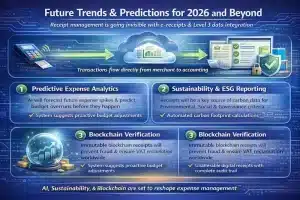 The trajectory of receipt management points toward invisibility. The ultimate goal is a frictionless process where the transaction data flows directly from the merchant to the buyer’s accounting system without the need for an intermediate “receipt” artifact at all. This concept, often called “e-receipts” or Level 3 data integration, is gaining traction.
1. Predictive Expense Analytics
Future systems will not just record what happened; they will predict what will happen. By analyzing historical receipt data, AI will forecast future spending trends, alerting finance leaders to potential budget overruns before they occur. For example, if travel receipt volume spikes in Q1 historically, the system will suggest budget adjustments automatically.
2. Sustainability and ESG Reporting
As companies face pressure to report on Environmental, Social, and Governance (ESG) criteria, receipts will become a source of carbon data. Systems will analyze travel receipts (flights, fuel, hotels) to calculate the carbon footprint of company operations automatically. This turns receipt management into a tool for sustainability tracking.
3. Blockchain Verification
While still nascent, blockchain technology holds promise for immutable receipt verification. A receipt generated on a blockchain would be impossible to alter, providing the ultimate audit trail. This could revolutionize cross-border VAT reclamation, where trust and verification between tax authorities and businesses are paramount.
Best Practices for Maintaining a Healthy System
The system is only as good as the discipline behind it. Configuration needs to be reviewed regularly when tax rates change or spending limits shift, the rules in the software need to keep up. Letting that slip is how compliance gaps creep in.
Finance teams should also share what the data is telling them. If spending patterns point to an opportunity like a vendor being used heavily enough to negotiate better rates that insight should reach the people who can act on it. It also reinforces why accurate submission matters in the first place.
Data hygiene is the boring stuff that nobody wants to deal with but it matters. Duplicate vendors, old user accounts that were never deactivated, categories that no longer match how the business operates. Let these pile up long enough and the reports your team relies on start giving you the wrong picture.
Sector Specific Applications of Receipt Management
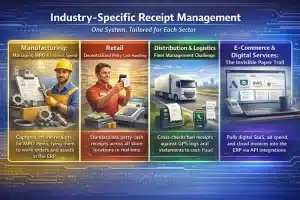 While the fundamental need for financial documentation is universal, the operational demands of receipt management vary drastically across different industry verticals. A generic approach often fails to address the nuanced pain points specific to manufacturing, retail, logistics, or e-commerce. Implementing an ERP-integrated receipt management system requires tailoring the workflow to the specific rhythms of the sector.
1. Manufacturing: Managing MRO and Indirect Spend
In manufacturing, receipt management is less about travel expenses and more about MRO spare parts, lubricants, and emergency tools that keep production running. These purchases happen fast and rarely come with formal invoices, which makes capturing them properly a real challenge.
The system needs to work offline on the factory floor and tie each receipt directly to a work order or asset in the ERP. That way, the true cost of running specific equipment is always visible and if a machine keeps racking up repair purchases, the data will flag it before it turns into a bigger problem.
2. Retail: Decentralized Petty Cash and Store Operations
For retail chains, receipt management is a decentralized headache. Store managers handle petty cash across multiple locations supplies, breakroom items, local services and without a central system, the shoebox problem multiplies with every new store you open.
Modern ERP solutions fix this by standardizing receipt capture across all locations. Managers snap a photo, it routes to finance for approval, and the treasury team always knows where petty cash stands across the network.
3. Distribution and Logistics: The Fleet Management Challenge
Logistics companies deal with high volumes of small expenses fuel, tolls, weigh stations, meals spread across a mobile workforce. Physical receipts in this environment don’t last long; sunlight, oil, and general wear mean they’re often illegible by the time anyone needs them.
Receipt management here needs to connect directly with fleet management. OCR pulls data from fuel receipts and cross-checks it against GPS logs and fuel card statements and that three-way match is one of the most effective ways to catch fuel fraud before it becomes a habit.
4. E-Commerce and Digital Services: The Invisible Paper Trail
E-commerce businesses don’t deal with paper receipts their expenses are born digital. SaaS subscriptions, ad spend, cloud hosting the challenge isn’t scanning anything, it’s pulling fragmented invoices together from dozens of portals and email inboxes.
API integrations and email scraping handle that automatically, retrieving invoices from platforms like Google Ads or AWS and matching them against card transactions. When ad spend receipts are tied directly to campaign codes in the ERP, marketing gets precise, audited cost data which means CAC calculations are based on what was actually billed, not what was budgeted.
Strategic Implementation Framework
Transitioning from a manual or semi-automated process to a fully integrated receipt management ecosystem is a significant operational overhaul. Success requires a structured implementation framework that goes beyond software installation. It requires a change in organizational behavior and rigorous configuration.
Phase 1: The Audit and Policy Definition
Before touching any software, the organization needs to understand what it’s actually working with. Where do receipts come from, who handles them, and where do they get stuck? Knowing the split between paper and digital, which departments generate the most volume, and what the current rejection rates look like gives you a realistic baseline to work from.
At the same time, the expense policy needs to be airtight before automation kicks in. A vague policy doesn’t get fixed by new software it just gets processed faster. Rules around submission deadlines, acceptable file formats, and required fields need to be clearly defined before the system goes live, because these are what the ERP uses to validate every receipt that comes through.
Phase 2: Configuration and OCR Tuning
This phase is about mapping the receipt management module to the General Ledger and linking expense categories to the Chart of Accounts. The system needs to know how to classify a transaction based on context a coffee shop receipt could be Meals & Entertainment or Office Supplies depending on the situation, and getting that logic right upfront saves a lot of manual corrections later.
OCR tuning is just as important and often gets skipped. Running the AI through a sample of historical receipts helps it learn the difference between a Total and a Subtotal, and how to read tax identifiers like VAT or GST numbers. Approval workflows also get configured here a small receipt might be auto-approved, mid-range goes to a line manager, and anything significant routes to finance leadership.
Phase 3: Rollout and Change Management
The rollout should be staggered, typically starting with a pilot group—usually the sales team, as they are the heaviest users of T&E. Their feedback allows for UI/UX adjustments before a company-wide launch. Training should focus not just on “how” to use the app, but “why.” When employees understand that immediate receipt capture leads to faster reimbursement (often within 24 hours), adoption rates skyrocket.
Metrics and KPIs for Measuring Success
To justify the ROI of an automated receipt management system, organizations must track specific Key Performance Indicators (KPIs). These metrics provide tangible evidence of efficiency gains and identify areas requiring further optimization.
1. Cost Per Transaction (CPT)
Manual receipt processing is expensive. By factoring in the time of the employee submitting, the manager approving, and the accountant reconciling, companies can calculate a baseline CPT. A successful implementation should reduce this cost by 60-80%. Tracking this metric month-over-month reveals the direct financial impact of automation.
2. Reimbursement Cycle Time
This measures the elapsed time from expense submission to payment deposit. In manual systems, this often spans weeks. World-class implementations reduce this to 2-3 days. A shorter cycle time is a primary driver of employee satisfaction and prevents employees from effectively financing company operations with personal funds.
3. First-Pass Match Rate
This technical metric tracks the percentage of receipts that are successfully scanned, categorized, and verified by the system without human intervention. A low match rate indicates poor OCR performance or overly complex approval rules. Continually tuning the system to increase this rate is essential for achieving “touchless” accounting.
4. Audit Trail Completeness
Compliance is binary you are either compliant or you are not. This metric tracks the percentage of GL entries that have a valid, legible source document attached. In a robust system, this should be 100%. Any deviation represents a compliance risk during a tax audit.
Common Pitfalls and Mitigation Strategies
Even with top-tier ERP software, receipt management initiatives can fail. Understanding common pitfalls allows implementation teams to build preemptive defenses.
1. The “Garbage In, Garbage Out” Trap
The Pitfall: Users upload blurry photos, screenshots of credit card statements instead of itemized receipts, or duplicate images. The OCR fails to read the data, forcing accountants to manually intervene, thereby negating the benefits of automation.
The Mitigation: Implement front-end validation. The mobile app should detect image quality before submission, prompting the user to retake the photo if it is blurry or dark. Additionally, configure the system to auto-reject “summary” statements that lack line-item details, forcing users to provide the correct documentation at the source.
2. The Integration Silo
The Pitfall: The receipt management tool works beautifully in isolation but fails to sync effectively with the core ERP or payroll system. This results in the “swivel chair” effect, where finance staff manually re-key data from the receipt system into the GL.
The Mitigation: Prioritize seamless integration over feature sets. The data exchange between the receipt module and the ERP should be real-time or near real-time. Ensure that tax codes, vendor masters, and project codes are synchronized bi-directionally so that a new project created in the ERP is immediately available for expense allocation in the receipt app.
3. Shadow IT and User Resistance
The Pitfall: Employees find the corporate tool cumbersome and revert to using unauthorized third-party apps to store receipts, sending PDFs to finance at the end of the month. This creates security risks and data fragmentation.
The Mitigation: User Experience (UX) is paramount. The corporate tool must be as intuitive as consumer-grade apps. Features like email forwarding (where a user forwards a receipt to receipts@company.com) and credit card integration (which reminds users to snap a photo when a charge is detected) reduce the friction that leads to shadow IT.
Advanced Best Practices and Future Outlook
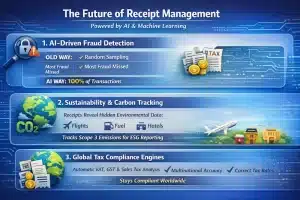 As Artificial Intelligence and Machine Learning continue to mature, receipt management is moving beyond simple digitization toward predictive auditing and strategic analysis. Leading organizations are leveraging these advanced capabilities to gain a competitive edge.
1. AI-Driven Fraud Detection
Old audit systems rely on random sampling, which means most fraud slips through. AI checks every transaction flagging suspicious invoice patterns, digitally altered receipts, or personal purchases snuck into business expenses. Auditors can then focus on what actually needs attention.
2. Sustainability and Carbon Tracking
Receipts contain more environmental data than most people realize. Flights, fuel, and hotel stays all carry carbon information, and advanced ERPs are now pulling that directly from receipt data to track Scope 3 emissions making the accounting team an unexpected player in ESG reporting.
3. Global Tax Compliance Engines
Managing VAT, GST, and sales tax across multiple countries is a minefield. The best systems handle it automatically, applying the correct tax treatment based on location, date, and expense type recovering money that would otherwise be lost and keeping the business clear of cross-border penalties.
Conclusion
Receipt management isn’t back office admin anymore. It touches compliance, cash flow, and cost control and businesses that treat it seriously tend to run tighter operations because of it.
Every receipt tells you something about your business. Where money is going, whether spending is on track, and where the gaps are. The companies that capture and act on that data have a clearer picture than those still chasing paper at month end and that difference adds up over time.
The technology to fix this isn’t complicated or out of reach. AI, mobile capture, and cloud storage have made proper receipt management accessible for businesses of all sizes. At this point it’s less about whether you can do it, and more about how much longer you can afford not to.
Frequently Asked Question
Receipt management focuses specifically on the capture, storage, and organization of proof-of-purchase documentation. Expense management is a broader category that includes receipt management but also covers policy enforcement, approval workflows, and employee reimbursement processes.
OCR technology automates the extraction of data from receipts, converting images into editable text. This eliminates manual data entry, reduces human error, and allows for searchable digital archives, significantly speeding up the reconciliation process.
Retention periods vary by jurisdiction, but a general standard is three to seven years. The IRS in the US typically recommends keeping records for three years, while other countries may require longer. Digital storage is increasingly accepted as a valid form of retention.
Yes, automated systems use algorithms to detect anomalies such as duplicate submissions, weekend spending, or amounts that do not match bank feeds. This real-time monitoring makes it much harder for fraudulent claims to slip through compared to manual review.
If a thermal receipt fades to the point of illegibility, it is no longer valid proof of purchase for tax audits. This highlights the importance of digitizing receipts immediately upon transaction to create a permanent, legible record.