









 Limited to 100 registrants

When rolling power outages swept across Metro Manila and key Philippine provinces, thousands of companies discovered a painful truth that their ERP system was only as accessible as their nearest server room. Finance teams missed payroll deadlines. Sales staff couldn’t process orders, because their data was physically locked inside an office they couldn’t reach. The energy crisis didn’t just cut the lights. For businesses running on-premise ERP, it cut off their entire operation
In the ever-changing world of business technology, the debate between cloud ERP vs on premise ERP solutions remains a critical topic for companies in the Philippines. Cloud ERP offers flexibility and scalability, while On-Premise ERP provides greater control, customization, and enhanced security.
Both options bring unique advantages that cater to various business needs, making the choice crucial to streamline operations and foster growth. Therefore, should your business adopt the innovative and cost-effective Cloud ERP or stick with the trusted On-Premise ERP for its control and reliability? Let’s dive into the detailed comparison of cloud ERP vs on premise ERP and discover which solution suits your business.
Key Takeaways
Cloud ERP vs on premise ERP are distinct systems that manage business operations.
Cloud ERP offers accessibility, scalability, and regular updates but depends on a stable internet.
On-premise ERP provides greater control and security without internet reliance but involves higher upfront costs and maintenance.
Choosing the right software like HashMicro could be the best option for your business because it offers a free demo and comprehensive features.

What is Cloud ERP?
Enterprise Resource Planning (ERP) refers to software systems that help businesses manage and integrate essential operations. One of the most popular forms is Cloud ERP, a Software-as-a-Service (SaaS) solution. This system is hosted centrally on vendor servers and accessed through an internet browser.
A cloud ERP system offers a range of advantages for companies in the Philippines, including scalability and flexibility. It supports remote work and team collaboration, making it a great solution for businesses with decentralized teams.
What is On-premise ERP?
On-premise ERP is a traditional software solution installed on physical servers within a company’s facilities. Unlike Cloud ERP, which the vendor hosts, On-premise ERP is managed and maintained by the company’s internal IT staff.
On-premise ERP system offer customization options that can be tailored to meet specific business needs. They also integrate seamlessly with other internal systems, making it a viable choice for businesses in the Philippines with stringent data security requirements or those needing a highly customized ERP solution.
The Pros and Cons of Cloud ERP vs On Premise ERP
 When selecting an ERP system, businesses in the Philippines must weigh the pros and cons of ERP on premise vs cloud. Each solution offers unique benefits that could significantly impact business operations.
Cloud ERP:
- Advantages: Cloud ERP software provides unmatched accessibility, allowing users to access data and applications from anywhere. It also scales easily to accommodate business growth and requires no hardware investment. The vendor manages updates and security automatically.
- Disadvantages: However, Cloud ERP is entirely dependent on internet connectivity. Without a stable connection, businesses may experience disruptions in data access, hindering productivity, especially in areas with inconsistent internet access.
On-Premise ERP:
- Advantages: On-premise ERP allows businesses complete control over their data and systems. Since the software is hosted on local servers, companies can manage their security policies, control access, and handle updates at their own pace.
- Disadvantages: The initial investment for On-Premise ERP can be substantial. Companies must purchase servers, hardware, and software licenses upfront. Additionally, ongoing maintenance requires dedicated IT resources and future system upgrades may involve costly and time-consuming processes.
The Difference Between Cloud ERP vs On Premise ERP
Choosing between Cloud ERP vs on premise ERP depends on various factors, such as:
| Aspect | Cloud ERP | On-Premise ERP |
| Deployment | Hosted on vendor’s cloud servers, accessed via the internet | Installed on the company’s servers, managed internally |
| Accessibility | Accessible from anywhere with an internet connection | Accessible only within the company’s network or specific locations |
| Scalability | Easily scalable, can increase capacity without hardware changes | Limited scalability, requires hardware upgrades for expansion |
| Maintenance & Updates | Managed by the vendor, automatic updates | Managed by internal IT staff, manual updates |
| Cost | Subscription-based with lower upfront costs | High upfront costs for hardware and software |
| Security | Vendor-managed security, encryption, and compliance | Full control over security, customizable data protection |
| Internet Dependency | Requires a stable internet connection to function | Operates independently of internet, not reliant on connectivity |
| Customization | Limited customization based on vendor options | Highly customizable to meet specific business needs |
How the Philippines Energy Crisis Exposed the Risk of On-Premise ERP
For years, on-premise ERP was marketed as the “safer” choice where your data is on your own servers, under your own roof. But the Philippines energy crisis turned that selling point into a vulnerability. Employees shifted to work-from-home setups by necessity, only to find there was nothing to work with.
The impact was concrete and costly:
- Finance and accounting teams could not run payroll or process invoices because the data sat on an on-site server behind a locked office door.
- Procurement and warehouse staff were unable to check stock levels or approve purchase orders, causing supply chain delays that rippled through the business for weeks.
- HR managers couldn’t access employee records, attendance logs, or leave approvals if all stored locally on hardware with no remote access configured.
- Business owners had no real-time view of operations, making it impossible to make informed decisions during a period when agility mattered most.
Cloud ERP, by contrast, kept operations running for companies that had made the switch. Their teams logged in from home, from mobile devices, from anywhere with internet access, and business continued. Learn how work-from-home ERP software keeps your business running regardless of what happens at the office.
Why 4-Day Workweek Policies Make Cloud ERP Non-Negotiable
As the Philippine government and several private sector companies have begun piloting compressed workweek schedules, fewer working days means the same volume of work must be completed in less time, with less room for system downtime, access delays, or manual workarounds. A compressed schedule breaks that model in several ways:
-
Critical Off-Day Access: A 4-day week makes remote access vital for Friday emergencies; on-premise systems struggle to support this without complex VPNs.
-
Shrinking Maintenance Windows: Fewer working days mean IT updates often clash with active business hours, increasing the risk of operational downtime.
-
Broken Collaboration: Flexible or staggered shifts require real-time data access from anywhere, which is native to Cloud ERP but absent in on-premise setups.
-
Harder Continuity Planning: With more “non-office” days, technical failures (like power or hardware issues) go unresolved longer, magnifying their negative impact.
Cloud ERP solves all of these challenges by design. Because it is hosted externally and accessed through a browser. The system is always available, always updated, and always accessible which exactly what modern Philippine businesses require as workplace policies continue to evolve.
Which One Should You Choose? Cloud ERP vs On Premise ERP
Now that you understand the key differences between cloud vs on premise ERP, the next step is determining which solution fits your business in the Philippines. The choice largely depends on your business size, industry, and specific needs.
When is On-Premise the better choice than Cloud ERP: Large enterprises with strict data security or regulatory requirements may prefer It for its complete control over data and infrastructure. This is also a better choice for businesses with unstable internet connectivity, as the system operates independently of an internet connection.
When Cloud ERP is better than On-Premise: Cloud ERP is often the better choice for small and medium-sized businesses (SMBs) looking for cost-effective solutions. It offers flexibility, lower upfront costs, and eliminates the need for dedicated IT resources to manage hardware and updates. Cloud ERP is also an excellent fit for businesses that want to prioritise scalability and remote work capabilities.
The Best ERP for Your Business: Hash Core ERP
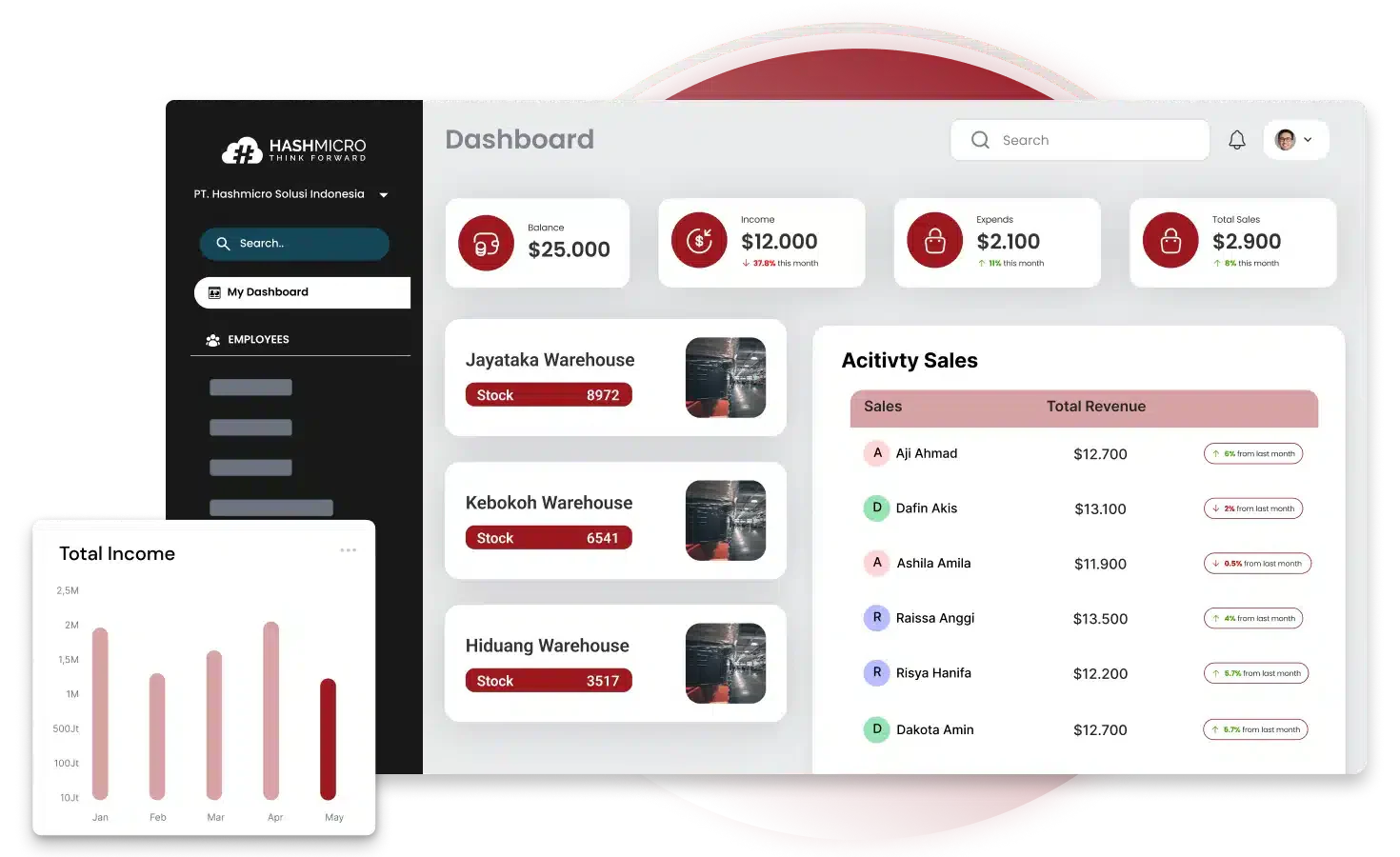 With so many cloud ERP vendors and providers, how do you choose the best one? The most recommended cloud ERP in the Philippines is HashMicro. It is trusted by over 1,750 businesses and companies from various industries. It is a cloud-based ERP system that offers a comprehensive range of solutions.
The software allows for improved productivity and optimized business process operations. With a free demo and features like business process automation and easy access to data, users can make smarter decisions to grow their businesses. Some of its features are like:
- Built-in BI (Business Intelligence): Tools to transform and rotate data from different angles for more in-depth analysis.
- Bright transaction bookkeeping: Automatically records all expenses, costs, bank reconciliations, and sales transactions.
- Production cost control: Full control of production costs, starting from purchasing, production results, and component transfer from defective products.
- Mobile apps: The app is available on iOS and Google Play Store platforms, allowing easy access from various mobile devices.
- Sheet management: Efficiently manage, automate, and analyze spreadsheets or business documents in spreadsheet format while ensuring data security and module integration.
- Access-level: Features that manage and restrict employee access to various data and functions in the system based on roles and responsibilities.
Conclusion
Choosing between cloud and on-premise ERP requires careful consideration of your business’s needs, resources, and long-term goals. For many companies in the Philippines, Cloud ERP provides greater flexibility, scalability, and cost-effectiveness, making it a highly recommended solution.
If you’re looking for an advanced, all-in-one solution, HashMicro’s Hash Core ERP is an excellent choice. Trusted by businesses across various industries, it offers a free demo and comprehensive features that help improve productivity, streamline operations, and support business growth.
FAQ About Cloud ERP vs On Premise ERP
Cloud ERP systems bring greater flexibility, scalability, and accessibility than traditional on-premises solutions. They lower the need for internal IT resources, cut infrastructure costs, and provide real-time data and modern features tailored for mobile-first work settings.
Cloud-based ERP is safe, as it includes advanced security features like data encryption, multi-factor authentication, and regular updates. Service providers also maintain high-security data centers monitored 24/7, ensuring data protection against cyber threats.
The three types of ERP are on-premises, cloud-based, and hybrid. On-premises ERP is installed locally, offering full control but with higher costs and maintenance needs. Cloud-based ERP is hosted online, providing scalability, flexibility, and lower IT demands. Hybrid ERP combines both, giving businesses a balance of control and adaptability to suit specific requirements.