













Retail has changed fast. Stores and eCommerce channels can no longer run separately because customers expect a smooth experience across both. They want to browse online, buy on mobile, pick up in-store, and return items through the channel that suits them best.
That is why unified point of sale systems matter. Shopify POS is a popular choice for businesses using Shopify because it connects inventory, payments, customer data, and sales in one system. This article will explain how Shopify POS works and what retailers should know before using it.
Table of Contents
Key Takeaways
|
Understanding Shopify POS
Shopify POS is a point of sale system that helps retailers manage in store and online sales in one connected platform. Instead of treating physical stores and eCommerce as separate operations, Shopify POS brings inventory, customer data, payments, and order information into a single system.
When a sale happens in-store, the platform can update stock levels, customer profiles, and sales records across the business in real time. This helps retailers keep their data consistent across channels and makes it easier to manage day-to-day operations. Shopify POS also works through mobile devices or tablets, giving staff more flexibility on the shop floor while supporting smoother coordination between physical and digital sales.
Deep Dive into the Shopify POS Hardware Ecosystem
Shopify POS supports a range of hardware for in-store sales, including card readers, tablets, barcode scanners, receipt printers, and cash drawers. This gives retailers more flexibility when setting up checkout counters and helps stores choose devices that match their daily operating needs.
Because these tools connect directly to the POS system, staff can process payments, scan products, and manage receipts more efficiently. It also helps reduce manual mistakes and supports a smoother checkout experience for both employees and customers.
Software Tiers: Analyzing Lite vs. Pro Capabilities
To accommodate the diverse needs of its vast merchant base, the platform offers its point-of-sale software in two distinct tiers: Lite and Pro. Choosing the appropriate tier is a critical strategic decision that directly impacts a retailer’s ability to scale operations, manage complex inventory workflows, and execute advanced omnichannel strategies.
| Aspect | Shopify POS Lite | Shopify POS Pro |
| Best for | Small sellers and pop up stores | Retail stores with more complex operations |
| Checkout tools | Basic order processing and payments | More advanced retail workflows |
| Inventory | Basic inventory support | Purchase orders, stock counts, and transfers |
| Omnichannel features | Limited | Supports BOPIS and ship to home |
| Reporting | Basic reports | Advanced analytics and retail insights |
Mastering Omnichannel Strategies with Shopify POS
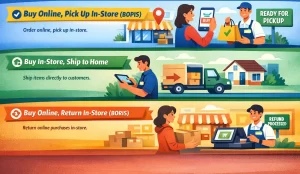 The true power of a unified commerce platform lies in its ability to dissolve the boundaries between digital and physical sales channels. An effective omnichannel strategy ensures that the customer experiences the brand consistently, regardless of how or where they choose to interact.
1. Buy Online, Pick Up In-Store (BOPIS)
BOPIS lets customers place an order online and collect it from a physical store. Shopify POS helps by reserving the item, alerting store staff, and updating the order status so customers know when it is ready for pickup.
2. Buy In-Store, Ship to Home
If a product is unavailable in-store, staff can still complete the sale by checking stock from another location or warehouse and shipping it directly to the customer. This helps retailers avoid lost sales and offer more options without keeping every item on display.
3. Buy Online, Return In-Store (BORIS)
BORIS allows customers to return online purchases at a physical store instead of sending them back by mail. Shopify POS makes this easier by pulling up the original order, processing the refund, and updating inventory more quickly.
Advanced Inventory Management and Supply Chain Tracking
Inventory management is critical in retail because too much stock can tie up cash, while too little can lead to missed sales and disappointed customers. Shopify POS helps retailers keep inventory more accurate by updating stock in real time across sales, returns, and multiple store locations.
It also supports purchase orders, stock counts, and low-stock alerts in one system. This makes it easier for staff to track inventory, catch discrepancies, and reorder items before they run out.
Key Shopify POS Features for Retail Operations
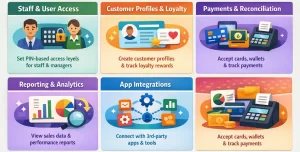 Shopify POS offers more than basic checkout tools. It helps retailers manage staff, customer data, payments, reporting, and connected apps in one system, making daily store operations easier to control across channels.
1. Staff and User Access
Shopify POS lets businesses set different access levels for each employee. Managers can handle reports, refunds, and inventory updates, while other staff only see the tools they need. PIN-based login also helps improve security and accountability.
2. Customer Profiles and Loyalty
The system allows staff to create customer profiles during checkout. This helps retailers track purchase history, support more personalized service, and connect loyalty programs that encourage repeat purchases.
3. Payments and Reconciliation
Shopify POS supports cards, digital wallets, gift cards, and split payments. It also helps with end-of-day reconciliation by tracking cash flow, register activity, and payment records more accurately.
4. Reporting and Analytics
Retailers can view real-time data on sales, discounts, taxes, product performance, and customer trends. This helps teams make faster decisions and spot what is selling well or underperforming.
5. App Integrations
Shopify POS can connect with third-party apps for accounting, marketing, and customer retention. These integrations help retailers keep more of their data and workflows connected in one setup.
Implementation Tips and Common Challenges
Implementing Shopify POS takes planning, not just new devices. Businesses need to prepare product data, review tax and inventory settings, test hardware, and train staff before going live. Without that groundwork, daily operations can become messy once the system is in use.
The most common problems usually come from internet and hardware issues. Unstable connections can interrupt card payments, while older printers or scanners may not work well with the current setup. That is why reliable internet and supported hardware matter from the start.
Conclusion
Shopify POS helps retailers manage in-store and online sales in one connected system. It brings together checkout, inventory, customer data, and reporting, making daily operations easier to handle across channels.
Retailers that need stronger branch control and BIR-ready workflows can also compare their options with a dedicated POS software in the Philippines solution.
FAQ About Shopify POS
-
What is Shopify POS used for?
Shopify POS is used to manage in-store and online sales in one connected system. It helps retailers handle payments, inventory, customer data, and sales records from a single platform.
-
What is the difference between Shopify POS Lite and Shopify POS Pro?
Shopify POS Lite is better suited for small sellers, pop-up stores, and businesses with simpler retail needs. Shopify POS Pro offers more advanced features such as stronger inventory control, omnichannel tools, and deeper reporting for more complex retail operations.
-
Can Shopify POS support omnichannel retail?
Yes, Shopify POS supports omnichannel workflows such as buy online, pick up in-store, ship-to-home, and in-store returns for online purchases. This helps retailers create a more connected customer experience across sales channels.
-
What hardware works with Shopify POS?
Shopify POS works with hardware such as card readers, tablets, barcode scanners, receipt printers, and cash drawers. These devices help retailers process payments, scan products, and manage checkout more efficiently in-store.
-
Is Shopify POS good for inventory management?
Shopify POS can support inventory management by updating stock in real time across sales, returns, and store locations. It also helps retailers track stock counts, manage purchase orders, and respond faster to low inventory levels.














